
基于antdv封装的特殊复杂表格,带通行描述信息
主要功能:
- 可展示通行的单元格信息
- 可跨页选择数据功能
- 表单插槽、合计插槽、操作按钮区插槽
- 分页功能
- 接口内请求api
- 可编辑单元格
- 表格组件暴漏出的方法:查询、获取选中数据、接口返回数据、当前表格数据【设置可编辑单元格时获取数据】
页面示例:
本页主要是下面这种大通行效果【选择和序号都通行】
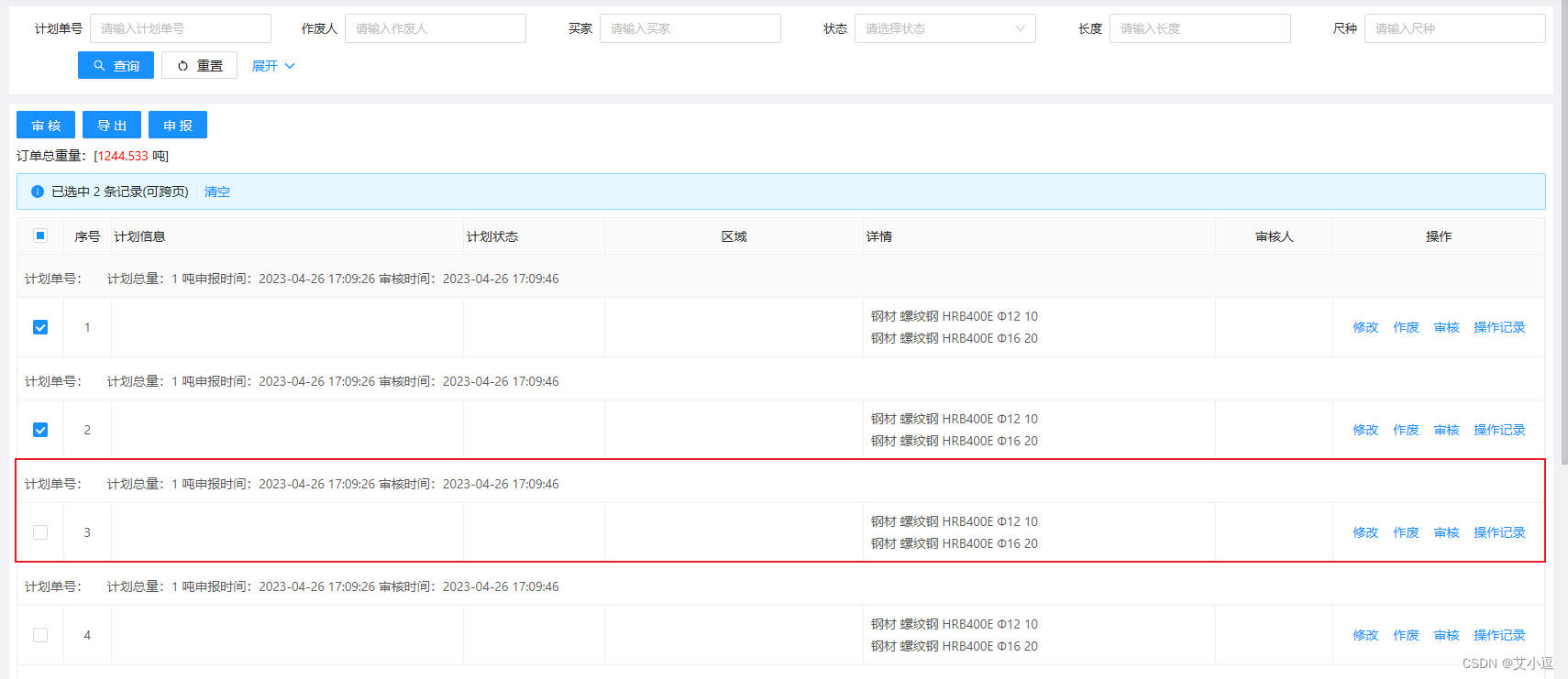
讯享网
还有一种是通行不带选择和序号,如下:代码下载地址 : https://download.csdn.net/download/_/
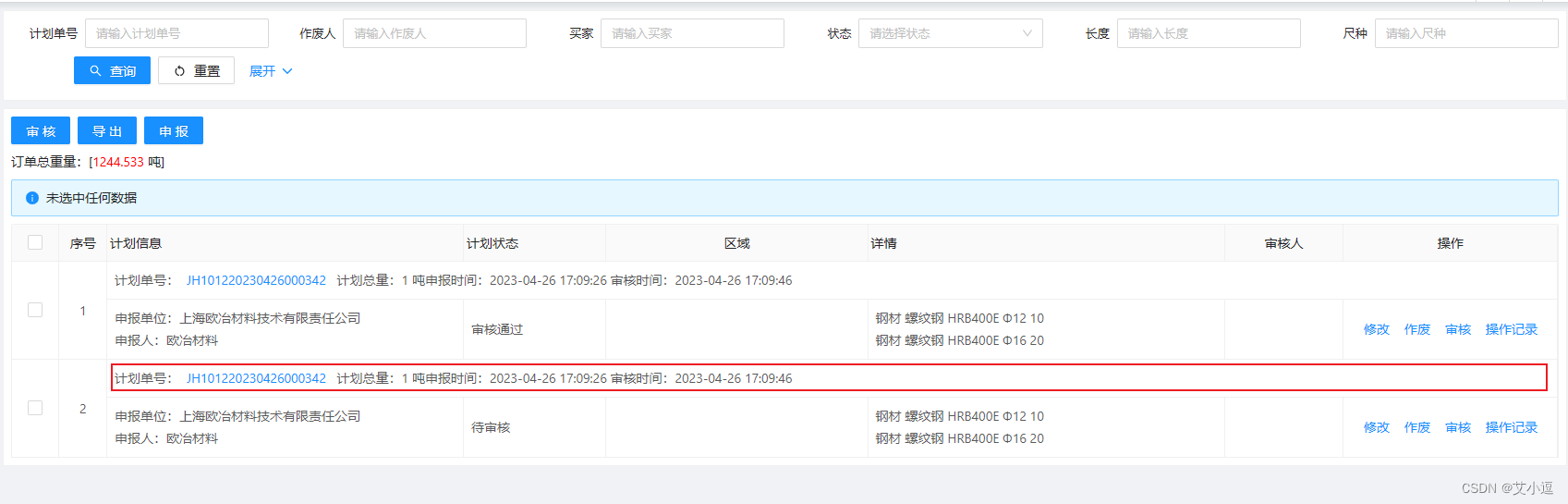
使用示例:
页面文件page.vue
<template> <self-table ref="selfTableRef" :full-row-type="fullRowType" :api="planManageListApi" :columns="tableColumns(fullRowType)" :full-row-key-list="[]" :has-checkbox="true" :tableProps="{}" > <template #form="{ loading }"> <!-- 自定义表单组件 可用任意表单组件 submit为表单 查询按钮事件 --> <BasicForm @submit="handleSubmit" :submit-button-options="{ loading: loading }" /> </template> <template #tableTitle> 订单总重量:[<span class="color-red">1244.533</span> 吨] </template> <template #tableHead> <a-button type="primary">导出</a-button> </template> <template #full-row="{ row }"> 计划单号:<a-button type="link" size="small" @click="handlePlanDetail(row)">{


  { row.noId }}</a-button> 计划总量:1 吨申报时间:2023-04-26 17:09:26 审核时间:2023-04-26 17:09:46 </template> <template #colSlot1="{ row }"> <div>申报单位:{


  { row.xa }}XXXXX有限责任公司</div> <div>申报人:欧冶材料</div> </template> <template #colSlot4="{ row }"> <div>钢材 10 {


  { row.xs }}</div> <div>钢材 20</div> </template> <template #action="{ row }"> <a-button type="link" size="small" @click="handlePlanApply('edit', row)">修改</a-button> </template> </self-table> </template> <script setup lang="ts"> import SelfTable from '/@/views/components/SelfTable/index.vue'; import {
      ref } from 'vue'; import {
      FullRowType } from '/@/views/components/SelfTable/selfTableTools'; import {
      tableColumns } from '/@/views/planManage/planManage.data'; import {
      planManageListApi } from '/@/views/planManage/planManage.api'; // 定义通行类型 const fullRowType: FullRowType = 'prev'; const selfTableRef = ref(); function handleSubmit(v) {
      selfTableRef.value.search(v); } </script> <style scoped lang="less"></style>
讯享网
planManage.data中tableColumns() 方法
讯享网export const tableColumns = (fullRowType): SelfTableColumnType[] => [ {
    title: '计划信息', dataIndex: 'key1', width: 300, customCell: (_, index) => sharedOnCell(index, fullRowType), slot: 'colSlot1', }, {
    title: '计划状态', dataIndex: 'planStatus', width: 120, customCell: (_, index) => sharedOnCell(index, fullRowType), }, {
    title: '区域', dataIndex: 'oldRecordCdName', width: 220, align: 'center', customCell: (_, index) => sharedOnCell(index, fullRowType), }, {
    title: '详情', dataIndex: 'createTime', width: 300, customCell: (_, index) => sharedOnCell(index, fullRowType), slot: 'colSlot4', }, {
    title: '审核人', dataIndex: 'accountMark', width: 100, align: 'center', customCell: (_, index) => sharedOnCell(index, fullRowType), }, {
    title: '操作', key: 'action', fixed: 'right', align: 'center', width: 180, customCell: (_, index) => sharedOnCell(index, fullRowType), }, ];
参数说明:
| 字段 | 类型 | 描述 |
|---|---|---|
| api | Promise | 表格数据api |
| dataSource | array | 表格数据 ,dataSource和api二选一 |
| columns | array | 表格column数据,列数据一定要指定width |
| has-checkbox | boolean | 是否可选,默认false |
| has-pagination | boolean | 是否显示页码,默认true |
| full-row-type | string | 通行类型 ‘prev’ 前一行,‘last’ 后一行 ,FullRowType类型 |
| fullRowKeyList | array | 展示在同行的数据key值,传空则复制通行所有key值 |
| tableProps | Object | 传给antd table组件的数据 |
| isDiv | boolean | 为true是不用a-card包裹 |
| searchInfo | object | 搜索数据 |
组件抛出事件
| 事件名 | 类型 | 描述 |
|---|---|---|
| search | function | 搜索方法 |
| getChecked | function | 获取已选中数据方法 - id |
| getCheckedRows | function | 获取已选中数据方法 - 行数据 |
| getTableData | function | 获取现在表格数据 |
| setTableData | function | 设置表格某行的某个单元格数据 |
| reload | function | 重载表格数据,调用api方法 |
| resetCheckbox | function | 重置选中状态 |
| sourceData | array | 获取接口返回的数据 |
| tableSourceData | array | 获取接口返回的数据中表格的数据 |
SelfTable.vue组件
<template> <a-card style="margin: 8px" v-if="$slots['form']"> <slot name="form" :loading="loading"></slot> </a-card> <component :is="isDiv ? 'div' : 'a-card'" style="margin: 8px"> <!-- 可放操作按钮 --> <div class="table-head" v-if="$slots['tableHead']"> <slot name="tableHead"></slot> </div> <!-- 可放合计数据 --> <div class="table-head" v-if="$slots['tableTitle']"> <slot name="tableTitle" :totalRecord="sourceData.totalRecord"></slot> </div> <a-alert class="a-alert-cont" type="info" show-icon v-if="hasCheckbox"> <template #message> <span>{


  { checkedAlertMessage }}</span> <template v-if="checkedList.length"> <a-divider type="vertical" /> <a href="javascript:" @click="resetCheckbox">清空</a> </template> </template> </a-alert> <a-table :columns="columns" :loading="loading" :data-source="tableData" :scroll="{ x: '100%' }" :pagination="false" size="small" @change="pageChange" bordered v-bind="$attrs.tableProps" :sticky="sticky" class="self-table" > <!-- 编辑列显示编辑ICON --> <template #headerCell="{ column, title }"> <template v-if="column.isEdit === true"> <div class="head-edit-cont"> <i class="vxe-cell--edit-icon vxe-icon--edit-outline"></i> {


  { title }} </div> </template> <!-- 选择 --> <template v-else-if="column.dataIndex === 'rowSelection'"> <a-checkbox :indeterminate="indeterminate" v-model:checked="checkAll" @change="onCheckAllChange" /> </template> </template> <template #bodyCell="{ column, index, record, text }"> <!-- 序号 非通行时显示序号 --> <template v-if="index % 2 === unFullRowIndex && column.dataIndex === 'selfIndex'"> {


  { tableIndex(index) }} </template> <!--如果是通行则展示full-row插槽,如果不是通行并且传入了插槽则展示 --> <template v-if="column.fullFirst"> <div class="full-row-cont" v-if="index % 2 === fullRowIndex"> <slot name="full-row" :row="record" :index="index"></slot> </div> <!-- 选择列 --> <template v-else-if="column.dataIndex === 'rowSelection'"> <div class="slot-wrap" :style="{ background: computedColor(record.markColor) }"> <a-checkbox name="tableCheckbox" class="my-checkbox" v-model:checked="record._checked" :key="record.id" :value="record.id" @change="onCheckBoxChange(record)" /> </div> </template> <template v-else-if="column.slot"> <slot :name="column.slot" :row="record" :rowIndex="index"></slot> </template> <template v-else>{


  { text }}</template> </template> <!-- 如果不是通行、并且传入了插槽,则展示 --> <template v-else-if="index % 2 === unFullRowIndex && column.slot"> <slot :name="column.slot" :row="record" :rowIndex="index" :column="column"></slot> </template> <!-- 操作 --> <template v-if="column.key === 'action'"> <template v-if="index % 2 === unFullRowIndex"> <slot name="action" :row="record"></slot> </template> </template> </template> </a-table> <!-- 页码:传入dataSource时不显示页码 --> <div class="my-footer" v-if="hasPagination"> <a-pagination size="small" :total="total" :current="pageNo" :page-size="pageSize" show-size-changer show-quick-jumper :show-total="(total) => `共 ${total} 条数据`" @change="pageChange" /> </div> </component> </template> <script lang="ts" setup name="SelfTable"> import type {
      TableColumnType } from 'ant-design-vue'; import {
      checkColumnsHasExist, filterSelfTableColumns, filterSelfTableData, FullRowType, getAllCheckedListData, getIndeterminateAndCheckAllStatus, SelfTableColumnType, useFullRowIndex, } from '/@/views/components/SelfTable/selfTableTools'; import {
      computed, nextTick, onMounted, reactive, ref, toRaw, watch } from 'vue'; import {
      isEmpty } from '/@/utils/is'; const sticky = ref<any>({
      getContainer: () => document.body as HTMLElement }); interface Props {
      dataSource?: any[]; // 数据, fullRowType: FullRowType; // 同行类型 fullRowKeyList?: any[]; // 展示在同行的数据,组件内自动转换数据 api?: any; // 接口 hasCheckbox?: boolean; // 是否显示选择框 hasPagination?: boolean; // 是否显示页码 columns: TableColumnType[]; // 表格列 isDiv?: boolean; searchData?: any; // 搜索数据,searchInfo会覆盖searchData searchInfo?: any; // 搜索数据,与上面功能一样,searchInfo、searchData有一个有值就行 isSticky?: boolean; pageSize?: any; } const props = withDefaults(defineProps<Props>(), {
      hasPagination: true }); / * checkChange 复选框改变事件 * getSourceData 接口请求后发送接口返回数据 */ const emits = defineEmits(['getSourceData', 'checkChange']); let loading = ref(false); // fullRowType 通行索引 0代表偶数行为通行,即行下展示描述信息 const {
      fullRowIndex, unFullRowIndex } = useFullRowIndex(props.fullRowType); function filterData(records) {
      return filterSelfTableData(records, props.fullRowKeyList || [], fullRowIndex, unFullRowIndex); } // 表格基础数据 let pageNo = ref<number>(1); // 页码 let pageSize = ref<number>(10); // 页条数 let total = ref<number>(0); // 总条数 let sourceData = ref<any[]>([]); // 接口返回原始数据 let tableSourceData = ref<any[]>([]); // 接口返回原始数据中的表格数据 let tableData = ref<any[]>([]); // 表格数据 const hasPagination = ref<boolean>(true); // 是否显示页码 // 添加空行 const emptyFixedLeftColumn: SelfTableColumnType = {
      dataIndex: 'empty', fixed: 'left', width: 0, customCell: (_, index: number) => ({
      colSpan: index % 2 === fullRowIndex ? columns.value.length : 1, }), fullFirst: true, }; const checkColumn: SelfTableColumnType = {
      title: ' ', dataIndex: 'rowSelection', key: Math.random(), fixed: 'left', align: 'center', width: 40, customCell: (_, index: number) => ({
      colSpan: index % 2 === fullRowIndex ? 0 : 1, }), fullFirst: props.hasCheckbox, }; const indexColumn: SelfTableColumnType = {
      title: '序号', key: Math.random(), dataIndex: 'selfIndex', fixed: 'left', align: 'center', width: 40, customCell: (_, index: number) => ({
      colSpan: index % 2 === fullRowIndex ? 0 : 1, }), fullFirst: false, }; let columns = ref<TableColumnType[]>([]); columns.value = filterSelfTableColumns(toRaw(props.columns)); !checkColumnsHasExist(props.columns, 'selfIndex') && columns.value.unshift(indexColumn); props.hasCheckbox && !checkColumnsHasExist(props.columns, 'rowSelection') && columns.value.unshift(checkColumn); !checkColumnsHasExist(props.columns, 'empty') && columns.value.unshift(emptyFixedLeftColumn); /* 选择 相关 start */ let checkAll = ref(false); let indeterminate = ref(false); let checkedList = ref<any[]>([]); // 全选 function onCheckAllChange(e: any) {
      const checked = e.target.checked; tableData.value.map((item) => {
      item._checked = checked; }); checkedList.value = checked ? getAllCheckedListData(tableSourceData.value, checkedList.value) : []; indeterminate.value = false; nextTick(() => {
      emits('checkChange'); }); } function onCheckBoxChange(record) {
      const index = checkedList.value.findIndex((item) => item.id === record.id); if (index > -1) {
      checkedList.value.splice(index, 1); } else {
      checkedList.value.push(record); } nextTick(() => {
      emits('checkChange'); }); } const checkedAlertMessage = computed(() => {
      return checkedList.value.length === 0 ? '未选中任何数据' : `已选中 ${
       checkedList.value.length} 条记录(可跨页)`; }); // 监听 选择改变 props.hasCheckbox && watch(() => checkedList.value, reloadCheckStatus, {
      immediate: true, deep: true, }); watch( () => props.isSticky, (value) => {
      if (value) {
      sticky.value = false; } }, {
      immediate: false } ); const computedColor = computed(() => (markColor) => {
      // 计算颜色 if (!markColor) return; if (markColor == 'yello') {
      return '#ffffbf'; } else if (markColor == 'red') {
      return '#ffdada'; } else if (markColor == 'green') {
      return '#caffca'; } else if (markColor == 'blue') {
      return '#bdbdff'; } }); function reloadCheckStatus() {
      if (!props.hasCheckbox) return; const {
      indeterminateStatus, checkAllStatus } = getIndeterminateAndCheckAllStatus(checkedList.value, tableSourceData.value); indeterminate.value = indeterminateStatus; checkAll.value = checkAllStatus; } // 重置选择 function resetCheckbox() {
      onCheckAllChange({
      target: {
      checked: false } }); } // 给数据添加选项字段 function addCheckedParam(data = []) {
      if (!props.hasCheckbox) {
      return data; } let nData = data; nData.map((item: any) => {
      const index = checkedList.value.findIndex((check) => item.id === check.id); item['_checked'] = index !== -1; }); return nData; } /* 选择 相关 end */ // index序号计算 const tableIndex = computed(() => (index) => (index + unFullRowIndex) / 2 + fullRowIndex + (pageNo.value - 1) * pageSize.value); let searchData = reactive({
     }); searchData = props.searchData || {
     }; // 搜索 - 传入搜索数据 function search(sd, reset = true) {
      searchData = sd; reload(reset); resetCheckbox(); } // 重载表格 async function reload(reset = false) {
      if (reset) {
      pageNo.value = 1; sourceData.value = []; tableSourceData.value = []; total.value = 0; tableData.value = []; } loading.value = true; const res = await props .api({
      ...searchData, ...props.searchInfo, pageNo: pageNo.value, pageSize: pageSize.value, // goodsOrderType: 1, }) .finally(() => {
      loading.value = false; }); // 保存接口数据 sourceData.value = res || []; tableSourceData.value = addCheckedParam(res.records); total.value = res.total || 0; tableData.value = addCheckedParam(filterData(res.records)); setTimeout(() => {
      reloadCheckStatus(); }, 100); emits('getSourceData', res); } function reloadNoApi(data) {
      tableData.value = addCheckedParam(filterData(data)); sourceData.value = data; tableSourceData.value = addCheckedParam(data); } / * 修改表格数据 * @param {number} rowIndex 行索引 * @param {string} changeKey 改变的字段 * @param value 要改变的值 * @param {number} childrenIndex * @param {string} childrenKey */ function setTableData(rowIndex: number, changeKey: string, value: any, childrenIndex?: number, childrenKey?: string) {
      if (tableData.value[rowIndex] === undefined) return; const rowData: any = tableData.value[rowIndex]; let changeKeyData: any = rowData[changeKey]; /* if (changeKeyData === undefined) return;*/ try {
      // 如果是数组 if (Array.isArray(rowData[changeKey])) {
      if (isEmpty(childrenIndex)) {
      throw new Error('childrenIndex is not allow empty'); } if (isEmpty(childrenKey)) {
      throw new Error('childrenKey is not allow empty'); } changeKeyData[childrenIndex][childrenKey] = value; } else {
      // 非数组 rowData[changeKey] = value; } } catch (e) {
      throw new Error('更新数值失败'); } } / * 批量修改表格数据 * @param rowIndex 行索引 * @param dataToUpdate 改变的数组[key,value] */ function setTableDataList(rowIndex: number, dataToUpdate: Array<{
       key: string; value: any }>) {
      if (tableData.value[rowIndex] === undefined) return; const rowData: any = tableData.value[rowIndex]; dataToUpdate.forEach(({
       key, value }) => {
      if (rowData[key] !== undefined) {
      rowData[key] = value; } }); } onMounted(() => {
      if (props.pageSize != undefined) {
      pageSize.value = props.pageSize; } if (props.isSticky) {
      sticky.value = false; } hasPagination.value = props.hasPagination; if (props.dataSource) {
      // hasPagination.value = false; sourceData.value = props.dataSource; tableSourceData.value = addCheckedParam(props.dataSource); tableData.value = addCheckedParam(filterData(props.dataSource)); } else {
      reload(true); } }); // 页码改变事件 function pageChange(pNo, pSize) {
      pageNo.value = pNo; // 页数改变时,页码设置1 const reset = pageSize.value !== pSize; pageSize.value = pSize; reload(reset); } / * 获取选中数据 - id * @return [string | number] 选中数据 */ function getChecked(): (string | number)[] {
      let checkArr: (string | number)[] = reactive([]); let checkDom: any[] = document.querySelectorAll('input[name="tableCheckbox"]:checked') || []; checkDom.forEach((check) => {
      checkArr.push(check.value); }); return toRaw(checkArr); } / * 获取选中数据 - row * @return [string | number] 选中数据 */ function getCheckedRows(): (string | number)[] {
      // let checkArr: [] = reactive([]); // let checkDom: any[] = document.querySelectorAll('input[name="tableCheckbox"]:checked') || []; // let getData = getTableData(); // checkDom.forEach((check) => {
      // let checkDataRows = getData.find((item) => item.id == check.value); // checkArr.push(checkDataRows ? checkDataRows : {}); // }); return toRaw(checkedList.value); } // 获取当前表格的数据 function getTableData() {
      const tData = tableData.value; let realData: any[] = []; tData.forEach((item, index) => {
      if (index % 2 === fullRowIndex) return; realData.push({
      ...item, ...tData[index + 1] }); }); return realData; } / * 暴露属性方法 * @param {function} search 搜索方法 * @param {function} getChecked 获取已选中数据方法 - id * @param {function} getCheckedRows 获取已选中数据方法 - row * @param {Array} sourceData 获取接口返回的数据 * @param {Array} tableSourceData 获取接口返回的数据中表格的数据 * @param {function} getTableData 获取表格数据 * @param {function} setTableData 设置表格某行的某个单元格数据 * @param {function} reload 重载表格数据 * @param {function} resetCheckbox 重置选中状态 */ defineExpose({
      search, getChecked, getCheckedRows, sourceData, tableSourceData, getTableData, setTableData, setTableDataList, reloadNoApi, reload, resetCheckbox, }); </script> <style lang="less" scoped> .a-alert-cont {
      margin-bottom: 8px; } .ant-table-striped :deep(.table-striped) td {
      background-color: #fafafa; } :deep(.ant-table-content) {
      border-right: 1px solid #f0f0f0; } :deep(.ant-table-thead) > tr > th, :deep(.ant-table-tbody) > tr > td, :deep(.ant-table tfoot) > tr > th, :deep(.ant-table) tfoot > tr > td {
      padding: 4px 8px; } :deep(.ant-table-sticky-scroll-bar-active) {
      background-color: #c4c5c7; } .my-footer {
      display: flex; justify-content: flex-end; margin-top: 8px; } .my-checkbox {
      cursor: pointer; width: 16px; height: 16px; } .table-head {
      margin-bottom: 8px; :deep(.ant-btn) {
      margin-right: 8px; } margin-right: 8px; } .head-edit-cont {
      display: flex; align-items: center; :deep(.vxe-cell--edit-icon) {
      border-color: # !important; margin-right: 3px; } } .full-row-cont {
      text-align: left; } .slot-wrap {
      width: calc(100% + 6px); height: calc(100% + 16px); padding-left: 10px; transform: translateX(-3px); display: flex; flex-direction: row; align-items: center; justify-content: center; } </style>
selfTableTools.ts
SelfTable组件的依赖工具方法

讯享网/ * 遍历表格数据 为 SelfTable数据类型 * @param data 表格源数据 * @param keys 要放到通行里使用的数据 * @param fullRowIndex 通行索引 * @param unFullRowIndex 非通行索引 */ export const filterSelfTableData = (data: any[], keys: any[], fullRowIndex: number, unFullRowIndex: number): any[] => {
    if (keys.length === 0) {
    const arr: any[] = []; data.map((item) => {
    arr.push(item); arr.push(item); }); return arr; } const arr: any[] = []; data.map((d) => {
    const d2 = {
   }; keys.map((k) => {
    d2[k] = d[k]; }); fullRowIndex && arr.push(d); d2['id'] = d.id; arr.push(d2); unFullRowIndex && arr.push(d); }); return arr; }; // 过滤表单列 export const filterSelfTableColumns = (columns) => {
    return columns.filter((item) => item.ifShow === undefined || item.ifShow() === true); }; // 通行类型 'prev' 前一行 | 'last' 后一行 export type FullRowType = 'prev' | 'last'; export const useFullRowIndex = (type: FullRowType) => {
    const fullRowIndex = type === 'prev' ? 0 : 1; const unFullRowIndex = type === 'prev' ? 1 : 0; return {
    fullRowIndex, unFullRowIndex }; }; // 除第一列外的普通列 export const sharedOnCell = (index, type: FullRowType) => {
    // 设置为0时不渲染 return {
    colSpan: index % 2 === useFullRowIndex(type).fullRowIndex ? 0 : 1 }; }; / * 首位列 * @param type 通行位置 prev | last * @param columnsNum 要合并的行数,也就是总列数,包括操作,不含序号和选择 * @param index 索引 */ export const firstSharedOnCell = (type: FullRowType, columnsNum: number, index) => ({
    colSpan: index % 2 === useFullRowIndex(type).fullRowIndex ? columnsNum : 1, }); import {
    TableColumnType } from 'ant-design-vue'; // 表格column类型 export interface SelfTableColumnType extends TableColumnType {
    slot?: string; fullFirst?: boolean; isEdit?: boolean; ifShow?: () => boolean; } export function checkColumnsHasExist(arr, key): boolean {
    return arr.findIndex((item) => item.dataIndex === key) !== -1; } / * 全选操作时,将所选数据加入到已选择列表中 * @param currentPageData 当前页选中数据 * @param checkedData 已选择的数据 */ export function getAllCheckedListData(currentPageData: any[], checkedData: any[]) {
    const result: any[] = checkedData; currentPageData.forEach((item) => {
    const index = result.findIndex((c) => c.id === item.id); // 不存在 && 添加 index === -1 && result.push(item); }); return result; } interface CheckAllStatus {
    indeterminateStatus: boolean; checkAllStatus: boolean; } / * 获取半选状态及全选状态 * @param checkedList 已选列表 * @param currentPageData 当前页数据 */ export function getIndeterminateAndCheckAllStatus(checkedList, currentPageData): CheckAllStatus {
    // 已选数据为空 或者 当前页数据为空 if (!checkedList.length || !currentPageData.length) {
    return {
    indeterminateStatus: false, checkAllStatus: false, }; } // 筛选当前页面数据未再已选列表的数据 const notCheckedData = currentPageData.filter((item) => {
    const index = checkedList.findIndex((c) => c.id === item.id); return index === -1; }); return {
    indeterminateStatus: notCheckedData.length > 0 && notCheckedData.length < currentPageData.length, checkAllStatus: notCheckedData.length === 0, }; }
可编辑单元格使用:
页面示例:

使用示例:
主要依赖的就是组件中的setTableData方法,根据行index,和key去修改表格里面的数据
<SelfTable ref="selfTableRef" :has-checkbox="true" :data-source="dataSource" :full-row-type="fullRowType" :columns="selfTableColumns(fullRowType)" :full-row-key-list="['desc']" :is-div="true" > <template #fileNumberSlot="scope"> <div class="slot-cont"> <a-input @change="(e) => selfTableRef.setTableData(scope.rowIndex, 'fileNumber', e.target.value)" /> </div> </template> <template #inputSlot="scope"> <div class="slot-cont"> <a-input @change="(e) => selfTableRef.setTableData(scope.rowIndex, 'inputValue', e.target.value)" /> </div> </template> <template #contractNoSlot="scope"> <div class="slot-cont"> <a-select style="width: 100%" @change="(value) => selfTableRef.setTableData(scope.rowIndex, 'contractNo', value)"> <a-select-option value="jack">Jack</a-select-option> <a-select-option value="lucy">Lucy</a-select-option> </a-select> </div> </template> <template #full-row="{ row }"> 其他等级: 资源号: 捆绑号:{


  { row.id }}</template> </SelfTable>
tableColumns方法需要增加isEdit字段,会显示编辑icon
讯享网 {
    title: '件数(件)', dataIndex: 'fileNumber', width: 100, customCell: (_, index) => sharedOnCell(index, fullRowType), slot: 'fileNumberSlot', isEdit: true, }, {
    title: '重量(吨)', dataIndex: 'inputValue', width: 100, customCell: (_, index) => sharedOnCell(index, fullRowType), slot: 'inputSlot', isEdit: true, },
版权声明:本文内容由互联网用户自发贡献,该文观点仅代表作者本人。本站仅提供信息存储空间服务,不拥有所有权,不承担相关法律责任。如发现本站有涉嫌侵权/违法违规的内容,请联系我们,一经查实,本站将立刻删除。
如需转载请保留出处:https://51itzy.com/kjqy/65745.html