
vue-cli前端工程webpack优化记录
优化原因
- 开发环境启动时间耗时长。公司电脑配置一般,启动一下需要一两分钟。
- 持续构建环境耗时长,打包慢。
优化效果
优化前
启动时间:17.37秒
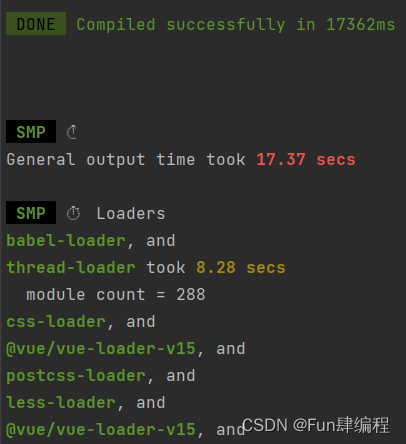
Jenkins打包时间:6分钟

优化后
启动时间:1.36秒
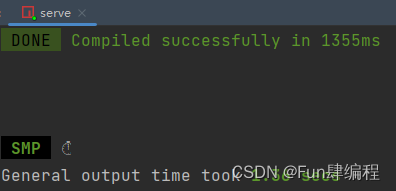
服务器打包时间:29秒

优化步骤
基础环境

优化思路
简单讲就两点:1.缓存,2.利用多线程

webpack5是直接提供了开启文件缓存的简单配置,如果你还在用4及以下版本的webpack就需要手动引入hard-source-webpack-plugin、cache-loader插件去手动配置了
步骤
引入speed-measure-webpack-plugin(统计编译时间插件)、thread-loader(多线程编译):
npm install -D speed-measure-webpack-plugin thread-loader 讯享网
具体步骤:
- 开启编译缓存,相关代码:
讯享网
configureWebpack: { cache: { // 使用文件缓存,加速二次构建 type: 'filesystem' } } - 开启多线程编译,相关代码:
const { defineConfig } = require('@vue/cli-service'); const os = require('os'); // cpu核数 const threads = os.cpus().length; console.log('编译线程数', threads); const vueConfig = defineConfig({ chainWebpack: (config) => { // 多核编译 config.module .rule('vue') .use('thread-loader') .loader('thread-loader') .options({ workers: threads }) .end(); config.module .rule('js') .use('thread-loader') .loader('thread-loader') .options({ workers: threads }) .end(); } } }); vue-cli已经自带了terser插件,所以我们需要通过chainwebpack去修改,让插件多线程编译,相关代码:讯享网
config.optimization.minimizer('terser').tap((args) => { args[0].parallel = threads; args[0].terserOptions.compress.warnings = true; args[0].terserOptions.compress.drop_debugger = true; args[0].terserOptions.compress.drop_console = true; return args; });
完整vue.conifg.js:
const {
    defineConfig } = require('@vue/cli-service'); const webpack = require('webpack'); const path = require('path'); const os = require('os'); // 构建时间统计插件 const SpeedMeasurePlugin = require('speed-measure-webpack-plugin'); // 开发环境代理的后端地址 const target = 'http://127.0.0.1:8080'; // 打包输出文件夹 const outputDir = 'dist'; // 打包后资源文件存放的目录 const assetsDir = 'static'; // 是否启用ESLint const lintOnSave = true; // 是否使用mock数据 const useMock = true; // 生产环境是否构建source map const productionSourceMap = false; // cpu核数 const threads = os.cpus().length; console.log('编译线程数', threads); const vueConfig = defineConfig({
    indexPath: 'index.html', devServer: {
    host: '0.0.0.0', port: 3000, hot: true, proxy: {
    '/api/*': {
    target, secure: false, changeOrigin: true } } }, publicPath: process.env.NODE_ENV === 'production' ? '/api' : '/', transpileDependencies: true, runtimeCompiler: true, lintOnSave, assetsDir, outputDir, productionSourceMap, css: {
    sourceMap: true, loaderOptions: {
    less: {
    lessOptions: {
    javascriptEnabled: true } }, sass: {
   }, scss: {
   } } }, chainWebpack: (config) => {
    // 多核编译 config.module .rule('vue') .use('thread-loader') .loader('thread-loader') .options({
    workers: threads }) .end(); config.module .rule('js') .use('thread-loader') .loader('thread-loader') .options({
    workers: threads }) .end(); if (process.env.NODE_ENV === 'development' && useMock) {
    config .plugin('copy-webpack-plugin') .use('copy-webpack-plugin') .tap((options) => {
    options[0] = {
    patterns: [ {
    from: path.resolve(__dirname, './mock'), to: path.join(__dirname, './', outputDir, assetsDir), toType: 'dir', force: true } ] }; return options; }); } if (process.env.NODE_ENV === 'production') {
    config.optimization.minimizer('terser').tap((args) => {
    args[0].parallel = threads; args[0].terserOptions.compress.warnings = true; args[0].terserOptions.compress.drop_debugger = true; args[0].terserOptions.compress.drop_console = true; return args; }); config.optimization.runtimeChunk(true).splitChunks({
    chunks: 'all', // 重复打包问题 cacheGroups: {
    vendors: {
    // node_modules里的代码 test: /[\\/]node_modules[\\/]/, chunks: 'all', priority: 10, // 优先级 enforce: true } } }); } }, configureWebpack: {
    cache: {
    // 使用文件缓存,加速二次构建 type: 'filesystem' }, plugins: [ new webpack.ProvidePlugin({
$: 'jquery', jQuery: 'jquery', 'window.jQuery': 'jquery' }), new SpeedMeasurePlugin() ] } }); module.exports = vueConfig; 【Docker】入门教程-基本概念解读
【前端-开发环境】使用NVM实现不同nodejs版本的自由切换(NVM完整安装使用手册)
【前端-NPM私服】内网使用verdaccio搭建私有npm服务器
【前端-IE兼容】Win10和Win11使用Edge调试前端兼容IE6、IE7、IE8、IE9、IE10、IE11问题
【前端-工程化】React项目工程化记录-内置项目活文档(老项目升级优化-集成Hosky/ESLint/Prettier-升级Webpack/Babel/NodeSass/React)
【工具-TWRP-frp-Termux】旧手机暴改成免费云服务器-MIUI刷TWRP安装magisk获取root
【工具-Shell脚本】java程序产品包模板-linux和windows通用shell启动停止脚本(无需系统安装Java运行环境)
【工具-Nginx】从入门安装到高可用集群搭建
【工具-Nginx】Nginx高性能通用配置文件-注释版-支持防刷限流、可控高并发、HTTP2、防XSS、Gzip、OCSP Stapling、负载、SSL
【工具-WireShark】网络HTTP抓包使用教程
【后端-maven打包】通过profile标签解决同时打jar包 war包需求
【架构-DDD】使用领域驱动设计-互联网未来架构设计之道(一)
【后端-SpringCache】基于Spring Cache封装一个能够批量操作的Redis缓存记录下踩坑历程(pipeline或mget封装)
【后端-SkyWalking】SkyWalking前后端开发环境搭建详细教程步骤-6.x/7.x/8.x版本通用-插件二次开发利器(一)
【后端-Quartz】Springboot整合Quartz支持集群环境-设计业务与框架分离及实现定时任务调度
✨欢迎为耿直少年点赞、关注、收藏!!!
👇👇👇
版权声明:本文内容由互联网用户自发贡献,该文观点仅代表作者本人。本站仅提供信息存储空间服务,不拥有所有权,不承担相关法律责任。如发现本站有涉嫌侵权/违法违规的内容,请联系我们,一经查实,本站将立刻删除。
如需转载请保留出处:https://51itzy.com/kjqy/41557.html