
前端时间研究了一下 AR 相机的实现,但是觉得支付宝的 AR 相机扫描界面和一般相机扫描界面不一样,因为它的背景中间“挖的坑”是一个正六边形,而不是常规的矩形,于是就起了模仿的心思。

仔细观察,发现需要实现的几个亮点:
- 带圆角的正六边形
- 六边形的外围实现一条由粗到细的线条,轨迹也是一个带圆角的正六边形
- 背景中间“挖坑”,“挖”出一个正六边形的坑来显示需要扫描的区域
- 中间点状的元素展示
在仔细分析以前,先看看我实现的动图:

上面我基本上完成了预定目标,接下来分析一下是如何完成的?
画圆角多边形
在实现这个功能的时候,我是直接百度的,然后发现这个六边形不是我需要的,效果图如下:
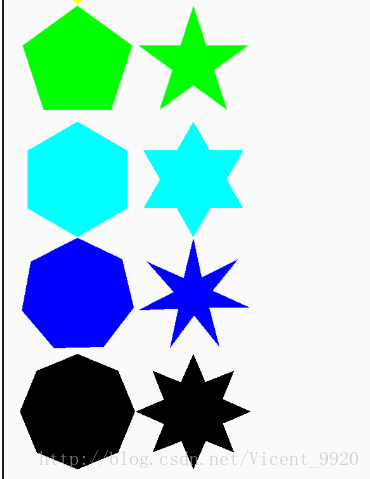
实现代码:
/ * 绘制彩色多边形或星形 * @param canvas Canvas画布 * @param paint Paint画笔 * @param color 颜色 * @param radius 外接圆半径 * @param count 外顶点数 * @param isStar 是否为星形 */ private void drawStar(Canvas canvas, Paint paint, @ColorInt int color, float radius,int count,boolean isStar){ canvas.translate(radius,radius); if ((!isStar) && count < 3){ canvas.translate(-radius,-radius); return; } if (isStar && count < 5){ canvas.translate(-radius,-radius); return; } canvas.rotate(-90); if (paint == null){ paint = new Paint(); }else{ paint.reset(); } Path path = new Path(); float inerRadius = count%2==0? (radius*(cos(360/count/2)-sin(360/count/2)*sin(90-360/count)/cos(90-360/count))) :(radius*sin(360/count/4)/sin(180-360/count/2-360/count/4)); for (int i=0;i<count;i++){ if (i==0){ path.moveTo(radius*cos(360/count*i),radius*sin(360/count*i)); }else{ path.lineTo(radius*cos(360/count*i),radius*sin(360/count*i)); } if (isStar){ path.lineTo(inerRadius*cos(360/count*i+360/count/2),inerRadius*sin(360/count*i+360/count/2)); } } path.close(); paint.setColor(color); canvas.drawPath(path,paint); canvas.rotate(90); canvas.translate(-radius,-radius); } / * Math.sin的参数为弧度,使用起来不方便,重新封装一个根据角度求sin的方法 * @param num 角度 * @return */ float sin(int num){ return (float) Math.sin(num*Math.PI/180); } / * 与sin同理 */ float cos(int num){ return (float) Math.cos(num*Math.PI/180); } 讯享网

圆内接正六边形的六条半径长度相等,都等于每条边的长度。
∵OB=OC
∴∠OBC=∠OCB
∵∠BOC=60°
∴?∠OBC=∠OCB=60°
∴OB=OC=BC[2](六边形每一个边对的圆心角=360°÷6=60°,因此三角形全部是等边三角形,边长就是半径.)

接下来,根据已知的圆心位置和半径,我们就可以利用三角函数求出尖角向上的正六边形了。

讯享网 / * 绘制多边形 * @param rect 绘制区域 * @param path */ private void makePolygon(RectF rect, Path path) { float r = (rect.right - rect.left) / 2; float mX = (rect.right + rect.left) / 2; float mY = (rect.top + rect.bottom) / 2; path.moveTo(mX,mY-r);//1 path.lineTo(mX+r*sin(60),mY-r/2);//3 path.lineTo(mX+r*sin(60),mY+r/2);//5 path.lineTo(mX,mY+r);//6 path.lineTo(mX-r*sin(60),mY+r/2);//4 path.lineTo(mX-r*sin(60),mY-r/2);//2 path.close(); }
CornerPathEffect cornerPathEffect = new CornerPathEffect(10); mBitmapPaint.setStrokeWidth(4); mBitmapPaint.setAntiAlias(true); mBitmapPaint.setStyle(Paint.Style.STROKE); mBitmapPaint.setPathEffect(cornerPathEffect);现在我们就解决了第一个问题,绘制圆角的多边形,接下来开始第二个部分:绘制由粗到细的六边形轨迹。

六边形轨迹绘制
SweepGradient
added in API level 1
SweepGradient (float cx, float cy, int[] colors, float[] positions)
A Shader that draws a sweep gradient around a center point.
Parameters cx float: The x-coordinate of the center cy float: The y-coordinate of the center colors int: The colors to be distributed between around the center. There must be at least 2 colors in the array.This value must never be null. positions float: May be NULL. The relative position of each corresponding color in the colors array, beginning with 0 and ending with 1.0. If the values are not monotonic, the drawing may produce unexpected results. If positions is NULL, then the colors are automatically spaced evenly.This value may be null.
Parameters cx float: The x-coordinate of the center cy float: The y-coordinate of the center color0 int: The color to use at the start of the sweep color1 int: The color to use at the end of the sweep
我初看以后也是完全一脸懵逼,后来看了几篇关于渐进透明 SweepGradient 的讲解才明白其中各个参数的具体含义以及使用方法。比如第二个构造方法:
cx——圆心的X坐标;
cy——圆心的Y坐标;
上面两个参数都出现在构造方法里面,说明了 SweepGradient 扫描渐变只能用于圆心区域,如果想要在矩形区域实现的话,可以参考LinerGradient
color0——开始的颜色;
color1——结束的颜色;
讯享网int[] colos = new int []{ Color.BLACK, Color.GREEN}; Shader mShader = new SweepGradient(viewSize / 2, viewSize / 2, Color.BLACK, Color.GREEN); mPaintSector.setShader(mShader); canvas.concat(matrix); canvas.drawCircle(viewSize / 2, viewSize / 2, 350, mPaintSector);
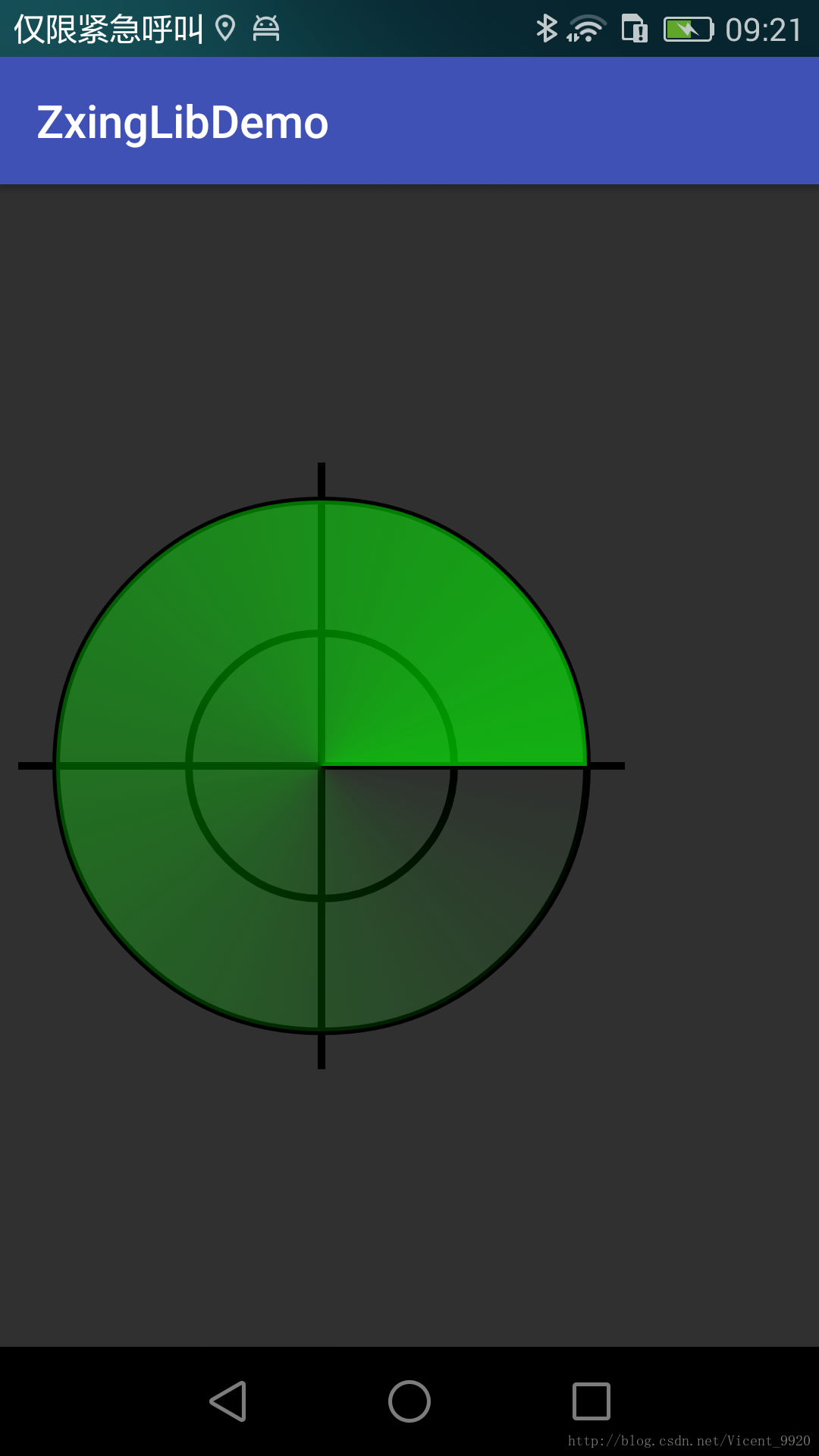
上面的构造方法只能用于两个颜色(黑色到绿色)的渐变,如果我们需要三个颜色的渐变怎么处理呢?
这个时候我们可以考虑使用第一个构造方法;
colors ——需要实现渐变的颜色数组,
positions ——需要渐变的位置
比如我们现在需要实现四个颜色,均匀的渐进
int[] colos = new int []{ Color.BLACK, Color.GREEN,Color.BLUE,Color.RED}; Shader mShader = new SweepGradient(viewSize / 2, viewSize / 2, colos, null); mPaintSector.setShader(mShader); canvas.concat(matrix); canvas.drawCircle(viewSize / 2, viewSize / 2, 350, mPaintSector);
如果我们需要定义渐变颜色的起始位置,如—— [0,0.1,0.3,1]:
讯享网 int[] colos = new int []{ Color.BLACK, Color.GREEN,Color.BLUE,Color.RED}; float[] points = new float[]{


  0,0.1f,0.3f,1}; Shader mShader = new SweepGradient(viewSize / 2, viewSize / 2, colos, points); mPaintSector.setShader(mShader); canvas.concat(matrix); canvas.drawCircle(viewSize / 2, viewSize / 2, 350, mPaintSector);
知道了这个 SweepGradient 的构造方法及使用效果,接下来就可以解释我们在游戏变粗的这种渐进效果了,这里又有两种情况,先看代码:
 public void start() { mAnimator = ValueAnimator.ofInt(360, 0); mAnimator.setDuration(30 * 360); // mAnimator.setRepeatCount(ValueAnimator.INFINITE); mAnimator.setInterpolator(new Interpolator() { @Override public float getInterpolation(float input) { return input; } }); mAnimator.addUpdateListener(new ValueAnimator.AnimatorUpdateListener() { @Override public void onAnimationUpdate(ValueAnimator animation) { Integer value = (Integer) animation.getAnimatedValue(); startLinePoint = value / 360f; if(startLinePoint>=0.25f){ startLinePoint = startLinePoint-0.25f; }else{ startLinePoint = startLinePoint+0.76f; }//1——0 endLinePoint = startLinePoint + 0.5f; if (startLinePoint > 0.5f) { offsetLinePoint = startLinePoint - 0.5f; endLinePoint-=1; int splitColor = Color.argb((int) (255 * (endLinePoint / 0.5f)), 255, 255, 255); colorArray = new int[]{splitColor, 0x00FFFFFF, 0, 0, 0xFFFFFFFF, splitColor}; // new int[]{0, 0, 0xFFFFFFFF, 0x00FFFFFF, 0, 0}; pathArray = // new float[]{0f, offsetLinePoint, offsetLinePoint, startLinePoint, startLinePoint, 1f}; new float[]{


  0f, endLinePoint, endLinePoint, startLinePoint, startLinePoint, 1f}; } else { colorArray = new int[]{


  0, 0, 0xFFFFFFFF, 0x00FFFFFF, 0, 0}; pathArray = new float[]{


  0f, startLinePoint, startLinePoint, endLinePoint, endLinePoint, 1f}; } SweepGradient mShader = new SweepGradient(mBitmapCenter, mBitmapCenter, colorArray, pathArray); mBitmapPaint.setShader(mShader); mBitmapCanvas.drawColor(Color.TRANSPARENT, PorterDuff.Mode.CLEAR); mBitmapCanvas.drawPath(mPath, mBitmapPaint); postInvalidate(); } }); mAnimator.start(); }
当旋转的进度值以0.5为临界点,低于0.5的时候,如下所示:

这样,就可以绘制出由细到粗带圆角的正六边形了。
显示区域“挖坑”
这个其实比较简单,就是找到各个点的路径,然后绘制出一条path。由于中间需要显示一个“坑”,因此我们将绘制区域划分为两部分,如图:

代码如下:
讯享网 makeShadeShop(new RectF(frame),mLeftShadePath,true,canvas); makeShadeShop(new RectF(frame),mRightShadePath,false,canvas); canvas.drawPath(mLeftShadePath,mMaskPaint); canvas.drawPath(mRightShadePath,mMaskPaint); / * 绘制阴影区域 * @param rect 识别区域矩形 * @param path 设置的路径 * @param isLeft 是否是左边 * @param canvas 画布(获取宽高使用) */ private void makeShadeShop(RectF rect,Path path,boolean isLeft,Canvas canvas){ float r = (rect.right - rect.left) / 2; float mX = (rect.right + rect.left) / 2; float mY = (rect.top + rect.bottom) / 2; final int width = canvas.getWidth(); final int height = canvas.getHeight(); if(isLeft){ path.moveTo(0,0);//左上 path.lineTo(width/2,0);//顶部中心点 path.lineTo(mX,mY-r);//1 path.lineTo(mX-r*sin(60),mY-r/2);//2 path.lineTo(mX-r*sin(60),mY+r/2);//4 path.lineTo(mX,mY+r);//6 path.lineTo(width/2,height);//底部中心点 path.lineTo(0,height);//左下 path.close(); }else{ path.moveTo(width,0);//右上 path.lineTo(width/2,0);//顶部中心点 path.lineTo(mX,mY-r);//1 path.lineTo(mX+r*sin(60),mY-r/2);//3 path.lineTo(mX+r*sin(60),mY+r/2);//5 path.lineTo(mX,mY+r);//6 path.lineTo(width/2,height);//底部中心点 path.lineTo(width,height);//右下 path.close(); } }
中间点状元素显示
一开始,我的想法是自己在中间的多边形区域内随机的生成一些点,然后将它显示出来。后来在观察demo的默认扫描效果里面也有这个光点,而且是从 Zxing 里面获取的。于是我就阅读源码,从源码里面取出来。后来发现直接取出来的时候不方便,于是自己又做了一些封装,修改了一些接口,这个过程很是琐碎,如果不嫌麻烦可以去看看我是怎么取的,也可以研究一下 Zxing 是如何将这些重要的点获取(这个我没有研究)
源码
版权声明:本文内容由互联网用户自发贡献,该文观点仅代表作者本人。本站仅提供信息存储空间服务,不拥有所有权,不承担相关法律责任。如发现本站有涉嫌侵权/违法违规的内容,请联系我们,一经查实,本站将立刻删除。
如需转载请保留出处:https://51itzy.com/kjqy/29215.html