
本次介绍,基于mongdb 4.2版本。
一、配置mongo Shell
- 自定义提示
- 使用mongo Shell中的外部编辑器
- 更改mongo Shell批处理大小
1.自定义提示
可以通过在mongo shell中设置变量提示来修改提示的内容。prompt变量可以保存字符串和JavaScript代码。如果prompt包含一个返回字符串的函数,mongo可以在每个提示中显示动态信息。
可以在.mongorc.js文件中添加提示逻辑,以便在每次启动mongo shell时设置提示。
1.1 自定义提示符来显示操作的数量
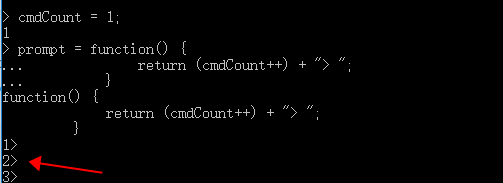
要创建包含当前会话中发出的操作数的mongo shell提示符,需要在mongo shell中定义以下变量:
cmdCount = 1; prompt = function() { return (cmdCount++) + "> "; }讯享网
提示符将类似于以下内容:
讯享网1> 2> 3>
例:
1.2 自定义提示以显示数据库和主机名
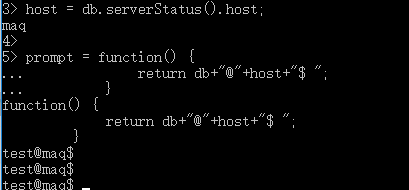
要以<database>@<hostname>$的形式创建mongo shell提示,请定义以下变量:
host = db.serverStatus().host; prompt = function() { return db+"@"+host+"$ "; }提示符将类似于以下内容:
讯享网test@myHost1$
例:
1.3 自定义提示符来显示运行时间和文档数量
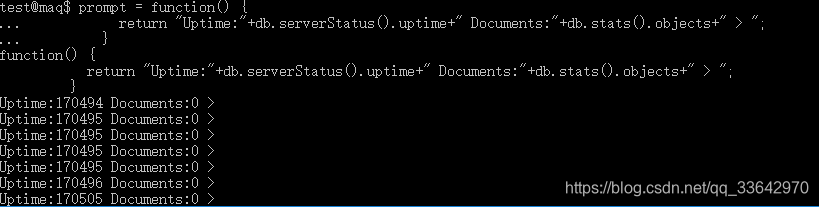
要创建包含系统运行时间和当前数据库中的文档数量的mongo shell提示符,请在mongo shell中定义以下提示变量:
prompt = function() { return "Uptime:"+db.serverStatus().uptime+" Documents:"+db.stats().objects+" > "; }提示符将类似于以下内容:
讯享网Uptime:5897 Documents:6 >
例:
2. 使用mongo Shell中的外部编辑器
可以在启动mongo shell之前设置编辑器环境变量,从而在mongo shell中使用自己的编辑器。
export EDITOR=vim mongo讯享网function myFunction () { }
b.使用编辑器编辑函数:
edit myFunction该命令应该打开vim编辑会话。完成编辑后,保存并退出vim编辑会话。
c.在mongo shell中,输入myFunction来查看函数定义:
讯享网myFunction
结果应该是从你保存的修改:
function myFunction() { print("This was edited"); }提示:当mongo shell解释在外部编辑器中编辑的代码时,它可能修改函数中的代码,这取决于JavaScript编译器。例如,mongo可以将1+1转换为2或删除注释。实际的更改只影响代码的外观,并且会根据所使用的JavaScript版本而有所不同,但不会影响代码的语义。
3.更改mongo Shell批处理大小
find()方法是从集合中检索文档的JavaScript方法。find()方法返回结果的游标;但是,在mongo shell中,如果没有使用var关键字将返回的游标分配给变量,那么游标将自动迭代20次,以打印与查询匹配的前20个文档。mongo shell将提示键入它,以再次迭代20次。
可以设置DBQuery.shellBatchSize属性将文档数量从默认值20更改为10,如下面的例子所示:
讯享网DBQuery.shellBatchSize = 10;
例:
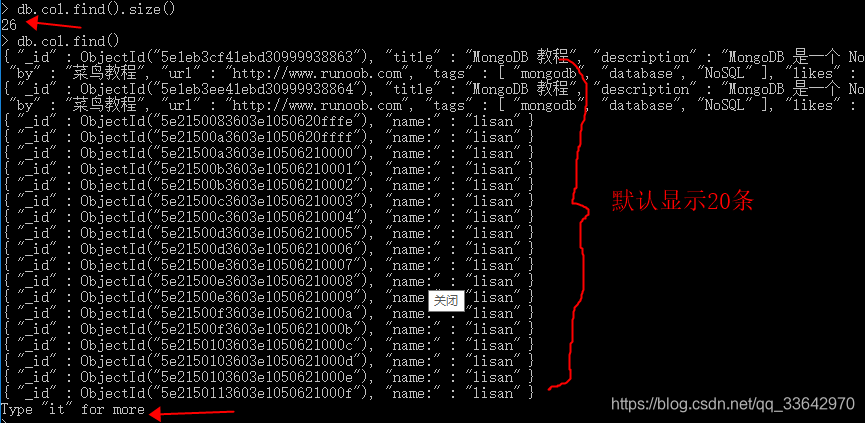
输入"it"显示其它:
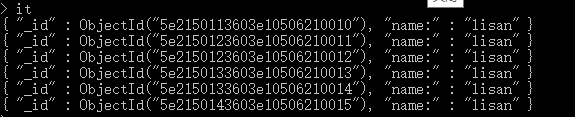
我们设置显示的个数后:

提示:重启服务后,设置失效。
二、访问mongo Shell帮助
本节将展示以下几点:
- Command Line Help
- Shell Help
- Database Help
- Collection Help
- Cursor Help
- Wrapper Object Help
除了MongoDB手册中的文档外,mongo shell还在其“在线”帮助系统中提供了一些额外的信息。本文档提供了访问此帮助信息的概述。
1.命令行帮助
要查看启动mongo shell的选项和帮助列表,请使用命令行中的--help选项:
mongo --help2.Shell Help
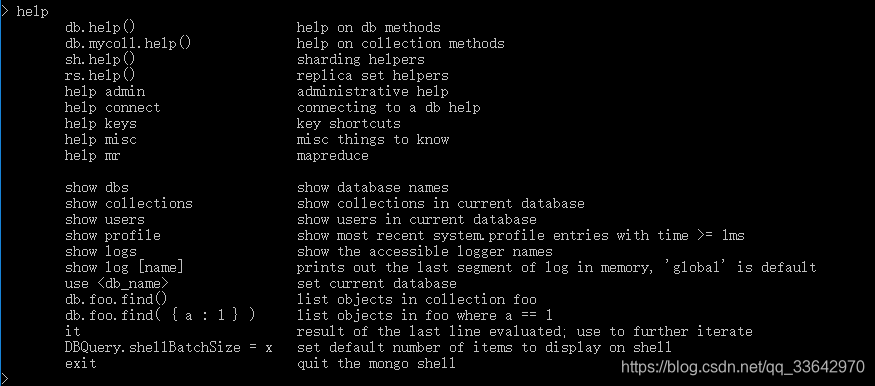
要查看帮助列表,在mongo shell中,键入help:
讯享网help
3.Database Help
a.要查看服务器上的数据库列表,请使用show dbs命令:
show dbsshow databases是show dbs的别名。
b.要查看可以在db对象上使用的方法的帮助列表,请调用db.help()方法:
讯享网db.help()

c.要查看shell中方法的实现,请键入db.<方法名>,不带括号(()),如下面的例子所示,它将返回方法db.updateUser()的实现:
db.updateUser 
提示:如果部署使用访问控制运行,则操作根据用户权限返回不同的值。有关详细信息,请参见listDatabases Behavior行为。
4.Collection Help
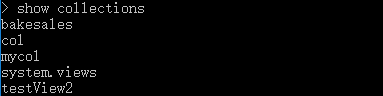
a.要查看当前数据库中的集合列表,请使用show collections命令:
讯享网show collections
b.要查看集合对象上可用方法的帮助(例如db.<collection>),请使用db.<collection>.help()方法:
db.collection.help()<collection>可以是一个存在的集合的名称,尽管您可以指定一个不存在的集合。

c.要查看集合方法的实现,请键入db.<collection>.<method> name without the圆括号(()),如下面的例子所示,它将返回save()方法的实现:
讯享网db.collection.save

提示:如何插入的是数组列表,在代码中是批量插入。
5.Cursor Help
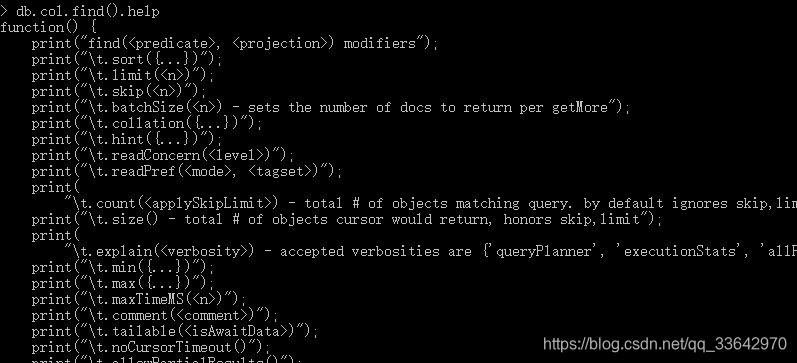
当您使用mongo shell中的find()方法执行读操作时,您可以使用各种游标方法来修改find()行为,并使用各种JavaScript方法来处理find()方法返回的游标。
a.要列出可用的修饰符和游标处理方法,请使用db.collection.find().help()命令:
db.collection.find().help()<collection>可以是一个存在的集合的名称,尽管您可以指定一个不存在的集合。


b.要查看游标方法的实现,请键入db.<collection>.find().<method> name without the圆括号(()),如下面的例子所示,它将返回toArray()方法的实现:
讯享网db.collection.find().toArray
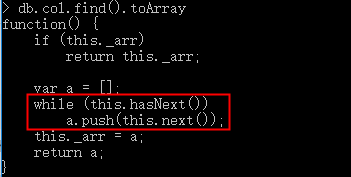
处理游标的一些有用方法如下:
- hasNext()检查游标是否有更多的文档要返回。
- next()返回下一个文档并将光标向前移动1。
- forEach(<function>)迭代整个游标,并将<function>应用于游标返回的每个文档。函数>需要一个单独的参数,该参数对应于每个迭代的文档。
有关迭代游标和从游标检索文档的示例,请参阅 cursor handling。有关所有可用的游标方法,请参见Cursor。
6.Wrapper Object Help
要获得mongo shell中可用的包装器类的列表,如BinData(),请在mongo shell中键入help misc:
help misc三、为mongo Shell编写脚本
本节介绍以下几点:
- 打开新连接
- 交互式和mongo脚本之间的区别
- 脚本
1.打开新连接
在mongo shell或JavaScript文件中,可以使用mongo()构造函数实例化数据库连接:
讯享网new Mongo() new Mongo(<host>) new Mongo(<host:port>)
考虑下面的示例,它实例化了一个到MongoDB实例的新连接,该连接在默认端口的本地主机上运行,并使用getDB()方法将全局db变量设置为myDatabase:
conn = new Mongo(); db = conn.getDB("myDatabase");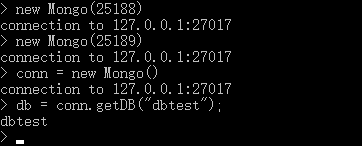
如果连接到实施访问控制的MongoDB实例,则可以使用db.auth()方法进行身份验证。
另外,可以使用connect()方法连接到MongoDB实例。下面的示例连接到在本地主机上运行的MongoDB实例,并使用非默认端口27020设置全局db变量:
讯享网db = connect("localhost:27020/myDatabase");
2.交互式和脚本蒙戈之间的区别
提示:从4.2版开始,mongo shell提供了 isInteractive()方法,该方法返回一个布尔值,指示mongo shell是在交互模式还是脚本模式下运行。

true:交互式
在为mongo shell编写脚本时,请考虑以下几点:
- 要设置db全局变量,请使用getDB()方法或connect()方法。可以将数据库引用分配给db之外的变量。
- mongo shell中的写操作默认使用{w: 1}的写关注点。如果执行批量操作,请使用bulk()方法。有关更多信息,请参见写入方法确认。
- 您不能在JavaScript文件中使用任何shell帮助程序(例如使用<dbname>, show dbs等),因为它们不是有效的JavaScript。
下表将最常见的mongo shell帮助程序映射到对应的JavaScript。
| Shell Helpers | JavaScript Equivalents |
|---|---|
show dbs, show databases |
db.adminCommand('listDatabases') |
讯享网use <db> |
db = db.getSiblingDB('<db>') |
讯享网show collections |
db.getCollectionNames() |
讯享网show users |
db.getUsers() |
讯享网show roles |
db.getRoles({showBuiltinRoles: true}) |
讯享网show log <logname> |
db.adminCommand({ 'getLog' : '<logname>' }) |
讯享网show logs |
db.adminCommand({ 'getLog' : '*' }) |
讯享网it |
cursor = db.collection.find() if ( cursor.hasNext() ){ cursor.next(); } |
- 在交互模式下,mongo打印操作的结果,包括所有游标的内容。在脚本中,可以使用JavaScript print()函数,也可以使用返回格式化JSON的mongo特定printjson()函数。
要在mongo shell脚本中打印结果游标中的所有项目,请使用以下习语:
讯享网cursor = db.collection.find(); while ( cursor.hasNext() ) { printjson( cursor.next() ); }
3.脚本
在系统提示中,使用mongo来评估JavaScript。
--eval option
使用--eval选项mongo传递一个JavaScript片段给shell,如下图所示:
mongo test --eval "printjson(db.getCollectionNames())"这将返回db.getCollectionNames()的输出,使用mongo shell连接到本地主机接口上端口27017上运行的mongod或mongos实例。
3.1.执行JavaScript文件
可以为mongo shell指定一个.js文件,mongo将直接执行JavaScript。考虑下面的例子:
讯享网mongo localhost:27017/test myjsfile.js
此操作在mongo shell中执行myjsfile.js脚本,该脚本连接到mongod实例上的测试数据库,通过端口27017上的localhost接口进行访问。
另外,可以使用Mongo()构造函数在javascript文件中指定mongodb连接参数。有关更多信息,请参见打开新连接。
可以使用load()函数从mongo shell中执行.js文件,如下所示:
load("myjstest.js")这个函数加载并执行myjste .js文件。
:load()方法接受相对路径和绝对路径。如果mongo shell的当前工作目录是/data/db,并且myjste .js驻留在/data/db/scripts目录中,那么在mongo shell中进行以下调用是等价的:
讯享网load("scripts/myjstest.js") load("/data/db/scripts/myjstest.js")
提示:load()函数没有搜索路径。如果所需的脚本不在当前工作目录或完整的指定路径中,mongo将无法访问该文件。
四、mongo Shell中的数据类型
本节将介绍以下内容:
- Types
- Date
- ObjectId
- NumberLong
- NumberInt
- NumberDecimal
- Check Types in the
mongoShellinstanceoftypeof
MongoDB BSON支持JSON之外的其他数据类型。驱动程序在宿主语言中为这些数据类型提供本地支持,mongo shell还提供了几个帮助类来支持在mongo JavaScript shell中使用这些数据类型。有关其他信息,请参阅扩展JSON引用。
1.类型
1.1 日期
mongo shell提供了各种方法来返回日期,可以是字符串,也可以是日期对象:
- Date(),该方法将返回当前日期的字符串。
- new Date()构造函数,它使用ISODate()包装器返回一个日期对象。
- ISODate()构造函数,使用ISODate()包装器返回一个日期对象。
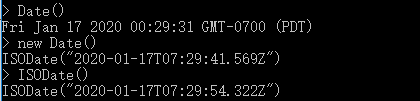
1.1.1 以字符串形式返回日期
要将日期作为字符串返回,请使用date()方法,如下面的示例所示:
var myDateString = Date();要打印变量的值,请在shell中键入变量名,如下所示:
讯享网myDateString
结果是myDateString的值:
Wed Dec 19 2012 01:03:25 GMT-0500 (EST)要验证类型,请使用typeof操作符,如下所示:
讯享网typeof myDateString
操作返回字符串。
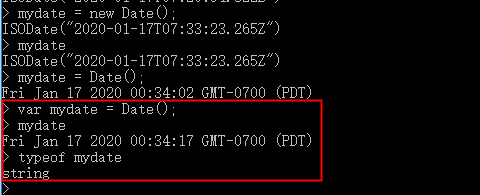
1.1.2 返回日期

var myDate = new Date(); var myDateInitUsingISODateWrapper = ISODate();讯享网myDate
结果是包装在ISODate()帮助程序中的myDate的日期值:
ISODate("2012-12-19T06:01:17.171Z")要验证类型,请使用instanceof操作符,如下所示:
讯享网myDate instanceof Date myDateInitUsingISODateWrapper instanceof Date
这两个操作都返回true。
1.2 ObjectId
mongo shell围绕ObjectId数据类型提供了ObjectId()包装器类。要生成新的ObjectId,请在mongo shell中使用以下操作:
new ObjectId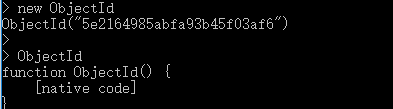
1.3 NumberLong
讯享网NumberLong("52")
下面的例子使用NumberLong()包装器来写入集合:
db.collection.insertOne( { _id: 10, calc: NumberLong("52") } ) db.collection.updateOne( { _id: 10 }, { $set: { calc: NumberLong("00") } } ) db.collection.updateOne( { _id: 10 }, { $inc: { calc: NumberLong(5) } } )a.检索文件以验证:
讯享网db.collection.findOne( { _id: 10 } )
b.在返回的文档中,calc字段包含一个NumberLong对象:
{ "_id" : 10, "calc" : NumberLong("05") }如果使用$inc将包含NumberLong对象的字段的值增加一个浮点数,则数据类型将更改为一个浮点数,如下面的示例所示:
a.使用$inc将calc字段增加5,mongo shell将其视为一个浮点数:
讯享网db.collection.updateOne( { _id: 10 }, { $inc: { calc: 5 } } )
b.检索更新后的文件:
db.collection.findOne( { _id: 10 } )c.在更新的文档中,calc字段包含一个浮点值:
讯享网{ "_id" : 10, "calc" : 10 }
1.4 NumberInt
默认情况下,mongo shell将所有数字都视为浮点值。mongo shell提供NumberInt()构造函数来显式地指定32位整数。
1.5 NumberDecimal
NumberDecimal("1000.55")该值存储在数据库中如下:
讯享网NumberDecimal("1000.55")
NumberDecimal()构造函数也接受来自mongo shell的双精度值(即不带引号),但由于存在丢失精度的风险,不建议这样做。构造函数创建基于二进制的双精度参数表示(可能会丢失精度),然后将该值转换为精度为15位的十进制值。下面的示例以双精度值的形式隐式传递该值,并演示如何创建精度为15位的值:
NumberDecimal(1000.55)该值存储在数据库中,如下所示:
讯享网NumberDecimal("1000.")
下面的示例以双精度值的形式隐式传递该值,并展示了精度损失是如何发生的:
NumberDecimal (.)
该值存储在数据库中如下:
NumberDecimal(".")下面的示例以双精度值的形式隐式传递该值,并展示了精度损失是如何发生的:
讯享网NumberDecimal(.)
该值存储在数据库中如下:
NumberDecimal(".")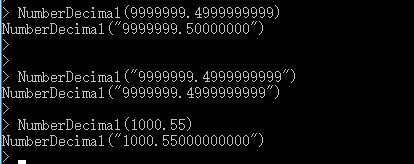
提示:要在MongoDB驱动程序中使用decimal数据类型,请确保使用支持它的驱动程序版本。
1.6 相等与排序顺序
十进制类型的值将根据其实际数值与其他数字类型进行比较和排序。基于二进制的双类型的数值通常具有基于小数的数值的近似表示,并且可能不完全等于它们的十进制表示,因此在检查十进制值的相等性时,请使用NumberDecimal()构造函数。考虑以下例子与以下文件的数字收集:
讯享网{ "_id" : 1, "val" : NumberDecimal( "9.99" ), "description" : "Decimal" } { "_id" : 2, "val" : 9.99, "description" : "Double" } { "_id" : 3, "val" : 10, "description" : "Double" } { "_id" : 4, "val" : NumberLong(10), "description" : "Long" } { "_id" : 5, "val" : NumberDecimal( "10.0" ), "description" : "Decimal" }
当将来自下表的查询插入到db.numbers.find(<query>)方法中时,将返回以下结果:
| Query | Results |
|---|---|
| { “val”: 9.99 } | { “_id”: 2, “val”: 9.99, “description”: “Double” } |
| { “val”: NumberDecimal( “9.99” ) } | { “_id”: 1, “val”: NumberDecimal( “9.99” ), “description”: “Decimal” } |
| { val: 10 } | { “_id”: 3, “val”: 10, “description”: “Double” } { “_id”: 4, “val”: NumberLong(10), “description”: “Long” } { “_id”: 5, “val”: NumberDecimal( “10.0” ), “description”: “Decimal” } |
| { val: NumberDecimal( “10” ) } | { “_id”: 3, “val”: 10, “description”: “Double” } { “_id”: 4, “val”: NumberLong(10), “description”: “Long” } { “_id”: 5, “val”: NumberDecimal( “10.0” ), “description”: “Decimal” } |
第一个查询{“val”:9.99}隐式地搜索9.99的双表示形式,它不等于该值的小数表示形式。
构造函数NumberDecimal()用于查询十进制表示为9.99的文档。double类型的值被排除,因为它们与十进制表示的9.99的精确值不匹配。
在查询整数时,将返回所有数字类型的匹配值。例如,查询10的双表示将在结果中包含10.0的十进制表示,反之亦然。
1.7 decimal类型检查
要测试十进制类型,请使用字符串别名“decimal”或十进制类型的数字代码19的$type操作符。
db.inventory.find( { price: { $type: "decimal" } } )2.Check Types in the mongo Shell
为了确定字段的类型,mongo shell提供了instanceof和typeof操作符。
2.1 instanceof
讯享网mydoc._id instanceof ObjectId
操作返回true.
2.2 typeof
typeof mydoc._id在这种情况下,typeof将返回更一般的对象类型,而不是ObjectId类型。
五、mongo Shell快速参考
mongoShell Command History- Command Line Options
- Command Helpers
- Basic Shell JavaScript Operations
- Keyboard Shortcuts
- Queries
- Error Checking Methods
- Administrative Command Helpers
- Opening Additional Connections
- Miscellaneous
- Additional Resources
1.mongo Shell命令历史
您可以使用向上和向下箭头键检索mongo shell中发出的以前的命令。命令历史记录存储在~/中.dbshell文件。有关更多信息,请参见 .dbshell。
2.命令行参数
| Option | Description |
|---|---|
--help |
Show command line options |
--nodb |
Start To connect later, see Opening New Connections. |
--shell |
Used in conjunction with a JavaScript file (i.e. <file.js>) to continue in the See JavaScript file for an example. |
3.Command Helpers
mongo shell提供了各种帮助。下表显示了一些常用的帮助方法和命令:
| Help Methods and Commands | Description |
|---|---|
help |
Show help. |
db.help() |
Show help for database methods. |
db.<collection>.help() |
Show help on collection methods. The <collection> can be the name of an existing collection or a non-existing collection. |
show dbs |
Print a list of all databases on the server. The operation corresponds to the |
use <db> |
Switch current database to <db>. The mongo shell variable db is set to the current database. |
show collections |
Print a list of all collections for current database. SEE ALSO show collections |
show users |
Print a list of users for current database. |
show roles |
Print a list of all roles, both user-defined and built-in, for the current database. |
show profile |
Print the five most recent operations that took 1 millisecond or more. See documentation on the database profiler for more information. |
show databases |
Print a list of all available databases. The operation corresponds to the |
load() |
Execute a JavaScript file. See Write Scripts for the mongo Shell for more information. |
4.基本的Shell JavaScript操作
mongo shell为数据库操作提供了一个JavaScript API。
在mongo shell中,db是引用当前数据库的变量。变量自动设置为默认数据库测试,或者在使用use <db>切换当前数据库时设置。
下表显示了一些常见的JavaScript操作:
| JavaScript Database Operations | Description |
|---|---|
db.auth() |
If running in secure mode, authenticate the user. |
coll = db.<collection> |
Set a specific collection in the current database to a variable copied 讯享网coll = db.myCollection; You can perform operations on the copied coll.find(); |
db.collection.find() |
Find all documents in the collection and returns a cursor. See the See Iterate a Cursor in the mongo Shell for information on cursor handling in the |
db.collection.insertOne() |
Insert a new document into the collection. |
db.collection.insertMany() |
Insert multiple new documents into the collection. |
db.collection.updateOne() |
Update a single existing document in the collection. |
db.collection.updateMany() |
Update multiple existing documents in the collection. |
db.collection.save() |
Insert either a new document or update an existing document in the collection. |
db.collection.deleteOne() |
Delete a single document from the collection. |
db.collection.deleteMany() |
Delete documents from the collection. |
db.collection.drop() |
Drops or removes completely the collection. |
db.collection.createIndex() |
Create a new index on the collection if the index does not exist; otherwise, the operation has no effect. |
db.getSiblingDB() |
Return a reference to another database using this same connection without explicitly switching the current database. This allows for cross database queries. |
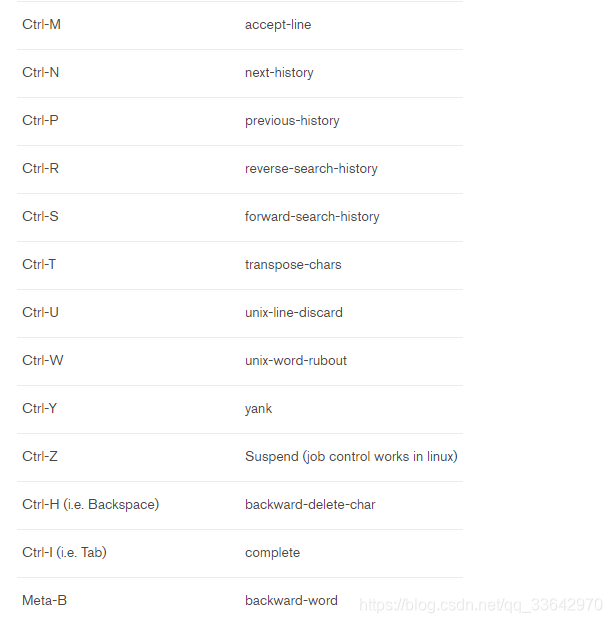
5.Keyboard Shortcuts



6.Queries
下表提供了一些常见的读操作在mongo shell:
| Read Operations | Description |
|---|---|
db.collection.find(<query>) |
讯享网coll = db.users; coll.find( { name: "Joe" } ); 有关指定<query>条件的更多信息,请参见 Specify Equality Condition. |
db.collection.find(<query>, <projection>) |
coll = db.users; coll.find( { }, { name: true } ); For more information on specifying the |
db.collection.find().sort(<sort order>) |
讯享网coll = db.users; coll.find().sort( { name: 1 } ); |
db.collection.find(<query>).sort(<sort order>) |
返回与指定的<sort order>中的<query>条件匹配的文档。 |
db.collection.find( ... ).limit( <n> ) |
将结果限制为<n>行。强烈建议您只需要一定数量的行就可以获得**性能。 |
db.collection.find( ... ).skip( <n> ) |
Skip <n> results. |
db.collection.count() |
返回集合中的文档总数。 |
db.collection.find(<query>).count() |
|
db.collection.findOne(<query>) |
coll = db.users; coll.findOne( { name: "Joe" } ); Internally, the |
有关更多信息和示例,请参见 Query Documents文档。请参阅 Query and Projection Operators操作符以指定其他查询操作符。
7.错误检查方法
mongo shell写方法将写关注点直接集成到方法执行中,并返回一个WriteResult()对象,该对象包含操作的结果,包括任何写错误和写关注点错误。
8.Administrative Command Helpers
下表列出了一些支持数据库管理的常用方法:
| JavaScript Database Administration Methods | Description |
|---|---|
db.fromColl.renameCollection(<toColl>) |
将集合从fromColl重命名为<toColl>。 See Naming Restrictions. |
db.getCollectionNames() |
获取当前数据库中所有集合的列表。 |
db.dropDatabase() |
除当前数据库。 |
有关方法的完整列表,请参见administrative database methods。
9.打开额外的连接
讯享网db = connect("<host><:port>/<dbname>") |
打开一个新的数据库连接。 |
conn = new Mongo() db = conn.getDB("dbname") |
使用新Mongo()打开到新服务器的连接。 使用连接的getDB()方法来选择数据库。 |
有关从mongo shell打开新连接的更多信息,请参见 Opening New Connections。
10.Miscellaneous
下表显示了一些杂项方法:
Object.bsonsize(<document>) 以字节为单位打印<文档>的 BSON大小
11.Additional Resources
参考之前的文档。
版权声明:本文内容由互联网用户自发贡献,该文观点仅代表作者本人。本站仅提供信息存储空间服务,不拥有所有权,不承担相关法律责任。如发现本站有涉嫌侵权/违法违规的内容,请联系我们,一经查实,本站将立刻删除。
如需转载请保留出处:https://51itzy.com/kjqy/29209.html