
概述
过去传统的开发模式是开发团队研发了产品,后期的部署运维交给单独的运维团队负责。这种开发模式经常会导致一些混乱的问题,比如,前期开发时由于缺乏后面测试和部署时的及时反馈,一些小问题没有及时发现,导致后面错误累积,甚至积重难返,需要返工重做;也有可能前期开发时没有出现任何问题,但是到后面部署运维时一些基础环境变了,导致很多冲突产生,运维或开发团队又需要在短时间内解决该问题,耗时耗力,甚至可能拖延产品的上线日期。这种传统的开发模式虽然有分工明确,各司其职的优点,但是正因为如此,开发、测试和运维团队之间严重脱节,缺乏密切的合作,很多前期没有发现的小问题会在后期部署运维时集中爆发,大大提高了开发的成本以及延长了产品的迭代周期。针对现代软件越来越复杂,需求变化越来越快的趋势,人们提出了DevOps(Development&Operations)开发模式,它不是一种工具集,而是一套方法论,主张开发、测试和运维团队之间进行沟通、协作、集成和自动化,以综合协作的工作方式改善整个团队在交付软件过程中的速度和质量。
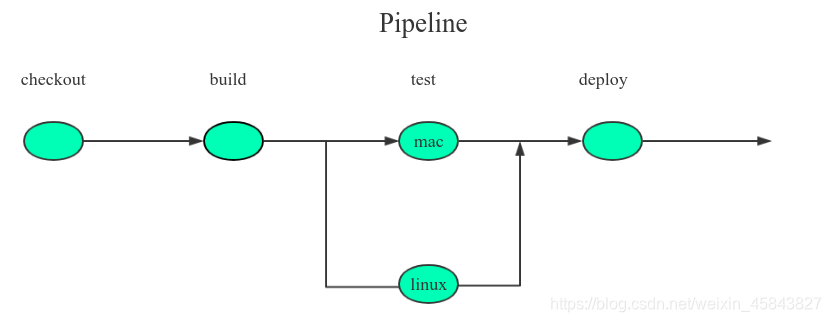
如果说DevOps是一种开发理念,那么CI/CD(持续集成、持续部署)管道就是其中的一种实践方式,它代表着发布流程自身的一个循环,从编写代码、构建镜像、测试代码、部署代码到后面生产环境重新测试和部署等,这是一个持续的过程,反复的过程。它使开发、测试和运维团队等一开始就以综合协作的方式绑定在一起,解决了前期开发得不到及时的测试、部署反馈以及运维在后期才开始介入等问题,避免了错误累积以及能够快速响应新的需求变化。常用的CI/CD工具有Jenkins、Drone和GitLab CI等等,由于系统平台使用的是Jenkins,我们就以Jenkins为例简单介绍下其相关概念。Jenkins是一个用java语言编写的开源工具,其CI/CD功能是通过一个叫pipeline的插件完成的。顾名思义,pipeline就是一套运行在Jenkins上的流水线框架,类似于工厂中的流水线作业。它将代码编译、脚本运行、镜像构建、测试、部署等功能集成在一起,为了清楚地划分不同的功能逻辑,一个pipeline被划分成了若干个Stage(称之为阶段),每个Stage代表一组相关的操作,比如:“build”,“Test”,“Deploy”等。其中每个Stage内又划分了多个Step(称之为步骤),它是最基本的操作单元,比如:创建目录、构建镜像、部署应用等等,由各类Jenkins插件提供具体功能。pipeline示意图如下所示:
讯享网
魔方云DevOps实现
简单地说,魔方云是基于Kubernetes管理多种云的云平台管理系统,内部功能的设计基本上均是通过Kubernetes(以下简称k8s)提供的自定义controller功能来实现的,其基本逻辑就是根据业务需要抽象出多个CRD(Custom Resource Definition,自定义资源对象),并编写对应的controller来实现业务逻辑。
为了实现CI/CD功能,我们抽象出了多个CRD,跟pipeline相关的3个CRD:
- pipeline:记录pipeline运行时状态、仓库的认证信息、钩子触发配置以及项目代码地址等信息。
- pipelineExecution:每次pipeline运行时产生的执行实例(以下简称执行实例),运行完记录结果信息;
- pipelineSetting:整个项目下pipeline运行的设置信息,比如内存、CPU的限制,最大流水线并行运行个数等等。
跟源代码仓库(以下以gitlab为例)相关的3个CRD:
- sourceCodeProviderConfig:记录代码仓库的application id 和secret授权信息;
- sourceCodeCredential:记录代码仓库的oauth认证信息;
- sourceCodeRepository:记录代码仓库的每个具体的项目信息。
除了抽象出对应的CRD外,我们还需要编写对应的controller代码实现对应的业务逻辑,比如当pipeline运行时,我们需要产生pipeline执行实例,并实时同步其运行的状态信息等等。文章下面会详细介绍。
pipeline功能步骤有很多种类型,包括运行脚本、构建发布镜像、发布应用模板、部署YAML、部署应用等等。为了提供这些功能,我们采用Jenkins作为底层的CI/CD工具,docker registry 作为镜像仓库中心,minio作为日志存储中心等等。这些服务是运行在pipeline所在项目的命名空间下。综上,我们设计的CI/CD系统功能的实现逻辑如图所示:
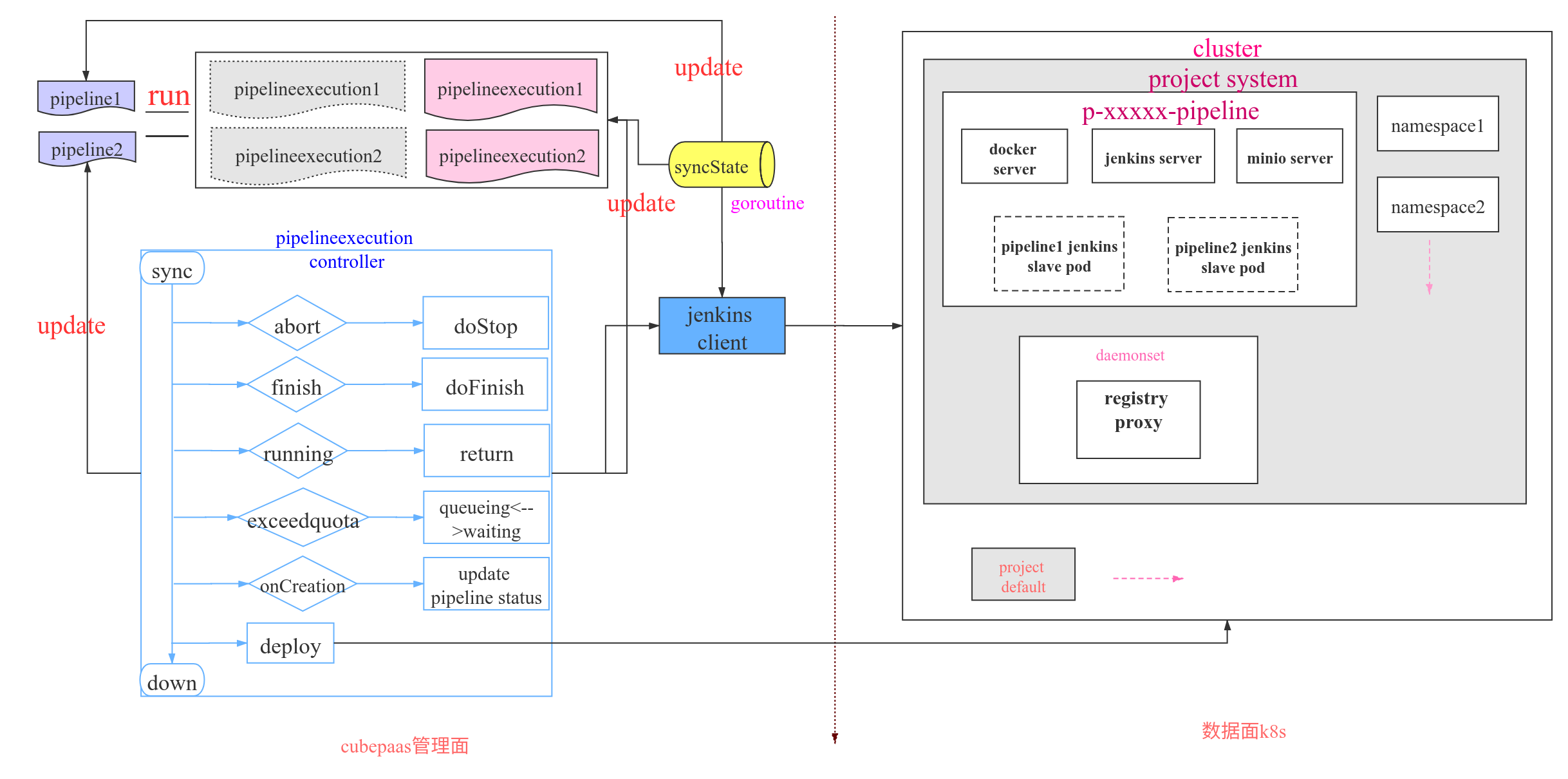
如上,当触发pipeline执行逻辑时,会产生一个pipelineExecution crd,以记录本次运行pipeline的状态信息。当goroutine(syncState)发现有新的执行实例产生时,就会通过Jenkins引擎接口启动Jenkins server端流水线作业的运行,Jenkins server 端收到信息后会启动单独的一个Jenkins slave pod进行流水线作业的响应。同时,goroutine(syncState)会不断地通过引擎接口轮询pipeline执行实例的运行情况进而更新 pipelineExecution crd的状态,比如,运行成功或失败等等。当pipeline执行实例发生状态变化时,就会触发其对应的controller业务逻辑,进而通过Jenkins引擎接口与Jenkins server 通信进行不同的操作,比如,暂停流水线的运行,运行完清除不需要的资源等等。当流水线作业发生状态变化时,又会通过goroutine(syncState)更改pipeline执行实例的状态,进而又触发对应的controller业务代码进行不同的业务逻辑处理,往复循环,直到流水线运行结束。这就是整个pipeline执行时的一个逻辑流程。我们把整个pipeline模块的实现划分成了3个部分:
- crd:即上述提到的6个crd类型;
- 基础接口定义:即与Jenkins server通信的客户端,与代码仓库交互的客户端等等基础模块;
- controller:实现逻辑功能的业务代码。
CRD
我们首先介绍下3个与源代码仓库相关的crd。当我们首次配置pipeline时会进行代码仓库授权设置,填写的gitlab Application Id和secret等信息会被存入到sourceCodeProviderConfig这个crd中,下面摘取了一些主要的字段信息并添加了详细注释,敏感信息使用了‘*’代替。
apiVersion: project.cubepaas.com/v3 metadata: name: gitlab namespace: p-xs7 clientId: 89d840b // Application Id clientSecret: a69657b // secret enabled: true hostname: gitlab..cn // 代码仓库的地址 projectName: c-llqwv:p-xs7 redirectUrl: https:///verify-auth type: gitlabPipelineConfig // 仓库类型 讯享网
当配置完授权信息后,平台就会与源代码仓库进行交互,获取到仓库的oauth认证信息并填充到sourceCodeCredential crd中,同时会获取该仓库下所有的项目代码的信息并填充到sourceCodeRepository crd中。如下所示:
讯享网apiVersion: project.cubepaas.com/v3 metadata: name: p-xs7-gitlab- spec: accessToken: 65b4e90 // 访问token displayName: // 代码仓库的显示昵称 gitLoginName: oauth2 loginName: // 代码仓库的登入用户名 projectName: c-llqwv:p-xs7 sourceCodeType: gitlab // 代码仓库类型, gitlab github ...
apiVersion: project.cubepaas.com/v3 kind: SourceCodeRepository metadata: labels: cubepaas.com/creator: linkcloud name: 89c129ff-f572-489e-98f7-3f111b3056f7 namespace: user-lwckv spec: defaultBranch: master // 默认代码分支 projectName: c-llqwv:p-xs7 sourceCodeCredentialName: user-lwckv:p-xs7-gitlab- // 指向上述 sourceCodeCredential crd sourceCodeType: gitlab url: https://gitlab.netbank.cn//testpipeline.git // 项目的url地址 这样就将仓库的oauth认证信息以及仓库的项目信息保存到了2个不同的crd中。
下面详细看下与pipeline相关的3个crd结构信息。
讯享网sh-4.4# kubectl get crds | grep pipeline pipelineexecutions.project.cubepaas.com 2019-12-18T10:32:10Z pipelines.project.cubepaas.com 2019-12-18T10:32:11Z pipelinesettings.project.cubepaas.com 2019-12-18T10:32:10Z
pipelinesetting crd 保存着整个项目下所有的pipeline的运行设置信息,比如CPU、内存资源限额,最多可同时运行多少个pipeline等等,不同功能的配置信息保存在多个crd下。
p-xs7 executor-cpu-limit 19d // cpu限制配置 p-xs7 executor-cpu-request 19d // cpu预留配置 p-xs7 executor-memory-limit 19d // 内存限制配置 p-xs7 executor-memory-request 19d // 内存预留配置 p-xs7 executor-quota 19d // 最多可同时运行多少个pipeline p-xs7 registry-signing-duration 19d // 用于设置docker镜像仓库证书的有效时长 // 比如,看下executor-quota详细信息 apiVersion: project.cubepaas.com/v3 metadata: name: executor-quota namespace: p-xs7 default: "2" // 默认最多可同时运行2个pipeline projectName: c-llqwv:p-xs7 value: "3" // 自定义设置,最多可同时运行3个pipeline,没有值会取上面默认值 下面是pipeline crd 的详细字段信息,主要是保存了上次执行pipeline时的结果信息、仓库的认证信息、钩子信息以及项目代码地址信息等。
讯享网apiVersion: project.cubepaas.com/v3 kind: Pipeline metadata: name: p-2qz4b namespace: p-xs7 spec: projectName: c-llqwv:p-xs7 repositoryUrl: https://gitlab..cn//testpipeline.git // 项目代码地址 sourceCodeCredentialName: user-lwckv:p-xs7-gitlab- // 指向对应的用户认证信息(sourceCodeCredential crd,见下面 status ---> sourceCodeCredential 字段) triggerWebhookPush: true // 当push代码时触发该流水线执行 status: lastExecutionId: p-xs7:p-2qz4b-1 // 最新一次运行的执行实例对应的id lastRunState: Success // 最新一次运行的最后结果 nextRun: 2 // 下次运行时执行实例对应的序号 pipelineState: active // 该流水线处于激活状态 sourceCodeCredential: // 上述已介绍,此处不再赘述 apiVersion: project.cubepaas.com/v3 kind: SourceCodeCredential metadata: name: p-xs7-gitlab- namespace: user-lwckv spec: displayName: gitLoginName: oauth2 loginName: projectName: c-llqwv:p-xs7 sourceCodeType: gitlab userName: user-lwckv status: {} token: a8c70ff2-a87a-4ef5-b677-73fc6c65fe69 // 访问token webhookId: "241" // 通过gitlab webhook触发流水线执行逻辑
pipelineExecution crd 结构的字段信息:
apiVersion: project.cubepaas.com/v3 kind: PipelineExecution metadata: name: p-2qz4b-1 // 执行实例的命名规则是:pipeline crd 的名字加序号,运行一次pipeline,序号加1 namespace: p-xs7 spec: branch: master // 代码仓库分支 commit: 6f67ae4 // git commit id event: push // push代码触发流水线执行 message: Update .cubepaas-devops.yml file pipelineConfig: // 以下是pipeline具体的stage和step的配置信息,每次运行时从代码仓库的配置文件(.cubepaas-devops.yml)拉取下来填充该结构 notification: {} stages: - name: Clone // 克隆代码 steps: - sourceCodeConfig: {} - name: one // 构建发布镜像 steps: - publishImageConfig: buildContext: . dockerfilePath: ./Dockerfile registry: 127.0.0.1:34844 tag: test:001 - name: two // 运行脚本 steps: - runScriptConfig: image: golang:latest shellScript: go env timeout: 60 // 超时设置 pipelineName: p-xs7:p-2qz4b projectName: c-llqwv:p-xs7 ref: refs/heads/master // 拉取的是master分支 repositoryUrl: https://gitlab.netbank.cn//testpipeline.git // 项目代码地址 run: 1 // 此次运行序号 triggeredBy: webhook // 如何触发 status: // 以下记录着pipeline每个stage和step的运行结果信息 executionState: Success stages: - ended: 2020-01-07T08:06:36Z state: Success steps: - ended: 2020-01-07T08:06:36Z state: Success ... ... 以上就是实现CI/CD系统功能所抽象出的6个主要的CRD。
基础接口定义
pipeline 涉及到的功能模块很多,从源代码仓库拉取代码、设置钩子操作、仓库触发流水线操作以及与 Jenkins server 端通信的 client 等等。为了方便以后的扩展,关键数据结构都被定义成了接口,如下所示:
这是与Jenkins server端通信的client接口定义。

讯享网type PipelineEngine interface { // 检查jenkins运行条件是否满足 PreCheck(execution *v3.PipelineExecution) (bool, error) // 运行pipeline RunPipelineExecution(execution *v3.PipelineExecution) error // 重新运行pipeline RerunExecution(execution *v3.PipelineExecution) error // 停止pipeline的运行 StopExecution(execution *v3.PipelineExecution) error // 获取详细的日志信息 GetStepLog(execution *v3.PipelineExecution, stage int, step int) (string, error) // 同步运行状态 SyncExecution(execution *v3.PipelineExecution) (bool, error) }
这是代码仓库触发流水线操作的接口定义:
// 当代码仓库触发流水线操作时,由该接口响应请求并启动流水线执行 type Driver interface { Execute(req *http.Request) (int, error) } 以 gitlab 为例
讯享网func (g GitlabDriver) Execute(req *http.Request) (int, error) { ... event := req.Header.Get(GitlabWebhookHeader) if event != gitlabPushEvent && event != gitlabMREvent && event != gitlabTagEvent { return http.StatusUnprocessableEntity, fmt.Errorf("not trigger for event:%s", event) } ... // 根据不同的触发条件获取请求参数中对应的信息 info := &model.BuildInfo{} if event == gitlabPushEvent { info, err = gitlabParsePushPayload(body) ... } else if event == gitlabMREvent { info, err = gitlabParseMergeRequestPayload(body) ... } else if event == gitlabTagEvent { info, err = gitlabParseTagPayload(body) ... } // 验证并创建pipeline执行实例,开始流水线的运行 return validateAndGeneratePipelineExecution(g.PipelineExecutions, g.SourceCodeCredentials, g.SourceCodeCredentialLister, info, pipeline) }
除此之外,还有与代码仓库进行交互的客户端(获取代码分支信息、克隆代码、拉取pipeline配置文件等)、与minio server通信的客户端(保存、获取日志信息)等结构,不再赘述。
controller
当触发流水线执行逻辑时,会通过pipeline crd和代码仓库中的pipeline配置文件产生一个pipelineExecution crd,这时会触发pipelineExecution对应的controller运行业务逻辑。如下所示:
func (l *Lifecycle) Create(obj *v3.PipelineExecution) (runtime.Object, error) { return l.Sync(obj) } func (l *Lifecycle) Updated(obj *v3.PipelineExecution) (runtime.Object, error) { return l.Sync(obj) } 当创建或更新pipelineExecution时会调用Sync同步函数进行业务处理。下面只摘取重要的代码逻辑,如下所示:
讯享网func (l *Lifecycle) Sync(obj *v3.PipelineExecution) (runtime.Object, error) { ... // 如果 pipeline 执行实例被暂停,则会停止流水线作业 if obj.Status.ExecutionState == utils.StateAborted { if err := l.doStop(obj); err != nil { return obj, err } } // 如果 pipeline 执行实例运行完毕,则会清理流水线作业的一些资源 // 比如,产生的Jenkins slave pod if obj.Labels != nil && obj.Labels[utils.PipelineFinishLabel] == "true" { return l.doFinish(obj) } // 如果 pipeline 执行实例正在运行中,则直接返回,无操作 if v3.PipelineExecutionConditionInitialized.GetStatus(obj) != "" { return obj, nil } // 判断流水线作业是否超出资源限额 exceed, err := l.exceedQuota(obj) if err != nil { return obj, err } // 如果超出资源限额,则会设置当前 pipeline 执行实例为阻塞状态 if exceed { obj.Status.ExecutionState = utils.StateQueueing obj.Labels[utils.PipelineFinishLabel] = "" if err := l.newExecutionUpdateLastRunState(obj); err != nil { return obj, err } return obj, nil } else if obj.Status.ExecutionState == utils.StateQueueing { obj.Status.ExecutionState = utils.StateWaiting } // 更新 pipeline 执行实例的状态: 比如运行序号+1 if err := l.newExecutionUpdateLastRunState(obj); err != nil { return obj, err } v3.PipelineExecutionConditionInitialized.CreateUnknownIfNotExists(obj) obj.Labels[utils.PipelineFinishLabel] = "false" // 在数据面部署pipeline功能所需资源 if err := l.deploy(obj.Spec.ProjectName); err != nil { obj.Labels[utils.PipelineFinishLabel] = "true" obj.Status.ExecutionState = utils.StateFailed v3.PipelineExecutionConditionInitialized.False(obj) v3.PipelineExecutionConditionInitialized.ReasonAndMessageFromError(obj, err) } // 将 configMap 存储的docker镜像仓库端口信息同步到pipeline执行实例中去. if err := l.markLocalRegistryPort(obj); err != nil { return obj, err } return obj, nil }
其中,deploy函数的逻辑就是第一次运行时通过判断数据面中是否存在pipeline的命名空间,如果存在就代表基础资源已经配置完成,直接走reconcileRb函数,该函数的逻辑见下面;如果不存在,就会在数据面中初始化必要的基础资源,比如:pipeline命名空间, Jenkins docker minio服务, 配置configMap, secret等等。
func (l *Lifecycle) deploy(projectName string) error { clusterID, projectID := ref.Parse(projectName) ns := getPipelineNamespace(clusterID, projectID) // 如果该pipeline的namespace已经有了,说明下面的资源部署已经完成了,则直接走reconcileRb流程 // 否则走下面的资源部署流程 if _, err := l.namespaceLister.Get("", ns.Name); err == nil { return l.reconcileRb(projectName) } else if !apierrors.IsNotFound(err) { return err } // 创建pipeline对应的命名空间,如p-xs7-pipeline if _, err := l.namespaces.Create(ns); err != nil && !apierrors.IsAlreadyExists(err) { return errors.Wrapf(err, "Error creating the pipeline namespace") } ... // 随机产生一个token,用于配置下面的secret token, err := randomtoken.Generate() nsName := utils.GetPipelineCommonName(projectName) ns = getCommonPipelineNamespace() // 创建用于部署docker镜像仓库的代理服务的命名空间 if _, err := l.namespaces.Create(ns); err != nil && !apierrors.IsAlreadyExists(err) { return errors.Wrapf(err, "Error creating the cattle-pipeline namespace") } // 在 pipeline namespace 内创建secret : pipeline-secret secret := getPipelineSecret(nsName, token) l.secrets.Create(secret); ... // 获取管理面项目的系统用户token apikey, err := l.systemAccountManager.GetOrCreateProjectSystemToken(projectID) ... // 在 pipeline namespace 内创建secret: pipeline-api-key,用于数据面与管理面通信的凭证 secret = GetAPIKeySecret(nsName, apikey) l.secrets.Create(secret); // 调谐 docker 镜像仓库的证书配置(在控制面中) if err := l.reconcileRegistryCASecret(clusterID); err != nil { return err } // 将控制面中的 docker 镜像仓库的证书配置同步到数据面中 if err := l.reconcileRegistryCrtSecret(clusterID, projectID); err != nil { return err } // 在 pipeline namespace 内创建 serviceAccount : jenkins sa := getServiceAccount(nsName) if _, err := l.serviceAccounts.Create(sa); err != nil && !apierrors.IsAlreadyExists(err) { return errors.Wrapf(err, "Error creating a pipeline service account") } ... // 在 pipeline namespace 内创建 service: jenkins jenkinsService := getJenkinsService(nsName) if _, err := l.services.Create(jenkinsService); err != nil && !apierrors.IsAlreadyExists(err) { return errors.Wrapf(err, "Error creating the jenkins service") } // 在 pipeline namespace 内创建 deployment: jenkins jenkinsDeployment := GetJenkinsDeployment(nsName) if _, err := l.deployments.Create(jenkinsDeployment); err != nil && !apierrors.IsAlreadyExists(err) { return errors.Wrapf(err, "Error creating the jenkins deployment") } // 在 pipeline namespace 内创建 service: docker-registry registryService := getRegistryService(nsName) if _, err := l.services.Create(registryService); err != nil && !apierrors.IsAlreadyExists(err) { return errors.Wrapf(err, "Error creating the registry service") } // 在 pipeline namespace 内创建 deployment: docker-registry registryDeployment := GetRegistryDeployment(nsName) if _, err := l.deployments.Create(registryDeployment); err != nil && !apierrors.IsAlreadyExists(err) { return errors.Wrapf(err, "Error creating the registry deployment") } // 在 pipeline namespace 内创建 service: minio minioService := getMinioService(nsName) if _, err := l.services.Create(minioService); err != nil && !apierrors.IsAlreadyExists(err) { return errors.Wrapf(err, "Error creating the minio service") } // 在 pipeline namespace 内创建 deployment: minio minioDeployment := GetMinioDeployment(nsName) if _, err := l.deployments.Create(minioDeployment); err != nil && !apierrors.IsAlreadyExists(err) { return errors.Wrapf(err, "Error creating the minio deployment") } // 调谐 configMap: proxy-mappings,用于配置docker镜像仓库代理服务的端口信息 if err := l.reconcileProxyConfigMap(projectID); err != nil { return err } // 创建secret: devops-docker-registry,存储访问docker仓库的认证信息 if err := l.reconcileRegistryCredential(projectName, token); err != nil { return err } // 创建 daemonset: registry-proxy,每个节点部署一套docker镜像仓库的nginx代理服务 // 可以在任意一个节点上通过不同的端口即可访问到不同的docker镜像仓库 nginxDaemonset := getProxyDaemonset() if _, err := l.daemonsets.Create(nginxDaemonset); err != nil && !apierrors.IsAlreadyExists(err) { return errors.Wrapf(err, "Error creating the nginx proxy") } return l.reconcileRb(projectName) } reconcileRb函数的功能就是遍历所有namespace, 对其调谐rolebindings, 目的是让 pipeline serviceAccount(jenkins) 对该project下的所有namespace具有所需要的操作权限,这样Jenkins server才能够在数据面中正常提供CI/CD基础服务。
讯享网func (l *Lifecycle) reconcileRb(projectName string) error { ... var namespacesInProject []*corev1.Namespace for _, namespace := range namespaces { parts := strings.Split(namespace.Annotations[projectIDLabel], ":") if len(parts) == 2 && parts[1] == projectID { // 过滤出属于该project下的所有namespace namespacesInProject = append(namespacesInProject, namespace) } else { // 对非该project下的namespace, 清除有关该 pipeline 的 rolebinding if err := l.roleBindings.DeleteNamespaced(namespace.Name, commonName, &metav1.DeleteOptions{}); err != nil && !apierrors.IsNotFound(err) { return err } } } for _, namespace := range namespacesInProject { // 对属于该project下的namespace, 创建 rolebinding: 对 jenkins serviceAccount 绑定角色 // 即赋予 jenkins serviceAccount 对该project下的所有namespace所需要的操作权限 rb := getRoleBindings(namespace.Name, commonName) if _, err := l.roleBindings.Create(rb); err != nil && !apierrors.IsAlreadyExists(err) { return errors.Wrapf(err, "Error create role binding") } } // 赋予 jenkins serviceAccount 在 cluster 内创建和修改 namespace 的权限 // 当部署应用时可以指定创建新的命名空间 clusterRbs := []string{roleCreateNs, projectID + roleEditNsSuffix} for _, crbName := range clusterRbs { crb := getClusterRoleBindings(commonName, crbName) if _, err := l.clusterRoleBindings.Create(crb); err != nil && !apierrors.IsAlreadyExists(err) { return errors.Wrapf(err, "Error create cluster role binding") } } return nil }
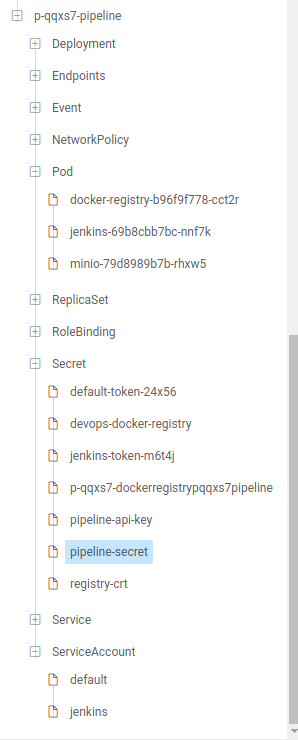
我们通过kubernator ui查看下数据面k8s中部署的有关pipeline的资源,如图所示:
deploy
pipeline-secret用于配置Jenkins、docker-registry、minio服务的auth信息,pipeline-api-key用于数据面与管理面通信的凭证,registry-crt用于配置docker镜像仓库的证书。
goroutine(syncState)的代码逻辑比较简单,当产生新的pipeline执行实例时就会启动Jenkins server端流水线作业的运行并实时同步其运行状态到pipeline执行实例中。代码逻辑如下:
func (s *ExecutionStateSyncer) syncState() { set := labels.Set(map[string]string{utils.PipelineFinishLabel: "false"}) allExecutions, err := s.pipelineExecutionLister.List("", set.AsSelector()) executions := []*v3.PipelineExecution{} // 遍历该cluster下的 pipeline 执行实例 for _, e := range allExecutions { if controller.ObjectInCluster(s.clusterName, e) { executions = append(executions, e) } } for _, execution := range executions { if v3.PipelineExecutionConditionInitialized.IsUnknown(execution) { // 检查数据面k8s中 Jenkins pod 是否正常,正常则运行该 pipeline job s.checkAndRun(execution) } else if v3.PipelineExecutionConditionInitialized.IsTrue(execution) { e := execution.DeepCopy() // 如果已经启动了,则同步运行状态 updated, err := s.pipelineEngine.SyncExecution(e) if updated { // 更新最新的状态到 pipelineExecution crd 中 s.updateExecutionAndLastRunState(e); } } else { // 更新最新的状态到 pipelineExecution crd 中 s.updateExecutionAndLastRunState(execution); } } logrus.Debugf("Sync pipeline execution state complete") } 除此之外,系统为了内部的docker镜像仓库的安全性,会启动一个goroutine每隔一段时间就更新下docker镜像仓库的证书。同时为了方便访问docker镜像仓库,系统在数据面k8s中启动了一个daemonset类型的代理服务,内部采用的是nginx代理,通过不同的端口指向不同的docker镜像仓库,这样就可以在任意一个节点通过不同的端口方便地访问到不同的docker镜像仓库。通过kubectl在数据面中获取到的configMap(proxy-mappings)信息如下所示:
讯享网apiVersion: v1 items: - apiVersion: v1 data: mappings.yaml: | mappings: '{"p-ljzgf":"34380","p-xs7":"34844"}' kind: ConfigMap metadata: labels: cubepaas.com/creator: linkcloud name: proxy-mappings kind: List metadata: resourceVersion: "" selfLink: ""
我们可以看到现在系统上有两个pipeline的docke镜像仓库端口信息。我们可以通过不同的端口访问到对应pipeline的docker镜像仓库。如:
michael@work1:~$ docker login 127.0.0.1:34844 Username: admin Password: WARNING! Your password will be stored unencrypted in /home/michael/.docker/config.json. Configure a credential helper to remove this warning. See https://docs.docker.com/engine/reference/commandline/login/#credentials-store 魔方云DevOps使用
通常,流水线第一步是从代码仓库克隆代码,然后才是编译、测试和部署等一系列功能的设置,因此我们首先需要授权平台能够访问代码仓库。我们以gitlab仓库为例,将配置好的Application Id、secret和仓库地址填入到对应的文本框中,点击授权,这样我们就完成了仓库的授权配置。如图所示:
shouquan
配置完成后,我们就可以激活pipeline功能了,我们简单地设置pipeline配置文件( .cubepaas-devops.yml)如下:
stages:
- name: one steps:
- publishImageConfig:
dockerfilePath: ./Dockerfile
buildContext: .
tag: test:001
registry: 127.0.0.1:34844- name: two steps:
- runScriptConfig:
image: golang:latest
shellScript: go env timeout: 60 notification: {}
如上,简单地配置了两个阶段,一个是构建发布镜像,一个是运行脚本,你可以按照自己项目的发布流程配置好pipeline,最后点击完成,我们就可以看到该pipeline自动运行了。pipeline的配置文件会推送到代码仓库中,这样就可以实现pipeline历史版本的回溯,支持从代码库直接读取pipeline配置文件,从而实现了Pipeline as Code的理念。点击查看日志,你可以看到pipeline各个阶段运行的详细日志信息。如图所示。
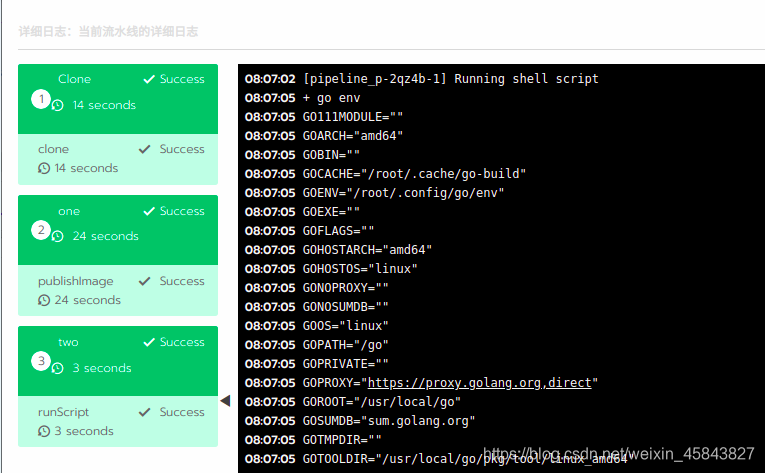
【注意】首次运行pipeline时系统会从网络下载Jenkins、docker、minio以及其他pipeline-tools镜像,如果长时间未运行,请查看网络是否有问题。
版权声明:本文内容由互联网用户自发贡献,该文观点仅代表作者本人。本站仅提供信息存储空间服务,不拥有所有权,不承担相关法律责任。如发现本站有涉嫌侵权/违法违规的内容,请联系我们,一经查实,本站将立刻删除。
如需转载请保留出处:https://51itzy.com/kjqy/128591.html