
前言:
好像已经很久没发过文章了,水一篇吧,最近在回头恶补java web的一些东西还有研究链条和内存马的一些东西,有些东西还没整明白,怕误人子弟,所以暂时就不发了。
后面等学明白了在发吧,先发一篇java审计需要的一些基础知识点吧,也能算是开发吧(也是笔者基于javaweb学习过程中自己基于自己的理解的一些学习笔记,所以可能存在一些问题,若有问题,希望批评指教),也希望能给入坑审计java审计的人一些参考吧。
讯享网
而至于实战审计的一些文章,最近一段时间应该是不会打算发的,倒不是说没相关的素材,最近也确实审计了不少的系统,水了不少的cnvd证书和奖金,但是从自己本身而言还是不是特别喜欢写相关的东西,写基于系统本身的一些漏洞的代码审计吧,在某种角度而言其实就是路由+source+sink+trick,而基于这种漏洞本身而言,其实可能遇到的绕过技巧本身不会太多,最多也就是几个组合拳或者几个特性导致的一些问题。
而基于组件和链条相关的漏洞挖掘吧,能力仍有不足,所以基于这种角度还不如安心分享自己的一些知识笔记。
最后:虚心进步,慢慢成长。
正文:
1.JAVA SE
java常用类库
java.applet 提供了创建applet需要的所有类 java.awt.* 提供了创建⽤户界⾯以及绘制和管理图形、图像的类 java.beans.* 提供了开发Java Beans需要的所有类 java.io 提供了通过数据流、对象序列以及⽂件系统实现的系统输⼊、输出 java.lang.* Java编程语⾔的基本类库 java.math.* 提供了简明的整数算术以及⼗进制算术的基本函数 java.rmi 提供了与远程⽅法调⽤相关的所有类 java.net 提供了⽤于实现⽹络通讯应⽤的所有类 java.security.* 提供了设计⽹络安全⽅案需要的⼀些类 java.sql 提供了访问和处理来⾃于Java标准数据源数据的类 java.test 包括以⼀种独⽴于⾃然语⾔的⽅式处理⽂本、⽇期、数字和消息的类和接⼝ java.util.* 包括集合类、时间处理模式、⽇期时间⼯具等各类常⽤⼯具包 javax.accessibility 定义了⽤户界⾯组件之间相互访问的⼀种机制 javax.naming.* 为命名服务提供了⼀系列类和接⼝ javax.swing.* 提供了⼀系列轻量级的⽤户界⾯组件,是⽬前Java⽤户界⾯常⽤的包 注:在使⽤Java时,除了java.lang外,其他的包都需要import语句引⼊之后才能使⽤ 讯享网
常用注解
格式:@注解名称(属性=属性值)@suerping(value=‘aaa’)
概念:也叫元数据。即对一些说明含义做了一些简写操作。
意义:
①编写文档:利用注解生成文档。
②代码分析:利用注解对代码进行分析。
③编译检测:让编译器进行基础的编译检测。如@Override就是一个编译检查注解
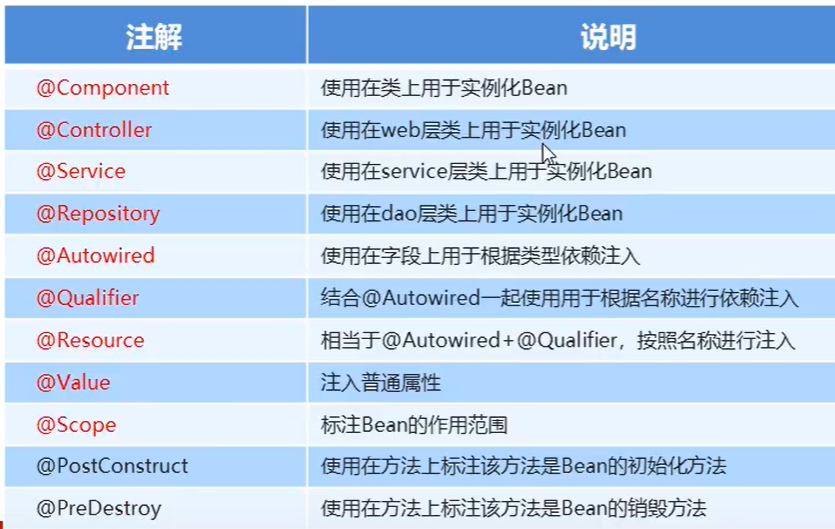
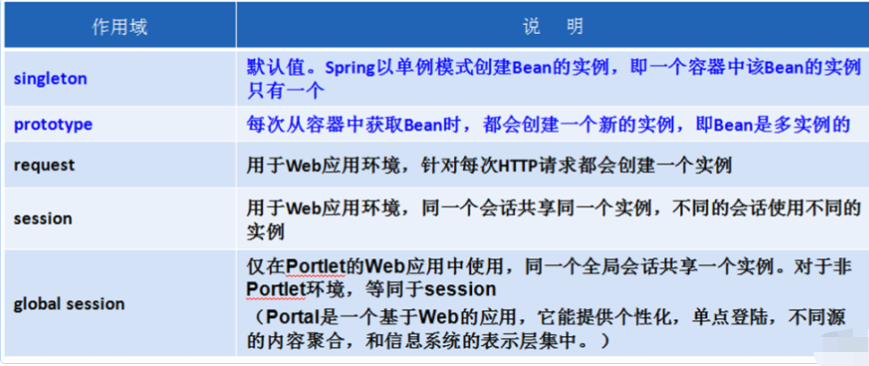
讯享网1.基础路由以及函数相关的注解 @override 重写 @WebServlet("/hello") servlet中的配置路由的注解 2.spring引入相关注解 @Component:创建此类的对象,并放入到Spring容器中。即给一个对象起对象名 //@Component("xxxx"):创建此类的对象,取一个对象名,并放入到Spring容器中。 @Autowired:默认自动按照类型在Spring容器寻找对象,并注入到属性中。 //即在spring容器中寻找对象,然后注入到属性中,所以此时要注意:UserDao接口的实现类只能有一个。 @Value //用于设置默认值,配置文件时使用 //如@Value("${jdbc.url}") 配置jdbc的路由 //@Value("#{T(java.lang.Math).PI}")或者配置springEL表达式 3.作用范围注解 @Scope(),设置bean的作用域。
案例使用:
1.给UserDao取对象名
@Repository("userDao") public class UserDaoImpl implements UserDao{
    }
2.使用@Qualifier通知@Autowired 注解,注入对象名为userDao的对象
讯享网@Autowired @Qualifier("userDao")//即把属性userDao的注入到userDao的值中去 private UserDao userDao;
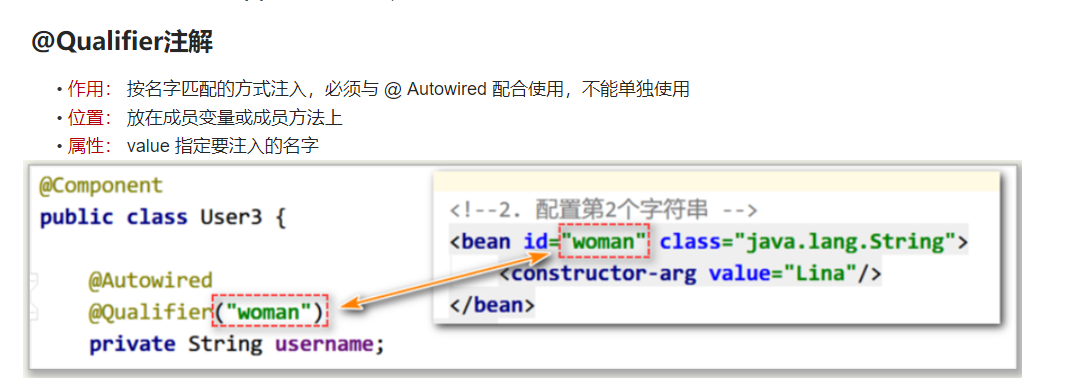
注意点:
①与@Component相同注解含义的注解
- @Service 业务层组件
- @Controller 控制层组件
- @Repository 数据层组件
JAVA WEB
四层
view(视图层)->controller层(控制值)–>server层(服务层)–>dao层(持久层)–>entity(实体层)
url获取以及转发实现代码(request作用域的实现)
URL获取
具体的几种方法 ①request.getRequestURL();//获取除参数以外的所有路径 ②request.getRequestURI();//获取除参数以及域名以外的所有路径 ③request.getQueryString();/获取参数字符串 ④request.getMethod();//获取请求方式 ⑤request.getProtocol();//获取当前协议版本 以http://www.baidu.com/aa/ssss?name=ice为例 获取请求时的完整路径:Srting url= request.getRequestURL()+""; 结果 http://www.baidu.com/aa/ssss 获取请求时的部分路径:String uri=request.getRequestURI(); 结果 /aa/ssss 获取请求时的参数字符串:String queryString=request.getQueryString(); 结果 name=ice 获取请求方式:Srting method=request.getMethod(); 结果 GET/POST/PUT/DELETE 获取当前协议版本:String protocol=request.getProtocol() 结果 HTTP/1.1 获取项目站点名:String webapp=request.getContextPath() 结果 /aa (这个看Tomcat的配置) 获取请求参数:request.getParmater("name") 获取请求同一参数的所有值(复选框传值):request.getParmaterValues("name") 转发跳转
讯享网request.getRequestDispatcher("/jsp/index.jsp").forward(request, response); 重定向 response.sendRedirect("//jsp/index.jsp");
Spring
基础
体系结构
①框架结构
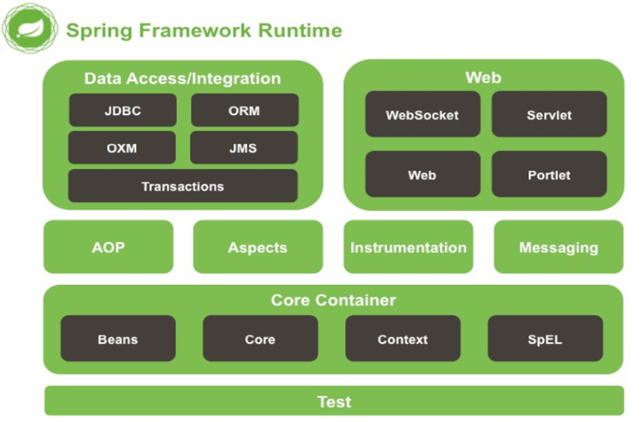
- 核心容器(Core Container)
- AOP(Aspect Oriented Programming)
- 设备支持(Instrmentation)
- 数据访问及集成(Data Access/Integeration)
- Web报文发送(Messaging)
- Test测试
②结构详细解释
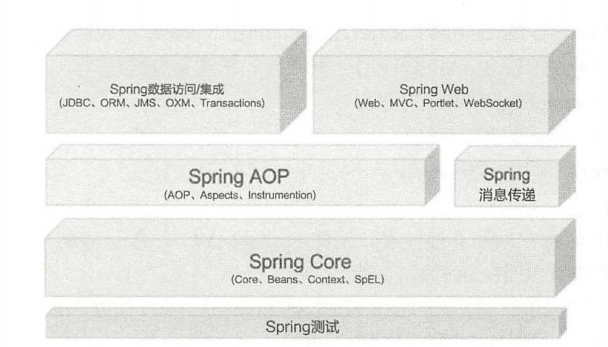
- Spring Core 核心容器模块
- spring-core包和spring-beans包提供框架的基础部分,包括IOC和DI功能,BeanFactory是一个复杂的工厂模式的实现,无需编程就能实现单例,并允许开发人员将配置和特定的依赖从实际程序逻辑中解耦
- Context包建立在core和beans模块的基础之上,context继承了Beans模块的特性,并且增加了对国际化的支持,事件广播,资源加载和创建上下文等等
- spirng-expression包提供了强大的表达式语言
- AOP模块
能够实现方法拦截器和切入点完全分离的代码。
- 事务
- 消息模块
- 数据访问
提供了数据访问,事务,对象关系映射等功能的集成
- web
即将要学习的Springmvc框架包含其中,两外还包括了spring5新增的支持响应式编程的Web开发框架
- 测试
组合Junit或TestNG来实现单元测试和集成测试等功能
两大核心:
DI:依赖注入(Dependency Injection),作用:去除组件之间的依赖关系,实现解耦合。
含义:所谓依赖注入,是指工程中需要的组件无须自己创建,而是依赖于外部环境注入。
AOP:面向切面编程(filter以及代理问题即通过这个实现)
几个注意点
①BeanFactory与ApplicationContext
BeanFactory
BeanFactory是spring的核心接口,提供了IOC的配置机制,作用是实例化、定位、配置应用程序中的对象及建立这些对象间的依赖。
使用的代码特点:
链接:https://blog.csdn.net/_/article/details/
使用BeanFactory或者是其接口的特点即可
public interface BeanFactory {
    / * factoryBean的前缀 */ String FACTORY_BEAN_PREFIX = "&"; /* * 四个不同形式的getBean方法 */ Object getBean(String name) throws BeansException; <T> T getBean(String name, Class<T> requiredType) throws BeansException; <T> T getBean(Class<T> requiredType) throws BeansException; Object getBean(String name, Object... args) throws BeansException; // 是否存在某个bean boolean containsBean(String name); // 是否为单实例,bean的作用域为Singleton boolean isSingleton(String name) throws NoSuchBeanDefinitionException; // 是否为原型(多实例),bean的作用域为Prototype boolean isPrototype(String name) throws NoSuchBeanDefinitionException; // 名称、类型是否匹配 boolean isTypeMatch(String name, Class<?> targetType) throws NoSuchBeanDefinitionException; // 通过Bean的名字获取该bean的类型 Class<?> getType(String name) throws NoSuchBeanDefinitionException; // 根据实例的名字获取实例的别名 String[] getAliases(String name); }
ApplicationContext
②IOC与DI
IOC:
概念:控制反转(Inversion of Control):它是一种控制权的转移。即组件与组件之间的依赖由主动变为被动。也就是说:应用程序本身不再负责组件的创建、维护等,而是将控制权移交出去。从这一点来说,几乎所有的框架都是IOC框架。
DI:(和IOC的关系是IOC思想的具体实现方法)
依赖注入(Dependency Injection):依赖其他容器(比如spring)来创建和维护所需要的组件,并将其注入到应用程序中。
DI(依赖注入)
注解方式配置
讯享网<!--开启注解扫描,设置需要扫描的包 --> <context:component-scan base-package="com.neusoft"/>
xml配置文件方式
依赖注入的几种方式
①set方法注入(即默认的方式就是set方法)
//1.)注入对象属性,这里的ref必须是利用bean标签设置好了的 <property name="set方法后的方法名" ref="被注入的对象id"></property> //2.)注入普通属性,这里的value可以是属性值也可以是类 //<property name="viewClass" value="org.springframework.web.servlet.view.JstlView"/> <property name="属性名" value="属性值"></property> //3.)注入list集合属性 <proerty name="属性名"> <list> <value>值1</value> <value>值2</value> <value>值3</value> </list> </proerty> //4.)注入map集合属性 <proerty name="属性名"> <map> <entry key="map集合的键" valueref="map集合的值"></entry> <entry key="map集合的键" valueref="map集合的值"></entry> <entry key="map集合的键" valueref="map集合的值"></entry> </map> </proerty> //5.)注入properties集合属性 <property name="属性名"> <props> <prop key="properties集合的键">值1</prop> <prop key="properties集合的键">值2</prop> <prop key="properties集合的键">值3</prop> </props> </property> SET拓展注入:P命名空间和C命名空间
P命令空间注入
C命名空间注入
②带参构造注入(构造器注入)
讯享网//1.)注入对象属性 <constructor name="属性名" ref="被注入对象id"></constructor> //2.)注入普通属性 <constructor name="属性名" value="属性值"></constructor> //3.)注入list集合属性 <constructor name="属性名"> <list> <value>值1</value> <value>值2</value> <value>值3</value> </list> </constructor> //4.)注入map集合属性 <constructor name="属性名"> <map> <entry key="map集合的键" valueref="map集合的值"></entry> <entry key="map集合的键" valueref="map集合的值"></entry> <entry key="map集合的键" valueref="map集合的值"></entry> </map> </constructor> //5.)注入properties集合属性 <constructor name="属性名"> <props> <prop key="properties集合的键">值1</prop> <prop key="properties集合的键">值2</prop> <prop key="properties集合的键">值3</prop> </props> </constructor>
详细代码
①pom.xml中配置依赖
<?xml version="1.0" encoding="UTF-8"?> <project xmlns="http://maven.apache.org/POM/4.0.0" xmlns:xsi="http://www.w3.org/2001/XMLSchema-instance" xsi:schemaLocation="http://maven.apache.org/POM/4.0.0 http://maven.apache.org/xsd/maven-4.0.0.xsd"> <modelVersion>4.0.0</modelVersion> <groupId>org.example</groupId> <artifactId>spring</artifactId> <version>1.0-SNAPSHOT</version> <build> <plugins> <!-- 设置jdk版本 --> <plugin> <groupId>org.apache.maven.plugins</groupId> <artifactId>maven-compiler-plugin</artifactId> <configuration> <source>1.8</source> <target>1.8</target> <encoding>utf-8</encoding> </configuration> </plugin> </plugins> </build> <properties> <!-- spring 版本号 --> <spring.version>5.2.8.RELEASE</spring.version> </properties> <dependencies> <!-- 此依赖会关联引用Spring中的所有基础jar包 --> <dependency> <groupId>org.springframework</groupId> <artifactId>spring-context</artifactId> <version>${
   spring.version}</version> </dependency> </dependencies> </project>
成功后是这种的
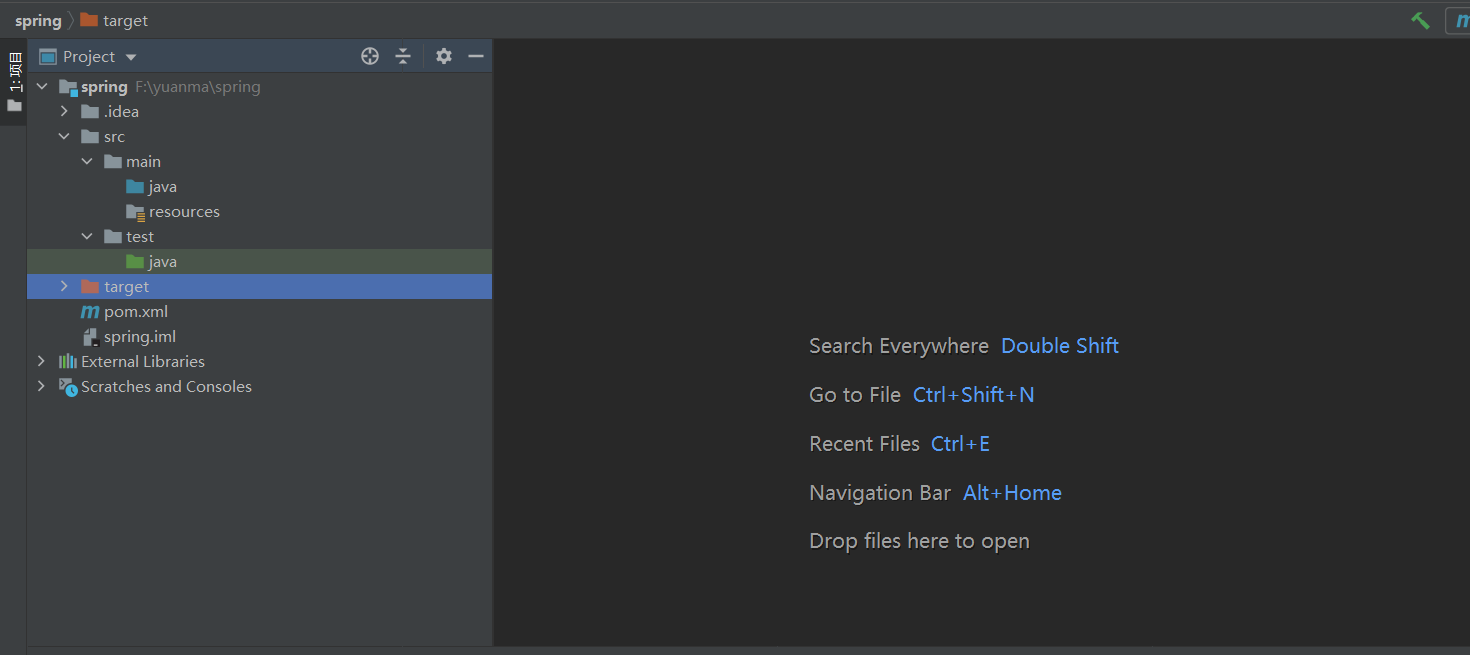
且配置资源时会下载相关的spring东西
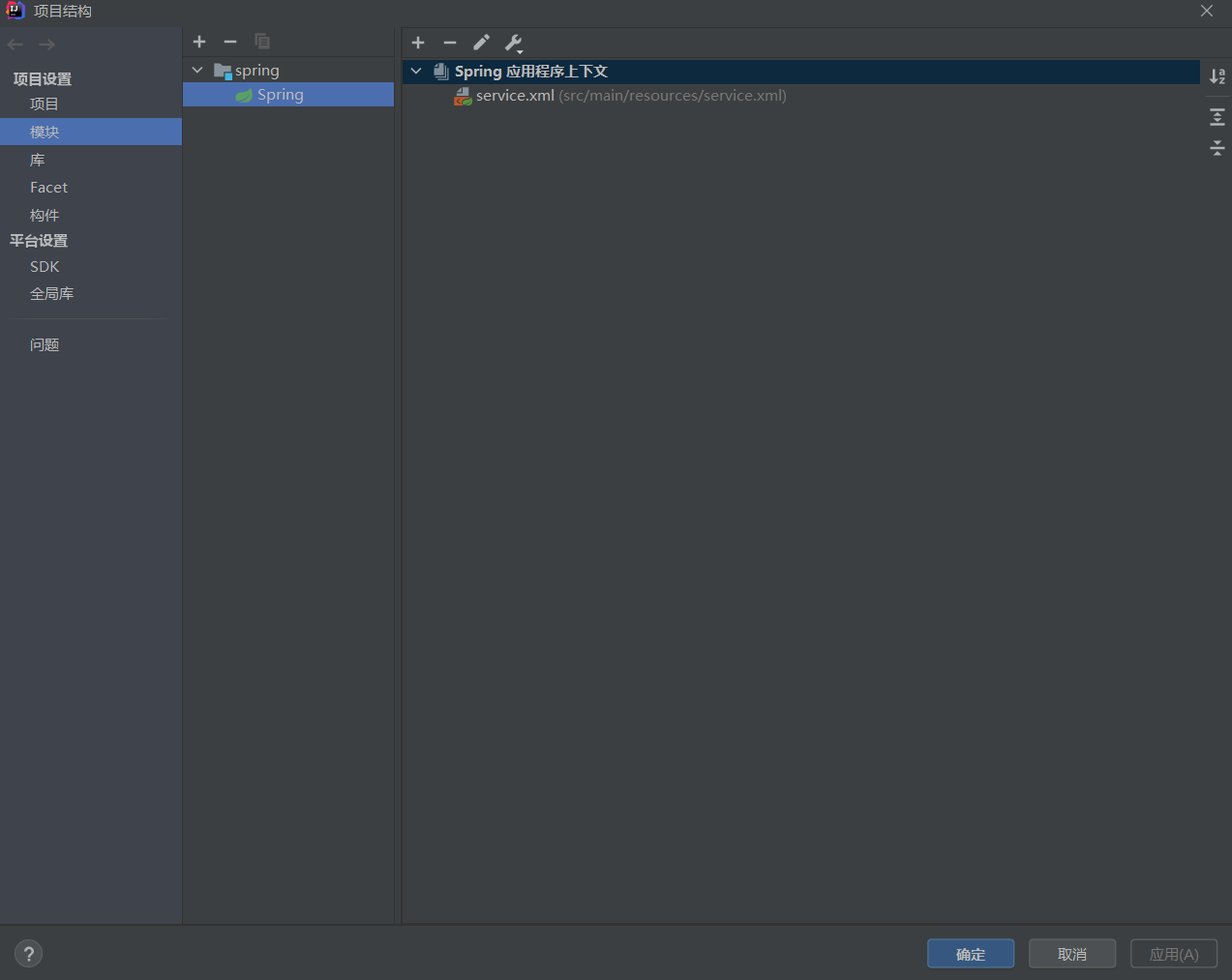
②配置service,dao,以及配置文件
目录结构
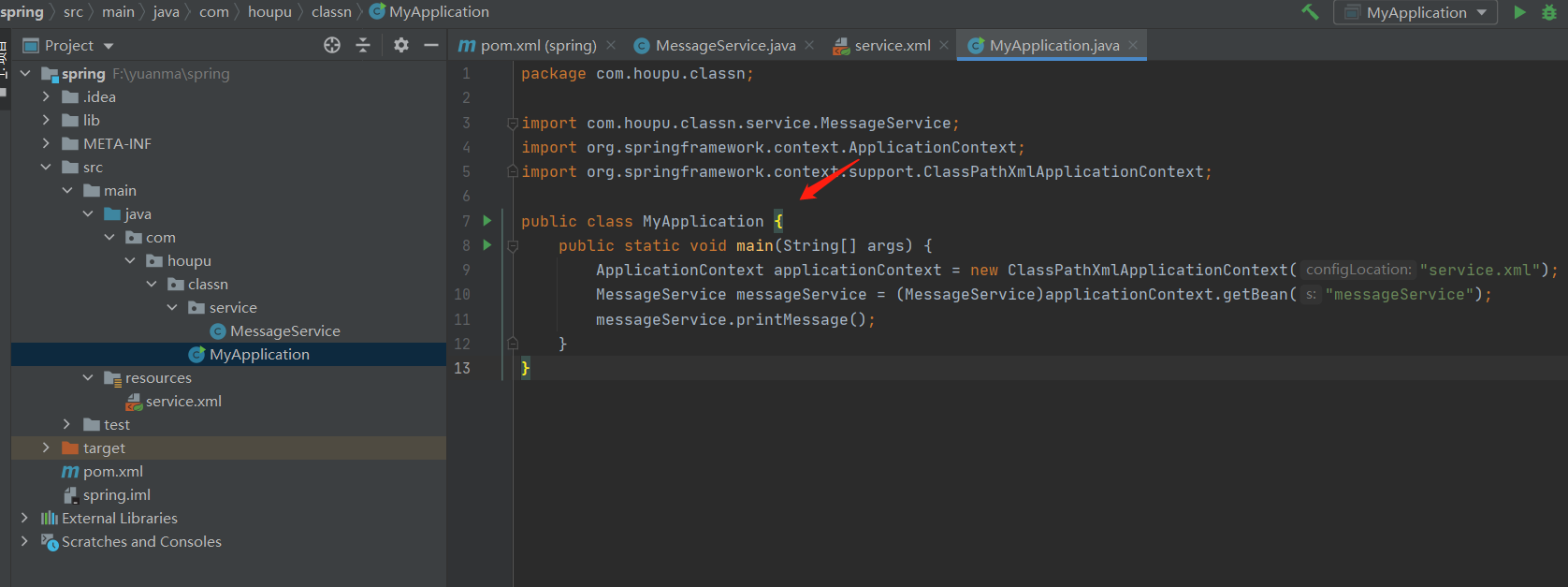
xml文件代码(即xml文件需要扔进resources中去配置)
讯享网//通过构造器实例化bean,id和name属性都指定Bean对象的名称,方便从Spring容器中查找相应的Bean class属性用于指定Bean类型,会自动调用无参构造创建对象 //意义就是给class换个名字然后方便spring从中取出值获取 <?xml version="1.0" encoding="UTF-8"?> <beans xmlns="http://www.springframework.org/schema/beans" xmlns:xsi="http://www.w3.org/2001/XMLSchema-instance" xsi:schemaLocation="http://www.springframework.org/schema/beans http://www.springframework.org/schema/beans/spring-beans.xsd"> <bean id="messageService" class="com.houpu.classn.service.MessageService"/> //这里的userDao是bean设置好了的 //<bean id="userDao" class="com.neusoft.dao.impl.UserDaoImpl"></bean> //<property name="userDao" ref="userDao"/>这里没使用这个,但是这个标签的意义将一个对象注入到一个属性中去,如这里的意义就是将userDao对象注入到userDao中去 </beans>
这里的一个点需要注意:
spring实例化bean的三种方式
①构造器进行实例化
上面的这种即是构造器实例化
②静态方式实例化
xml文件配置方法<bean id=“personService1” class=“cn.mytest.service.impl.PersonServiceFactory” factory-method=“createPersonServiceBean”>
这里的factory-method是实现实例化类的静态方法。
这里的类即如下
package cn.mytest.service.impl;
public class PersonServiceFactory { //创建静态方法
public static PersonServiceBean createPersonServiceBean(){
//返回实例化的类的对象
return new PersonServiceBean();
}
}
然后调用获取方法和上面的一样即可
③实例化工厂方法实例化
和上面的区别就是spring配置文件的区别
类和上面一样
但是xml文件中配置方式不同<bean id=“personServiceFactory” class=“cn.mytest.service.impl.PersonServiceFactory”>
<bean id=“personService2” factory-bean=“personServiceFactory” factory-method=“createPersonServiceBean1”>
第一个bean使用构造器方式实例化类,第二个bean调用第一个实例化的类
service代码
package com.houpu.classn.service; public class MessageService {
    public void printMessage(){
    System.out.println("HelloWrold!"); } }
class文件代码
讯享网package com.houpu.classn; import com.houpu.classn.service.MessageService; import org.springframework.context.ApplicationContext; import org.springframework.context.support.ClassPathXmlApplicationContext; public class MyApplication {
    public static void main(String[] args) {
    //通过ApplicationContext实现注册bean组件 ApplicationContext applicationContext = new ClassPathXmlApplicationContext("service.xml"); MessageService messageService = (MessageService)applicationContext.getBean("messageService"); messageService.printMessage(); } }
javaConfig方式
基础知识:
原理:
javaConfig是spring3.0后并入到spring中的,可以理解为一个用于完成bean装配的spring容器即spring配置文件。(只是该容器是用java实现的)
使用方法:
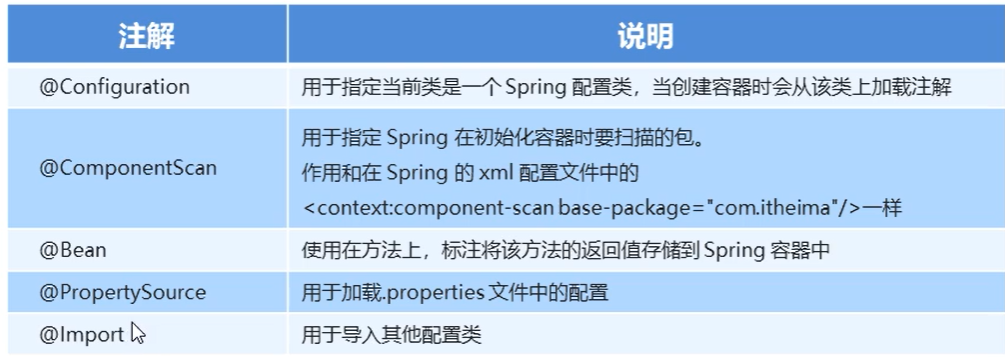
@Configuration和@Bean
@Configuration的作用跟@Component的功能含义差不多,即可以理解为一个类。
@Bean即和的原理差不多,每一个@Bean的方法都相当于提供了一个Bean的定义信息。
创建的具体代码
1.javaConfig创建代码
package com.neusoft; import org.springframework.beans.factory.annotation.Configurable; import org.springframework.context.annotation.Bean; import org.springframework.context.annotation.Configuration; import com.neusoft.dao.UserDao; import com.neusoft.dao.impl.UserDaoImpl; import com.neusoft.service.UserService; import com.neusoft.service.impl.UserServiceImpl; @Configuration public class AppConfig {
    @Bean public UserDao userDao() {
    return new UserDaoImpl(); } @Bean public UserService userService() {
    //这里不能声明接口类型 UserServiceImpl userService = new UserServiceImpl(); //配置依赖关系(需要set方法) userService.setUserDao(userDao()); return userService; } }
2.测试类
讯享网package com.houpu.classn; import com.houpu.classn.service.MessageService; import org.springframework.context.ApplicationContext; import org.springframework.context.support.ClassPathXmlApplicationContext; public class MyApplication {
    public static void main(String[] args) {
    ApplicationContext context = new ClassPathXmlApplicationContext("spring.xml"); UserService service = (UserService)context.getBean("userService"); User user = service.getUser(); System.out.println(user); } }
AOP
基础知识
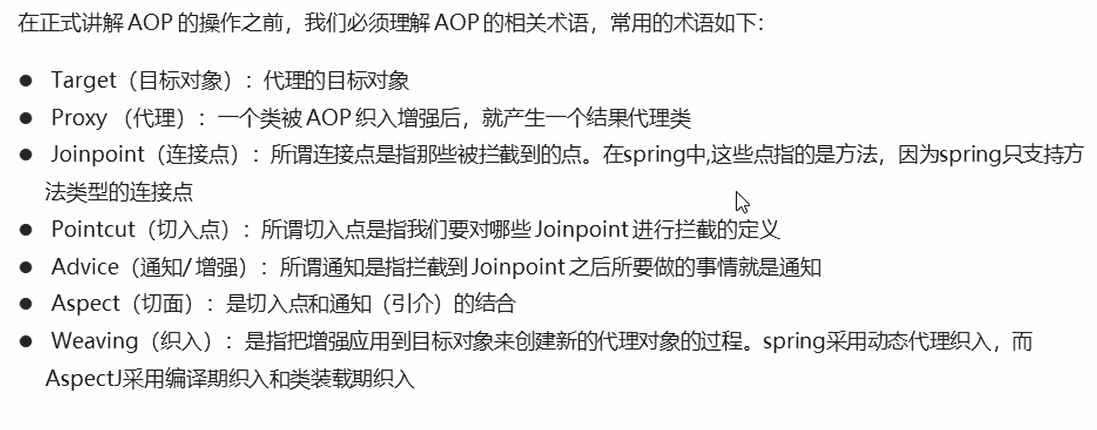
即必备内容为
1、目标对象——这里的目标是一个类,你想给日志类多一个update的功能,这个日志类就是目标对象 2、连接点——比如日志类有一个add方法,这个add方法就是连接点,你可以 1、通知——给类增强的逻辑, 前置通知——在方法之前执行 后置通知——方法之后执行 异常通知——方法出现异常执行 最终通知 环绕通知 ①动态代理和静态代理
②五种通知类型
意义:定义一个“切面”要实现的功能。
类型:
1.前置通知:在某连接点(JoinPoint 就是要织入的业务方法)之前执行的通知。
2.后置通知:当某连接点退出时执行的通知(不论是正常结束还是发生异常)
3.返回通知:(最终通知,可以理解为获取返回值时获取到的通知)在这里可以得到业务方法的返回值。但在发生异常时无法得到返回值。
4.环绕通知:包围一个连接点的通知,也就是在业务方法执行前和执行后执行的通知。
5.异常通知:在业务方法发生异常时执行的通知。
实现代码:
讯享网package com.neusoft.advice; import org.aspectj.lang.JoinPoint; import org.aspectj.lang.ProceedingJoinPoint; import org.aspectj.lang.annotation.After; import org.aspectj.lang.annotation.AfterReturning; import org.aspectj.lang.annotation.AfterThrowing; import org.aspectj.lang.annotation.Around; import org.aspectj.lang.annotation.Aspect; import org.aspectj.lang.annotation.Before; import org.aspectj.lang.annotation.Pointcut; import org.springframework.stereotype.Component; @Component @Aspect public class MyAdvice {
    //定义通用Aspect表达式,下面通知方法就可以引用此方法的规则了 @Pointcut("execution(* com.neusoft.service.impl.*.*(..))") private void anyMethod(){
   } @Before("anyMethod()") public void beforeMethod(JoinPoint joinpoint){
    System.out.println("【前置通知日志】" + joinpoint.toString()); } @After("anyMethod()") public void afterMethod(JoinPoint joinpoint){
    System.out.println("后置通知日志" + joinpoint.toString()); } @AfterReturning(pointcut="anyMethod()",returning="result") public void afterReturnning(JoinPoint joinpoint,Object result){
    System.out.println("返回通知日志" + joinpoint.toString()); } @AfterThrowing(pointcut="anyMethod()",throwing="ex") public void afterThrowing(JoinPoint joinpoint,Exception ex){
    System.out.println("异常通知日志" + joinpoint.toString()); } @Around("anyMethod()") public Object aroundMethod(ProceedingJoinPoint pjp) {
    Object obj = null; try{
    System.out.println("环绕通知日志" + pjp.toString()); obj = pjp.proceed(); }catch(Throwable e){
    e.printStackTrace(); } return obj; } }
③spring 动态代理两种实现方式:
自动化切换这两种代理的规则:
①如果目标对象实现了接口,采用jdk动态代理实现aop。 ②如果目标对象没有实现接口,采用CGLib动态代理实现aop。 ③如果目标对象实现了接口,但仍然想要使用CGLIB实现aop,可以手动进行配置。 ①jdk动态代理:
概念:根据目标类接口获取代理类实现规则,生成代理对象。这个代理对象,也是目标类接口的一个实现类。
讯享网public static void main(String[] args) {
    ApplicationContext context = new ClassPathXmlApplicationContext("spring.xml"); long begin = System.currentTimeMillis(); //使用接口 就是这里的区别 UserService service = (UserService)context.getBean("userService"); User user = service.getUser(); long end = System.currentTimeMillis(); System.out.println("执行时间:"+(end-begin)); }
②cglib动态代理:
概念:根据目标类本身获取代理类实现规则,生成代理对象。这个代理对象,也是目标类的一个子类。 (如果目标类为final,则不能使用CGLib实现动态代理)。
public static void main(String[] args) {
    ApplicationContext context = new ClassPathXmlApplicationContext("spring.xml"); long begin = System.currentTimeMillis(); //不使用接口 UserServiceImpl service = (UserServiceImpl)context.getBean("userService"); User user = service.getUser(); long end = System.currentTimeMillis(); System.out.println("执行时间:"+(end-begin)); }
③注意点:
1.)service和dao层注意事项
- dao层不能再实现接口。
- service层不能再实现接口。
④AOP实现具体代码
1.导入相关坐标,如下图所示,导入下图POM依赖
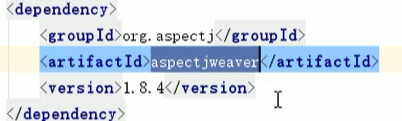
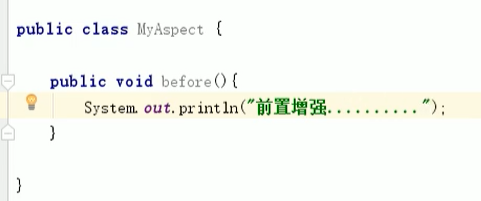
2.创建目标对象和切面对象,就是写两个普通的类,目标对象如下

切面对象
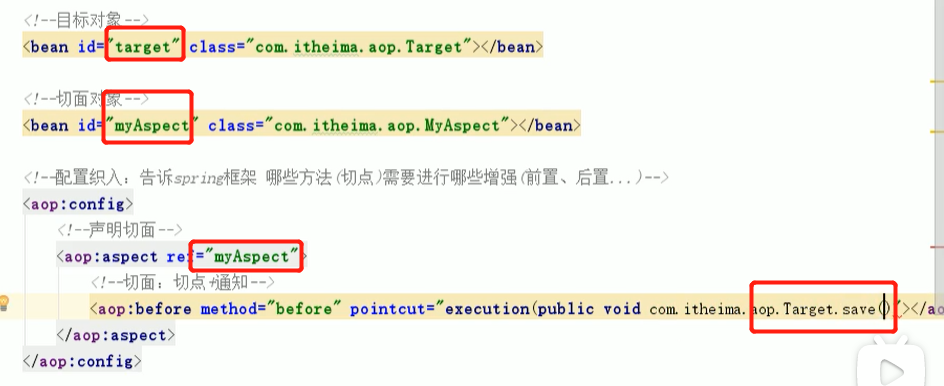
3.创建配置文件
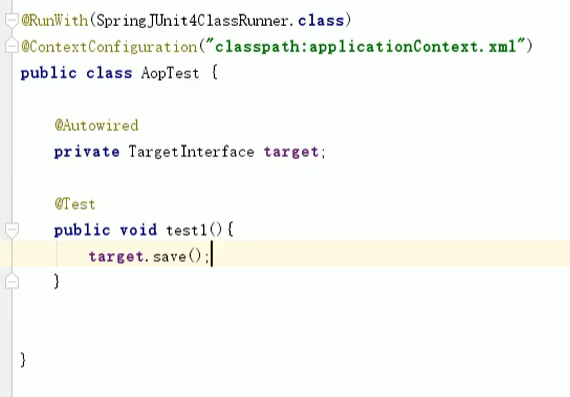
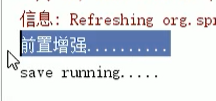
 4.编写测试类,调用save方法,此时运算结果就是我们在调用save时,同时调用了myAspect
5.输出结果
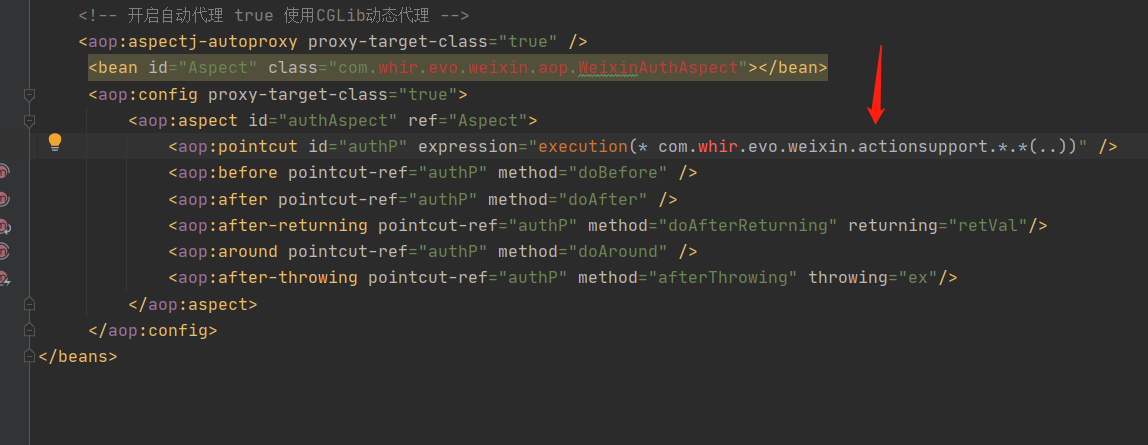
如这里审计中出现了这个的含义即是如果调用了
com.whir.evo.weixin.actionsupport..(…)就去执行com.whir.evo.weixin.aop.WeixinAuthAspect
小tips
①Spring配置文件很多,因此可以将xml分块使用Import引入配置xml
spring的文件中去配置
讯享网<?xml version="1.0" encoding="UTF-8"?> <beans xmlns="http://www.springframework.org/schema/beans" xmlns:xsi="http://www.w3.org/2001/XMLSchema-instance" xsi:schemaLocation="http://www.springframework.org/schema/beans http://www.springframework.org/schema/beans/spring-beans.xsd"> <bean name="service" class="service.userService2"> <property name="userBean2" ref="userBean2"></property> </bean> <import resource="applicationContext-xxx.xml"></import> </beans>
SpringMVC框架
基础知识:
1.执行原理以及spring配置基础:
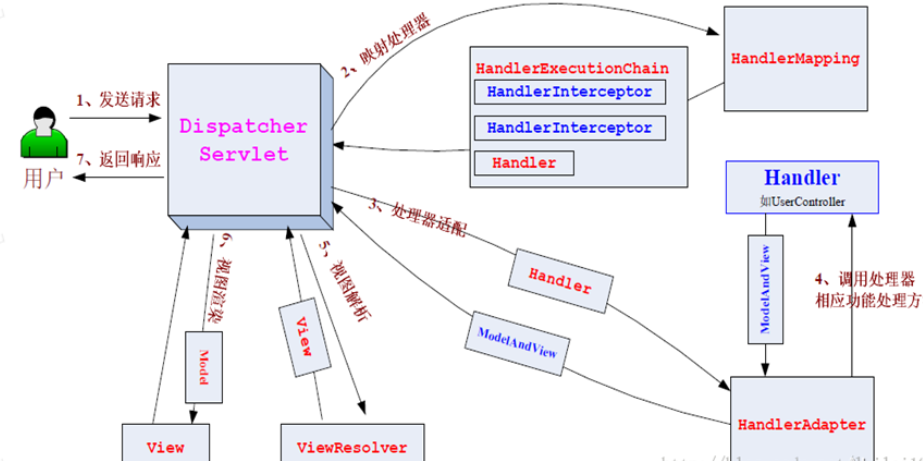
①springmvc的几个配置文件
spring-servlet.xml文件配置解析器以及扫描包实现注解功能 当然解析器规则也可以写到spring-mvc.xml中去,spring-dao.xml配置数据库来源这些
<?xml version="1.0" encoding="UTF-8"?> <beans xmlns="http://www.springframework.org/schema/beans" xmlns:xsi="http://www.w3.org/2001/XMLSchema-instance" xmlns:context="http://www.springframework.org/schema/context" xmlns:mvc="http://www.springframework.org/schema/mvc" xsi:schemaLocation="http://www.springframework.org/schema/beans http://www.springframework.org/schema/beans/spring-beans.xsd http://www.springframework.org/schema/context https://www.springframework.org/schema/context/spring-context.xsd http://www.springframework.org/schema/mvc https://www.springframework.org/schema/mvc/spring-mvc.xsd"> <!-- 自动扫描包,让指定包下的注解生效,由IOC容器统一管理 --> <context:component-scan base-package="com.shida.controller"/> <!-- 让Spring MVC不处理静态资源 --> <mvc:default-servlet-handler /> <!-- 支持mvc注解驱动 在spring中一般采用@RequestMapping注解来完成映射关系 要想使@RequestMapping注解生效 必须向上下文中注册DefaultAnnotationHandlerMapping 和一个AnnotationMethodHandlerAdapter实例 这两个实例分别在类级别和方法级别处理。 而annotation-driven配置帮助我们自动完成上述两个实例的注入。 --> <mvc:annotation-driven /> <!-- 自动扫描指定的包,下面所有注解类交给IOC容器管理 --> <context:component-scan base-package="com.shida.controller"/> <!-- 视图解析器 --> <bean class="org.springframework.web.servlet.view.InternalResourceViewResolver" id="internalResourceViewResolver"> <!-- 前缀 --> <property name="prefix" value="/WEB-INF/jsp/" /> <!-- 后缀 --> <property name="suffix" value=".jsp" /> </bean> </beans> 
②创建controller
- @Controller是为了让Spring IOC容器初始化时自动扫描到;
- @RequestMapping是为了映射请求路径,这里因为类与方法上都有映射所以访问时应该是/HelloController/hello;
- 方法中声明Model类型的参数是为了把Action中的数据带到视图中;
- 方法返回的结果是视图的名称hello,加上配置文件中的前后缀变成WEB-INF/jsp/hello.jsp。
讯享网package com.shida.controller; import org.springframework.stereotype.Controller; import org.springframework.ui.Model; import org.springframework.web.bind.annotation.RequestMapping; / * Description: * / @Controller @RequestMapping("/HelloController") public class HelloController {
    @RequestMapping("/hello") public String sayHello(Model model) {
    //向模型中添加属性msg与值,可以在JSP页面中取出并渲染 model.addAttribute("msg", "hello,SpringMVC"); //web-inf/jsp/hello.jsp return "hello"; } }
③配置解析
必要条件:起到能被扫描到的作用
//@Controller注解的类会自动添加到Spring上下文中 @Controller public class ControllerTest2{
    //映射访问路径 @RequestMapping("/t2") public String index(Model model){
    //Spring MVC会自动实例化一个Model对象用于向视图中传值 model.addAttribute("msg", "ControllerTest2"); //返回视图位置 return "hello"; } }
2.注解(相关的注解)
讯享网@Controller @RequestMapping("/user") public class HelloController {
    @ResponseBody @RequestMapping("/hello") public String hello() throws Exception {
    return "hello world"; } }
1.@ResponseBody
作用:将controller的方法返回的数据写入到response对象的body区,也就是直接将数据写入到输出流中,效果等同于使用 response.getWriter() 输出流对象向前端返回数据。
2.@RequestMapping(路由跳转)
可以设置的参数:
//value:用于指定请求的URL。 method:用于指定请求的方式。 @ResponseBody @RequestMapping(value="/hello",method=RequestMethod.POST) public String hello() throws Exception {
    return "hello world"; }
等同于的注解
@GetMapping是一个组合注解,是@RequestMapping(method = RequestMethod.GET)的缩写。
@PostMapping是一个组合注解,是@RequestMapping(method = RequestMethod.POST)的缩写。
3.@RequestParm参数
1、value——解决前后端开发不一致,如前端传参为name,后端参数为username
2、required——解决传参不规范报错问题
3、defaultValue——打开网页就进行默认传参

4.@RequestBody 注解参数
接受的参数是来自requestBody中,一般用于接受处理非 Content-Type: application/x-www-form-urlencoded编码格式的数据,比如:application/json、application/xml等类型的数据。
3.处理器方法的参数请求
①处理器方法参数(即方法里面的参数)
可以进行注入的数据有
- HttpServletRequest对象。
- HttpServletResponse对象。
- HttpSession对象。(注意:ServletContext不会注入。)
- 简单数据类型。作用:获取客户端提交的单值参数。
讯享网public String hello(String userName,String password) throws Exception {
   }
5.数组类型。作用:获取客户端的多值参数
public String hello(Integer[] aihao) throws Exception {
   }
6.对象类型。作用:获取客户端提交参数。
讯享网public String hello(User user) throws Exception {
   }
②使用@RequestParam匹配参数
作用:当处理器方法的参数与提交的参数不一样时,使用这种方式。
public String hello(@RequestParam("userName") String un, @RequestParam("password") String pw) throws Exception {
   }
③Ajax提交json数据(这种主要还是提交多个参数这块的)
前端
讯享网<button onclick="hello()">提交</button> <script src="https://unpkg.com/axios/dist/axios.js"></script> <script src="https://cdn.bootcss.com/qs/6.5.1/qs.min.js"></script> <script> let user = {
    userId:1, userName:'zhangsan', password:'123' }; function hello() {
    axios.post('http://localhost:8080/smvc/user/hello',Qs.stringify(user)) .then(response=>{
    console.log(response.data); }).catch(error=>{
    console.log(error); }); /* axios.get('http://localhost:8080/smvc/user/hello',{params:user}) .then(response=>{ console.log(response.data); }).catch(error=>{ console.log(error); }); */ } </script>
后端:
//返回值设置为对象或者集合 @ResponseBody @RequestMapping("/hello") public User hello(User user) throws Exception {
    System.out.println(user); return user; } /* @ResponseBody @RequestMapping("/hello") public List<User> hello(User user) throws Exception { List<User> list = new ArrayList<>(); list.add(user); list.add(user); list.add(user); return list; } */
4.数据显示
区别:
讯享网Model 只有寥寥几个方法只适合用于储存数据,简化了新手对于Model对象的操作和理解; ModelMap 继承了 LinkedMap ,除了实现了自身的一些方法,同样的继承 LinkedMap 的方法和特性; ModelAndView 可以在储存数据的同时,可以进行设置返回的逻辑视图,进行控制展示层的跳转。
①通过modelandview
 @RequestMapping("/modelAndView") public ModelAndView handleRequest(HttpServletRequest httpServletRequest, HttpServletResponse httpServletResponse) throws Exception {
    //返回一个模型视图对象 ModelAndView mv = new ModelAndView(); mv.addObject("msg","ControllerTest1"); mv.setViewName("hello"); return mv; }
②通过modelmap
讯享网 @RequestMapping("/modelMap") public String hello(@RequestParam("username") String name, ModelMap model){
    //封装要显示到视图中的数据 //相当于req.setAttribute("name",name); model.addAttribute("msg",name); System.out.println(name); return "hello"; }
③通过Model
 @RequestMapping("/model") public String hello(@RequestParam("username") String name, Model model){
    //封装要显示到视图中的数据 //相当于req.setAttribute("name",name); model.addAttribute("msg",name); System.out.println(name); return "hello"; }
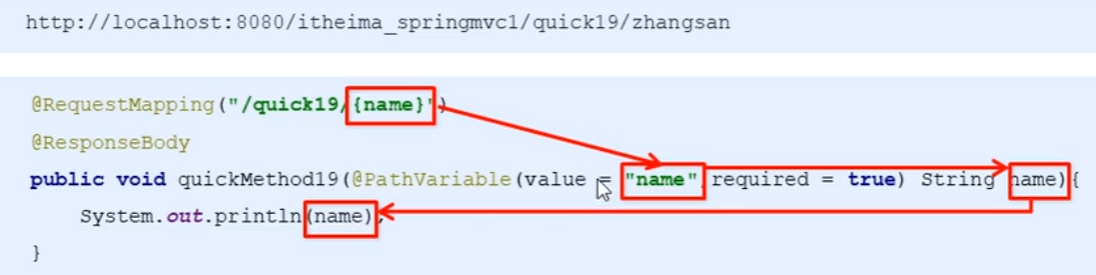
④restful(使用PathVariable结合name进行)
概念:如果一个互联网软件架构符合REST原则,就称它为RESTful架构。
使用格式:
1.映射器配置(必须为 “/” ,不能是 .do 或 .action 等后缀)
讯享网<servlet-mapping> <servlet-name>springmvc</servlet-name> <url-pattern>/</url-pattern> </servlet-mapping>
2.客户端提交方式
http://localhost:8080/quick19/libai 3.处理器接受参数方式
使用@PathVariable+ /user/{id}进行占位符的匹配
⑤回写数据
直接返回字符串
1、response.getWrite().Print(“xxxxxxxxxxxxxxxxxxx”)
2、或者使用@ResponseBody+return “xxxx”
返回对象或集合
5.Spring MVC的一些tips
①获取请求头(获取请求头的相关值)
在spring MVC里使用@requestHeader 类似request.getHeader(name),如下图可获得agent的值
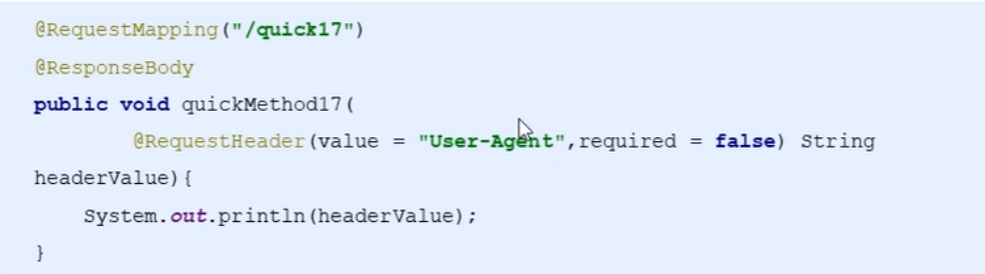
@CookieValue 可以获得指定的Cookie得值

②静态资源放行(解决找不到资源的问题)
讯享网<mvc:default-servlet-handler>——找不到的默认使用tomcat来找资源 或者 <mvc:resources mapping="/css/" location="/css/"/> <mvc:resources mapping="/img/" location="/img/"/>
③文件上传
1、文件上传统用的类为commons-fileupload,在pom.xml写入
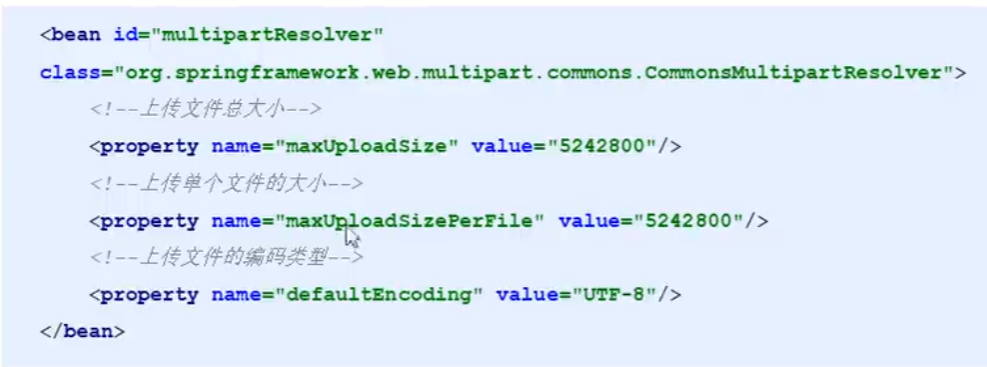
2、配置文件上传解析器(spring里通用)
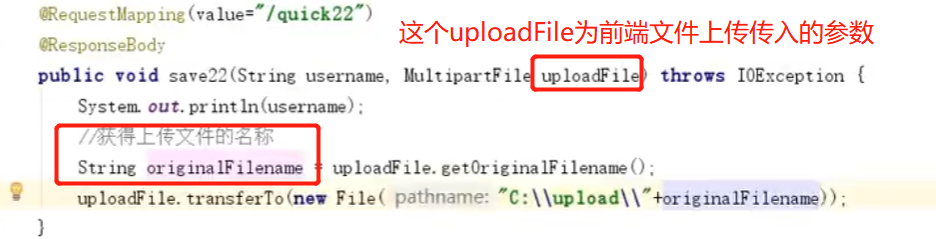
3、写文件上传代码(MyltipartFile后的内容即是上传传入的参数)
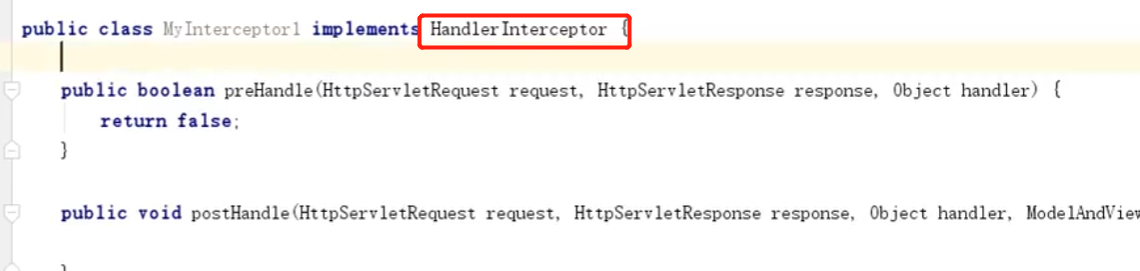
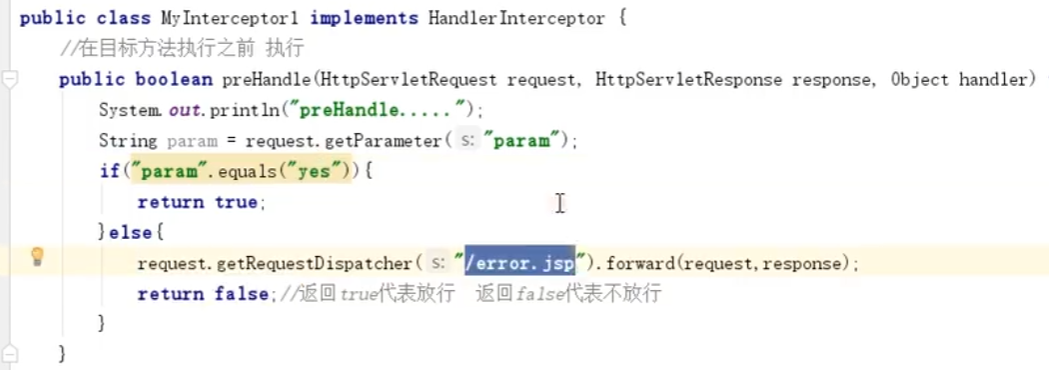
④Spring MVC拦截器配置(即集成handlerIntercepter,跟filter拦截器的拦截的差不多)
配置spring-mvc.xml,告诉spring我的拦截器在哪里,要匹配啥资源
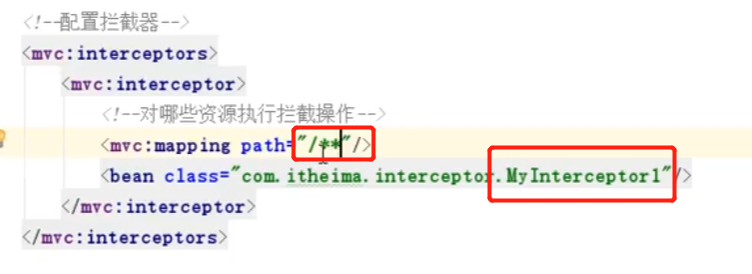
如下图所示,传入参数param=yes即可访问资源,在实际情况中,可以将其进行SESSION的匹配
Struts2框架
基础知识:
①目录结构与基础JAR包
目录结构
| 名称 | 作用 |
|---|---|
| apps | 用于存放官方提供的 Struts2 示例程序,这些程序可以作为学习者的参考资料。各示例均为 war 文件,可以通过 zip 方式进行解压。 |
| docs | 用于存放官方提供的 Struts2 文档,包括 Struts2 的快速入门、Struts2 的文档,以及 API 文档等内容。 |
| lib | 用于存放 Struts2 的核心类库,以及 Struts2 的第三方插件类库。 |
| src | 用于存放该版本 Struts2 框架对应的源代码。 |
依赖的JAR包
| 文件名 | 说 明 |
|---|---|
| asm-3.3.jar | 操作 Java字节码的类库 |
| asm-commons-3.3.jar | 提供了基于事件的表现形式 |
| asm-tree-3.3.jar | 提供了基于对象的表现形式 |
| struts2-core-2.3.37.jar | Struts2 框架的核心类库 |
| xwork-core-2.3.37.jar | Web Work 核心库,Struts2 的构建基础 |
| ognl-3.0.6.jar | 对象图导航语言(Object Graph Navigation Language),Struts2 框架通过其读/写对象的属性 |
| freemarker-2.3.22.jar | Struts2 标签模板使用的类库 |
| javassist-3.11.0.GA.jar | JavaScript 字节码解释器 |
| commons-fileupload-1.4.jar | Struts2 文件上传组件依赖包 |
| commons-io-2.2.jar | Struts2 的输入/输出,传文件依赖的 JAR |
| commons-lang-2.4.jar | 包含一些数据类型工具,是对 java.lang 包的增强 |
| log4j-api-2.2.jar | Struts2 的日志管理组件依赖包的 API |
| log4j-core-2.2.jar | Struts2 的日志管理组件依赖包 |
②struts2基础配置与执行流程
基础xml文件配置
<?xml version="1.0" encoding="UTF-8"?> <web-app xmlns:xsi="http://www.w3.org/2001/XMLSchema-instance" xmlns="http://java.sun.com/xml/ns/javaee" xmlns:web="http://java.sun.com/xml/ns/javaee/web-app_2_5.xsd" xsi:schemaLocation="http://java.sun.com/xml/ns/javaee http://java.sun.com/xml/ns/javaee/web-app_3_0.xsd" id="WebApp_ID" version="3.0"> <!-- 配置Struts2核心过滤器 --> <filter> <filter-name>struts2</filter-name> <filter-class>org.apache.struts2.dispatcher.ng.filter.StrutsPrepareAndExecuteFilter</filter-class> </filter> <filter-mapping> <filter-name>struts2</filter-name> <url-pattern>/*</url-pattern> </filter-mapping> </web-app>
- 元素是文件的根元素,所有其他元素都放在 中。
- 元素用于进行常量配置。
- 元素用于进行包配置,在 Struts2 框架中,包用于组织 Action 和拦截器等信息,每个包都是由零个或多个拦截器以及 Action 所组成的集合。
- 元素用于在一个 struts.xml 配置文件中包含其他的配置文件。
讯享网<?xml version="1.0" encoding="UTF-8" ?> <!DOCTYPE struts PUBLIC "-//Apache Software Foundation//DTD Struts Configuration 2.3//EN" "http://struts.apache.org/dtds/struts-2.3.dtd"> <struts> //<!--<constant>元素用常量的配置--> <constant name="struts.enable.DynamicMethodInvocation" value="false" /> <constant name="struts.devMode" value="true" /> //<!--<package>元素用于包配置-->作用就是多个action或者是多个拦截器的集合引用 <package name="default" namespace="/" extends="struts-default"> //<!--配置Action--> <action name="index" class="Xxx"/> //<!--配置Result--> <result type="dispatcher"> <param name="location">/index.jsp</param> </result> </action> </package> //<!-- <include>元素用于包含配置,即当xml文件过大时的切割操作的作用 --> <include file="example.xml"/> </struts>
常量配置(常见的三种方式)
- 1.在 struts.xml 文件中使用 元素配置常量(常用方式)。
- 2.在 struts.properties 文件中配置常量。
- 3.在 web.xml 文件中通过 元素配置常量。
通过配置的特点
<struts> <!--设置默认编码集为UTF-8--> <constant name="struts.il8n.encoding" value="UTF-8" /> <!--设置使用开发模式--> <constant name="struts.devMode" value="true" /> </struts> 配置常类文件的顺序
讯享网1)default.properties:该文件保存在 struts2-core-2.3.37.jar 中的 org.apache.struts2 包中。 2)struts-default.xml:该文件保存在 struts2-core-2.3.37.jar 文件中。 3)struts-plugin.xml:该文件保存在 struts-Xxx-2.3.37.jar 等 Struts2 插件 JAR 包中。 4)struts.xml:该文件是 Web 应用自身的 Struts2 配置文件。 5)struts.properties:该文件是 Web 应用默认的 Struts2 配置文件。 6)web.xml:该文件是 Web 应用的配置文件。
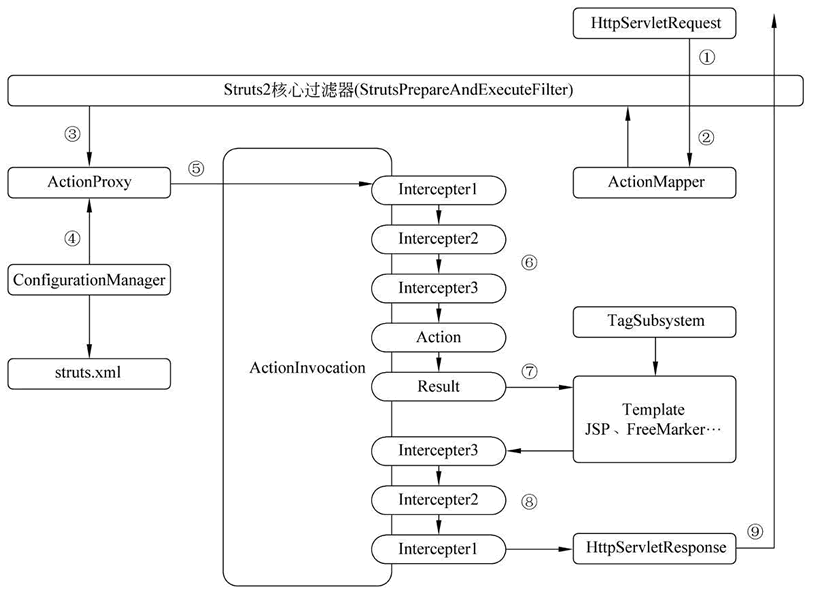
struts2执行流程
③Action实现与配置
Action实现
1.自写实现Action接口
public interface Action {
    //定义Action接口中包含的一些结果字符串 public static final String SUCCESS="success"; public static final String NONE="none"; public static final String ERROR="error"; public static final String INPUT="input"; public static final String LOGIN="login"; //定义处理用户请求的execute()方法 public String execute() throws Exception; }
2.继承ActionSupport类(一般都是这种方式)
讯享网public class LoginAction extends ActionSupport{
    private static final long serialVersionUID = 1L; @Override public String execute() throws Exception{
    return super.execute(); } }
配置Action与通配符
配置Action
struts.xml
<action name="userAction" class="com.mengma.action.UserAction" method="add"></action> action的三个常用属性 name和class和其他的差不多 这里就是method指定Action的调用方法,如果指定了method,即默认会调用action中method的方法 否则则调用execute()方法。
通配符
特点:method 属性值中的数字 1 表示匹配第 1 个 *。
当客户端发送 /user/userAction_login.action 这样的请求时, 元素的 name 属性值就被设置成 userAction_login,method 属性值就被设置成 login。
当客户端发送 /user/userAction_register.action 这样的请求时, 元素的 name 属性值就被设置为 userAction_register,method 属性值也被设置成 register。
讯享网<package name="user" namespace="/user" extends="struts-default"> <action name="userAction_*" class="com.mengma.action.UserAction" method="{1}"> <result>/index.jsp</result>//这里也可以用通配符来配置<result>/(1).jsp</result> </action> </package>
通过Action访问Servlet API的两种方式
通过 ActionContext 访问
典型的几个方法
| 方法声明 | 功能描述 |
|---|---|
| void put(String key, Object value) | 将 key-value 键值对放入 ActionContext 中,模拟 Servlet API 中的 HttpServletRequest 的 setAttribute() 方法 |
| Object get(String key) | 通过参数 key 查找当前 ActionContext 中的值 |
| Map<String, Object> get Application() | 返回一个 Application 级的 Map 对象 |
| static ActionContext getContext() | 获取当前线程的 ActionContext 对象 |
| Map<String, Object> getParameters() | 返回一个包含所有 HttpServletRequest 参数信息的 Map 对象 |
| Map<String, Object> getSession() | 返回一个 Map 类型的 HttpSession 对象 |
具体代码
ActionContext context = ActionContext.getContext(); context.put("name","mengma");//这里的含义即是输出相关内容到页面上的含义 context.getApplication().put("name","mengma"); context.getSession().put("name","mengma"); 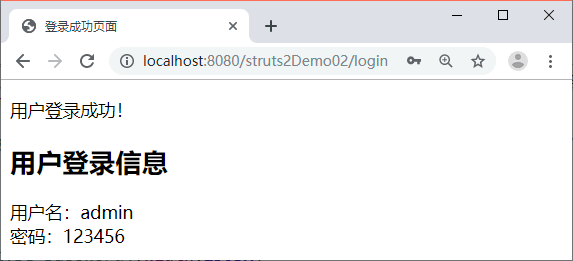
通过 ServletActionContext 访问
涉及方法
| 方法声明 | 功能描述 |
|---|---|
| static PageContext getPageContext() | 获取 Web 应用的 PageContext 对象 |
| static HttpServletRequest getRequest() | 获取 Web 应用的 HttpServletRequest 对象 |
| static HttpServletResponse getResponse() | 获取 Web 应用的 HttpServletResponse 对象 |
| static ServletContext getServletContext() | 获取 Web 应用的 ServletContext 对象 |
相关代码使用
讯享网在 WebContent 目录下创建一个名称为 message.jsp 的页面,通过 EL 表达式访问存放在 Request 对象中键值为 message 的值,其页面主体部分代码如下所示: <div align="center">${
   requestScope.message }</div>
④参数与结果配置
参数配置
①利用get,set方式获取参数(此时name和massage可为外部传参),get/post均可
<form action="login" method="post" name="form1"> 用户名:<s:textfield name="username"/><br/> 密 码:<s:password name="password"/><br/> <s:submit value="提交"/> </form> 讯享网public class TestAction extends ActionSupport{
private String username; private String password; public String getUsername() {
return username; } public void setUsername(String username) {
this.username = username; } public String getPassword() {
return password; } public void setPassword(String password) {
this.password = password; } }
测试用例:testAction? name=admin

②利用DomainModel
jsp
<form action="login" method="post" name="form1"> 用户名:<s:textfield name="users.username"/><br/> 密 码:<s:password name="users.password"/><br/> <s:submit value="提交"/> </form> 测试案例:testAction? resBananRc.name=admin
Action
讯享网public class TestAction extends ActionSupport{
    //错误的写法,不能自己实例化,struts会自动实例化 private Users users = new Users(); private Users users; public Users getUsers(){
    return users; } public void setUsers(Users users){
    this.users=users; }
entity:
public class Users{
    private String username; private String password; public String getUsername() {
    return username; } public void setUsername(String username) {
    this.username = username; } public String getPassword() {
    return password; } public void setPassword(String password) {
    this.password = password; } }
DTO–数据传输对象
意义:接收参数和传递参数,并不是项目中的实体类。
DTO:
讯享网public class UserDTO {
    private String name; private String password; private String confirm; public String getName() {
    return name; } public void setName(String name) {
    this.name = name; } public String getPassword() {
    return password; } public void setPassword(String password) {
    this.password = password; } public String getConfirm() {
    return confirm; } public void setConfirm(String confirm) {
    this.confirm = confirm; } }
Action:
public class TestAction extends ActionSupport{
    private static final long serialVersionUID = -00L; private UserDTO userDTO; public UserDTO getUserDTO() {
    return userDTO; } public void setUserDTO(UserDTO userDTO) {
    this.userDTO = userDTO; } public void execeute() {
    System.out.println("姓名: " + userDTO.getName()); } }
使用ModelDriven的接口进行参数获取
jsp
讯享网<form action="login" method="post" name="form1"> 用户名:<s:textfield name="username"/><br/> 密 码:<s:password name="password"/><br/> <s:submit value="提交"/> </form>
testAction? name=admin
JAVA Action
public class sysAction extends ActionSupport implements ModelDriven<User>{
    private User user = new User(); //手动实例化 public User getModel() {
    return user; //返回实例 } }
Request对象方式进行获取
使用request. getParameter(“”)方法
讯享网public class TestAction extends ActionSupport{
    private static final long serialVersionUID = -00L; public void execeute() {
    String name = super.getRequest().getParameter("paraName"); System.out.println("姓名:" + name); } }
结果类型
结果类型配置:
struts.xml文件中配置
标签进行配置,且result存在两个参数值第一个是name(用于指定逻辑视图的名称),第二个是type(指定返回资源的类型)
里面内置的 子元素含义
- location:指定该逻辑视图所对应的实际视图资源。
- parse:指定在逻辑视图资源名称中是否可以使用 OGNL(对象图导航语言)表达式。默认值为 true,表示可以使用,如果设为 false,则表示不支持。
<action name="loginAction" class="com.mengma.action.LoginAction"> <result name="success" type="dispatcher"> <param name="location">/success.jsp</param> </result> </action> Result 配置中指定实际资源位置时,可以使用绝对路径,也可以使用相对路径。
预定义的结果类型配置含义
讯享网<result-types> <result-type name="chain" class="com.opensymphony.xwork2.ActionChainResult"/> <result-type name="dispatcher" class="org.apache.struts2.dispatcher.ServletDispatcherResult" default="true"/> <result-type name="freemarker" class="org.apache.struts2.views.freemarker.FreemarkerResult"/> <result-type name="httpheader" class="org.apache.struts2.dispatcher.HttpHeaderResult"/> <result-type name="redirect" class="org.apache.struts2.dispatcher.ServletRedirectResult"/> <result-type name="redirectAction" class="org.apache.struts2.dispatcher.ServletActionRedirectResult"/> <result-type name="stream" class="org.apache.struts2.dispatcher.StreamResult"/> <result-type name="velocity" class="org.apache.struts2.dispatcher.VelocityResult"/> <result-type name="xslt" class="org.apache.struts2.views.xslt.XSLTResult"/> <result-type name="plainText" class="org.apache.struts2.dispatcher.PlainTextResult" /> <result-type name="postback" class="org.apache.struts2.dispatcher.PostbackResult" /> </result-types>
对应情况关系
| 属 性 | 说 明 |
|---|---|
| chain | 用于处理 Action 链,被跳转的 Action 中仍能获取上个页面的值,如 request 信息 |
| dispatcher | 用于转向页面,通常处理 JSP,是默认的结果类型 |
| freemarker | 用于整合 FreeMarker 模板结果类型 |
| httpheader | 用于处理特殊的 HTTP 行为结果类型 |
| redirect | 重定向到一个 URL,被跳转的页面中丢失传递的信息 |
| redirectAction | 重定向到一个 Action,跳转的页面中丢失传递的信息 |
| stream | 向浏览器发送 InputStream 对象,通常用于处理文件下载,还可用于 Ajax 数据 |
| velocity | 用于整合 Velocity 模板结果类型 |
| xslt | 用于整合 XML/XSLT 结果类型 |
| plainText | 显示原始文件内容,如文件源代码 |
| postback | 使当前请求参数以表单形式提交 |
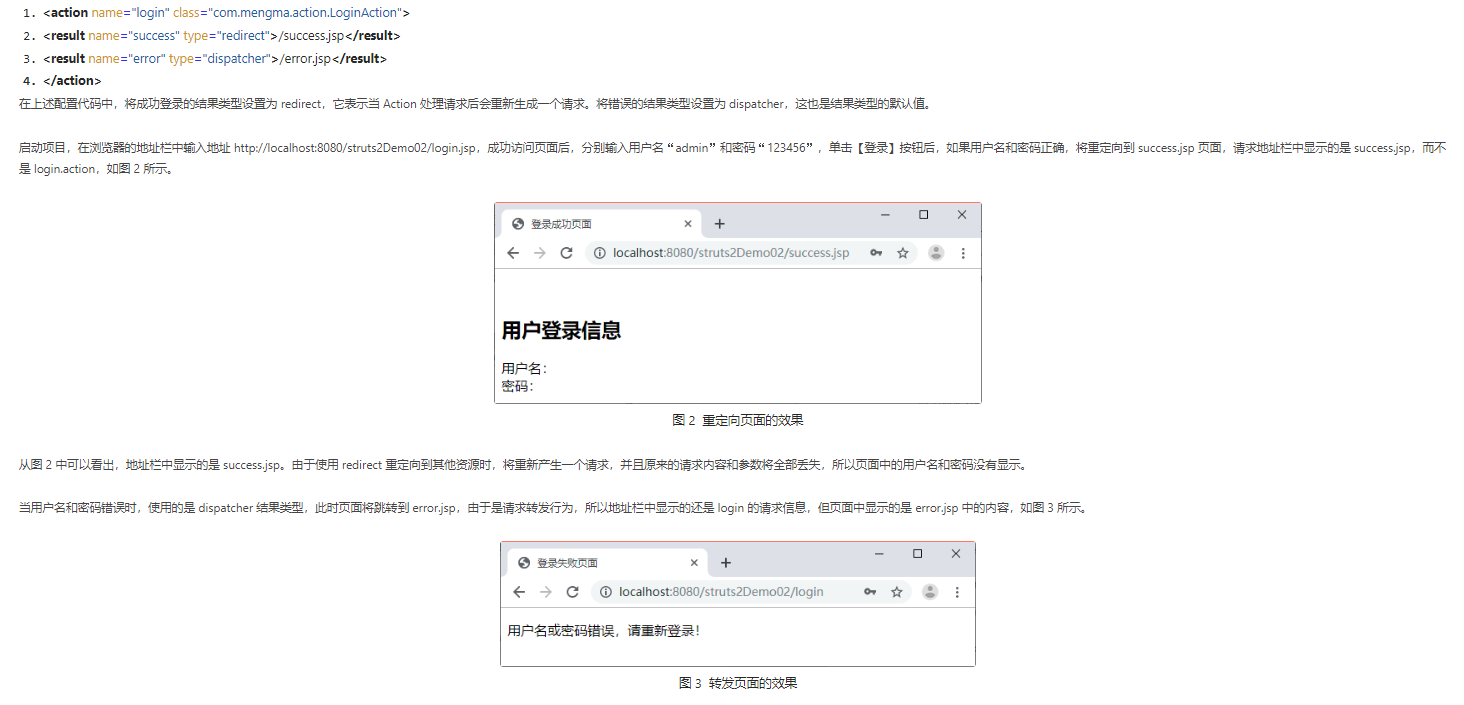
Dispatcher结果类型(不改变地址栏的转发方式)
概念:dispatcher 是 Struts2 的默认结果类型,它用于表示转发到指定结果资源。
<result name="success">/1.jsp</result> 默认为dispatcher转发,地址栏不会变 redirect
讯享网 <result name="success" type="redirect">/1.jsp</result> 重定向,302,地址栏变化,当前请求的参数和数模默认在下个页面不能使用
redirctAction
<result name="success" type="redirctAction">/1.action/do</result> 和redirect类似 不过redirectAction是重定向到另外的Action类里 Dispatcher和redict的区别如下
chain
讯享网 <result name="success" type="chain">/hello</result> 和redirctAction一样都是请求到另外的Action类里 和dispatcher一样的都是进行转发,而不是重定向 chain类型不用写后缀名,默认可携带参数进行传递
动态调用页面/转发
1.通过调用某个写好的类来进行转发,如page类 http://127.0.0.1/page=login 此时服务器直接转发login.jsp
<default-action-ref name="default"></default-action-ref> (写在struts.xml前面点的为止) <action name="default" class="com.xxx"> <result name="success">${
   page}.jsp</result> </action>
2.利用通配符的方式
讯享网<action name="chapter_*" class="chapter4.action.ChapterAction" method="{1}"> <result name="success">/WEB-INF/JspPage/chapter/chapter_{
   1}.jsp</result> </action>
3.另外一种动态方式
<constant name="struts.enable.DynamicMethodInvocation" value="true" /> 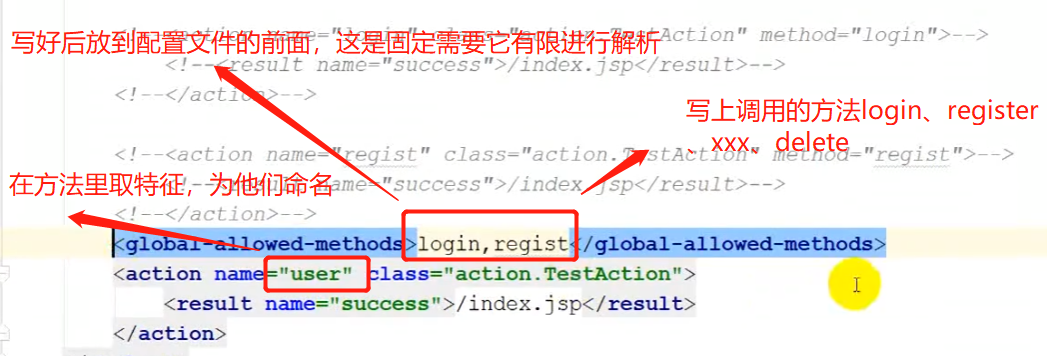
调用方法:
http://127.0.0.1/user/user!register.do
http://127.0.0.1/user/user!login.do
4.默认调用方式(输入不存在的方法时,重定向到error.jsp页面)
讯享网<default-action-ref name="default"></default-action-ref> (写在struts.xml前面点的为止) <action name="default" class="com.xxxx"> <result name="success">/error/xxxx/error.jsp</result> </action>
拦截器
配置与使用
配置方法
元素的 name 属性用于指定拦截器的名称,class 属性用于指定拦截器的实现类。有时,在定义拦截器时需要传入参数,这时需要使用 标签,其中 name 属性用于指定参数的名称,paramValue 表示参数的值
struts.xml文件配置
配置拦截器的东西+配置拦截栈+配置默认拦截器
<package name="default" namespace="/" extends="struts-default"> <!--声明拦截器--> <interceptors> <interceptor name="interceptor1" class="interceptorClass"/> <interceptor name="interceptor2" class="interceptorClass"/> <!--定义一个拦截器栈myStack,该拦截器栈中包含两个拦截器和一个拦截器栈--> <interceptor-stack name="myStack"> <interceptor-ref name="defaultStack"/> <interceptor-ref name="interceptor1"/> <interceptor-ref name="interceptor2"/> </interceptor-stack> </interceptors> <!--配置包下的默认拦截器,既可以是拦截器,也可以是拦截器栈--> <default-interceptor-ref name="myStack"/> <action name="login" class="com.mengma.action.LoginAction"> <result name="input">/login.jsp</result> </action> </package> 内置拦截器
| 名 称 | 说 明 |
|---|---|
| alias | 在不同请求之间将请求参数在不同名称间转换,请求内容不变 |
| autowiring | 用于实现 Action 的自动装配 |
| chain | 让前一个 Action 的属性可以被后一个 Action 访问,现在和 chain 类型的 result() 结合使用 |
| conversionError | 将错误从 ActionContext 中添加到 Action 的属性字段中 |
| cookies | 使用配置的 Name 和 Value 指定 Cookies |
| cookieProvider | 该类是一个 Cookie 工具,方便开发者向客户端写 Cookie |
| clearSession | 用于清除一个 HttpSession 实例 |
| createSession | 自动创建 HttpSession,用于为需要使用 HttpSession 的拦截器服务 |
| debugging | 提供不同的调试用的页面展现内部的数据状况 |
| execAndWait | 在后台执行 Action,同时将用户带到一个中间的等待页面 |
| exception | 将异常定位到一个画面 |
| fileUpload | 提供文件上传功能 |
| il8n | 记录用户选择的 locale |
| logger | 输出 Action 的名称 |
| model-driven | 如果一个类实现了 Model Driven,将 get Model 得到的结果放在 Value Slack 中 |
| scoped-model-driven | 如果一个 Action 实现了 ScopedModelDriven,则这个拦截器会从相应的 Scope 中取 出 model 调用 Action 的 setModel 方法,将其放入 Action 内部 |
| params | 将请求中的参数设置到 Action 中 |
| actionMappingParams | 用于负责在 Action 配置中传递参数 |
| prepare | 如果 Action 实现了 Preparable,则该拦截器调用 Action 类的 prepare 方法 |
| staticParams | 将 struts.xml 文件中 标签的参数内容设置到对应的 Action 中 |
| scope | 将 Action 状态存入 session 和 application 范围 |
| servletConfig | 提供访问 HttpServlet |
| Request 和 HttpServletResponse 方法,以 Map 方式访问 | |
| timer | 输岀 Action 执行的时间 |
| token | 通过 Token 避免双击 |
| tokenSession | 和 Token Interceptor 一样,不过双击时把请求的数据存储在 Session 中 |
| validation | 使用 action-validation.xml 文件中定义的内容校验提交的数据 |
| workflow | 调用 Action 的 validate 方法,一旦有错谋返回,则重新定位到 INPUT 画面 |
| store | 存储或者访问实现 ValidalionAware 接口的 Action 类出现的消息、错误和字段错误等 |
| checkbox | 添加了 checkbox 自动处理代码,将没有选中的 checkbox 的内容设定为 false,而 html 在默认情况下不提交没有选中的 checkbox |
| datetime | 日期拦截器 |
| profiling | 通过参数激活 profile |
| roles | 确定用户是否具有 JAAS 指定的 Role,否则不予执行 |
| annotationWorkflow | 利用注解代替 XML 配置,使用 annotationWorkflow 拦截器可以使用注解,执行流程为 before-execute-feforeResult-after |
| multiselect | 检测是否有像 标签一样被选中的多个值,然后添加一个空参数 |
| deprecation | 当日志级别设置为调试模式(debug)并且没有特殊参数时,在 devMode 模式中,会检查应用程序使用过时或未知的常量,并且显示警告 |
使用方法:
讯享网<package name="struts-default" abstract="true"> 2. ... <interceptors> <!--系统内建拦截器部分,上一部分介绍的内容--> <interceptor name="alias" class="com.opensymphony.xwork2.interceptor.AliasInterceptor"/> <interceptor name="autowiring" class="com.opensymphony.xwork2.spring.interceptor.ActionAutowiringInterceptor"/> <interceptor name="chain" class="com.opensymphony.xwork2.interceptor.ChainingInterceptor"/> ... <!-- 定义Basic stack拦截器栈 --> <interceptor-stack name="basicStack"> <!--引用系统定义的exception拦截器--> <interceptor-ref name="exception"/> ... </interceptor-stack> ... <!-- 定义Sample model -driven stack --> <interceptor-stack name="modelDrivenStack"> <!--引用系统定义的modelDriven拦截器--> <interceptor-ref name="modelDriven"/> <!--引用系统定义的basicStack拦截器栈--> <interceptor-ref name="basicStack"/> </interceptor-stack> ... <!--定义defaultStack拦截器栈--> <interceptor-stack name="defaultStack"> <interceptor-ref name="exception"/> <interceptor-ref name="alias"/> <interceptor-ref name="il8n"/> ... <interceptor-ref name="validation"> <param name="excludeMethods">input,back,cancel,browse</param> </interceptor-ref> ... </interceptor-stack> </interceptors> <!--将defaulrStack拦截器栈配置为系统默认拦截器栈--> <default-interceptor-ref name="defaultStack"/> <!--默认action类是ActionSupport--> <default-class-ref class="com.opensymphony.xwork2.ActionSupport" /> </package>
自定义拦截器
原生的接口定义
public interface Interceptor extends Serializable{
    void init(); void destroy(); String intercept(ActionInvocation invocation) throws Exception; }
实现接口的类(这里进行配置实现接口即可)
讯享网public abstract class AbstractInterceptor implements Interceptor{
    public void init(){
   } public void destroy(){
   } public abstract String intercept (ActionInvocation invocation) throws Exception; }
具体案例使用方法:https://www.yuque.com/dylan1314/tcqus2/tkbp4o
标签
基础知识:
标签分类:
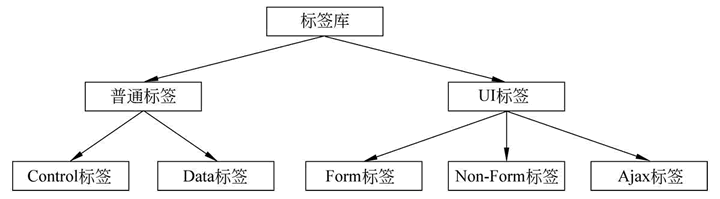
具体:
1.普通标签的主要功能是在页面生成时控制页面代码的执行流程;UI 标签的主要功能是以丰富且可复用的 HTML 文件显示数据。
2.控制标签用于完成条件逻辑和循环逻辑的控制,也可用于做集合的操作。数据标签用于输出后台的数据和完成其他数据访问功能。
3.UI 标签又分为表单标签(Form Tags)、非表单标签(Non-Form Tags)和 Ajax 标签。表单标签主要用于生成 HTML 页面中的表单元素,非表单标签主要用于生成非表单的可视化元素,如输出 Action 中封装的信息等。Ajax 标签主要用于提供对 Ajax 技术的支持。
数据标签
<s:property>
参数与作用:
<s:property> 标签的作用是输出指定的值,通常输出的是 value 属性指定的值,<s:property> 标签的属性及属性说明如下。
- value:可选属性,指定需要输出的属性值,如果没有指定该属性,则默认输出 ValueStack 栈顶的值(关于值栈内容会在后面教程中进行讲解)。
- id:可选属性,指定该元素的标识。
- default:可选属性,如果要输出的属性值为 null,则显示 default属性的指定值。
- escape:可选属性,指定是否忽略 HTML 代码。默认值是 true,即忽略输出值中的 HTML 代码。
使用代码:
<%@ page language="java" contentType="text/html; charset=utf-8" pageEncoding="utf-8"%> <%@taglib prefix="s" uri="/struts-tags" %> <!DOCTYPE html PUBLIC "-//W3C//DTD HTML 4.01 Transitional//EN" "http://www.w3.org/TR/html4/loose.dtd"> <html> <head> <meta http-equiv="Content-Type" content="text/html; charset=utf-8"> <title>property标签</title> </head> <body> // 输出字符串: <s:property value="'this is a string'"/><br/> 输出默认值: <s:property value="" default="default_value"/><br/> 忽略HTML代码: <s:property value="'<h2>www.w3school.com.cn</h2>'" escape="true"/><br/> 不忽略HTML代码: <s:property value="'<h2>www.w3school.com.cn</h2>'" escape="false"/><br/> </body> </html> 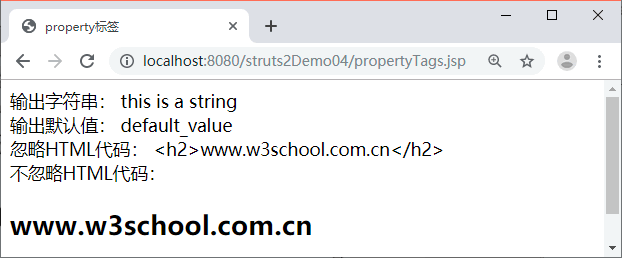
<s:a>
参数与作用:
与 HTML 中的 标签类似,主要用于构造 HTML 页面中的超链接
| 属性 | 是否必须 | 类型 | 描述 |
|---|---|---|---|
| action | 否 | String | 指定超链接 Action 地址 |
| href | 否 | String | 超链接地址 |
| namespace | 否 | String | 指定 Action 地址 |
| id | 否 | String | 指定其 id |
| method | 否 | String | 指定 Action 调用方法 |
<s:a> 标签的使用格式如下所示:
<s:a href=“链接地址”></s:a>
<s:a namespace=“” action=“”>www.baidu.com</s:a>
<s:debug>
参数与作用:
<s:debug> 标签用于输出服务端对象(如 request、application、ValueStack 等)中的信息,该标签可用于辅助调试 Java Web 程序。
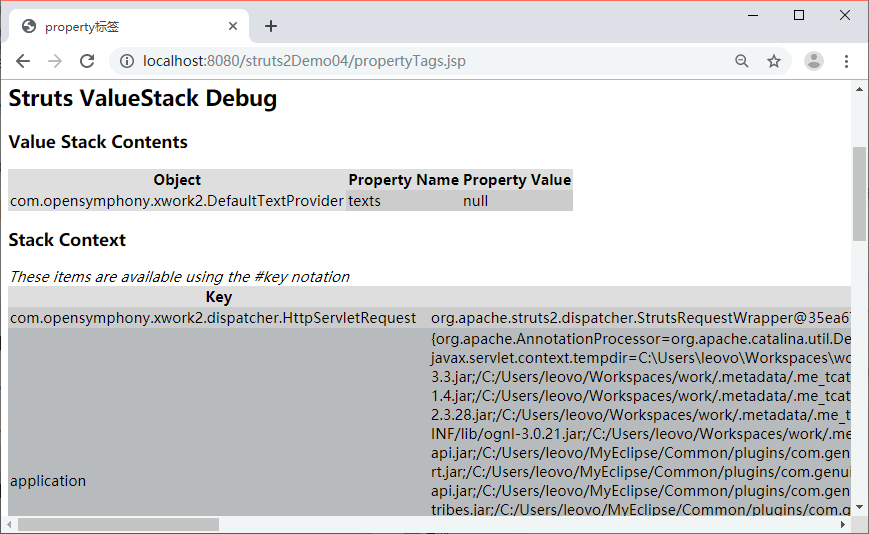
<s:include>
作用:
标签用于在当前页面中包含另一个 Web 资源(如 HTML、JSP、Servlet 等)。该标签有两个属性 id 和 value。其中 id 是可选属性,表示该标签的引用;value 是必填属性,用于指定被包含的 Web 资源文件。
讯享网1. <%@ page language="java" contentType="text/html; charset=utf-8" 2. pageEncoding="utf-8"%> 3. <%@taglib prefix="s" uri="/struts-tags" %> 4. <!DOCTYPE html PUBLIC "-//W3C//DTD HTML 4.01 Transitional//EN" "http://www.w3.org/TR/html4/loose.dtd"> 5. <html> 6. <head> 7. <meta http-equiv="Content-Type" content="text/html; charset=utf-8"> 8. <title>property标签</title> 9. </head> 10. <body> 11. <h2>这是被包含页面includefile.jsp</h2><br/> 12. 传递的参数为:<%out.print(request.getParameter("username")); %> 13. </body> 14. </html>
1. <%@ page language="java" contentType="text/html; charset=UTF-8" 2. pageEncoding="UTF-8"%> 3. <%@taglib prefix="s" uri="/struts-tags"%> 4. <!DOCTYPE html PUBLIC "-//W3C//DTD HTML 4.01 Transitional//EN" "http://www.w3.org/TR/html4/loose.dtd"> 5. <html> 6. <head> 7. <meta http-equiv="Content-Type" content="text/html; charset=UTF-8"> 8. <title>includeTags</title> 9. </head> 10. <body> 11. <h3>这是包含页面includeTags.jsp</h3><br/> 12. <s:include value="file.jsp"> 13. <s:param name="username" value="'小韩'"/> 14. </s:include> 15. </body> 16. </html> 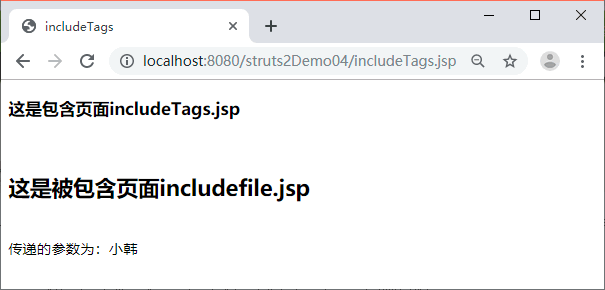
<s:param>
参数与作用:
<s:param> 标签主要用于为其他标签提供参数,通常要与其他标签一起使用。
在上一部分使用 <s:include> 标签时,就使用了 <s:param> 标签给被包含的页面传递参数。<s:param> 标签有两种用法
代码方法:
讯享网<s:param name="color">red</s:param> <s:param name="color" value="'red'"/>
注意点:
1.在使用 value 属性设置参数值时,需要添加单引号,而使用标签体设置参数值时,不需要添加单引号。
2.在使用 value 属性指定参数时,如果不添加单引号,则表示该值为一个引用对象,如果该对象不存在,则为其属性赋值为 null。
控制标签
<s:if>
作用:和java中的if,else的用法差不多,但是这个可以单独使用
<s:if test="表达式1"> 标签体 </s:if> <s:elseif>
作用:跟上面的差不多,不过后两者的区别是需要结合<s:if>标签使用
讯享网<s:elseif test="表达式2"> 标签体 </s:elseif>
<s:else>
<s:else> 标签体 </s:else> <s:iterator>标签
| 属性 | 是否必须 | 默认值 | 类型 | 描 述 |
|---|---|---|---|---|
| begin | 否 | 0 | Integer | 迭代数组或集合的起始位置 |
| end | 否 | 数组或集合的长度大小减 1,若 Step 为负,则为 0。 | Integer | 迭代数组或集合的结束位置 |
| status | 否 | false | Boolean | 迭代过程中的状态 |
| step | 否 | 1 | Integer | 指定每一次迭代后索引增加的值 |
| value | 否 | 无 | String | 迭代的数组或集合对象 |
| var | 否 | 无 | String | 将生成的 Iterator 设置为 page 范围的属性 |
| id | 否 | 无 | String | 指定了集合元素的 id,现已用 var 代替 |
stautus里面的方法具体使用:
| 方 法 | 说 明 | |
|---|---|---|
| st.count | 返回当前已经遍历的集合元素的个数 | |
| st.first | 返回当前遍历元素是否为集合的第一个元素 | |
| st.last | 返回当前遍历元素是否为集合的最后一个元素 | |
| st.index | 返回遍历元素的当前索引值 |
具体代码使用:
讯享网<%@ page language="java" contentType="text/html; charset=utf-8" pageEncoding="utf-8"%> <%@taglib prefix="s" uri="/struts-tags" %> <!DOCTYPE html PUBLIC "-//W3C//DTD HTML 4.01 Transitional//EN" "http://www.w3.org/TR/html4/loose.dtd"> <html> <head> <meta http-equiv="Content-Type" content="text/html; charset=utf-8"> <title>控制标签</title> </head> <body> <center> <table border="1px" cellpadding="1"> <s:iterator var="name" value="{'apple','orange','pear','banana'}" status="st"> <s:if test="#st.odd"> <tr style="background-color:white;"> <td><s:property value="name"/></td> </tr> </s:if> <s:else> <tr style="background-color:grey;"> <td><s:property value="name"/></td> </tr> </s:else> </s:iterator> </table> </center> </body> </html>
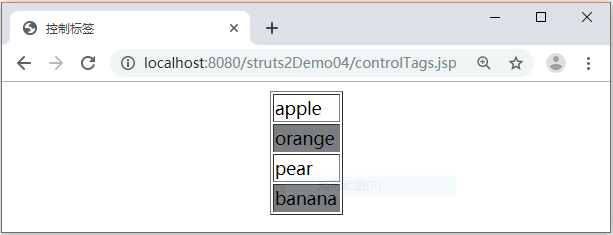
表单标签
表单标签的通用属性:
| 属性名 | 主题 | 数据类型 | 说 明 |
|---|---|---|---|
| title | simple | String | 设置表单元素的 title 属性 |
| disabled | simple | String | 设置表单元素是否可用 |
| label | xhtml | String | 设置表单元素的 label 属性 |
| labelPosition | xhtml | String | 设置 label 元素的显示位置,可选值为 top 和 left(默认) |
| name | simple | String | 设置表单元素的 name 属性,与 Action 中的属性名对应 |
| value | simple | String | 设置表单元素的值 |
| cssClass | simple | String | 设置表单元素的 class |
| cssStyle | simple | String | 设置表单元素的 style 属性 |
| required | xhtml | Boolean | 设置表单元素为必填项 |
| requiredposition | xhtml | String | 设置必填标记(默认为*)相对于 label 元素的位置,可选值为 left 和 right(默认) |
| tabindex | simple | String | 设置表单元素的 tabindex 属性 |
表单标签的 name 和 value 属性基本等同于 HTML 组件的 name 和 value,但也有所不同:表单标签在生成 HTML 时,如果标签没有设置 value 属性,则会从值栈中按照 name 获取相应的值,并把这个值设置成 HTML 组件的 value。
具体标签:
1.<s:form>
作用:和from表单差不多
| 属性名 | 是否必填 | 类 型 | 说 明 |
|---|---|---|---|
| action | 否 | String | 指定提交时对应的 action,不需要 action 后缀 |
| enctype | 否 | String | HTML 表单 enctype 属性 |
| method | 否 | String | HTML 表单 method 属性 |
| namespace | 否 | String | 所提交 action 的命名空间 |
2.<s:textfield>与<s:textarea>
作用:创建文本框,区别是前者是单行文本框,后者是多行文本框。
<s:textfield> 标签的用法: <s:textfield label="用户名" name="username"/> <s:textarea> 标签的用法: <s:textarea label="描述" name="description"/> 3.<s:passWord>标签
作用:创建一个密码框,可以生成html中的 标签。
| 属性名 | 说 明 | |
|---|---|---|
| name | 用于指定密码输入框的名称 | |
| size | 用于指定密码输入框的显示宽度,以字符数为单位 | |
| maxlength | 用于限定密码输入框的最大输入字符串个数 | |
| showPassword | 是否显示初始值,即使显示也仍为密文显示,用掩码代替 |
4.<s:radio>标签
作用:
用于创建单选按钮,生成 HTML 中的 标签。
具体参数:
| 属性名 | 是否必填 | 类 型 | 说 明 |
|---|---|---|---|
| list | 是 | Collection,Map Enmumeration,Iterator,Array | 用于生成单选框中的集合 |
| listKey | 否 | String | 指定集合对象中的哪个属性作为选项的 value |
| listValue | 否 | String | 指定集合对象中的哪个属性作为选项的内容 |
5.<s:reset>标签
作用:
创建一个重置按钮,会生成 HTML 中的 标签,该标签的使用比较简单,其常用属性为 name 和 value。
参数:
讯享网<s:reset value="reset"/> <s:reset name="reset" value="重置"/>
6.<s:submit>标签
作用:
产生一个提交框的按钮。
| 属性名 | 是否必填 | 类型 | 说明 |
|---|---|---|---|
| action | 否 | String | 指定提交时对应的 Action |
| method | 否 | String | 指定 Action 中调用的方法 |
7.<s:checkboxlist>
作用:一次性创建多个复选框,用户可以选择创建零到多个复选框,它可以产生一组标签
常见属性:
| 属性名 | 是否必填 | 类型 | 说明 |
|---|---|---|---|
| name | 否 | String | 指定该元素的 name |
| label | 否 | String | 指定复选框前显示的文本 |
| list | 是 | list | 定义集合变量 |
| listKey | 否 | String | 指定集合对象中的哪个属性作为选项的 value |
| listValue | 否 | String | 指定集合对象中的哪个属性作为选项的内容 |
8.<s:select>
作用:创建一个下拉列表框,它会生成 HTML 中的 标签。
属性:
| 属性名 | 是否必填 | 类型 | 说明 |
|---|---|---|---|
| list | 是 | Collection,Map Enmumeration,Iterator,Array | 用于生成下拉框的集合 |
| listKey | 否 | String | 生成选项的 value 属性 |
| listValue | 否 | String | 生成选项的显示文字 |
| headerKey | 否 | String | 在所有的选项前再添加一个额外的选项作为其标题的 value 值 |
| headerValue | 否 | String | 显示在页面中 header 选项的内容 |
| multiple | 否 | Boolean | 指定是否多选,默认为 false |
| emptyOption | 否 | Boolean | 是否在标题和真实的选项之间加一个空选项 |
| size | 否 | Integer | 下拉框的高度,即最多可以同时显示多少个选项 |
<%@ page language="java" contentType="text/html; charset=UTF-8" pageEncoding="UTF-8"%> <%@taglib prefix="s" uri="/struts-tags" %> <!DOCTYPE html PUBLIC "-//W3C//DTD HTML 4.01 Transitional//EN" "http://www.w3.org/TR/html4/loose.dtd"> <html> <head> <meta http-equiv="Content-Type" content="text/html; charset=UTF-8"> <title>optgroup标签</title> </head> <body> <s:form> <s:select label="请选择所在城市" name="city" list="#{'BJ':'北京','SH':'上海' }" listKey="key" listValue="value"> <s:optgroup label="河北" list="#{'BD':'保定','HS':'衡水','SJZ':'石家庄'}" listKey="key" listValue="value"/> <s:optgroup label="河南" list="#{'LY':'洛阳','KF':'开封','SQ':'商丘'}" listKey="key" listValue="value"/> </s:select> </s:form> </body> </html> 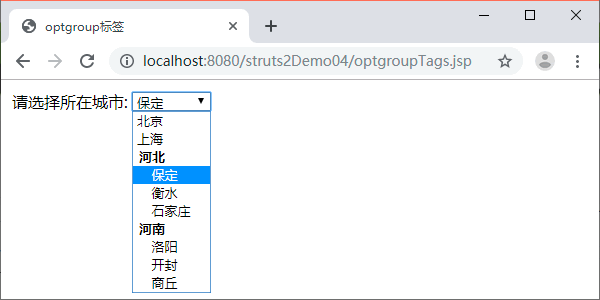
9.<s:file>
作用:创建一个文件选择框,它会生成 HTML 中的 标签
| 属性名 | 是否必填 | 类型 | 说明 |
|---|---|---|---|
| name | 否 | String | 指定表单元素名 |
| accept | 否 | String | 指定可接收的文件 MIME 类型,默认为input |
使用方法:
讯享网<s:file name="uploadFile" accept="text/*"/> <s:file name="otherUploadFile" accept="text/html,text/plain"/>
10.<s:hidden>
作用:
创建隐藏表单元素,它会生成 HTML 中的隐藏域标签
方法:
<s:hidden name=“id” value=“%{id}”/>
校验
数据校验
原理:
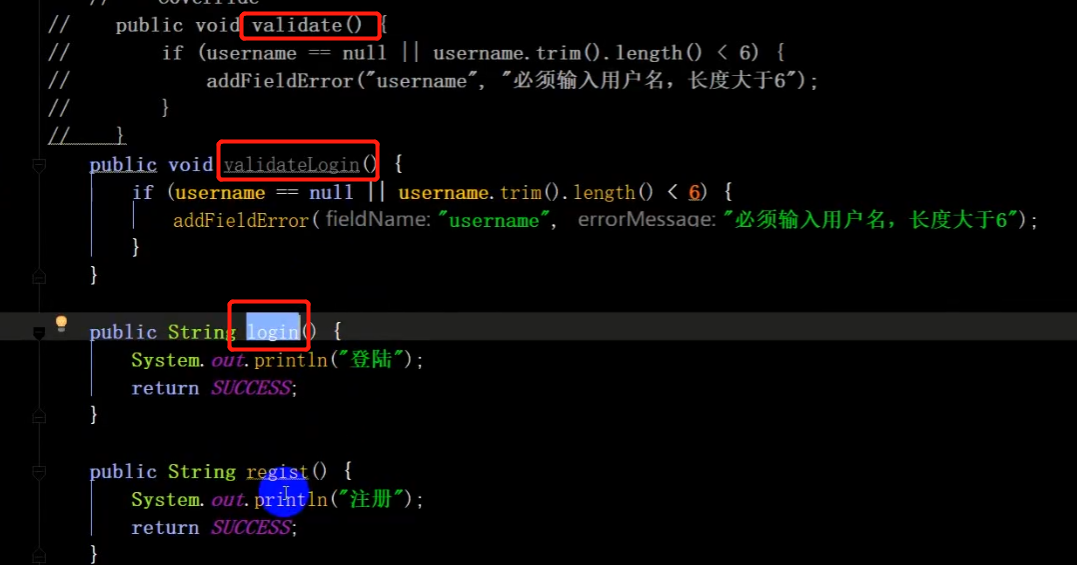
1.一个Action类里有vaildate()时,先执行该vaildate里的内容进行数据校验后,然后才会调用方法。
2.vaildate继承与ActionSupport类
当你写了一个Action类时,并通过struts.xml将主要的方法注册成功,且在该类里面写了一个validate方法,此时默认该类存在vaildate数据校验的功能,具体功能判断可自定义
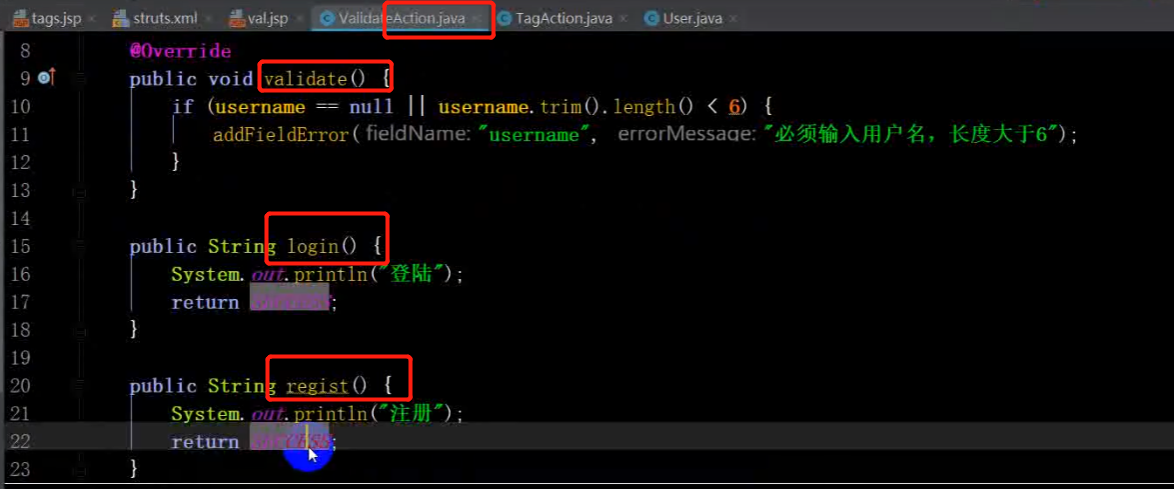
然后在struts.xml中进行配置

在xxx.jsp里加上
<s:fielderror />即可回显报错errorMessage的信息

方法校验
概念:直接利用方法进行校验,即在前面加validate
框架校验
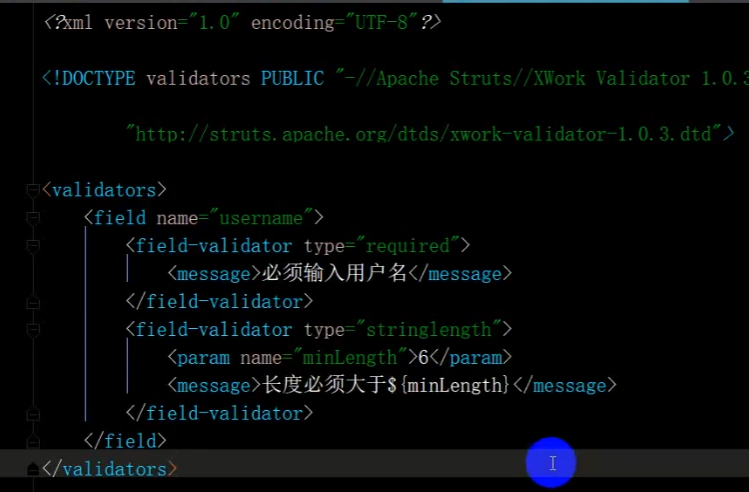
需要在Action类的同个包下创建xml文件,文件命名为Action类的类名-validation.xml
如UserAction–validation.xml
如果你只想校验UserAction的login方法,那么就修改为UserAction-valLogin-validation.xml
文件操作
文件上传
特征:
①private File Upload 有一个File类型的参数
②ServletActionContext.getServletContext().getRealPath(“/xxxx”) 有一个获取绝对路径的实现
③方法里有文件IO流FileInputStream以及FileoutputStream
具体代码:
https://blog.csdn.net/_/article/details/
文件下载
特征:
①private InputStream filename 有一个输出流参数
②struts.xml配置文件里必须有的type=stream
代码
前端:
<s:a href="simpledownload?filename=test.txt" name="test">test.txt</s:a> Action:
讯享网package com.mengma.action; import java.io.InputStream; import org.apache.struts2.ServletActionContext; import com.opensymphony.xwork2.ActionSupport; public class SimpleDownLoadAction extends ActionSupport {
    private String filename; public String getFilename() {
    return filename; } public void setFilename(String filename) {
    this.filename = filename; } // 定义了返回InputStream的方法,该方法作为被下载文件的入口 public InputStream getDownloadFile() {
    // 获取下载文件名称 String filename = ServletActionContext.getRequest().getParameter("filename"); // 定义下载文件路径 String filePath = "/upload/" + filename; // 返回一个流对象 return ServletActionContext.getServletContext().getResourceAsStream( filePath); } }
配置文件信息:
<action name="simpledownload" class="com.mengma.action.SimpleDownLoadAction"> <result type="stream"> <!--文件类型 --> <param name="contentType">text/plain</param> <!--指定文件名 --> <param name="contentDisposition"> attachment;filename=${
filename} </param> <!--输入流 --> <param name="inputName">downloadFile</param> </result> </action> 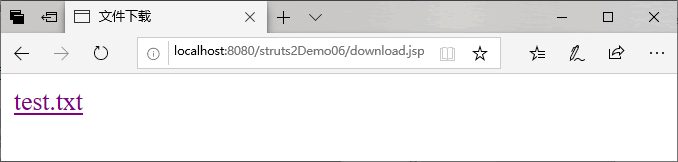
OGNL
基础概念
OGNL 的全称是“Object-Graph Navigation Language”,即对象图导航语言,它是一种功能强大的开源表达式语言。使用这种表达式语言可以通过某种表达式语法存取 Java 对象的任意属性,调用 Java 对象的方法,以及实现类型转换等。
表达式%,#,$用法
①#符号
1.)访问非根对象的属性。
讯享网#相当于 ActionContext.getContext()。例如‘#session.user’表达式相当于 ActionContext.getContext().getSession().getAttribute("user"),‘#request.userName’表达式相当于 request.getAttribute("userName")。
2.)用于过滤和投影集合
 books.{
   ?#this.price>25}
3.)构造MAP
讯享网 #{
   key1:value1,key2:value2},这种方式常用于给 radio 或 select、checkbox 等标签赋值。如果要在页面中取一个 Map 的值可以如下书写:<s:property value="#myMap['key']"/>。
②%符号
作用:%是在标签的属性值被理解为字符串类型时,告诉执行环境‘%{}’中的是 OGNL 表达式,并计算 OGNL 表达式的值。
③$符号
作用:用于在 Struts2 配置文件中引入 OGNL 表达式。
<action name="userAction_*" class="userAction" method="{1}"> <result name="add" type="redirect"> userAction_findById?userId=${
   User.userId} </result> </action>
访问对象方法和静态方法
访问对象方法
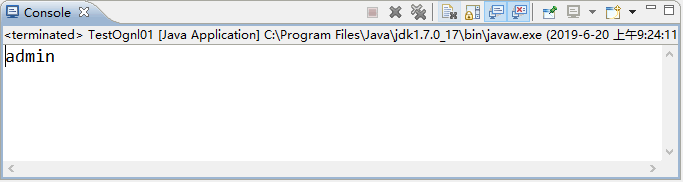
调用方法:Ognl.getValue(“方法名”,对象名);
讯享网package com.mengma.ognl; import ognl.OgnlException; public class TestOgnl01 {
    public static void main(String[] args) {
    Person person = new Person(); person.setName("admin"); try {
    System.out.println(ognl.Ognl.getValue("name", person)); } catch (OgnlException e) {
    e.printStackTrace(); } } }
静态方法和静态属性获取
设置:
@类的全路径名@属性名称 @类的全路径名@方法名称(参数列表) 需要注意的是,在低版本的 Struts2 中,已经默认开启了对访问类静态方法的支持,但是高版本的 Struts2 默认是关闭这项支持的,也就是说,要想访问类的静态方法,需要手动开启设置。开启设置的方法十分简单,只需要在 struts.xml 中进行如下配置即可。 <constant name="struts.ognl.allowStaticMethodAccess" value="true"/> 在上述代码配置了一个名称为 struts.ognl.allowStaticMethodAccess 的常量,并将其值设置为 true,这就表示开启了访问静态方法的支持。接下来通过一个案例演示如何使用 OGNL 访问静态方法和静态属性。 讯享网package com.mengma.ognl; public class TestOgnl02 {
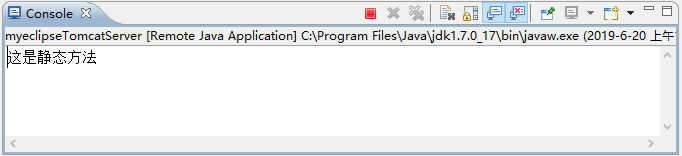
public static String staticValue="这是静态属性值"; public static void testMethod(){
System.out.println("这是静态方法"); } }
2.配置文件
在配置文件 struts.xml 中,添加用于开启对静态方法访问的支持代码。
3.创建index.jsp
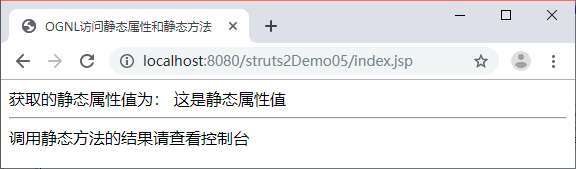
<%@ page language="java" contentType="text/html; charset=UTF-8" pageEncoding="UTF-8"%> <%@taglib prefix="s" uri="/struts-tags" %> <!DOCTYPE html PUBLIC "-//W3C//DTD HTML 4.01 Transitional//EN" "http://www.w3.org/TR/html4/loose.dtd"> <html> <head> <meta http-equiv="Content-Type" content="text/html; charset=UTF-8"> <title>OGNL访问静态属性和静态方法</title> </head> <body> // 获取的静态属性值为: <s:property value="@com.mengma.ognl.index.jsp@staticValue"/><br/> <hr/> // 调用静态方法的结果请查看控制台 <s:property value="@com.mengma.ognl.TestOgnl02@testMethod()"/> </body> </html> 4.启动项目
参考资料
https://www.yuque.com/neuedu/campus/zkd7cg#XIc95
https://www.yuque.com/iceqaq/fwz2q8/sgrol6
https://blog.csdn.net/m0_/article/details/
struts2资料
https://www.yuque.com/dylan1314/tcqus2/yy7moy
版权声明:本文内容由互联网用户自发贡献,该文观点仅代表作者本人。本站仅提供信息存储空间服务,不拥有所有权,不承担相关法律责任。如发现本站有涉嫌侵权/违法违规的内容,请联系我们,一经查实,本站将立刻删除。
如需转载请保留出处:https://51itzy.com/kjqy/125083.html