
1.创建工作区
ros2 pkg create my_package --build-type ament_cmake --dependencies rclcpp 讯享网
然后创建一个launch文件夹,内部导入simulation.launch.py的launch.py启动文件
讯享网# Copyright 2019 Louise Poubel # # Licensed under the Apache License, Version 2.0 (the "License"); # you may not use this file except in compliance with the License. # You may obtain a copy of the License at # # http://www.apache.org/licenses/LICENSE-2.0 # # Unless required by applicable law or agreed to in writing, software # distributed under the License is distributed on an "AS IS" BASIS, # WITHOUT WARRANTIES OR CONDITIONS OF ANY KIND, either express or implied. # See the License for the specific language governing permissions and # limitations under the License. """Launch Gazebo with a world that has Dolly, as well as the follow node.""" import os from ament_index_python.packages import get_package_share_directory from launch import LaunchDescription from launch.actions import DeclareLaunchArgument from launch.actions import IncludeLaunchDescription from launch.conditions import IfCondition from launch.launch_description_sources import PythonLaunchDescriptionSource from launch.substitutions import LaunchConfiguration from launch_ros.actions import Node from launch.substitutions import ThisLaunchFileDir def generate_launch_description(): pkg_gazebo_ros = get_package_share_directory('gazebo_ros') pkg_dolly_gazebo = get_package_share_directory('dolly_gazebo') pkg_my_package = get_package_share_directory('my_package') # Gazebo launch gazebo = IncludeLaunchDescription( PythonLaunchDescriptionSource( os.path.join(pkg_gazebo_ros, 'launch', 'gazebo.launch.py'), ) ) # Follow node follow = Node( package='dolly_follow', executable='dolly_follow', output='screen', remappings=[ ('cmd_vel', '/dolly/cmd_vel'), ('laser_scan', '/dolly/laser_scan') ] ) # RViz rviz = Node( package='rviz2', executable='rviz2', condition=IfCondition(LaunchConfiguration('rviz')) ) return LaunchDescription([ DeclareLaunchArgument( 'world', default_value=[os.path.join(pkg_dolly_gazebo, 'worlds', 'dolly_empty.world'), ''], description='SDF world file'), DeclareLaunchArgument('rviz', default_value='true', description='Open RViz.'), gazebo, follow, rviz ])
2.分析.launch.py代码
1.导入launch文件的包,默认就是这些。
import os from ament_index_python.packages import get_package_share_directory from launch import LaunchDescription from launch.actions import DeclareLaunchArgument from launch.actions import IncludeLaunchDescription from launch.conditions import IfCondition from launch.launch_description_sources import PythonLaunchDescriptionSource from launch.substitutions import LaunchConfiguration from launch_ros.actions import Node from launch.substitutions import ThisLaunchFileDir 2.要启动的部分
讯享网def generate_launch_description(): ... return LaunchDescription([ ])
3.导入要启动部分的文件夹路径
pkg_gazebo_ros = get_package_share_directory('gazebo_ros') pkg_dolly_gazebo = get_package_share_directory('dolly_gazebo') pkg_my_package = get_package_share_directory('my_package') 4.添加gazebo的默认程序的节点
讯享网 # Gazebo launch gazebo = IncludeLaunchDescription( PythonLaunchDescriptionSource( os.path.join(pkg_gazebo_ros, 'launch', 'gazebo.launch.py'), ) )
5.添加主要的程序部分的节点
# Follow node follow = Node( package='dolly_follow', executable='dolly_follow', output='screen', remappings=[ ('cmd_vel', '/dolly/cmd_vel'), ('laser_scan', '/dolly/laser_scan') ] ) 6.·添加rviz部分的节点
讯享网 # RViz rviz = Node( package='rviz2', executable='rviz2', condition=IfCondition(LaunchConfiguration('rviz')) )
DeclareLaunchArgument( 'world', default_value=[os.path.join(pkg_dolly_gazebo, 'worlds', 'dolly_empty.world'), ''], description='SDF world file') 代表设定的启动时候的参数
两个设定参数的函数:
1.LaunchConfiguration: is local to the launch file and scoped.
2.DeclareLaunchArgument: allows you to expose the argument outside of your launch file. Allowing them to be listed, set, or marked as required when a user launches it from the command line (using ros2 launch) or when including it from another launch file (using IncludeLaunchDescription).
补充:
A LaunchConfiguration cannot be required to be set when launching or including and it is not possible to set it when launching from the command line. You can set a LaunchConfiguration before including another launch file, but an argument is better if you want it to be reused.
参考:https://answers.ros.org/question//ros2-what-is-different-between-declarelaunchargument-and-launchconfiguration/
这里,给’world’添加了两个参数,一个是default_value(从本launch文件外添加),另一个是description
然后启动这个world文件,因为return LaunchDescription
8.
讯享网 DeclareLaunchArgument('rviz', default_value='true', description='Open RViz.')
这里同样,给’rviz’添加了参数
-
gazebo, follow, rviz
运行这三部分。

3.修改cmakelists
添加以下部分,只是编译launch.py文件的话,以下足够!牢记!!
讯享网install(DIRECTORY launch DESTINATION share/${
   PROJECT_NAME}/ )
4.编译即可
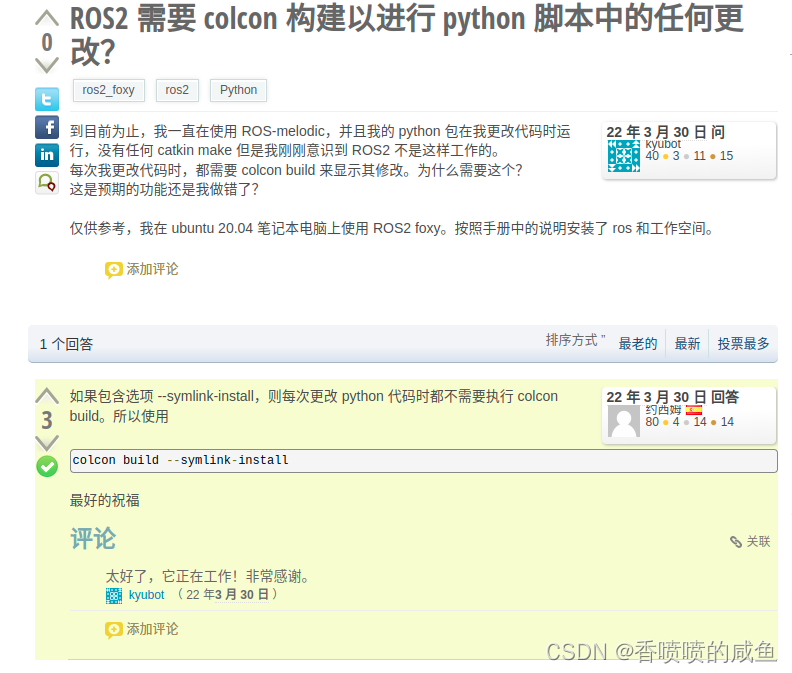
只是更改python文件,再进行编译的时候使用colcon build --symlink-install 即可
5.添加主要项目部分
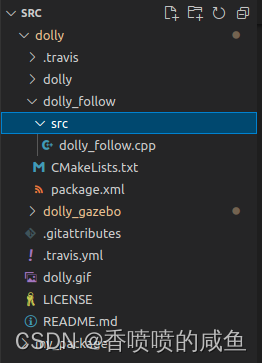
添加了dolly。
修改CMakeLists(My_package中的)
添加:
find_package(ament_cmake REQUIRED)
find_package(geometry_msgs REQUIRED)
find_package(rclcpp REQUIRED)
find_package(sensor_msgs REQUIRED)
add_executable(dolly_follow src/dolly_follow.cpp)
ament_target_dependencies(dolly_follow
“rclcpp”
“geometry_msgs”
“sensor_msgs”)
install(TARGETS
dolly_follow
DESTINATION lib/${PROJECT_NAME}
)
编译即可
编译完之后,尝试启动
ros2 launch my_package simulation.launch.py
结果报错:
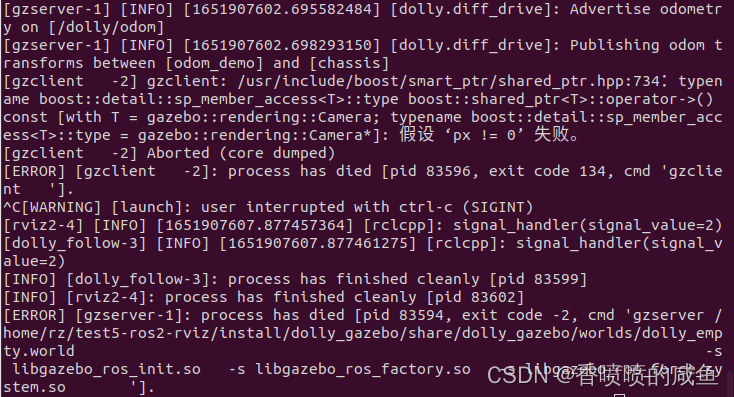
找了半天错误也没找到,反正就是gzclient出了问题。
然后在.bashrc里面添加 source /usr/share/gazebo/setup.sh一下,结果就好了
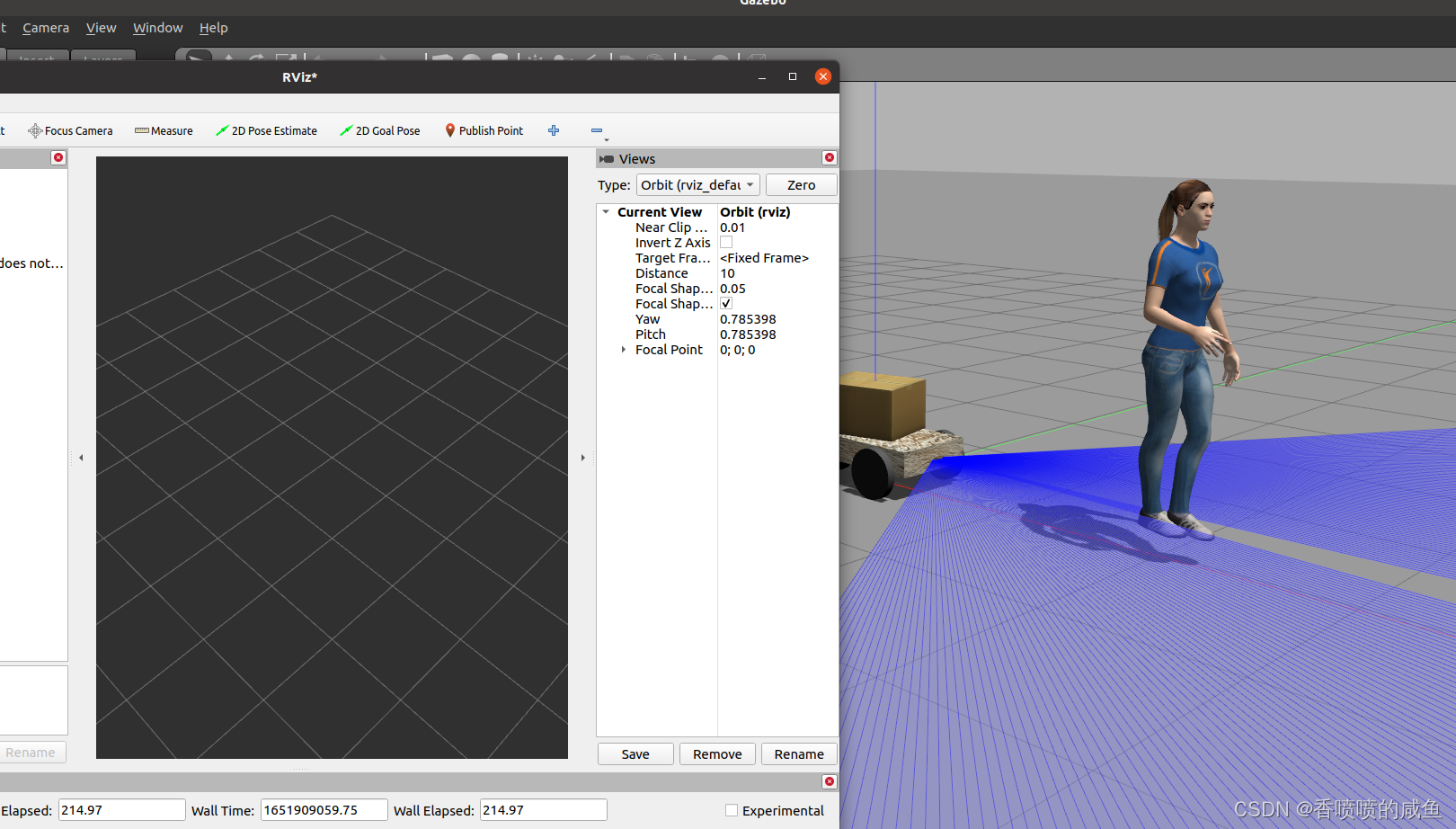
6开始搞rviz
6.1增添TF
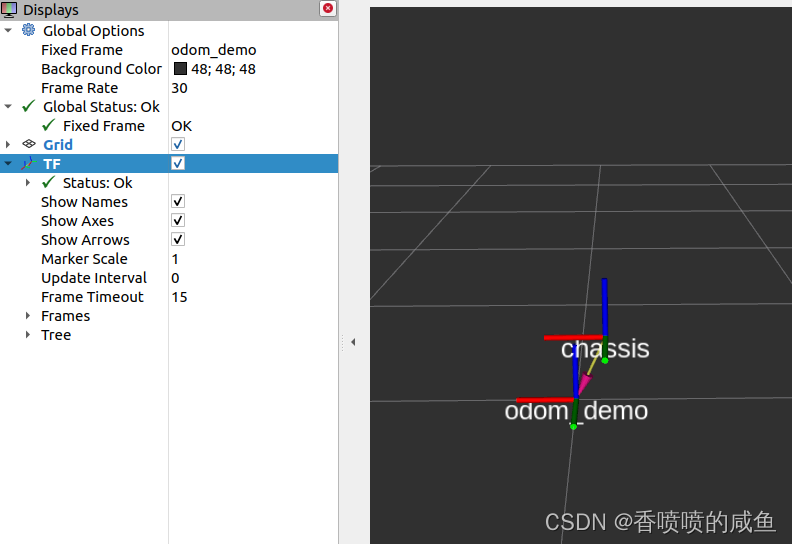
增添TF后,TF相当于物体坐标,odom是世界的固定坐标,chassis则是自己创建的机器人的坐标,用这个坐标来模拟机器人。(不要忘记调换Fixed Frame)
在这里选择odom_demo 就是指以它为地图的中心坐标
6.2增添激光扫描
add

调整主题

即可。
版权声明:本文内容由互联网用户自发贡献,该文观点仅代表作者本人。本站仅提供信息存储空间服务,不拥有所有权,不承担相关法律责任。如发现本站有涉嫌侵权/违法违规的内容,请联系我们,一经查实,本站将立刻删除。
如需转载请保留出处:https://51itzy.com/kjqy/60540.html