
作者丨龟壳@知乎 编辑丨极市平台
来源丨https://zhuanlan.zhihu.com/p/
1.FLOPs和Params计算
1.1概念理解
FLOPS: 注意全大写,是floating point operations per second的缩写,意指每秒浮点运算次数,理解为计算速度。是一个衡量硬件性能的指标。
计算公式: 对卷积层:(K_h * K_w * C_in * C_out) * (H_out * W_out) 对全连接层:C_in * C_out讯享网
FLOPs: 注意s小写,是floating point operations的缩写(s表复数),意指浮点运算数,理解为计算量。可以用来衡量算法/模型的复杂度
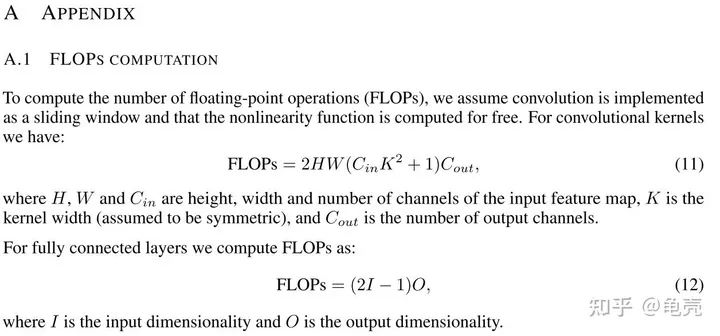
讯享网
Params: 是指模型训练中需要训练的参数总数
讯享网模型参数量计算公式为: 对卷积层:(K_h * K_w * C_in)* C_out 对全连接层:C_in * C_out
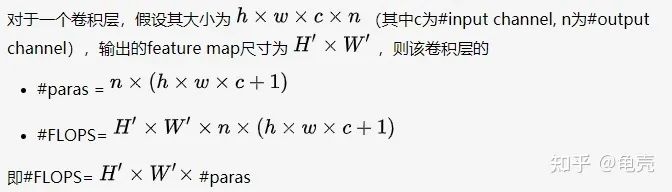
注意: 1.params只与你定义的网络结构有关,和forward的任何操作无关。即定义好了网络结构,参数就已经决定了。FLOPs和不同的层运算结构有关。如果forward时在同一层(同一名字命名的层)多次运算,FLOPs不会增加 2.Model_size = 4*params 模型大小约为参数量的4倍补充:
MAC:内存访问成本
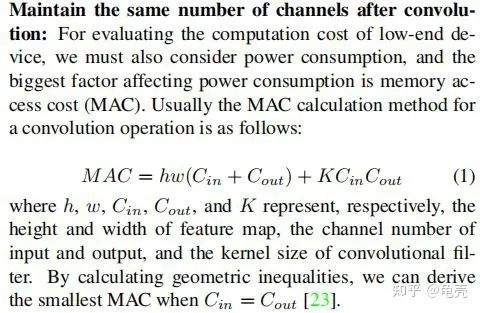
1.2计算方法
方法1-使用thop库
讯享网''' code by zzg-2020-05-19 pip install thop ''' import torch from thop import profile from models.yolo_nano import YOLONano device = torch.device("cpu") #input_shape of model,batch_size=1 net = YOLONano(num_classes=20, image_size=416) 定义好的网络模型 input = torch.randn(1, 3, 416, 416) flops, params = profile(net, inputs=(input, )) print("FLOPs=", str(flops/1e9) +'{}'.format("G")) print("params=", str(params/1e6)+'{}'.format("M")
方法2-使用torchstat库
''' 在PyTorch中,可以使用torchstat这个库来查看网络模型的一些信息,包括总的参数量params、MAdd、显卡内存占用量和FLOPs等 pip install torchstat ''' from torchstat import stat from torchvision.models import resnet50 model = resnet50() stat(model, (3, 224, 224))方法3-使用 ptflops:https://github.com/sovrasov/flops-counter.pytorch
讯享网#pip install ptflops from ptflops import get_model_complexity_info from torchvision.models import resnet50 model = resnet50() flops, params = get_model_complexity_info(model, (3, 224, 224), as_strings=True, print_per_layer_stat=True) print('Flops: ' + flops) print('Params: ' + params)
参考:
https://www.cnblogs.com/king-lps/p/10904552.html
https://zhuanlan.zhihu.com/p/
2.模型推理速度计算
2.1 模型推理速度正确计算
需要克服GPU异步执行和GPU预热两个问题,下面例子使用 Efficient-net-b0,在进行任何时间测量之前,我们通过网络运行一些虚拟示例来进行“GPU 预热”。这将自动初始化 GPU 并防止它在我们测量时间时进入省电模式。接下来,我们使用 tr.cuda.event 来测量 GPU 上的时间。在这里使用 torch.cuda.synchronize() 至关重要。这行代码执行主机和设备(即GPU和CPU)之间的同步,因此只有在GPU上运行的进程完成后才会进行时间记录。这克服了不同步执行的问题。
model = EfficientNet.from_pretrained(‘efficientnet-b0’) device = torch.device(“cuda”) model.to(device) dummy_input = torch.randn(1, 3, 224, 224,dtype=torch.float).to(device) starter, ender = torch.cuda.Event(enable_timing=True), torch.cuda.Event(enable_timing=True) repetitions = 300 timings=np.zeros((repetitions,1)) #GPU-WARM-UP for _ in range(10): _ = model(dummy_input) # MEASURE PERFORMANCE with torch.no_grad(): for rep in range(repetitions): starter.record() _ = model(dummy_input) ender.record() # WAIT FOR GPU SYNC torch.cuda.synchronize() curr_time = starter.elapsed_time(ender) timings[rep] = curr_time mean_syn = np.sum(timings) / repetitions std_syn = np.std(timings) mean_fps = 1000. / mean_syn print(' * Mean@1 {mean_syn:.3f}ms Std@5 {std_syn:.3f}ms FPS@1 {mean_fps:.2f}'.format(mean_syn=mean_syn, std_syn=std_syn, mean_fps=mean_fps)) print(mean_syn)2.2 模型吞吐量计算
神经网络的吞吐量定义为网络在单位时间内(例如,一秒)可以处理的最大输入实例数。与涉及单个实例处理的延迟不同,为了实现最大吞吐量,我们希望并行处理尽可能多的实例。有效的并行性显然依赖于数据、模型和设备。因此,为了正确测量吞吐量,我们执行以下两个步骤:(1)我们估计允许最大并行度的**批量大小;(2)给定这个**批量大小,我们测量网络在一秒钟内可以处理的实例数
要找到**批量大小,一个好的经验法则是达到 GPU 对给定数据类型的内存限制。这个大小当然取决于硬件类型和网络的大小。找到这个最大批量大小的最快方法是执行二进制搜索。当时间不重要时,简单的顺序搜索就足够了。为此,我们使用 for 循环将批量大小增加 1,直到达到运行时错误为止,这确定了 GPU 可以处理的最大批量大小,用于我们的神经网络模型及其处理的输入数据。
在找到**批量大小后,我们计算实际吞吐量。为此,我们希望处理多个批次(100 个批次就足够了),然后使用以下公式:
讯享网(批次数 X 批次大小)/(以秒为单位的总时间)
这个公式给出了我们的网络可以在一秒钟内处理的示例数量。下面的代码提供了一种执行上述计算的简单方法(给定**批量大小)
model = EfficientNet.from_pretrained(‘efficientnet-b0’) device = torch.device(“cuda”) model.to(device) dummy_input = torch.randn(optimal_batch_size, 3,224,224, dtype=torch.float).to(device) repetitions=100 total_time = 0 with torch.no_grad(): for rep in range(repetitions): starter, ender = torch.cuda.Event(enable_timing=True),torch.cuda.Event(enable_timing=True) starter.record() _ = model(dummy_input) ender.record() torch.cuda.synchronize() curr_time = starter.elapsed_time(ender)/1000 total_time += curr_time Throughput = (repetitions*optimal_batch_size)/total_time print(‘Final Throughput:’,Throughput)参考:
https://www.cnblogs.com/king-lps/p/10904552.html
https://zhuanlan.zhihu.com/p/

猜您喜欢:
等你着陆!【GAN生成对抗网络】知识星球!
CVPR 2021专题1:GAN的改进
CVPR 2021 | GAN的说话人驱动、3D人脸论文汇总
CVPR 2021 | 图像转换 今如何?几篇GAN论文
【CVPR 2021】通过GAN提升人脸识别的遗留难题
CVPR 2021生成对抗网络GAN部分论文汇总
经典GAN不得不读:StyleGAN
最新最全20篇!基于 StyleGAN 改进或应用相关论文
超100篇!CVPR 2020最全GAN论文梳理汇总!
附下载 | 《Python进阶》中文版
附下载 | 经典《Think Python》中文版
附下载 | 《Pytorch模型训练实用教程》
附下载 | 最新2020李沐《动手学深度学习》
附下载 | 《可解释的机器学习》中文版
附下载 |《TensorFlow 2.0 深度学习算法实战》
附下载 | 超100篇!CVPR 2020最全GAN论文梳理汇总!
附下载 |《计算机视觉中的数学方法》分享

版权声明:本文内容由互联网用户自发贡献,该文观点仅代表作者本人。本站仅提供信息存储空间服务,不拥有所有权,不承担相关法律责任。如发现本站有涉嫌侵权/违法违规的内容,请联系我们,一经查实,本站将立刻删除。
如需转载请保留出处:https://51itzy.com/kjqy/59361.html