
目录
一、功能要求
1、设计内容
2、学生宿舍管理系统主要功能
3、学生宿舍管理系统数据库表单(可以按照需求增、删、改)
二、系统需求分析
2.1 功能需求分析
2.2数据需求分析
2.3 业务规则及完整性约束分析
三、数据库概念结构设计
3.1 局部E-R图
四、 数据库物理结构设计
4.1创建数据库:
4.2创建Suguan表:
4.3创建qinshizhang表:
4.4创建student表:
4.5创建baoxun表:
4.6创建存储过程my
4.7另一种实现利用触发器实现当前时间
五、程序代码展示
5.1登录界面
5.2寝室长
5.3宿管员
六、程序运行和数据库截图
六、源代码链接
一、功能要求
1、设计内容
设计一个学生宿舍管理系统,该系统的用户由寝室长和宿管员组成,不同的用户拥有不同的管理权限,各自完成各自的管理功能,首先是登录,登录的时候首先要判断用户的身份,合法的用户然后进入到系统主界面中,不同的用户看到不同的系统功能。
2、学生宿舍管理系统主要功能
(1)登录界面
(2)寝室长界面:寝室人员信息、保修操作、修改密码。
(3)管理员管理:查看学生住宿信息(按学号搜索、空白搜索全部)、管理学生住宿信息(添加学生住宿信息、删除学生住宿信息)、处理保修信息(修改处理状况)、管理学生账号(添加和删除)、修改密码。
3、学生宿舍管理系统数据库表单(可以按照需求增、删、改)
(1)寝室长信息表单:账号、密码
(2)宿管员信息表单:账号、密码
(3)报修信息表单:报修编号、寝楼、宿舍号、时间、问题、状况
(4)学生信息表单:学号、姓名、性别、专业、班级、宿舍号、寝楼、联系电话
二、系统需求分析
2.1 功能需求分析
首先,基本功能是登录。登录有两种身份:寝室长或宿管员。对于寝室长而言,系统中需要提供,寝室人员信息显示、报修功能、报修状态查看、修改密码的功能。对于管理员而言,系统需要提供查看学生住宿信息,管理学生住宿信息,处理报修,管理学生账号,修改密码的功能

图1.1 系统功能模块图
2.2数据需求分析
寝室长登录需要对寝室长采集账号和密码;
寝室人员信息显示:在界面上显示寝室人员的全部信息,由宿管员界面添加学生信息采集;

报修操作需要对寝室长采集寝楼、宿舍号、时间、问题的信息;
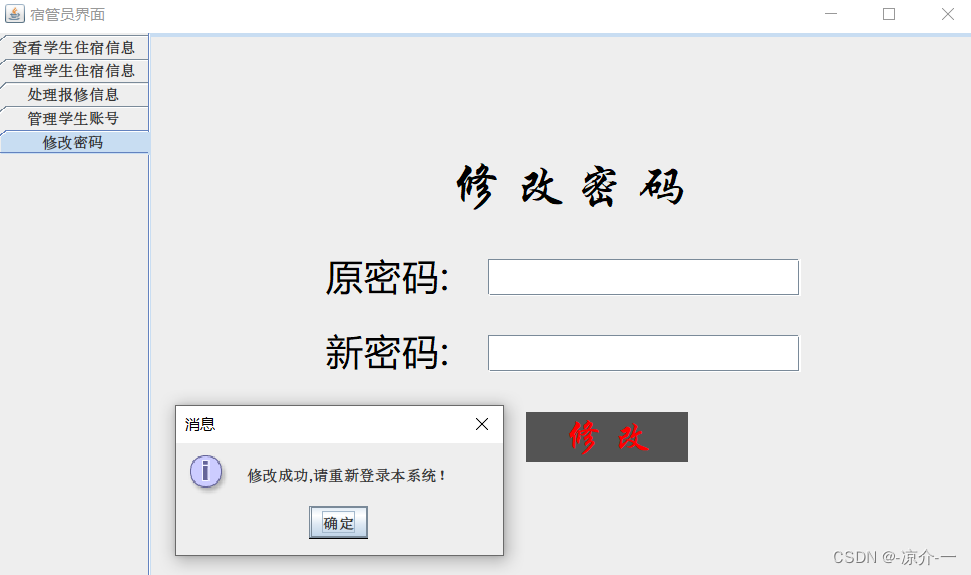
修改密码需要采集原密码和新密码;
宿管员登录需要对宿管员采集用户名和用户密码;
查看学生住宿信息:开始显示全部学生的信息,通过搜索按钮需要输入对应的学号(模糊匹配)、输入空白则搜索全部学生信息;
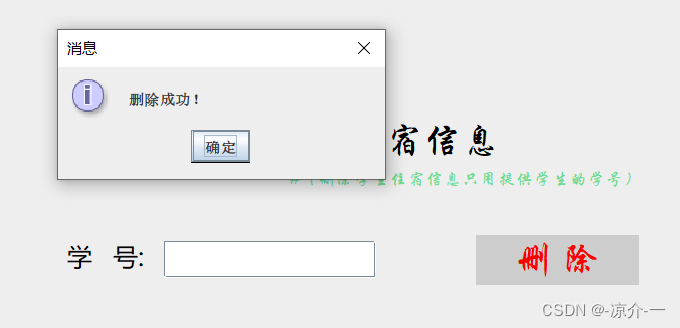
管理学生住宿信息:添加需要对学生采集学号、姓名、性别、专业、班级、宿舍号、寝楼、联系电话,删除学生信息只需要提供学生的学号;
处理报修:需要采集处理序号,选择处理的状况;
管理学生账号:需要采集学生的账号和密码后可以选择删除还是添加;
修改密码需要采集原密码和新密码;
2.3 业务规则及完整性约束分析
寝室长(账号、密码)
学生(学号、姓名、性别、专业、班级、宿舍号、寝楼、联系电话)
报修信息(报修编号、寝楼(外码)、宿舍号、时间、问题、状况)
宿管员(账号、密码)
三、数据库概念结构设计
3.1 局部E-R图
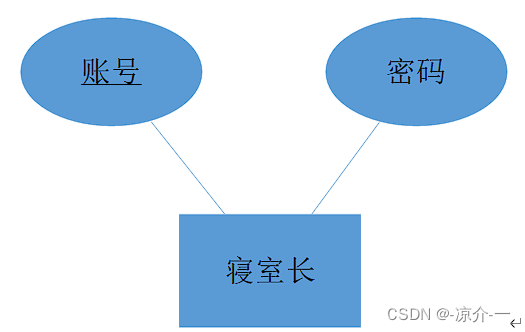
图2.1寝室长实体E-R图
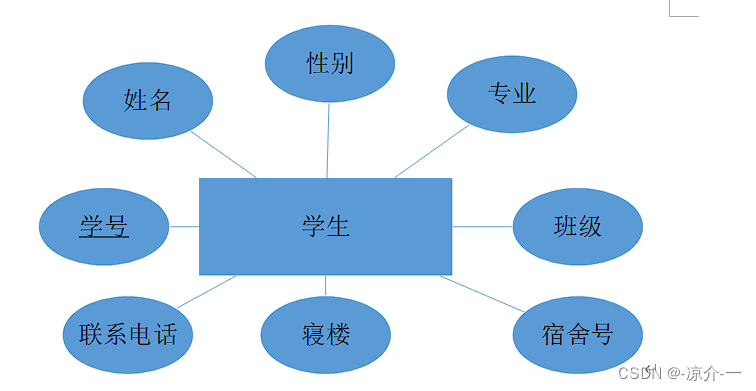
图2.2顾客实体E-R图
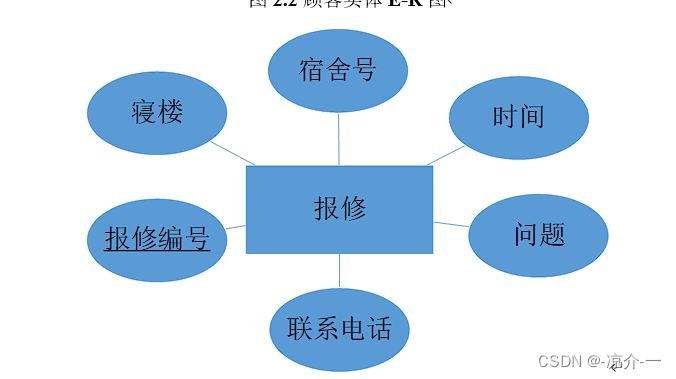
图2.3订单实体E-R图
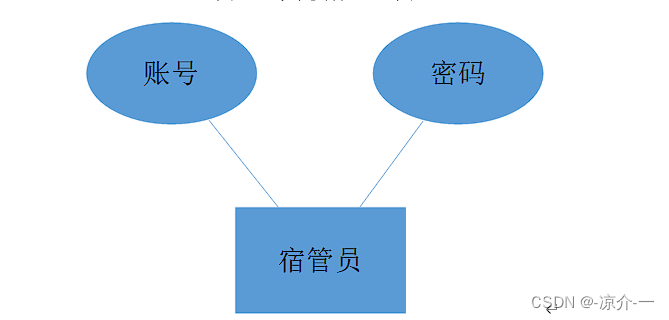
图2.4菜单实体E-R图
四、 数据库物理结构设计
4.1创建数据库:
CREATE database susheSystem;讯享网
4.2创建Suguan表:
讯享网use susheSystem; create table Suguan( Zhanghao CHAR(10) PRIMARY KEY, Mima CHAR(20) NOT null );
4.3创建qinshizhang表:
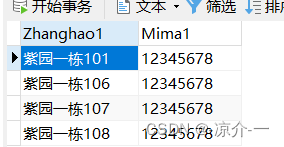
create table qinshizhang( Zhanghao1 CHAR(10) PRIMARY KEY, Mima1 CHAR(20) NOT null );4.4创建student表:
讯享网CREATE Table student( Xuehao CHAR(20) PRIMARY KEY, #学号 Name CHAR(10) NOT NULL, #姓名 Sex CHAR(5) NOT NULL, #性别 Specialistion CHAR(10) NOT NULL,#专业 Class CHAR(10) NOT NULL,#班级 Dormitory CHAR(10) NOT NULL,#宿舍号 Qinlou CHAR(10) NOT NULL,#寝楼 Phone CHAR(20)#电话 );
4.5创建baoxun表:
CREATE TABLE baoxun( Number1 int(2) NOT NULL AUTO_INCREMENT,#报修编号 Qinlou CHAR(10) NOT NULL,#寝楼 Dormitory CHAR(10) NOT NULL,#宿舍号 Time1 DATE ,#时间 Question char(100) NOT NULL,#问题 Situation char(10) DEFAULT '等待处理',#状况 PRIMARY KEY (Number1) USING BTREE, FOREIGN KEY (Qinlou) REFERENCES Suguan(zhanghao) );4.6创建存储过程my
讯享网delimiter $ create procedure my() begin alter table baoxun drop Number1; alter table baoxun add Number1 int(2) not null auto_increment primary key first; end $ delimiter ; 设置定时事件 show variables like '%event_sche%';-- 查看事件计划是否开启 set global event_scheduler=1; create event on1 on schedule every 1 second do call my();-- 创建定时事务
4.7另一种实现利用触发器实现当前时间
/*delimiter $ create procedure my(in id int) begin declare ti date default 0; set ti=curdate(); update baoxun set Time1=ti where Number1=id; end $ delimiter ; delimiter $ create trigger my1 after insert on baoxun for each row begin call my(new.Number1); end $ delimiter ; drop trigger if exists my; delimiter $ create trigger my2 after insert on baoxun for each row begin declare ti date default 0; set ti=curdate(); update baoxun set Time1=ti where Number1=new.Number1; end $ delimiter ; INSERT INTO baoxun(Qinlou,Dormitory,Question) VALUES ('紫园一栋', '107','门坏了'); */五、程序代码展示
5.1登录界面
讯享网package 学生宿舍管理系统; import java.awt.*; import javax.swing.*; import javax.swing.JComboBox; import java.sql.Connection; import java.sql.DriverManager; import java.sql.ResultSet; import java.sql.SQLException; import java.sql.Statement; import java.awt.event.ActionEvent; import java.awt.event.ActionListener; @SuppressWarnings("serial") public class 登录界面 extends JFrame implements ActionListener{ //添加输入框【用户名输入框】 JTextField user1 = new JTextField(20); //定义两个静态变量,提共账号和密码 public static String chaxu,pass1; String url = "jdbc:mysql://localhost:3306/sushesystem?useSSL=false&serverTimezone=UTC"; //添加下拉单 static JComboBox<Object> jc1 = new JComboBox<>(); //主方法 public static void main(String[] args) { 登录界面 a =new 登录界面(); a.界面(); } //定义界面方法 public void 界面() { //创建主界面框架“登录” JFrame jFrame = new JFrame("登录"); //设置窗口大小 jFrame.setSize(900,507); //设置布局管理为null jFrame.setLayout(null); //添加标签{学生宿舍管理系统} //创建一个标签并命名 JLabel textStudentManage = new JLabel("学生宿舍管理系统"); //设置颜色 textStudentManage.setForeground(new Color(0x0010FF)); //设置字体、大小 textStudentManage.setFont(new Font("微软雅黑", Font.PLAIN,30)); //设置标签的绝对位置 textStudentManage.setBounds(280,50,800,100); //向框架中添加组件 jFrame.add(textStudentManage); //添加标签【用户名】 JLabel textUser = new JLabel("用户名:"); textUser.setForeground(new Color(0xFF0000)); textUser.setFont(new Font("微软雅黑", Font.PLAIN,30)); textUser.setBounds(200,140,200,100); jFrame.add(textUser); //添加输入框【用户名输入框】 user1.setFont(new Font("微软雅黑", Font.PLAIN,18)); user1.setSelectedTextColor(new Color(0xFF0000)); user1.setBounds(330,170,280,40); jFrame.add(user1); //添加标签【密码】 JLabel textPassword = new JLabel("密 码 :"); textPassword.setForeground(new Color(0xFF0000)); textPassword.setFont(new Font("微软雅黑", Font.PLAIN,30)); textPassword.setBounds(200,200,200,100); jFrame.add(textPassword); //添加密码输入框【密码】 JPasswordField password = new JPasswordField(20); password.setBounds(330,230,280,40); jFrame.add(password); //添加下拉单 jc1.setBounds(380,280,150,30); jc1.addItem("宿管员"); jc1.addItem("寝室长"); jFrame.add(jc1); //添加按钮【登录】 JButton jButton = new JButton("登录"); jButton.setForeground(new Color(0x023BF6)); jButton.setBackground(new Color(0x38FF00)); jButton.setFont(new Font("微软雅黑", Font.PLAIN,20)); jButton.setBorderPainted(false); jButton.setBounds(300,330,100,50); jFrame.add(jButton); //添加按钮【注册】 JButton chongzhi = new JButton("重置"); chongzhi.setForeground(new Color(0x0029FF)); chongzhi.setBackground(new Color(0xECA871)); chongzhi.setFont(new Font("微软雅黑", Font.PLAIN,20)); chongzhi.setBorderPainted(false); chongzhi.setBounds(500,330,100,50); jFrame.add(chongzhi); //设置界面关闭,显示 jFrame.setDefaultCloseOperation(WindowConstants.EXIT_ON_CLOSE); jFrame.setResizable(false);//false设置窗口大小不可改变 jFrame.setLocationRelativeTo(null);//将窗口置于屏幕的中央 jFrame.setVisible(true);//设置可见 chongzhi.addActionListener(new ActionListener(){//为重置按钮添加监听事件 //同时清空name、password的数据 public void actionPerformed(ActionEvent arg0) { user1.setText(""); password.setText(""); } }); //设置登录按钮监听 jButton.addActionListener(new ActionListener(){ public void actionPerformed(ActionEvent arg0){ //获取用户输入的密码和账号,并赋值给静态变量 String name = user1.getText(); chaxu = name; String pass = password.getText(); pass1 = pass; //账号规范检测 if (0 == name.length()) { JOptionPane.showMessageDialog(null, "账号不能为空"); user1.grabFocus(); return; } if (0 == pass.length()) { JOptionPane.showMessageDialog(null, "密码不可为空!"); password.grabFocus(); return; } //双界面登录判断 if (jc1.getSelectedItem().toString().equals("宿管员")) { if (check(name, pass)) { JOptionPane.showMessageDialog(null, "登录成功"); jFrame.dispose(); //关闭当前界面 new 宿管员(); } else JOptionPane.showMessageDialog(null, "密码错误"); } if (jc1.getSelectedItem().toString().equals("寝室长")) { if (check(name, pass)) { JOptionPane.showMessageDialog(null, "登录成功"); jFrame.dispose(); new 寝室长(); } else JOptionPane.showMessageDialog(null, "密码错误"); } } }); } //重写由继承actionlistener得到的方法 @Override public void actionPerformed(ActionEvent e) { } //定义账号密码检查方法check,从数据库获取账号信息 public static boolean check(String name, String password){ try { //数据库加载 Class.forName("com.mysql.cj.jdbc.Driver"); System.out.println("Success loading Mysql Driver!"); } catch (ClassNotFoundException e) { e.printStackTrace(); } boolean result = false; try { //数据库信息定义和连接数据库 String url = "jdbc:mysql://localhost:3306/sushesystem?useSSL=false&serverTimezone=UTC"; String username = "root"; String passwords = "yu"; Connection c = DriverManager.getConnection(url, username, passwords); if (c != null) { System.out.println("数据库连接成功!"); } else { System.out.println("数据库连接失败!"); } Statement s = c.createStatement(); //上面的是为了建立数据而做驱动准备以及连接测试。 //账号登录判断,通过改变数据库查询代码来读取相应的表并验证账号、密码 if (jc1.getSelectedItem().toString().equals("宿管员")) { //当用户选择“超级管理员”身份登录时 String sql = "select * from suguan " + "where Zhanghao = '" + name + "' and Mima = '" //查询 + password + "'"; ResultSet rs = s.executeQuery(sql); while (rs.next()) { if (rs.getString("Zhanghao").equals(name) && rs.getString("Mima").equals(password)) { //如果用户输入的用户名和密码都和数据库中信息对得上。 result = true; //返回true } else { System.out.println(rs.getString("Zhanghao").equals(name)); System.out.println(rs.getString("Mima").equals(password)); return false; } } } else { if (jc1.getSelectedItem().toString().equals("寝室长")) { //当用户选择“供应商”身份登录时 String sql = "select * from qinshizhang " + "where Zhanghao1 = '" + name + "' and Mima1 = '" + password + "'"; ResultSet rs = s.executeQuery(sql); while (rs.next()) { if (rs.getString("Zhanghao1").equals(name) && rs.getString("Mima1").equals(password)) { result = true; // 如果用户名和密码都正确,那么就将result返回为true; } else { return false; } } } } c.close(); }catch (SQLException e2) { e2.printStackTrace(); } //返回验证结果 return result; } }
5.2寝室长
package 学生宿舍管理系统; import java.awt.Color; import java.awt.Dimension; import java.awt.Font; import java.awt.event.ActionEvent; import java.awt.event.ActionListener; import java.sql.Connection; import java.sql.PreparedStatement; import java.sql.ResultSet; import javax.swing.JButton; import javax.swing.JFrame; import javax.swing.JLabel; import javax.swing.JOptionPane; import javax.swing.JPanel; import javax.swing.JPasswordField; import javax.swing.JScrollPane; import javax.swing.JTabbedPane; import javax.swing.JTable; import javax.swing.JTextArea; import javax.swing.JTextField; public class 寝室长 extends JFrame{ JTabbedPane jbb = new JTabbedPane(JTabbedPane.TOP); Connection connection = new GetConnection().GetConnection(); JPanel 寝室人员,报修,修改密码; 登录界面 c = new 登录界面(); String a = c.chaxu;//"紫园一栋107";//c.chaxu; String pass1 = c.pass1;//"";//c.pass1; public 寝室长() { this.setTitle("寝室长界面"); this.setSize(800,600); this.setLayout(null); this.setLocation(400,400); this.setVisible(true); 寝室人员 = new JPanel(); 寝室人员.setSize(700,500); 报修 = new JPanel(); 报修.setSize(700,500); 报修.setLayout(null); 修改密码 = new JPanel(); 修改密码.setSize(700,500); 修改密码.setLayout(null); jbb.addTab("寝室人员", 寝室人员); jbb.addTab("报修", 报修); jbb.addTab("修改密码", 修改密码); this.setContentPane(jbb); this.寝室人员界面(); this.报修(); this.修改密码(); } public void 寝室人员界面() { JScrollPane scpDome = new JScrollPane(); scpDome.setPreferredSize(new Dimension(700, 400)); 寝室人员.add(scpDome); //Connection connection = new GetConnection().GetConnection(); String sql = "select * from student where Dormitory='"+a.substring(4,7)+"'and Qinlou='"+a.substring(0,4)+"'"; try { PreparedStatement state; ResultSet re; state=connection.prepareStatement(sql); re=state.executeQuery(); int count=0; while(re.next()) { count++; } re = state.executeQuery(); Object[][] info= new Object[count][8]; count = 0; while(re.next()) { info[count][0]=re.getString("Xuehao"); info[count][1]=re.getString("Name"); info[count][2]=re.getString("Sex"); info[count][3]=re.getString("Specialistion"); info[count][4]=re.getString("Class"); info[count][5]=re.getString("Dormitory"); info[count][6]=re.getString("Qinlou"); info[count][7]=re.getString("Phone"); count++; } String[] title = {"学号","姓名","性别","专业","班级","宿舍号","寝楼","联系电话"}; JTable tabDome = new JTable(info,title); //JTableHeader jth = tabDome.getTableHeader(); scpDome.getViewport().add(tabDome); // connection.close(); }catch (Exception e) { e.printStackTrace(); } } public void 报修() { JScrollPane scpDome1 = new JScrollPane(); scpDome1.setBounds(5,5,400,400); 报修.add(scpDome1); //Connection connection1 = new GetConnection().GetConnection(); String sql = "select * from baoxun where Dormitory='"+a.substring(4,7)+"'and Qinlou='"+a.substring(0,4)+"'"; try { PreparedStatement state; ResultSet re; state=connection.prepareStatement(sql); re=state.executeQuery(); int count=0; while(re.next()) { count++; } re = state.executeQuery(); Object[][] info= new Object[count][6]; count = 0; while(re.next()) { info[count][0]=Integer.valueOf(re.getString("Number1")); info[count][1]=re.getString("Qinlou"); info[count][2]=re.getString("Dormitory"); info[count][3]=re.getString("Time1"); info[count][4]=re.getString("Question"); info[count][5]=re.getString("Situation"); count++; } String[] title = {"报修编号","寝楼","宿舍号","时间","问题","状况"}; JTable tabDome = new JTable(info,title); //JTableHeader jth = tabDome.getTableHeader(); scpDome1.getViewport().add(tabDome); //connection.close(); }catch (Exception e) { e.printStackTrace(); } JLabel r1 = new JLabel("寝 楼:"); r1.setForeground(new Color(000)); r1.setFont(new Font("微软雅黑", Font.PLAIN,20)); r1.setBounds(430,10,100,100); 报修.add(r1); JTextField b1 = new JTextField(5); b1.setFont(new Font("微软雅黑", Font.PLAIN,18)); b1.setSelectedTextColor(new Color(0xFF0000)); b1.setBounds(500,40,180,40); 报修.add(b1); JLabel r2 = new JLabel("宿舍号:"); r2.setForeground(new Color(000)); r2.setFont(new Font("微软雅黑", Font.PLAIN,20)); r2.setBounds(430,72,100,100); 报修.add(r2); JTextField b2 = new JTextField(5); b2.setFont(new Font("微软雅黑", Font.PLAIN,18)); b2.setSelectedTextColor(new Color(0xFF0000)); b2.setBounds(500,100,180,40); 报修.add(b2); JLabel r3 = new JLabel("时 间:"); r3.setForeground(new Color(000)); r3.setFont(new Font("微软雅黑", Font.PLAIN,20)); r3.setBounds(430,134,100,100); 报修.add(r3); JTextField b3 = new JTextField(5); b3.setFont(new Font("微软雅黑", Font.PLAIN,18)); b3.setSelectedTextColor(new Color(0xFF0000)); b3.setBounds(500,170,180,40); 报修.add(b3); JLabel r4 = new JLabel("问 题:"); r4.setForeground(new Color(000)); r4.setFont(new Font("微软雅黑", Font.PLAIN,20)); r4.setBounds(430,196,100,100); 报修.add(r4); JTextArea b4 = new JTextArea(); b4.setFont(new Font("微软雅黑", Font.PLAIN,18)); b4.setSelectedTextColor(new Color(0xFF0000)); b4.setBounds(500,230,180,100); 报修.add(b4); JButton j1 = new JButton("报 修"); j1.setForeground(new Color(128)); j1.setBackground(new Color(225,225,255)); j1.setFont(new Font("微软雅黑", Font.PLAIN,20)); j1.setBorderPainted(false); j1.setBounds(530,360,120,40); 报修.add(j1); j1.addActionListener(new ActionListener(){ public void actionPerformed(ActionEvent arg0){ String a1 = b1.getText(); String a2 = b2.getText(); String a3 = b3.getText(); String a4 = b4.getText(); b1.setText(""); b2.setText(""); b3.setText(""); b4.setText(""); if(a1.equals(a.substring(0,4))&& a2.equals(a.substring(4,7))) { //Connection connection2 = new GetConnection().GetConnection(); String sql = "insert into baoxun(Qinlou,Dormitory,Time1,Question) values('"+a1+"','"+a2+"','"+a3+"','"+a4+"');"; try { PreparedStatement state; state=(PreparedStatement)connection.prepareStatement(sql); state.executeUpdate(); JOptionPane.showMessageDialog(null, "报修成功!"); }catch (Exception e) { JOptionPane.showMessageDialog(null, "报修失败!"); System.out.println("报修失败"); e.printStackTrace(); }finally { 报修.remove(scpDome1); JScrollPane scpDome1 = new JScrollPane(); scpDome1.setBounds(5,5,400,400); 报修.add(scpDome1); //Connection connection1 = new GetConnection().GetConnection(); String sql1 = "select * from baoxun where Dormitory='"+a.substring(4,7)+"'and Qinlou='"+a.substring(0,4)+"'"; try { PreparedStatement state; ResultSet re; state=connection.prepareStatement(sql1); re=state.executeQuery(); int count=0; while(re.next()) { count++; } re = state.executeQuery(); Object[][] info= new Object[count][6]; count = 0; while(re.next()) { info[count][0]=Integer.valueOf(re.getString("Number1")); info[count][1]=re.getString("Qinlou"); info[count][2]=re.getString("Dormitory"); info[count][3]=re.getString("Time1"); info[count][4]=re.getString("Question"); info[count][5]=re.getString("Situation"); count++; } String[] title = {"报修编号","寝楼","宿舍号","时间","问题","状况"}; JTable tabDome = new JTable(info,title); //JTableHeader jth = tabDome.getTableHeader(); scpDome1.getViewport().add(tabDome); //connection.close(); }catch (Exception e) { e.printStackTrace(); } } } else { JOptionPane.showMessageDialog(null, "输入有误!"); } } }); } public void 修改密码() { JLabel title = new JLabel("修 改 密 码"); title.setForeground(new Color(000)); title.setFont(new Font("华文行楷", Font.PLAIN,40)); title.setBounds(300,20,200,200); 修改密码.add(title); JLabel x1 = new JLabel("原密码:"); x1.setForeground(new Color(000)); x1.setFont(new Font("微软雅黑", Font.PLAIN,30)); x1.setBounds(200,140,100,100); 修改密码.add(x1); JPasswordField password1 = new JPasswordField(20); password1.setBounds(330,177,250,30); 修改密码.add(password1); // JTextField y1 = new JTextField(5); // y1.setFont(new Font("微软雅黑", Font.PLAIN,18)); // y1.setSelectedTextColor(new Color(0xFF0000)); // y1.setBounds(340,170,250,40); // 修改密码.add(y1); JLabel x2 = new JLabel("新密码:"); x2.setForeground(new Color(000)); x2.setFont(new Font("微软雅黑", Font.PLAIN,30)); x2.setBounds(200,200,100,100); 修改密码.add(x2); JPasswordField password2 = new JPasswordField(20); password2.setBounds(330,238,250,30); 修改密码.add(password2); // JTextField y2 = new JTextField(5); // y2.setFont(new Font("微软雅黑", Font.PLAIN,18)); // y2.setSelectedTextColor(new Color(0xFF0000)); // y2.setBounds(340,230,250,40); // 修改密码.add(y2); JButton jb1 = new JButton("修 改"); jb1.setForeground(new Color()); jb1.setBackground(new Color()); jb1.setFont(new Font("华文行楷", Font.PLAIN,30)); jb1.setBorderPainted(false); jb1.setBounds(360,300,130,40); 修改密码.add(jb1); jb1.addActionListener(new ActionListener(){ public void actionPerformed(ActionEvent arg0){ String a1 = password1.getText(); String a2 = password2.getText(); password1.setText(""); password2.setText(""); if(a1.equals(pass1)) { //Connection connection2 = new GetConnection().GetConnection(); String sql = "update qinshizhang set Mima1 = '"+a2+"' where Zhanghao1 = '"+a+"'"; try { PreparedStatement state; state=(PreparedStatement)connection.prepareStatement(sql); state.executeUpdate(); JOptionPane.showMessageDialog(null, "修改成功,请重新登录本系统!"); connection.close(); }catch (Exception e) { JOptionPane.showMessageDialog(null, "修改失败!"); System.out.println("修改失败"); e.printStackTrace(); }finally { System.exit(0); } } else { JOptionPane.showMessageDialog(null, "原密码输入有误!"); } } }); } public static void main(String[] args) { new 寝室长(); } } 5.3宿管员
讯享网package 学生宿舍管理系统; import java.awt.Color; import java.awt.Dimension; import java.awt.Font; import java.awt.event.ActionEvent; import java.awt.event.ActionListener; import java.sql.Connection; import java.sql.PreparedStatement; import java.sql.ResultSet; import javax.swing.JButton; import javax.swing.JComboBox; import javax.swing.JFrame; import javax.swing.JLabel; import javax.swing.JMenu; import javax.swing.JMenuBar; import javax.swing.JOptionPane; import javax.swing.JPanel; import javax.swing.JPasswordField; import javax.swing.JScrollPane; import javax.swing.JTabbedPane; import javax.swing.JTable; import javax.swing.JTextField; public class 宿管员 extends JFrame{ JLabel jlabel=new JLabel(); JScrollPane scpDome = new JScrollPane(); JTabbedPane jbb = new JTabbedPane(JTabbedPane.LEFT); Connection connection = new GetConnection().GetConnection(); JPanel 查看学生住宿信息,管理学生住宿信息,处理报修信息,管理学生账号,修改密码; 登录界面 c = new 登录界面(); String a = c.chaxu;//"紫园一栋";//c.chaxu; String pass1 = c.pass1;//"";//c.pass1; public 宿管员() { this.setTitle("宿管员界面"); this.setSize(800,800); this.setLayout(null); this.setLocation(350,50); this.setVisible(true); 查看学生住宿信息 = new JPanel(); 查看学生住宿信息.setSize(750,750); 查看学生住宿信息.setLayout(null); 管理学生住宿信息 = new JPanel(); 管理学生住宿信息.setSize(750,750); 管理学生住宿信息.setLayout(null); 处理报修信息 = new JPanel(); 处理报修信息.setSize(750,750); 处理报修信息.setLayout(null); 管理学生账号 = new JPanel(); 管理学生账号.setSize(750,750); 管理学生账号.setLayout(null); 修改密码 = new JPanel(); 修改密码.setSize(700,500); 修改密码.setLayout(null); jbb.addTab("查看学生住宿信息", 查看学生住宿信息); jbb.addTab("管理学生住宿信息", 管理学生住宿信息); jbb.addTab("处理报修信息", 处理报修信息); jbb.addTab("管理学生账号", 管理学生账号); jbb.addTab("修改密码", 修改密码); this.setContentPane(jbb); this.查看学生住宿信息(); this.管理学生住宿信息(); this.处理报修信息(); this.管理学生账号(); this.修改密码(); } public void 查看学生住宿信息() { JLabel title1 = new JLabel("查看学生住宿信息"); title1.setForeground(new Color(000)); title1.setFont(new Font("华文行楷", Font.PLAIN,30)); title1.setBounds(186,10,326,40); 查看学生住宿信息.add(title1); JButton jbt1 = new JButton("搜索"); jbt1.setForeground(new Color()); jbt1.setBackground(new Color()); jbt1.setFont(new Font("华文行楷", Font.PLAIN,13)); jbt1.setBorderPainted(false); jbt1.setBounds(165,65,60,18); 查看学生住宿信息.add(jbt1); JTextField b1 = new JTextField(25); b1.setFont(new Font("微软雅黑", Font.PLAIN,15)); b1.setSelectedTextColor(new Color(0xFF0000)); b1.setBounds(5,65,160,20); 查看学生住宿信息.add(b1); //JScrollPane scpDome = new JScrollPane(); scpDome.setBounds(5,85,650,600); 查看学生住宿信息.add(scpDome); //Connection connection = new GetConnection().GetConnection(); String sql = "select * from student where Qinlou='"+a+"'"; try { PreparedStatement state; ResultSet re; state=connection.prepareStatement(sql); re=state.executeQuery(); int count=0; while(re.next()) { count++; } re = state.executeQuery(); Object[][] info= new Object[count][8]; count = 0; while(re.next()) { info[count][0]=re.getString("Xuehao"); info[count][1]=re.getString("Name"); info[count][2]=re.getString("Sex"); info[count][3]=re.getString("Specialistion"); info[count][4]=re.getString("Class"); info[count][5]=re.getString("Dormitory"); info[count][6]=re.getString("Qinlou"); info[count][7]=re.getString("Phone"); count++; } String[] title = {"学号","姓名","性别","专业","班级","宿舍号","寝楼","联系电话"}; JTable tabDome = new JTable(info,title); //JTableHeader jth = tabDome.getTableHeader(); scpDome.getViewport().add(tabDome); // connection.close(); }catch (Exception e) { e.printStackTrace(); } jbt1.addActionListener(new ActionListener(){ public void actionPerformed(ActionEvent arg0){ String a1 = b1.getText(); b1.setText(""); if(a1.equals("")) { 查看学生住宿信息.remove(scpDome); //JScrollPane scpDome = new JScrollPane(); scpDome.setBounds(5,85,650,600); 查看学生住宿信息.add(scpDome); //Connection connection = new GetConnection().GetConnection(); String sql2 = "select * from student where Qinlou='"+a+"'"; try { PreparedStatement state; ResultSet re; state=connection.prepareStatement(sql2); re=state.executeQuery(); int count=0; while(re.next()) { count++; } re = state.executeQuery(); Object[][] info= new Object[count][8]; count = 0; while(re.next()) { info[count][0]=re.getString("Xuehao"); info[count][1]=re.getString("Name"); info[count][2]=re.getString("Sex"); info[count][3]=re.getString("Specialistion"); info[count][4]=re.getString("Class"); info[count][5]=re.getString("Dormitory"); info[count][6]=re.getString("Qinlou"); info[count][7]=re.getString("Phone"); count++; } String[] title = {"学号","姓名","性别","专业","班级","宿舍号","寝楼","联系电话"}; JTable tabDome = new JTable(info,title); //JTableHeader jth = tabDome.getTableHeader(); scpDome.getViewport().add(tabDome); // connection.close(); }catch (Exception e) { e.printStackTrace(); } }else { //Connection connection2 = new GetConnection().GetConnection(); scpDome.setBounds(5,85,650,600); 查看学生住宿信息.add(scpDome); //Connection connection = new GetConnection().GetConnection(); String sql1 = "select * from student where Xuehao like '%"+a1+"%'"; try { PreparedStatement state; ResultSet re; state=connection.prepareStatement(sql1); re=state.executeQuery(); int count=0; while(re.next()) { count++; } if(count==0) { JOptionPane.showMessageDialog(null, "搜索失败,该学号不存在!"); System.out.println("搜索失败,该学号不存在!"); } re = state.executeQuery(); Object[][] info= new Object[count][8]; count = 0; while(re.next()) { info[count][0]=re.getString("Xuehao"); info[count][1]=re.getString("Name"); info[count][2]=re.getString("Sex"); info[count][3]=re.getString("Specialistion"); info[count][4]=re.getString("Class"); info[count][5]=re.getString("Dormitory"); info[count][6]=re.getString("Qinlou"); info[count][7]=re.getString("Phone"); count++; } String[] title = {"学号","姓名","性别","专业","班级","宿舍号","寝楼","联系电话"}; JTable tabDome = new JTable(info,title); //JTableHeader jth = tabDome.getTableHeader(); scpDome.getViewport().add(tabDome); // connection.close(); }catch (Exception e) { JOptionPane.showMessageDialog(null, "搜索失败,该学号不存在!"); System.out.println("搜索失败,该学号不存在!"); e.printStackTrace(); } } } }); } public void 管理学生住宿信息() { JLabel title1 = new JLabel("添加学生住宿信息"); title1.setForeground(new Color(000)); title1.setFont(new Font("华文行楷", Font.PLAIN,30)); title1.setBounds(186,20,326,40); 管理学生住宿信息.add(title1); JLabel r1 = new JLabel("学 号:"); r1.setForeground(new Color(000)); r1.setFont(new Font("微软雅黑", Font.PLAIN,20)); r1.setBounds(77,50,100,100); 管理学生住宿信息.add(r1); JTextField b1 = new JTextField(25); b1.setFont(new Font("微软雅黑", Font.PLAIN,15)); b1.setSelectedTextColor(new Color(0xFF0000)); b1.setBounds(140,90,160,30); 管理学生住宿信息.add(b1); JLabel r2 = new JLabel("姓 名:"); r2.setForeground(new Color(000)); r2.setFont(new Font("微软雅黑", Font.PLAIN,20)); r2.setBounds(350,50,100,100); 管理学生住宿信息.add(r2); JTextField b2 = new JTextField(25); b2.setFont(new Font("微软雅黑", Font.PLAIN,15)); b2.setSelectedTextColor(new Color(0xFF0000)); b2.setBounds(440,90,160,30); 管理学生住宿信息.add(b2); JLabel r3 = new JLabel("性 别:"); r3.setForeground(new Color(000)); r3.setFont(new Font("微软雅黑", Font.PLAIN,20)); r3.setBounds(77,100,100,100); 管理学生住宿信息.add(r3); JTextField b3 = new JTextField(25); b3.setFont(new Font("微软雅黑", Font.PLAIN,15)); b3.setSelectedTextColor(new Color(0xFF0000)); b3.setBounds(140,135,160,30); 管理学生住宿信息.add(b3); JLabel r4 = new JLabel("专 业:"); r4.setForeground(new Color(000)); r4.setFont(new Font("微软雅黑", Font.PLAIN,20)); r4.setBounds(350,100,100,100); 管理学生住宿信息.add(r4); JTextField b4 = new JTextField(25); b4.setFont(new Font("微软雅黑", Font.PLAIN,15)); b4.setSelectedTextColor(new Color(0xFF0000)); b4.setBounds(440,135,160,30); 管理学生住宿信息.add(b4); JLabel r5 = new JLabel("班 级:"); r5.setForeground(new Color(000)); r5.setFont(new Font("微软雅黑", Font.PLAIN,20)); r5.setBounds(77,150,100,100); 管理学生住宿信息.add(r5); JTextField b5 = new JTextField(25); b5.setFont(new Font("微软雅黑", Font.PLAIN,15)); b5.setSelectedTextColor(new Color(0xFF0000)); b5.setBounds(140,188,160,30); 管理学生住宿信息.add(b5); JLabel r6 = new JLabel("宿 舍 号:"); r6.setForeground(new Color(000)); r6.setFont(new Font("微软雅黑", Font.PLAIN,20)); r6.setBounds(350,150,100,100); 管理学生住宿信息.add(r6); JTextField b6 = new JTextField(25); b6.setFont(new Font("微软雅黑", Font.PLAIN,15)); b6.setSelectedTextColor(new Color(0xFF0000)); b6.setBounds(440,188,160,30); 管理学生住宿信息.add(b6); JLabel r7 = new JLabel("寝 楼:"); r7.setForeground(new Color(000)); r7.setFont(new Font("微软雅黑", Font.PLAIN,20)); r7.setBounds(77,200,100,100); 管理学生住宿信息.add(r7); JTextField b7 = new JTextField(25); b7.setFont(new Font("微软雅黑", Font.PLAIN,15)); b7.setSelectedTextColor(new Color(0xFF0000)); b7.setBounds(140,238,160,30); 管理学生住宿信息.add(b7); JLabel r8 = new JLabel("联系电话:"); r8.setForeground(new Color(000)); r8.setFont(new Font("微软雅黑", Font.PLAIN,20)); r8.setBounds(350,200,100,100); 管理学生住宿信息.add(r8); JTextField b8 = new JTextField(25); b8.setFont(new Font("微软雅黑", Font.PLAIN,15)); b8.setSelectedTextColor(new Color(0xFF0000)); b8.setBounds(440,238,160,30); 管理学生住宿信息.add(b8); JButton jbt1 = new JButton("添 加"); jbt1.setForeground(new Color()); jbt1.setBackground(new Color()); jbt1.setFont(new Font("华文行楷", Font.PLAIN,30)); jbt1.setBorderPainted(false); jbt1.setBounds(150,300,130,40); 管理学生住宿信息.add(jbt1); JButton jbt2 = new JButton("重 置"); jbt2.setForeground(new Color()); jbt2.setBackground(new Color()); jbt2.setFont(new Font("华文行楷", Font.PLAIN,30)); jbt2.setBorderPainted(false); jbt2.setBounds(370,300,130,40); 管理学生住宿信息.add(jbt2); jbt2.addActionListener(new ActionListener(){//为重置按钮添加监听事件 //同时清空name、password的数据 public void actionPerformed(ActionEvent arg0) { b1.setText(""); b2.setText(""); b3.setText(""); b4.setText(""); b5.setText(""); b6.setText(""); b7.setText(""); b8.setText(""); } }); jbt1.addActionListener(new ActionListener(){ public void actionPerformed(ActionEvent arg0){ String a1 = b1.getText(); String a2 = b2.getText(); String a3 = b3.getText(); String a4 = b4.getText(); String a5 = b5.getText(); String a6 = b6.getText(); String a7 = b7.getText(); String a8 = b8.getText(); if(a1!=null&& a2!=null && a3!=null&& a4!=null) { //Connection connection2 = new GetConnection().GetConnection(); String sql = "insert into student(Xuehao,Name,Sex,Specialistion,Class,Dormitory,Qinlou,Phone) values('"+a1+"','"+a2+"','"+a3+"','"+a4+"','"+a5+"','"+a6+"','"+a7+"','"+a8+"')"; try { PreparedStatement state; state=(PreparedStatement)connection.prepareStatement(sql); // int abc = Integer.valueOf(a8);; // state.setInt(1, abc); state.executeUpdate(); JOptionPane.showMessageDialog(null, "添加成功!"); }catch (Exception e) { JOptionPane.showMessageDialog(null, "添加失败,该学号已经存在!"); System.out.println("添加失败,该学号已经存在!"); e.printStackTrace(); }finally { 查看学生住宿信息.remove(scpDome); //JScrollPane scpDome = new JScrollPane(); scpDome.setBounds(5,85,650,600); 查看学生住宿信息.add(scpDome); //Connection connection = new GetConnection().GetConnection(); String sql1 = "select * from student where Qinlou='"+a+"'"; try { PreparedStatement state; ResultSet re; state=connection.prepareStatement(sql1); re=state.executeQuery(); int count=0; while(re.next()) { count++; } re = state.executeQuery(); Object[][] info= new Object[count][8]; count = 0; while(re.next()) { info[count][0]=re.getString("Xuehao"); info[count][1]=re.getString("Name"); info[count][2]=re.getString("Sex"); info[count][3]=re.getString("Specialistion"); info[count][4]=re.getString("Class"); info[count][5]=re.getString("Dormitory"); info[count][6]=re.getString("Qinlou"); info[count][7]=re.getString("Phone"); count++; } String[] title = {"学号","姓名","性别","专业","班级","宿舍号","寝楼","联系电话"}; JTable tabDome = new JTable(info,title); //JTableHeader jth = tabDome.getTableHeader(); scpDome.getViewport().add(tabDome); // connection.close(); }catch (Exception e) { e.printStackTrace(); } } } else { JOptionPane.showMessageDialog(null, "输入有误,请修改信息!"); } } }); JLabel title2 = new JLabel("删除学生住宿信息"); title2.setForeground(new Color(000)); title2.setFont(new Font("华文行楷", Font.PLAIN,30)); title2.setBounds(186,450,326,40); 管理学生住宿信息.add(title2); JLabel title3 = new JLabel("#(删除学生住宿信息只用提供学生的学号)"); title3.setForeground(new Color()); title3.setFont(new Font("华文行楷", Font.PLAIN,14)); title3.setBounds(260,480,326,40); 管理学生住宿信息.add(title3); JLabel x1 = new JLabel(" 学 号:"); x1.setForeground(new Color(000)); x1.setFont(new Font("微软雅黑", Font.PLAIN,20)); x1.setBounds(77,512,100,100); 管理学生住宿信息.add(x1); JTextField y1 = new JTextField(25); y1.setFont(new Font("微软雅黑", Font.PLAIN,15)); y1.setSelectedTextColor(new Color(0xFF0000)); y1.setBounds(160,550,170,30); 管理学生住宿信息.add(y1); JButton jbt3 = new JButton("删 除"); jbt3.setForeground(new Color()); jbt3.setBackground(new Color()); jbt3.setFont(new Font("华文行楷", Font.PLAIN,30)); jbt3.setBorderPainted(false); jbt3.setBounds(410,545,130,40); 管理学生住宿信息.add(jbt3); jbt3.addActionListener(new ActionListener(){ public void actionPerformed(ActionEvent arg0){ String a1 = y1.getText(); y1.setText(""); if(a1!=null) { //Connection connection2 = new GetConnection().GetConnection(); String sql = "delete from student"+ " where Xuehao = '"+a1+"'"; try { PreparedStatement state; state=(PreparedStatement)connection.prepareStatement(sql); // int abc = Integer.valueOf(a8);; // state.setInt(1, abc); state.executeUpdate(); JOptionPane.showMessageDialog(null, "删除成功!"); }catch (Exception e) { JOptionPane.showMessageDialog(null, "删除失败,该学号不存在!"); System.out.println("删除失败,该学号不存在!"); e.printStackTrace(); }finally { 查看学生住宿信息.remove(scpDome); //JScrollPane scpDome = new JScrollPane(); scpDome.setBounds(5,5,650,600); 查看学生住宿信息.add(scpDome); //Connection connection = new GetConnection().GetConnection(); String sql1 = "select * from student where Qinlou='"+a+"'"; try { PreparedStatement state; ResultSet re; state=connection.prepareStatement(sql1); re=state.executeQuery(); int count=0; while(re.next()) { count++; } re = state.executeQuery(); Object[][] info= new Object[count][8]; count = 0; while(re.next()) { info[count][0]=re.getString("Xuehao"); info[count][1]=re.getString("Name"); info[count][2]=re.getString("Sex"); info[count][3]=re.getString("Specialistion"); info[count][4]=re.getString("Class"); info[count][5]=re.getString("Dormitory"); info[count][6]=re.getString("Qinlou"); info[count][7]=re.getString("Phone"); count++; } String[] title = {"学号","姓名","性别","专业","班级","宿舍号","寝楼","联系电话"}; JTable tabDome = new JTable(info,title); //JTableHeader jth = tabDome.getTableHeader(); scpDome.getViewport().add(tabDome); // connection.close(); }catch (Exception e) { e.printStackTrace(); } } } else { JOptionPane.showMessageDialog(null, "输入有误,学号不能为空!"); } } }); } public void 处理报修信息() { JLabel title1 = new JLabel("处理报修信息"); title1.setForeground(new Color(000)); title1.setFont(new Font("华文行楷", Font.PLAIN,30)); title1.setBounds(186,10,326,40); 处理报修信息.add(title1); JScrollPane scpDome1 = new JScrollPane(); scpDome1.setBounds(5,80,400,550); 处理报修信息.add(scpDome1); //Connection connection1 = new GetConnection().GetConnection(); String sql = "select * from baoxun where Qinlou='"+a+"'"; try { PreparedStatement state; ResultSet re; state=connection.prepareStatement(sql); re=state.executeQuery(); int count=0; while(re.next()) { count++; } re = state.executeQuery(); Object[][] info= new Object[count][6]; count = 0; while(re.next()) { info[count][0]=Integer.valueOf(re.getString("Number1")); info[count][1]=re.getString("Qinlou"); info[count][2]=re.getString("Dormitory"); info[count][3]=re.getString("Time1"); info[count][4]=re.getString("Question"); info[count][5]=re.getString("Situation"); count++; } String[] title = {"报修编号","寝楼","宿舍号","时间","问题","状况"}; JTable tabDome = new JTable(info,title); //JTableHeader jth = tabDome.getTableHeader(); scpDome1.getViewport().add(tabDome); //connection.close(); }catch (Exception e) { e.printStackTrace(); } JLabel title2 = new JLabel("处 理"); title2.setForeground(new Color()); title2.setFont(new Font("华文行楷", Font.PLAIN,30)); title2.setBounds(480,180,326,40); 处理报修信息.add(title2); JLabel r1 = new JLabel("处理序号:"); r1.setForeground(new Color(000)); r1.setFont(new Font("微软雅黑", Font.PLAIN,20)); r1.setBounds(410,200,100,100); 处理报修信息.add(r1); JTextField b1 = new JTextField(25); b1.setFont(new Font("微软雅黑", Font.PLAIN,15)); b1.setSelectedTextColor(new Color(0xFF0000)); b1.setBounds(500,238,100,30); 处理报修信息.add(b1); JLabel r2 = new JLabel("处理状态:"); r2.setForeground(new Color(000)); r2.setFont(new Font("微软雅黑", Font.PLAIN,20)); r2.setBounds(410,254,100,100); 处理报修信息.add(r2); JComboBox<Object> jc2 = new JComboBox<>(); jc2.setBounds(500,290,100,30); jc2.addItem("等待处理"); jc2.addItem("正在处理"); jc2.addItem("已处理"); 处理报修信息.add(jc2); JButton jb1 = new JButton("处 理"); jb1.setForeground(new Color()); jb1.setBackground(new Color()); jb1.setFont(new Font("华文行楷", Font.PLAIN,30)); jb1.setBorderPainted(false); jb1.setBounds(450,360,130,40); 处理报修信息.add(jb1); jb1.addActionListener(new ActionListener(){ public void actionPerformed(ActionEvent arg0){ String a1 = b1.getText(); String a2 = jc2.getSelectedItem().toString(); b1.setText(""); //Connection connection2 = new GetConnection().GetConnection(); String sql1 = "update baoxun set Situation = '"+a2+"' where Number1= ?"; try { PreparedStatement state; state=(PreparedStatement)connection.prepareStatement(sql1); int z = Integer.parseInt(a1); state.setInt(1, z); state.executeUpdate(); JOptionPane.showMessageDialog(null, "修改成功!"); //connection.close(); }catch (Exception e) { JOptionPane.showMessageDialog(null, "你输入的编号有问题,请重新输入!"); System.out.println("修改失败"); e.printStackTrace(); }finally { 处理报修信息.remove(scpDome1); JScrollPane scpDome1 = new JScrollPane(); scpDome1.setBounds(5,80,400,550); 处理报修信息.add(scpDome1); //Connection connection1 = new GetConnection().GetConnection(); String sql2 = "select * from baoxun where Qinlou='"+a+"'"; try { PreparedStatement state; ResultSet re; state=connection.prepareStatement(sql2); re=state.executeQuery(); int count=0; while(re.next()) { count++; } re = state.executeQuery(); Object[][] info= new Object[count][6]; count = 0; while(re.next()) { info[count][0]=Integer.valueOf(re.getString("Number1")); info[count][1]=re.getString("Qinlou"); info[count][2]=re.getString("Dormitory"); info[count][3]=re.getString("Time1"); info[count][4]=re.getString("Question"); info[count][5]=re.getString("Situation"); count++; } String[] title = {"报修编号","寝楼","宿舍号","时间","问题","状况"}; JTable tabDome = new JTable(info,title); //JTableHeader jth = tabDome.getTableHeader(); scpDome1.getViewport().add(tabDome); //connection.close(); }catch (Exception e) { e.printStackTrace(); } } } }); } public void 管理学生账号() { JLabel title1 = new JLabel("管理学生账号"); title1.setForeground(new Color(000)); title1.setFont(new Font("华文行楷", Font.PLAIN,30)); title1.setBounds(186,10,326,40); 管理学生账号.add(title1); JScrollPane scpDome1 = new JScrollPane(); scpDome1.setBounds(5,80,320,550); 管理学生账号.add(scpDome1); //Connection connection1 = new GetConnection().GetConnection(); String sql = "select * from qinshizhang "; try { PreparedStatement state; ResultSet re; state=connection.prepareStatement(sql); re=state.executeQuery(); int count=0; while(re.next()) { count++; } re = state.executeQuery(); Object[][] info= new Object[count][2]; count = 0; while(re.next()) { info[count][0]=re.getString("Zhanghao1"); info[count][1]=re.getString("Mima1"); count++; } String[] title = {"账号","密码"}; JTable tabDome = new JTable(info,title); //JTableHeader jth = tabDome.getTableHeader(); scpDome1.getViewport().add(tabDome); //connection.close(); }catch (Exception e) { e.printStackTrace(); } JLabel title2 = new JLabel("管理账号"); title2.setForeground(new Color()); title2.setFont(new Font("华文行楷", Font.PLAIN,30)); title2.setBounds(440,80,326,40); 管理学生账号.add(title2); JLabel r1 = new JLabel(" 账 号:"); r1.setForeground(new Color(000)); r1.setFont(new Font("微软雅黑", Font.PLAIN,20)); r1.setBounds(370,120,100,100); 管理学生账号.add(r1); JTextField b1 = new JTextField(25); b1.setFont(new Font("微软雅黑", Font.PLAIN,15)); b1.setSelectedTextColor(new Color(0xFF0000)); b1.setBounds(460,158,150,30); 管理学生账号.add(b1); JLabel r2 = new JLabel(" 密 码:"); r2.setForeground(new Color(000)); r2.setFont(new Font("微软雅黑", Font.PLAIN,20)); r2.setBounds(370,180,100,100); 管理学生账号.add(r2); JTextField b2 = new JTextField(25); b2.setFont(new Font("微软雅黑", Font.PLAIN,15)); b2.setSelectedTextColor(new Color(0xFF0000)); b2.setBounds(460,215,150,30); 管理学生账号.add(b2); JButton jb1 = new JButton("添加"); jb1.setForeground(new Color()); jb1.setBackground(new Color()); jb1.setFont(new Font("华文行楷", Font.PLAIN,20)); jb1.setBorderPainted(false); jb1.setBounds(380,280,80,40); 管理学生账号.add(jb1); JButton jb2 = new JButton("删除"); jb2.setForeground(new Color()); jb2.setBackground(new Color()); jb2.setFont(new Font("华文行楷", Font.PLAIN,20)); jb2.setBorderPainted(false); jb2.setBounds(530,280,80,40); 管理学生账号.add(jb2); jb1.addActionListener(new ActionListener(){ public void actionPerformed(ActionEvent arg0){ String a1 = b1.getText(); String a2 = b2.getText(); b1.setText(""); b2.setText(""); //Connection connection2 = new GetConnection().GetConnection(); String sql = "insert into qinshizhang(Zhanghao1,Mima1) values('"+a1+"','"+a2+"')"; try { PreparedStatement state; state=(PreparedStatement)connection.prepareStatement(sql); // int abc = Integer.valueOf(a8);; // state.setInt(1, abc); state.executeUpdate(); JOptionPane.showMessageDialog(null, "添加成功!"); }catch (Exception e) { JOptionPane.showMessageDialog(null, "添加失败,该账号已经存在!"); System.out.println("添加失败,该账号已经存在!"); e.printStackTrace(); }finally { 管理学生账号.remove(scpDome1); JScrollPane scpDome1 = new JScrollPane(); scpDome1.setBounds(5,80,320,550); 管理学生账号.add(scpDome1); //Connection connection1 = new GetConnection().GetConnection(); String sql1 = "select * from qinshizhang "; try { PreparedStatement state; ResultSet re; state=connection.prepareStatement(sql1); re=state.executeQuery(); int count=0; while(re.next()) { count++; } re = state.executeQuery(); Object[][] info= new Object[count][2]; count = 0; while(re.next()) { info[count][0]=re.getString("Zhanghao1"); info[count][1]=re.getString("Mima1"); count++; } String[] title = {"账号","密码"}; JTable tabDome = new JTable(info,title); //JTableHeader jth = tabDome.getTableHeader(); scpDome1.getViewport().add(tabDome); //connection.close(); }catch (Exception e) { e.printStackTrace(); } } } }); jb2.addActionListener(new ActionListener(){ public void actionPerformed(ActionEvent arg0){ String a1 = b1.getText(); //String a2 = b2.getText(); b1.setText(""); b2.setText(""); //Connection connection2 = new GetConnection().GetConnection(); String sql2 = "delete from qinshizhang where Zhanghao1='"+a1+"'"; try { PreparedStatement state; state=(PreparedStatement)connection.prepareStatement(sql2); // int abc = Integer.valueOf(a8);; // state.setInt(1, abc); state.executeUpdate(); JOptionPane.showMessageDialog(null, "删除成功!"); }catch (Exception e) { JOptionPane.showMessageDialog(null, "删除失败,该账号不存在!"); System.out.println("删除失败,该账号不存在!"); e.printStackTrace(); }finally { 管理学生账号.remove(scpDome1); JScrollPane scpDome1 = new JScrollPane(); scpDome1.setBounds(5,80,320,550); 管理学生账号.add(scpDome1); //Connection connection1 = new GetConnection().GetConnection(); String sql1 = "select * from qinshizhang "; try { PreparedStatement state; ResultSet re; state=connection.prepareStatement(sql1); re=state.executeQuery(); int count=0; while(re.next()) { count++; } re = state.executeQuery(); Object[][] info= new Object[count][2]; count = 0; while(re.next()) { info[count][0]=re.getString("Zhanghao1"); info[count][1]=re.getString("Mima1"); count++; } String[] title = {"账号","密码"}; JTable tabDome = new JTable(info,title); //JTableHeader jth = tabDome.getTableHeader(); scpDome1.getViewport().add(tabDome); //connection.close(); }catch (Exception e) { e.printStackTrace(); } } } }); } public void 修改密码() { JLabel title = new JLabel("修 改 密 码"); title.setForeground(new Color(000)); title.setFont(new Font("华文行楷", Font.PLAIN,40)); title.setBounds(240,20,200,200); 修改密码.add(title); JLabel x1 = new JLabel("原密码:"); x1.setForeground(new Color(000)); x1.setFont(new Font("微软雅黑", Font.PLAIN,30)); x1.setBounds(140,140,100,100); 修改密码.add(x1); JPasswordField password1 = new JPasswordField(20); password1.setBounds(270,177,250,30); 修改密码.add(password1); // JTextField y1 = new JTextField(5); // y1.setFont(new Font("微软雅黑", Font.PLAIN,18)); // y1.setSelectedTextColor(new Color(0xFF0000)); // y1.setBounds(340,170,250,40); // 修改密码.add(y1); JLabel x2 = new JLabel("新密码:"); x2.setForeground(new Color(000)); x2.setFont(new Font("微软雅黑", Font.PLAIN,30)); x2.setBounds(140,200,100,100); 修改密码.add(x2); JPasswordField password2 = new JPasswordField(20); password2.setBounds(270,238,250,30); 修改密码.add(password2); // JTextField y2 = new JTextField(5); // y2.setFont(new Font("微软雅黑", Font.PLAIN,18)); // y2.setSelectedTextColor(new Color(0xFF0000)); // y2.setBounds(340,230,250,40); // 修改密码.add(y2); JButton jb1 = new JButton("修 改"); jb1.setForeground(new Color()); jb1.setBackground(new Color()); jb1.setFont(new Font("华文行楷", Font.PLAIN,30)); jb1.setBorderPainted(false); jb1.setBounds(300,300,130,40); 修改密码.add(jb1); jb1.addActionListener(new ActionListener(){ public void actionPerformed(ActionEvent arg0){ String a1 = password1.getText(); String a2 = password2.getText(); password1.setText(""); password2.setText(""); if(a1.equals(pass1)) { //Connection connection2 = new GetConnection().GetConnection(); String sql = "update Suguan set Mima = '"+a2+"' where Zhanghao = '"+a+"'"; try { PreparedStatement state; state=(PreparedStatement)connection.prepareStatement(sql); state.executeUpdate(); JOptionPane.showMessageDialog(null, "修改成功,请重新登录本系统!"); connection.close(); }catch (Exception e) { JOptionPane.showMessageDialog(null, "修改失败!"); System.out.println("修改失败"); e.printStackTrace(); }finally { System.exit(0); } } else { JOptionPane.showMessageDialog(null, "原密码输入有误!"); } } }); } // public static void main(String [] args) // { // new 宿管员(); // } }
5.4数据库链接辅助类
package 学生宿舍管理系统; import java.sql.Connection; import java.sql.DriverManager; import java.sql.ResultSet; import java.sql.Statement; //连接到mySQL数据库 public class GetConnection { private Connection con=null; public Connection GetConnection(){ //数据库连接URL(url:就是一个jdbc的规范的约定) String url = "jdbc:mysql://localhost:3306/sushesystem?useSSL=false&serverTimezone=UTC"; String username = "root"; String passwords = "yu"; try { Class.forName("com.mysql.cj.jdbc.Driver");//加载数据库驱动 con= DriverManager.getConnection(url, username, passwords);//数据库连接用户名、密码 } catch (Exception e) { // TODO 自动生成的 catch 块 e.printStackTrace(); } return con;// 返回的con就是一个数据库连接对象,通过它你就可以对这个数据库做添删改查的动作 } }六、程序运行和数据库截图
- 登录界面
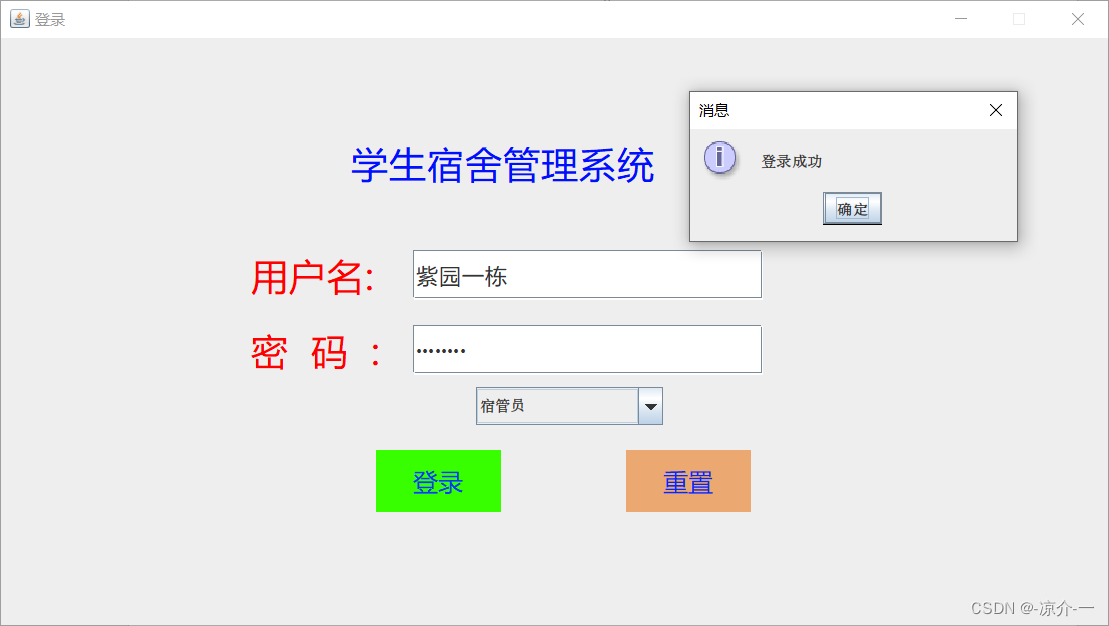
- 宿管员操作界面

- 管理学生信息(添加)
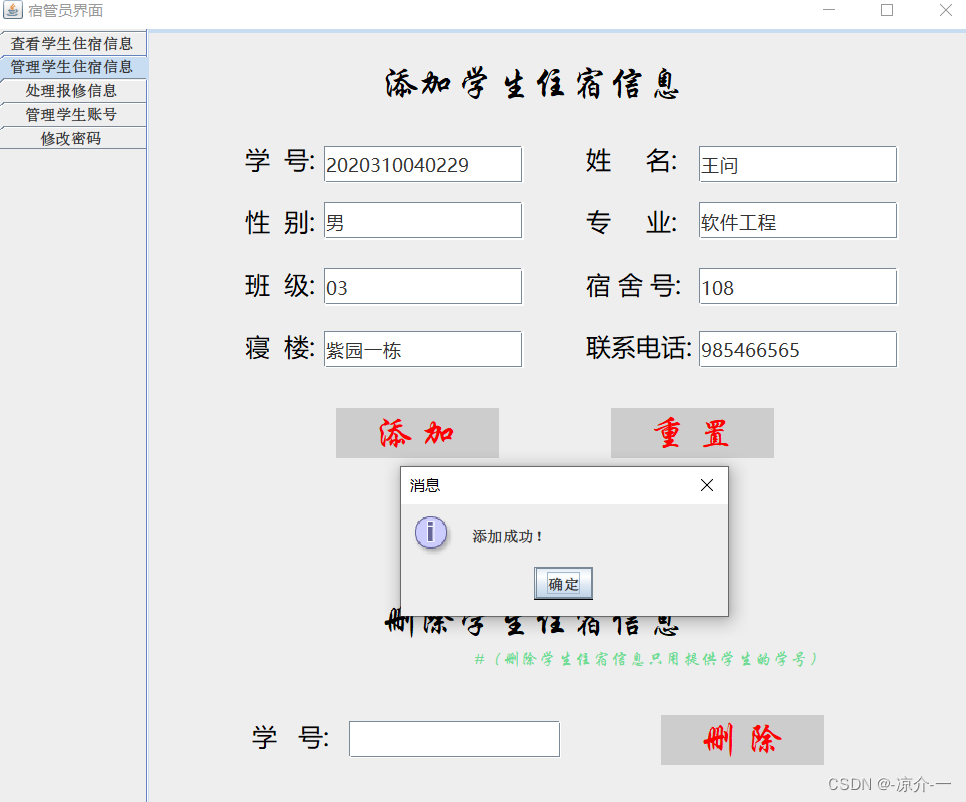
- 管理学生信息(删除)
- 处理报修信息
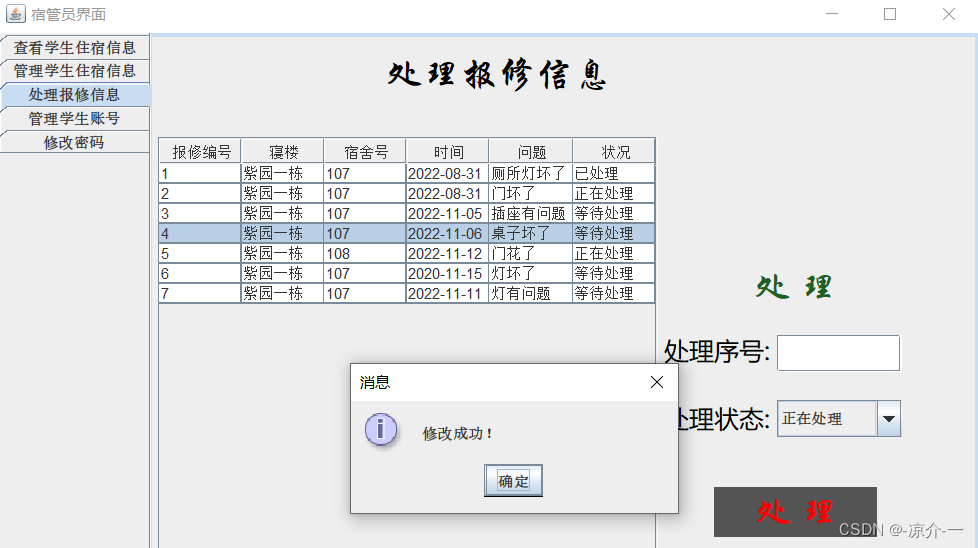
- 管理学生账号
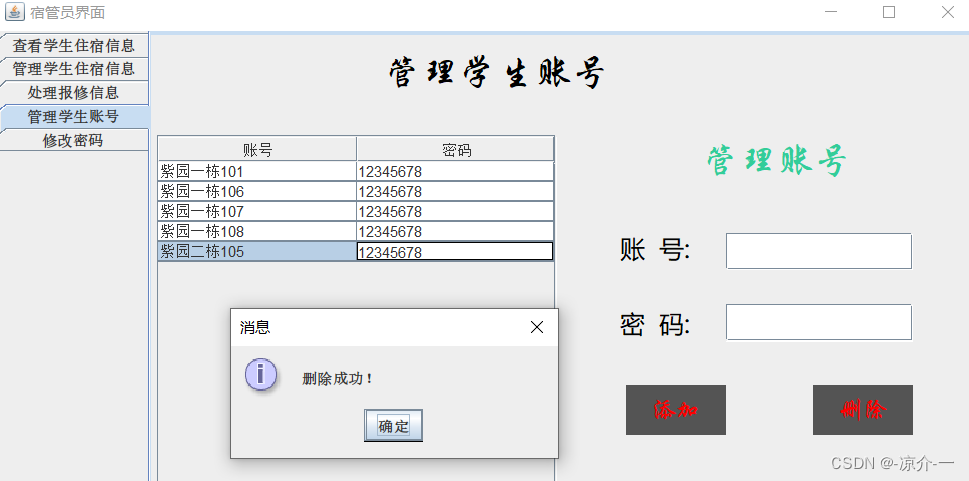
- 修改密码
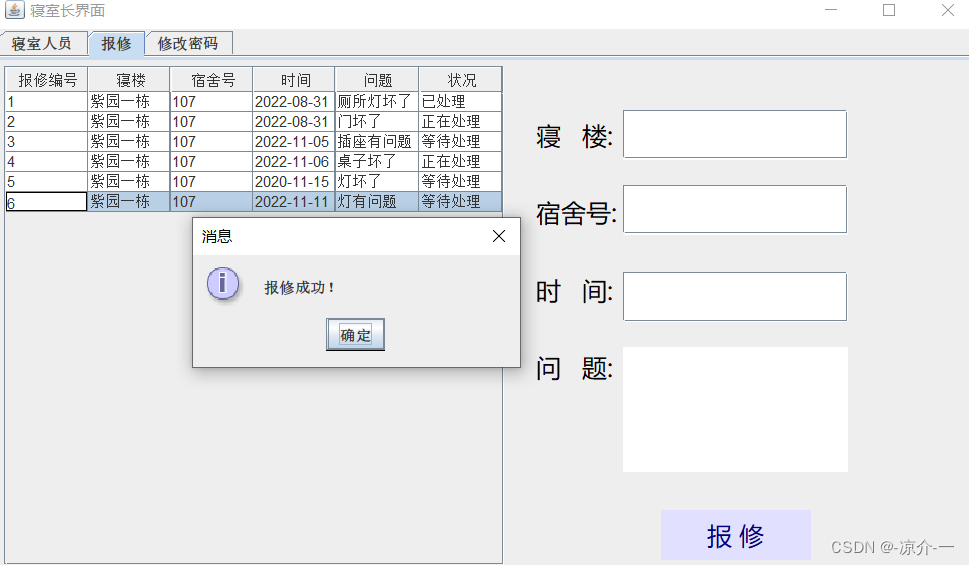
- 寝室人员查看

- 报修操作
- 寝室长账号表
- 宿管员账号

- 学生信息

- 报修信息

- 存储过程

六、源代码链接
链接:https://download.csdn.net/download/m0_/
版权声明:本文内容由互联网用户自发贡献,该文观点仅代表作者本人。本站仅提供信息存储空间服务,不拥有所有权,不承担相关法律责任。如发现本站有涉嫌侵权/违法违规的内容,请联系我们,一经查实,本站将立刻删除。
如需转载请保留出处:https://51itzy.com/kjqy/56204.html