
一.简介
Base64是网络上最常见的用于传输8Bit字节代码的编码方式之一,Base64并不是安全领域的加密算法,其实Base64只能算是一个编码算法,对数据内容进行编码来适合传输。标准Base64编码解码无需额外信息即完全可逆,即使你自己自定义字符集设计一种类Base64的编码方式用于数据加密,在多数场景下也较容易激活成功教程。Base64编码本质上是一种将二进制数据转成文本数据的方案。对于非二进制数据,是先将其转换成二进制形式,然后每连续6比特(2的6次方=64)计算其十进制值,根据该值在A--Z,a--z,0--9,+,/ 这64个字符中找到对应的字符,最终得到一个文本字符串。基本规则如下几点:
1.标准Base64只有64个字符(英文大小写、数字和+、/)以及用作后缀等号。
2.Base64是把3个字节变成4个可打印字符,所以Base64编码后的字符串一定能被4整除(不算用作后缀的等号)。
3.等号一定用作后缀,且数目一定是0个、1个或2个。这是因为如果原文长度不能被3整除,Base64要在后面添加\0凑齐3n位。为了正确还原,添加了几个\0就加上几个等号。显然添加等号的数目只能是0、1或2。
4.严格来说Base64不能算是一种加密,只能说是编码转换。
二.常用详解
1.Bitmap转Base64
public static String bitmapToBase64(Bitmap bitmap) { String result = ""; ByteArrayOutputStream bos = null; try { if (null != bitmap) { bos = new ByteArrayOutputStream(); //将bitmap放入字节数组流中 bitmap.compress(Bitmap.CompressFormat.JPEG, 90, bos); // 将bos流缓存在内存中的数据全部输出,清空缓存 bos.flush(); bos.close(); byte[] bitmapByte = bos.toByteArray(); result = Base64.encodeToString(bitmapByte, Base64.DEFAULT); } } catch (Exception e) { e.printStackTrace(); } finally { if (null != bos) { try { bos.close(); } catch (IOException e) { e.printStackTrace(); } } } return result; }讯享网
附:bitmap.compress(Bitmap.CompressFormat.JPEG, 90, bos);
这个是图像压缩的方法,三个参数分别是压缩后的图像的格式(png),图像显示的质量(0—100),100表示最高质量,图像处理的输出流(out)。
Bitmap.compress方法确实可以压缩图片,但压缩的是存储大小,即你放到disk上的大小。
2.Base64转Bitmap
讯享网public static Bitmap base64ToBitmap(String base64String) { byte[] bytes = Base64.decode(base64String, Base64.DEFAULT); Bitmap bitmap = BitmapFactory.decodeByteArray(bytes, 0, bytes.length); return bitmap; }
3.字符串进行Base64编码
public static String stringToBase64(String string){ String encodedString = Base64.encodeToString(string.getBytes(), Base64.DEFAULT); return encodedString; }4.字符串进行Base64解码
讯享网public static String base64ToString(String string){ String decodedString =new String(Base64.decode(string,Base64.DEFAULT)); return decodedString; }
5.对文件进行Base64编码
public static String fileToBase64(File file){ String encodedString=""; FileInputStream inputFile = null; try { inputFile = new FileInputStream(file); byte[] buffer = new byte[(int) file.length()]; inputFile.read(buffer); inputFile.close(); encodedString = Base64.encodeToString(buffer, Base64.DEFAULT); } catch (Exception e) { e.printStackTrace(); } return encodedString; }6.对文件进行Base64解码

讯享网public static void base64ToFile(String string,File file){ FileOutputStream fos = null; try { byte[] decodeBytes = Base64.decode(string.getBytes(), Base64.DEFAULT); fos = new FileOutputStream(file); fos.write(decodeBytes); fos.close(); } catch (Exception e) { e.printStackTrace(); } }
7.整个工具类
package com.wjn.okhttpmvpdemo.mode.utils; import android.graphics.Bitmap; import android.graphics.BitmapFactory; import android.util.Base64; import java.io.ByteArrayOutputStream; import java.io.File; import java.io.FileInputStream; import java.io.FileOutputStream; import java.io.IOException; / * Base64 加密解密 工具类 */ public class Base64Utils { / * Bitmap转Base64 * */ public static String bitmapToBase64(Bitmap bitmap) { String result = ""; ByteArrayOutputStream bos = null; try { if (null != bitmap) { bos = new ByteArrayOutputStream(); //将bitmap放入字节数组流中 bitmap.compress(Bitmap.CompressFormat.JPEG, 90, bos); // 将bos流缓存在内存中的数据全部输出,清空缓存 bos.flush(); bos.close(); byte[] bitmapByte = bos.toByteArray(); result = Base64.encodeToString(bitmapByte, Base64.DEFAULT); } } catch (Exception e) { e.printStackTrace(); } finally { if (null != bos) { try { bos.close(); } catch (IOException e) { e.printStackTrace(); } } } return result; } / * Base64转Bitmap * */ public static Bitmap base64ToBitmap(String base64String) { byte[] bytes = Base64.decode(base64String, Base64.DEFAULT); Bitmap bitmap = BitmapFactory.decodeByteArray(bytes, 0, bytes.length); return bitmap; } / * 字符串进行Base64编码 * */ public static String stringToBase64(String string){ String encodedString = Base64.encodeToString(string.getBytes(), Base64.DEFAULT); return encodedString; } / * 字符串进行Base64解码 * */ public static String base64ToString(String string){ String decodedString =new String(Base64.decode(string,Base64.DEFAULT)); return decodedString; } / * 对文件进行Base64编码 * */ public static String fileToBase64(File file){ String encodedString=""; FileInputStream inputFile = null; try { inputFile = new FileInputStream(file); byte[] buffer = new byte[(int) file.length()]; inputFile.read(buffer); inputFile.close(); encodedString = Base64.encodeToString(buffer, Base64.DEFAULT); } catch (Exception e) { e.printStackTrace(); } return encodedString; } / * 对文件进行Base64解码 * */ public static void base64ToFile(String string,File file){ FileOutputStream fos = null; try { byte[] decodeBytes = Base64.decode(string.getBytes(), Base64.DEFAULT); fos = new FileOutputStream(file); fos.write(decodeBytes); fos.close(); } catch (Exception e) { e.printStackTrace(); } } } 8.调用
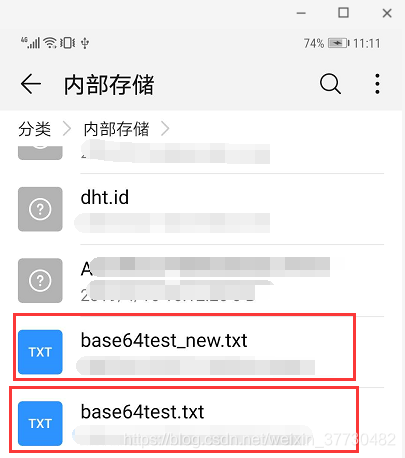
讯享网//Bitmap转Base64 Bitmap bitmap= BitmapFactory.decodeResource(getResources(),R.mipmap.zan); String result= Base64Utils.bitmapToBase64(bitmap); textView.setText(result); //Base64转Bitmap Bitmap bitmap1=Base64Utils.base64ToBitmap(result); imageView.setImageBitmap(bitmap1); //字符串使用Base64加密解密 String string="Base64加密解密......"; String encodedString = Base64Utils.stringToBase64(string); String decodedString =Base64Utils.base64ToString(encodedString); textView.setText("加密后:"+encodedString+"\n"+"解密后:"+decodedString); //File转Base64 File file=new File("/storage/emulated/0/base64test.txt"); String string=Base64Utils.fileToBase64(file); textView.setText(string); //Base64转File File newfile=new File("/storage/emulated/0/base64test_new.txt"); Base64Utils.base64ToFile(string,newfile);
9.针对Base64.DEFAULT参数说明
无论是编码还是解码都会有一个参数Flags,Android提供了以下几种
DEFAULT 这个参数是默认,使用默认的方法来加密
NO_PADDING 这个参数是略去加密字符串最后的”=”
NO_WRAP 这个参数意思是略去所有的换行符(设置后CRLF就没用了)
CRLF 这个参数看起来比较眼熟,它就是Win风格的换行符,意思就是使用CR LF这一对作为一行的结尾而不是Unix风格的LF
URL_SAFE 这个参数意思是加密时不使用对URL和文件名有特殊意义的字符来作为加密字符,具体就是以-和_取代+和/
10.总结
Base64编码看似简单,但是其在实际开发中使用相当广泛。目前项目中只是用到这么多,以后用到更复杂的情况的时候再做补充。
11.补充
使用Base64方式转换Bitmap与字符流时会涉及编码和解码
编码
String url="http://www.abc.com.8080:/abc/def/ghi/aaa.html?name=张三&age=30";
String encodeContent = null;
try {
     encodeContent = URLEncoder.encode(url, "utf-8");
} catch (UnsupportedEncodingException e) {
      e.printStackTrace();
}
Log.d("TAG", "encodeContent----:" + encodeContent);
解码
讯享网String decodeContent = null; try { decodeContent = URLDecoder.decode(encodeContent, "utf-8"); } catch (UnsupportedEncodingException e) { e.printStackTrace(); } Log.d("TAG", "decodeContent----:" + decodeContent);
结果
encodeContent----:http%3A%2F%2Fwww.abc.com.8080%3A%2Fabc%2Fdef%2Fghi%2Faaa.html%3Fname%3D%E5%BC%A0%E4%B8%89%26age%3D30

decodeContent----:http://www.abc.com.8080:/abc/def/ghi/aaa.html?name=张三&age=30
版权声明:本文内容由互联网用户自发贡献,该文观点仅代表作者本人。本站仅提供信息存储空间服务,不拥有所有权,不承担相关法律责任。如发现本站有涉嫌侵权/违法违规的内容,请联系我们,一经查实,本站将立刻删除。
如需转载请保留出处:https://51itzy.com/kjqy/45618.html