
《虎吃羊》这个游戏是很小的时候玩的,这几天突然想用java给实现了,一方面怀旧,一方面不想放下java。好了,不废话,先介绍规则:
游戏介绍:《虎吃羊》是一个棋类游戏,有20个羊棋和2个虎棋,相同种类棋没有差别。开始时,20个羊棋会每5个一组,分4组在棋盘上,如图1所示,绿色的点代表羊棋,虎棋由走虎棋的玩家放在任意一个没有棋子的棋格中,不可以两个虎棋同放一格。

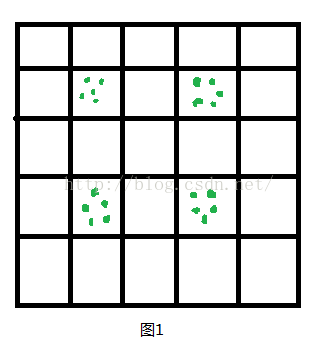
规则介绍:1、两个棋手,虎棋先行,每人一次走一步,只能上下左右走棋,不可以斜向走棋。
2、除了开始的羊棋是放在同一个棋格中,所有棋子都不能放在同一个棋格中,即有棋的棋格不能再往里走棋,羊棋分开后,也不能聚合。
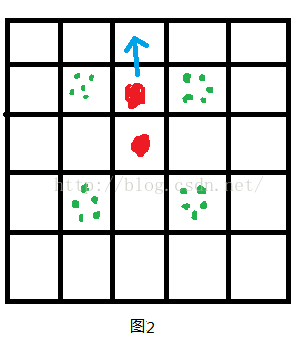
3、虎棋有两种行走方式:(1)走一步。(如图2)
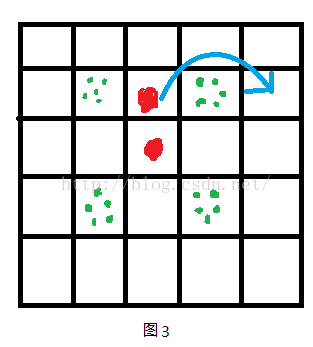
(2)“吃羊”,此时要跳过挨着且有羊棋的棋格,(如图3)那么这个格的羊棋就要拿掉一个(相当于被吃了),即如果这个格子只有1个羊棋,那么就掉这个羊棋空出这个棋格,如果有多个,就要拿走1个羊棋。
4、赢法:虎赢:所有羊棋都被吃掉。
羊赢:羊棋把所有的虎棋都堵得不能行棋。
不废话,规则介绍完了,上代码(ps:各位大大不要笑话宝宝的输出,那是程序员仅存的乐趣o(╯□╰)o):
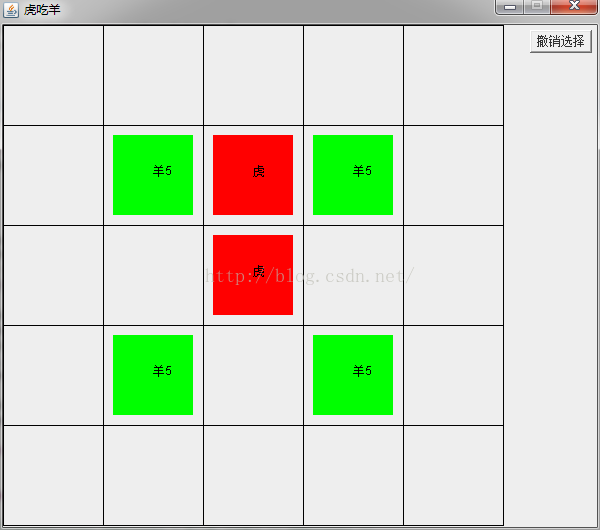
package Test1; import java.awt.BorderLayout; import java.awt.Button; import java.awt.Color; import java.awt.Graphics; import java.awt.Label; import java.awt.Panel; import java.awt.event.ActionEvent; import java.awt.event.ActionListener; import java.awt.event.MouseAdapter; import java.awt.event.MouseEvent; import javax.swing.JFrame; import javax.swing.JPanel; /* * 虎吃羊 * */ public class TES extends JFrame implements ActionListener { public static void main(String args[]) { TES tagEshe = new TES(); } private CheckPanel cp; public JPanel bpanel = null;//菜单面板 public Button cancel = null;//按键:撤销 public Label blabel = null; public int step = TEStep.STEP.putager;// 全局变量,记录当前步骤,初始默认为可以放虎 public TES() { super("虎吃羊"); this.setDefaultCloseOperation(EXIT_ON_CLOSE); this.setLocation(700, 200);// 游戏界面出现位置 this.setSize(600, 530); // 游戏界面大小 this.setResizable(false); // 不可改变界面大小 bpanel = new JPanel(); cancel = new Button("撤销选择"); cancel.addActionListener(this); bpanel.add(cancel, BorderLayout.SOUTH); this.getContentPane().add(bpanel, BorderLayout.EAST); cp = new CheckPanel(); this.getContentPane().add(cp, BorderLayout.CENTER); this.setVisible(true); } class CheckPanel extends Panel{// 画格子 /* * 假设地图上坐标为(x,y)块值为map[x][y] map[x][y] = 0——空,可位移 1 <= map[x][y] <= * 5——有羊,且数量代表此坐标羊的数量,不可位移 map[x][y] = 6——有虎,不可位移 */ public int mapx;// x坐标 public int mapy;// y坐标 public int map0x;// 用来记录拿起棋子的x坐标 public int map0y;// 用来记录拿起棋子的y坐标 public int sheepsum = 20;// 活羊的数量,初始为20 int map[][] = new int[][] {// 定义地图 { 0, 0, 0, 0, 0 }, { 0, 5, 0, 5, 0 }, { 0, 0, 0, 0, 0 }, { 0, 5, 0, 5, 0 }, { 0, 0, 0, 0, 0 } }; public CheckPanel() { // 点击位置监听 this.addMouseListener(new MouseAdapter() { // 匿名内部类,鼠标事件 public void mouseClicked(MouseEvent e) { // 鼠标完成点击事件 if (e.getButton() == MouseEvent.BUTTON1) { // e.getButton就会返回点鼠标的那个键,左键还是右健,1代表左键 mapx = e.getX() / 100; // 得到鼠标x坐标 mapy = e.getY() / 100; // 得到鼠标y坐标 System.out.println("鼠标当前点击位置的坐标是" + mapx + "," + mapy); System.out.println("数值是:" + map[mapx][mapy]); if (step == TEStep.STEP.putager) {//初始放下虎棋子 puttager(mapx, mapy); repaint(); } else if (step == TEStep.STEP.tget && map[mapx][mapy] == 6) {//拿起虎棋 tagerget(mapx, mapy); repaint(); } else if (step == TEStep.STEP.tput) {//放下虎棋 tagerput(mapx, mapy); repaint(); } else if (step == TEStep.STEP.shget && map[mapx][mapy] >= 1 && map[mapx][mapy] <=5){//拿起羊棋子 sheepget(mapx, mapy); repaint(); } else if (step == TEStep.STEP.shput){//放下羊棋 sheepput(mapx, mapy); repaint(); } } } }); } // 放虎 public void puttager(int x, int y) { if (map[x][y] == 0) { int tagernum = 0; for (int i = 0; i < 5; i++) {// 判断是否有两个虎棋子 for (int j = 0; j < 5; j++) { if (map[i][j] == 6) { tagernum++; } } } if (tagernum != 2) {// 当不是两只虎的时候放下 map[x][y] = 6; } else if (tagernum == 2) { step = TEStep.STEP.tget;// 可以拿起虎棋子 System.out.println("现在可以拿起您的大老虎啦"); } } else { System.out.println("此处不可以放旗子"); } } // 拿起老虎棋子 public void tagerget(int x, int y) { // 存储拿起之前的坐标 map0x = x; map0y = y; step = TEStep.STEP.tput; System.out.println("可以放下您的大老虎啦"); } // 放下老虎棋子 public void tagerput(int x, int y) { boolean sign = true; if (x - map0x == 1 && y - map0y == 0 && map[x][y] == 0) {// (x+1,y) System.out.println("1"); } else if (x - map0x == 2 && y - map0y == 0 && map[x][y] == 0 && map[x - 1][y] != 6 && map[x - 1][y] >= 1 && map[x - 1][y] <= 5) {// (x+2,y) System.out.println("2"); map[x - 1][y] -= 1; } else if (x - map0x == 0 && y - map0y == 1 && map[x][y] == 0) {// (x,y+1) System.out.println("3"); } else if (x - map0x == 0 && y - map0y == 2 && map[x][y] == 0 && map[x][y - 1] != 6 && map[x][y - 1] >= 1 && map[x][y - 1] <= 5) {// (x,y+2) System.out.println("4"); map[x][y - 1] -= 1; } else if (x - map0x == -1 && y - map0y == 0 && map[x][y] == 0) {// (x-1,y) System.out.println("5"); } else if (x - map0x == -2 && y - map0y == 0 && map[x][y] == 0 && map[x + 1][y] != 6 && map[x + 1][y] >= 1 && map[x + 1][y] <= 5) {// (x-2,y) System.out.println("6"); map[x + 1][y] -= 1; } else if (x - map0x == 0 && y - map0y == -1 && map[x][y] == 0) {// (x,y-1) System.out.println("7"); } else if (x - map0x == 0 && y - map0y == -2 && map[x][y] == 0 && map[x][y + 1] != 6 && map[x][y + 1] >= 1 && map[x][y + 1] <= 5) {// (x,y-2) System.out.println("8"); map[x][y + 1] -= 1; } else { sign = false; System.out.println("不可走"); } if (sign) { map[map0x][map0y] = 0; map[x][y] = 6; step = TEStep.STEP.shget; System.out.println("可以拿起您的小绵羊啦"); // step = TEStep.STEP.tget;// 测试语句,循环走老虎 } } //拿起羊棋子 public void sheepget(int x, int y){ map0x = x; map0y = y; step = TEStep.STEP.shput; System.out.println("可以放下您的小绵羊啦"); } //放下羊棋 public void sheepput(int x, int y){ if(((x + y - map0x - map0y) == 1 || (x + y - map0x - map0y) == -1) && map[x][y] == 0){ map[x][y] = 1; map[map0x][map0y] -= 1; step = TEStep.STEP.tget; System.out.println("您可以拿起您的打老虎啦"); }else { System.out.println("不可走"); } } // 画图 public void paint(Graphics g) { super.paint(g);// 消除残影 for (int i = 0; i < 5; i++) {// 走列 for (int j = 0; j < 5; j++) {// 走行 g.setColor(Color.black); g.drawRect(i * 100, j * 100, 100, 100);// 边缘边框 if (map[i][j] >= 1 && map[i][j] <= 5) {// 判断是否是羊 g.setColor(Color.green); g.fillRect(i * 100 + 10, j * 100 + 10, 80, 80); g.setColor(Color.black); g.drawString("羊" + map[i][j], i * 100 + 50, j * 100 + 50); } else if (map[i][j] == 6) {//判断是否是虎 g.setColor(Color.red); g.fillRect(i * 100 + 10, j * 100 + 10, 80, 80); g.setColor(Color.black); g.drawString("虎", i * 100 + 50, j * 100 + 50); } } } } } public interface TEStep {// 接口,记录步骤 public class STEP { public static final int putager = 0; // 放虎 public static final int tget = 1; // 可以拿起“虎”,即只响应点击位置值为6 public static final int tput = 2; // 可以放下虎, public static final int shget = 3; // 可以拿起羊 public static final int shput = 4; // 可以放下羊 } } public void actionPerformed(ActionEvent e) { // TODO Auto-generated method stub if(e.getSource() == cancel){//撤销 if(step == TEStep.STEP.tput){ step = TEStep.STEP.tget; System.out.println("撤销成功,您又可以拿起您的大老虎啦"); }else if(step == TEStep.STEP.shput){ step = TEStep.STEP.shget; System.out.println("撤销成功,您又可以拿起您的小绵羊啦"); } } } } 讯享网 下边就是上效果图,很low ,走棋的时候走不动了就点击撤销,不过肯定能走棋了,哈哈,蛮高兴!!!
版权声明:本文内容由互联网用户自发贡献,该文观点仅代表作者本人。本站仅提供信息存储空间服务,不拥有所有权,不承担相关法律责任。如发现本站有涉嫌侵权/违法违规的内容,请联系我们,一经查实,本站将立刻删除。
如需转载请保留出处:https://51itzy.com/kjqy/40738.html