
地址:https://mp.weixin..com/ 讯享网
2.公众号配置
2.1.在进入公众号后台后,在左边侧边栏找到基本配置,就可以看到APPID与AppSecret
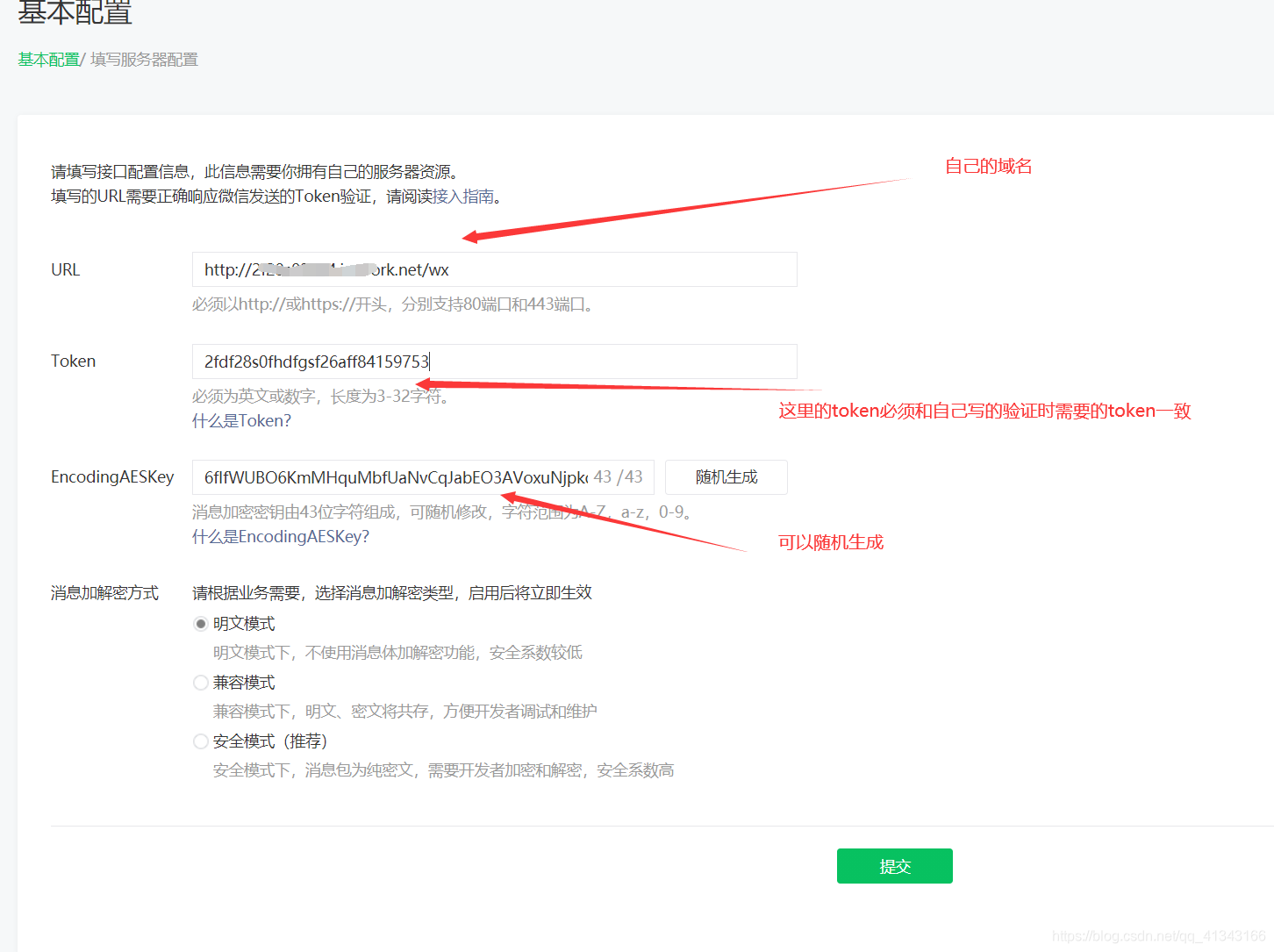
2.2.配置服务器配置:在APPID与AppSecret页面下有一个服务器配置,需要配置,配置中的token是一个坑,需要先写验证请求才能把token配置成功。图片里的工具了在下面代码中,具体如图:

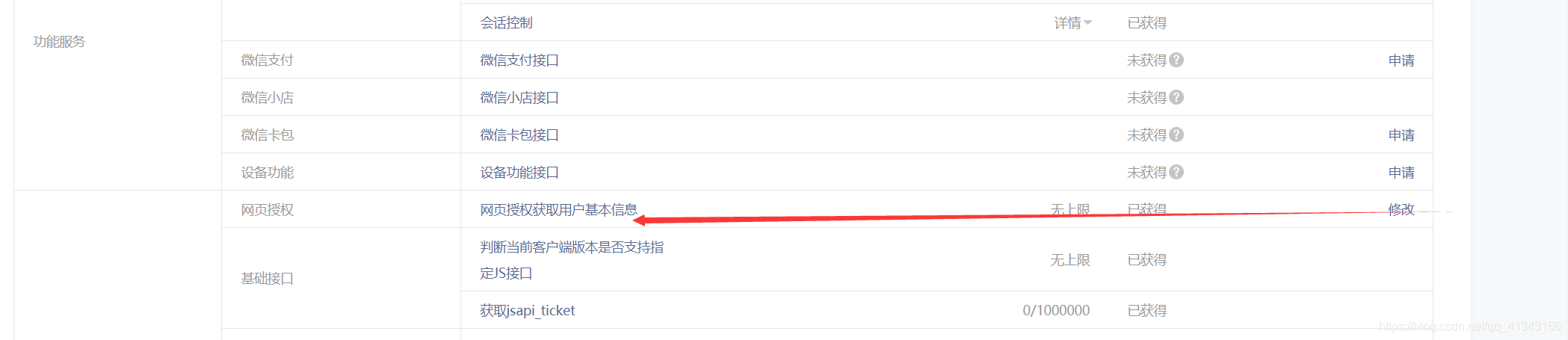
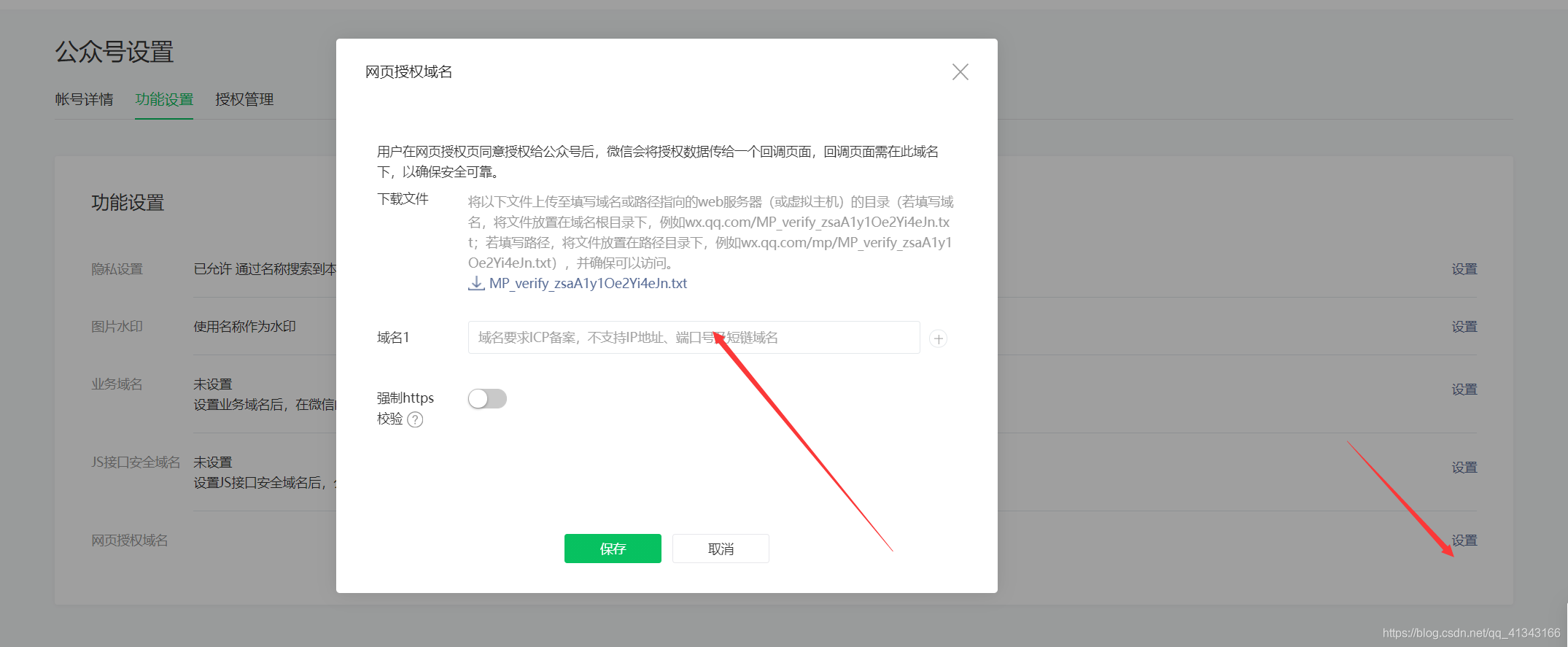
2.3. 添加页面授权(也就是在那个页面可以调起登录,一般设置为域名即可)
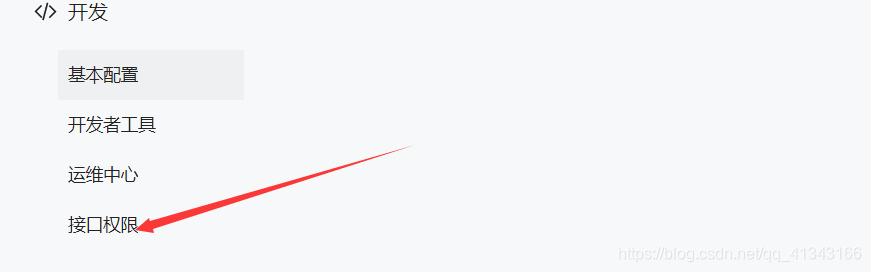
2.4在接口权限中找到

3.需要的包
讯享网 <dependency> <groupId>org.springframework.boot</groupId> <artifactId>spring-boot-starter-web</artifactId> </dependency> <dependency> <groupId>org.springframework.boot</groupId> <artifactId>spring-boot-starter</artifactId> </dependency> <dependency> <groupId>org.projectlombok</groupId> <artifactId>lombok</artifactId> <optional>true</optional> </dependency> <!--网络链接--> <dependency> <groupId>org.apache.httpcomponents</groupId> <artifactId>httpclient</artifactId> <version>4.5.12</version> </dependency> <!--json处理--> <dependency> <groupId>com.alibaba</groupId> <artifactId>fastjson</artifactId> <version>1.2.60</version> </dependency>
4.编写验证token的工具类
package com.taxing.wxopenid.utills; import java.security.MessageDigest; import java.security.NoSuchAlgorithmException; / * 签名认证工具类 * @ClassName: WeixinCheckoutUtil * */ public class WeixinCheckoutUtil {
    // 与接口配置信息中的Token要一致 private static String token = "2fdf28s0fhdfgsf26aff"; / * 验证签名 * * @param signature * @param timestamp * @param nonce * @return */ public static boolean checkSignature(String signature, String timestamp, String nonce) {
    String[] arr = new String[] {
    token, timestamp, nonce }; // 将token、timestamp、nonce三个参数进行字典序排序 // Arrays.sort(arr); sort(arr); StringBuilder content = new StringBuilder(); for (int i = 0; i < arr.length; i++) {
    content.append(arr[i]); } MessageDigest md = null; String tmpStr = null; try {
    md = MessageDigest.getInstance("SHA-1"); // 将三个参数字符串拼接成一个字符串进行sha1加密 byte[] digest = md.digest(content.toString().getBytes()); tmpStr = byteToStr(digest); } catch (NoSuchAlgorithmException e) {
    e.printStackTrace(); } content = null; // 将sha1加密后的字符串可与signature对比,标识该请求来源于微信 return tmpStr != null ? tmpStr.equals(signature.toUpperCase()) : false; } / * 将字节数组转换为十六进制字符串 * * @param byteArray * @return */ private static String byteToStr(byte[] byteArray) {
    String strDigest = ""; for (int i = 0; i < byteArray.length; i++) {
    strDigest += byteToHexStr(byteArray[i]); } return strDigest; } / * 将字节转换为十六进制字符串 * @param mByte * @return */ private static String byteToHexStr(byte mByte) {
    char[] Digit = {
    '0', '1', '2', '3', '4', '5', '6', '7', '8', '9', 'A', 'B', 'C', 'D', 'E', 'F' }; char[] tempArr = new char[2]; tempArr[0] = Digit[(mByte >>> 4) & 0X0F]; tempArr[1] = Digit[mByte & 0X0F]; String s = new String(tempArr); return s; } public static void sort(String a[]) {
    for (int i = 0; i < a.length - 1; i++) {
    for (int j = i + 1; j < a.length; j++) {
    if (a[j].compareTo(a[i]) < 0) {
    String temp = a[i]; a[i] = a[j]; a[j] = temp; } } } } }
5.编写验证token的controller
讯享网/ * 微信公众号签名认证接口 * @Title: test * @throws */ @RequestMapping("/wx") public String test(String signature,String timestamp,String nonce,String echostr) {
    // 通过检验signature对请求进行校验,若校验成功则原样返回echostr,表示接入成功,否则接入失败 if (signature != null && WeixinCheckoutUtil.checkSignature(signature, timestamp, nonce)) {
    return echostr; } return null; }
6.微信内浏览器获得openid
@RequestMapping("/wx") @RestController public class WeiXinController {
    String appid="公众号id"; String AppSecret="公众号密钥"; String originUrl="登录完成后进入的页面"; @GetMapping("getcode") public void getCode(HttpServletResponse response ) throws IOException {
    String cooke="https://open.weixin..com/connect/oauth2/authorize?redirect_uri="+ originUrl+ "&appid="+appid+ "&secret="+AppSecret+ "&response_type=code" + "&scope=snsapi_userinfo" + "&state=STATE" + "&connect_redirect=1#wechat_redirect"; //重定向,重定向后就可以看到微信公众号调起登录的选项款,同时微信授权登录后会把code追加到我们重定向地址的后面 response.sendRedirect(cooke); } //前端获得code调用请求并把code传到我们获得openid的请求中 @RequestMapping("/getOpenid") public WxInfo getOpenid(String code) throws IOException {
    WxInfo wxinfo = null; //创建请求 HttpGet Url = new HttpGet("https://api.weixin..com/sns/jscode2session?appid=" +appid + "&secret=" + AppSecret+ "&js_code=" + code + "&grant_type=authorization_code"); BufferedReader result = getClient(Url); //向微信请求,返回的数据中就有openid信息 String line=""; while ((line=result.readLine())!=null){
    wxinfo = JSON.parseObject(line, WxInfo.class);//解析出来的数据时json,我们使用fastjson把数据转换为对象 } return wxinfo; } //把流转变为IO public BufferedReader getClient(HttpGet url){
    CloseableHttpClient httpClient = HttpClientBuilder.create().build(); try {
    CloseableHttpResponse response = httpClient.execute(url); HttpEntity enity = response.getEntity(); InputStream content = enity.getContent(); return new BufferedReader(new InputStreamReader(content));//解析url中的数据,就是把它转发为IO流 } catch (IOException e) {
    e.printStackTrace(); System.out.println("链接错误,请检查网址"); return null; } } }
7.实体类
讯享网@Data @EqualsAndHashCode(callSuper = false) @Accessors(chain = true) public class WxInfo {
    private String APP_ID;//小程序id private String APP_SECRET;//小程序密钥 private String session_key;//seesion private String openid;//用户openid }
8.uniapp中获得code
onLoad() {
    let code = this.getQueryString('code')//获得地址中参数 this.openid(code) }, methods: {
    getQueryString(name) {
    const reg = new RegExp('(^|&)' + name + '=([^&]*)(&|$)', 'i'); const search = window.location.search.split('?')[1] || ''; const r = search.match(reg) || []; return r[2]; } openid(codes){
    let data={
    code:codes } uni.request({
    url: '根据code获得openid的接口地址', //仅为示例,并非真实接口地址。 data: {
    code: codes }, success: function(res) {
    console.log(res.data); } }); } }
版权声明:本文内容由互联网用户自发贡献,该文观点仅代表作者本人。本站仅提供信息存储空间服务,不拥有所有权,不承担相关法律责任。如发现本站有涉嫌侵权/违法违规的内容,请联系我们,一经查实,本站将立刻删除。
如需转载请保留出处:https://51itzy.com/kjqy/34790.html