
Linux IO
文件分区
# 不同的文件系统挂载到不同的目录下,如下/dev挂载点,取消/dev的挂载后,如存在dev文件则仍可见dev [root@VM-16-13-centos ~]# df 文件系统 1K-块 已用 可用 已用% 挂载点 devtmpfs 0 0% /dev tmpfs 24 1% /dev/shm tmpfs 484 1% /run tmpfs 0 0% /sys/fs/cgroup /dev/vda1 11% / tmpfs 0 0% /run/user/0 # 查看不同挂载点分配的空间详情 [root@VM-16-13-centos /]# df -h 文件系统 容量 已用 可用 已用% 挂载点 devtmpfs 1.9G 0 1.9G 0% /dev tmpfs 1.9G 24K 1.9G 1% /dev/shm tmpfs 1.9G 492K 1.9G 1% /run tmpfs 1.9G 0 1.9G 0% /sys/fs/cgroup /dev/vda1 79G 8.2G 68G 11% / tmpfs 374M 0 374M 0% /run/user/0 # 卸载挂载目录 umount [挂载点目录] # 挂载目录 mount [被挂载的分区镜像的位置] [挂载点目录] 讯享网
硬链接(如同一份副本)
讯享网# root 目录下有一文件 a.txt # 将 a.txt 文件硬链接到 b.txt ln /root/a.txt /root/b.txt # stat 查看Inode节点都是同一份 [root@VM-16-13-centos ~]# stat a.txt 文件:a.txt 大小:13 块:8 IO 块:4096 普通文件 设备:fd01h/64769d Inode: 硬链接:2 权限:(0644/-rw-r--r--) Uid:( 0/ root) Gid:( 0/ root) 最近访问:2022-04-19 21:04:52. +0800 最近更改:2022-04-19 21:04:50. +0800 最近改动:2022-04-19 21:05:07.0 +0800 创建时间:- [root@VM-16-13-centos ~]# stat b.txt 文件:b.txt 大小:13 块:8 IO 块:4096 普通文件 设备:fd01h/64769d Inode: 硬链接:2 权限:(0644/-rw-r--r--) Uid:( 0/ root) Gid:( 0/ root) 最近访问:2022-04-19 21:04:52. +0800 最近更改:2022-04-19 21:04:50. +0800 最近改动:2022-04-19 21:05:07.0 +0800 创建时间:- # 硬链接了几份文件就是几,这里有两份a.txt与b.txt [root@VM-16-13-centos ~]# ll 总用量 8 -rw-r--r-- 2 root root 13 4月 19 21:04 a.txt -rw-r--r-- 2 root root 13 4月 19 21:04 b.txt # 任意编辑其中一文件另外被被链接的文件均会被修改 # 当删除a.txt或b.txt另一文件会继续存在,并且链接number会-1 [root@VM-16-13-centos ~]# ll 总用量 8 -rw-r--r-- 2 root root 13 4月 19 21:04 a.txt -rw-r--r-- 2 root root 13 4月 19 21:04 b.txt [root@VM-16-13-centos ~]# rm -rf a.txt [root@VM-16-13-centos ~]# ll 总用量 4 -rw-r--r-- 1 root root 13 4月 19 21:04 b.txt
软链接(如同被链接文件的快捷方式)
# 将b.txt文件软链接到c.txt ln -s /root/b.txt /root/c.txt [root@VM-16-13-centos ~]# ln -s /root/b.txt /root/c.txt [root@VM-16-13-centos ~]# ll 总用量 4 -rw-r--r-- 1 root root 13 4月 19 21:04 b.txt lrwxrwxrwx 1 root root 11 4月 19 21:13 c.txt -> /root/b.txt # 从上发现链接number不变都为1,查看器Inode节点不在同一结点 [root@VM-16-13-centos ~]# stat b.txt 文件:b.txt 大小:13 块:8 IO 块:4096 普通文件 设备:fd01h/64769d Inode: 硬链接:1 权限:(0644/-rw-r--r--) Uid:( 0/ root) Gid:( 0/ root) 最近访问:2022-04-19 21:04:52. +0800 最近更改:2022-04-19 21:04:50. +0800 最近改动:2022-04-19 21:12:37. +0800 创建时间:- [root@VM-16-13-centos ~]# stat c.txt 文件:c.txt -> /root/b.txt 大小:11 块:0 IO 块:4096 符号链接 设备:fd01h/64769d Inode: 硬链接:1 权限:(0777/lrwxrwxrwx) Uid:( 0/ root) Gid:( 0/ root) 最近访问:2022-04-19 21:14:09. +0800 最近更改:2022-04-19 21:13:26. +0800 最近改动:2022-04-19 21:13:26. +0800 创建时间:- # 编辑任意文件b.txt或c.txt其链接的文件都会改变 # 当删除被链接的文件b.txt则c.txt文件会显示异常无法操作 [root@VM-16-13-centos ~]# rm -rf b.txt [root@VM-16-13-centos ~]# ll 总用量 0 lrwxrwxrwx 1 root root 11 4月 19 21:13 c.txt -> /root/b.txt (此处会显示为红色并闪烁,代表该文件不存在) 创建虚拟分区挂载
dd:拷贝数据生成文件if:输入文件(input file)/dev/zero:无限大的空of:输出文件(output file)bs:文件块大小(block size)count:块的数量
讯享网[root@VM-16-13-centos armin]# dd if=/dev/zero of=mydisk bs= count=10 记录了10+0 的读入 记录了10+0 的写出 bytes (10 MB, 10 MiB) copied, 0.00 s, 1.2 GB/s [root@VM-16-13-centos armin]# ll 总用量 10240 -rw-r--r-- 1 root root 4月 19 22:16 mydisk [root@VM-16-13-centos armin]# ll -h 总用量 10M -rw-r--r-- 1 root root 10M 4月 19 22:16 mydisk # 将 mydisk 挂载到 /dev/loop0 文件系统,并格式化为 ext2 格式 [root@VM-16-13-centos armin]# losetup /dev/loop0 mydisk [root@VM-16-13-centos armin]# mke2fs /dev/loop0 mke2fs 1.45.6 (20-Mar-2020) 丢弃设备块: 完成 创建含有 10240 个块(每块 1k)和 2560 个inode的文件系统 文件系统UUID:7c626cc6-3e03-427e-b709-170e207dcbd8 超级块的备份存储于下列块: 8193 正在分配组表: 完成 正在写入inode表: 完成 写入超级块和文件系统账户统计信息: 已完成 # 将生成的文件系统挂载到 /mnt/ooxx目录 [root@VM-16-13-centos ooxx]# mount -t ext2 /dev/loop0 /mnt/ooxx/ [root@VM-16-13-centos ooxx]# df 文件系统 1K-块 已用 可用 已用% 挂载点 devtmpfs 0 0% /dev tmpfs 24 1% /dev/shm tmpfs 512 1% /run tmpfs 0 0% /sys/fs/cgroup /dev/vda1 11% / tmpfs 0 0% /run/user/0 /dev/loop0 9911 92 9307 1% /mnt/ooxx # 找到 bash(linux输入字符解析工具) 程序 [root@VM-16-13-centos ooxx]# whereis bash bash: /usr/bin/bash /usr/share/man/man1/bash.1.gz /usr/share/info/bash.info.gz # 将 bash 程序 copy 到 /mnt/ooxx/bin [root@VM-16-13-centos ooxx]# mkdir bin [root@VM-16-13-centos ooxx]# cp /usr/bin/bash bin [root@VM-16-13-centos ooxx]# cd bin/ [root@VM-16-13-centos bin]# ll 总用量 1130 -rwxr-xr-x 1 root root 4月 19 22:33 bash # 分析 bash 程序依赖的动态链接库 [root@VM-16-13-centos bin]# ldd bash linux-vdso.so.1 (0x00007ffc0) libtinfo.so.6 => /lib64/libtinfo.so.6 (0x00007f67444ec000) libdl.so.2 => /lib64/libdl.so.2 (0x00007f67442e8000) libc.so.6 => /lib64/libc.so.6 (0x00007f6743f23000) /lib64/ld-linux-x86-64.so.2 (0x00007f6744a37000) # 模拟 bash 程序copy依赖的动态链接库到 /mnt/ooxx 目录,{}当前目录中的多个文件可使用 [root@VM-16-13-centos ooxx]# mkdir lib64 [root@VM-16-13-centos ooxx]# cp /lib64/{libtinfo.so.6,libdl.so.2,libc.so.6,ld-linux-x86-64.so.2} ./lib64/ [root@VM-16-13-centos ooxx]# ll 总用量 1131 -rwxr-xr-x 1 root root 4月 19 22:33 bash drwxr-xr-x 2 root root 1024 4月 19 22:37 lib64 [root@VM-16-13-centos ooxx]# cd lib64/ [root@VM-16-13-centos lib64]# ll 总用量 3598 -rwxr-xr-x 1 root root 4月 19 22:37 ld-linux-x86-64.so.2 -rwxr-xr-x 1 root root 4月 19 22:37 libc.so.6 -rwxr-xr-x 1 root root 28816 4月 19 22:37 libdl.so.2 -rwxr-xr-x 1 root root 4月 19 22:37 libtinfo.so.6 # 把根目录切换到当前目录,并启动当前目录 bash,获取当前进程id号 [root@VM-16-13-centos ooxx]# chroot ./ bash-4.4# echo $$ # 将111输出到虚拟文件系统根目录下a.txt文件 bash-4.4# echo 111 > /a.txt # 父 bash 进程号 bash-4.4# exit exit [root@VM-16-13-centos ooxx]# echo $$ # 查看虚拟文件系统根目录是否存在 a.txt文件(存在) -rw-r--r-- 1 root root 4 4月 19 22:46 a.txt drwxr-xr-x 2 root root 1024 4月 19 22:41 bin drwxr-xr-x 2 root root 1024 4月 19 22:37 lib64 drwx------ 2 root root 12288 4月 19 22:23 lost+found [root@VM-16-13-centos ooxx]# cat a.txt 111
脏读
# lost 查看进程打开了哪些文件 $$代表当前bash进程 [root@VM-16-13-centos /]# lsof -p $$ COMMAND PID USER FD TYPE DEVICE SIZE/OFF NODE NAME bash root cwd DIR 253,1 4096 2 / bash root rtd DIR 253,1 4096 2 / bash root txt REG 253,1 /usr/bin/bash bash root mem REG 253,1 83728 /usr/lib64/libnss_files-2.28.so bash root mem REG 253,1 /var/lib/sss/mc/passwd bash root mem REG 253,1 /usr/lib/locale/zh_CN.utf8/LC_COLLATE bash root mem REG 253,1 /usr/lib64/libc-2.28.so bash root 0u CHR 136,0 0t0 3 /dev/pts/0 bash root 1u CHR 136,0 0t0 3 /dev/pts/0 bash root 2u CHR 136,0 0t0 3 /dev/pts/0 bash root 3r REG 253,1 /var/lib/sss/mc/passwd bash root 4u unix 0xffff968df7c5ad00 0t0 type=STREAM bash root 255u CHR 136,0 0t0 3 /dev/pts/0 FD - cwd:当前工作目录 - rtd:root根目录在哪 - txt:文本域,进程启动时加载的可执行程序 - mem:分配的内存空间 - xu(u:读写都可以、r:读) - x=0:程序的标准输入 - x=1:程序的标准输出 - x=2:程序报错输出 TYPE - REG:-(普通文件:可执行、图片、文本) - CHR:c(字符设备) - DIR:d(文件目录) DEVICE - 设备号 SIZE/OFF - 偏移量 NODE - Inode号 # 令文件描述符 8 可以去读取 xxoo.txt 文件 [root@VM-16-13-centos ~]# vi xxoo.txt [root@VM-16-13-centos ~]# exec 8< xxoo.txt [root@VM-16-13-centos ~]# cd /proc/$$/fd [root@VM-16-13-centos fd]# ll 总用量 0 lrwx------ 1 root root 64 4月 20 22:35 0 -> /dev/pts/0 lrwx------ 1 root root 64 4月 20 22:35 1 -> /dev/pts/0 lrwx------ 1 root root 64 4月 20 22:35 2 -> /dev/pts/0 lrwx------ 1 root root 64 4月 20 22:36 255 -> /dev/pts/0 lr-x------ 1 root root 64 4月 20 22:35 3 -> /var/lib/sss/mc/passwd lrwx------ 1 root root 64 4月 20 22:35 4 -> 'socket:[]' lr-x------ 1 root root 64 4月 20 22:35 8 -> /root/xxoo.txt # 8r 8文件描述符读取 偏移量 0t0 为 0字节 [root@VM-16-13-centos fd]# lsof -op $$ COMMAND PID USER FD TYPE DEVICE OFFSET NODE NAME bash root cwd DIR 0,5 /proc//fd bash root rtd DIR 253,1 2 / bash root txt REG 253,1 /usr/bin/bash bash root mem REG 253,1 /usr/lib/locale/en_US.utf8/LC_COLLATE bash root mem REG 253,1 /usr/lib64/libnss_files-2.28.so bash root mem REG 253,1 /var/lib/sss/mc/passwd bash root mem REG 253,1 /usr/lib64/libnss_sss.so.2 bash root 0u CHR 136,0 0t0 3 /dev/pts/0 bash root 1u CHR 136,0 0t0 3 /dev/pts/0 bash root 2u CHR 136,0 0t0 3 /dev/pts/0 bash root 3r REG 253,1 0t0 /var/lib/sss/mc/passwd bash root 4u unix 0xffff968df7c5ad00 0t0 type=STREAM bash root 8r REG 253,1 0t0 /root/xxoo.txt bash root 255u CHR 136,0 0t0 3 /dev/pts/0 # 读取 8 文件描述符中的首行(包括换行符)数据到变量 a [root@VM-16-13-centos fd]# read a 0<& 8 # 打印变量 a 读到的数据 [root@VM-16-13-centos fd]# echo $a affdsadgsdag # 查看 8r 新的偏移量 0t13 偏移了13个字节 [root@VM-16-13-centos fd]# lsof -op $$ COMMAND PID USER FD TYPE DEVICE OFFSET NODE NAME bash root cwd DIR 0,5 /proc//fd bash root rtd DIR 253,1 2 / bash root txt REG 253,1 /usr/bin/bash bash root mem REG 253,1 /usr/lib/locale/en_US.utf8/LC_COLLATE bash root mem REG 253,1 /usr/lib64/libnss_files-2.28.so bash root mem REG 253,1 /var/lib/sss/mc/passwd bash root mem REG 253,1 /usr/lib64/libnss_sss.so.2 bash root 0u CHR 136,0 0t0 3 /dev/pts/0 bash root 1u CHR 136,0 0t0 3 /dev/pts/0 bash root 2u CHR 136,0 0t0 3 /dev/pts/0 bash root 3r REG 253,1 0t0 /var/lib/sss/mc/passwd bash root 4u unix 0xffff968df7c5ad00 0t0 type=STREAM bash root 8r REG 253,1 0t13 /root/xxoo.txt bash root 255u CHR 136,0 0t0 3 /dev/pts/0 # 新开的 bash 进程如同迭代器获取到了新的数据,可以做同上操作,互不影响 # 查看脏页缓存字符 [root@VM-16-13-centos ~]# cat /proc/vmstat | grep dirty nr_dirty 25 nr_dirty_threshold nr_dirty_background_threshold 78347 socket
讯享网# ‘<’ 输入 ‘>’ 输出 # 将 8 输入输出来自/dev/tcp/www.baidu.com/80的数据 [root@VM-16-13-centos fd]# exec 8<> /dev/tcp/www.baidu.com/80 [root@VM-16-13-centos fd]# ll 总用量 0 lrwx------ 1 root root 64 4月 20 23:16 0 -> /dev/pts/2 lrwx------ 1 root root 64 4月 20 23:16 1 -> /dev/pts/2 lrwx------ 1 root root 64 4月 20 23:16 2 -> /dev/pts/2 lrwx------ 1 root root 64 4月 20 23:23 255 -> /dev/pts/2 lr-x------ 1 root root 64 4月 20 23:16 3 -> /var/lib/sss/mc/passwd lrwx------ 1 root root 64 4月 20 23:16 4 -> 'socket:[]' lrwx------ 1 root root 64 4月 20 23:16 8 -> 'socket:[]' # 8 指向的是一个 IPv4 的 TCP 数据(一切皆文件) [root@VM-16-13-centos fd]# lsof -op $$ COMMAND PID USER FD TYPE DEVICE OFFSET NODE NAME bash root cwd DIR 0,5 /proc//fd bash root rtd DIR 253,1 2 / bash root txt REG 253,1 /usr/bin/bash bash root mem REG 253,1 /usr/lib64/libresolv-2.28.so bash root mem REG 253,1 /usr/lib64/libnss_dns-2.28.so bash root mem REG 253,1 /usr/lib/locale/en_US.utf8/LC_COLLATE bash root mem REG 253,1 /usr/lib64/libnss_files-2.28.so bash root mem REG 253,1 /var/lib/sss/mc/passwd bash root 0u CHR 136,2 0t0 5 /dev/pts/2 bash root 1u CHR 136,2 0t0 5 /dev/pts/2 bash root 2u CHR 136,2 0t0 5 /dev/pts/2 bash root 3r REG 253,1 0t0 /var/lib/sss/mc/passwd bash root 4u unix 0xffff968d471c9200 0t0 type=STREAM bash root 8u IPv4 0t0 TCP VM-16-13-centos:60170->112.80.248.76:http (ESTABLISHED) bash root 255u CHR 136,2 0t0 5 /dev/pts/2
/proc:映射内核变量属性的目录
/proc/$$:当前 bash 的 pid($$/$BASHPID)
/proc/$$/fd:当前 bash 程序的所有文件描述符 lsof -of $$(查看当前程序的细节)
重定向:不是命令,机制
File file = new File("/ooxx/txt"); OutputStream out「out会映射到fd目录,指向到/ooxx.txt文件」 = new FileOutputStream(file); out.write("aaaaa") # 将当前目录输出到~目录下的ls.out文件中 1为输出 ls ./ 1> ~/ls.out # 将查看(输入)到的 ooxx.txt文件数据 输出到 cat.out 文件 cat 0< ooxx.txt 1> cat.out read
讯享网# read对换行符敏感,遇见换行(回车)则退出,c 为变量 armin@xiaobawxuexiji2 ~ % read c hello world! armin@xiaobawxuexiji2 ~ % echo $c hello world! # 将 cat.out 文件 标准(0)输入(<)到 a 变量 read a 0< cat.out
cat.out 文件内容
aaa bbbb cccc ~ "cat.out" 3L, 14C 1,1 全部 读取到的数据为 cat.out 文件中的第一行,因为 read 读到换行符则结束
讯享网[root@VM-16-13-centos ~]# read a 0< cat.out [root@VM-16-13-centos ~]# echo $a aaa
ls
# ls [当前目录] [一个不存在的目录] 不存在的目录会显示报错(2-异常输出) 存在的则正常标准输出(1-标准输出) [root@VM-16-13-centos ~]# ll 总用量 12 drwxr-xr-x 2 root root 4096 4月 19 22:16 armin -rw-r--r-- 1 root root 14 4月 21 22:15 cat.out -rw-r--r-- 1 root root 50 4月 21 22:15 xxoo.txt [root@VM-16-13-centos ~]# ls ./ /cmdb ls: 无法访问'/cmdb': 没有那个文件或目录 ./: armin cat.out xxoo.txt # 将异常输出到 ls02.out 文件 标准输出到 ls01.out 文件 [root@VM-16-13-centos ~]# ls ./ /cmdb 1> ls01.out 2> ls02.out [root@VM-16-13-centos ~]# cat ls01.out ./: armin cat.out ls01.out ls02.out xxoo.txt [root@VM-16-13-centos ~]# cat ls02.out ls: 无法访问'/cmdb': 没有那个文件或目录 # 如同时输出到同一文件,则前面输出的会被覆盖 [root@VM-16-13-centos ~]# ls ./ /cmdb 1> ls03.out 2> ls03.out [root@VM-16-13-centos ~]# cat ls03.out ./: armin cat.out ls01.out ls02.out ls03.out xxoo.txt [root@VM-16-13-centos ~]# # 重定向操作符 < or > 左边放的 文件描述符 右边放的文件 如 右边需要放 文件描述符 则 需要在重定向描述符右边加上& # 报错是由于 2 指向 1 这时1未指向任何文件所以又指回了屏幕,所以出现了异常信息,文件也未写入异常信息 [root@VM-16-13-centos ~]# ls ./ /cmdb 2>& 1 1> ls04.out ls: 无法访问'/cmdb': 没有那个文件或目录 # 此时交换他们的位置即可实现同时写入一个文件 [root@VM-16-13-centos ~]# ls ./ /cmdb 1> ls04.out 2>& 1 [root@VM-16-13-centos ~]# cat ls04.out ls: 无法访问'/cmdb': 没有那个文件或目录 ./: armin cat.out ls01.out ls02.out ls03.out ls04.out xxoo.txt |(pipeline管道)
- head
-
讯享网
# 读取文件的前十行 head [file] # 读取文件的第一行 head -1 [file] # 读取文件的前十一行 head -11 [file]
-
- tail
-
# 读取文件的最好十行 tail [file] # 读取文件的最后一行 tail -1 [file] # 读取文件的最后十二行 tail -12 [file]
-
- |
-
讯享网
# 将文件开头前8行交给tail取最后一行(读第8行) head -8 [file] | tail -1
-
Linux基础
程序有父子关系
# 由此可见第一个 bash 进程是第二个 bash 进程的父进程 [root@VM-16-13-centos /]# echo $$ [root@VM-16-13-centos /]# /bin/bash [root@VM-16-13-centos /]# echo $$ [root@VM-16-13-centos /]# pstree systemd─┬─NetworkManager───2*[{NetworkManager}] ├─YDLive─┬─YDService─┬─sh───10*[{sh}] │ │ └─24*[{YDService}] │ └─10*[{YDLive}] ├─2*[agetty] ├─atd ├─auditd─┬─sedispatch │ └─2*[{auditd}] ├─barad_agent─┬─barad_agent │ └─barad_agent───2*[{barad_agent}] ├─chronyd ├─crond ├─dbus-daemon ├─lsmd ├─mcelog ├─mysqld_safe───mysqld───31*[{mysqld}] ├─nginx───nginx ├─polkitd───7*[{polkitd}] ├─rngd───4*[{rngd}] ├─rsyslogd───2*[{rsyslogd}] ├─sgagent───{sgagent} ├─sshd───sshd───sshd───bash───bash───pstree ├─sssd─┬─sssd_be │ └─sssd_nss ├─systemd───(sd-pam) ├─systemd-journal ├─systemd-logind ├─systemd-udevd ├─tat_agent───4*[{tat_agent}] └─tuned───3*[{tuned}] [root@VM-16-13-centos /]# ps -fe | grep root 0 11:09 pts/0 00:00:00 -bash root 0 11:11 pts/0 00:00:00 /bin/bash root 0 11:14 pts/0 00:00:00 grep --color=auto # 如果退出则退出到了父进程 [root@VM-16-13-centos /]# echo $$ 变量,父子进程变量隔离,打破隔离使用 export
讯享网# 定义一个变量 x 取其值 [root@VM-16-13-centos /]# x=100 [root@VM-16-13-centos /]# echo $x 100 # 父进程的变量子进程无法取值 [root@VM-16-13-centos /]# echo $$ [root@VM-16-13-centos /]# /bin/bash [root@VM-16-13-centos /]# echo $$ [root@VM-16-13-centos /]# echo $x [root@VM-16-13-centos /]# # export 使进程具有导出能力,随时随地可以取出该变量值(环境变量均需加该参数,代表任意程序都可使用该变量) [root@VM-16-13-centos /]# export x [root@VM-16-13-centos /]# /bin/bash [root@VM-16-13-centos /]# echo $x 100
指令块{ [指令1]; [指令2]; ... }
# 同时执行多行指令 [root@VM-16-13-centos /]# { echo "abc"; echo "cba"; } abc cba 管道与指令
讯享网# 管道左边指令 | 管道右边指令,在回车都会启动一个新的子进程对其进行代码块的解释执行,如: # 左边的子进程 echo 通过管道交给了右边的 cat 进行输出了,执行完后,子进程自动终止,所以 变量 a 还是为 1 [root@VM-16-13-centos ~]# a=1 [root@VM-16-13-centos ~]# { a=9; echo "aaaaaa"; } | cat aaaaaa [root@VM-16-13-centos ~]# echo $a 1
|(管道) 与 $$ 优先级
# $$ 优先级高于 |,所以无法通过此方法获取管道开辟的子进程id号(获取结果还是为父进程id号) [root@VM-16-13-centos ~]# echo $$ [root@VM-16-13-centos ~]# echo $$ | cat # 使用 $BASHPID 优先级则低于| 可正常 cat [root@VM-16-13-centos ~]# echo $$ [root@VM-16-13-centos ~]# echo $BASHPID | cat 讯享网[root@VM-16-13-centos ~]# echo $$ [root@VM-16-13-centos ~]# { echo $BASHPID; read x;} | { cat; echo $BASHPID; redy; } (此处进程阻塞,等待输入) # 打开新的窗口查看父进程,进程下有两个 bash 子进程 对应代码块中的左边 bash 与 右边 bash [root@VM-16-13-centos ~]# ps -fe | grep root 0 11:54 pts/4 00:00:00 -bash root 0 11:56 pts/4 00:00:00 -bash root 0 11:56 pts/4 00:00:00 -bash root 0 11:57 pts/5 00:00:00 grep --color=auto # 进入子进程的 fd 目录,对应pipe 1 为左边输出,右边 0 为输入。即左右两边通过 | [root@VM-16-13-centos ~]# cd /proc//fd [root@VM-16-13-centos fd]# ll 总用量 0 lrwx------ 1 root root 64 4月 23 12:01 0 -> /dev/pts/4 l-wx------ 1 root root 64 4月 23 12:01 1 -> 'pipe:[]' lrwx------ 1 root root 64 4月 23 12:01 2 -> /dev/pts/4 lrwx------ 1 root root 64 4月 23 12:01 255 -> /dev/pts/4 lr-x------ 1 root root 64 4月 23 12:01 3 -> /var/lib/sss/mc/passwd lrwx------ 1 root root 64 4月 23 12:01 4 -> 'socket:[]' [root@VM-16-13-centos fd]# cd /proc//fd [root@VM-16-13-centos fd]# ll 总用量 0 lr-x------ 1 root root 64 4月 23 12:01 0 -> 'pipe:[]' lrwx------ 1 root root 64 4月 23 12:01 1 -> /dev/pts/4 lrwx------ 1 root root 64 4月 23 12:01 2 -> /dev/pts/4 lrwx------ 1 root root 64 4月 23 12:01 255 -> /dev/pts/4 lr-x------ 1 root root 64 4月 23 12:01 3 -> /var/lib/sss/mc/passwd lrwx------ 1 root root 64 4月 23 12:01 4 -> 'socket:[]' # 左边写右边读 [root@VM-16-13-centos fd]# lsof -op ... bash root 1w FIFO 0,13 0t0 pipe ... [root@VM-16-13-centos fd]# lsof -op ... bash root 0r FIFO 0,13 0t0 pipe ...
PageCache 4K/页(kernel)
kernel -> pagecache -> disk
# dirty 系统配置参数 [root@VM-16-13-centos ~]# sysctl -a | grep dirty vm.dirty_background_bytes = 0 // 字节数 vm.dirty_background_ratio = 10 // 域值(%)内存达到这个值才会触发开启新的线程数据写入磁盘操作(后台触发,不会阻塞程序,剩余90%继续缓存到pagecache)。可以调优,如:程序写的慢,该参数写的快,内存将不会存在爆满出错情况 vm.dirty_bytes = 0 // 字节数 vm.dirty_expire_centisecs = 3000 vm.dirty_ratio = 30 // 域值(%)略大于background域值,达到该值,内核阻塞专注于执行数据写入磁盘操作,触发非脏页数据lru将老的没用分页淘汰 vm.dirty_writeback_centisecs = 500 // 100:1 s 500/100=5s vm.dirtytime_expire_seconds = 43200 # 修改其参数 vi /etc/sysctl.conf JAVA文件IO
FileOuputStream 普通IO
讯享网每调用一次 write 当读到数据末尾就进行写到 pagecache 的操作 单位时间内内核与用户态的切换比buffered频繁,浪费了许多系统调用的损耗
BufferedOutputStream 缓冲IO
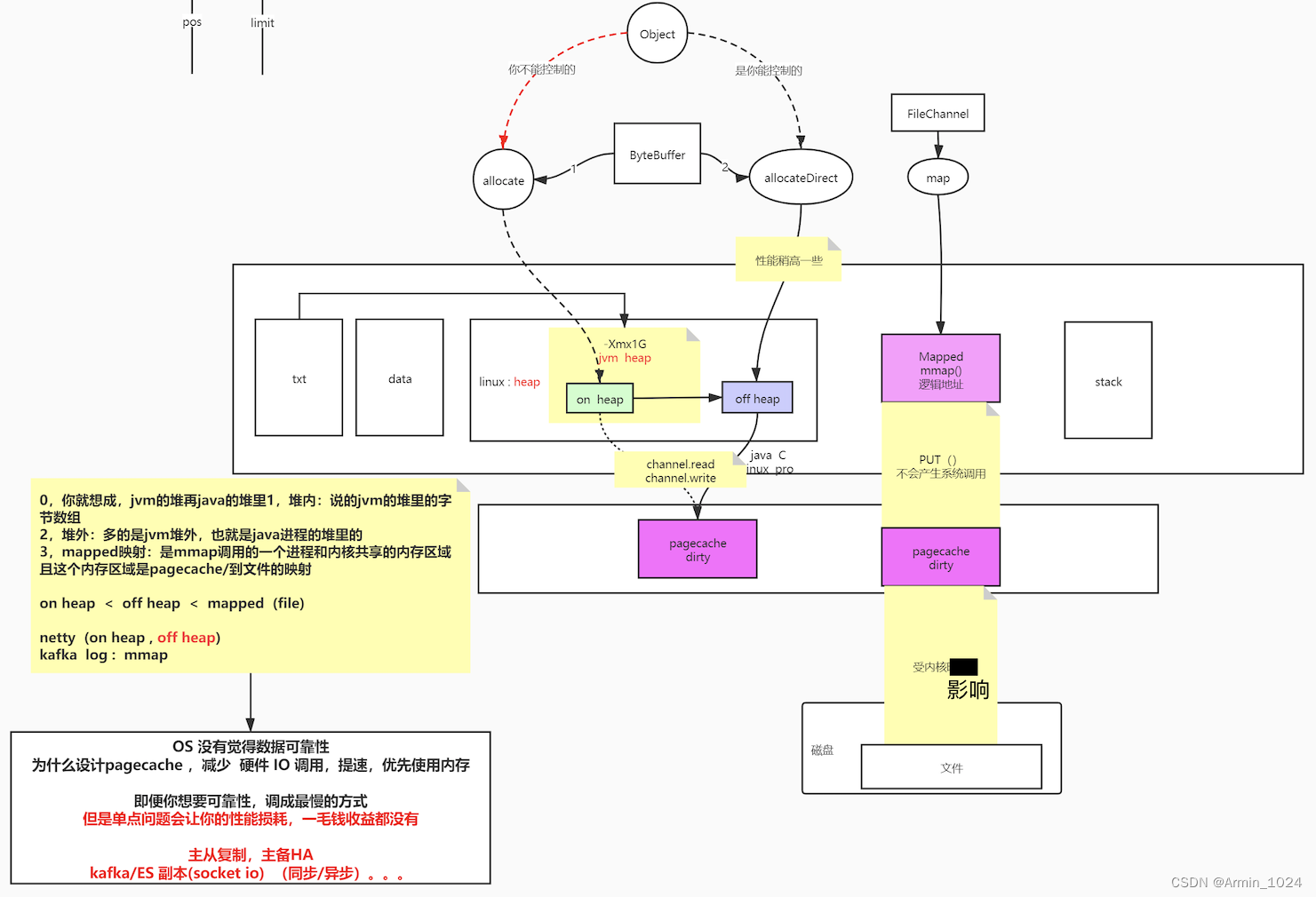
buffer 比 普通IO快 (应用了缓冲,去解决系统调用的损耗) 因为 少 IO 次数 数据会临时存入jvm,当满了8kb才会调用内核进行pagecache(减少了内核调用) out -> jvm 8kb byte[] (full) -> kernel 内存淘汰机制(内存不够用/达到设定的域值):lfu、lru,不会淘汰脏页,仅会淘汰不脏的pagecache,如果除了脏页没有其他可用空间会将脏页数据写入磁盘再淘汰
DMA协处理器
倒腾数据的过程交给DMA,协助CPU完成内存寻址总线到磁盘的缓冲,搬运的过程
NIO
ByteBuffer
讯享网ByteBuffer buffer = ByteBuffer.allocate(8192); // 堆上分配 ByteBuffer buffer = ByteBuffer.allocateDirect(1024); // 堆外分配 - pos 当前读到的位置 - limit 当调用 flip()「读写交替」 翻转时,limit 指向 pos 指向的位置 并把 pos 初始化到起始位置 只有 flip() 后 get() 才能让 pos 位置 +1 代表读一个字符 当调用 campact() pos +1 移动到刚才读到位置的下一个位置,再将 limit 值调到 capacity - capacity ByteBuffer 的最大位置
RandomAccessFile
随机文件读写 - seek(pos) seek 到指定 pos 位置,可在后进行 读(从该位置读)写(从该位置追加写) 操作 - getChannel() 拿到 管道 调用 map(FileChannel.MapMode.READ_WRITE, pos, size) 获取 MappedByteBuffer「mmap」堆外 文件映射 使用该 map.put(byte[]) // 不是系统调用,但数据会到达内核的 pagecache,省略了用户态到系统态的切换 map 依然会等系统给你刷写到 pagecache 或者 调用 force()「类似flush」 刷写 讯享网//测试文件NIO public static void testRandomAccessFileWrite() throws Exception {
RandomAccessFile raf = new RandomAccessFile(path, "rw"); raf.write("hello mashibing\n".getBytes()); raf.write("hello seanzhou\n".getBytes()); System.out.println("write------------"); System.in.read(); raf.seek(4); raf.write("ooxx".getBytes()); System.out.println("seek---------"); System.in.read(); FileChannel rafchannel = raf.getChannel(); //mmap 堆外 和文件映射的 byte not object (映射文件大小 4096 Byte) MappedByteBuffer map = rafchannel.map(FileChannel.MapMode.READ_WRITE, 0, 4096); map.put("@@@".getBytes()); //不是系统调用 但是数据会到达 内核的pagecache //曾经我们是需要out.write() 这样的系统调用,才能让程序的data 进入内核的pagecache //曾经必须有用户态内核态切换 //mmap的内存映射,依然是内核的pagecache体系所约束的!!! //换言之,丢数据 //你可以去github上找一些 其他C程序员写的jni扩展库,使用linux内核的Direct IO //直接IO是忽略linux的pagecache //是把pagecache 交给了程序自己开辟一个字节数组当作pagecache,动用代码逻辑来维护一致性/dirty。。。一系列复杂问题 //数据库一般使用 Direct IO System.out.println("map--put--------"); System.in.read(); // map.force(); // flush raf.seek(0); ByteBuffer buffer = ByteBuffer.allocate(8192); // ByteBuffer buffer = ByteBuffer.allocateDirect(1024); int read = rafchannel.read(buffer); //buffer.put() System.out.println(buffer); buffer.flip(); // 翻转 limit指向pos,pos初始化,准备读 System.out.println(buffer); for (int i = 0; i < buffer.limit(); i++) {
Thread.sleep(200); System.out.print(((char) buffer.get(i))); //读取每一个字节 } }
Socket
四元组(使客户端与服务器建立唯一通信):clinet ip & client port + server ip & server port
ServerSocket 对象
建立listen状态
Socket 对象
建立listen状态后进行读写操作
TCP/IP
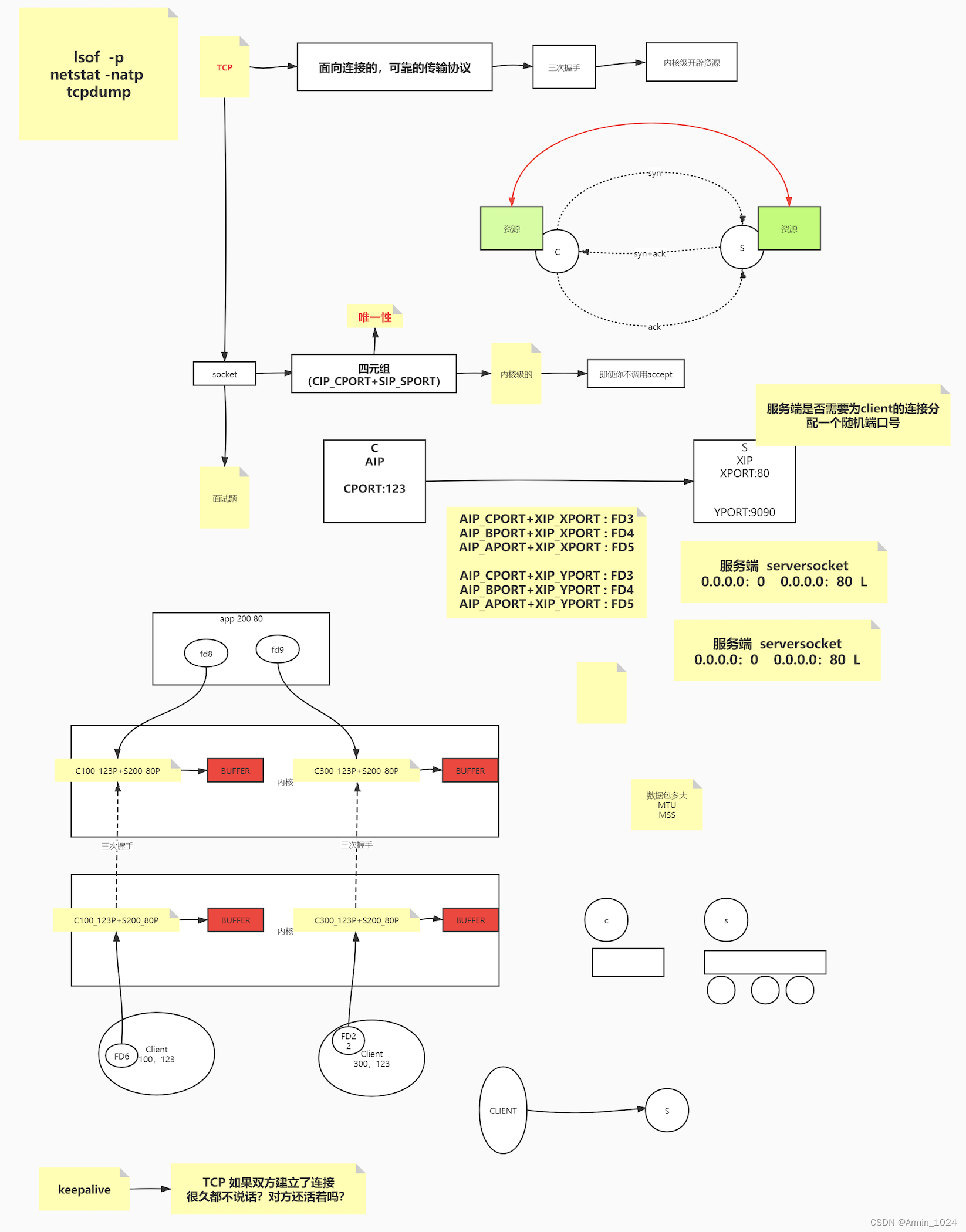
linux 传输通信数据包大小 ifconfig -> mtu = mss「数据内容大小」 + ip + package head 窗口机制,解决单个包发送的拥塞问题 当客户端向服务端发送数据,一次性发送了多个包,服务端(根据队列是否还有位置)回复客户端是否可以继续发,实现拥 塞控制 当客户端与服务端建立通信后,程序还未接受时,客户端向服务端发送的数据会堆积到一个缓冲队列,当缓冲队列堆满后,后续发送的数据会被丢失,当服务端启动接收后缓冲区满后,后续发送的数据全部丢失 查看端口与进程情况:netstat -natp
讯享网[root@localhost ~]# netstat -natp Active Internet connections (servers and established) Proto Recv-Q Send-Q Local Address Foreign Address State PID/Program name tcp 0 0 0.0.0.0:80 0.0.0.0:* LISTEN 1106/nginx: master tcp 0 0 0.0.0.0:22 0.0.0.0:* LISTEN 1061/sshd tcp 0 0 127.0.0.1:25 0.0.0.0:* LISTEN 1240/master tcp 0 0 172.16.179.138:22 172.16.179.1:50239 ESTABLISHED 1375/sshd: root@pts tcp6 0 0 :::8080 :::* LISTEN 659/java tcp6 0 0 :::22 :::* LISTEN 1061/sshd tcp6 0 0 ::1:25 :::* LISTEN 1240/master
Linux操作手册
man [需要查看的指令] ex: man ip「对照翻译理解」 IP(4) BSD Kernel Interfaces Manual IP(4) NAME ip -- Internet Protocol SYNOPSIS #include <sys/socket.h> #include <netinet/in.h> int socket(AF_INET, SOCK_RAW, proto); DESCRIPTION IP is the transport layer protocol used by the Internet protocol family. Options may be set at the IP level when using higher-level protocols that are based on IP (such as TCP and UDP). It may also be accessed through a ``raw socket'' when developing new protocols, or special-purpose applica- tions. There are several IP-level setsockopt(2) /getsockopt(2) options. IP_OPTIONS may be used to provide IP options to be transmitted in the IP header of each outgoing packet or to examine the header options on incom- : 网络IO变化模型
C10K问题(连接数到达1万)
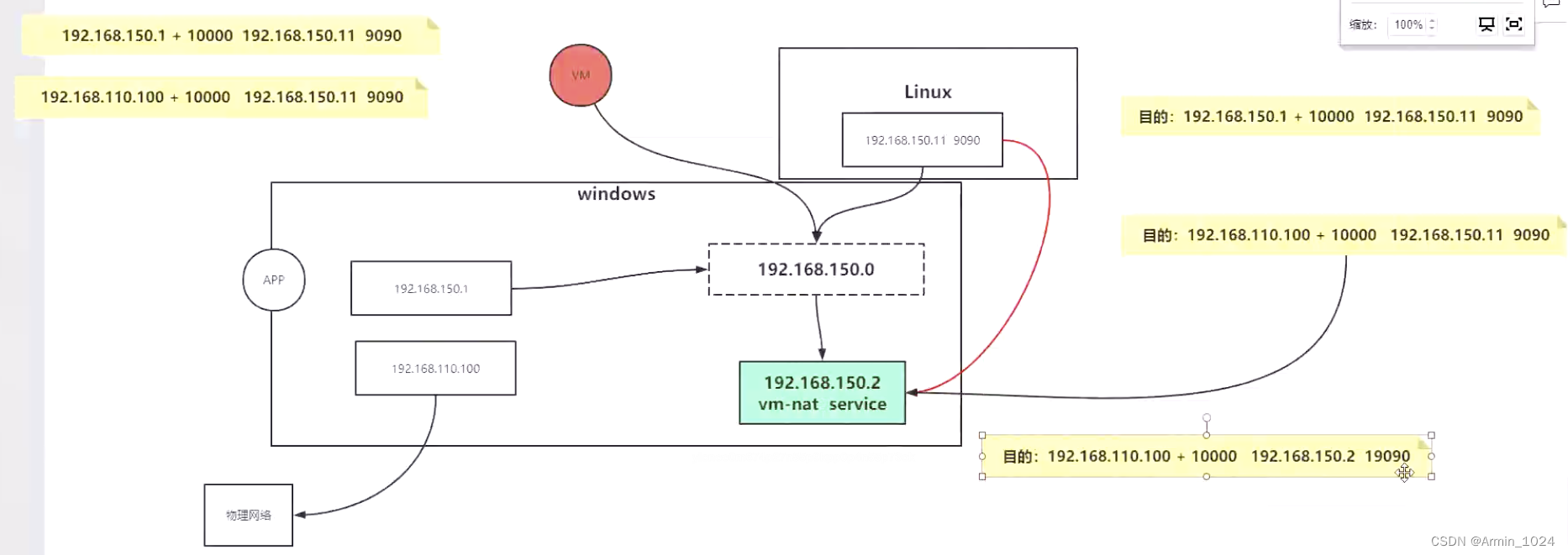
为什么192.168.110.100回来的确认包会丢包:
192.168.110.100不在网关192.168.150.0的网关范围所以先跳到nat程序网络192.168.150.2分配随机端口号再到目的地址时,windows发现不是原来发送的目的地址返回的数据,所以匹配不到该返回的目的ip则丢弃。解决办法添加主机条目,配置路由转发。
讯享网# 添加主机条目 route add -host [source ip] gw [gateway ip] source ip 数据跳转到 gateway ip # 查看路由条目 route -n
模拟10K个链接
import java.io.IOException; import java.net.InetSocketAddress; import java.nio.channels.SocketChannel; import java.util.LinkedList; public class C10Kclient { public static void main(String[] args) { LinkedList<SocketChannel> clients = new LinkedList<>(); InetSocketAddress serverAddr = new InetSocketAddress("192.168.150.11", 9090); //端口号的问题:65535 // windows for (int i = 10000; i < 65000; i++) { try { SocketChannel client1 = SocketChannel.open(); SocketChannel client2 = SocketChannel.open(); /* linux中你看到的连接就是: client...port: 10508 client...port: 10508 */ client1.bind(new InetSocketAddress("192.168.150.1", i)); // 192.168.150.1:10000 192.168.150.11:9090 client1.connect(serverAddr); clients.add(client1); client2.bind(new InetSocketAddress("192.168.110.100", i)); // 192.168.110.100:10000 192.168.150.11:9090 client2.connect(serverAddr); clients.add(client2); } catch (IOException e) { e.printStackTrace(); } } System.out.println("clients "+ clients.size()); try { System.in.read(); } catch (IOException e) { e.printStackTrace(); } } } BIO为什么慢(同步阻塞)
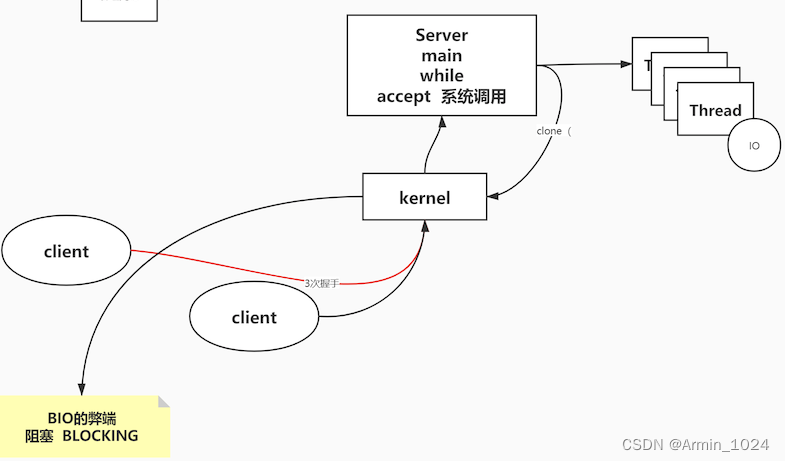
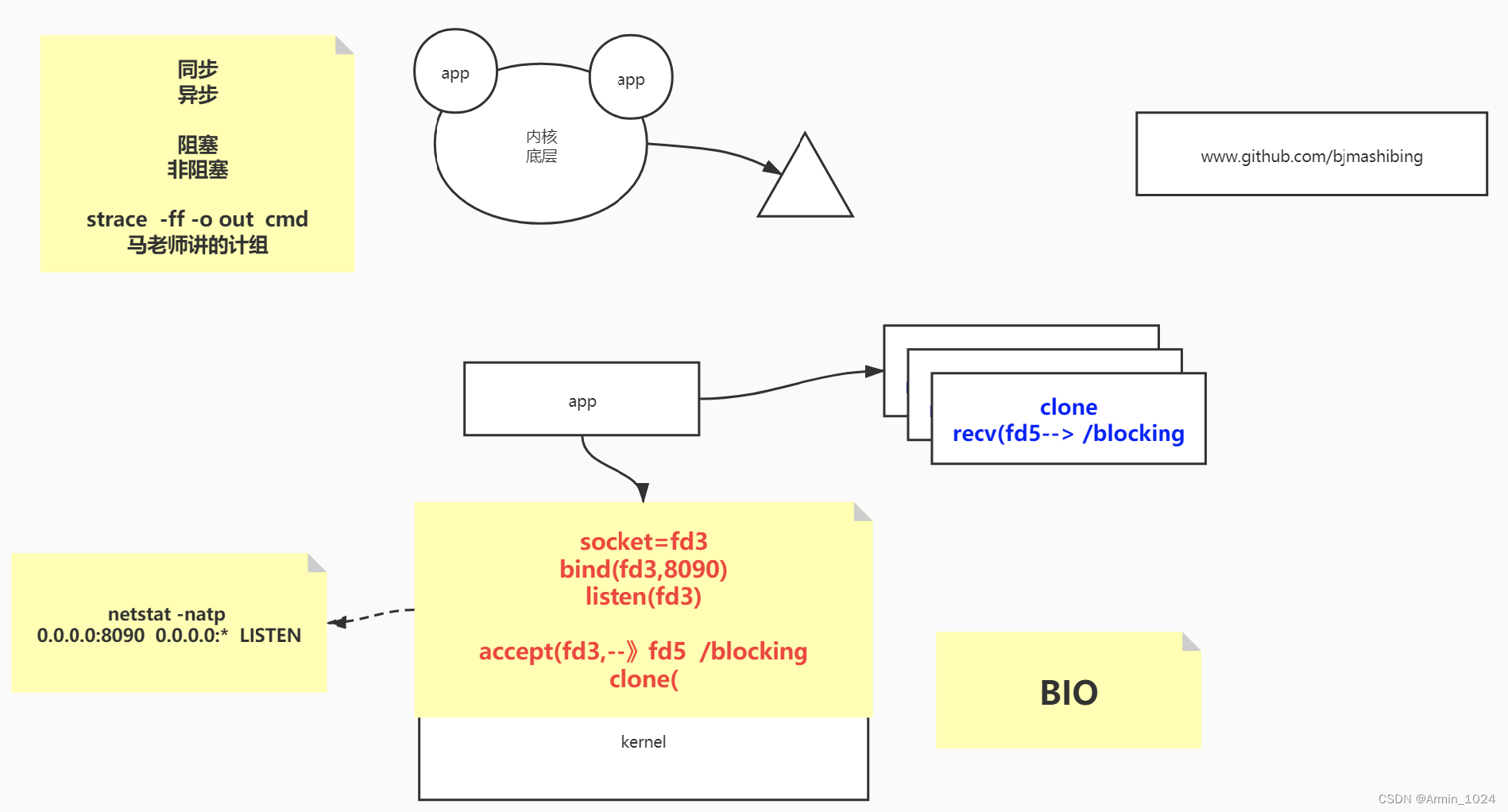
accept阻塞等待新的链接,链接完成kernel创建新的线程对内容进行克隆输出
循环等待accept系统调用,待调用后系统clone调用内核创建新的线程「又一次系统调用」(多了用户态到系统态的切换)再到主线程接收其他的链接

解决IOException:Too many open file
讯享网# 找到文件描述符的最大值 open files (u)「代表有多少个链接」 下一步将值设置为期望值 [root@VM-16-13-centos ~]# ulimit -a ... open files (-n) 1024 ... # 将文件描述符调大SHn「软件/硬件/文件描述符」 [root@VM-16-13-centos ~]# ulimit -SHn # 查看调整后的文件描述符,最大支持万个链接(最多支持创建个文件描述符) [root@VM-16-13-centos ~]# ulimit -a ... open files (-n) ... # 查看指定进程的文件描述符清单 lsof -p [pid]
NIO(同步非阻塞)
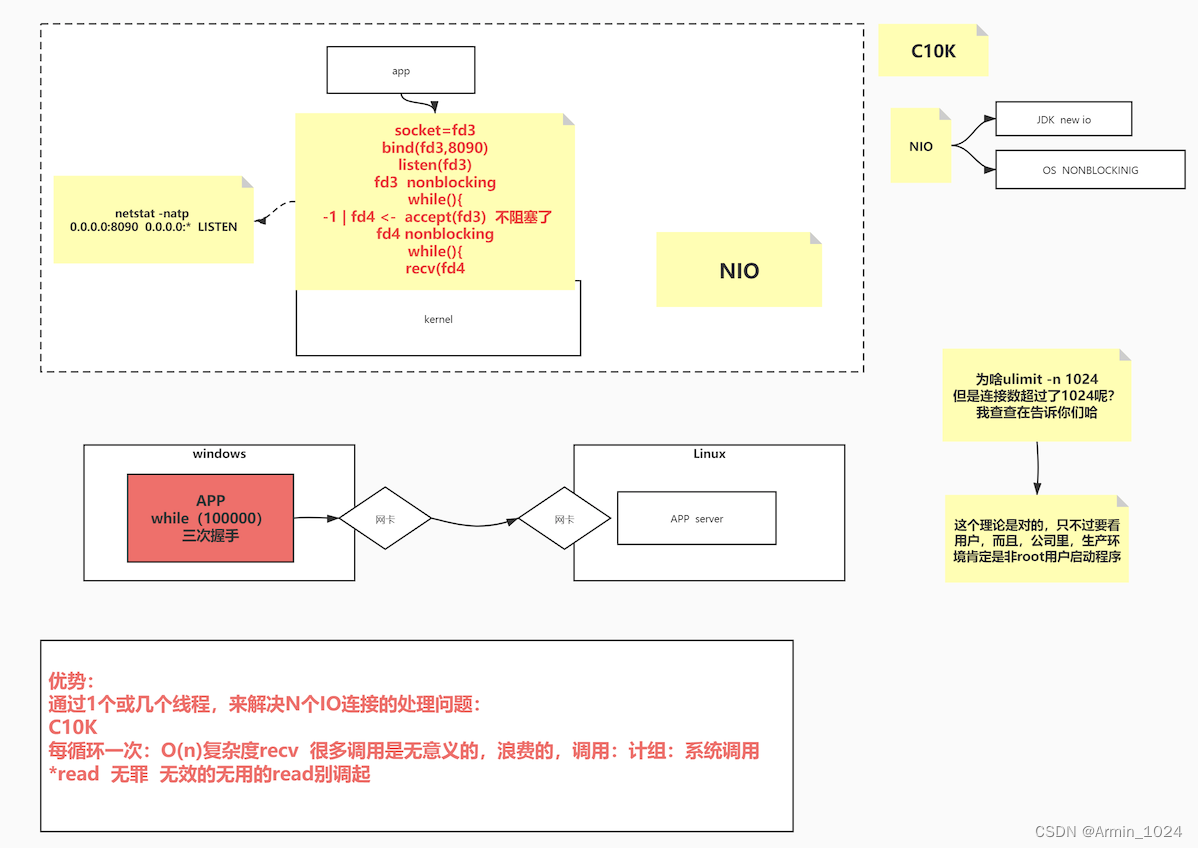
文件描述符root用户通常可以超过设定的值,普通用户到达临界值则抛出IOException:Too many open file异常
# 获取Linux OS kernel可以开辟的文件描述符数量 cat /proc/sys/fs/file-max 讯享网import java.net.InetSocketAddress; import java.net.StandardSocketOptions; import java.nio.ByteBuffer; import java.nio.channels.ServerSocketChannel; import java.nio.channels.SocketChannel; import java.util.LinkedList; public class SocketNIO {
// what why how public static void main(String[] args) throws Exception {
LinkedList<SocketChannel> clients = new LinkedList<>(); ServerSocketChannel ss = ServerSocketChannel.open(); //服务端开启监听:接受客户端 ss.bind(new InetSocketAddress(9090)); ss.configureBlocking(false); //重点 OS NONBLOCKING!!! //只让接受客户端 不阻塞 // ss.setOption(StandardSocketOptions.TCP_NODELAY, false); // StandardSocketOptions.TCP_NODELAY // StandardSocketOptions.SO_KEEPALIVE // StandardSocketOptions.SO_LINGER // StandardSocketOptions.SO_RCVBUF // StandardSocketOptions.SO_SNDBUF // StandardSocketOptions.SO_REUSEADDR while (true) {
//接受客户端的连接 Thread.sleep(1000); SocketChannel client = ss.accept(); //不会阻塞? -1 NULL //accept 调用内核了:1,没有客户端连接进来,返回值?在BIO 的时候一直卡着,但是在NIO ,不卡着,返回-1,NULL //如果来客户端的连接,accept 返回的是这个客户端的fd 5,client object //NONBLOCKING 就是代码能往下走了,只不过有不同的情况 if (client == null) {
// System.out.println("null....."); } else {
client.configureBlocking(false); //重点 socket(服务端的listen socket<连接请求三次握手后,往我这里扔,我去通过accept 得到 连接的socket>,连接socket<连接后的数据读写使用的> ) int port = client.socket().getPort(); System.out.println("client..port: " + port); clients.add(client); } ByteBuffer buffer = ByteBuffer.allocateDirect(4096); //可以在堆里 堆外 //遍历已经链接进来的客户端能不能读写数据 for (SocketChannel c : clients) {
//串行化!!!! 多线程!! int num = c.read(buffer); // >0 -1 0 //不会阻塞 if (num > 0) {
buffer.flip(); byte[] aaa = new byte[buffer.limit()]; buffer.get(aaa); String b = new String(aaa); System.out.println(c.socket().getPort() + " : " + b); buffer.clear(); } } } } }
NIO效率不及多路复用器(Select)
多路复用器
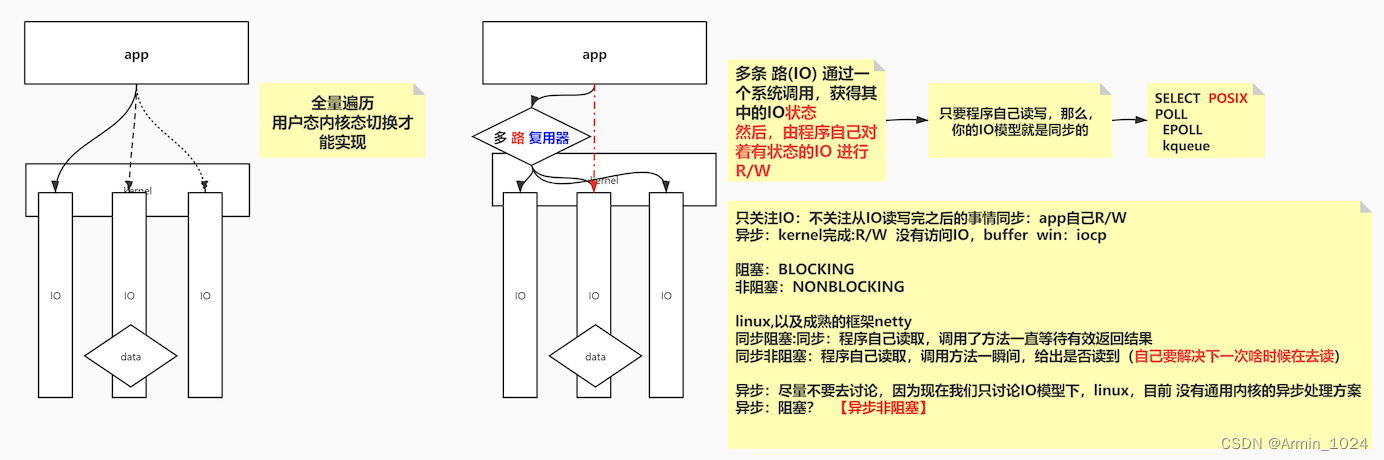
同步非阻塞(多路复用器) - SELECT POSIX「解耦性很强的一种系统调用」所有OS都遵守POSIX组织的规范(如下是各个操作系统针对select「各个操作系统都有」进行向上的优化) FD_SIZE有限制 = 1024? - POLL FD_SIZE无限制 - 基于I/O事件的一种通知行为 - EPOLL「linux」 相较于POLL多了个链表<红黑数>,能存放fd返回,即不用遍历fd - kqueue「unix」 NIO与SELECT/POLL
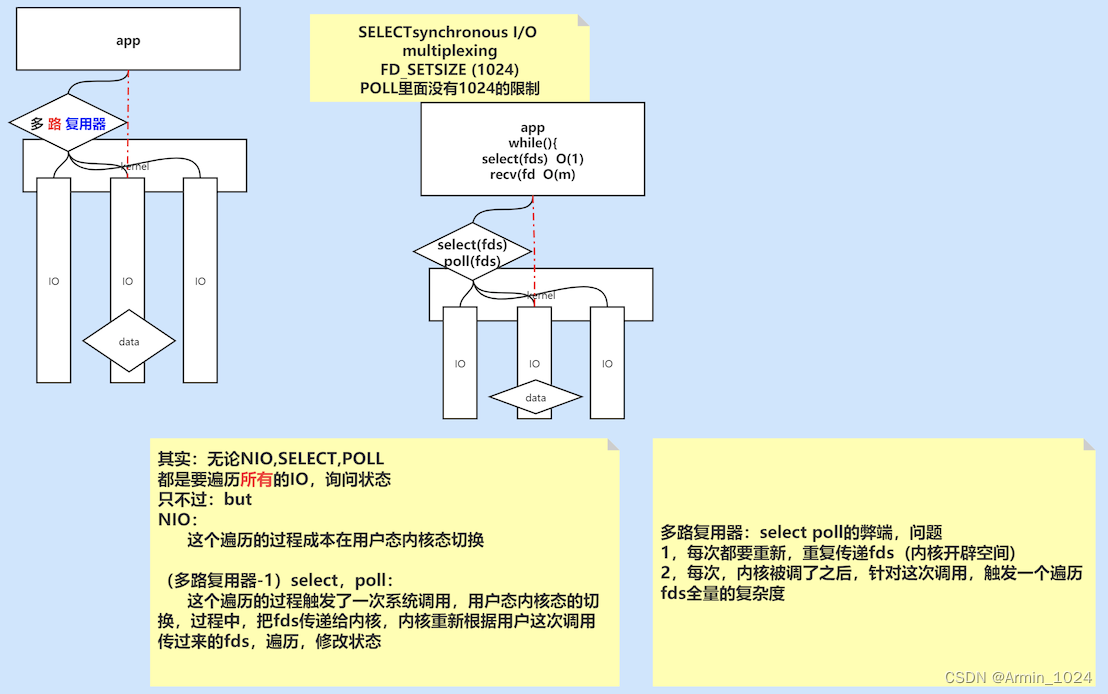
拓展中断相关
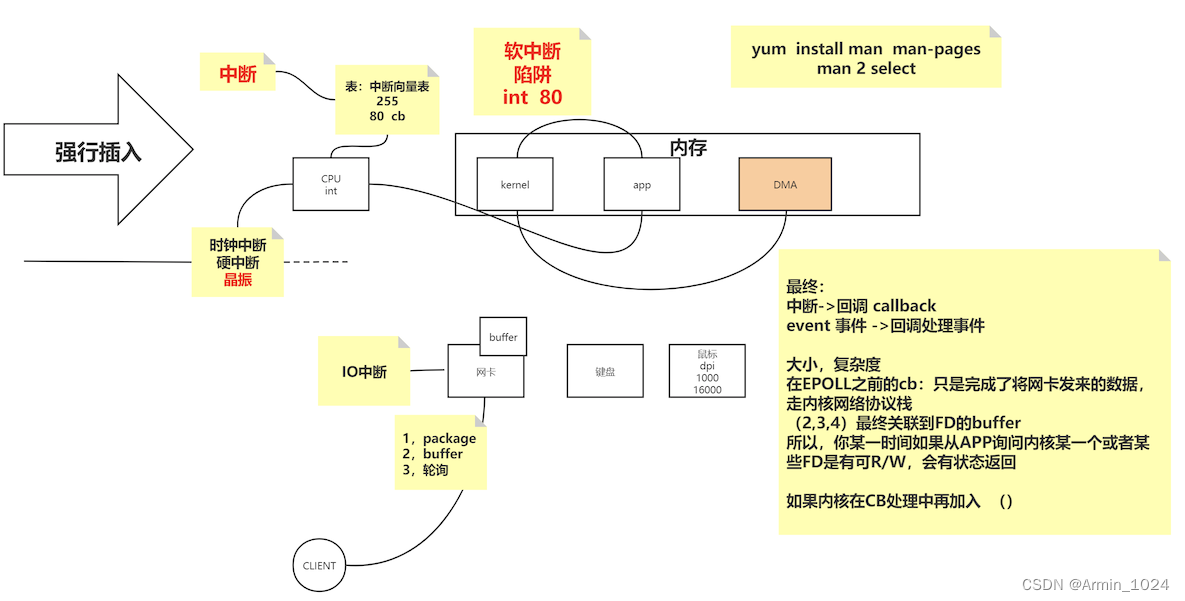
EPOLL与SELECT/POLL
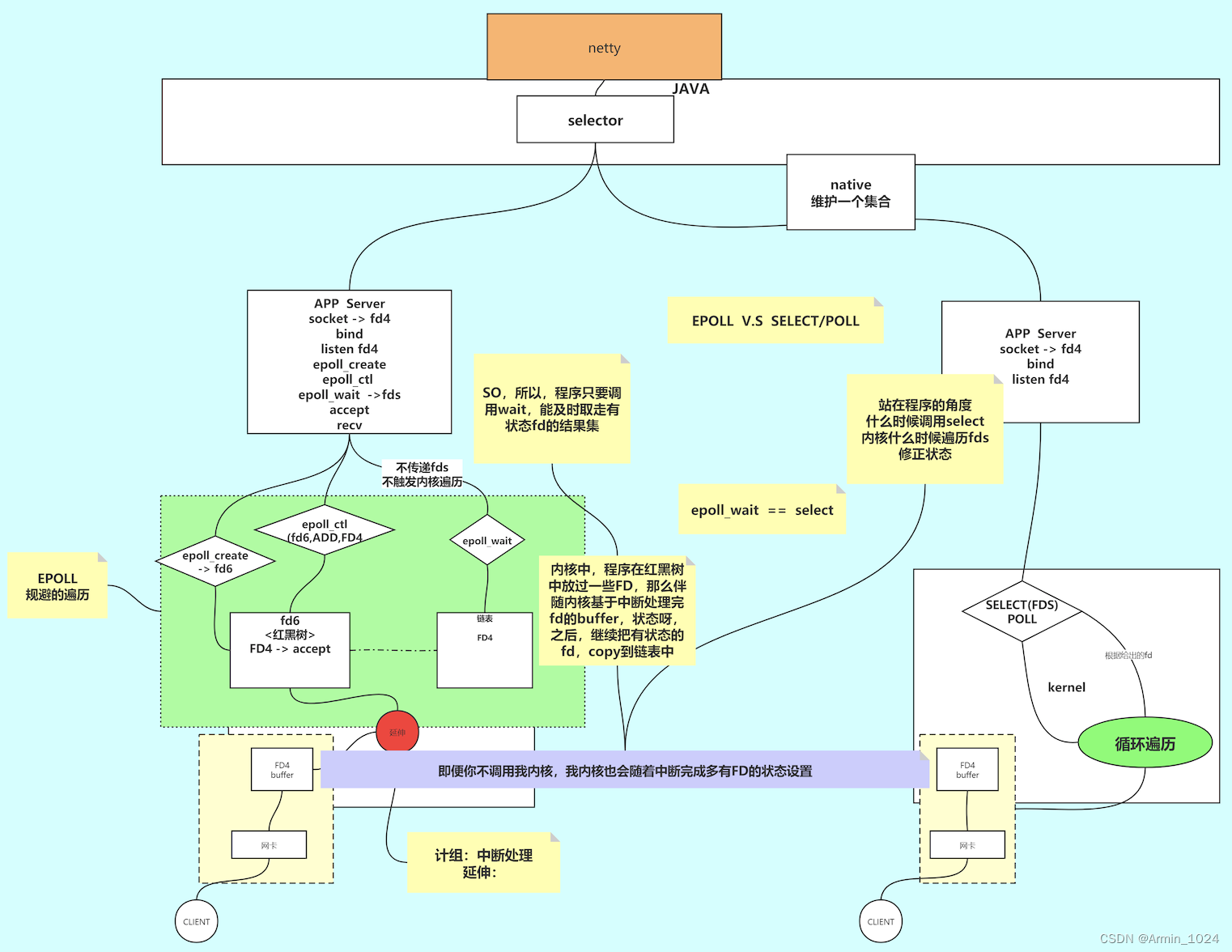
讯享网# 获取当前linux系统epoll epoll_ctl 注册支持的最大值 cat /proc/sys/fs/epoll/max_user_watches
四次挥手
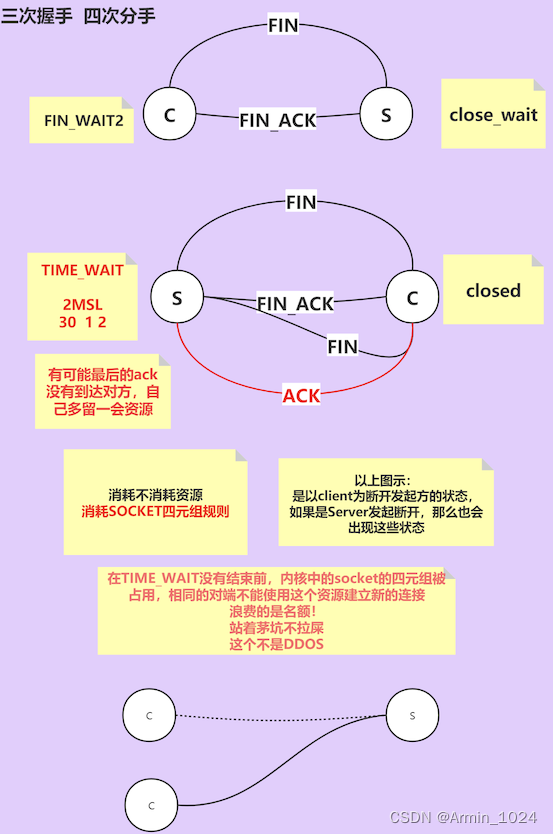
# 解决占用名额问题 [root@VM-16-13-centos ~]# vi /etc/sysctl.conf [root@VM-16-13-centos ~]# sysctl -p [root@VM-16-13-centos ~]# sysctl -a | grep reuse net.ipv4.tcp_tw_reuse = 1 # net.ipv4.tcp_tw_reuse = 1 表示开启重用。允许将TIME-WAIT sockets重新用于新的TCP连接,默认为0,表示关闭; # net.ipv4.tcp_tw_recycle = 1 表示开启TCP连接中TIME-WAIT sockets的快速回收,默认为0,表示关闭。 // 启用TIME_WAIT状态sockets的快速回收,这个选项不推荐启用。在NAT(Network Address Translation)网络下,会导致大量的TCP连接建立错误。 POLL与EPOLL底层实现
讯享网import java.io.IOException; import java.net.InetSocketAddress; import java.nio.ByteBuffer; import java.nio.channels.*; import java.util.HashMap; import java.util.Iterator; import java.util.Set; public class SocketMultiplexingSingleThreadv1 {
    private ServerSocketChannel server = null; private Selector selector = null; //linux 多路复用器(select poll epoll kqueue) nginx event{} int port = 9090; public void initServer() {
    try {
    server = ServerSocketChannel.open(); server.configureBlocking(false); server.bind(new InetSocketAddress(port)); //如果在epoll模型下,open--》 epoll_create -> fd3 selector = Selector.open(); // select poll *epoll 优先选择:epoll 但是可以 -D修正 //server 约等于 listen状态的 fd4 /* register 如果: select,poll:jvm里开辟一个数组 fd4 放进去 epoll: epoll_ctl(fd3,ADD,fd4,EPOLLIN */ server.register(selector, SelectionKey.OP_ACCEPT); } catch (IOException e) {
    e.printStackTrace(); } } public void start() {
    initServer(); System.out.println("服务器启动了。。。。。"); try {
    while (true) {
    //死循环 Set<SelectionKey> keys = selector.keys(); System.out.println(keys.size()+" size"); //1,调用多路复用器(select,poll or epoll (epoll_wait)) /* select()是啥意思: 1,select,poll 其实 内核的select(fd4) poll(fd4) 2,epoll: 其实 内核的 epoll_wait() *, 参数可以带时间:没有时间,0 : 阻塞,有时间设置一个超时 selector.wakeup() 结果返回0 懒加载: 其实再触碰到selector.select()调用的时候触发了epoll_ctl的调用 */ while (selector.select() > 0) {
    Set<SelectionKey> selectionKeys = selector.selectedKeys(); //返回的有状态的fd集合 Iterator<SelectionKey> iter = selectionKeys.iterator(); //so,管你啥多路复用器,你呀只能给我状态,我还得一个一个的去处理他们的R/W。同步好辛苦!!!!!!!! // NIO 自己对着每一个fd调用系统调用,浪费资源,那么你看,这里是不是调用了一次select方法,知道具体的那些可以R/W了? //幕兰,是不是很省力? //我前边可以强调过,socket: listen 通信 R/W while (iter.hasNext()) {
    SelectionKey key = iter.next(); iter.remove(); //set 不移除会重复循环处理 if (key.isAcceptable()) {
    //看代码的时候,这里是重点,如果要去接受一个新的连接 //语义上,accept接受连接且返回新连接的FD对吧? //那新的FD怎么办? //select,poll,因为他们内核没有空间,那么在jvm中保存和前边的fd4那个listen的一起 //epoll: 我们希望通过epoll_ctl把新的客户端fd注册到内核空间 acceptHandler(key); } else if (key.isReadable()) {
    readHandler(key); //连read 还有 write都处理了 //在当前线程,这个方法可能会阻塞 ,如果阻塞了十年,其他的IO早就没电了。。。 //所以,为什么提出了 IO THREADS //redis 是不是用了epoll,redis是不是有个io threads的概念 ,redis是不是单线程的 //tomcat 8,9 异步的处理方式 IO 和 处理上 解耦 } } } } } catch (IOException e) {
    e.printStackTrace(); } } public void acceptHandler(SelectionKey key) {
    try {
    ServerSocketChannel ssc = (ServerSocketChannel) key.channel(); SocketChannel client = ssc.accept(); //来啦,目的是调用accept接受客户端 fd7 client.configureBlocking(false); ByteBuffer buffer = ByteBuffer.allocate(8192); //前边讲过了 // 0.0 我类个去 //你看,调用了register /* select,poll:jvm里开辟一个数组 fd7 放进去 epoll: epoll_ctl(fd3,ADD,fd7,EPOLLIN */ client.register(selector, SelectionKey.OP_READ, buffer); System.out.println("-------------------------------------------"); System.out.println("新客户端:" + client.getRemoteAddress()); System.out.println("-------------------------------------------"); } catch (IOException e) {
    e.printStackTrace(); } } public void readHandler(SelectionKey key) {
    SocketChannel client = (SocketChannel) key.channel(); ByteBuffer buffer = (ByteBuffer) key.attachment(); buffer.clear(); int read = 0; try {
    while (true) {
    read = client.read(buffer); if (read > 0) {
    buffer.flip(); while (buffer.hasRemaining()) {
    client.write(buffer); } buffer.clear(); } else if (read == 0) {
    break; } else {
    client.close(); break; } } } catch (IOException e) {
    e.printStackTrace(); } } public static void main(String[] args) {
    SocketMultiplexingSingleThreadv1 service = new SocketMultiplexingSingleThreadv1(); service.start(); } }
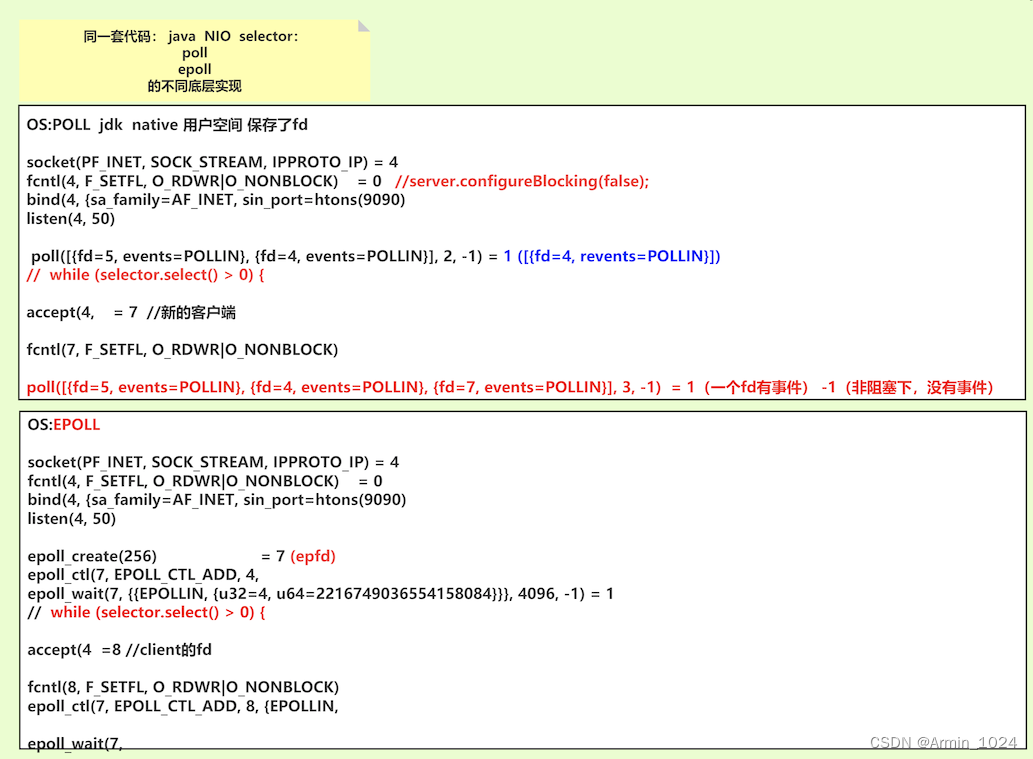
key.cancel()解决重复触发问题
import java.io.IOException; import java.net.InetSocketAddress; import java.nio.ByteBuffer; import java.nio.channels.*; import java.util.Iterator; import java.util.Set; public class SocketMultiplexingSingleThreadv2 {
    private ServerSocketChannel server = null; private Selector selector = null; //linux 多路复用器(select poll epoll) nginx event{} int port = 9090; public void initServer() {
    try {
    server = ServerSocketChannel.open(); server.configureBlocking(false); server.bind(new InetSocketAddress(port)); selector = Selector.open(); // select poll *epoll server.register(selector, SelectionKey.OP_ACCEPT); } catch (IOException e) {
    e.printStackTrace(); } } public void start() {
    initServer(); System.out.println("服务器启动了。。。。。"); try {
    while (true) {
    // Set<SelectionKey> keys = selector.keys(); // System.out.println(keys.size()+" size"); while (selector.select(50) > 0) {
    Set<SelectionKey> selectionKeys = selector.selectedKeys(); Iterator<SelectionKey> iter = selectionKeys.iterator(); while (iter.hasNext()) {
    SelectionKey key = iter.next(); iter.remove(); if (key.isAcceptable()) {
    acceptHandler(key); } else if (key.isReadable()) {
    key.cancel(); //现在多路复用器里把key cancel了 // System.out.println("in....."); // key.interestOps(key.interestOps() | ~SelectionKey.OP_READ); readHandler(key);//还是阻塞的嘛? 即便以抛出了线程去读取,但是在时差里,这个key的read事件会被重复触发 } else if(key.isWritable()){
    //我之前没讲过写的事件!!!!! //写事件<-- send-queue 只要是空的,就一定会给你返回可以写的事件,就会回调我们的写方法 //你真的要明白:什么时候写?不是依赖send-queue是不是有空间 //1,你准备好要写什么了,这是第一步 //2,第二步你才关心send-queue是否有空间 //3,so,读 read 一开始就要注册,但是write依赖以上关系,什么时候用什么时候注册 //4,如果一开始就注册了write的事件,进入死循环,一直调起!!! key.cancel(); // key.interestOps(key.interestOps() & ~SelectionKey.OP_WRITE); writeHandler(key); } } } } } catch (IOException e) {
    e.printStackTrace(); } } private void writeHandler(SelectionKey key) {
    new Thread(()->{
    System.out.println("write handler..."); SocketChannel client = (SocketChannel) key.channel(); ByteBuffer buffer = (ByteBuffer) key.attachment(); buffer.flip(); while (buffer.hasRemaining()) {
    try {
    client.write(buffer); } catch (IOException e) {
    e.printStackTrace(); } } try {
    Thread.sleep(2000); } catch (InterruptedException e) {
    e.printStackTrace(); } buffer.clear(); // key.cancel(); // try {
     client.shutdownOutput(); //  client.close(); // // } catch (IOException e) {
    // e.printStackTrace(); // } }).start(); } public void acceptHandler(SelectionKey key) {
    try {
    ServerSocketChannel ssc = (ServerSocketChannel) key.channel(); SocketChannel client = ssc.accept(); client.configureBlocking(false); ByteBuffer buffer = ByteBuffer.allocate(8192); client.register(selector, SelectionKey.OP_READ, buffer); System.out.println("-------------------------------------------"); System.out.println("新客户端:" + client.getRemoteAddress()); System.out.println("-------------------------------------------"); } catch (IOException e) {
    e.printStackTrace(); } } public void readHandler(SelectionKey key) {
    new Thread(()->{
    System.out.println("read handler....."); SocketChannel client = (SocketChannel) key.channel(); ByteBuffer buffer = (ByteBuffer) key.attachment(); buffer.clear(); int read = 0; try {
    while (true) {
    read = client.read(buffer); System.out.println(Thread.currentThread().getName()+ " " + read); if (read > 0) {
    // key.interestOps( SelectionKey.OP_READ); client.register(key.selector(),SelectionKey.OP_WRITE,buffer); } else if (read == 0) {
    break; } else {
    client.close(); break; } } } catch (IOException e) {
    e.printStackTrace(); } }).start(); } public static void main(String[] args) {
SocketMultiplexingSingleThreadv2 service = new SocketMultiplexingSingleThreadv2(); service.start(); } } 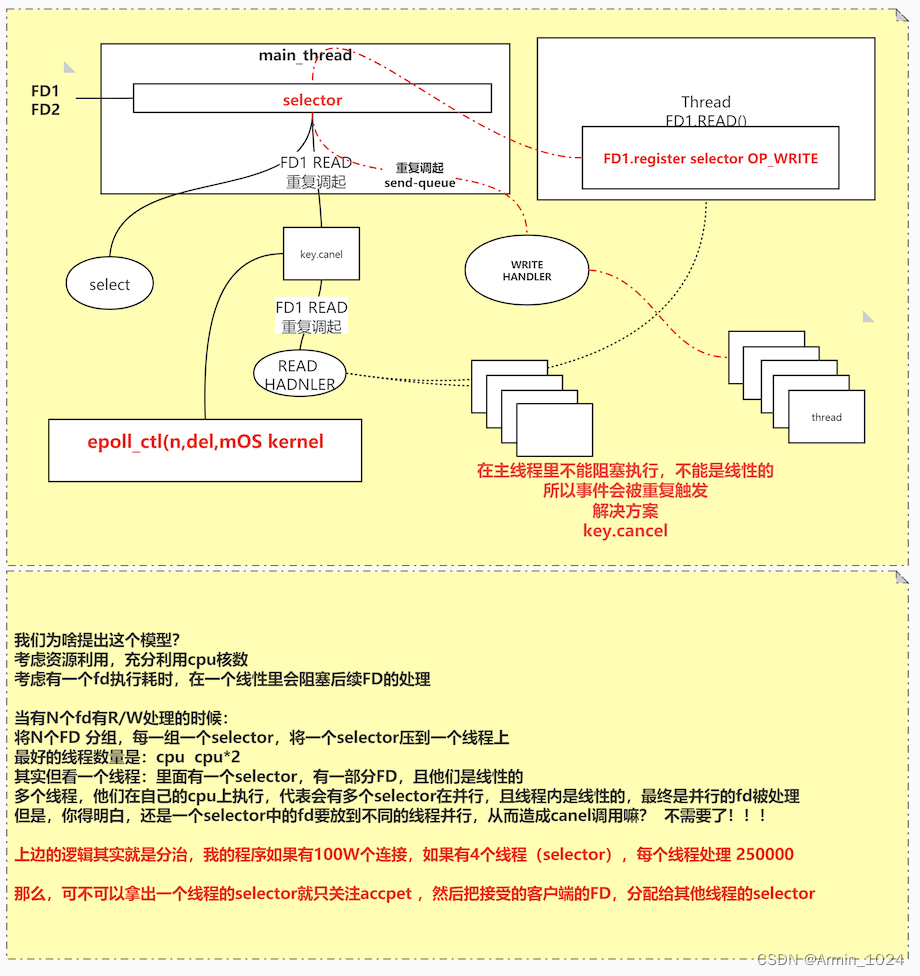
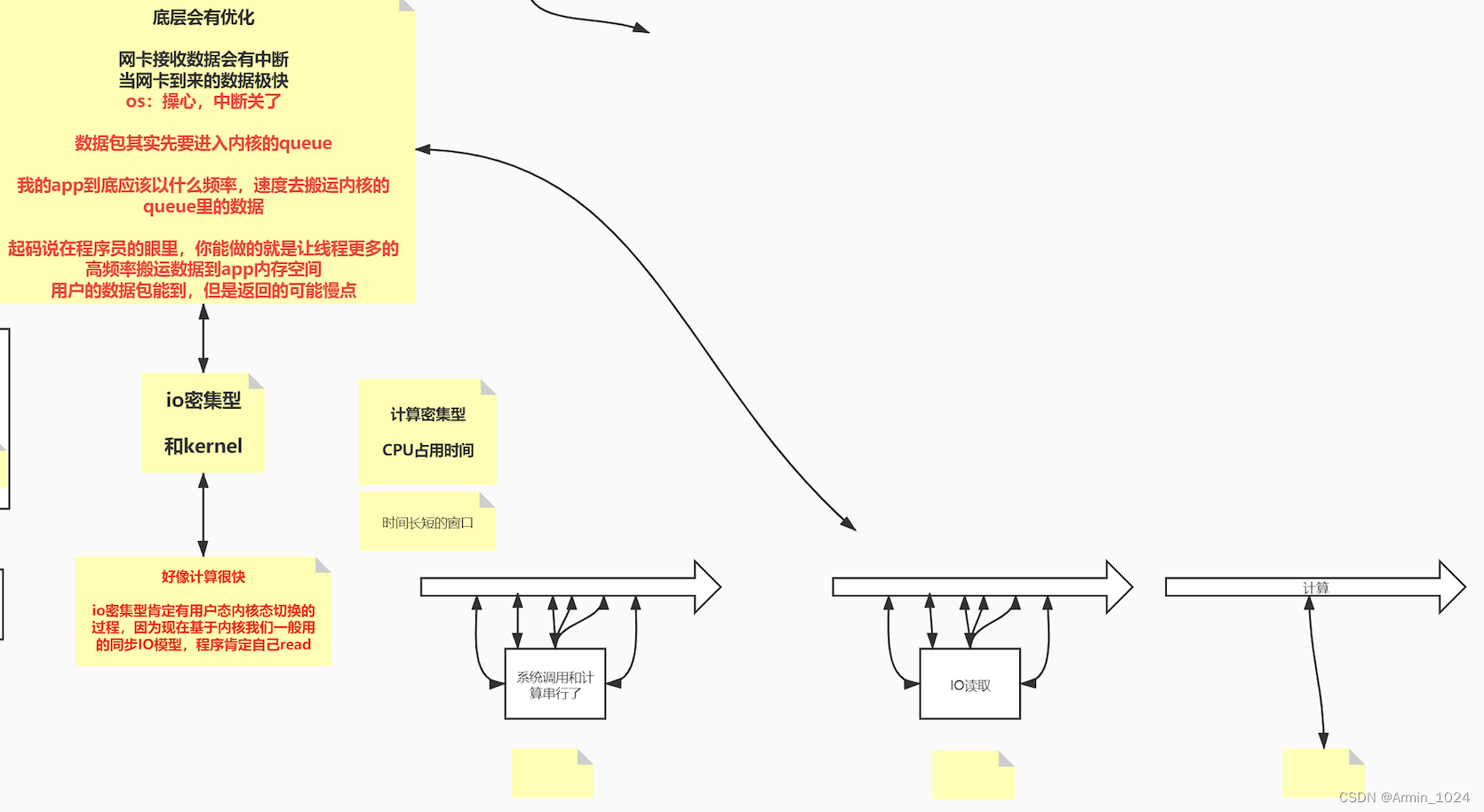
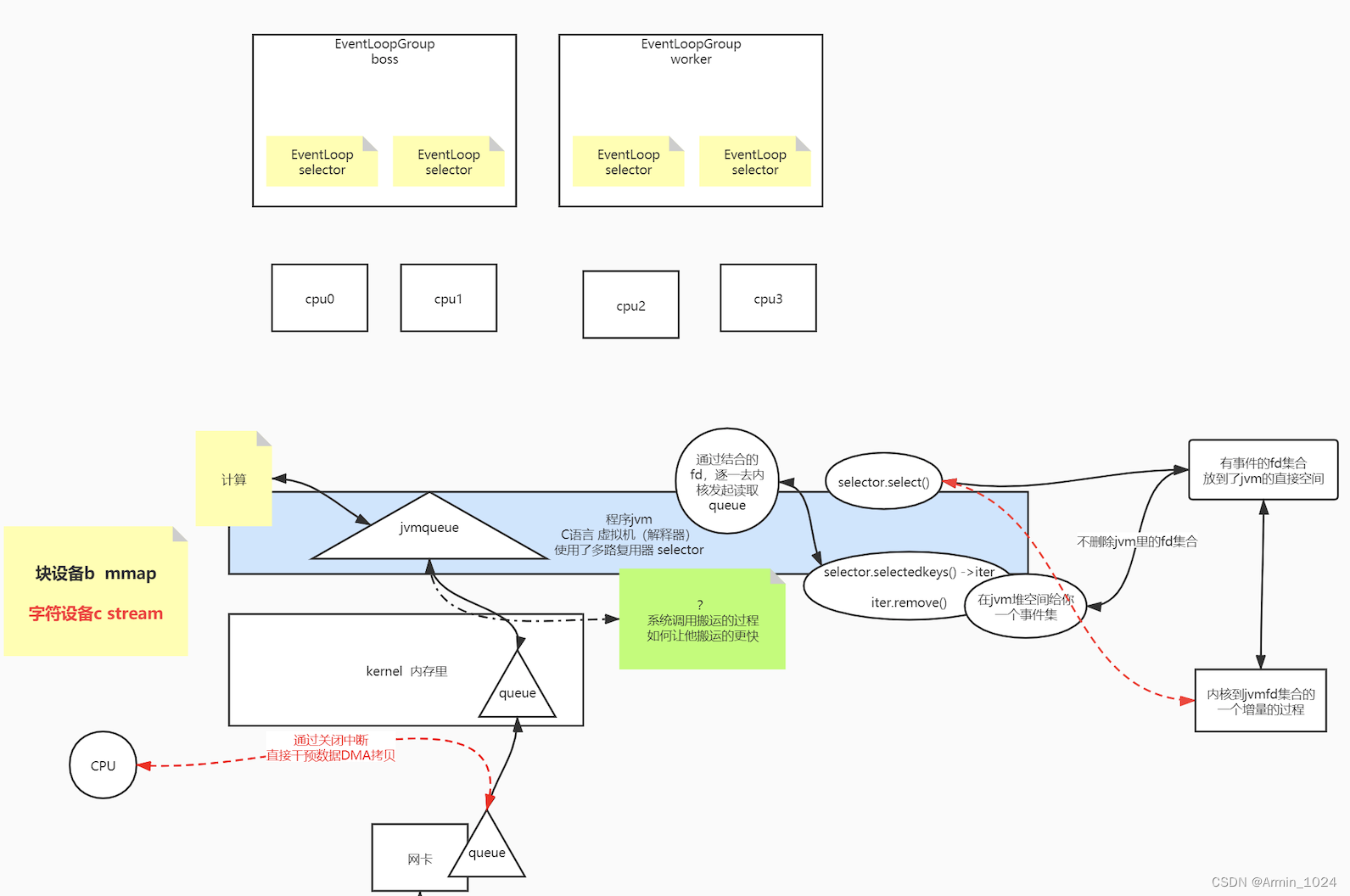
频繁的cancel「key.cancel()【相当于epoll_ctl(del会删除<通知区域(红黑树)>中的文件描述符】」与注册会增大内核的开销(用户态与内核态的切换)解决方案使用:
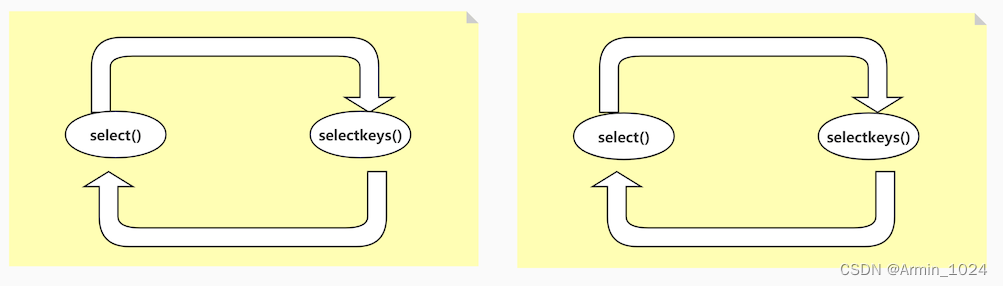
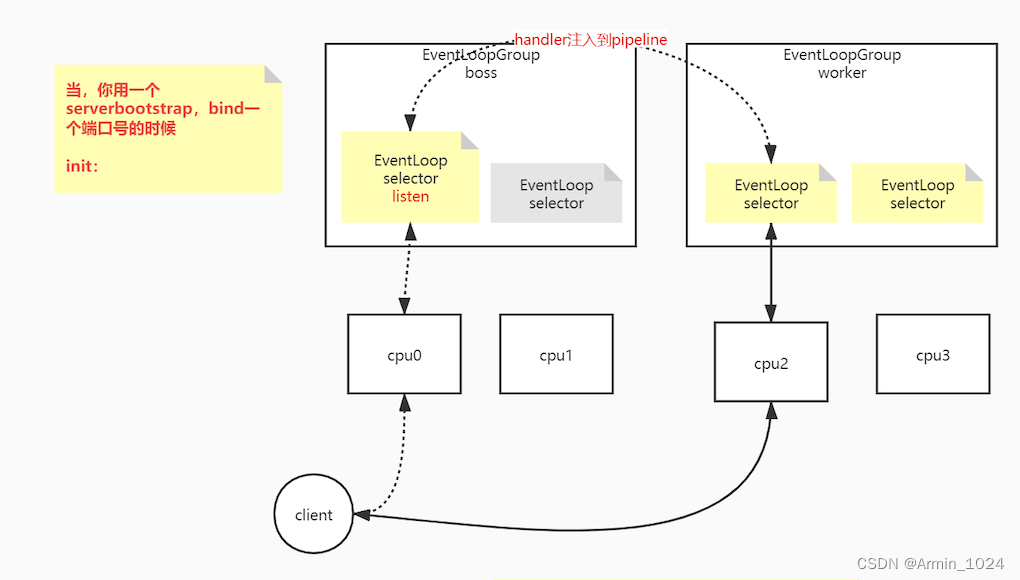
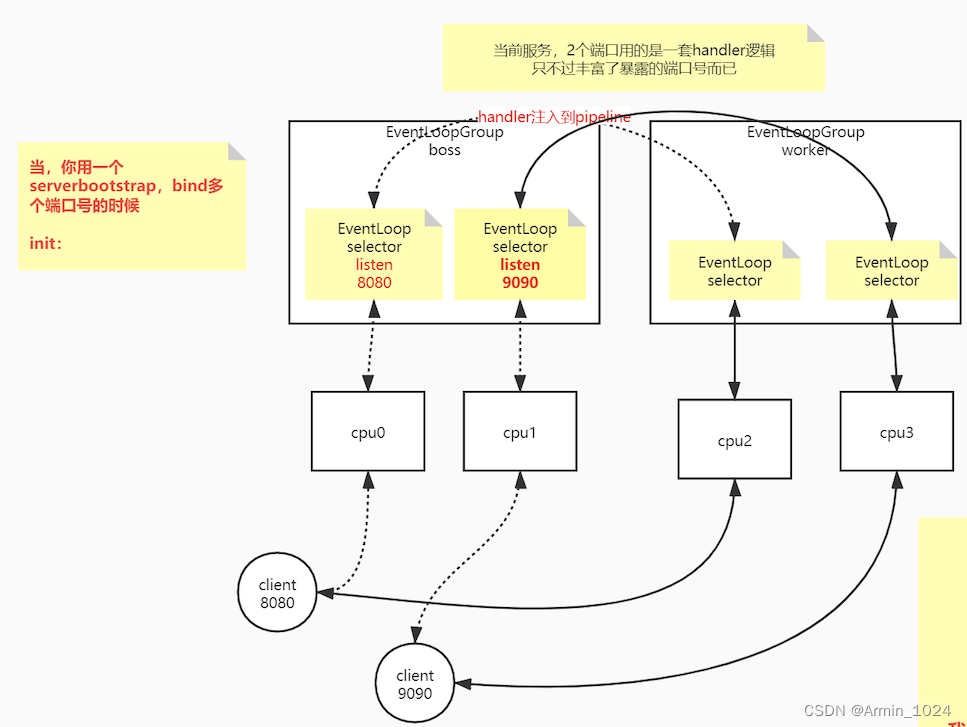
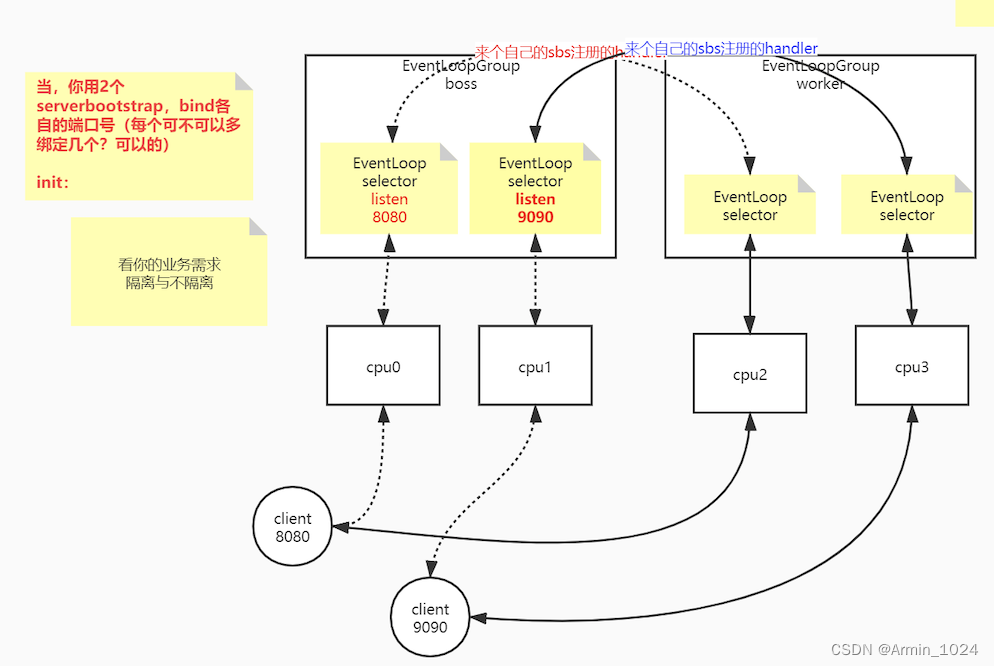
一个线程一个selector,每个selector有注册一组fd,分而治之
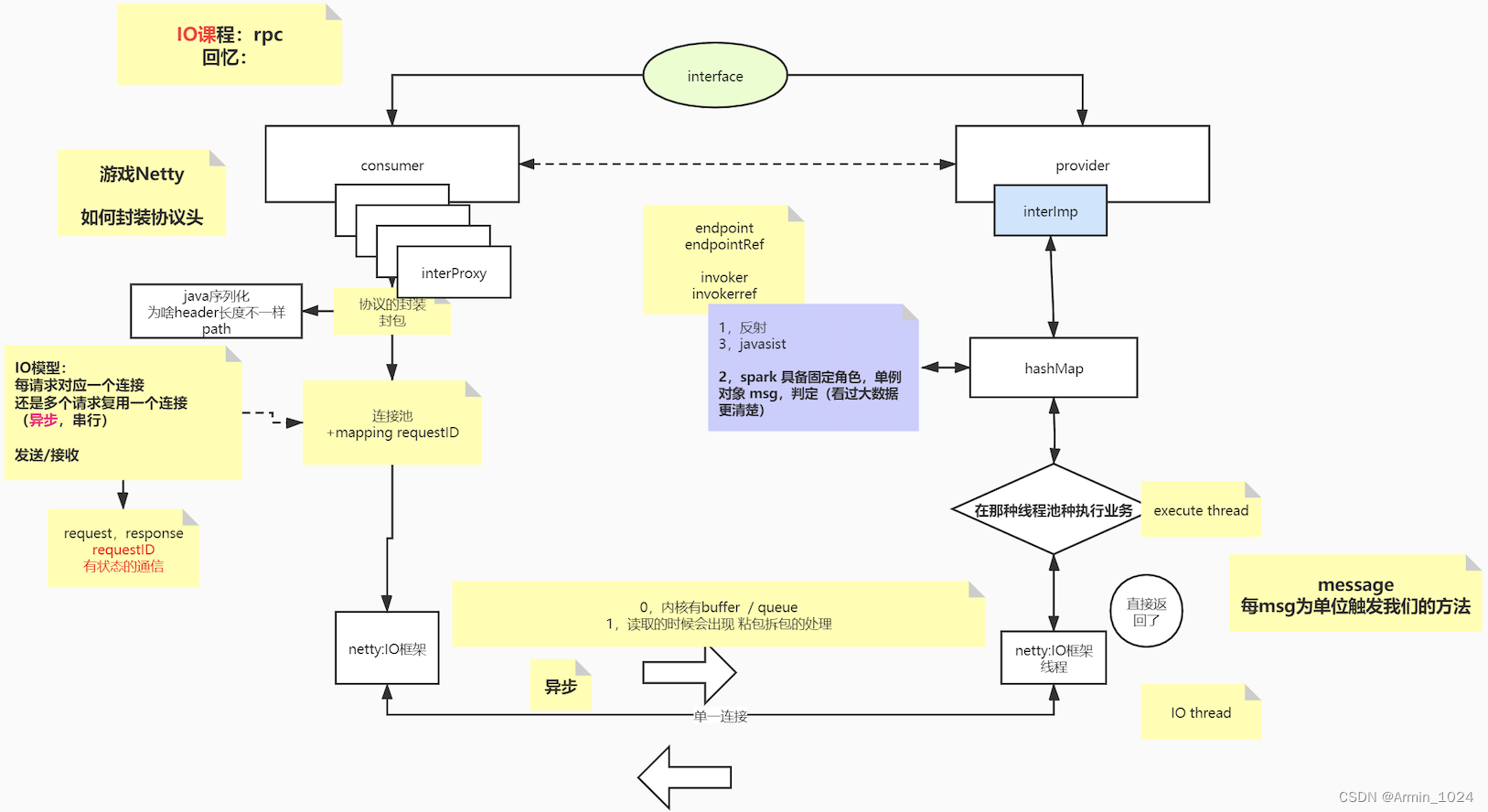
基于netty的rpc框架
并发可达到多大
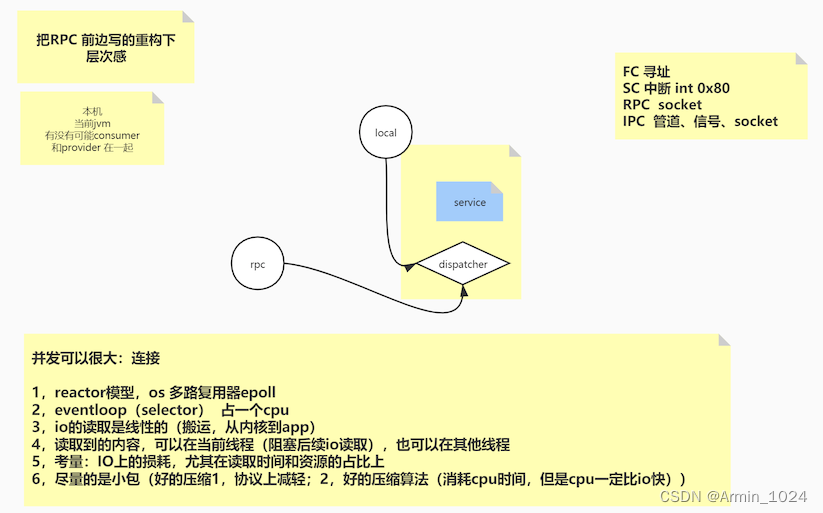
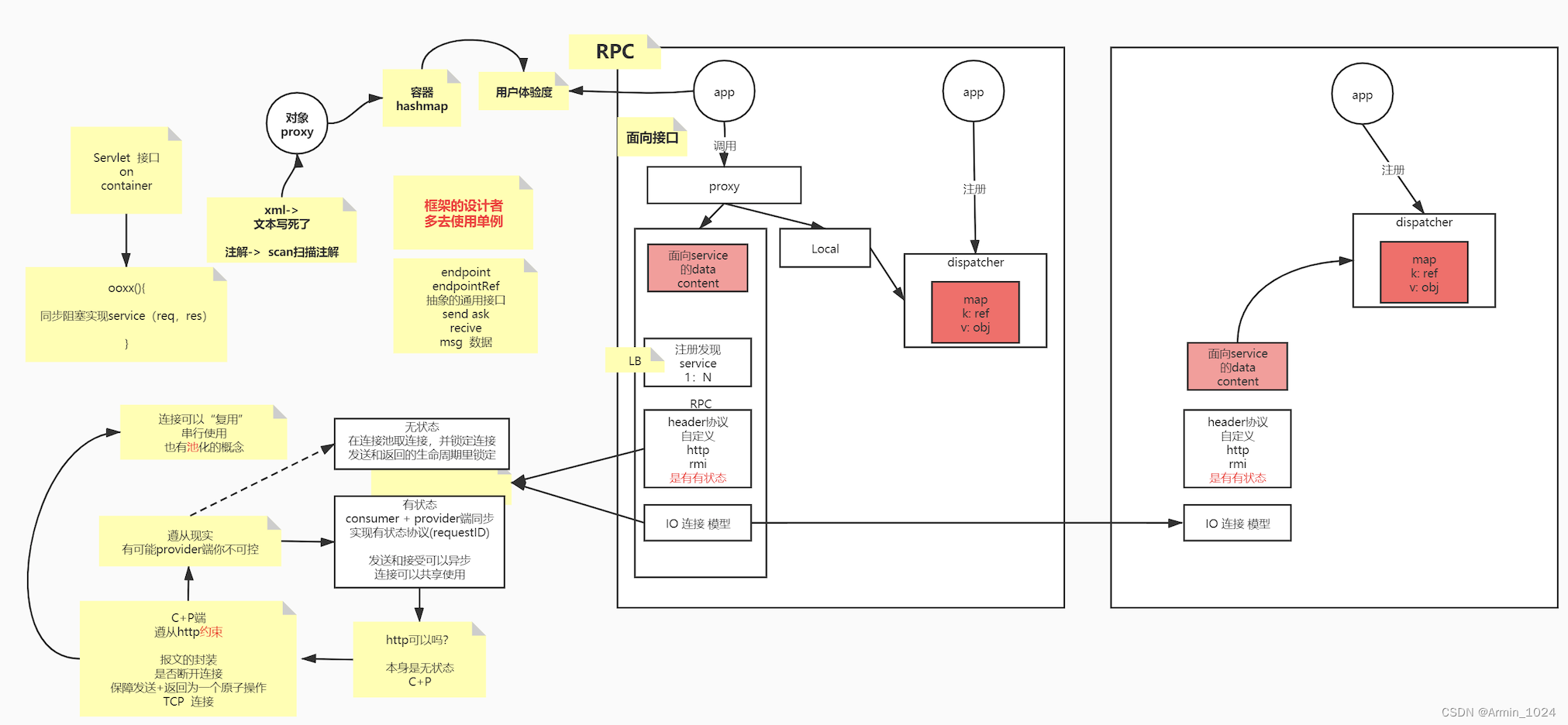
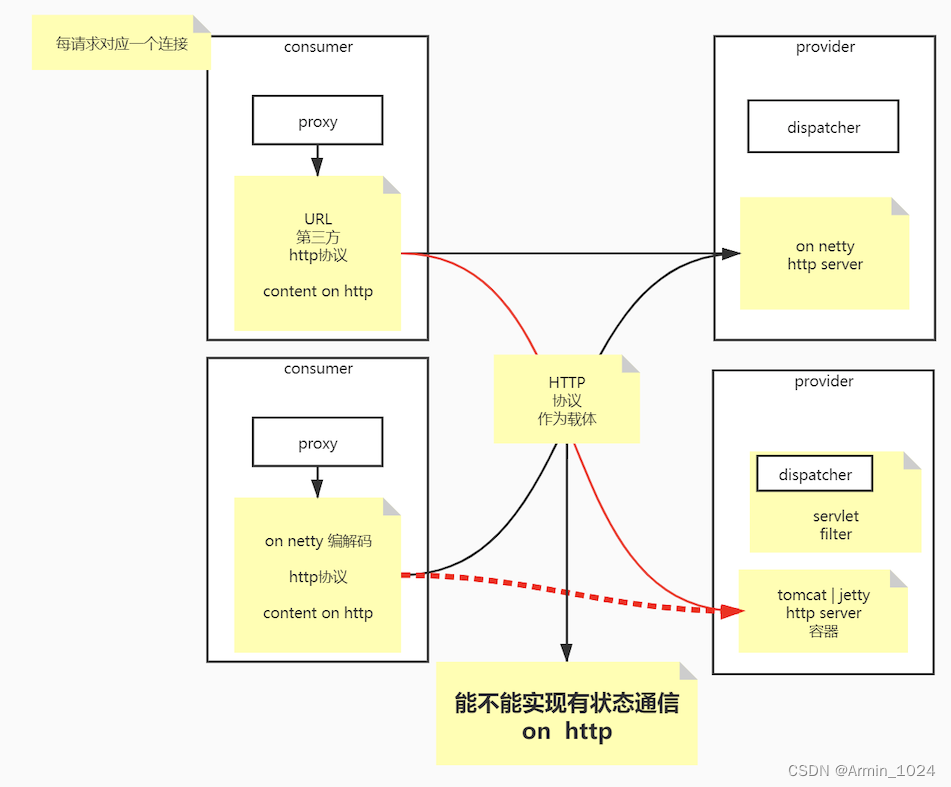
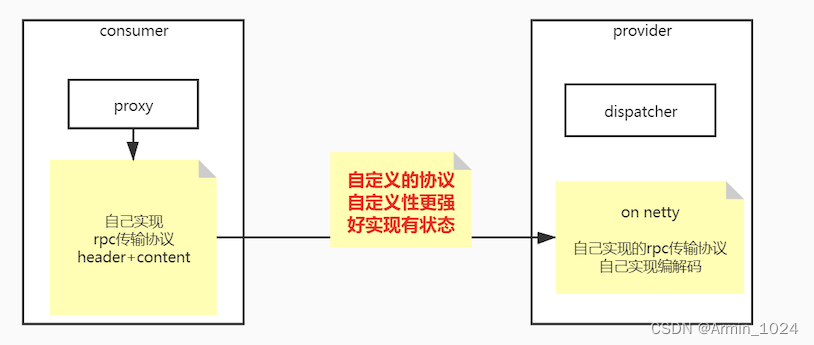
自定义RPC代码链接:https://github.com/armin1024/nio
版权声明:本文内容由互联网用户自发贡献,该文观点仅代表作者本人。本站仅提供信息存储空间服务,不拥有所有权,不承担相关法律责任。如发现本站有涉嫌侵权/违法违规的内容,请联系我们,一经查实,本站将立刻删除。
如需转载请保留出处:https://51itzy.com/kjqy/31805.html