
简而言之:WinForm是·Net开发平台中对Windows Form的一种称谓,开发语言通常是C#,一款微软出品并可以媲美Java的面向对象编程语言,它含有一个窗体,作为控件和其它图形的平台,可以开发智能客户端,比如、Photoshop等C端,在Windows平台下非常NICE,笔者在开发一款【车辆管理系统】软件中,用到了缓存机制,简单记录一下。
一,效果图,是否如你所想,点击配置代理,弹出需要存储的Neek和AppKey,这两个值即是需要缓存到本地的,以便下次启动项目时使用此值。

二,创建一个普通类:AgencyCache,编写缓存和读取代码。
1、缓存代码:

public static void Cache(String neek, String appkey) { Dictionary<String, String> keys = new Dictionary<String, String>(); FileStream fileStream = new FileStream("agency.data", FileMode.Create); BinaryFormatter binaryFormatter = new BinaryFormatter(); keys.Add("neek", neek); keys.Add("appkey",appkey); binaryFormatter.Serialize(fileStream, keys); fileStream.Close(); }讯享网
2、读取代码:
讯享网 public static Dictionary<String, String> Query() { Dictionary<String, String> keys = new Dictionary<String, String>(); FileStream fileStream = new FileStream("agency.data", FileMode.OpenOrCreate); if (fileStream.Length > 0) { BinaryFormatter binaryFormatter = new BinaryFormatter(); keys = binaryFormatter.Deserialize(fileStream) as Dictionary<String, String>; Console.WriteLine("缓存数据:" + "=Neek=" + keys["neek"] + "=AppKey=" + keys["appkey"]); } else { keys.Add("neek", ""); keys.Add("appkey", ""); } fileStream.Close(); return keys; }
3、如何使用代码,即当点击配置代理时打开弹窗并读取数据值显示,当点击保存配置时则缓存本地。
private void AgencyForm_Load(object sender, EventArgs e) { Console.WriteLine("开始载入窗体,读取保存数据"); this.NeekTextBox.Text = AgencyCache.Query()["neek"]; this.AppKeyTextBox.Text = AgencyCache.Query()["appkey"]; this.NeekTextBox.Select(this.NeekTextBox.TextLength, 0); } 讯享网 private void SaveBtn_Click(object sender, EventArgs e) { if (this.NeekTextBox.Text.Length == 0 || this.AppKeyTextBox.Text.Length == 0) { MessageBox.Show("抱歉,配置代理不能为空"); } else { AgencyCache.Cache(this.NeekTextBox.Text, this.AppKeyTextBox.Text); MessageBox.Show("保存配置成功"); } }
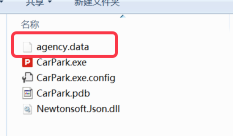
三、查看创建的缓存文件位置在项目根目录,如下图:
至此,一个非常简单又实用的基于WinForm客户端的本地数据缓存功能就实现了,春暖花开,我还在写代码。
版权声明:本文内容由互联网用户自发贡献,该文观点仅代表作者本人。本站仅提供信息存储空间服务,不拥有所有权,不承担相关法律责任。如发现本站有涉嫌侵权/违法违规的内容,请联系我们,一经查实,本站将立刻删除。
如需转载请保留出处:https://51itzy.com/kjqy/29192.html