
开发环境应注意问题
安装JDK,并配置JAVA环境变量JAVA_HOME
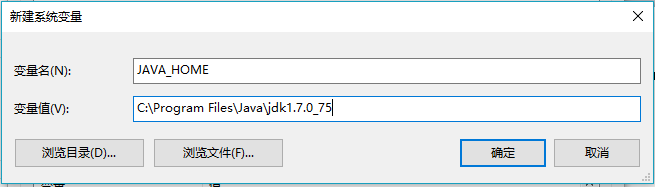
讯享网
同时需要申请一个访问EBS服务器的端口。
(注:端口可用别人已申请好了的也可自己再申请新的)
申请端口:mwactl.sh -login apps/apps start 11444
关闭端口:mwactl.sh -login apps/apps stop_force 11444
安装JDeveloper 12c
根据EBS版本,在Metalink上找到合适的JDeveloper版本,与OAF开发共用 JDeveloper,这里JDeveloper安装包为fmw_12.1.3.0.0_soa_quickstart.jar。

设置环境变量JDEV_USER_HOME
JDeveloper安装后启动JDeveloper,在非主目录下的其他路径中找到JDeveloper解压后的子路径\jdevhome\jdev子路径\jdevhome\jdev
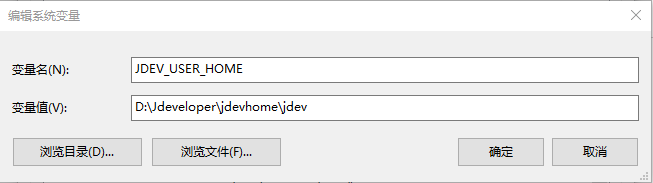
如果Win7/8出现显示异常,需要jdevbin\jdev\bin 下的 jdev.conf 配置文件,将以下 注释项去掉,AddVMOption -Dsun.java2d.noddraw=true。
必需Java库及JDBC库文件打包
在EBS服务器中打包需要的JAVA库,命令如下:
cd $JAVA_TOP jar -cvf mwa.jar oracle/apps/mwa jar -cvf fnd.jar oracle/apps/fnd jar -cvf wms.jar oracle/apps/wms jar -cvf inv.jar oracle/apps/inv 讯享网
打包完后该目录下的情况:

将打包好的JAVA文件下载到本地。
安装Oracle主目录 下oracle_common\rda\da\lib里面就有多种jdbc库文件,使用ojdbc14.jar。
MWA客户化案例
案例Demo演示案例
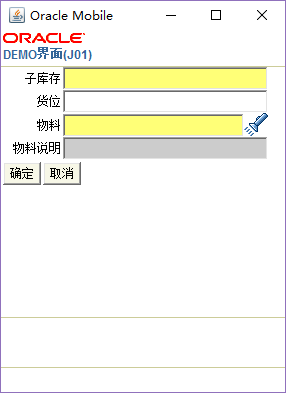
创建MWA工程
打开JDeveloper,点击File >New >Applications

点击OK,编辑Application Name

点击Next,编辑Project Name

点击Finish。
加载库文件
双击项目MWADemoProject,并导航到Libraries and
Classpath。点击Add Library 和Add Jar/Directory ,分别加入之前打包好的Jar文件和jdbc库文件。

Function 开发
创建Function文件
右键项目MWADemoProject,选择New -> Java Class

点击OK
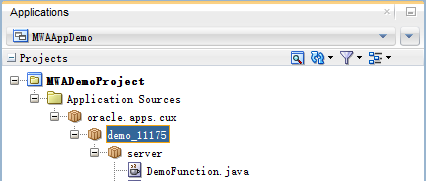
修改DemoFunction文件中代码
讯享网package oracle.apps.cux.demo_11175.server; import oracle.apps.inv.utilities.server.OrgFunction; public class DemoFunction extends OrgFunction { public DemoFunction() { super(); setFirstPageName("oracle.apps.cux.demo_11175.server.DemoPage"); addListener(this); } }
Page开发
创建Page文件
与创建Function文件的方法一样
修改如下信息:
Name: DemoPage
Package: oracle.apps.cux.demo_11175.server
修改DemoPage文件中代码
package oracle.apps.cux.demo_11175.server; import java.sql.SQLException; import oracle.apps.inv.utilities.server.UtilFns; import oracle.apps.mwa.beans.ButtonFieldBean; import oracle.apps.mwa.beans.LOVFieldBean; import oracle.apps.mwa.beans.PageBean; import oracle.apps.mwa.beans.TextFieldBean; import oracle.apps.mwa.container.MWALib; import oracle.apps.mwa.container.Session; import oracle.apps.mwa.eventmodel.MWAEvent; import oracle.apps.mwa.eventmodel.MWAPageListener; public class DemoPage extends PageBean implements MWAPageListener { public DemoPage(Session paramSession) { setSession(paramSession); initLayouts(); initPrompts(); initListeners(); } private void initLayouts() { } private void initPrompts() { } private void initListeners() { } public void pageEntered(MWAEvent mwaEvent) { } public void pageExited(MWAEvent mwaEvent) { } public void specialKeyPressed(MWAEvent mwaEvent) { } } 实现界面布局
讯享网 private TextFieldBean subinvField; private TextFieldBean locatorField; private LOVFieldBean itemLovField; private TextFieldBean itemDespField; private ButtonFieldBean confirmButton; private ButtonFieldBean cancleButton; private void initLayouts() { this.subinvField = new TextFieldBean(); this.subinvField.setName("SUBINV"); this.subinvField.setRequired(true); this.locatorField = new TextFieldBean(); this.locatorField.setName("LOCATOR"); this.locatorField.setRequired(false); this.itemLovField = new LOVFieldBean(); this.itemLovField.setName("ITEM"); this.itemLovField.setRequired(true); this.itemLovField.setlovStatement("cux_11175_mwa_demo_pkg.get_item_lov"); String[] itemLovInputParams = {"","ORGID","oracle.apps.cux.demo_11175.server.DemoPage.SUBINV","oracle.apps.cux.demo_11175.server.DemoPage.LOCATOR","oracle.apps.cux.demo_11175.server.DemoPage.ITEM"}; this.itemLovField.setInputParameters(itemLovInputParams); this.itemLovField.setInputParameterTypes(new String[] { "C","N", "S", "S", "S" }); this.itemLovField.setSubfieldDisplays(new boolean[] { false, true, true}); this.itemLovField.setSubfieldPrompts(new String[] { "a", "物料编码", "物料说明" }); this.itemDespField = new TextFieldBean(); this.itemDespField.setName("ITEMDESP"); this.itemDespField.setRequired(false); this.itemDespField.setEditable(false); this.confirmButton = new ButtonFieldBean(); this.confirmButton.setName("CONFIRM"); this.confirmButton.setNextPageName("oracle.apps.cux.demo_11175.server.DemoPage"); this.cancleButton = new ButtonFieldBean(); this.cancleButton.setName("CANCEL"); this.cancleButton.setNextPageName("|END_OF_TRANSACTION|"); this.cancleButton.setEnableAcceleratorKey(true); addFieldBean(this.subinvField); addFieldBean(this.locatorField); addFieldBean(this.itemLovField); addFieldBean(this.itemDespField); addFieldBean(this.confirmButton); addFieldBean(this.cancleButton); }
物料LOV
SELECT msiv.inventory_item_id, msiv.concatenated_segments, msiv.description FROM mtl_system_items_vl msiv WHERE msiv.organization_id = 组织ID AND msiv.concatenated_segments LIKE 物料编码|| '%' AND EXISTS (SELECT 1 FROM mtl_onhand_quantities_detail hoqd, mtl_item_locations_kfv mil WHERE hoqd.organization_id = msiv.organization_id AND hoqd.inventory_item_id = msiv.inventory_item_id AND hoqd.subinventory_code = 子库存编码 AND hoqd.organization_id = mil.organization_id AND hoqd.locator_id = mil.inventory_location_id AND nvl(mil.concatenated_segments, '9999') = nvl(货位编码,nvl(mil.concatenated_segments,'9999'))); PageListener实现
讯享网 private void clears() { if (UtilFns.isTraceOn) UtilFns.trace("In DemoPage clears()"); this.subinvField.setValue(""); this.locatorField.setValue(""); this.itemLovField.setValue(""); this.itemDespField.setValue(""); if (UtilFns.isTraceOn) UtilFns.trace("In DemoPage clears()"); } public void pageEntered(MWAEvent mwaEvent) { clears(); }
Page标题和字段提示
- 标题和提示信息AK属性(下面只列出需要设置的AK属性清单,详细的设置步骤 请参考《信息技术**实践-Oracle MWA 技术总结.pdf》)
属性定义和在区域中维护属性

- 在Page代码实现获取并设置标题和提示

private void initPrompts() { if (UtilFns.isTraceOn) UtilFns.trace("In DemoPage initPrompts()"); try { setPrompt(MWALib.getAKPrompt(getSession(),"cux.oracle.apps.wms.utilities.CuxWmsResourceTable", "CUX_DEMO_TITLE") + "(" +getSession().getObject("ORGCODE") + ")"); this.subinvField.setPrompt(MWALib.getAKPrompt(getSession(), "cux.oracle.apps.wms.utilities.CuxWmsResourceTable", "CUX_SUBINVENTORY_PROMPT")); this.locatorField.setPrompt(MWALib.getAKPrompt(getSession(), "cux.oracle.apps.wms.utilities.CuxWmsResourceTable","CUX_LOCATOR_PROMPT")); this.itemLovField.setPrompt(MWALib.getAKPrompt(getSession(),"cux.oracle.apps.wms.utilities.CuxWmsResourceTable", "CUX_ITEM_PROMPT")); this.itemDespField.setPrompt(MWALib.getAKPrompt(getSession(), "cux.oracle.apps.wms.utilities.CuxWmsResourceTable", "CUX_ITEM_DESC_PROMPT")); this.confirmButton.setPrompt(MWALib.getAKPrompt(getSession(), "cux.oracle.apps.wms.utilities.CuxWmsResourceTable","CUX_CONFIRM_PROMPT")); this.cancleButton.setPrompt(MWALib.getAKPrompt(getSession(), "cux.oracle.apps.wms.utilities.CuxWmsResourceTable", "CUX_CANCEL_PROMPT")); } catch (SQLException e) { if (UtilFns.isTraceOn) UtilFns.trace("In DemoPage initPrompts() --exception:" + e.getMessage()); } if (UtilFns.isTraceOn) UtilFns.trace("Out DemoPage initPrompts()"); } FieldListener开发
创建Listener文件
与创建Function文件的方法一样
修改如下信息:
Name: DemoListener
Package: oracle.apps.cux.demo_11175.server

修改DemoListener文件中代码
讯享网package oracle.apps.cux.demo_11175.server; import oracle.apps.mwa.beans.FieldBean; import oracle.apps.mwa.container.Session; import oracle.apps.mwa.eventmodel.AbortHandlerException; import oracle.apps.mwa.eventmodel.DefaultOnlyHandlerException; import oracle.apps.mwa.eventmodel.InterruptedHandlerException; import oracle.apps.mwa.eventmodel.MWAEvent; import oracle.apps.mwa.eventmodel.MWAFieldListener; public class DemoListener implements MWAFieldListener { private DemoPage curPage = null; private Session session = null; public DemoListener(DemoPage demoPage) { this.curPage = demoPage; this.session = this.curPage.getSession(); } public void fieldEntered(MWAEvent mwaEvent) throws AbortHandlerException, InterruptedHandlerException, DefaultOnlyHandlerException { } public void fieldExited(MWAEvent mwaEvent) throws AbortHandlerException, InterruptedHandlerException, DefaultOnlyHandlerException { } }
实现验证字段值
在DemoListener文件中验证各字段值
import java.sql.Connection; import java.sql.SQLException; import oracle.apps.inv.utilities.server.UtilFns; import oracle.apps.mwa.beans.FieldBean; import oracle.jdbc.OracleCallableStatement; public void fieldExited(MWAEvent mwaEvent) throws AbortHandlerException, InterruptedHandlerException, DefaultOnlyHandlerException { String fieldName = ((FieldBean) mwaEvent.getSource()).getName(); String action = mwaEvent.getAction(); if (UtilFns.isTraceOn) UtilFns.trace("DemoListener:fieldExited for" + fieldName + ",action is " + action); if ((action.equals("MWA_SUBMIT")) || (action.equals("MWA_NEXTFIELD"))) if (fieldName.equals(this.curPage.getSubinvField().getName())){ subinvExited(); } else if (fieldName.equals(this.curPage.getLocatorField().getName())) { locatorExited(); } else if (fieldName.equals(this.curPage.getItemLovField().getName())) itemExited(); } private void subinvExited() throws AbortHandlerException { Long organizationId = Long.valueOf(Long.parseLong(this.session.getObject("ORGID").toString())); String subinvCode = this.curPage.getSubinvField().getValue(); Connection localConnection = this.session.getConnection(); OracleCallableStatement localOracleCallableStatement = null; try { if (UtilFns.isTraceOn) { UtilFns.trace("calling cux_11175_mwa_demo_pkg.validate_subinv with organizationId:" + organizationId); UtilFns.trace("calling cux_11175_mwa_demo_pkg.validate_subinv with subinvCode:" + subinvCode); } localOracleCallableStatement = (OracleCallableStatement) localConnection.prepareCall("{call cux_11175_mwa_demo_pkg.validate_subinv(:1,:2,:3,:4,:5)}"); localOracleCallableStatement.registerOutParameter(1, 12, 0, 10); localOracleCallableStatement.registerOutParameter(2, 2); localOracleCallableStatement.registerOutParameter(3, 12, 0, 4000); localOracleCallableStatement.setLong(4, organizationId.longValue()); localOracleCallableStatement.setString(5, subinvCode); localOracleCallableStatement.executeQuery(); String returnStatus = localOracleCallableStatement.getString(1); String returnMsg = localOracleCallableStatement.getString(3); if (returnStatus.equalsIgnoreCase("S")) { if (UtilFns.isTraceOn) UtilFns.trace("Success from validate_subinv Transaction Number:" + subinvCode); } else { this.session.setStatusMessage(returnMsg); if (UtilFns.isTraceOn) { UtilFns.trace("Failure from validate_subinv:" + returnMsg); } } try { if (localOracleCallableStatement != null) localOracleCallableStatement.close(); } catch (SQLException e) { if (UtilFns.isTraceOn) UtilFns.trace("Exception when closing localOracleCallableStatement" + e.getMessage()); throw new AbortHandlerException("Exception when closing localOracleCallableStatement"); } } catch (Exception localSQLException) { throw new AbortHandlerException("SQL error validate_subinv "); } finally { try { if (localOracleCallableStatement != null) localOracleCallableStatement.close(); } catch (SQLException e) { if (UtilFns.isTraceOn) UtilFns.trace("Exception when closing localOracleCallableStatement " + e.getMessage()); throw new AbortHandlerException("Exception when closing localOracleCallableStatement"); } } } private void locatorExited() throws AbortHandlerException { Long organizationld = Long.valueOf(Long.parseLong(this.session.getObject("ORGID").toString())); String subinvCode = this.curPage.getSubinvField().getValue(); String locatorCode = this.curPage.getLocatorField().getValue(); Connection localConnection = this.session.getConnection(); OracleCallableStatement loraclecallablestatment = null; try { if (UtilFns.isTraceOn) { UtilFns.trace("calling cux_11175_mwa_demo_pkg.validate_locator with organizationId:" + organizationld); UtilFns.trace("calling cux_11175_mwa_demo_pkg.validate_locator with subinvCode:" + subinvCode); UtilFns.trace("calling cux_11175_mwa_demo_pkg.validate_locator with lcaotorCode:" + locatorCode); } loraclecallablestatment = (OracleCallableStatement) localConnection.prepareCall("{call cux_11175_mwa_demo_pkg.validate_locator(:1,:2,:3,:4,:5,:6)}"); loraclecallablestatment.registerOutParameter(1, 12, 0, 10); loraclecallablestatment.registerOutParameter(2,2); loraclecallablestatment.registerOutParameter(3, 12, 0, 4000); loraclecallablestatment.setLong(4,organizationld.longValue()); loraclecallablestatment.setString(5, subinvCode); loraclecallablestatment.setString(6, locatorCode); loraclecallablestatment.executeQuery(); String returnStatus = loraclecallablestatment.getString(1); String returnMsg = loraclecallablestatment.getString(3); if (returnStatus.equalsIgnoreCase("S")) { if (UtilFns.isTraceOn) UtilFns.trace("Success from validate_subinv Transaction Number:" + subinvCode); } else { this.session.setStatusMessage(returnMsg); if (UtilFns.isTraceOn) { UtilFns.trace("Failure from validate_subinv:" + returnMsg); } } try { if (loraclecallablestatment != null) loraclecallablestatment.close(); } catch (SQLException e) { if (UtilFns.isTraceOn) UtilFns.trace("Exception when closing localOracleCallableStatement" + e.getMessage()); throw new AbortHandlerException("Exception when closing localOracleCallableStatement"); } } catch (Exception localSQLException) { throw new AbortHandlerException("SQL error validate_subinv "); } finally { try { if (loraclecallablestatment != null) loraclecallablestatment.close(); } catch (SQLException e) { if (UtilFns.isTraceOn) UtilFns.trace("Exception when closing localOracleCallableStatement " + e.getMessage()); throw new AbortHandlerException("Exception when closing localOracleCallableStatement"); } } } private void itemExited() throws AbortHandlerException { if (this.curPage.getItemLovField().isPopulated()) this.curPage.getItemDespField().setValue(this.curPage.getItemLovField().getSelectedValues().elementAt(2).toString()); } 验证字段值SQL语句
验证子库信息
讯享网SELECT COUNT(1) FROM mtl_secondary_inventories msi WHERE msi.organization_id = 组织ID AND msi.secondary_inventory_name = 子库编码
验证货位信息
SELECT COUNT(1) FROM mtl_item_locations_kfv mil WHERE mil.organization_id = 组织ID AND mil.subinventory_code = 子库编码 AND mil.concatenated_segments = 货位编码; 在Page代码实现获取相应字段值
注:一定要初始化FieldListener,否则将不会执行字段验证相关函数
讯享网private DemoListener mListener = null; private void initListeners() { this.mListener = new DemoListener(this); this.subinvField.addListener(this.mListener); this.locatorField.addListener(this.mListener); this.itemLovField.addListener(this.mListener); this.confirmButton.addListener(this.mListener); this.cancleButton.addListener(this.mListener); addListener(this); } public void setSubinvField(TextFieldBean subinvField) { this.subinvField = subinvField; } public TextFieldBean getSubinvField() { return this.subinvField; } public void setItemLovField(LOVFieldBean itemLovField) { this.itemLovField = itemLovField; } public LOVFieldBean getItemLovField() { return this.itemLovField; } public void setItemDespField(TextFieldBean itemDespField) { this.itemDespField = itemDespField; } public TextFieldBean getItemDespField() { return this.itemDespField; } public void setLocatorField(TextFieldBean locatorField) { this.locatorField = locatorField; } public TextFieldBean getLocatorField() { return this.locatorField; }
发布到EBS
编译、上传
1、 右键MWAAppDemo.jws或MWAAppDemo.jpr,Rebuild
2、 将<JDEV_USER_HOME>\mywork\MWAAppDemo\MWADemoProject\Classes/oracle/apps/cux/demo_11175
上传到服务器$JAVA_TOP//oracle/apps/cux/demo_11175
3、 修改目录属性,cd $JAVA_TOP后运行:chmod -R 775 hand

重启服务
在打开MWA客户端之前,需要重启端口;在MWA开发过程中,任何修改都需要重启端口才能生效
cd $ADMIN_SCRIPTS_HOME mwactl.sh –login apps/apps stop_force 11444 mwactl.sh –login apps/apps start 11444 
定义功能菜单
在EBS中创建演示的用户,职责和菜单
与挂form方式一样,注意个别选项的值即可。

特性菜单下
类型:移动应用产品
然后将功能挂到对应需求的菜单和职责之下。
启动MWA
新建connect
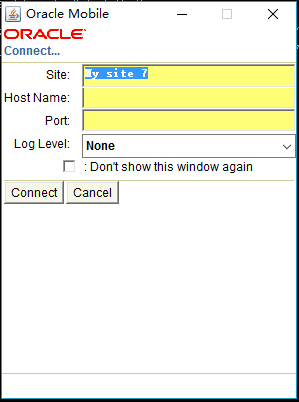
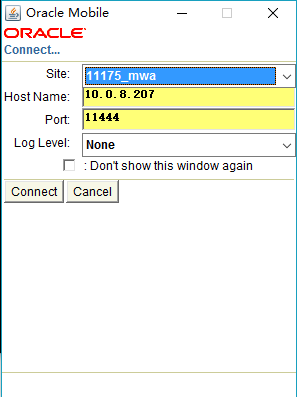
登陆EBS系统
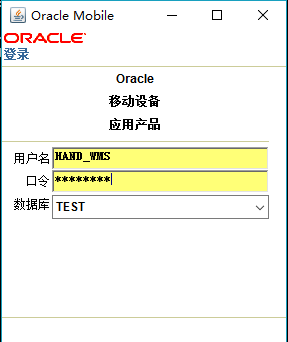
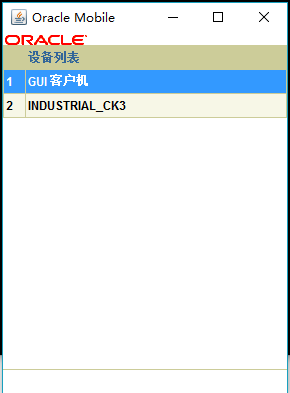
测试数据
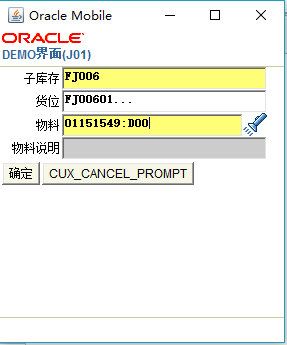
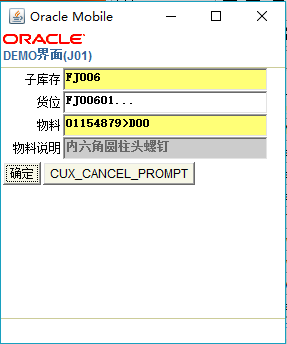
版权声明:本文内容由互联网用户自发贡献,该文观点仅代表作者本人。本站仅提供信息存储空间服务,不拥有所有权,不承担相关法律责任。如发现本站有涉嫌侵权/违法违规的内容,请联系我们,一经查实,本站将立刻删除。
如需转载请保留出处:https://51itzy.com/kjqy/26392.html