
先看图
讯享网
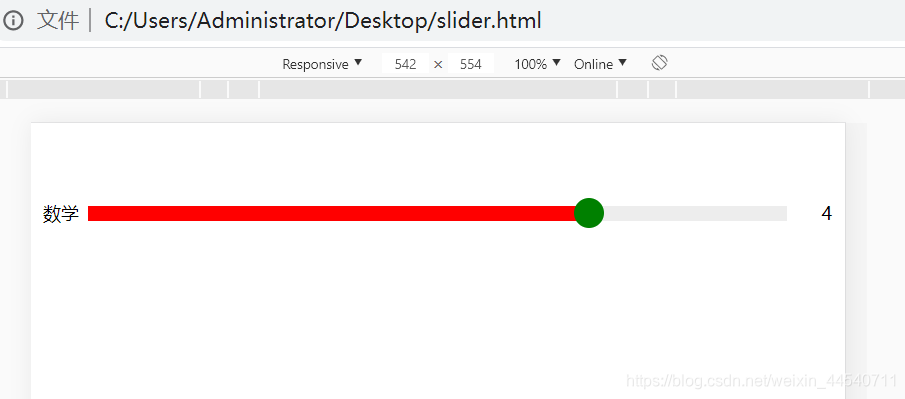

代码,根据自己的需求打包
<!DOCTYPE html> <html lang="zh-cn"> <head> <meta http-equiv="Content-Type" content="text/html; charset=utf-8"> <meta name="viewport" content="width=device-width,initial-scale=1,maximum-scale=1,user-scalable=no" /> <title>小滑块</title> <style type="text/css"> .slider-wrapper {
    position: relative; margin: 50px auto; padding: 5px 30px; font-size: 12px; height: 20px; box-sizing: border-box; } .slider-wrapper .label-left{
    position: absolute; left: 0; top: 0; line-height: 20px; } .slider-wrapper .label-right{
    position: absolute; right: 0; top: 0; line-height: 20px; } .slider-wrapper .slider-bar {
    position: absolute; top: -5px; left: -5px; width: 20px; height: 20px; background: green; cursor: pointer; border-radius: 100%; } * {
    -webkit-user-select: none; -moz-user-select: none; -ms-user-select: none; user-select: none; } .slider-content{
    height: 10px; background: #ededed; position: relative; } .slider-content p{
    margin: 0; height: 100%; background: red; width: 0; } </style> </head> <body> <div class="slider-wrapper"> <label class="label-left">数学</label> <div class="slider-content" onclick="slideBar(this,event)"> <p></p> <div id="slider-node-1" class="slider-bar"></div> </div> <label class="label-right">0</label> </div> <script src="https://cdn.bootcdn.net/ajax/libs/jquery/3.5.1/jquery.min.js"></script> <script> var sliderBenchmark = 5;//定义最大得分 function slideBar(el,e){
    //获取单击坐标 let clickX = e.clientX; //获取当前元素的左边距 let domX = $(el).offset().left; //获取dom宽度 let domW = $(el).width(); //计算比例 var margin = Math.round(Math.min(domW,Math.max(0,clickX-domX))); let rate = Math.max(0,margin/domW); let score = Math.round(sliderBenchmark*rate);//当前分数 if(score === sliderBenchmark){
    rate = 1; margin = domW; } $(el).children("p").css("width",margin+'px'); $(el).children("div").css("left",(margin - 10)+'px'); $(el).next().text(score); } //避免默认事件 2018.7.10 更新 优化uc浏览器左右滑动时候页面被拖动 document.addEventListener('touchmove', function(e) {
    e.preventDefault(); }, {
    passive: false }); function dragSlide(id) {
    this.minDiv = document.getElementById(id); //小方块  this.width = parseInt(window.getComputedStyle(this.minDiv, null).width); //小方块的宽度 this.lineDiv = this.minDiv.parentNode; //长线条 //滑动的数值呈现 this.scoreDom = $("#"+id).parent().next()[0]; this.speed = $("#"+id).prev()[0];//滑动进度 var that = this; var lastX = null; //判断鼠标移动方向,解决向左侧滑动时候的bug var move = function(e) {
    var x = e.touches[0].pageX, direction = ''; if (lastX == null) {
    lastX = x; return; } if (x > lastX) {
    direction = 'right'; } else if (x < lastX) {
    direction = 'left'; } else {
    direction = ''; } var lineDiv_left = that.getPosition(that.lineDiv).left; //长线条的横坐标 var minDiv_left = x - lineDiv_left; //小方块相对于父元素(长线条)的left值 if (minDiv_left >= that.lineDiv.offsetWidth) {
    minDiv_left = that.lineDiv.offsetWidth; } if (minDiv_left < 0) {
    minDiv_left = 0; } //设置拖动后小方块的left值 that.minDiv.style.left = (minDiv_left - 10) + "px"; that.speed.style.width = minDiv_left + "px" //percent百分比改为如下所示,解决开始和最后滑动的体验不好问题 var percent = (minDiv_left / (that.lineDiv.offsetWidth - that.width)) * sliderBenchmark; if (percent < 0.5 && direction == 'right') {
    percent = Math.ceil(percent); } else if (percent > 0.5 && direction == 'right') {
    percent = Math.floor(percent); } else {
    percent = Math.ceil(percent); } that.scoreDom.innerText = percent; }; //获取元素的绝对位置,工具函数 this.getPosition = function(node) {
    var left = node.offsetLeft; //获取元素相对于其父元素的left值var left var top = node.offsetTop; current = node.offsetParent; // 取得元素的offsetParent   // 一直循环直到根元素    while (current != null) {
    left += current.offsetLeft;   top += current.offsetTop;   current = current.offsetParent;   } return {
    "left": left, "top": top }; } this.minDiv.addEventListener("touchmove", move); } //取消移动端手势长按弹出提示框的操作 document.addEventListener('contextmenu', function(e) {
    e.preventDefault(); }); new dragSlide("slider-node-1"); </script> </body> </html>
讯享网
版权声明:本文内容由互联网用户自发贡献,该文观点仅代表作者本人。本站仅提供信息存储空间服务,不拥有所有权,不承担相关法律责任。如发现本站有涉嫌侵权/违法违规的内容,请联系我们,一经查实,本站将立刻删除。
如需转载请保留出处:https://51itzy.com/kjqy/22632.html