Downloading and installing node v22.12.0… Downloading https://nodejs.org/dist/v22.12.0/node-v22.12.0-linux-x64.tar.xz... 100.0% Computing checksum with sha256sum Checksums matched! Now using node v22.12.0 (npm v10.9.0)
# 再次安装openclaw
npm install -g openclaw@latest
npm warn deprecated npmlog@6.0.2: This package is no longer supported. npm warn deprecated are-we-there-yet@3.0.1: This package is no longer supported. npm warn deprecated gauge@4.0.4: This package is no longer supported. npm warn deprecated node-domexception@1.0.0: Use your platform‘s native DOMException instead
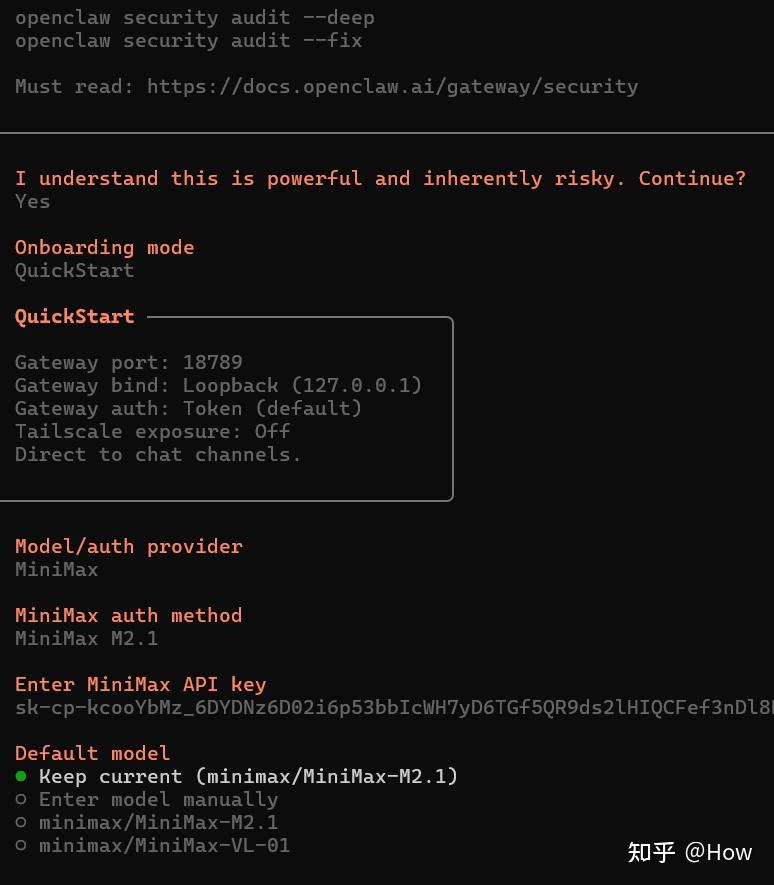
Options: –port <port> Port for the gateway WebSocket –bind <mode> Bind mode (“loopback”|“lan”|“tailnet”|“auto”|“custom”). Defaults to config gateway.bind (or
讯享网 loopback).
–token <token> Shared token required in connect.params.auth.token (default: OPENCLAW_GATEWAY_TOKEN env if
set)
–auth <mode> Gateway auth mode (“token”|“password”) –password <password> Password for auth mode=password –tailscale <mode> Tailscale exposure mode (“off”|“serve”|“funnel”) –tailscale-reset-on-exit Reset Tailscale serve/funnel configuration on shutdown (default: false) –allow-unconfigured Allow gateway start without gateway.mode=local in config (default: false) –dev Create a dev config + workspace if missing (no BOOTSTRAP.md) (default: false) –reset Reset dev config + credentials + sessions + workspace (requires –dev) (default: false) –force Kill any existing listener on the target port before starting (default: false) –verbose Verbose logging to stdout/stderr (default: false) –claude-cli-logs Only show claude-cli logs in the console (includes stdout/stderr) (default: false) –ws-log <style> WebSocket log style (“auto”|“full”|“compact”) (default: “auto”) –compact Alias for “–ws-log compact” (default: false) –raw-stream Log raw model stream events to jsonl (default: false) –raw-stream-path <path> Raw stream jsonl path -h, –help display help for command
Commands: run Run the WebSocket Gateway (foreground) status Show gateway service status + probe the Gateway install Install the Gateway service (launchd/systemd/schtasks) uninstall Uninstall the Gateway service (launchd/systemd/schtasks) start Start the Gateway service (launchd/systemd/schtasks) stop Stop the Gateway service (launchd/systemd/schtasks) restart Restart the Gateway service (launchd/systemd/schtasks) call Call a Gateway method usage-cost Fetch usage cost summary from session logs health Fetch Gateway health probe Show gateway reachability + discovery + health + status summary (local + remote) discover Discover gateways via Bonjour (local + wide-area if configured)
│ ◇ Service: systemd (enabled) File logs: /tmp/openclaw/openclaw-2026-02-03.log Command: /home/test/.nvm/versions/node/v22.12.0/bin/node /home/test/.nvm/versions/node/v22.12.0/lib/node_modules/openclaw/dist/index.js gateway –port 18789 Service file: ~/.config/systemd/user/openclaw-gateway.service Service env: OPENCLAW_GATEWAY_PORT=18789
Service config looks out of date or non-standard. Service config issue: Gateway service uses Node from a version manager; it can break after upgrades. (/home/test/.nvm/versions/node/v22.12.0/bin/node) Recommendation: run “openclaw doctor” (or “openclaw doctor –repair”). Config (cli): ~/.openclaw/openclaw.json Config (service): ~/.openclaw/openclaw.json
Gateway: bind=loopback (127.0.0.1), port=18789 (service args) Probe target: ws://127.0.0.1:18789 Dashboard: http://127.0.0.1:18789/ Probe note: Loopback-only gateway; only local clients can connect.
Runtime: running (pid , state active, sub running, last exit 0, reason 0) RPC probe: ok
Listening: 127.0.0.1:18789 Troubles: run openclaw status Troubleshooting: https://docs.openclaw.ai/troubleshooting







版权声明:本文内容由互联网用户自发贡献,该文观点仅代表作者本人。本站仅提供信息存储空间服务,不拥有所有权,不承担相关法律责任。如发现本站有涉嫌侵权/违法违规的内容,请联系我们,一经查实,本站将立刻删除。
如需转载请保留出处:https://51itzy.com/kjqy/213398.html