
富文本(Normal)
改变某个字符串中部分字符的显示样式
//NSFontAttributeName 设置字体属性,默认值:字体:Helvetica(Neue) 字号:12
//NSForegroundColorAttributeNam 设置字体颜色,取值为 UIColor对象,默认值为黑色
//NSBackgroundColorAttributeName 设置字体所在区域背景颜色,取值为 UIColor对象,默认值为nil, 透明色
//NSLigatureAttributeName 设置连体属性,取值为NSNumber 对象(整数),0 表示没有连体字符,1 表示使用默认的连体字符
//NSKernAttributeName 设定字符间距,取值为 NSNumber对象(整数),正值间距加宽,负值间距变窄
//NSStrikethroughStyleAttributeName 设置删除线,取值为 NSNumber 对象(整数)
//NSStrikethroughColorAttributeName 设置删除线颜色,取值为 UIColor 对象,默认值为黑色
//NSUnderlineStyleAttributeName 设置下划线,取值为 NSNumber 对象(整数),枚举常量NSUnderlineStyle中的值,与删除线类似
//NSUnderlineColorAttributeName 设置下划线颜色,取值为 UIColor 对象,默认值为黑色
//NSStrokeColorAttributeName 填充部分颜色,不是字体颜色,取值为 UIColor 对象
//NSShadowAttributeName 设置阴影属性,取值为 NSShadow 对象
//NSBaselineOffsetAttributeName 设置基线偏移值,取值为 NSNumber(float),正值上偏,负值下偏
//NSObliquenessAttributeName 设置字形倾斜度,取值为 NSNumber(float),正值右倾,负值左倾
//NSExpansionAttributeName 设置文本横向拉伸属性,取值为 NSNumber(float),正值横向拉伸文本,负值横向压缩文本
//NSWritingDirectionAttributeName 设置文字书写方向,从左向右书写或者从右向左书写
//NSVerticalGlyphFormAttributeName 设置文字排版方向,取值为 NSNumber 对象(整数),0 表示横排文本,1 表示竖排文本
//NSLinkAttributeName 设置链接属性,点击后调用浏览器打开指定URL地址
//NSAttachmentAttributeName 设置文本附件,取值为NSTextAttachment对象,常用于文字图片混排
//NSParagraphStyleAttributeName 设置文本段落排版格式,取值为 NSParagraphStyle 对象

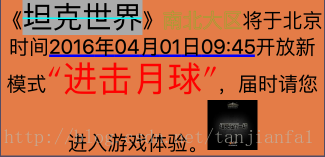
NSMutableAttributedString *text = [[NSMutableAttributedString alloc]initWithString:@"《坦克世界》南北大区将于北京时间2016年04月01日09:45开放新模式“进击月球”,届时请您进入游戏体验。"]; [text beginEditing]; //改变字体大小 //NSFontAttributeName:这个属性的值是一个UIFont对象。使用这个属性来更改字体的文本 [text addAttribute:NSFontAttributeName value:[UIFont systemFontOfSize:30] range:NSMakeRange(1,4)]; //字体的设置 [text addAttribute:NSFontAttributeName value:[UIFont fontWithName:@"Optima" size:35] range:NSMakeRange(37, 6)]; // NSLog(@"%@",[UIFont familyNames]); //字体颜色 //NSForegroundColorAttributeName:这个属性的值是一个用户界面颜色对象。使用这个属性来指定文本中呈现的颜色。如果你不指定该属性,文本呈现黑色。 [text addAttribute:NSForegroundColorAttributeName value:[UIColor redColor] range:NSMakeRange(37, 6)]; //下划线 //NSUnderlineStyleAttributeName:描述文本中的下划线属性。默认是NSUnderlineStyleNone。 [text addAttribute:NSUnderlineStyleAttributeName value:@(NSUnderlineStyleThick) range:NSMakeRange(16, 16)]; //下划线颜色(依附于下划线) [text addAttribute:NSUnderlineColorAttributeName value:[UIColor blueColor] range:NSMakeRange(16, 16)]; //删除线 //NSStrikethroughStyleAttributeName:描述文本中的下划线属性。默认是NSUnderlineStyleNone。 [text addAttribute:NSStrikethroughStyleAttributeName value:@( NSUnderlineStyleSingle) range:NSMakeRange(1, 4)]; //删除线颜色(依附于删除线) [text addAttribute:NSStrikethroughColorAttributeName value:[UIColor cyanColor] range:NSMakeRange(1, 4)]; //添加背景色 [text addAttribute:NSBackgroundColorAttributeName value:[UIColor lightGrayColor] range:NSMakeRange(1, 4)]; //填充字 [text addAttribute:NSStrokeWidthAttributeName value:@(-1) range:NSMakeRange(16, 16)]; //空心字 [text addAttribute:NSStrokeWidthAttributeName value:@(1) range:NSMakeRange(6, 4)]; //改变填充字/空心字颜色(依附于填充字/空心字) [text addAttribute:NSStrokeColorAttributeName value:[UIColor greenColor] range:NSMakeRange(6, 4)]; // 添加图片 / 步骤如下: 创建NSTextAttachment的对象,用来装在图片 将NSTextAttachment对象的image属性设置为想要使用的图片 设置NSTextAttachment对象bounds大小,也就是要显示的图片的大小 用[NSAttributedString attributedStringWithAttachment:attch]方法,将图片添加到富文本上 */ // 添加图片 NSTextAttachment *attch = [[NSTextAttachment alloc] init]; // 表情图片 attch.image = [UIImage imageNamed:@"tank"]; // 设置图片大小 attch.bounds = CGRectMake(0, 0, 50, 50); // 创建带有图片的富文本 NSAttributedString *string = [NSAttributedString attributedStringWithAttachment:attch]; [text appendAttributedString:string]; [text endEditing]; self.label.attributedText = text;讯享网
富文本(CoreText)
首先记得
讯享网#import <CoreText/CoreText.h
在drawRect:中实现
- (void)drawRect:(CGRect)rect{ [super drawRect:rect]; [self coreText]; }CoreText 框架中最常用的几个类:
- CTFont
- CTFontCollection
- CTFontDescriptor
- CTFrame
- CTFramesetter
- CTGlyphInfo
- CTLine
- CTParagraphStyle
- CTRun
- CTTextTab
- CTTypesetter
//kCTFontAttributeName 这个键是字体的名称 必须传入CTFont对象
//kCTKernAttributeName 这个键设置字体间距 传入必须是数字对象 默认为0
//kCTLigatureAttributeName 这个键设置连字方式 必须传入CFNumber对象
//kCTParagraphStyleAttributeName 段落对其方式
//kCTForegroundColorAttributeName 字体颜色 必须传入CGColor对象
//kCTStrokeWidthAttributeName 笔画宽度 必须是CFNumber对象
//kCTStrokeColorAttributeName 笔画颜色
//kCTSuperscriptAttributeName 控制垂直文本定位 CFNumber对象
//kCTUnderlineColorAttributeName 下划线颜色
第一步:添加属性
讯享网 NSMutableAttributedString *text = [[NSMutableAttributedString alloc]initWithString:@"《坦克世界》南北大区将于北京时间2016年04月01日09:45开放新模式“进击月球”,届时请您进入游戏体验。"]; //开始编辑 [text beginEditing]; //设置字体属性 //参数1.字体的名字 参数2.字体的大小 参数3.字体的变换矩阵。在大多数情况下,将该参数设置为NULL。 CTFontRef font = CTFontCreateWithName(CFSTR("Optima-Regular"), 25, NULL); [text addAttribute:(id)kCTFontAttributeName value:(__bridge id _Nonnull)(font) range:NSMakeRange(0, text.length)]; //设置字体间隔 long number = 10; //参数1.allocator:通过NULL或kCFAllocatorDefault使用默认的分配器。 //参数2.theType:通过CFNumber用来显示一个值的数据类型 CFNumberRef num = CFNumberCreate(kCFAllocatorDefault, kCFNumberSInt8Type, &number); //kCTKernAttributeName:字距调整 [text addAttribute:(id)kCTKernAttributeName value:(__bridge id)num range:NSMakeRange(37, 6)]; //设置字体颜色 //kCTForegroundColorAttributeName:文本的前景颜色。该属性的值必须是一个CGColor对象。默认值是黑色 [text addAttribute:(NSString *)kCTForegroundColorAttributeName value:(id)[UIColor purpleColor].CGColor range:NSMakeRange(0, text.length)]; //设置空心字 long number2 = 3; CFNumberRef num2 = CFNumberCreate(kCFAllocatorDefault, kCFNumberSInt8Type, &number2); [text addAttribute:(id)kCTStrokeWidthAttributeName value:(__bridge id) num2 range:NSMakeRange(0, text.length)]; //设置空心字颜色 [text addAttribute:(id)kCTStrokeColorAttributeName value:(id)[UIColor redColor].CGColor range:NSMakeRange(16, 16)]; //设置斜体字 CTFontRef font2 = CTFontCreateWithName((CFStringRef)[UIFont italicSystemFontOfSize:25].fontName, 25, NULL); [text addAttribute:(id)kCTFontAttributeName value:(__bridge id _Nonnull)(font2) range:NSMakeRange(16, 16)]; //下划线 [text addAttribute:(id)kCTUnderlineStyleAttributeName value:(id)[NSNumber numberWithInt:kCTUnderlineStyleDouble] range:NSMakeRange(16, 16)]; //下划线颜色 [text addAttribute:(id)kCTUnderlineColorAttributeName value:(id)[UIColor greenColor].CGColor range:NSMakeRange(16, 16)]; //对同一段字体进行多属性设置 //黑色 NSMutableDictionary *attributes = [NSMutableDictionary dictionaryWithObject:(id)[UIColor blackColor].CGColor forKey:(id)kCTForegroundColorAttributeName]; //字体 CTFontRef font3 = CTFontCreateWithName((CFStringRef)[UIFont italicSystemFontOfSize:20].fontName, 40, NULL); [attributes setObject:(__bridge id)font3 forKey:(id)kCTFontAttributeName]; //下划线 [attributes setObject:(id)[NSNumber numberWithInt:kCTUnderlineStyleDouble] forKey:(id)kCTUnderlineStyleAttributeName]; [text addAttributes:attributes range:NSMakeRange(1, 4)]; //结束编辑 [text endEditing];
第二步:绘图、渲染
//设置绘制文字区域 CGMutablePathRef Path = CGPathCreateMutable(); CGPathAddRect(Path, NULL ,self.bounds); CTFramesetterRef framesetter = CTFramesetterCreateWithAttributedString((CFAttributedStringRef)text); CTFrameRef frame = CTFramesetterCreateFrame(framesetter, CFRangeMake(0, text.length), Path, NULL); //获取当前(View)上下文以用于之后的绘画 CGContextRef context = UIGraphicsGetCurrentContext(); // Flip the coordinate system CGContextSetTextMatrix(context , CGAffineTransformIdentity); //x,y轴方向移动 CGContextTranslateCTM(context , 0 ,self.bounds.size.height); //缩放x,y轴方向缩放,-1.0为反向1.0倍,坐标系转换,沿x轴翻转180度 CGContextScaleCTM(context, 1.0 ,-1.0); //绘制 CTFrameDraw(frame,context); //清理资源 CGPathRelease(Path); CFRelease(framesetter);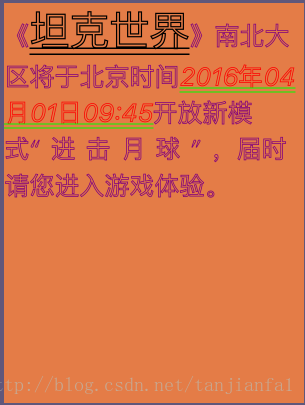
版权声明:本文内容由互联网用户自发贡献,该文观点仅代表作者本人。本站仅提供信息存储空间服务,不拥有所有权,不承担相关法律责任。如发现本站有涉嫌侵权/违法违规的内容,请联系我们,一经查实,本站将立刻删除。
如需转载请保留出处:https://51itzy.com/kjqy/78163.html