
❤ javascript时间戳操作全系列(不断更新中…)
JavaScript时间戳
1. 认识时间格式
Date类型 : Fri Jul 21 2023 14:21:59 GMT+0800 (中国标准时间)
时间字符串: 2021-02-13
13位时间戳: 00
2. 时间相关函数:
① getDate()的用法
1.获取当月日期 var date = new Date(); var curDay = date.getDate();//25 当前天 2.获取当月天数,注意参数 var date = new Date('2018','06',0); var curMonthLen = date.getDate();//30 3.new Date(), 月份传参注意0 2023.0 指的是2022.12 2023.12指的是2013.12 讯享网
② 其他使用总结
讯享网 var myDate = new Date(); myDate.getYear(); //获取当前年份(2位) myDate.getFullYear(); //获取完整的年份(4位,1970-????) myDate.getMonth(); //获取当前月份(0-11,0代表1月) myDate.getDate(); //获取当前日(1-31) myDate.getDay(); //获取当前星期X(0-6,0代表星期天) myDate.getTime(); //获取当前时间(从1970.1.1开始的毫秒数) myDate.getHours(); //获取当前小时数(0-23) myDate.getMinutes(); //获取当前分钟数(0-59) myDate.getSeconds(); //获取当前秒数(0-59) myDate.getMilliseconds(); //获取当前毫秒数(0-999) myDate.toLocaleDateString(); //获取当前日期 var mytime=myDate.toLocaleTimeString(); //获取当前时间 myDate.toLocaleString( ); //获取日期与时间 日期时间脚本库方法列表 Date.prototype.isLeapYear 判断闰年 Date.prototype.Format 日期格式化 Date.prototype.DateAdd 日期计算 Date.prototype.DateDiff 比较日期差 Date.prototype.toString 日期转字符串 Date.prototype.toArray 日期分割为数组 Date.prototype.DatePart 取日期的部分信息 Date.prototype.MaxDayOfDate 取日期所在月的最大天数 Date.prototype.WeekNumOfYear 判断日期所在年的第几周 StringToDate 字符串转日期型 IsValidDate 验证日期有效性 CheckDateTime 完整日期时间检查 daysBetween 日期天数差
// 判断闰年
//---------------------------------------------------
Date.prototype.isLeapYear = function()
{
return (0this.getYear()%4&&((this.getYear()%100!=0)||(this.getYear()%4000)));
}
//---------------------------------------------------
// 日期格式化
// 格式 YYYY/yyyy/YY/yy 表示年份
// MM/M 月份
// W/w 星期
// dd/DD/d/D 日期
// hh/HH/h/H 时间
// mm/m 分钟
// ss/SS/s/S 秒
//---------------------------------------------------
Date.prototype.Format = function(formatStr)
{
var str = formatStr;
var Week = [‘日’,‘一’,‘二’,‘三’,‘四’,‘五’,‘六’];
str=str.replace(/yyyy|YYYY/,this.getFullYear()); str=str.replace(/yy|YY/,(this.getYear() % 100)>9?(this.getYear() % 100).toString():'0' + (this.getYear() % 100)); str=str.replace(/MM/,this.getMonth()>9?this.getMonth().toString():'0' + this.getMonth()); str=str.replace(/M/g,this.getMonth()); str=str.replace(/w|W/g,Week[this.getDay()]); str=str.replace(/dd|DD/,this.getDate()>9?this.getDate().toString():'0' + this.getDate()); str=str.replace(/d|D/g,this.getDate()); str=str.replace(/hh|HH/,this.getHours()>9?this.getHours().toString():'0' + this.getHours()); str=str.replace(/h|H/g,this.getHours()); str=str.replace(/mm/,this.getMinutes()>9?this.getMinutes().toString():'0' + this.getMinutes()); str=str.replace(/m/g,this.getMinutes()); str=str.replace(/ss|SS/,this.getSeconds()>9?this.getSeconds().toString():'0' + this.getSeconds()); str=str.replace(/s|S/g,this.getSeconds()); return str; }
//±--------------------------------------------------
//| 求两个时间的天数差 日期格式为 YYYY-MM-dd
//±--------------------------------------------------
function daysBetween(DateOne,DateTwo)
{
var OneMonth = DateOne.substring(5,DateOne.lastIndexOf (‘-’));
var OneDay = DateOne.substring(DateOne.length,DateOne.lastIndexOf (‘-’)+1);
var OneYear = DateOne.substring(0,DateOne.indexOf (‘-’));
讯享网var TwoMonth = DateTwo.substring(5,DateTwo.lastIndexOf ('-')); var TwoDay = DateTwo.substring(DateTwo.length,DateTwo.lastIndexOf ('-')+1); var TwoYear = DateTwo.substring(0,DateTwo.indexOf ('-')); var cha=((Date.parse(OneMonth+'/'+OneDay+'/'+OneYear)- Date.parse(TwoMonth+'/'+TwoDay+'/'+TwoYear))/); return Math.abs(cha);
}
//±--------------------------------------------------
//| 日期计算
//±--------------------------------------------------
Date.prototype.DateAdd = function(strInterval, Number) {
var dtTmp = this;
switch (strInterval) {
case ‘s’ :return new Date(Date.parse(dtTmp) + (1000 * Number));
case ‘n’ :return new Date(Date.parse(dtTmp) + (60000 * Number));
case ‘h’ :return new Date(Date.parse(dtTmp) + ( * Number));
case ‘d’ :return new Date(Date.parse(dtTmp) + ( * Number));
case ‘w’ :return new Date(Date.parse(dtTmp) + (( * 7) * Number));
case ‘q’ :return new Date(dtTmp.getFullYear(), (dtTmp.getMonth()) + Number*3, dtTmp.getDate(), dtTmp.getHours(), dtTmp.getMinutes(), dtTmp.getSeconds());
case ‘m’ :return new Date(dtTmp.getFullYear(), (dtTmp.getMonth()) + Number, dtTmp.getDate(), dtTmp.getHours(), dtTmp.getMinutes(), dtTmp.getSeconds());
case ‘y’ :return new Date((dtTmp.getFullYear() + Number), dtTmp.getMonth(), dtTmp.getDate(), dtTmp.getHours(), dtTmp.getMinutes(), dtTmp.getSeconds());
}
}
//±--------------------------------------------------
//| 比较日期差 dtEnd 格式为日期型或者有效日期格式字符串
//±--------------------------------------------------
Date.prototype.DateDiff = function(strInterval, dtEnd) {
var dtStart = this;
if (typeof dtEnd == ‘string’ )//如果是字符串转换为日期型
{
dtEnd = StringToDate(dtEnd);
}
switch (strInterval) {
case ‘s’ :return parseInt((dtEnd - dtStart) / 1000);
case ‘n’ :return parseInt((dtEnd - dtStart) / 60000);
case ‘h’ :return parseInt((dtEnd - dtStart) / );
case ‘d’ :return parseInt((dtEnd - dtStart) / );
case ‘w’ :return parseInt((dtEnd - dtStart) / ( * 7));
case ‘m’ :return (dtEnd.getMonth()+1)+((dtEnd.getFullYear()-dtStart.getFullYear())*12) - (dtStart.getMonth()+1);
case ‘y’ :return dtEnd.getFullYear() - dtStart.getFullYear();
}
}
//±--------------------------------------------------
//| 日期输出字符串,重载了系统的toString方法
//±--------------------------------------------------
Date.prototype.toString = function(showWeek)
{
var myDate= this;
var str = myDate.toLocaleDateString();
if (showWeek)
{
var Week = [‘日’,‘一’,‘二’,‘三’,‘四’,‘五’,‘六’];
str += ’ 星期’ + Week[myDate.getDay()];
}
return str;
}
//±--------------------------------------------------
//| 日期合法性验证
//| 格式为:YYYY-MM-DD或YYYY/MM/DD
//±--------------------------------------------------
function IsValidDate(DateStr)
{
var sDate=DateStr.replace(/(^\s+|\s+$)/g,‘’); //去两边空格;
if(sDate==‘’) return true;
//如果格式满足YYYY-(/)MM-(/)DD或YYYY-(/)M-(/)DD或YYYY-(/)M-(/)D或YYYY-(/)MM-(/)D就替换为’’
//数据库中,合法日期可以是:YYYY-MM/DD(2003-3/21),数据库会自动转换为YYYY-MM-DD格式
var s = sDate.replace(/[\d]{ 4,4 }[-/]{ 1 }[\d]{ 1,2 }[-/]{ 1 }[\d]{ 1,2 }/g,‘’);
if (s==‘’) //说明格式满足YYYY-MM-DD或YYYY-M-DD或YYYY-M-D或YYYY-MM-D
{
var t=new Date(sDate.replace(/-/g,‘/’));
var ar = sDate.split(/[-/:]/);
if(ar[0] != t.getYear() || ar[1] != t.getMonth()+1 || ar[2] != t.getDate())
{
//alert(‘错误的日期格式!格式为:YYYY-MM-DD或YYYY/MM/DD。注意闰年。’);
return false;
}
}
else
{
//alert(‘错误的日期格式!格式为:YYYY-MM-DD或YYYY/MM/DD。注意闰年。’);
return false;
}
return true;
}
//±--------------------------------------------------
//| 日期时间检查
//| 格式为:YYYY-MM-DD HH:MM:SS
//±--------------------------------------------------
function CheckDateTime(str)
{
var reg = /^(\d+)-(\d{ 1,2 })-(\d{ 1,2 }) (\d{ 1,2 })😦\d{ 1,2 })😦\d{ 1,2 })$/;
var r = str.match(reg);
if(r==null)return false;
r[2]=r[2]-1;
var d= new Date(r[1],r[2],r[3],r[4],r[5],r[6]);
if(d.getFullYear()!=r[1])return false;
if(d.getMonth()!=r[2])return false;
if(d.getDate()!=r[3])return false;
if(d.getHours()!=r[4])return false;
if(d.getMinutes()!=r[5])return false;
if(d.getSeconds()!=r[6])return false;
return true;
}
//±--------------------------------------------------
//| 把日期分割成数组
//±--------------------------------------------------
Date.prototype.toArray = function()
{
var myDate = this;
var myArray = Array();
myArray[0] = myDate.getFullYear();
myArray[1] = myDate.getMonth();
myArray[2] = myDate.getDate();
myArray[3] = myDate.getHours();
myArray[4] = myDate.getMinutes();
myArray[5] = myDate.getSeconds();
return myArray;
}
//±--------------------------------------------------
//| 取得日期数据信息
//| 参数 interval 表示数据类型
//| y 年 m月 d日 w星期 ww周 h时 n分 s秒
//±--------------------------------------------------
Date.prototype.DatePart = function(interval)
{
var myDate = this;
var partStr=‘’;
var Week = [‘日’,‘一’,‘二’,‘三’,‘四’,‘五’,‘六’];
switch (interval)
{
case ‘y’ :partStr = myDate.getFullYear();break;
case ‘m’ :partStr = myDate.getMonth()+1;break;
case ‘d’ :partStr = myDate.getDate();break;
case ‘w’ :partStr = Week[myDate.getDay()];break;
case ‘ww’ :partStr = myDate.WeekNumOfYear();break;
case ‘h’ :partStr = myDate.getHours();break;
case ‘n’ :partStr = myDate.getMinutes();break;
case ‘s’ :partStr = myDate.getSeconds();break;
}
return partStr;
}
//±--------------------------------------------------
//| 取得当前日期所在月的最大天数
//±--------------------------------------------------
Date.prototype.MaxDayOfDate = function()
{
var myDate = this;
var ary = myDate.toArray();
var date1 = (new Date(ary[0],ary[1]+1,1));
var date2 = date1.dateAdd(1,‘m’,1);
var result = dateDiff(date1.Format(‘yyyy-MM-dd’),date2.Format(‘yyyy-MM-dd’));
return result;
}
//±--------------------------------------------------
//| 取得当前日期所在周是一年中的第几周
//±--------------------------------------------------
Date.prototype.WeekNumOfYear = function()
{
var myDate = this;
var ary = myDate.toArray();
var year = ary[0];
var month = ary[1]+1;
var day = ary[2];
document.write(‘< script language=VBScript> \n’);
document.write(‘myDate = Datue(’‘+month+’-‘+day+’-‘+year+’‘) \n’);
document.write(‘result = DatePart(‘ww’, myDate) \n’);
document.write(’ \n’);
return result;
}
//±--------------------------------------------------
//| 字符串转成日期类型
//| 格式 MM/dd/YYYY MM-dd-YYYY YYYY/MM/dd YYYY-MM-dd
//±--------------------------------------------------
function StringToDate(DateStr)
{
var converted = Date.parse(DateStr); var myDate = new Date(converted); if (isNaN(myDate)) { //var delimCahar = DateStr.indexOf('/')!=-1?'/':'-'; var arys= DateStr.split('-'); myDate = new Date(arys[0],--arys[1],arys[2]); } return myDate; }
若要显示:当前日期加时间(如:2009-06-12 12:00)
function CurentTime()
{
var now = new Date();
讯享网 var year = now.getFullYear(); //年 var month = now.getMonth() + 1; //月 var day = now.getDate(); //日 var hh = now.getHours(); //时 var mm = now.getMinutes(); //分 var clock = year + "-"; if(month < 10) clock += "0"; clock += month + "-"; if(day < 10) clock += "0"; clock += day + " "; if(hh < 10) clock += "0"; clock += hh + ":"; if (mm < 10) clock += '0'; clock += mm; return(clock); }
③ 补充 ```js Date() 返回当日的日期和时间。 getDate() 从 Date 对象返回一个月中的某一天 (1 ~ 31)。 getDay() 从 Date 对象返回一周中的某一天 (0 ~ 6)。 getMonth() 从 Date 对象返回月份 (0 ~ 11)。 getFullYear() 从 Date 对象以四位数字返回年份。 getYear() 请使用 getFullYear() 方法代替。 getHours() 返回 Date 对象的小时 (0 ~ 23)。 getMinutes() 返回 Date 对象的分钟 (0 ~ 59)。 getSeconds() 返回 Date 对象的秒数 (0 ~ 59)。 getMilliseconds() 返回 Date 对象的毫秒(0 ~ 999)。 getTime() 返回 1970 年 1 月 1 日至今的毫秒数。 getTimezoneOffset() 返回本地时间与格林威治标准时间 (GMT) 的分钟差。 getUTCDate() 根据世界时从 Date 对象返回月中的一天 (1 ~ 31)。 getUTCDay() 根据世界时从 Date 对象返回周中的一天 (0 ~ 6)。 getUTCMonth() 根据世界时从 Date 对象返回月份 (0 ~ 11)。 getUTCFullYear() 根据世界时从 Date 对象返回四位数的年份。 getUTCHours() 根据世界时返回 Date 对象的小时 (0 ~ 23)。 getUTCMinutes() 根据世界时返回 Date 对象的分钟 (0 ~ 59)。 getUTCSeconds() 根据世界时返回 Date 对象的秒钟 (0 ~ 59)。 getUTCMilliseconds() 根据世界时返回 Date 对象的毫秒(0 ~ 999)。 parse() 返回1970年1月1日午夜到指定日期(字符串)的毫秒数。 setDate() 设置 Date 对象中月的某一天 (1 ~ 31)。 setMonth() 设置 Date 对象中月份 (0 ~ 11)。 setFullYear() 设置 Date 对象中的年份(四位数字)。 setYear() 请使用 setFullYear() 方法代替。 setHours() 设置 Date 对象中的小时 (0 ~ 23)。 setMinutes() 设置 Date 对象中的分钟 (0 ~ 59)。 setSeconds() 设置 Date 对象中的秒钟 (0 ~ 59)。 setMilliseconds() 设置 Date 对象中的毫秒 (0 ~ 999)。 setTime() 以毫秒设置 Date 对象。 setUTCDate() 根据世界时设置 Date 对象中月份的一天 (1 ~ 31)。 setUTCMonth() 根据世界时设置 Date 对象中的月份 (0 ~ 11)。 setUTCFullYear() 根据世界时设置 Date 对象中的年份(四位数字)。 setUTCHours() 根据世界时设置 Date 对象中的小时 (0 ~ 23)。 setUTCMinutes() 根据世界时设置 Date 对象中的分钟 (0 ~ 59)。 setUTCSeconds() 根据世界时设置 Date 对象中的秒钟 (0 ~ 59)。 setUTCMilliseconds() 根据世界时设置 Date 对象中的毫秒 (0 ~ 999)。 toSource() 返回该对象的源代码。 toString() 把 Date 对象转换为字符串。 toTimeString() 把 Date 对象的时间部分转换为字符串。 toDateString() 把 Date 对象的日期部分转换为字符串。 toGMTString() 请使用 toUTCString() 方法代替。 toUTCString() 根据世界时,把 Date 对象转换为字符串。 toLocaleString() 根据本地时间格式,把 Date 对象转换为字符串。 toLocaleTimeString() 根据本地时间格式,把 Date 对象的时间部分转换为字符串。toLocaleDateString() 根据本地时间格式,把 Date 对象的日期部分转换为字符串。 UTC() 根据世界时返回 1997 年 1 月 1 日 到指定日期的毫秒数。valueOf() 返回 Date 对象的原始值。 ———————————————————————————————————————————————————————————————————————————————————————————————— 一、时间转时间戳
js字符串转化时间戳可以使用自带函数 Date(要转化的时间字符串)先转化为Date类型
例如: Date('2023-02-13')=> Fri Jul 21 2023 14:21:59 GMT+0800 (中国标准时间)

再将Date类型转化为时间戳类型

时间字符串格式的要求:
形式必须是 yyyy-MM-dd HH:mm:ss 的形式(例如:2023-07-20 14:16:52)
也可以只是 yyyy-MM-dd, 就是 (例如:2013-08-30)
(1) 通过实例化时间对象new Date()

讯享网console.log(Date.now()) //65 当前时间的时间戳格式 13位时间戳
(2) Date.parse()
不推荐这种办法,毫秒级别的数值被转化为000
Date.parse()将字符串或者时间对象直接转化成时间戳
Date.parse(new Date()) //00 13位时间戳 Date.parse("2022/1/18 10:05") //00 13位时间戳 精确到秒,毫秒用000替代
注意:获取到的时间戳除以1000就可获得Unix时间戳,就可传值给后台得到,除以100表示精确到秒,看需求场景
讯享网(new Date()).valueOf() 56
(4) getTime()
通过原型方法直接获得当前时间的毫秒值,准确
new Date().getTime() 讯享网Number(new Date())
二、时间戳转时间
① 获取时间戳
1. Date.now() console.log(Date.now()) //获取当前时间戳 2. Date.parse() `不推荐这种办法,毫秒级别的数值被转化为000` Date.parse()将字符串或者时间对象直接转化成时间戳 Date.parse(new Date()) //00 Date.parse("2022/1/18 10:05") //00 3. valueOf() 通过valueOf()函数返回指定对象的原始值获得准确的时间戳值 (new Date()).valueOf() //12 4.getTime() 通过原型方法直接获得当前时间的毫秒值,准确 new Date().getTime() //88 5. Number 将时间对象转化为一个number类型的数值,即时间戳 Number(new Date()) //35 ② 转化
讯享网new Date(52) Wed Aug 24 2016 22:26:19 GMT+0800 (中国标准时间)
时间戳参数必须是Number类型,如果是字符串,解析结果:Invalid Date
(2) 转化为标准格式
生成’2022/1/18 上午10:09 '格式
1. replace function getLocalTime(n) {
    return new Date(parseInt(n)).toLocaleString().replace(/:\d{1,2}$/,' '); } getLocalTime(35) //'2022/1/18 上午10:09 ' 2. substr function getLocalTime(n) {
    return new Date(parseInt(n)).toLocaleString().substr(0,14) } getLocalTime(35) //'2022/1/18 上午10' 3. 利用正则 function getLocalTime(n){
    return new Date(parseInt(n)).toLocaleString().replace(/年|月/g, "-").replace(/日/g, " "); } getLocalTime (35) //'2022/1/18 上午10:09:06'
三、时间的大小比较(时间戳)
时间戳和毫秒是等同的
(1)时间戳表示
讯享网———————————————————————————————— 计算5分钟的时间戳方法 console.log(5 * 60 * 1000)// ----5分钟时间 ———————————————————————————————— 计算100天的时间戳方法 console.log(100 * 24 * 60 * 60 * 1000)// ------100天 ———————————————————————————————— 计算14天后的日期(由此可以推算出计算一定的年月日时分秒之后的比较方法) var dateObj1 = new Date() console.log(dateObj1)// Fri May 18 2018 23:36:00 GMT+0800 (中国标准时间) dateObj1.setDate(dateObj1.getDate() + 14) console.log(dateObj1)// Fri Jun 01 2018 23:36:00 GMT+0800 (中国标准时间) ————————————————
(2)相同格式的字符串直接比较大小 (时分秒均支持)
(3)不同格式的字符串转化为13位的时间戳比较大小 (时分秒均支持)
var time1="2009-12-02 12:20:00"; var time2="2009-12-02 12:24:10"; let timeStampdataA=new Date(time1).getTime(); let timeStampdataB=new Date(time2).getTime(); console.log(timeStampdataA<timeStampdataB,'大小结果'); 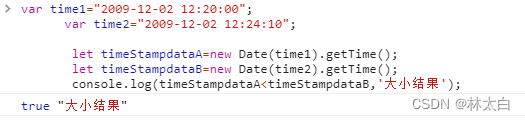
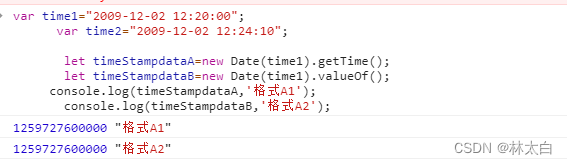
getTime() 等价于 valueOf()
timeStampdataA.getTime() 也可以替换为 timeStampdataA.valueOf()
四、实战(时间戳)
(1)判断距离现在五分钟
讯享网// 格式化时间并且比较五分钟以内的时间-2022-07-21 10:26:02 timeFormatter(row){
    if(row != ''&&row != null) {
    if(new Date().getTime()-new Date(row).getTime()>(5 * 60 * 1000)){
    return '离线' }else{
   return '在线'} }else{
    return '--' } },
(2)时间戳转化为时间
页面需要展示开始时间和结束时间,此时,需要把时间戳转化为正常年月日的格式:
// 时间戳转为正常时间的公共方法,当然你也可以加上小时、分、秒 filterTime(time) {
    const date = new Date(time) const Y = date.getFullYear() const M = date.getMonth() + 1 < 10 ? '0'+(date.getMonth()+1) : date.getMonth()+1 const D = date.getDate() return `${
    Y}-${
    M}-${
    D}` }, // 在点击确认添加之后,调用filterTime方法,赋值给当前数据即可,下边是小时、分、秒 const H = date.getHours() // 小时 const M = date.getMinutes() // 分钟 const S = date.getSeconds() // 秒 // 下边这个方法是判断时间是否小于10,小于10 前边加0,更加规范一些,看自己需求 function isAddZero(time) {
    let str = '' if(time < 10) {
    str = '0' + time }else{
    str = time.toString() } return str // 方法二 let str = '' str = time < 10 ? '0' + time : time.toString() return str }
持续更新中…
(3)获取本周时间
讯享网 _this.getweektime();//本周开始时间和结束时间 // 获取本周开始时间和结束时间 getweektime(){
    var now = new Date(); //当前日期 var nowDayOfWeek = now.getDay(); //今天本周的第几天 var nowDay = now.getDate(); //当前日 var nowMonth = now.getMonth(); //当前月 var nowYear = now.getYear(); //当前年 nowYear += (nowYear < 2000) ? 1900 : 0; // var lastMonthDate = new Date(); //上月日期 lastMonthDate.setDate(1); lastMonthDate.setMonth(lastMonthDate.getMonth()-1); var lastYear = lastMonthDate.getYear(); var lastMonth = lastMonthDate.getMonth(); //获得本周的开始日期 var weekStartDate = new Date(nowYear, nowMonth, nowDay - nowDayOfWeek); //获得本周的结束日期 var weekEndDate = new Date(nowYear, nowMonth, nowDay + (6 - nowDayOfWeek)); console.log(this.formatDate(weekStartDate),this.formatDate(weekEndDate),'本周时间'); }, //格式化日期:yyyy-MM-dd formatDate(date) {
    var myyear = date.getFullYear(); var mymonth = date.getMonth()+1; var myweekday = date.getDate(); if(mymonth < 10){
    mymonth = "0" + mymonth; } if(myweekday < 10){
    myweekday = "0" + myweekday; } return (myyear+"-"+mymonth + "-" + myweekday); }, //获得本周的开始日期 getWeekStartDate() {
    var weekStartDate = new Date(nowYear, nowMonth, nowDay - nowDayOfWeek); return formatDate(weekStartDate); }, //获得本周的结束日期 getWeekEndDate() {
    var weekEndDate = new Date(nowYear, nowMonth, nowDay + (6 - nowDayOfWeek)); return formatDate(weekEndDate); },
版权声明:本文内容由互联网用户自发贡献,该文观点仅代表作者本人。本站仅提供信息存储空间服务,不拥有所有权,不承担相关法律责任。如发现本站有涉嫌侵权/违法违规的内容,请联系我们,一经查实,本站将立刻删除。
如需转载请保留出处:https://51itzy.com/kjqy/75504.html