
我的使用安装环境是Ubuntu20,使用vscode+cmake进行编译与调试。
安装KDL库前必须安装好Eigen库。
KDL库是机械臂的运动学、动力学、轨迹规划的开源第三方库,功能强大。
一、Eigen库安装
首先可以搜索一下
sudo apt search eigen3 讯享网
然后就出来了这几个选择,选择一个安装,很多其他的库安装也可以先搜索一下,这个命令还挺好用的
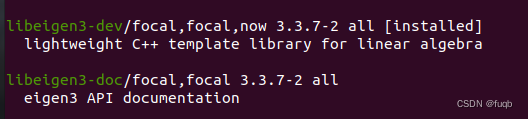
讯享网
讯享网sudo apt install libeigen3-dev
二、KDL库安装
首先将远程代码仓的代码拷贝到本地
git clone https://github.com/orocos/orocos_kinematics_dynamics.git 然后切换到对应的目录
讯享网cd orocos_kinematics_dynamics/ cd orocos_kdl
然后创建build文件夹
mkdir build 然后编译以及安装

讯享网cd build cmake .. make sudo make install
正常来说到这里KDL库就已经安装好了。
三、KDL库使用
找个新的文件夹,打开命令行,执行(目的是运行vscode打开当前文件夹)
code . 讯享网cmake_minimum_required(VERSION 3.10) project(learn_kdl) find_package(Eigen3 REQUIRED CONFIG) find_package(orocos_kdl REQUIRED) add_executable(main main.cc) target_link_libraries(main Eigen3::Eigen orocos-kdl orocos-kdl-models)
/ * \file path_example.cpp * An example to demonstrate the use of trajectory generation * functions. * * There are is a matlab/octave file in the examples directory to visualise the results * of this example program. (visualize_trajectory.m) * */ #include <frames.hpp> #include <frames_io.hpp> #include <trajectory.hpp> #include <trajectory_segment.hpp> #include <trajectory_stationary.hpp> #include <trajectory_composite.hpp> #include <trajectory_composite.hpp> #include <velocityprofile_trap.hpp> #include <path_roundedcomposite.hpp> #include <rotational_interpolation_sa.hpp> #include <utilities/error.h> #include <utilities/utility.h> #include <trajectory_composite.hpp> int main(int argc,char* argv[]) {
    using namespace KDL; // Create the trajectory: // use try/catch to catch any exceptions thrown. // NOTE: exceptions will become obsolete in a future version. try {
    // Path_RoundedComposite defines the geometric path along // which the robot will move. // Path_RoundedComposite* path = new Path_RoundedComposite(0.2,0.01,new RotationalInterpolation_SingleAxis()); // The routines are now robust against segments that are parallel. // When the routines are parallel, no rounding is needed, and no attempt is made // add constructing a rounding arc. // (It is still not possible when the segments are on top of each other) // Note that you can only rotate in a deterministic way over an angle less then PI! // With an angle == PI, you cannot predict over which side will be rotated. // With an angle > PI, the routine will rotate over 2*PI-angle. // If you need to rotate over a larger angle, you need to introduce intermediate points. // So, there is a common use case for using parallel segments. path->Add(Frame(Rotation::RPY(PI,0,0), Vector(-1,0,0))); path->Add(Frame(Rotation::RPY(PI_2,0,0), Vector(-0.5,0,0))); path->Add(Frame(Rotation::RPY(0,0,0), Vector(0,0,0))); path->Add(Frame(Rotation::RPY(0.7,0.7,0.7), Vector(1,1,1))); path->Add(Frame(Rotation::RPY(0,0.7,0), Vector(1.5,0.3,0))); path->Add(Frame(Rotation::RPY(0.7,0.7,0), Vector(1,1,0))); // always call Finish() at the end, otherwise the last segment will not be added. path->Finish(); // Trajectory defines a motion of the robot along a path. // This defines a trapezoidal velocity profile. VelocityProfile* velpref = new VelocityProfile_Trap(0.5,0.1); velpref->SetProfile(0,path->PathLength()); Trajectory* traject = new Trajectory_Segment(path, velpref); Trajectory_Composite* ctraject = new Trajectory_Composite(); ctraject->Add(traject); ctraject->Add(new Trajectory_Stationary(1.0,Frame(Rotation::RPY(0.7,0.7,0), Vector(1,1,0)))); // use the trajectory double dt=0.1; std::ofstream of("./trajectory.dat"); for (double t=0.0; t <= traject->Duration(); t+= dt) {
    Frame current_pose; current_pose = traject->Pos(t); for (int i=0;i<4;++i) for (int j=0;j<4;++j) of << current_pose(i,j) << "\t"; of << "\n"; // also velocities and accelerations are available ! //traject->Vel(t); //traject->Acc(t); } of.close(); // you can get some meta-info on the path: for (int segmentnr=0; segmentnr < path->GetNrOfSegments(); segmentnr++) {
    double starts,ends; Path::IdentifierType pathtype; if (segmentnr==0) {
    starts = 0.0; } else {
    starts = path->GetLengthToEndOfSegment(segmentnr-1); } ends = path->GetLengthToEndOfSegment(segmentnr); pathtype = path->GetSegment(segmentnr)->getIdentifier(); std::cout << "segment " << segmentnr << " runs from s="<<starts << " to s=" <<ends; switch(pathtype) {
    case Path::ID_CIRCLE: std::cout << " circle"; break; case Path::ID_LINE: std::cout << " line "; break; default: std::cout << " unknown "; break; } std::cout << std::endl; } std::cout << " trajectory written to the ./trajectory.dat file " << std::endl; delete ctraject; } catch(Error& error) {
    std::cout <<"I encountered this error : " << error.Description() << std::endl; std::cout << "with the following type " << error.GetType() << std::endl; } }
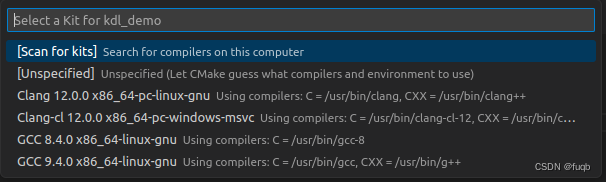
然后在vscode的最底下这栏,设置好编译器,我用的是clang,也可以用其他的,比如gcc,如果没有需要自行安装。

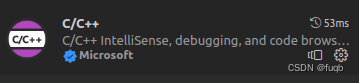
还需要在vscode中安装好c++以及cmake的扩展

好了,一切就像,可以开始编译了,点击vscode的最底下这栏的build,然后开始编译
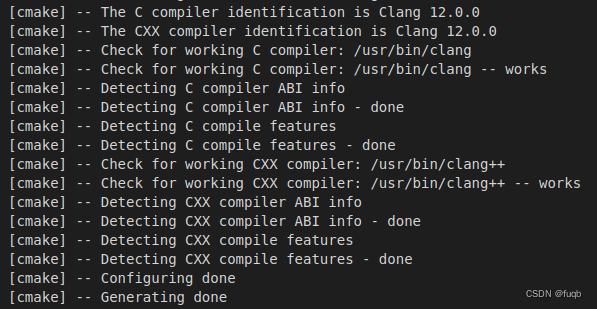
没有问题的话就可以运行编译出来的可执行文件了,

最底下这栏,可以设置是debug模式还是release模式,点击三角形或者虫子符号,就可以运行了,最右边的main是可执行文件名称,如果有多个可执行文件,可以执行哪个。
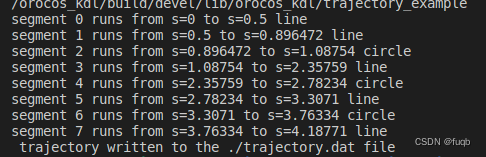
执行结果如上所示,结束。
版权声明:本文内容由互联网用户自发贡献,该文观点仅代表作者本人。本站仅提供信息存储空间服务,不拥有所有权,不承担相关法律责任。如发现本站有涉嫌侵权/违法违规的内容,请联系我们,一经查实,本站将立刻删除。
如需转载请保留出处:https://51itzy.com/kjqy/71900.html