
之前一直用小米的驱动,但是感觉太慢了,所以还是决定使用有线连接。
但是之前进入Linux系统后,有线连接没有,所以需要安装驱动。
01 查询网卡类型(Windows)
进入windows系统,进入CMD命令行,输入systeminfo
查询网卡类型
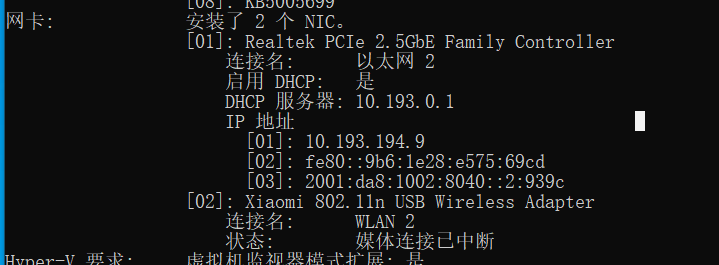
网卡: 安装了 2 个 NIC。 [01]: Realtek PCIe 2.5GbE Family Controller 连接名: 以太网 2 启用 DHCP: 是 DHCP 服务器: 10.193.0.1 IP 地址 [01]: 10.193.194.9 [02]: fe80::9b6:1e28:e575:69cd [03]: 2001:da8:1002:8040::2:939c [02]: Xiaomi 802.11n USB Wireless Adapter 连接名: WLAN 2 状态: 媒体连接已中断 讯享网
02 查询网卡驱动(Ubuntu)
在 Ubuntu打开终端,输入lspci -v 查看网卡驱动
如果末尾显示:Kernel driver in use:r8169
说明驱动版本不符,需要重新安装驱动,要安装RTL8125
选择安装RTL8125,是根据windows查询到的网卡类型选择的
查询结果如下:

讯享网guyue@guyue:~$ lspci -v 00:00.0 Host bridge: Intel Corporation Device 9b53 (rev 03) Subsystem: ASUSTeK Computer Inc. Device 8694 Flags: bus master, fast devsel, latency 0 Capabilities: <access denied> 00:01.0 PCI bridge: Intel Corporation Xeon E3-1200 v5/E3-1500 v5/6th Gen Core Processor PCIe Controller (x16) (rev 03) (prog-if 00 [Normal decode]) Flags: bus master, fast devsel, latency 0, IRQ 120 Bus: primary=00, secondary=01, subordinate=01, sec-latency=0 I/O behind bridge: 00004000-00004fff Memory behind bridge: -920fffff Prefetchable memory behind bridge: 00000000a0000000-00000000b1ffffff Capabilities: <access denied> Kernel driver in use: pcieport 00:14.0 USB controller: Intel Corporation Device a3af (prog-if 30 [XHCI]) Subsystem: ASUSTeK Computer Inc. Device 8694 Flags: bus master, medium devsel, latency 0, IRQ 125 Memory at (64-bit, non-prefetchable) [size=64K] Capabilities: <access denied> Kernel driver in use: xhci_hcd 00:16.0 Communication controller: Intel Corporation Device a3ba Subsystem: ASUSTeK Computer Inc. Device 8694 Flags: bus master, fast devsel, latency 0, IRQ 136 Memory at (64-bit, non-prefetchable) [size=4K] Capabilities: <access denied> Kernel driver in use: mei_me Kernel modules: mei_me 00:17.0 SATA controller: Intel Corporation Device a382 (prog-if 01 [AHCI 1.0]) Subsystem: ASUSTeK Computer Inc. Device 8694 Flags: bus master, 66MHz, medium devsel, latency 0, IRQ 126 Memory at (32-bit, non-prefetchable) [size=8K] Memory at (32-bit, non-prefetchable) [size=256] I/O ports at 5050 [size=8] I/O ports at 5040 [size=4] I/O ports at 5020 [size=32] Memory at (32-bit, non-prefetchable) [size=2K] Capabilities: <access denied> Kernel driver in use: ahci Kernel modules: ahci 00:1b.0 PCI bridge: Intel Corporation Device a3e9 (rev f0) (prog-if 00 [Normal decode]) Flags: bus master, fast devsel, latency 0, IRQ 121 Bus: primary=00, secondary=02, subordinate=02, sec-latency=0 I/O behind bridge: 00006000-00006fff Memory behind bridge: -901fffff Prefetchable memory behind bridge: 000000-00000040002fffff Capabilities: <access denied> Kernel driver in use: pcieport 00:1c.0 PCI bridge: Intel Corporation Device a392 (rev f0) (prog-if 00 [Normal decode]) Flags: bus master, fast devsel, latency 0, IRQ 122 Bus: primary=00, secondary=03, subordinate=03, sec-latency=0 I/O behind bridge: 00007000-00007fff Memory behind bridge: -903fffff Prefetchable memory behind bridge: 000000-00000040004fffff Capabilities: <access denied> Kernel driver in use: pcieport 00:1c.3 PCI bridge: Intel Corporation Device a393 (rev f0) (prog-if 00 [Normal decode]) Flags: bus master, fast devsel, latency 0, IRQ 123 Bus: primary=00, secondary=04, subordinate=04, sec-latency=0 I/O behind bridge: 00003000-00003fff Memory behind bridge: -922fffff Capabilities: <access denied> Kernel driver in use: pcieport 00:1d.0 PCI bridge: Intel Corporation Device a398 (rev f0) (prog-if 00 [Normal decode]) Flags: bus master, fast devsel, latency 0, IRQ 124 Bus: primary=00, secondary=05, subordinate=05, sec-latency=0 Memory behind bridge: -921fffff Capabilities: <access denied> Kernel driver in use: pcieport 00:1f.0 ISA bridge: Intel Corporation Device a3c8 Subsystem: ASUSTeK Computer Inc. Device 8694 Flags: bus master, medium devsel, latency 0 00:1f.2 Memory controller: Intel Corporation Device a3a1 Subsystem: ASUSTeK Computer Inc. Device 8694 Flags: fast devsel Memory at (32-bit, non-prefetchable) [disabled] [size=16K] 00:1f.3 Audio device: Intel Corporation Device a3f0 Subsystem: ASUSTeK Computer Inc. Device 8797 Flags: bus master, fast devsel, latency 32, IRQ 137 Memory at (64-bit, non-prefetchable) [size=16K] Memory at (64-bit, non-prefetchable) [size=64K] Capabilities: <access denied> Kernel driver in use: snd_hda_intel Kernel modules: snd_hda_intel, snd_sof_pci 00:1f.4 SMBus: Intel Corporation Device a3a3 Subsystem: ASUSTeK Computer Inc. Device 8694 Flags: medium devsel, IRQ 11 Memory at (64-bit, non-prefetchable) [size=256] I/O ports at efa0 [size=32] 01:00.0 VGA compatible controller: NVIDIA Corporation Device 1f0a (rev a1) (prog-if 00 [VGA controller]) Subsystem: ASUSTeK Computer Inc. Device 879b Flags: bus master, fast devsel, latency 0, IRQ 142 Memory at (32-bit, non-prefetchable) [size=16M] Memory at a0000000 (64-bit, prefetchable) [size=256M] Memory at b0000000 (64-bit, prefetchable) [size=32M] I/O ports at 4000 [size=128] Expansion ROM at 000c0000 [disabled] [size=128K] Capabilities: <access denied> Kernel driver in use: nouveau Kernel modules: nvidiafb, nouveau 01:00.1 Audio device: NVIDIA Corporation Device 10f9 (rev a1) Subsystem: ASUSTeK Computer Inc. Device 879b Flags: bus master, fast devsel, latency 0, IRQ 17 Memory at (32-bit, non-prefetchable) [size=16K] Capabilities: <access denied> Kernel driver in use: snd_hda_intel Kernel modules: snd_hda_intel 04:00.0 Ethernet controller: Realtek Semiconductor Co., Ltd. Device 8125 (rev 04) Subsystem: ASUSTeK Computer Inc. Device 87d7 Flags: fast devsel, IRQ 19 I/O ports at 3000 [size=256] Memory at (64-bit, non-prefetchable) [size=64K] Memory at (64-bit, non-prefetchable) [size=16K] Capabilities: <access denied> Kernel modules: r8169 05:00.0 Non-Volatile memory controller: Kingston Technology Company, Inc. Device 500e (rev 01) (prog-if 02 [NVM Express]) Subsystem: Kingston Technology Company, Inc. Device 500e Flags: bus master, fast devsel, latency 0, IRQ 16, NUMA node 0 Memory at (64-bit, non-prefetchable) [size=16K] Capabilities: <access denied> Kernel driver in use: nvme Kernel modules: nvme

03 Ubuntu下安装驱动
进入官网
- https://www.realtek.com/en/component/zoo/category/network-interface-controllers-10-100-1000m-gigabit-ethernet-pci-express-software
选择Linux下的 r8125 进行安装
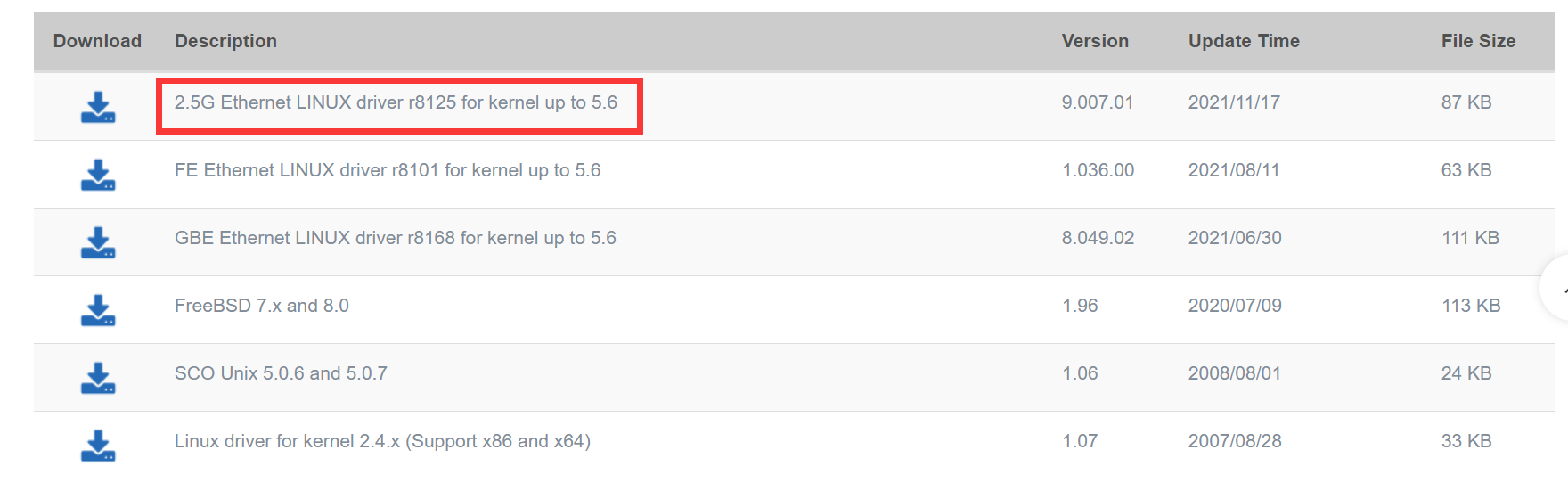
下载下来的文件名为:r8125-9.007.01.tar.bz2
将此文件右键解压缩,然后把压缩文件复制到想要安装的位置
然后进入此目录下,运行以下指令
cd ~/software/r8125-9.007.01 sudo chmod +x autorun.sh sudo ./autorun.sh 运行结果如下:
讯享网guyue@guyue:~/software/r8125-9.007.01$ sudo chmod +x autorun.sh [sudo] guyue 的密码: guyue@guyue:~/software/r8125-9.007.01$ sudo ./autorun.sh Check old driver and unload it. rmmod r8169 Build the module and install At main.c:160: - SSL error:0:system library:fopen:No such file or directory: ../crypto/bio/bss_file.c:72 - SSL error:2006D080:BIO routines:BIO_new_file:no such file: ../crypto/bio/bss_file.c:79 sign-file: certs/signing_key.pem: No such file or directory Warning: modules_install: missing 'System.map' file. Skipping depmod. Backup r8169.ko rename r8169.ko to r8169.bak DEPMOD 5.4.0-90-generic load module r8125 Updating initramfs. Please wait. update-initramfs: Generating /boot/initrd.img-5.4.0-90-generic Completed.
安装完后运行以下指令,更新软件
sudo apt-get update sudo apt-get install ubuntu-make 04 后续问题解决
电脑重启以后,网络有线连接又没有了,然后重新运行下述代码,网络有限连接就又有了
讯享网cd ~/software/r8125-9.007.01 sudo chmod +x autorun.sh sudo ./autorun.sh
05 参考
- https://blog.csdn.net/weixin_/article/details/
- https://blog.csdn.net/_/article/details/
版权声明:本文内容由互联网用户自发贡献,该文观点仅代表作者本人。本站仅提供信息存储空间服务,不拥有所有权,不承担相关法律责任。如发现本站有涉嫌侵权/违法违规的内容,请联系我们,一经查实,本站将立刻删除。
如需转载请保留出处:https://51itzy.com/kjqy/71877.html