
在前面文章《嵌入式软件开发杂谈(5):线程的CPU使用率》中简单介绍了如何查看线程的CPU使用率,那么问题来了,知道了某个进程或者线程的CPU使用率,那么如何知道是那个函数导致的CPU使用率升高呐?
最方便的方法是使用perf工具,perf是一款性能分析工具,不仅可以用来分析系统全局性性能,还可以Fenix进程线程级别的性能,甚至到函数以及汇编级别,这里不介绍perf的用法,有兴趣的可以百度下。
参考前面文章的代码,测试代码如下:
#include <stdio.h> #include <unistd.h> #include <pthread.h> #include <stdlib.h> #include <sys/prctl.h> #include <math.h> int test_sqrt() { double value = 0; int i = 0; for (i = 0; i < ; i++) value += sqrt(i*i*i*i); return 0; } void* thread11(void* arg) { printf("----->thread11\n"); prctl(PR_SET_NAME, "thread11"); while(1) { test_sqrt(); sleep(1); } } void* thread12(void* arg) { printf("----->thread12\n"); prctl(PR_SET_NAME, "thread12"); while(1) { usleep(1); } } void* thread13(void* arg) { printf("----->thread13\n"); prctl(PR_SET_NAME, "thread13"); while(1) { usleep(100); } } int main() { pthread_t thread[3]; int s32Ret = 0; s32Ret = pthread_create(&thread[0], NULL, thread11, NULL); printf("pthread_create, ret:%d\n", s32Ret); sleep(1); s32Ret = pthread_create(&thread[1], NULL, thread12, NULL); printf("pthread_create, ret:%d\n", s32Ret); sleep(1); s32Ret = pthread_create(&thread[0], NULL, thread13, NULL); printf("pthread_create, ret:%d\n", s32Ret); sleep(1); while(1) { sleep(1); } return 0; } 讯享网
将其编译并生成可执行文件test,并执行
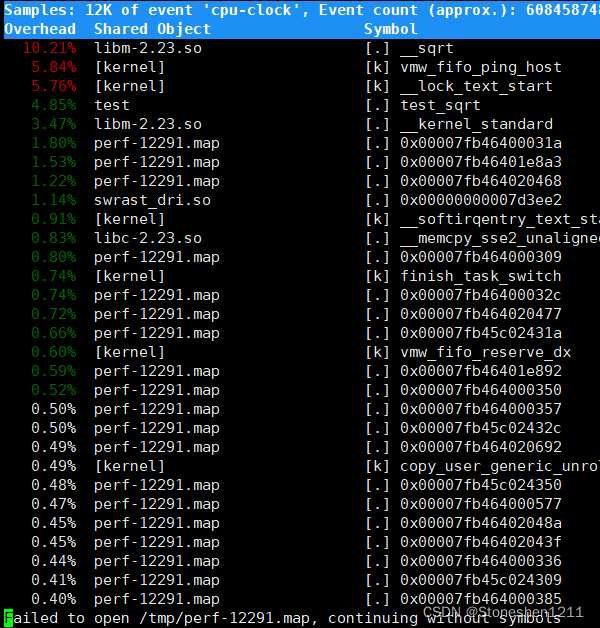
我们使用perf top指令,可以查看占用CPU时钟最多的函数或指令,如下
讯享网

上面字段中的Overhead表示该Symbol事件在所有采样中的比例,可以看到进程test 中的test_sqrt 占用的采样数比例较高。
我们可以单独分析进程test这个进程的情况,使用下面指令:
讯享网#perf top -g -p 841
-g 表示开启调用关系分析 -p 指定某个进程号 841为test的进程号

如上,为详细的信息,我们可以使用“方向键”选择test_sqrt,然后再按下“回车键”查看调用关系
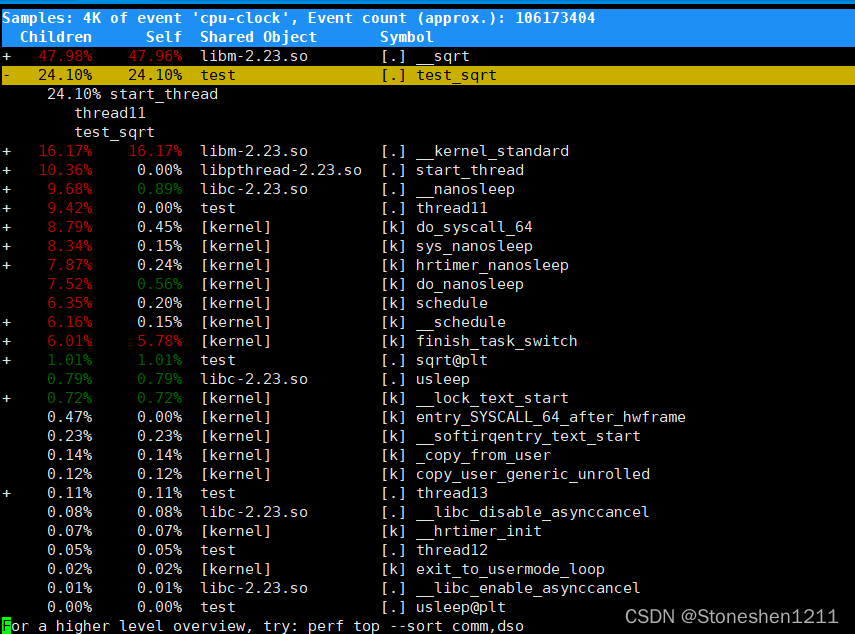
如上,可以看到thread11中的test_sqrt函数占用的比例较高
版权声明:本文内容由互联网用户自发贡献,该文观点仅代表作者本人。本站仅提供信息存储空间服务,不拥有所有权,不承担相关法律责任。如发现本站有涉嫌侵权/违法违规的内容,请联系我们,一经查实,本站将立刻删除。
如需转载请保留出处:https://51itzy.com/kjqy/69630.html