
AGL – Application framework
1. 介绍
1.1 概述
下图通过应用程序安装场景描述了framework的主要组件以及其交互(
图片转载自:
https://docs.automotivelinux.org/en/lamprey/#3_Developer_Guides/1_Application_Framework/0_Introduction/

讯享网
下面对图片中描述的时序进行解释:
- APPLICATION 调用其binder安装另外一个应用程序
- binder调用的afm-main-binding通过D-Bus system和afm-system-daemon安装程序
- D-Bus system通过调用SYNARA检查APPLICATION是否有权限安装程序
- D-Bus system将安装命令传送到afm-system-daemon,afm-system-daemon检查被安装的应用程序的签名和权限,然后进行安装
- afm-system-daemon调用SECURITY-MANAGER完成安装程序的security上下文
- SECURITY-MANAGER通过调用SYNARA为应用程序安装初始化权限
- APPLICATION通过其binder启动刚安装的应用程序
- binder调用的afm-main-binding通过D-Bus session和afm-user-daemon启动应用程序。
- D-Bus session通过调用SYNARA检查APPLICATION是否有权限启动其他进程
- D-Bus session将请求转送至afm-user-daemon
- afm-user-daemon通过SYNARA检查APPLICATION是否有权限启动其他程序
- afm-user-daemon通过SECURITY-MANAGER特性为应用程序设置security上下文
- afm-user-daemon启动应用程序
上图中部分组件的功能介绍:
- SECURITY-MANAGER:设置 Smack 上下文和规则、设置组、为应用程序创建 CYNARA 规则的初始内容。
- CYNARA:负责处理用户和应用程序的API访问权限。
- D-Bus:负责检查消息的安全性。 CYNARA 检查规则增强了通常的 D-Bus 安全规则。
- afm-system-daemon:负责安装和卸载应用程序
- afm-user-daemon:负责列出应用程序、查询应用程序详细信息、启动、终止、暂停、恢复给定用户上下文的应用程序及其实例。
- afb-binder:负责通过 HTTP 接口提供资源和功能。
- afm-main-binding:允许应用程序使用 AGL 框架的 API。
1.2 Security framework和Application framework的连接
- Security Framework是指用于确保安全的安全模型以及为实现该模型而提供的工具。
- Security Model是指系统如何使用 DAC(自主访问控制)、MAC(强制访问控制)和Capabilities来确保安全和隐私。 它还包括使用审计功能和管理日志和警报的报告功能。
- Application Framework使用安全模型/框架来确保其管理的应用程序的安全性和隐私性。
- Application Framework必须符合底层安全模型/框架。 但它应该将其隐藏到应用程序中。
1.3 Security Framework
包含三部分:
- Security-Manager
- Cynara
- 符合Cynara的D-Bus.
理论上,Security Framework/Model是不应该影响Application Framework之上的层的实现细节。
1.4 Application Framework
2. afb daemons
2.1 介绍
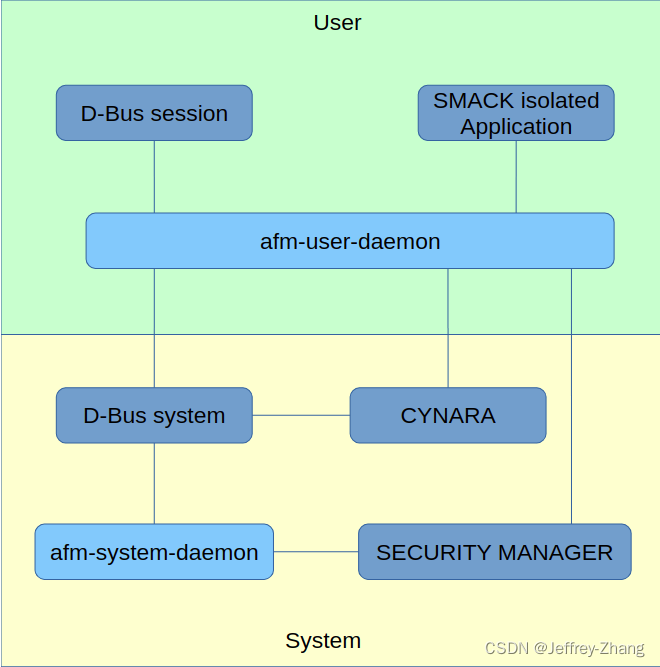
afm-user-daemon和afm-system-daemon管理应用程序的生命周期,管理方式:installation,uninstallation,running,suspend,inventory…
afm-user-daemon和afm-system-daemon能够确保在需要的时候使用security framework,并且能够保证应用程序能在安全的上下文环境中运行.
D-Bus 负责根据 D-Bus 目的地将命令传输到适当的守护进程。
图片转载自https://docs.automotivelinux.org/en/lamprey/#3_Developer_Guides/1_Application_Framework/1_afm-daemons/
2.2 D-Bus接口
2.2.1 D-Bus接口概述
afm daemons从D-Bus session实例中获取命令
D-Bus session 默认由环境变量 DBUS_SESSION_BUS_ADDRESS 寻址。
afm daemons监听org.AGL.afm.[user|system]接口中路径为/org/AGL/afm/[user|system]的对象并且以org.AGL.afm.[user|system] 作为目的名称的成员
- afm-system-daemon:监听的接口:
- install
- uninstall
- afm-user-daemon监听的接口:
- runnables
- detail
- start
- once
- terminate
- pause
- resume
- runners
- state
- install
- uninstall
D-Bus主要用于signaling和discovery,client和server主要通过JSON交换数据
2.2.2 D-Bus协议
- DESTINATION: org.AGL.afm.[user|system]
- PATH: /org/AGL/afm/[user|system]
- INTERFACE: org.AGL.afm.[user|system]
Method org.AGL.afm.system.install
- 描述:通过widget安装应用程序,如果存在相同id,相同版本的程序,只有设置force=true才会重新安装,应用程序安装在应用程序公共目录的子目录中,如果指定了根目录,则应用程序安装在指定根目录的子目录中.
- 输入:要安装的widget路径, 可选项force=true, 可选项root
表示widget绝对路径的字符串
"/a/path/driving/to/the/widget" 讯享网
或者一个对象
讯享网{
    "wgt": "/a/path/to/the/widget", "force": false, "root": "/a/path/to/the/root" }
"wgt"和"root"必须是绝对路径
- 输出:包含"added"字段的对象
{
   "added":"appli@x.y"}
Method org.AGL.afm.system.uninstall
- 描述:卸载指定id的应用程序
- 输入:要卸载的应用程序id, 可选项应用程序根目录
一个字符串
讯享网"appli@x.y"
或一个对象
{
"id": "appli@x.y", "root": "/a/path/to/the/root" } - 输出:“true”
Method org.AGL.afm.user.detail
- 描述:获取指定应用程序的详细信息
- 输入:应用程序id
一个字符串:
讯享网"appli@x.y"
或者一个对象
{
"id":"appli@x.y"} - 输出:一个JSON对象,描述应用程序所包含的字段
讯享网{
    "id": string, the application id (id@version) "version": string, the version of the application "width": integer, requested width of the application "height": integer, requested height of the application "name": string, the name of the application "description": string, the description of the application "shortname": string, the short name of the application "author": string, the author of the application }
Method org.AGL.afm.user.runnables
- 描述: 获取能够运行的应用程序列表.
- 输入: 任何有效的json对象, 可以是除null外的任何东西
- 输出: 描述可以运行的应用程序数组.
数组中每一项都包含一个对象描述应用程序的详细信息,详细参考 org.AGL.afm.user.detail.
Method org.AGL.afm.user.install
- 描述: 通过widget安装应用程序,如果存在相同id,相同版本的程序,只有设置force=true才会重新安装,应用程序安装在应用程序公共目录的子目录中,如果指定了根目录,则应用程序安装在指定根目录的子目录中.
- 输入: 要安装的widget路径,可选项force=true, 可选项root
包含widget绝对路径的字符串:
"/a/path/driving/to/the/widget" 或者一个对象
讯享网{
    "wgt": "/a/path/to/the/widget", "force": false, "root": "/a/path/to/the/root" }
wgt and root 必须是绝对路径.
- 输出: 一个包含"added"字段的对象
{
   "added":"appli@x.y"}
Method org.AGL.afm.user.uninstall
- 描述: 卸载指定id的应用程序.
- 输入: 应用程序的id,可选项应用程序根目录
一个字符串
讯享网"appli@x.y"
或者一个对象:
{
"id": "appli@x.y", "root": "/a/path/to/the/root" } - 输出:“true”
Method org.AGL.afm.user.start
- 描述:启动指定id的应用程序
- 输入: 应用程序id,可选项启动模式
一个字符串:
讯享网"appli@x.y"
或者是一个包含id字段和可选mode字段的对象
{
"id":"appli@x.y","mode":"local"} mode字段的值只能是"local" 或者 “remote”.
- 输出: 启动程序的runid,是一个整型
Method org.AGL.afm.user.once
- 描述:
- 输入: 应用程序的id
一个字符串
讯享网"appli@x.y"
或者一个包含id字段的对象
{
"id":"appli@x.y"} - 输出: 应用程序的状态. 详细信息参考 org.AGL.afm.user.state
Method org.AGL.afm.user.terminate
- 描述: 终止指定runid的应用程序
- 输入: 要终止的应用程序的runid.
- 输出: “true”
Method org.AGL.afm.user.stop
使用 org.AGL.afm.user.pause 替代.
Method org.AGL.afm.user.continue
使用 org.AGL.afm.user.resume 替代.
Method org.AGL.afm.user.pause
[当前在systemd版本不存在]
- 描述: 暂定指定runid的应用程序.
- 输入: 要暂定的应用程序runid.
- 输出: “true”
Method org.AGL.afm.user.resume
[当前在systemd版本不存在]
- 描述: 恢复指定runid的应用程序.
- 输入: 要恢复的应用程序runid.
- 输出: “true”
Method org.AGL.afm.user.state
- 描述: 或者指定runid的运行实例.
- 输入: 运行实例的runid.
- 输出: 描述运行实例状态的对象,包含如下内容:
- the runid (整型)
- 进程pid数组
- with the group leader
- 运行应用程序的id (string)
- 应用程序状态 (string: “starting”, “running”, “paused”).
返回的状态举例:
讯享网 {
    "runid": 2, "pids": [ 435, 436 ], "state": "running", "id": "appli@x.y" }
Method org.AGL.afm.user.runners
- 描述: 获取当前运行实例列表.
- 输入: anything.
- 输出: 运行实例的状态,详细信息参考 org.AGL.afm.user.state.
2.3 启动afm daemons
afm-system-daemon 和 afm-user-daemon附加到system作为systemd服务被启动的, 服务文件位于/lib/systemd/system/afm-system-daemon.service 和 /usr/lib/systemd/user/afm-user-daemon.service。
- afm-system-daemon options
-r --root directory Set the root application directory. Note that the default root directory is defined to be /usr/share/afm/applications (may change). -d --daemon Daemonizes the process. It is not needed by systemd. -q --quiet Reduces the verbosity (can be repeated). -v --verbose Increases the verbosity (can be repeated). -h --help Prints a short help. - afm-user-daemon options
讯享网 -a --application directory [Currently not available in the systemd version] Includes the given application directory to the database base of applications. Can be repeated. -r --root directory [Currently not available in the systemd version] Includes root application directory or directories when passing multiple rootdir to applications database. Note that default root directory for applications is always added. In current version /usr/share/afm/applications is used as default. -m --mode (local|remote) [Currently not available in the systemd version] Set the default launch mode. The default value is 'local' -d --daemon Daemonizes the process. It is not needed by systemd. -q --quiet Reduces the verbosity (can be repeated). -v --verbose Increases the verbosity (can be repeated). -h --help Prints a short help.
2.4 afm-user-daemon的任务
- 维护应用程序列表
在启动时 afm-user-daemon 扫描包含应用程序的目录并在内存中加载当前用户可访问的可用应用程序列表。
当 afm-system-daemon 安装或删除应用程序时。 成功时它会发送信号 org.AGL.afm.system.changed。 当接收到这样的信号时,afm-user-daemon 会重建它的应用程序列表。
afm-user-daemon 将其收集的有关应用程序的数据提供给其客户端。 客户可以请求可用应用程序的完整列表,也可以请求有关给定应用程序的更具体信息。 - 启动应用程序
afm-user-daemon 使用 systemd 启动应用程序。 Systemd 在启动之前为应用程序构建一个安全的环境。
一旦启动,正在运行的应用程序实例会收到一个标识它们的 runid。 为了使与 systemd 的接口匹配,pid 是 runid。 - 管理运行应用程序的实例
afm-user-daemon 管理它启动的应用程序列表。
当拥有正确的权限时,客户端可以获得正在运行的实例列表和有关特定运行实例的详细信息。 它还可以终止给定的应用程序。 - 安装和卸载应用程序
如果客户端拥有正确的权限,afm-user-daemon 将该任务委托给 afm-system-daemon。
2.4 使用afm-util
- afm-util runnables : 列出可以运行的widget
- afm-util install wgt :安装widget文件
- afm-util uninstall id :卸载指定id的widget
- afm-util detail id :打印指定id的widget信息
- afm-util runners :列出运行实例
- afm-util start id :启动指定id的widget
- afm-util once id :run once指定id的widget
- afm-util terminate rid :终止指定rid的应用程序
- afm-util state rid :获取指定rid的运行实例的状态
使用 afm-util 的示例:
afm-util runnables 在demo上执行结果如下:

讯享网[ {
    "description":"This is a demo dashboard application", "name":"Dashboard", "shortname":"", "id":"dashboard", "version":"0.1", "author":"Qt", "author-email":"", "width":"", "height":"", "icon":"/var/local/lib/afm/applications/dashboard/icon.svg", "http-port":30030 }, {
    "description":"Messaging Application", "name":"Messaging", "shortname":"", "id":"messaging", "version":"0.1", "author":"Qt", "author-email":"", "width":"", "height":"", "icon":"/var/local/lib/afm/applications/messaging/icon.png", "http-port":30035 }, {
    "description":"POI App", "name":"POI", "shortname":"", "id":"poi", "version":"0.1", "author":"AISIN AW", "author-email":"", "width":"", "height":"", "icon":"/var/local/lib/afm/applications/poi/icon.png", "http-port":30039 }, {
    "description":"AGL Default Mixer", "name":"mixer", "shortname":"", "id":"mixer", "version":"12.1.1", "author":"\n \tLoïc Collignon <>\n \tMatt Porter <>\n ", "author-email":"", "width":"", "height":"", "icon":"/var/local/lib/afm/applications/mixer/icon.svg", "http-port":30036 }, {
    "description":"This is a demo application used to control and dialog with HVAC system", "name":"HVAC", "shortname":"", "id":"hvac", "version":"0.1", "author":"Romain Forlot <>", "author-email":"", "width":"", "height":"", "icon":"/var/local/lib/afm/applications/hvac/icon.svg", "http-port":30032 }, {
    "description":"This is a demo Radio application", "name":"Radio", "shortname":"", "id":"radio", "version":"0.1", "author":"Qt", "author-email":"", "width":"", "height":"", "icon":"/var/local/lib/afm/applications/radio/icon.svg", "http-port":30040 }, {
    "description":"This is a demo application for homescreen", "name":"homescreen", "shortname":"", "id":"homescreen", "version":"0.1", "author":"TOYOTA", "author-email":"", "width":"", "height":"", "icon":"/var/local/lib/afm/applications/homescreen/icon.svg", "http-port":30031 }, {
    "description":"AGL Task Manager", "name":"taskmanager", "shortname":"", "id":"taskmanager", "version":"0.1", "author":"Wool, Vitaly <>", "author-email":"", "width":"", "height":"", "icon":"/var/local/lib/afm/applications/taskmanager/icon.png", "http-port":30042 }, {
    "description":"This is the settings application for date & time, wifi, wired and bluetooth", "name":"Settings", "shortname":"", "id":"settings", "version":"0.1", "author":"Tasuku Suzuki <>", "author-email":"", "width":"", "height":"", "icon":"/var/local/lib/afm/applications/settings/icon.svg", "http-port":30041 }, {
    "description":"This is a demo navigation application", "name":"navigation", "shortname":"", "id":"navigation", "version":"0.1", "author":"Qt", "author-email":"", "width":"", "height":"", "icon":"/var/local/lib/afm/applications/navigation/icon.svg", "http-port":30037 }, {
    "description":"This is a demo application for launcher", "name":"launcher", "shortname":"", "id":"launcher", "version":"0.1", "author":"TOYOTA", "author-email":"", "width":"", "height":"", "icon":"/var/local/lib/afm/applications/launcher/icon.svg", "http-port":30033 }, {
    "description":"Phone Dialer Application", "name":"Phone", "shortname":"", "id":"phone", "version":"0.1", "author":"Qt", "author-email":"", "width":"", "height":"", "icon":"/var/local/lib/afm/applications/phone/icon.svg", "http-port":30038 }, {
    "description":"This is a demo application for multimedia", "name":"MediaPlayer", "shortname":"", "id":"mediaplayer", "version":"0.1", "author":"Tasuku Suzuki <>", "author-email":"", "width":"", "height":"", "icon":"/var/local/lib/afm/applications/mediaplayer/icon.svg", "http-port":30034 } ]
afm-util once dashboard 执行结果如下:
讯享网{
    "runid":1964, "pids":[ 1964 ], "state":"running", "id":"dashboard" }
afm-util runners 执行结果如下:
讯享网[ {
    "runid":1964, "pids":[ 1964 ], "state":"running", "id":"dashboard" }, {
    "runid":1679, "pids":[ 1679 ], "state":"running", "id":"phone" } ]
afm-util terminate 1964 执行结果如下:
讯享网true
afm-util start dashboard 执行结果:
讯享网1981
afm-util runners 执行结果:
讯享网[ {
    "runid":1981, "pids":[ 1981 ], "state":"running", "id":"dashboard" } ]
afm-util start xxx和 afm-util once xxx返回结果不同,效果相同
afm-util detail homescreen 执行结果如下:
讯享网{
    "description":"This is a demo application for homescreen", "name":"homescreen", "shortname":"", "id":"homescreen", "version":"0.1", "author":"TOYOTA", "author-email":"", "width":"", "height":"", "icon":"/var/local/lib/afm/applications/homescreen/icon.svg", "http-port":30031 }
3. widgets
widget是可以签名的 ZIP 文件,其内容由文件描述。
3.1 管理widgets的工具
- wgtpkg-info:命令行工具,用于显示有关 widget 文件的信息。
- wgtpkg-install:命令行工具,用于安装 widget 文件。
- wgtpkg-pack:用于从 Widget 目录创建 widget 文件的命令行工具。
- wgtpkg-sign:命令行工具,用于将签名添加到 widget 目录。
3.2 获取widget相关数据
命令 wgtpkg-info 打开一个 widget 文件,读取其 config.xml 文件并以人类可读的方式显示其内容。
3.3 签名打包widget
签名
为widget签名需要一个私钥及其证书。
wgtpkg-sign 工具在打包之前在widget目录中创建或替换签名文件。
两种签名方式:author 和 distributor.
author:
wgtpkg-sign -a -k me.key.pem -c me.cert.pem DIRECTORY distributor:
讯享网wgtpkg-sign -k authority.key.pem -c authority.cert.pem DIRECTORY
打包
可以使用zip命令,但是官方提供了wgtpkg-pack工具还可以进行检查
wgtpkg-pack DIRECTORY -o file.wgt 3.4 实现widget
App 目录组织
Binder 中默认使用的目录很少。 在 Widget 文件夹的根目录下,可以使用以下目录:
- lib :默认目录,其中包含binding所需的外部库。 binding可以存储在这里或用户选择的另一个目录中。
- htdocs :如果 Binding 具有 Web UI,则为根 HTTP 目录。
实现widget的步骤
- 程序编写
- 创建配置文件config.xml
- 签名
- 打包
3.5 应用程序的目录组织
存储应用程序的目录
应用可以被安装在不同的位置:system本身或者外部设备
AGL demo应用程序安装目录为:/var/local/lib/afm/applications,此路径在此被记为APPDIR
应用程序主目录为:APPDIR/PKGID/VER, 其中:
- APPDIR 定义如上
- PKGID 是一个目录,其名称是包标识符
- VER 是包 MAJOR.MINOR 的版本
被安装的文件标识
标记应用程序的目录
用户的数据位于其目录中,并由security-manager使用应用程序标签进行标记。
4. widget配置文件
4.1 概述
config.xml向framework描述了应用程序的一些重要数据:
- 应用程序唯一识别码
- 应用程序名称
- 应用程序图标
- 应用程序权限
- 应用程序的服务和依赖
config.xml文件必须放在widget的根目录,且名称必须是config.xml(大小写敏感)
示例:
讯享网<?xml version="1.0" encoding="UTF-8"?> <widget xmlns="http://www.w3.org/ns/widgets" id="smarthome" version="0.1"> <name>SmartHome</name> <icon src="smarthome.png"/> <content src="qml/smarthome/smarthome.qml" type="text/vnd.qt.qml"/> <description>This is the Smarthome QML demo application. It shows some user interfaces for controlling an automated house. The user interface is completely done with QML.</description> <author>Qt team</author> <license>GPL</license> </widget>
- <widget id="......">:widget的唯一识别码,要求是唯一的 - <widget version="......">:widget的版本 - <icon src="...">: icon的路径 - <content src="..." type="...">: 表示程序入口以及程序类型 4.2 config.xml中的标准元素
- widget: 属性id是强制的而且必须是唯一的
- version: 强制的
- content:强制的,要求通过属性src指定一个文件路径作为程序入口
- icon:强制的,要求通过属性src指定一个图片路径
4.3 AGL特性
AGL framework通过使用特性标签指定widget的security和binding需求
4.3.1 required-api: feature name=“urn:AGL:widget:required-api”
功能:widget所需的api列表,举例如下:
讯享网<feature name="urn:AGL:widget:required-api"> <param name="#target" value="main" /> <param name="gps" value="auto" /> <param name="afm-main" value="link" /> </feature>
- local:自 FF (AGL6) 以来已过时,提供兼容性使用功能 urn:AGL:widget:required-binding 代替
- auto:framework自动设置与 API 的连接类型
- ws:framework使用内部 websockets 连接
- dbus: [OBSOLETE, shouldn’t be used currently]framework使用内部dbus连接
- tcp:在这种情况下,名称是访问服务的 URI。framework使用 HOST:PORT/API 类型的 URI 进行连接,API 给出了导入的 api 的名称。
- cloud:[PROPOSAL - NOT IMPLEMENTED] framework使用 websock 进行外部连接。 在这种情况下,名称包括访问服务的数据。
4.3.2 required-binding: feature name=“urn:AGL:widget:required-binding”
功能:widget所需的binding列表,举例如下:
<feature name="urn:AGL:widget:required-binding"> <param name="libexec/binding-gps.so" value="local" /> <param name="extra" value="extern" /> </feature> required-binding: param name=[name or path] 所需binding的名称或路径,值描述了如何连接到所需的binding
- local:表示binding是本地共享对象。 在这种情况下,名称是要加载的共享对象的相对路径。
- extern:表示binding是外部的,name是导出的binding名称,参考provided-binding
4.3.3 provided-binding: feature name=“urn:AGL:widget:provided-binding”
功能:此特性允许为其他binder导出binding, binding会被赋予一个相对名称作为name, 然后作为值的内容导出给其他binder
讯享网<feature name="urn:AGL:widget:provided-binding"> <param name="extra" value="export/binding-gps.so" /> </feature>
provided-binding: param name=[exported name] 向其他应用程序导出一个本地binding,其值必须包含要导出的binding路径
4.3.4 required-permission: feature name=“urn:AGL:widget:required-permission”
功能:单元所需的权限列表
<feature name="urn:AGL:widget:required-permission"> <param name="#target" value="geoloc" /> <param name="urn:AGL:permission:real-time" value="required" /> <param name="urn:AGL:permission:syscall:*" value="required" /> </feature> - required:除非不需要该功能(required=“false”)并且在这种情况下它是可选的,否则该权限是强制性的。
- optional:表示权限是可选的
4.3.5 provided-unit: feature name=“urn:AGL:widget:provided-unit”
功能:此特性的作用是为widget声明新的单元,利用此特性,软件发布者可以在同一个widget中提供多个应用程序
讯享网 <feature name="urn:AGL:widget:provided-unit"> <param name="#target" value="geoloc" /> <param name="description" value="binding of name geoloc" /> <param name="content.src" value="index.html" /> <param name="content.type" value="application/vnd.agl.service" /> </feature>
provided-unit: param name="#target" REQUIRED 生命单元的名称,默认单元是"main", 此处给定的值在widget中必须是唯一的,值会在widget config.xml文件中的其他位置被用到,值不能是"main"
provided-unit: param name=“content.type” REQUIRED 提供单元的mimetype类型
provided-unit: param name=“content.src” 源路径
4.3.6 provided-api: feature name=“urn:AGL:widget:provided-api”
功能:将一个单元的一个或多个 API 导出到平台的其他widget。
<feature name="urn:AGL:widget:provided-api"> <param name="#target" value="geoloc" /> <param name="geoloc" value="auto" /> <param name="moonloc" value="auto" /> </feature> - ws:使用UNIX websocket导出api
- dbus: [OBSOLETE, shouldn’t be used currently]使用dbus导出api,
- tcp:在这种情况下,名称是用于公开服务的 URI。 URI 的类型是 HOST:PORT/API,API 给出了导出的 api 的名称。
4.3.7 file-properties: feature name=“urn:AGL:widget:file-properties”
功能:使用此功能为widget的文件设置属性。 目前,此功能仅允许设置可执行标志以使伴随程序显式可执行。
讯享网 <feature name="urn:AGL:widget:file-properties"> <param name="flite" value="executable" /> <param name="jtalk" value="executable" /> </feature>
file-properties: param name=“path” name为要设置属性的文件的相对路径,值只能是"executable"
4.3.8 已知的content类型
/etc/afm/afm-unit.conf定义了如何为widget创建systemd单元,已知的content类型如下:
- text/html:HTML 应用程序,content.src 指定应用程序的主页
- application/vnd.agl.native:AGL 兼容本机,content.src 指定二进制文件的相对路径。
- application/vnd.agl.service:AGL 服务,未使用 content.src。
- application/x-executable:本机应用程序 content.src 指定二进制文件的相对路径。 对于此类应用程序,仅进行安全设置。
通过修改/etc/afm/afm-unit.conf增加新的类型
5. 权限
5.1 权限名称
权限名称命名格式是urn即 urn:AGL:permission:<api>:<level>:<hierarchical-name>
“AGL”是专用于 AGL 的 NID(命名空间标识符)。
权限名称由 NSS(命名空间特定字符串)组成,以“permission:”开头,后跟冒号分隔的字段。前 2 个字段是 <api> 和 <level>,其余字段分组形成 <hierarchical-name>。
<api> ::= [ <pname> ] <pname> ::= 1*<pchars> <pchars> ::= <upper> | <lower> | <number> | <extra> <extra> ::= "-" | "." | "_" | "@" - <api> 字段可以由 NSS 的任何有效字符组成,除了字符冒号和星号 (: *)。 该字段指定提供权限的 api. 该方案用于从权限要求中推导出绑定要求。 当权限由 AGL 系统自己定义时,字段 <api> 可以是空字符串.
- 【提案1】字段如果以字符“@”开头,则表示横向/交叉权限,不绑定任何Binding。
- 【提案2】字段如果以2个字符“@@”开头,加上不绑定任何Binding的权限,表示安装时必须设置的权限,以后不能撤销。
讯享网 \<level> ::= 1*\<lower>
- <level> 字段仅由小写字母组成。 <level> 字段只能采用一些预定义的值:
- system
- platform
- partner
- tiers
- owner
- public
<hierarchical-name> 字段由用冒号分隔的 <pname> 组成。
<hierarchical-name> ::= <pname> 0*(":" <pname>) 左边的名字按层次分组右边的名字。 这种分层行为旨在用于使用分层分组请求权限。
5.2 权限值
在某些情况下,为权限添加值可能是值得的。
目前,该框架允许它获得与 systemd 关联的权限。 但这目前没有使用。
相反,与 cynara 关联的权限只能以他们的名义携带数据。
因此,为了有一个简单和干净的模型,最好禁止对许可附加价值。
5.3 权限举例
- urn:AGL:permission::platform:no-oom 设置 OOMScoreAdjust=-500 以防止因内存不足被杀死
- urn:AGL:permission::partner:real-time 设置 IOSchedulingClass=realtime 给进程实时调度。相反,没有此权限设置 RestrictRealtime=on 以禁止实时特性
- urn:AGL:permission::public:display 将组“display”添加到进程的补充组列表中。
- urn:AGL:permission::public:syscall:clock 没有这个权限 SystemCallFilter=~@clock 设置为禁止调用时钟。
- urn:AGL:permission::public:no-htdocs 提供的 http 目录不是“htdocs”而是“.”。
- urn:AGL:permission::public:applications:read 允许读取已安装应用程序的数据(并访问图标)。
- urn:AGL:permission::partner:service:no-ws 禁止服务通过 websocket 提供 API。
- urn:AGL:permission::partner:service:no-dbus 禁止服务通过 D-Bus 提供 API。
- urn:AGL:permission::system:run-by-default 自动启动应用程序。 示例:主屏幕。
- urn:AGL:permission::partner:scope-platform 在平台范围内安装服务。
- urn:AGL:permission::system:capability:keep-all 保留服务的所有功能。
版权声明:本文内容由互联网用户自发贡献,该文观点仅代表作者本人。本站仅提供信息存储空间服务,不拥有所有权,不承担相关法律责任。如发现本站有涉嫌侵权/违法违规的内容,请联系我们,一经查实,本站将立刻删除。
如需转载请保留出处:https://51itzy.com/kjqy/67850.html