
flex-grow 属性定义项目的放大比例,解决的问题是:在空间有多余时把多余空间分配给各个子元素。
flex-grow 的值默认为 0,也就是说,如果存在剩余空间,也不放大。
flex-grow 取值为非负数(如果取值为负数那么和0的取值效果相同)。
语法
.item {
    flex-grow: <number>; /* default 0 */ }
讯享网
flex-grow 默认为0
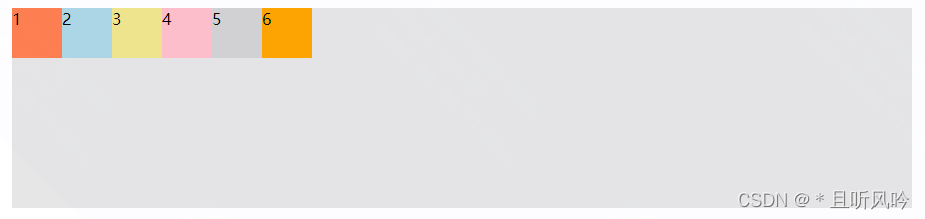
flex-grow 默认为 0 时:
讯享网<!DOCTYPE html> <html lang="en"> <head> <meta charset="UTF-8"> <title>Title</title> <style> .container {
    display: flex; margin: 0px auto; width: 900px; height: 200px; background-color: #e6e6e6; } .item {
    width: 50px; height: 50px; } .container div:nth-of-type(1) {
   background-color:coral;} .container div:nth-of-type(2) {
   background-color:lightblue;} .container div:nth-of-type(3) {
   background-color:khaki;} .container div:nth-of-type(4) {
   background-color:pink;} .container div:nth-of-type(5) {
   background-color:lightgrey;} .container div:nth-of-type(6) {
   background-color:orange;} </style> </head> <body> <div class="container"> <div class="item">1</div> <div class="item">2</div> <div class="item">3</div> <div class="item">4</div> <div class="item">5</div> <div class="item">6</div>
  </div>
</body>
</html>
可以看到,flex-grow 默认值为 0 时,并不会占用剩余的空白间隙扩展自己的宽度,页面效果如下:
讯享网
flex-grow 值为正整数
如果flex-grow大于0,则flex容器剩余空间的分配就会发生。
概念:将所有正整数相加得到分母 sum,每个属性的数值作为分子,然后乘以剩余空间。
公式:分子/分母*剩余空间
平均分配空间
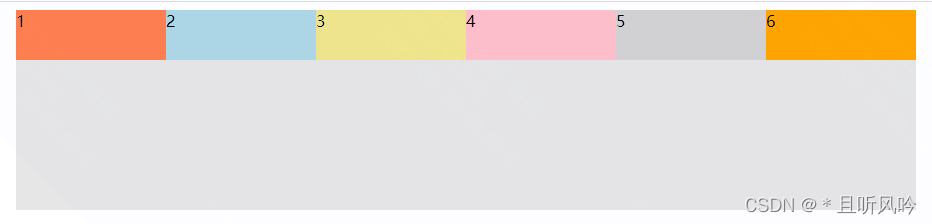
如果所有项目的 flex-grow 属性都为1,则它们将等分剩余空间(如果有的话)。
实例:
<!DOCTYPE html> <html lang="en"> <head> <meta charset="UTF-8"> <title>Title</title> <style> .container {
    display: flex; margin: 0px auto; width: 900px; height: 200px; background-color: #e6e6e6; } .item {
    height: 50px; flex:1; } .container div:nth-of-type(1) {
   background-color:coral;} .container div:nth-of-type(2) {
   background-color:lightblue;} .container div:nth-of-type(3) {
   background-color:khaki;} .container div:nth-of-type(4) {
   background-color:pink;} .container div:nth-of-type(5) {
   background-color:lightgrey;} .container div:nth-of-type(6) {
   background-color:orange;} </style> </head> <body> <div class="container"> <div class="item">1</div> <div class="item">2</div> <div class="item">3</div> <div class="item">4</div> <div class="item">5</div> <div class="item">6</div>
  </div>
</body>
</html>
页面效果:

不平均分配空间
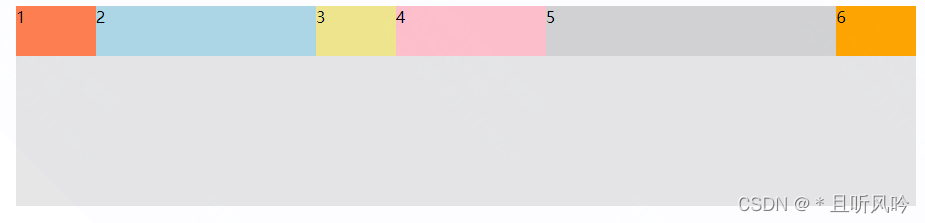
如果一个项目的 flex-grow属性不为1,则按照公式来计算每个元素占有的空间。
实例:
讯享网<!DOCTYPE html> <html lang="en"> <head> <meta charset="UTF-8"> <title>Title</title> <style> .container {
    display: flex; margin: 0px auto; width: 900px; height: 200px; background-color: #e6e6e6; } .item {
    height: 50px; } .container div:nth-of-type(1) {
   flex-grow: 1;background-color:coral;} .container div:nth-of-type(2) {
   flex-grow: 3;background-color:lightblue;} .container div:nth-of-type(3) {
   flex-grow: 1;background-color:khaki;} .container div:nth-of-type(4) {
   flex-grow: 2;background-color:pink;} .container div:nth-of-type(5) {
   flex-grow: 4;background-color:lightgrey;} .container div:nth-of-type(6) {
   flex-grow: 1;background-color:orange;} </style> </head> <body> <div class="container"> <div class="item">1</div> <div class="item">2</div> <div class="item">3</div> <div class="item">4</div> <div class="item">5</div> <div class="item">6</div>
  </div>
</body>
</html>
页面效果:
flex-grow 值为小数
flex-grow 属性值为小数,分两种情况:
1)所有 flex 项的 flex-gorw 属性值之和大于1,仍然按照上面正整数方式进行计算;
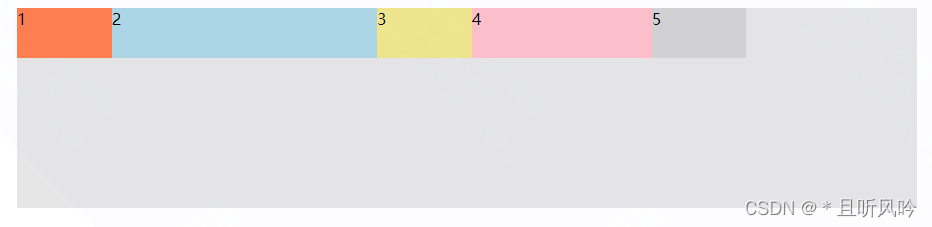
2)所有 flex 项的 flex-gorw 属性值之和小于1,基值按照1来进行计算。
例子:项目1为 0.1, 项目2为 0.3,项目3为 0.1, 项目4为 0.2,项目5为 0.1,则它们分配到的剩余空间分别为:
项目1: 900px * (0.1 / 1) = 94.7px;
项目2: 900px * (0.3 / 1) = 265.31px;
项目3: 900px * (0.1 / 1) = 94.7px;
项目4: 900px * (0.2 / 1) = 180px;
项目5: 900px * (0.1 / 1) = 94.7px;
实例:
<!DOCTYPE html> <html lang="en"> <head> <meta charset="UTF-8"> <title>Title</title> <style> .container {
    display: flex; margin: 0px auto; width: 900px; height: 200px; background-color: #e6e6e6; } .item {
    height: 50px; } .container div:nth-of-type(1) {
   flex-grow: 0.1;background-color:coral;} .container div:nth-of-type(2) {
   flex-grow: 0.3;background-color:lightblue;} .container div:nth-of-type(3) {
   flex-grow: 0.1;background-color:khaki;} .container div:nth-of-type(4) {
   flex-grow: 0.2;background-color:pink;} .container div:nth-of-type(5) {
   flex-grow: 0.1;background-color:lightgrey;} </style> </head> <body> <div class="container"> <div class="item">1</div> <div class="item">2</div> <div class="item">3</div> <div class="item">4</div> <div class="item">5</div>
  </div>
</body>
</html>
页面效果:
flex-grow 值为小数+正整数
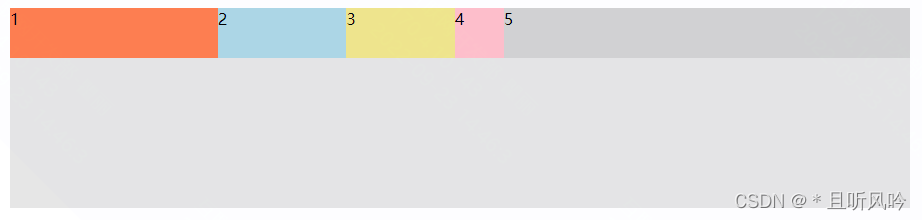
flex-grow 值为小数+正整数时,计算方式与正整数一样,如分母取值:sum=1+0.6+0.5+0.2+2=4.3,分子分别为:1/4.3、0.6/4.3、0.5/4.3、0.2/4.3、2/4.3
实例:
讯享网<!DOCTYPE html> <html lang="en"> <head> <meta charset="UTF-8"> <title>Title</title> <style> .container {
    display: flex; margin: 0px auto; width: 900px; height: 200px; background-color: #e6e6e6; } .item {
    height: 50px; } .container div:nth-of-type(1) {
   flex-grow: 1;background-color:coral;} .container div:nth-of-type(2) {
   flex-grow: 0.6;background-color:lightblue;} .container div:nth-of-type(3) {
   flex-grow: 0.5;background-color:khaki;} .container div:nth-of-type(4) {
   flex-grow: 0.2;background-color:pink;} .container div:nth-of-type(5) {
   flex-grow: 2;background-color:lightgrey;} </style> </head> <body> <div class="container"> <div class="item">1</div> <div class="item">2</div> <div class="item">3</div> <div class="item">4</div> <div class="item">5</div>
  </div>
</body>
</html>
页面效果:
版权声明:本文内容由互联网用户自发贡献,该文观点仅代表作者本人。本站仅提供信息存储空间服务,不拥有所有权,不承担相关法律责任。如发现本站有涉嫌侵权/违法违规的内容,请联系我们,一经查实,本站将立刻删除。
如需转载请保留出处:https://51itzy.com/kjqy/66398.html