
前言
文件IO,又称系统IO,系统调用
打开 open
流程:1.创建一个.c在vim中编译
2.引入头文件
#include<unistd.h> #include<fcntl.h> #include<errno.h> #include<stdio.h> #include<stdlib.h> #include<string.h> #include<unistd.h>
讯享网
3.代码
讯享网int fd = open("3.txt",O_RDWR|O_CREAT,0777);
4.代码说明
设定返回值类型 一般打开是int型的
利用open打开(“文件名和文件类型”,O大写_方式(只读/只写/读写)|或O_CREAT没有创建,0xxx权限分配)
5.判定是否打开成功,要严谨
if(fd<0){ printf("qnmd\n"); printf("error no",errno); }else{ printf("succ %d\n",fd); }
读
就是从文件中读取数据
模式:O_RDONLY或者O_RDWR(只读模式/读写模式)
函数:read(fd,buf,读多少)
代码:
讯享网 int fd = open("3.txt",O_RDONLY); int ret = read(fd,buf,20);
buf是提前定义好的一个空数组;
写
将东西写进文件中
模式:O_WRONLY 或者 O_RDWR(只写、读写)
函数:write(fd,buf,20)
代码:
char bufw[100] = "JDG WIN"; int ret1 = write(fd,bufw,20);读写 : RDWR
讯享网#include<stdio.h> #include<sys/types.h> #include<sys/stat.h> #include<fcntl.h> #include<unistd.h> int main() { char buf[50] = "asdqwe3ra aea aqe awqaea"; char buf1[50] = {'\0'}; int fd=open("1.txt",O_RDWR); if(fd<0){ printf("qnmd"); } int ret3 = write(fd,buf,40); int ret4 =read(fd,buf1,10); printf("nris : %s\n",buf1); close(fd); return 0; }
文件描述符
在 Linux 的世界里,一切设备皆文件。对文件的操作都是通过文件描述符(fd)来进行的。
文件描述符:是内核为了高效管理已被打开的文件所创建的索引,是一个非负整数用于指代被打开的文件,所有执行I/O操作的系统调用都是通过文件描述符。说白了就是你自定的那个fd......本质其实类似数组下标0.....(0 1 2)一般被 ’流‘ 占用。
文件属性
一般分为阻碍与非阻碍
fcntl函数
需要头文件: #include<fcntl.h>

作用:改文件的属性
关键点: F_GETL获取文件状态
F_SETL设置文件状态
int ret = fcntl(STDIN_FILENO,F_SETFL,flag);完整代码:
讯享网#include<unistd.h> #include<fcntl.h> #include<errno.h> #include<stdio.h> #include<stdlib.h> #include<string.h> #include<unistd.h> int main(){ char buf[10]; int n,fd; int flag = fcntl(STDIN_FILENO,F_GETFL); if(flag<0){ perror("get failed\n"); } flag |=O_NONBLOCK; int ret = fcntl(STDIN_FILENO,F_SETFL,flag); if(ret<0){ perror("get failed\n"); } int i; for(i=0;i<5;i++) { n=read(STDIN_FILENO,buf,10); if(n>0){ break; } if(n<0) { if(errno!=EAGAIN){ perror("error result\n"); }else{ write(STDIN_FILENO,"try again\n",strlen("try again\n")); sleep(3); } } } if(i==5){ write(STDOUT_FILENO,"TIME OUT\n",strlen("TIME OUT\n")); } else{ write(STDOUT_FILENO,buf,n); } close(fd); return 0; }
lessk函数
作用:修改读写位置
lseek(fd,-6,SEEK_END);
文件当前位置
SEEK- CUR ==1
文件尾
SEEK- END ==2
完整代码
讯享网#include<unistd.h> #include<fcntl.h> #include<errno.h> #include<stdio.h> #include<stdlib.h> #include<string.h> #include<unistd.h> int main(){ int fd,b; char msi[50] = "it is my life\n"; char ch; fd = open("life.txt",O_RDWR|O_CREAT,0777); if(fd<0){ printf("qnmd\n"); } write(fd,msi,strlen(msi)); lseek(fd,-6,SEEK_END); while(b=read(fd,&ch,1)) { if(b<0){ printf("qnmd"); } else if(b==0){ printf("it is end\n"); } else{ write(STDOUT_FILENO,&ch,b); } } close(fd); return 0; }
truncate函数
短截文件
od
一个命令
作用:显示文件
可以加:
dup/dup2
作用:修改文件描述符
参数:一个文件描述符如:fd 返回一个新的文件描述符:如自己输一个newfd
int fd = open("dp.txt",O_RDWR|O_CREAT,0777); if(fd<0){ printf("qnmd\n"); } int newfd = dup(fd);dup2
就是俩文件描述符 超级加倍
上代码
讯享网#include<unistd.h> #include<fcntl.h> #include<errno.h> #include<stdio.h> #include<stdlib.h> #include<string.h> #include<unistd.h> int main(){ int fd = open("dp.txt",O_RDWR|O_CREAT,0777); if(fd<0){ printf("qnmd\n"); } int fd2 = open("dp2.txt",O_RDWR|O_CREAT,0777); int newfd = dup2(fd,fd2); write(fd,"hello\n",strlen("hello")); write(fd2,"hi\n",strlen("hello")); write(newfd,"fku\n",strlen("hello")); printf("%d %d %d ",fd,fd2,newfd); close(fd); close(fd2); close(newfd); return 0; }
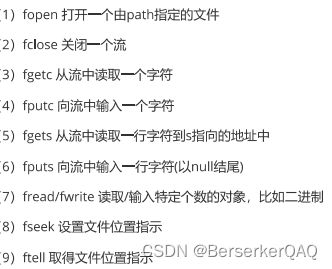
复习标准io
版权声明:本文内容由互联网用户自发贡献,该文观点仅代表作者本人。本站仅提供信息存储空间服务,不拥有所有权,不承担相关法律责任。如发现本站有涉嫌侵权/违法违规的内容,请联系我们,一经查实,本站将立刻删除。
如需转载请保留出处:https://51itzy.com/kjqy/64805.html