
效果展示:

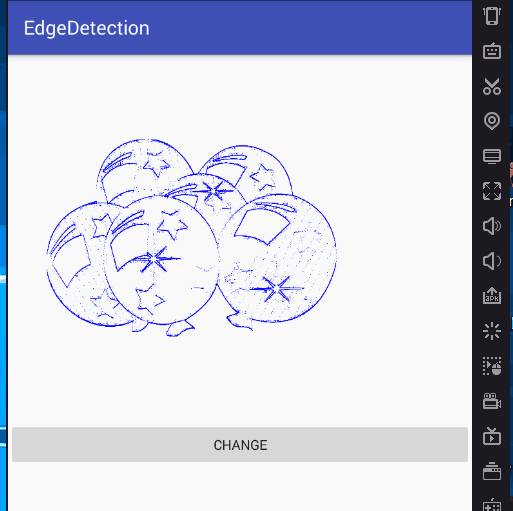
下面帖主要的图片计算类:

图片灰度化:
public class BitmapUtil { public static Bitmap bitmap2Gray(Bitmap bmSrc) { // 得到图片的长和宽 int width = bmSrc.getWidth(); int height = bmSrc.getHeight(); // 创建目标灰度图像 Bitmap bmpGray = null; bmpGray = Bitmap.createBitmap(width, height, Bitmap.Config.RGB_565); // 创建画布 Canvas c = new Canvas(bmpGray); Paint paint = new Paint(); ColorMatrix cm = new ColorMatrix(); cm.setSaturation(0); ColorMatrixColorFilter f = new ColorMatrixColorFilter(cm); paint.setColorFilter(f); c.drawBitmap(bmSrc, 0, 0, paint); return bmpGray; } }讯享网
Rober算子边缘提取计算类:
讯享网public class RobertsEdgeDetect { int width;//图像宽 int height;//图像高 int[] grayData;//图像灰度值 int size; //图像大小 int gradientThreshold = -1;//判断时用到的阈值 //BufferedImage outBinary;//输出的边缘图像 public RobertsEdgeDetect(int threshold) { gradientThreshold = threshold; } public void readImage(Bitmap bitmap) throws IOException { width = bitmap.getWidth(); height = bitmap.getHeight(); size = width * height; //获取图像像素值 int imageData[] = new int[width * height]; int count = 0; for (int i = 0;i<height;i++){ for (int j = 0;j<width;j++){ imageData[count] = bitmap.getPixel(j,i); count ++; } } grayData = new int[width * height];// 开辟内存空间 for (int i = 0; i < imageData.length; i++) { grayData[i] = (imageData[i] & 0xff0000) >> 16;// 由于读的是灰度图,故只考虑一个分量(三分量值相同) } } public Bitmap createEdgeImage() { int[] colors = new int[width * height]; float[] gradient = gradientM();// 计算图像各像素点的梯度值 float maxGradient = gradient[0]; for (int i = 1; i < gradient.length; ++i) if (gradient[i] > maxGradient) maxGradient = gradient[i];// 获取梯度最大值 float scaleFactor = 255.0f / maxGradient;// 比例因子用于调整梯度大小 int[][] cc = new int[width][height]; if (gradientThreshold >= 0) { for (int y = 1; y < height - 1; ++y) for (int x = 1; x < width - 1; ++x) if (Math.round(scaleFactor * gradient[y * width + x]) >= gradientThreshold){ cc[x][y] = Color.BLUE; }else { cc[x][y] = Color.parseColor("#00000000"); } }// 对梯度大小进行阈值处理 int count = 0; for (int i = 0;i<height;i++) for (int j = 0;j<width;j++) { colors[count] = cc[j][i]; count++; } Bitmap bitmap = Bitmap.createBitmap(colors,width,height, Bitmap.Config.ARGB_4444); return bitmap; } //得到点(x,y)处的灰度值 public int getGrayPoint(int x, int y) { return grayData[y * width + x]; } //算子计算 图像每个像素点 的 梯度大小 protected float[] gradientM() { float[] mag = new float[size]; @SuppressWarnings("unused") int gx, gy; for (int y = 1; y < height - 1; ++y) for (int x = 1; x < width - 1; ++x) { gx = GradientX(x, y); //用公式 g=|gx|+|gy|计算图像每个像素点的梯度大小.原因是避免平方和开方耗费大量时间 mag[y * width + x] = (float) (Math.abs(gx)); } return mag; } //算子 计算 点(x,y)处的x方向梯度大小 protected final int GradientX(int x, int y) { return getGrayPoint(x , y ) - getGrayPoint(x + 1, y+1) + getGrayPoint(x + 1, y ) - getGrayPoint(x , y +1); }// 计算像素点(x,y)X方向上的梯度值 // 算子 计算 点(x,y)处的y方向梯度大小 }
参考博客:http://blog.csdn.net/_/article/details/
版权声明:本文内容由互联网用户自发贡献,该文观点仅代表作者本人。本站仅提供信息存储空间服务,不拥有所有权,不承担相关法律责任。如发现本站有涉嫌侵权/违法违规的内容,请联系我们,一经查实,本站将立刻删除。
如需转载请保留出处:https://51itzy.com/kjqy/46728.html