
1、jQuery AJAX简介
AJAX是与服务器交换数据的技术,它在不重载全部页面的情况下,实现了对部分网页的更新。
2、jQuery load()方法
load()方法从服务器加载数据,并把返回的数据放入被选元素中。
语法:$(selector).load(URL,data,callback);
必需的URL参数规定您希望加载的URL。
可选的data参数规定与请求一同发送的查询字符串键/值对集合。
可选的callback参数是load()方法完成后所执行的函数名称。
3、jQuery $.get()方法
$.get()方法通过HTTP GET请求从服务器上请求数据。
语法:$.get(URL,callback);
必需的URL参数规定您希望请求的URL。
可选的callback参数是请求成功后所执行的函数名。
4、jQuery $.post()方法
$.post()方法通过HTTP POST请求从服务器上请求数据。
语法:$.post(URL,data,callback);
必需的URL参数规定您希望请求的URL。
可选的data参数规定连同请求发送的数据。
可选的callback参数是请求成功后所执行的函数名。
5、简单实例
(1)项目结构
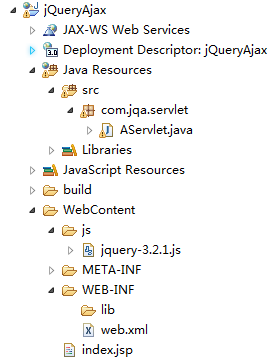
(2)index.jsp
<%@ page language="java" contentType="text/html; charset=utf-8"
    pageEncoding="utf-8"%>
<!DOCTYPE html PUBLIC "-//W3C//DTD HTML 4.01 Transitional//EN" "http://www.w3.org/TR/html4/loose.dtd">
<html>
<head>
<meta http-equiv="Content-Type" content="text/html; charset=ISO-8859-1">
<title>Insert title here</title>
<script type="text/javascript" src="js/jquery-3.2.1.js"></script>
<script type="text/javascript">
	$(document).ready(function(){
		$("#get1").click(function(){
			$.get("/jQueryAjax/AServlet?id=10000", function(data, status){
		    	alert("数据: " + data + "\n状态: " + status);
		  	});
		});
		$("#post1").click(function(){
			$.post("/jQueryAjax/AServlet", {
		        name: "Tom",
		        password: "123"
		    }, function(data, status){
		        alert("数据: " + data + "\n状态: " + status);
		    });
		});
		$("#ajax1").click(function(){
		  	$("#div1").load("/jQueryAjax/AServlet", {
		  		name: "Jerry",
		        password: "456"
		  	}, function(responseTxt, statusTxt, xhr){
			    if(statusTxt == "success") {
			    	alert("外部内容加载成功!");
			    }
			    if(statusTxt == "error") {
			    	alert("状态: " + xhr.status + "\n含义: " + xhr.statusText);
			    }
		  	});
		});
	});
</script>
</head>
<body>
	<input type="button" id="get1" value="get" />
	<input type="button" id="post1" value="post" />
	<input type="button" id="ajax1" value="ajax" />
	<div id="div1"></div>
</body>
</html>
讯享网
(3)AServlet.java
讯享网package com.jqa.servlet; import java.io.IOException; import javax.servlet.ServletException; import javax.servlet.http.HttpServlet; import javax.servlet.http.HttpServletRequest; import javax.servlet.http.HttpServletResponse; public class AServlet extends HttpServlet { protected void doGet(HttpServletRequest request, HttpServletResponse response) throws ServletException, IOException { String id = request.getParameter("id"); System.out.println(id); response.getWriter().print("Hello"); } protected void doPost(HttpServletRequest request, HttpServletResponse response) throws ServletException, IOException { String name = request.getParameter("name"); System.out.println(name); String password = request.getParameter("password"); System.out.println(password); response.getWriter().print("World"); } }
(4)web.xml
<?xml version="1.0" encoding="UTF-8"?>
<web-app xmlns:xsi="http://www.w3.org/2001/XMLSchema-instance" xmlns="http://java.sun.com/xml/ns/javaee" xsi:schemaLocation="http://java.sun.com/xml/ns/javaee http://java.sun.com/xml/ns/javaee/web-app_3_0.xsd" id="WebApp_ID" version="3.0">
  <display-name>jQueryAjax</display-name>
  <welcome-file-list>
    <welcome-file>index.html</welcome-file>
    <welcome-file>index.htm</welcome-file>
    <welcome-file>index.jsp</welcome-file>
    <welcome-file>default.html</welcome-file>
    <welcome-file>default.htm</welcome-file>
    <welcome-file>default.jsp</welcome-file>
  </welcome-file-list>
  <servlet>
    <servlet-name>AServlet</servlet-name>
    <servlet-class>com.jqa.servlet.AServlet</servlet-class>
  </servlet>
  <servlet-mapping>
    <servlet-name>AServlet</servlet-name>
    <url-pattern>/AServlet</url-pattern>
  </servlet-mapping>
</web-app>
(5)页面运行结果
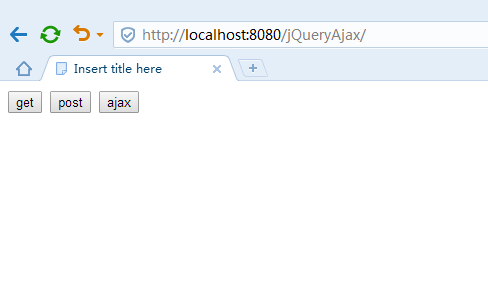
依次点击get、post和ajax按钮。
(6)控制台运行结果
讯享网10000 Tom 123 Jerry 456
版权声明:本文内容由互联网用户自发贡献,该文观点仅代表作者本人。本站仅提供信息存储空间服务,不拥有所有权,不承担相关法律责任。如发现本站有涉嫌侵权/违法违规的内容,请联系我们,一经查实,本站将立刻删除。
如需转载请保留出处:https://51itzy.com/kjqy/42538.html