
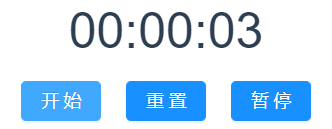
实现效果:
1.点击开始按钮启动计时
讯享网
2.点击重置按钮计时恢复到00:00:00
3.点击暂停按钮暂停计时

Vue代码:
<template> <div> <div class="timeContainer">{
   {
    time }}</div> <a-button style="margin-right: 20px" type="primary" @click="start" >开始</a-button > <a-button style="margin-right: 20px" type="primary" @click="reset" >重置</a-button > <a-button type="primary" @click="end">暂停</a-button> </div> </template> <script> export default {
    data() {
    return {
    flag: null, hour: 0, minute: 0, second: 0, time: "00:00:00", }; }, methods: {
    //开始计时 start() {
    this.flag = setInterval(() => {
    this.second = this.second + 1; if (this.second >= 60) {
    this.second = 0; this.minute = this.minute + 1; } if (this.minute >= 60) {
    this.minute = 0; this.hour = this.hour + 1; } this.time = this.complZero(this.hour) + ":" + this.complZero(this.minute) + ":" + this.complZero(this.second); }, 1000); }, //重新计时 reset() {
    window.clearInterval(this.flag); this.hour = 0; this.minute = 0; this.second = 0; this.time = "00:00:00"; }, //暂停计时 end() {
    this.flag = clearInterval(this.flag); }, //补零 complZero(n) {
    return n < 10 ? "0" + n : "" + n; }, }, }; </script> <style> .timeContainer {
    font-size: 40px; margin-bottom: 10px; } </style>
讯享网
版权声明:本文内容由互联网用户自发贡献,该文观点仅代表作者本人。本站仅提供信息存储空间服务,不拥有所有权,不承担相关法律责任。如发现本站有涉嫌侵权/违法违规的内容,请联系我们,一经查实,本站将立刻删除。
如需转载请保留出处:https://51itzy.com/kjqy/37288.html