
项目是刚刚完成的,于是趁热打铁把文档也写了。在这里分享出来,也方便以后回顾
目录
项目介绍
整体设计架构图
网站界面预览图
技术选型和原因
搭建步骤
库表设计
插件说明
后端说明
前端说明
部署说明
完整代码
插件代码
后端代码
前端代码
项目总结
项目介绍
本项目旨在为我的世界基岩版私服搭建一个可视化的后台管理系统,通过 LiteloaderBDS 插件实时收集游戏内数据,并将其存储在轻量级数据库 SQLite 中。后端采用 Spring Boot 和 MyBatis 技术栈实现 RESTful API,前端采用 Vue 框架、Element-UI Plus 组件库以及 Three.js WebGL 库实现三维可视化界面
整体设计架构图

网站界面预览图
主页:

方块地图:


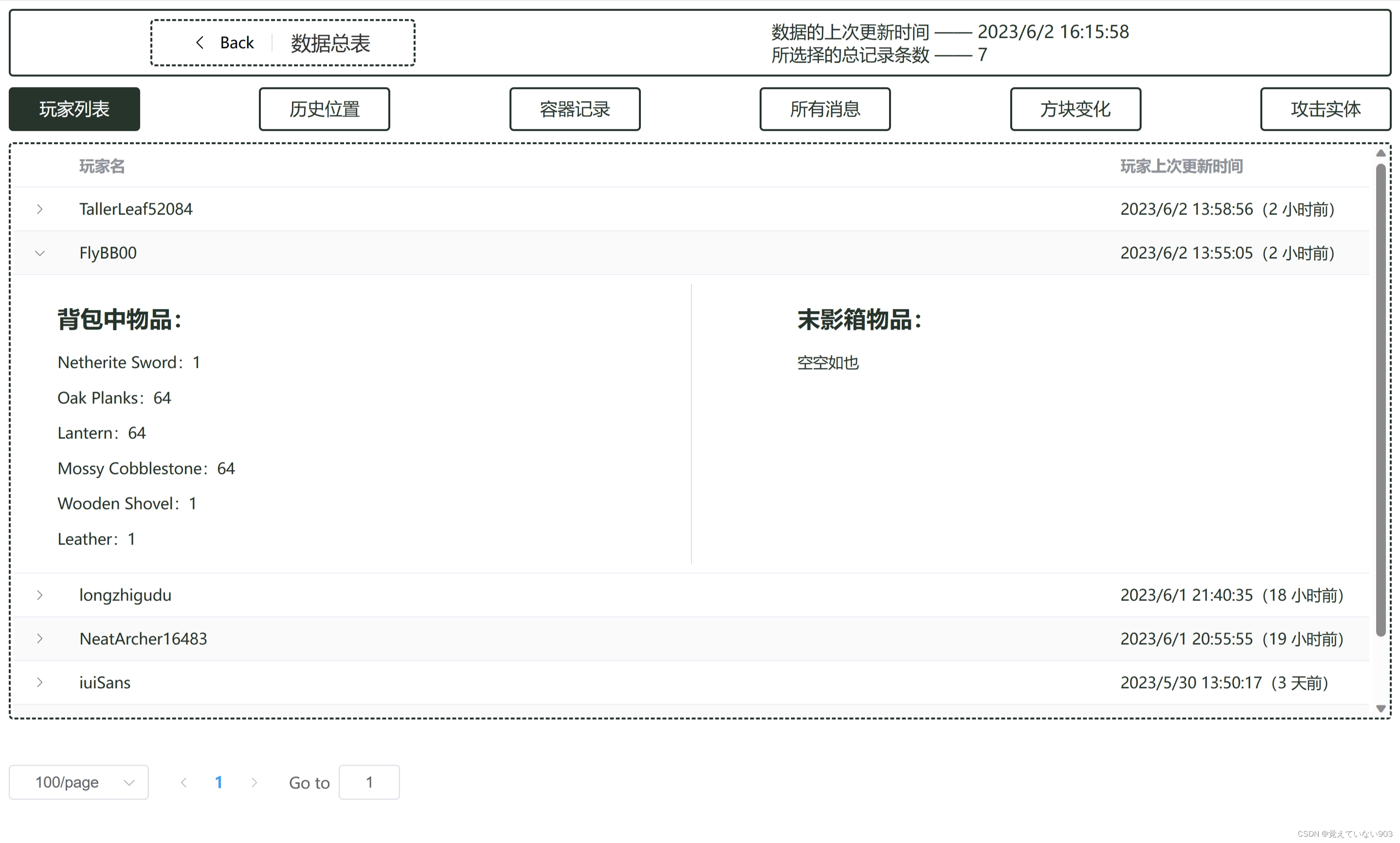
数据总表:


技术选型和原因
本项目采用的部分技术栈:
- LiteloaderBDS:跨语言 BDS 插件加载器(适用于我的世界基岩版服务器)
- SQLite:轻量级数据库,减少部署难度
- MyBatis:持久层框架
- Spring Boot:简化 Spring 应用的初始搭建及开发
- Spring MVC:基于 Java 的 Web 框架,支持 RESTful API 设计
- Vue:渐进式 JavaScript 框架,构建用户界面
- Element-UI Plus:基于 Vue 的组件库
- Three.js:WebGL库,实现三维可视化
搭建步骤
- 购买云服务器实例
- 安装部署 BDS
- 安装部署 LiteloaderBDS
- 编写 LiteloaderBDS 脚本插件(将数据存入 SQLite 数据库)
- 插件测试
- 插件部署
- 使用 IntelliJ IDEA、Hbuilder X,分别创建 Spring Boot 和 Vue 项目,编写后端和前端
- 网站测试
- 网站部署
库表设计
- 位置表
- 在下面表中,出现重复位置的概率很大,因此设计了位置表,节省占用空间
- 在未来,位置表中可以添加访问次数这样的列,用于统计玩家活跃地区
- 位置表的 x,y,z 和维度 id 上了索引,便于查找
- 容器表
- 包括玩家背包、末影箱和地图上的容器方块
- 玩家表
- 玩家有位置和容器
- 历史位置表
- 历史位置有玩家和位置
- 容器方块表
- 容器方块有容器和位置
- 破坏放置表
- 破坏放置有玩家和位置
- 攻击实体表
- 攻击实体有玩家和位置
插件说明
BB_Data.js 的代码内容分为四大部分:事件监听、定时任务、辅助函数、创表语句
其中,增删改查逻辑集中在事件监听、定时任务和辅助函数部分
被监听的事件:
- 玩家进入世界
- 玩家离开世界
- 玩家打开容器
- 玩家关闭容器
- 玩家发送消息
- 玩家破坏放置
- 玩家攻击实体
由于 SQLite 对并发修改支持不佳,代码中的 SQL 执行语句偶尔会出现异常;但总的来说,这仅仅会导致很小一部分行为没有被记录,所以我没有加锁来改善这一问题(加锁影响性能)
有一些测试用的打印语句,可以删掉
后端说明
后端采用了传统的 Spring Boot + MyBatis 技术栈
相对于持久层设计,简化了数据模型(去除了所有的外键部分),便于前端拿取数据后直接使用
前端说明
风格为选项式 API,单页面应用(SPA),面向组件设计,解耦较好
多种布局样式,包括传统、绝对位置和 Flex 布局
使用了路由管理
其中一个 svg 图标(ChatGPT),直接封装为组件使用了,在代码中省略
部署说明
后端打包成 JAR 文件,在服务器用命令行执行
前端打包成静态资源,上传到服务器的 Nginx 服务目录,启动 Nginx
完整代码
插件代码
BB_Data:
/// <reference path="HelperLib-master/src/index.d.ts" /> // TODO 删除过早的(根据时间戳)数据 let session; mc.listen('onServerStarted', () => { session = initDB(); }); mc.listen('onJoin', (player) => { let preSelectPlayer = session.prepare('SELECT COUNT(*) as count FROM player_table WHERE xuid = ?;'); let preInsertPlayer = session.prepare('INSERT INTO player_table (xuid, name, bag_uuid, enc_uuid) VALUES (?, ?, ?, ?);'); let preInsertCtr = session.prepare('INSERT INTO ctr_table (uuid, name, content, latest_timestamp) VALUES (?, ?, ?, ?);'); let currentTimestamp = Date.now(); // 1. 插入新玩家(如果不存在) preSelectPlayer.bind([player.xuid]); const playerResult = preSelectPlayer.reexec().fetch(); if (playerResult.count === 0) { // 插入新玩家 let bagUUID = generateUUID(); let encUUID = generateUUID(); preInsertPlayer.bind([player.xuid, player.name, bagUUID, encUUID]); preInsertPlayer.reexec(); // 插入新容器 let containers = [ {uuid: bagUUID, name: 'bag'}, {uuid: encUUID, name: 'ender_chest'} ]; containers.forEach((container) => { preInsertCtr.bind([ container.uuid, container.name, '{}', currentTimestamp ]); preInsertCtr.reexec(); preInsertCtr.clear(); }); log(`向玩家表中插入了 ${player.name}`); } // 2. 更新玩家 updatePlayer(player); // 3. 插入消息 const messageContent = JSON.stringify({text: `${player.name} 进入游戏`}); insertMsg(player, 'join', messageContent); }); setInterval(() => { mc.getOnlinePlayers().forEach((player) => { let preInsertHistoryPos = session.prepare('INSERT INTO history_pos_table (xuid, pos_id, timestamp) VALUES (?, ?, ?);'); let currentTimestamp = Date.now(); // 1. 更新玩家,并获得玩家位置id const newPosId = updatePlayer(player); // 2. 添加历史位置 preInsertHistoryPos.bind([player.xuid, newPosId, currentTimestamp]); preInsertHistoryPos.reexec(); }); }, 2 * 1000); mc.listen('onOpenContainer', (player, block) => { if (!block.hasContainer()) { return; } let preInsertCtr = session.prepare('INSERT INTO ctr_table (uuid, name) VALUES (?, ?);'); let preInsertCtrBlock = session.prepare('INSERT INTO ctr_block_table (uuid, pos_id, ctr_uuid) VALUES (?, ?, ?);'); let preUpdateCtr = session.prepare('UPDATE ctr_table SET content = ?, latest_timestamp = ? WHERE uuid = ?;'); let preUpdateCtrBlock = session.prepare('UPDATE ctr_block_table SET latest_timestamp = ? WHERE uuid = ?;'); let ctrContent = ctrContentJSON(block.getContainer()); let currentTimestamp = Date.now(); const newPosId = insertPos(block.pos); // 1. 查询或插入新容器方块 let {ctrBlockUuid, ctrUuid} = getCtrBlockAndCtrUUID(newPosId) || {}; if (!ctrBlockUuid || !ctrUuid) { // 生成新的容器方块和容器 UUID ctrBlockUuid = generateUUID(); ctrUuid = generateUUID(); // init preInsertCtr.bind([ctrUuid, block.getContainer().type]); preInsertCtr.reexec(); preInsertCtrBlock.bind([ctrBlockUuid, newPosId, ctrUuid]); preInsertCtrBlock.reexec(); } // 2. 添加容器记录到 ctr_table preUpdateCtr.bind([ctrContent, currentTimestamp, ctrUuid]); preUpdateCtr.reexec(); // 3. 添加容器记录到 ctr_block_table preUpdateCtrBlock.bind([currentTimestamp, ctrBlockUuid]); preUpdateCtrBlock.reexec(); // 4. 插入消息 const messageContent = JSON.stringify({ text: `${player.name} 打开容器`, pos_id: newPosId }); insertMsg(player, 'open_ctr', messageContent); }); mc.listen('onCloseContainer', (player, block) => {//只能监听到箱子和木桶的关闭 if (!block.hasContainer()) { return; } let preUpdateCtr = session.prepare('UPDATE ctr_table SET content = ?, latest_timestamp = ? WHERE uuid = ?;'); let preUpdateCtrBlock = session.prepare('UPDATE ctr_block_table SET latest_timestamp = ? WHERE uuid = ?;'); let ctrContent = ctrContentJSON(block.getContainer()); let currentTimestamp = Date.now(); const newPosId = insertPos(block.pos); // 1. 获取容器方块和容器 UUID let {ctrBlockUuid, ctrUuid} = getCtrBlockAndCtrUUID(newPosId) || {}; if (!ctrBlockUuid || !ctrUuid) { colorLog('red', `${player.name} 关闭了未记录的箱子或木桶`); return; } // 2. 添加容器记录到 ctr_table preUpdateCtr.bind([ctrContent, currentTimestamp, ctrUuid]); preUpdateCtr.reexec(); // 3. 添加容器记录到 ctr_block_table preUpdateCtrBlock.bind([currentTimestamp, ctrBlockUuid]); preUpdateCtrBlock.reexec(); // 4. 插入消息 const messageContent = JSON.stringify({ text: `${player.name} 关闭容器`, pos_id: newPosId }); insertMsg(player, 'close_ctr', messageContent); }); mc.listen('onDestroyBlock', (player, block) => { colorLog('dk_yellow', `destroy_block:${player.name},${block.name}`) let preInsertDestruction = session.prepare('INSERT INTO block_change_table (xuid, pos_id, type, name, timestamp) VALUES (?, ?, ?, ?, ?);'); let currentTimestamp = Date.now(); // 1. 插入位置 const newPosId = insertPos(block.pos); // 2. 插入破坏 preInsertDestruction.bind([player.xuid, newPosId, 'destroy', block.name, currentTimestamp]); preInsertDestruction.reexec(); // 3. 删除容器 if (block.hasContainer()) { // 获取容器方块和容器 UUID let {ctrBlockUuid, ctrUuid} = getCtrBlockAndCtrUUID(newPosId) || {}; if (!ctrBlockUuid || !ctrUuid) { return; } // 删除容器方块和容器 let preDeleteCtrBlock = session.prepare('DELETE FROM ctr_block_table WHERE uuid = ?;'); let preDeleteCtr = session.prepare('DELETE FROM ctr_table WHERE uuid = ?;'); preDeleteCtrBlock.bind([ctrBlockUuid]); preDeleteCtrBlock.reexec(); preDeleteCtr.bind([ctrUuid]); preDeleteCtr.reexec(); } }); mc.listen('afterPlaceBlock', (player, block) => { let preInsertPlacement = session.prepare('INSERT INTO block_change_table (xuid, pos_id, type, name, timestamp) VALUES (?, ?, ?, ?, ?);'); let currentTimestamp = Date.now(); // 1. 插入位置 const newPosId = insertPos(block.pos); // 2. 插入添加记录 preInsertPlacement.bind([player.xuid, newPosId, 'place', block.name, currentTimestamp]); preInsertPlacement.reexec(); // 3. 添加容器 if (block.hasContainer()) { let preInsertCtr = session.prepare('INSERT INTO ctr_table (uuid, name, content, latest_timestamp) VALUES (?, ?, ?, ?);'); let preInsertCtrBlock = session.prepare('INSERT INTO ctr_block_table (uuid, pos_id, ctr_uuid, latest_timestamp) VALUES (?, ?, ?, ?);'); let containerContent = ctrContentJSON(block.getContainer()); // 创建容器的 UUID const ctrUuid = generateUUID(); const ctrBlockUuid = generateUUID(); // 添加容器记录到 ctr_table preInsertCtr.bind([ctrBlockUuid, block.getContainer().type, containerContent, currentTimestamp]); preInsertCtr.reexec(); // 添加容器记录到 ctr_block_table preInsertCtrBlock.bind([ctrBlockUuid, newPosId, ctrUuid, currentTimestamp]); preInsertCtrBlock.reexec(); } }); mc.listen('onAttackEntity', (player, entity, damage) => { colorLog('dk_yellow', `attack:${player.name},${entity.name},${damage}`) let preInsertAttackEntity = session.prepare('INSERT INTO attack_entity_table (xuid, pos_id, damage, name, timestamp) VALUES (?, ?, ?, ?, ?);'); let entName = entity.name ? entity.name : 'null'; let damageNum = damage ? damage : 0; let currentTimestamp = Date.now(); // 1. 插入位置 const newPosId = insertPos(entity.blockPos); // 2. 插入攻击实体 preInsertAttackEntity.bind([player.xuid, newPosId, damageNum, entName, currentTimestamp]); preInsertAttackEntity.reexec(); }); mc.listen('onChat', (player, msg) => { // 1. 插入消息 const messageContent = JSON.stringify({ text: `${player.name} 发送消息`, message: msg }); insertMsg(player, 'chat', messageContent); }); mc.listen('onLeft', (player) => { // 1. 更新玩家 let newPosId = updatePlayer(player); // 2. 插入消息 const messageContent = JSON.stringify({ text: `${player.name} 离开游戏`, pos_id: newPosId }); insertMsg(player, 'left', messageContent); }); // 辅助函数:生成 UUID function generateUUID() { return 'xxxxxxxx-xxxx-4xxx-yxxx-xxxxxxxxxxxx'.replace(/[xy]/g, function (c) { let r = Math.random() * 16 | 0, v = c === 'x' ? r : (r & 0x3 | 0x8); return v.toString(16); }); } // 获取容器内容 JSON function ctrContentJSON(ctr) { if (ctr.isEmpty()) { return '{}'; } let itemsArray = []; ctr.getAllItems().forEach((item) => { if (item.id !== 0) { let itemObj = { name: item.name, count: item.count, }; itemsArray.push(itemObj); } }); let contentJSON = JSON.stringify(itemsArray); return contentJSON; } // 插入新位置(如果不存在),并返回位置 id function insertPos(blockPos) { let preSelectPos = session.prepare('SELECT id FROM pos_table WHERE x = ? AND y = ? AND z = ? AND dim_id = ?;'); let preInsertPos = session.prepare('INSERT OR IGNORE INTO pos_table (x, y, z, dim_id) VALUES (?, ?, ?, ?);'); let {x: newX, y: newY, z: newZ, dimid: newDimId} = blockPos; // 1. 插入新位置(如果不存在) preInsertPos.bind([newX, newY, newZ, newDimId]); preInsertPos.reexec(); // 2. 查询新位置的 id preSelectPos.bind([newX, newY, newZ, newDimId]); const result = preSelectPos.reexec().fetch(); return Object.values(result)[0]; } // 更新玩家的位置和容器,并返回玩家位置 id function updatePlayer(player) { let preUpdatePlayerPos = session.prepare('UPDATE player_table SET pos_id = ?, latest_timestamp = ? WHERE xuid = ?;'); let preUpdatePlayerBagCtr = session.prepare('UPDATE ctr_table SET content = ?, latest_timestamp = ? WHERE uuid IN (SELECT bag_uuid FROM player_table WHERE xuid = ?);'); let preUpdatePlayerEncCtr = session.prepare('UPDATE ctr_table SET content = ?, latest_timestamp = ? WHERE uuid IN (SELECT enc_uuid FROM player_table WHERE xuid = ?);'); let bagContent = ctrContentJSON(player.getInventory()); let encContent = ctrContentJSON(player.getEnderChest()); let currentTimestamp = Date.now(); // 1. 插入位置 let newPosId = insertPos(player.blockPos); // 2. 更新玩家的 pos_id preUpdatePlayerPos.bind([newPosId, currentTimestamp, player.xuid]); preUpdatePlayerPos.reexec(); // 3. 更新玩家背包容器和末影容器的内容以及时间戳 preUpdatePlayerBagCtr.bind([bagContent, currentTimestamp, player.xuid]); preUpdatePlayerBagCtr.reexec(); preUpdatePlayerEncCtr.bind([encContent, currentTimestamp, player.xuid]); preUpdatePlayerEncCtr.reexec(); return newPosId; } function insertMsg(player, type, content) { let preInsertMsg = session.prepare('INSERT INTO msg_table (uuid, type, content, timestamp) VALUES (?, ?, ?, ?);'); preInsertMsg.bind([generateUUID(), type, content, Date.now()]); preInsertMsg.reexec(); } // 获取容器方块和容器的 UUID function getCtrBlockAndCtrUUID(pos_id) { let preSelectCtrBlock = session.prepare('SELECT uuid, ctr_uuid FROM ctr_block_table WHERE pos_id = ?;'); preSelectCtrBlock.bind([pos_id]); const ctr_block_result = preSelectCtrBlock.reexec().fetch(); if (ctr_block_result && ctr_block_result.uuid && ctr_block_result.ctr_uuid) { return {ctrBlockUuid: Object.values(ctr_block_result)[0], ctrUuid: Object.values(ctr_block_result)[1]}; } else { return null; } } function initDB() {//初始化数据库 const dirPath = 'plugins/BB_Data'; if (!file.exists(dirPath)) { colorLog('dk_yellow', `检测到数据库目录./${dirPath}不存在, 现将自动创建`); file.mkdir(dirPath); } const session = new DBSession('sqlite', {path: `./${dirPath}/dat.db`}); session.exec(//位置表 'CREATE TABLE pos_table (\\n' + ' id INTEGER PRIMARY KEY AUTOINCREMENT,\\n' + ' x INTEGER,\\n' + ' y INTEGER,\\n' + ' z INTEGER,\\n' + ' dim_id INTEGER\\n' +//维度id ');' ); session.exec('CREATE UNIQUE INDEX idx_pos ON pos_table(x, y, z, dim_id);'); session.exec(//容器表 'CREATE TABLE ctr_table (\\n' + ' uuid TEXT PRIMARY KEY,\\n' + ' name TEXT,\\n' +//容器名字 ' content TEXT,\\n' +//容器内容JSON ' latest_timestamp INTEGER\\n' +//最后更新时间戳 ');' ); session.exec(//消息表 'CREATE TABLE msg_table (\\n' + ' uuid TEXT,\\n' + ' type TEXT,\\n' +//消息类型 ' content TEXT,\\n' +//消息内容JSON ' timestamp INTEGER,\\n' +//时间戳 ' PRIMARY KEY (uuid, timestamp)\\n' + ');' ); session.exec(//玩家表 'CREATE TABLE player_table (\\n' + ' xuid INTEGER PRIMARY KEY,\\n' + ' name TEXT,\\n' + ' pos_id INTEGER, -- 玩家位置id\\n' + ' bag_uuid INTEGER, -- 背包容器\\n' + ' enc_uuid INTEGER, -- 末影容器\\n' + ' latest_timestamp INTEGER, -- 最后更新时间戳\\n' + ' FOREIGN KEY (pos_id) REFERENCES pos_table(id),\\n' + ' FOREIGN KEY (bag_uuid) REFERENCES ctr_table(uuid),\\n' + ' FOREIGN KEY (enc_uuid) REFERENCES ctr_table(uuid)\\n' + ');' ); session.exec(//历史位置表 'CREATE TABLE history_pos_table (\\n' + ' xuid INTEGER, -- 玩家\\n' + ' pos_id INTEGER, -- 玩家位置id\\n' + ' timestamp INTEGER, -- 时间戳\\n' + ' PRIMARY KEY (xuid, timestamp),\\n' + ' FOREIGN KEY (xuid) REFERENCES player_table(xuid),\\n' + ' FOREIGN KEY (pos_id) REFERENCES pos_table(id)\\n' + ');' ); session.exec(//容器方块表 'CREATE TABLE ctr_block_table (\\n' + ' uuid TEXT PRIMARY KEY,\\n' + ' pos_id INTEGER, -- 容器位置id\\n' + ' ctr_uuid INTEGER, -- 容器\\n' + ' latest_timestamp INTEGER, -- 最后更新时间戳\\n' + ' FOREIGN KEY (pos_id) REFERENCES pos_table(id),\\n' + ' FOREIGN KEY (ctr_uuid) REFERENCES ctr_table(uuid)\\n' + ');' ); session.exec(//破坏放置表 'CREATE TABLE block_change_table (\\n' + ' xuid INTEGER, -- 玩家\\n' + ' pos_id INTEGER, -- 方块位置id\\n' + ' type TEXT, -- 动作类型\\n' + ' name TEXT, -- 方块名字\\n' + ' timestamp INTEGER, -- 时间戳\\n' + ' PRIMARY KEY (xuid, timestamp),\\n' + ' FOREIGN KEY (xuid) REFERENCES player_table(xuid),\\n' + ' FOREIGN KEY (pos_id) REFERENCES pos_table(id)\\n' + ');' ); session.exec(//攻击实体表 'CREATE TABLE attack_entity_table (\\n' + ' xuid INTEGER, -- 玩家\\n' + ' pos_id INTEGER, -- 实体位置id\\n' + ' damage INTEGER, -- 伤害\\n' + ' name TEXT, -- 实体名字\\n' + ' timestamp INTEGER, -- 时间戳\\n' + ' PRIMARY KEY (xuid, timestamp),\\n' + ' FOREIGN KEY (xuid) REFERENCES player_table(xuid),\\n' + ' FOREIGN KEY (pos_id) REFERENCES pos_table(id)\\n' + ');' ); let dbFile = new File(`./${dirPath}/dat.db`, file.ReadMode); colorLog('green', `[数据记录]数据库连接完成,当前大小${dbFile.size / 1024}K`); dbFile.close(); return session; } ll.registerPlugin('BB_Data', 'BB数据记录', [2, 0, 0, Version.Release], {}); 讯享网
后端代码
省略了配置的部分
Entity:
讯享网@Data public class AttackEntityPos { private String playerName; private String entityName; private long damage; private long x; private long y; private long z; private byte dimId; private long timestamp; }
@Data public class BlockChangePos { private String playerName; private String blockName; private String act; private long x; private long y; private long z; private byte dimId; private long timestamp; } 讯享网@Data public class ContainerPos { private String containerName; private String content; private long x; private long y; private long z; private byte dimId; private long latestTimestamp; }
@Data public class Message { private String type; private String content; private long timestamp; } 讯享网@Data public class Player { private String playerName; private String bagItems; private String enderItems; private long latestTimestamp; }
@Data public class PlayerHistoryPos { private String playerName; private long x; private long y; private long z; private byte dimId; private long timestamp; } Mapper:
讯享网@Mapper public interface AttackEntityPosMapper { @Select("<script>" + "SELECT COUNT(*) FROM attack_entity_table" + "<if test='playerName != null'> WHERE xuid IN (SELECT xuid FROM player_table WHERE name = #{playerName})</if>" + "</script>") int getTotalCount(@Param("playerName") String playerName); @Select("<script>" + "SELECT pl.name AS playerName, ae.name AS entityName, ae.damage, p.x, p.y, p.z, p.dim_id AS dimId, ae.timestamp " + "FROM attack_entity_table ae " + "JOIN pos_table p ON ae.pos_id = p.id " + "JOIN player_table pl ON ae.xuid = pl.xuid " + "<if test='playerName != null'> WHERE pl.name = #{playerName}</if>" + "ORDER BY ae.timestamp DESC " + "LIMIT #{start}, #{limit}" + "</script>") List<AttackEntityPos> findAll(int start, int limit, @Param("playerName") String playerName); }
@Mapper public interface BlockChangePosMapper { @Select("<script>" + "SELECT COUNT(*) FROM block_change_table" + "<if test='playerName != null'> WHERE xuid IN (SELECT xuid FROM player_table WHERE name = #{playerName})</if>" + "</script>") int getTotalCount(@Param("playerName") String playerName); @Select("<script>" + "SELECT pl.name AS playerName, bc.name AS blockName, bc.type AS act, p.x, p.y, p.z, p.dim_id AS dimId, bc.timestamp " + "FROM block_change_table bc " + "JOIN pos_table p ON bc.pos_id = p.id " + "JOIN player_table pl ON bc.xuid = pl.xuid " + "<if test='playerName != null'> WHERE pl.name = #{playerName}</if>" + "ORDER BY bc.timestamp DESC " + "LIMIT #{start}, #{limit}" + "</script>") List<BlockChangePos> findAll(int start, int limit, @Param("playerName") String playerName); } 讯享网@Mapper public interface ContainerPosMapper { @Select("SELECT COUNT(*) " + "FROM ctr_block_table cb " + "JOIN ctr_table c ON cb.ctr_uuid = c.uuid") int getTotalCount(); @Select("SELECT c.name AS containerName, c.content, p.x, p.y, p.z, p.dim_id AS dimId, cb.latest_timestamp AS latestTimestamp " + "FROM ctr_block_table cb " + "JOIN pos_table p ON cb.pos_id = p.id " + "JOIN ctr_table c ON cb.ctr_uuid = c.uuid " + "ORDER BY cb.latest_timestamp DESC " + "LIMIT #{start}, #{limit}") List<ContainerPos> findAll(int start, int limit); @Select("SELECT c.name AS containerName, c.content, p.x, p.y, p.z, p.dim_id AS dimId, cb.latest_timestamp AS latestTimestamp " + "FROM ctr_block_table cb " + "JOIN pos_table p ON cb.pos_id = p.id " + "JOIN ctr_table c ON cb.ctr_uuid = c.uuid " + "WHERE p.dim_id = #{dimId} " + "ORDER BY cb.latest_timestamp DESC") List<ContainerPos> findByDimId(@Param("dimId") int dimId); }
@Mapper public interface MessageMapper { @Select("<script>" + "SELECT COUNT(*) FROM msg_table" + "<where>" + "<if test='msgType != null'> AND type = #{msgType}</if>" + "</where>" + "</script>") int getTotalCount(@Param("msgType") String msgType); @Select("<script>" + "SELECT type, content, timestamp FROM msg_table " + "<where>" + "<if test='msgType != null'> AND type = #{msgType}</if>" + "</where>" + "ORDER BY timestamp DESC " + "LIMIT #{start}, #{limit}" + "</script>") List<Message> findAll(int start, int limit, @Param("msgType") String msgType); } 讯享网@Mapper public interface PlayerHistoryPosMapper { @Select("<script>" + "SELECT COUNT(*) FROM history_pos_table" + "<if test='playerName != null'> WHERE xuid IN (SELECT xuid FROM player_table WHERE name = #{playerName})</if>" + "</script>") int getTotalCount(@Param("playerName") String playerName); @Select("<script>" + "SELECT pl.name AS playerName, p.x, p.y, p.z, p.dim_id AS dimId, h.timestamp " + "FROM history_pos_table h " + "JOIN pos_table p ON h.pos_id = p.id " + "JOIN player_table pl ON h.xuid = pl.xuid " + "<if test='playerName != null'> WHERE pl.name = #{playerName}</if>" + "ORDER BY h.timestamp DESC " + "LIMIT #{start}, #{limit}" + "</script>") List<PlayerHistoryPos> findAll(int start, int limit, @Param("playerName") String playerName); @Select("SELECT x, y, z, dim_id " + "FROM pos_table " + "WHERE pos_table.id = #{pos_id}") PlayerHistoryPos findByPosId(int pos_id); }
@Mapper public interface PlayerMapper { @Select("SELECT COUNT(*) FROM player_table") int getTotalCount(); @Select("SELECT p.name AS playerName, " + "c1.content AS bagItems, " + "c2.content AS enderItems, " + "p.latest_timestamp AS latestTimestamp " + "FROM player_table p " + "JOIN ctr_table c1 ON p.bag_uuid = c1.uuid " + "JOIN ctr_table c2 ON p.enc_uuid = c2.uuid " + "ORDER BY p.latest_timestamp DESC " + "LIMIT #{start}, #{limit}") List<Player> findAll(int start, int limit); @Select("SELECT name AS playerName FROM player_table") List<String> getNameList(); } Controller:
讯享网@RestController @RequestMapping("/api") public class ApiController { @Autowired private PlayerMapper playerMapper; @Autowired private PlayerHistoryPosMapper playerHistoryPosMapper; @Autowired private ContainerPosMapper containerPosMapper; @Autowired private MessageMapper messageMapper; @Autowired private BlockChangePosMapper blockChangePosMapper; @Autowired private AttackEntityPosMapper attackEntityPosMapper; @GetMapping("/playerList") public List<Player> getPlayerList(@RequestParam("start") int start, @RequestParam("limit") int limit) { return playerMapper.findAll(start, limit); } @GetMapping("/playerHistoryPosList") public List<PlayerHistoryPos> getPlayerHistoryPosList(@RequestParam("start") int start, @RequestParam("limit") int limit, @RequestParam(value = "playerName", required = false) String playerName) { return playerHistoryPosMapper.findAll(start, limit, playerName); } @GetMapping("/containerPosList") public List<ContainerPos> getContainerPosList(@RequestParam("start") int start, @RequestParam("limit") int limit) { return containerPosMapper.findAll(start, limit); } @GetMapping("/messageList") public List<Message> getMessageList(@RequestParam("start") int start, @RequestParam("limit") int limit, @RequestParam(value = "msgType", required = false) String msgType) { return messageMapper.findAll(start, limit, msgType); } @GetMapping("/blockChangePosList") public List<BlockChangePos> getBlockChangePosList(@RequestParam("start") int start, @RequestParam("limit") int limit, @RequestParam(value = "playerName", required = false) String playerName) { return blockChangePosMapper.findAll(start, limit, playerName); } @GetMapping("/attackEntityPosList") public List<AttackEntityPos> getAttackEntityPosList(@RequestParam("start") int start, @RequestParam("limit") int limit, @RequestParam(value = "playerName", required = false) String playerName) { return attackEntityPosMapper.findAll(start, limit, playerName); } @GetMapping("/totalPlayerCount") public int getTotalPlayerCount() { return playerMapper.getTotalCount(); } @GetMapping("/totalPlayerHistoryPosCount") public int getTotalPlayerHistoryPosCount(@RequestParam(value = "playerName", required = false) String playerName) { return playerHistoryPosMapper.getTotalCount(playerName); } @GetMapping("/totalContainerPosCount") public int getTotalContainerPosCount() { return containerPosMapper.getTotalCount(); } @GetMapping("/totalMessageCount") public int getTotalMessageCount(@RequestParam(value = "msgType", required = false) String msgType) { return messageMapper.getTotalCount(msgType); } @GetMapping("/totalBlockChangePosCount") public int getTotalBlockChangePosCount(@RequestParam(value = "playerName", required = false) String playerName) { return blockChangePosMapper.getTotalCount(playerName); } @GetMapping("/totalAttackEntityPosCount") public int getTotalAttackEntityPosCount(@RequestParam(value = "playerName", required = false) String playerName) { return attackEntityPosMapper.getTotalCount(playerName); } @GetMapping("/playerNameList") public List<String> getPlayerNameList() { return playerMapper.getNameList(); } @GetMapping("/pos") public PlayerHistoryPos getPos(@RequestParam("pos_id") int pos_id) { return playerHistoryPosMapper.findByPosId(pos_id); } @GetMapping("/containerPosListByDimId") public List<ContainerPos> getContainerPosListByDimId(@RequestParam("dimId") int dimId) { return containerPosMapper.findByDimId(dimId); } }
Application:
@SpringBootApplication public class BbDataServerApplication { public static void main(String[] args) { SpringApplication.run(BbDataServerApplication.class, args); } @Bean public WebMvcConfigurer corsConfigurer() { return new WebMvcConfigurer() { @Override public void addCorsMappings(CorsRegistry registry) { // 生产环境中,需要将 "*" 替换为实际的前端域名 registry.addMapping("/").allowedOrigins("*"); } }; } } 前端代码
App:
讯享网<template> <router-view></router-view> </template>
main:
import { nextTick, createApp } from 'vue'; import { createRouter, createWebHistory } from 'vue-router'; import App from './App.vue'; import ElementPlus from 'element-plus'; import 'element-plus/theme-chalk/index.css'; import './assets/global.css'; import HomeView from './views/HomeView.vue'; import PosView from './views/PosView.vue'; import TabView from './views/TabView.vue'; const routes = [{ path: '/', name: 'HomeView', component: HomeView, }, { path: '/pos', name: 'PosView', component: PosView, }, { path: '/tab', name: 'TabView', component: TabView, }, ]; const router = createRouter({ history: createWebHistory(), routes, }); const app = createApp(App); app.use(ElementPlus); app.use(router); app.mount('#app'); assets(global.css):
讯享网 /* 通用文字色 */ #text { color: #27342b; } /* 头栏的行内容填满 */ #header-row { width: 100%; height: 100%; display: flex; align-items: center; } /* 头栏每列内容居中 */ #header-col { display: flex; align-items: center; justify-content: center; } #page-header { padding-left: 36px; padding-top: 1vh; padding-bottom: 1vh; border: 2px dashed #27342b; border-radius: 4px; } /* 滑动条样式 */ .el-slider__button { width: 25px !important; height: 15px !important; background: #ffffff !important; border-color: #27342b !important; border-radius: 4px !important; } .el-slider__bar { background-color: #f6f5ec !important; } .el-slider__runway { background-color: #f6f5ec !important; border-radius: 2 !important; } .el-button { border: 2px solid #27342b !important; border-radius: 4px; background-color: white !important; } .el-button:hover { background-color: #27342b !important; } #tab-expand { margin-left: 40px; margin-right: 40px; }
components:
<template> <el-table :data="data" stripe style="width: 100%; color: #27342b;"> <el-table-column prop="playerName" label="玩家名"></el-table-column> <el-table-column prop="entityName" label="实体名"></el-table-column> <el-table-column prop="damage" label="伤害数值"></el-table-column> <el-table-column prop="x" label="x"></el-table-column> <el-table-column prop="y" label="y"></el-table-column> <el-table-column prop="z" label="z"></el-table-column> <el-table-column prop="dimId" label="维度" :formatter="formatDim"></el-table-column> <el-table-column prop="timestamp" label="攻击时间" :formatter="formatTimestamp" width="240px"></el-table-column> </el-table> </template> <script> import tools from '../../utils/tools.js'; export default { props: { data: { type: Array, default: () => [] }, dataTime: { type: Number, default: 0 } }, methods: { formatDim(row, column, cellValue) { return tools.getDimName(cellValue); }, formatTimestamp(row, column, cellValue) { return tools.getTimeStr(this.dataTime, cellValue); } } } </script> 讯享网<template> <el-table ref="table" :data="data" stripe style="width: 100%; color: #27342b;" @expand-change="handleExpandChange"> <el-table-column type="expand"> <template #default="props"> <div id="tab-expand"> <h1>容器中物品({
{props.row.containerName}}):</h1> <p v-for="(item) in JSON.parse(props.row.content)"> {
{ item.name }}:{
{ item.count }} </p> <p v-if="props.row.content.length === 2">空空如也</p> </div> </template> </el-table-column> <el-table-column prop="containerName" label="容器名"></el-table-column> <el-table-column prop="x" label="x"></el-table-column> <el-table-column prop="y" label="y"></el-table-column> <el-table-column prop="z" label="z"></el-table-column> <el-table-column prop="dimId" label="维度" :formatter="formatDim"></el-table-column> <el-table-column prop="latestTimestamp" label="容器上次更新时间" :formatter="formatTimestamp" width="240px"></el-table-column> </el-table> </template> <script> import tools from '../../utils/tools.js'; export default { props: { data: { type: Array, default: () => [] }, dataTime: { type: Number, default: 0 } }, data() { return { expandedRow: null, } }, methods: { formatDim(row, column, cellValue) { return tools.getDimName(cellValue); }, formatTimestamp(row, column, cellValue) { return tools.getTimeStr(this.dataTime, cellValue); }, handleExpandChange(row, expandedRows) { if (this.expandedRow && this.expandedRow !== row) { this.$refs.table.toggleRowExpansion(this.expandedRow, false); } if (expandedRows.includes(row)) { this.expandedRow = row; } else { this.expandedRow = null; } }, } } </script>
<template> <el-table :data="data" stripe style="width: 100%; color: #27342b;"> <el-table-column prop="playerName" label="玩家名"></el-table-column> <el-table-column prop="blockName" label="方块名" :formatter="formatBlockName"></el-table-column> <el-table-column prop="act" label="动作类型" :formatter="formatAct"></el-table-column> <el-table-column prop="x" label="x"></el-table-column> <el-table-column prop="y" label="y"></el-table-column> <el-table-column prop="z" label="z"></el-table-column> <el-table-column prop="dimId" label="维度" :formatter="formatDim"></el-table-column> <el-table-column prop="timestamp" label="动作时间" :formatter="formatTimestamp" width="240px"></el-table-column> </el-table> </template> <script> import tools from '../../utils/tools.js'; export default { props: { data: { type: Array, default: () => [] }, dataTime: { type: Number, default: 0 } }, methods: { formatBlockName(row, column, cellValue) { return cellValue.replace("minecraft:", ""); }, formatAct(row, column, cellValue) { switch (cellValue) { case "place": return "放置"; case "destroy": return "摧毁"; } }, formatDim(row, column, cellValue) { return tools.getDimName(cellValue); }, formatTimestamp(row, column, cellValue) { return tools.getTimeStr(this.dataTime, cellValue); } } } </script> 讯享网<template> <el-table ref="table" :data="data" stripe style="width: 100%; color: #27342b;" @expand-change="handleExpandChange"> <el-table-column type="expand"> <template #default="props"> <div id="tab-expand"> <h1>消息内容:</h1> <p> {
{JSON.parse(props.row.content).text}} </p> <p v-if="JSON.parse(props.row.content).pos_id"> {
{posString}} </p> </div> </template> </el-table-column> <el-table-column prop="type" label="消息类型" :formatter="formatMsg"></el-table-column> <el-table-column prop="timestamp" label="消息时间" :formatter="formatTimestamp" width="240px"></el-table-column> </el-table> </template> <script> import tools from '../../utils/tools.js'; import api from '../../utils/api.js'; export default { props: { data: { type: Array, default: () => [] }, dataTime: { type: Number, default: 0 } }, data() { return { expandedRow: null, posString: '' } }, methods: { formatMsg(row, column, cellValue) { switch (cellValue) { case 'chat': return '发送消息'; case 'join': return '进入游戏'; case 'left': return '离开游戏'; case 'open_ctr': return '打开容器'; case 'close_ctr': return '关闭容器'; } }, formatTimestamp(row, column, cellValue) { return tools.getTimeStr(this.dataTime, cellValue); }, handleExpandChange(row, expandedRows) { if (this.expandedRow && this.expandedRow !== row) { this.$refs.table.toggleRowExpansion(this.expandedRow, false); } if (expandedRows.includes(row)) { this.expandedRow = row; const posId = JSON.parse(row.content).pos_id; if (posId) { this.setPosString(posId); } } else { this.expandedRow = null; } }, async setPosString(pos_id) { try { const pos = await api.fetchPosById(pos_id); this.posString = `位置:${tools.getDimName(pos.dimId)}(${pos.x} ${pos.y} ${pos.z})`; } catch (error) { console.error('Error fetching position:', error); } }, } } </script>
<template> <el-table ref="table" :data="data" stripe style="width: 100%; color: #27342b;" @expand-change="handleExpandChange"> <el-table-column type="expand"> <template #default="props"> <div id="tab-expand"> <el-row> <el-col :span="10"> <h1>背包中物品:</h1> <p v-for="(item) in JSON.parse(props.row.bagItems)"> {


  { item.name }}:{


  { item.count }} </p> <p v-if="props.row.bagItems.length === 2">空空如也</p> </el-col> <el-col :span="4" style="display: flex; flex-direction: column; align-items: center;"> <el-divider direction="vertical" style="height: 100%;"/> </el-col> <el-col :span="10"> <h1>末影箱物品:</h1> <p v-for="(item) in JSON.parse(props.row.enderItems)"> {


  { item.name }}:{


{ item.count }} </p> <p v-if="props.row.enderItems.length === 2">空空如也</p> </el-col> </el-row> </div> </template> </el-table-column> <el-table-column prop="playerName" label="玩家名"></el-table-column> <el-table-column prop="latestTimestamp" label="玩家上次更新时间" :formatter="formatTimestamp" width="240px"></el-table-column> </el-table> </template> <script> import tools from '../../utils/tools.js'; export default { props: { data: { type: Array, default: () => [] }, dataTime: { type: Number, default: 0 } }, data() { return { expandedRow: null, } }, methods: { formatTimestamp(row, column, cellValue) { return tools.getTimeStr(this.dataTime, cellValue); }, handleExpandChange(row, expandedRows) { if (this.expandedRow && this.expandedRow !== row) { this.$refs.table.toggleRowExpansion(this.expandedRow, false); } if (expandedRows.includes(row)) { this.expandedRow = row; } else { this.expandedRow = null; } }, } } </script> 讯享网<template> <el-table :data="data" stripe style="width: 100%; color: #27342b;"> <el-table-column prop="playerName" label="玩家名"></el-table-column> <el-table-column prop="x" label="x"></el-table-column> <el-table-column prop="y" label="y"></el-table-column> <el-table-column prop="z" label="z"></el-table-column> <el-table-column prop="dimId" label="维度" :formatter="formatDim"></el-table-column> <el-table-column prop="timestamp" label="记录时间" :formatter="formatTimestamp" width="240px"></el-table-column> </el-table> </template> <script> import tools from '../../utils/tools.js'; export default { props: { data: { type: Array, default: () => [] }, dataTime: { type: Number, default: 0 } }, methods: { formatDim(row, column, cellValue) { return tools.getDimName(cellValue); }, formatTimestamp(row, column, cellValue) { return tools.getTimeStr(this.dataTime, cellValue); } } } </script>
<template> <div style="position: fixed; z-index: 1;border: 2px dashed #27342b;border-radius: 4px;margin-top: 8px; margin-left: 8px"> <el-row style="padding: 4px;"> <el-input-number v-model="c_x" size="small" style="margin-right: 6px;" disabled /> <el-text id="text" size="large">地图中心 x 坐标</el-text> </el-row> <el-row style="padding: 4px;"> <el-input-number v-model="c_z" size="small" style="margin-right: 6px;" disabled /> <el-text id="text" size="large">地图中心 z 坐标</el-text> </el-row> <el-row style="padding: 4px;"> <el-select v-model="dim" :placeholder="dim" size="small" style="margin-right: 6px;" @change="handleDimChange"> <el-option v-for="item in dims" :key="item.value" :label="item.label" :value="item.value" /> </el-select> <el-text id="text" size="large">维度</el-text> </el-row> <el-row style="padding: 4px;"> <el-select v-model="pla" :placeholder="pla" size="small" style="margin-right: 6px;"> <el-option v-for="item in plas" :key="item.value" :label="item.label" :value="item.value" /> </el-select> <el-text id="text" size="large">玩家</el-text> </el-row> </div> <div ref="container" @mousedown="startDragging" @mousemove="drag" @mouseup="stopDragging"> <canvas ref="canvas" @click="moveCircle"></canvas> </div> </template> <script> export default { emits: ['circlePositionChanged', 'updateMap'], props: { positions: { type: Array, required: true, }, }, data() { return { dragging: false, currentX: 0, currentY: 0, isFirstClick: true, circleX: 0, circleY: 0, endX: 0, endY: 0, radius: 5 * 20, c_x: 0, c_z: 0, dim: 0, dims: [{ value: 0, label: '主世界', }, { value: 1, label: '下界', }, { value: 2, label: '末地', }, ], pla: 'all', plas: [{ value: 'all', label: '全部玩家', }], }; }, methods: { drawPoints() { const canvas = this.$refs.canvas; const ctx = canvas.getContext('2d'); const centerX = canvas.width / 2; const centerY = canvas.height / 2; ctx.clearRect(0, 0, canvas.width, canvas.height); // 清空画布 // 使用存储的点的坐标进行绘制 for (const pos of this.positions) { ctx.strokeStyle = '#5c7a29'; ctx.lineWidth = 2; const x = pos.x * 20 + centerX; const y = pos.z * 20 + centerY; ctx.strokeRect(x - 10, y - 10, 20, 20); } // 绘制圆形 const circleCenterX = this.circleX + canvas.width / 2; const circleCenterY = this.circleY + canvas.height / 2; ctx.beginPath(); ctx.setLineDash([8, 8]); // 虚线 ctx.arc(circleCenterX, circleCenterY, this.radius, 0, 2 * Math.PI); ctx.strokeStyle = 'rgba(72, 112, 112, 1)'; ctx.lineWidth = 2; ctx.stroke(); // 绘制红色线段 const endCenterX = this.endX + canvas.width / 2; const endCenterY = this.endY + canvas.height / 2; const shortenDistance = 8; // 要缩短的距离 const lineLength = Math.sqrt( Math.pow(endCenterX - circleCenterX, 2) + Math.pow(endCenterY - circleCenterY, 2)); const newEndCenterX = endCenterX - (shortenDistance * (endCenterX - circleCenterX)) / lineLength; const newEndCenterY = endCenterY - (shortenDistance * (endCenterY - circleCenterY)) / lineLength; ctx.beginPath(); ctx.moveTo(circleCenterX, circleCenterY); ctx.lineTo(newEndCenterX, newEndCenterY); ctx.strokeStyle = 'red'; ctx.lineWidth = 2; ctx.stroke(); ctx.setLineDash([]); // 还原实线 // 绘制箭头 const arrowSize = 12; const angle = Math.atan2(endCenterY - circleCenterY, endCenterX - circleCenterX); ctx.beginPath(); ctx.moveTo(endCenterX, endCenterY); ctx.lineTo( endCenterX - arrowSize * Math.cos(angle - Math.PI / 6), endCenterY - arrowSize * Math.sin(angle - Math.PI / 6) ); ctx.lineTo( endCenterX - arrowSize * Math.cos(angle + Math.PI / 6), endCenterY - arrowSize * Math.sin(angle + Math.PI / 6) ); ctx.lineTo(endCenterX, endCenterY); ctx.fillStyle = 'red'; ctx.fill(); }, initCanvas() { const canvas = this.$refs.canvas; const pixelRatio = window.devicePixelRatio || 1; const ww = 25 * 2 * 20 / pixelRatio; const wh = 35 * 2 * 20 / pixelRatio; // 设置 canvas 的宽度和高度 canvas.width = ww * pixelRatio; canvas.height = wh * pixelRatio; canvas.style.width = `${ww}px`; canvas.style.height = `${wh}px`; this.circleX -= canvas.width / 2; this.circleY -= canvas.height / 2; this.drawPoints(); // 调用 drawPoints 方法 // 初始化容器样式 this.$refs.container.style.overflow = 'auto'; this.$refs.container.style.width = '100%'; this.$refs.container.style.height = '100%'; }, startDragging(event) { this.dragging = true; this.currentX = event.clientX; this.currentY = event.clientY; }, drag(event) { if (!this.dragging) return; const deltaX = event.clientX - this.currentX; const deltaY = event.clientY - this.currentY; this.$refs.container.scrollLeft -= deltaX; this.$refs.container.scrollTop -= deltaY; this.currentX = event.clientX; this.currentY = event.clientY; }, stopDragging() { this.dragging = false; }, moveCircle(event) { const rect = this.$refs.canvas.getBoundingClientRect(); const pixelRatio = window.devicePixelRatio || 1; if (this.isFirstClick) { this.circleX = (event.clientX - rect.left) * pixelRatio - this.$refs.canvas.width / 2; this.circleY = (event.clientY - rect.top) * pixelRatio - this.$refs.canvas.height / 2; } else { this.endX = (event.clientX - rect.left) * pixelRatio - this.$refs.canvas.width / 2; this.endY = (event.clientY - rect.top) * pixelRatio - this.$refs.canvas.height / 2; } this.isFirstClick = !this.isFirstClick; this.drawPoints(); // 更新圆形位置后,重新绘制画布 this.$emit('circlePositionChanged', { x: this.circleX, y: this.circleY, endX: this.endX, endY: this.endY }); }, handleDimChange() { this.$emit('updateMap', this.dim); } }, watch: { positions() { this.initCanvas(); }, }, }; </script> <style> </style> 讯享网<template> <el-row> <el-col :span="22"> <div ref="threeContainer" class="three-container" @mousemove="showSelect" @mouseleave="nullSelect" @click="showSelect"></div> </el-col> <el-col :span="2"> <el-slider v-model="sliderValue" :format-tooltip="formatTooltip" height="72vh" vertical @input="handleSliderChange"></el-slider> </el-col> </el-row> </template> <script> import * as THREE from 'three'; import tools from '../utils/tools.js'; export default { emits: ['getBoxMsg', 'openBoxDialog'], props: { shouldInit: { type: Boolean, default: false }, positions: { type: Array, required: true }, circlePosition: { type: Object, required: true }, dataTime: { type: Number, default: 0 } }, data() { return { sliderValue: 50, scene: null, camera: null, hoveredBox: null, // 悬停块 previousBox: null, // 选中块(用于处理变色的临时量) animationProgress: 0, }; }, methods: { showSelect(event) { const mouse = new THREE.Vector2(); const raycaster = new THREE.Raycaster(); const rect = this.$refs.threeContainer.getBoundingClientRect(); // 将鼠标位置归一化为-1到1之间的值 mouse.x = ((event.clientX - rect.left) / this.$refs.threeContainer.clientWidth) * 2 - 1; mouse.y = -((event.clientY - rect.top) / this.$refs.threeContainer.clientHeight) * 2 + 1; // 通过鼠标位置和相机设置射线投射 raycaster.setFromCamera(mouse, this.camera); // 计算与射线相交的物体 const intersects = raycaster.intersectObjects(this.scene.children, true); if (intersects.length > 0) { // 如果有相交的物体,将第一个相交物体(最接近相机的物体)设置为悬停立方体 this.hoveredBox = intersects[0].object; } else { // 否则将悬停立方体设置为空 this.hoveredBox = null; } if (this.hoveredBox) { // 悬停了方块 this.$emit('getBoxMsg', { code: 1, x: this.hoveredBox.position.x, y: this.hoveredBox.position.y, z: this.hoveredBox.position.z, }); if (!this.previousBox) { // 且无红色块 // 添加红色块 this.previousBox = this.hoveredBox; this.previousBox.material = new THREE.MeshLambertMaterial({ color: 'green', emissive: 'red', wireframe: true, }); } else if (this.previousBox !== this.hoveredBox) { // 悬停方块不是红色块 // 红色块还原 this.previousBox.material = new THREE.MeshLambertMaterial({ color: 'green', emissive: 'black', wireframe: true, }); // 添加红色块 this.previousBox = this.hoveredBox; this.previousBox.material = new THREE.MeshLambertMaterial({ color: 'green', emissive: 'red', wireframe: true, }); } else { // 悬停方块就是红色块 // 什么也不做 } } else { // 未悬停方块 this.$emit('getBoxMsg', { code: 0, }); // 红色块还原 if (this.previousBox) { this.previousBox.material = new THREE.MeshLambertMaterial({ color: 'green', emissive: 'black', wireframe: true, }); } this.previousBox = null; } if (event.type === 'click' && this.hoveredBox) { this.openDialog(); } }, openDialog() { const matchedPosition = this.positions.find( (pos) => pos.x === this.hoveredBox.position.x && pos.y === this.hoveredBox.position.y && pos.z === this.hoveredBox.position.z ); if (matchedPosition) { let text = `方块类型:容器方块<br> 方块坐标:${matchedPosition.x},${matchedPosition.y},${matchedPosition.z}<br> 容器名称:${matchedPosition.containerName}<br> 容器上次更新时间:${tools.getTimeStr(this.dataTime, matchedPosition.latestTimestamp)}<br>`; if (matchedPosition.content.length === 2) { text += `容器内容:空空如也`; } else { const formattedContent = JSON.parse(matchedPosition.content).map( (item) => `${item.name}:${item.count}` ); const contentText = formattedContent.join("<br>"); text += `容器内容:<br><hr>${contentText}<hr>`; } this.$emit("openBoxDialog", { text: text }); } else { this.$emit("openBoxDialog", { text: '异常:未定义的方块信息', }); } }, nullSelect(event) { if (this.previousBox) { // 红色块还原 this.previousBox.material = new THREE.MeshLambertMaterial({ color: 'green', emissive: 'black', wireframe: true, }); this.previousBox = null; this.$emit('getBoxMsg', { code: 0, }); } }, formatTooltip(val) { return Math.floor(val * 2.56); }, initThree() { // 创建一个新的 Three.js 场景 const scene = new THREE.Scene(); scene.background = new THREE.Color('white'); // 创建一个透视相机,设置视角、长宽比、最近裁剪面和最远裁剪面 const camera = new THREE.PerspectiveCamera( 75, this.$refs.threeContainer.clientWidth / this.$refs.threeContainer.clientHeight, 0.1, 1000 ); this.camera = camera; // 创建一个 WebGL 渲染器,并设置其大小为容器的大小 const renderer = new THREE.WebGLRenderer({ antialias: true, // 开启抗锯齿 }); renderer.setSize( this.$refs.threeContainer.clientWidth, this.$refs.threeContainer.clientHeight ); // 开启像素比例选项 renderer.setPixelRatio(window.devicePixelRatio); // 将渲染器的 DOM 元素添加到容器中 if (this.$refs.threeContainer.firstChild) { // 删除之前的 child this.$refs.threeContainer.removeChild(this.$refs.threeContainer.firstChild); } this.$refs.threeContainer.appendChild(renderer.domElement); // 正方体材质 const boxGeometry = new THREE.BoxGeometry(1, 1, 1); const material = new THREE.MeshLambertMaterial({ color: 'green', // 本身的颜色 emissive: 'black', // 自发光的颜色 wireframe: true // 显示框线 }); // 使用正方体材质和几何体创建一个新的点对象 const points = new THREE.Group(); for (const pos of this.positions) { const box = new THREE.Mesh(boxGeometry, material); box.position.set(pos.x, pos.y, pos.z); points.add(box); } // 将点添加到场景中 scene.add(points); // 创建一个平行光源 const directionalLight = new THREE.DirectionalLight(0xffffff, 1); directionalLight.position.set(1, 1, 1); // 设置平行光源的阴影属性 directionalLight.castShadow = true; directionalLight.shadow.mapSize.width = 1024; directionalLight.shadow.mapSize.height = 1024; scene.add(directionalLight); // 将场景中所有对象都设置为投射和接收阴影 points.traverse(child => { child.castShadow = true; child.receiveShadow = true; }); // 将平行光源设置为场景中所有对象的光源 scene.add(new THREE.AmbientLight(0x)); this.scene = scene; // 设置渲染器的阴影属性 renderer.shadowMap.enabled = true; renderer.shadowMap.type = THREE.PCFSoftShadowMap; // 相机位置 camera.position.set(this.circlePosition.x, this.circlePosition.h, this.circlePosition.y); // 相机朝向 camera.lookAt(this.circlePosition.endX, this.circlePosition.h, this.circlePosition.endY); const animate = () => { requestAnimationFrame(animate); renderer.render(scene, camera); }; animate(); }, handleSliderChange(newValue) { const height = Math.floor(newValue * 2.56); this.camera.position.y = height; }, }, watch: { shouldInit(newVal) { if (newVal) { setTimeout(() => { this.initThree(); }, 15); } }, circlePosition(newPosition) { if (this.camera) { const startPosition = new THREE.Vector3( this.camera.position.x, this.camera.position.y, this.camera.position.z); const endPosition = new THREE.Vector3( newPosition.x, newPosition.h, newPosition.y); const worldDirection = new THREE.Vector3(); this.camera.getWorldDirection(worldDirection); const startTarget = new THREE.Vector3().setFromMatrixPosition(this.camera.matrixWorld).add( worldDirection); const endTarget = new THREE.Vector3(newPosition.endX, newPosition.h, newPosition.endY); // 创建表示初始和结束朝向的四元数 const startQuaternion = this.camera.quaternion.clone(); const endQuaternion = new THREE.Quaternion().setFromRotationMatrix( new THREE.Matrix4().lookAt(endPosition, endTarget, this.camera.up) ); this.animationProgress = 0; const animateCamera = () => { if (this.animationProgress < 1) { requestAnimationFrame(animateCamera); this.animationProgress += 0.1; // 可根据需要调整动画速度 const currentPosition = startPosition.clone().lerp(endPosition, this.animationProgress); this.camera.position.set(currentPosition.x, currentPosition.y, currentPosition.z); const currentQuaternion = new THREE.Quaternion().copy(startQuaternion).slerp(endQuaternion, this.animationProgress); this.camera.setRotationFromQuaternion(currentQuaternion); } }; animateCamera(); this.sliderValue = Math.floor((newPosition.h / 256) * 100); } }, }, }; </script> <style> .three-container { width: 100%; height: 100%; } </style>
utils:
//api.js import axios from 'axios'; const baseURL = '你的后端URL/api'; export default { async fetchTotalPlayerCount() { const response = await axios.get(`${baseURL}/totalPlayerCount`); return response.data; }, async fetchTotalPlayerHistoryPosCount(playerName) { const response = await axios.get(`${baseURL}/totalPlayerHistoryPosCount`, { params: { playerName } }); return response.data; }, async fetchTotalContainerPosCount() { const response = await axios.get(`${baseURL}/totalContainerPosCount`); return response.data; }, async fetchTotalMessageCount(msgType) { const response = await axios.get(`${baseURL}/totalMessageCount`, { params: { msgType } }); return response.data; }, async fetchTotalBlockChangePosCount(playerName) { const response = await axios.get(`${baseURL}/totalBlockChangePosCount`, { params: { playerName } }); return response.data; }, async fetchTotalAttackEntityPosCount(playerName) { const response = await axios.get(`${baseURL}/totalAttackEntityPosCount`, { params: { playerName } }); return response.data; }, async fetchPlayerList(start, limit) { const response = await axios.get(`${baseURL}/playerList`, { params: { start, limit }, }); return response.data; }, async fetchPlayerHistoryPosList(start, limit, playerName) { const response = await axios.get(`${baseURL}/playerHistoryPosList`, { params: { start, limit, playerName }, }); return response.data; }, async fetchContainerPosList(start, limit) { const response = await axios.get(`${baseURL}/containerPosList`, { params: { start, limit }, }); return response.data; }, async fetchMessageList(start, limit, msgType) { const response = await axios.get(`${baseURL}/messageList`, { params: { start, limit, msgType }, }); return response.data; }, async fetchBlockChangePosList(start, limit, playerName) { const response = await axios.get(`${baseURL}/blockChangePosList`, { params: { start, limit, playerName }, }); return response.data; }, async fetchAttackEntityPosList(start, limit, playerName) { const response = await axios.get(`${baseURL}/attackEntityPosList`, { params: { start, limit, playerName }, }); return response.data; }, async fetchTotalPlayerNameList() { const response = await axios.get(`${baseURL}/playerNameList`); return response.data; }, async fetchPosById(id) { const response = await axios.get(`${baseURL}/pos`, { params: { pos_id: id } }); return response.data; }, async fetchContainerPosListByDimId(dimId) { const response = await axios.get(`${baseURL}/containerPosListByDimId`, { params: { dimId }, }); return response.data; }, }; 讯享网//tools.js export default { getDimName(dimId) { switch (dimId) { case -1: return '未知'; case 0: return '主世界'; case 1: return '下界'; case 2: return '末地'; default: return '未知'; } }, getTimeStr(currentTime, value) { let timeString = new Date(value).toLocaleString(); timeString += `(${this.getTimeAgo(currentTime, value)})`; return timeString; }, getTimeAgo(currentTime, value) { const recordTime = new Date(value); const diffInSeconds = Math.floor((currentTime - recordTime) / 1000); if (diffInSeconds < 60) { return `${diffInSeconds} 秒前`; } const diffInMinutes = Math.floor(diffInSeconds / 60); if (diffInMinutes < 60) { return `${diffInMinutes} 分钟前`; } const diffInHours = Math.floor(diffInMinutes / 60); if (diffInHours < 24) { return `${diffInHours} 小时前`; } const diffInDays = Math.floor(diffInHours / 24); return `${diffInDays} 天前`; } }
views:
<template> <el-container> <el-header> <el-row id="header-row"> <el-col id="header-col" :span="24"> <el-text id="text" size="large" truncated> BBMC 我的世界基岩版*****后台数据展览平台(版本:2023.06.01) </el-text> </el-col> </el-row> </el-header> <el-main> <el-button color="#27342b" plain @click="navigateToPosView"> <div id="icon-container"> <el-icon size="120px" style="padding-bottom: 20px;"> <Guide /> </el-icon> <h1>方 块 地 图</h1> <h3>(在 地 图 中 查 看 任 意 容 器)</h3> </div> </el-button> <el-button color="#27342b" plain @click="navigateToTabView"> <div id="icon-container"> <el-icon size="120px" style="padding-bottom: 20px;"> <MessageBox /> </el-icon> <h1>数 据 总 表</h1> <h3>(以 表 格 的 样 式 展 览 记 录)</h3> </div> </el-button> <el-button color="#27342b" plain disabled> <div id="icon-container"> <el-icon size="120px" style="padding-bottom: 20px;"> <Wallet /> </el-icon> <h1>玩 家 商 店</h1> <h3>(你 可 以 购 买 或 售 卖 物 品)</h3> </div> </el-button> <el-button color="#27342b" plain disabled> <div id="icon-container"> <el-icon size="120px" style="padding-bottom: 20px;"> <ChatGPT /> </el-icon> <h1>G P T 问 答</h1> <h3>(向 A I 咨 询 服 务 器 的 情 况)</h3> </div> </el-button> </el-main> </el-container> </template> <script> import { Guide, MessageBox, Wallet, } from '@element-plus/icons-vue'; import ChatGPT from '../components/icons/ChatGPT.vue'; export default { data() { return { hoveredButton: null, } }, methods: { navigateToPosView() { this.$router.push('/pos'); }, navigateToTabView() { this.$router.push('/tab'); }, }, components: { Guide, MessageBox, Wallet, ChatGPT, }, }; </script> <style scoped> .el-header { height: 8vh; border: 2px solid #27342b; border-radius: 4px; } .el-main { padding: 0px; height: 88vh; display: flex; justify-content: space-between; align-items: center; } #icon-container { background-color: transparent; display: flex; flex-direction: column; align-items: center; } .el-button { width: 100%; height: 80%; } </style><template> <el-container> <el-header> <el-row id="header-row"> <el-col id="header-col" :span="24"> <el-text id="text" size="large" truncated> BBMC 我的世界基岩版*****后台数据展览平台(版本:2023.06.01) </el-text> </el-col> </el-row> </el-header> <el-main> <el-button color="#27342b" plain @click="navigateToPosView"> <div id="icon-container"> <el-icon size="120px" style="padding-bottom: 20px;"> <Guide /> </el-icon> <h1>方 块 地 图</h1> <h3>(在 地 图 中 查 看 任 意 容 器)</h3> </div> </el-button> <el-button color="#27342b" plain @click="navigateToTabView"> <div id="icon-container"> <el-icon size="120px" style="padding-bottom: 20px;"> <MessageBox /> </el-icon> <h1>数 据 总 表</h1> <h3>(以 表 格 的 样 式 展 览 记 录)</h3> </div> </el-button> <el-button color="#27342b" plain disabled> <div id="icon-container"> <el-icon size="120px" style="padding-bottom: 20px;"> <Wallet /> </el-icon> <h1>玩 家 商 店</h1> <h3>(你 可 以 购 买 或 售 卖 物 品)</h3> </div> </el-button> <el-button color="#27342b" plain disabled> <div id="icon-container"> <el-icon size="120px" style="padding-bottom: 20px;"> <ChatGPT /> </el-icon> <h1>G P T 问 答</h1> <h3>(向 A I 咨 询 服 务 器 的 情 况)</h3> </div> </el-button> </el-main> </el-container> </template> <script> import { Guide, MessageBox, Wallet, } from '@element-plus/icons-vue'; import ChatGPT from '../components/icons/ChatGPT.vue'; export default { data() { return { hoveredButton: null, } }, methods: { navigateToPosView() { this.$router.push('/pos'); }, navigateToTabView() { this.$router.push('/tab'); }, }, components: { Guide, MessageBox, Wallet, ChatGPT, }, }; </script> <style scoped> .el-header { height: 8vh; border: 2px solid #27342b; border-radius: 4px; } .el-main { padding: 0px; height: 88vh; display: flex; justify-content: space-between; align-items: center; } #icon-container { background-color: transparent; display: flex; flex-direction: column; align-items: center; } .el-button { width: 100%; height: 80%; } </style> 讯享网<template>
<el-dialog v-model="dialogVisible" title="所选中的方块内容" width="30%" :before-close="handleClose">
<span v-html="boxContent"></span>
<template #footer>
<span class="dialog-footer">
<el-button color="#27342b" @click="dialogVisible = false" plain>
了解
</el-button>
</span>
</template>
</el-dialog>
<el-container>
<el-header>
<el-row id="header-row">
<el-col id="header-col" :span="9">
<el-page-header id="page-header" @back="goBack" :icon="ArrowLeft">
<template #content>
容器地图
</template>
</el-page-header>
</el-col>
<el-col id="header-col" :span="15">
<el-text id="text" size="large" truncated>
数据的上次更新时间 —— {
{openTime.toLocaleString()}}<br /> 当前维度总方块数量 —— {
{positions.length}} </el-text> </el-col> </el-row> </el-header> <el-container> <el-aside> <PosMap :positions="positions" @circlePositionChanged="updateCameraPosition" @updateMap="updateMapData" /> </el-aside> <el-container> <el-main> <ThreePosMap v-show="showThreePosMap == 2" :shouldInit="showThreePosMap == 2" :positions="positions" :circlePosition="circlePosition" @getBoxMsg="updateMsg" @openBoxDialog="handleOpenBoxDialog" :dataTime="openTime" style="width: 100%;" /> <el-text id="text" v-show="showThreePosMap == 0" size="large" truncated> 欢迎!(ノ^o^)ノ<br /> <br /> 请仔细阅读以下说明:<br /> <br /> 须点击左侧二维地图<font color="red">两次</font>以设置三维地图中相机位置和朝向(相机高度会与箭头最近方块持平)<br /> <font color="red">点击完成后,</font>可拖动出现的黑色滑条来调整相机的高度(你现在还看不到它)<br /> 此后,在三维地图中,点击方块以查看它的坐标和内容<br /> <br /> 作者:邦邦拒绝魔抗<br /> 反馈:-<br /> <br /> 如遇地图选点等问题,请刷新页面<br /> </el-text> <el-text id="text" v-show="showThreePosMap == 1" size="large" truncated> 很好,你已经成功确定了三维地图中的相机位置<br /> 接下来,<font color="red">再次点击</font>左侧二维地图,设置相机朝向<br /> </el-text> </el-main> <el-footer> <el-text id="text" size="large" truncated> {
{msg}} </el-text> </el-footer> </el-container> </el-container> </el-container> </template> <script> import { ArrowLeft } from '@element-plus/icons-vue'; import api from '../utils/api.js'; import ThreePosMap from '../components/ThreePosMap.vue'; import PosMap from '../components/PosMap.vue'; export default { data() { return { ArrowLeft: ArrowLeft, openTime: new Date(), positions: [{ x: 0, y: 128, z: 0, }], circlePosition: null, showThreePosMap: 0, msg: 'Default Msg', dialogVisible: false, boxContent: '', }; }, methods: { goBack() { this.$router.push('/'); }, updateCameraPosition(position) { let nearestPosition = this.positions[0]; let minDistance = Number.MAX_VALUE; for (const pos of this.positions) { const distance = Math.sqrt(Math.pow(pos.x - position.endX / 20, 2) + Math.pow(pos.z - position.endY / 20, 2)); if (distance < minDistance) { minDistance = distance; nearestPosition = pos; } } this.circlePosition = { x: position.x / 20, y: position.y / 20, endX: position.endX / 20, endY: position.endY / 20, h: nearestPosition.y }; if (this.showThreePosMap < 2) { this.showThreePosMap++; } }, updateMsg(boxInfo) { switch (boxInfo.code) { case 0: this.msg = '你可以点击三维地图中的方块来查看它的内容'; break; case 1: this.msg = `方块类型:容器,坐标:(${boxInfo.x},${boxInfo.y},${boxInfo.z})`; break; default: this.msg = '异常:未定义的方块信息'; } }, handleOpenBoxDialog(boxData) { this.boxContent = boxData.text; this.dialogVisible = true; }, async updateMapData(dimId) { this.openTime=new Date(); try { this.positions = await api.fetchContainerPosListByDimId(dimId); } catch (error) { console.error('Error fetching container positions:', error); } finally { this.showThreePosMap = 0; } }, }, mounted() { this.updateMapData(0); }, components: { ThreePosMap, PosMap, }, }; </script> <style scoped> .el-header { height: 8vh; border: 2px solid #27342b; border-radius: 4px; } .el-aside { width: 37.5%; height: 88vh; border: 2px solid #27342b; border-radius: 4px; margin-top: 8px; margin-right: 8px; } .el-main { padding: 0; height: 80vh; display: flex; justify-content: center; } .el-footer { height: 8vh; border: 2px solid #27342b; border-radius: 4px; display: flex; justify-content: center; } </style>
<template> <div> <el-container> <el-header> <el-row id="header-row"> <el-col id="header-col" :span="9"> <el-page-header id="page-header" @back="goBack" :icon="ArrowLeft"> <template #content> 数据总表 </template> </el-page-header> </el-col> <el-col id="header-col" :span="15"> <el-text id="text" size="large" truncated> 数据的上次更新时间 —— {


  {openTime.toLocaleString()}}<br /> 所选择的总记录条数 —— {


  {selectedTableCount}} </el-text> </el-col> </el-row> </el-header> <el-main> <div id="tab-button-list"> <el-button v-for="(button, index) in buttons" :key="index" color="#27342b" plain @click="selectButton(index)" :class="{ 'selected-button': selectedIndex === index }" style="font-size: 16px;"> {


  { button }} </el-button> </div> <div id="tab-parent"> <div id="tab-box"> <PlaTable v-show="selectedIndex === 0" :data="plaTable" :dataTime="openTime" /> <PosTable v-show="selectedIndex === 1" :data="posTable" :dataTime="openTime" /> <CtrTable v-show="selectedIndex === 2" :data="ctrTable" :dataTime="openTime" /> <MsgTable v-show="selectedIndex === 3" :data="msgTable" :dataTime="openTime" /> <DifTable v-show="selectedIndex === 4" :data="difTable" :dataTime="openTime" /> <AtkTable v-show="selectedIndex === 5" :data="atkTable" :dataTime="openTime" /> </div> <div style="display: flex;flex-direction: row;"> <el-pagination @size-change="handleSizeChange" @current-change="handleCurrentChange" :current-page.sync="currentPage" :page-size="pageSize" layout="sizes, prev, pager, next, jumper" :page-sizes="[100, 200, 400, 800]" :total="selectedTableCount"> </el-pagination> <div v-show="selectedIndex === 1 || selectedIndex === 4 || selectedIndex === 5" style="margin-right: 26px;"> <el-select v-model="pla" :placeholder="pla" size="default" style="margin-right: 8px;" @change="handleSelectChange"> <el-option v-for="item in plas" :key="item.value" :label="item.label" :value="item.value" /> </el-select> <el-text id="text" size="large">筛选玩家</el-text> </div> <div v-show="selectedIndex === 2" style="margin-right: 26px;"> <el-select v-model="ctr" :placeholder="ctr" size="default" style="margin-right: 8px;" @change="handleSelectChange"> <el-option v-for="item in ctrs" :key="item.value" :label="item.label" :value="item.value" /> </el-select> <el-text id="text" size="large">容器类型</el-text> </div> <div v-show="selectedIndex === 3" style="margin-right: 26px;"> <el-select v-model="msg" :placeholder="msg" size="default" style="margin-right: 8px;" @change="handleSelectChange"> <el-option v-for="item in msgs" :key="item.value" :label="item.label" :value="item.value" /> </el-select> <el-text id="text" size="large">消息类型</el-text> </div> </div> </div> </el-main> <div v-show="isLoading" class="loading-overlay"> <h2 style="color: white;"> —— 正在加载表格 —— </h2> <h2 style="color: white;"> 所在页:{


  {currentPage}},数据量:{


  {pageSize}} </h2> <h2 style="color: white;"> —— 需要稍等片刻 —— </h2> </div> </el-container> </div> </template> <script> import { ArrowLeft } from '@element-plus/icons-vue'; import tools from '../utils/tools.js'; import api from '../utils/api.js'; import PlaTable from '../components/tables/PlaTable.vue'; import PosTable from '../components/tables/PosTable.vue'; import CtrTable from '../components/tables/CtrTable.vue'; import MsgTable from '../components/tables/MsgTable.vue'; import DifTable from '../components/tables/DifTable.vue'; import AtkTable from '../components/tables/AtkTable.vue'; export default { components: { PlaTable, PosTable, CtrTable, MsgTable, DifTable, AtkTable }, data() { return { ArrowLeft: ArrowLeft, openTime: new Date(), selectedIndex: 0, isLoading: false, buttons: ['玩家列表', '历史位置', '容器记录', '所有消息', '方块变化', '攻击实体'], totalPlayerCount: 0, totalPlayerHistoryPosCount: 0, totalContainerPosCount: 0, totalMessageCount: 0, totalBlockChangePosCount: 0, totalAttackEntityPosCount: 0, plaTable: [], posTable: [], ctrTable: [], msgTable: [], difTable: [], atkTable: [], currentPage: 1, pageSize: 100, pla: 'all', plas: [{ value: 'all', label: '全部玩家' }], ctr: 'all', ctrs: [{ value: 'all', label: '全部容器' }], msg: 'all', msgs: [{ value: 'all', label: '全部消息' }, { value: 'chat', label: '发送消息' }, { value: 'join', label: '进入游戏' }, { value: 'left', label: '离开游戏' }, { value: 'open_ctr', label: '打开容器' }, { value: 'close_ctr', label: '关闭容器' }, ], } }, methods: { goBack() { this.$router.push('/'); }, selectButton(index) { this.refreshSelectors(); this.isLoading = true; setTimeout(() => { this.selectedIndex = index; this.fetchData(); }, 15); }, handleSizeChange(newSize) { this.isLoading = true; this.pageSize = newSize; this.fetchData(); }, handleCurrentChange(newPage) { this.isLoading = true; this.currentPage = newPage; this.fetchData(); }, async fetchData() { this.openTime = new Date(); const start = (this.currentPage - 1) * this.pageSize; const plaName = this.pla === 'all' ? null : this.pla; const msgType = this.msg === 'all' ? null : this.msg; try { const nameList = await api.fetchTotalPlayerNameList(); this.plas = [{ value: 'all', label: '全部玩家' }, ...nameList.map(name => ({ value: name, label: name })), ]; switch (this.selectedIndex) { case 0: this.totalPlayerCount = await api.fetchTotalPlayerCount(); this.plaTable = await api.fetchPlayerList(start, this.pageSize); break; case 1: this.totalPlayerHistoryPosCount = await api.fetchTotalPlayerHistoryPosCount(plaName); this.posTable = await api.fetchPlayerHistoryPosList(start, this.pageSize, plaName); break; case 2: this.totalContainerPosCount = await api.fetchTotalContainerPosCount(); this.ctrTable = await api.fetchContainerPosList(start, this.pageSize); break; case 3: this.totalMessageCount = await api.fetchTotalMessageCount(msgType); this.msgTable = await api.fetchMessageList(start, this.pageSize, msgType); break; case 4: this.totalBlockChangePosCount = await api.fetchTotalBlockChangePosCount(plaName); this.difTable = await api.fetchBlockChangePosList(start, this.pageSize, plaName); break; case 5: this.totalAttackEntityPosCount = await api.fetchTotalAttackEntityPosCount(plaName); this.atkTable = await api.fetchAttackEntityPosList(start, this.pageSize, plaName); break; } } catch (error) { console.error('Error fetching data:', error); } finally { this.isLoading = false; } }, handleSelectChange() { this.isLoading = true; this.fetchData(); }, refreshSelectors() { this.pla = 'all'; this.ctr = 'all'; this.msg = 'all'; }, }, mounted() { this.fetchData(); }, computed: { selectedTableCount() { switch (this.selectedIndex) { case 0: return this.totalPlayerCount; case 1: return this.totalPlayerHistoryPosCount; case 2: return this.totalContainerPosCount; case 3: return this.totalMessageCount; case 4: return this.totalBlockChangePosCount; case 5: return this.totalAttackEntityPosCount; default: return 0; } }, }, } </script> <style scoped> .el-header { height: 8vh; border: 2px solid #27342b; border-radius: 4px; } .el-main { padding: 0px; height: 100%; display: flex; flex-direction: column; justify-content: space-between; } #tab-button-list { margin-top: 10px; margin-bottom: 10px; display: flex; flex-direction: row; justify-content: space-between; align-items: center; } #tab-parent { height: 78vh; display: flex; flex-direction: column; justify-content: space-between; } #tab-box { height: 68vh; border: 2px dashed #27342b; border-radius: 4px; padding-left: 2.5px; padding-right: 2.5px; overflow-y: auto; } .el-button { width: 120px; height: 40px; } .selected-button { color: white; background-color: #27342b !important; } .loading-overlay { position: absolute; top: 0; left: 0; right: 0; bottom: 0; display: flex; flex-direction: column; align-items: center; justify-content: center; z-index: 20; background-color: rgba(0, 0, 0, 0.5); } </style>
项目总结
- 运行时占内存的大头是 LiteloaderBDS,项目的逻辑集中在插件和前端部分
- 后端的安全性和容错性不足
- 前端的地图相机选点功能不够易用,需要改进
- 数据库部分并发处理不好,可能需要重新设计
版权声明:本文内容由互联网用户自发贡献,该文观点仅代表作者本人。本站仅提供信息存储空间服务,不拥有所有权,不承担相关法律责任。如发现本站有涉嫌侵权/违法违规的内容,请联系我们,一经查实,本站将立刻删除。
如需转载请保留出处:https://51itzy.com/kjqy/36573.html