
前言
工作中经常会遇到大批量数据操作的情况,在业务操作中,需要解析数据,并做填充,之后批量入库。
1. 批量入库,(addBatch)最初版
刚开始,优化了 填充算法,将所需的数组 放到内存中,在内存中填充,填充之后放到 list 中,然后 批量入库:addBatch
 private final Log log; Class<?> mapperClass; Class<T> beanClaz; String className; public BaseService(){
    Class<? extends LoadInfileUtils> aClass = getClass(); mapperClass = ReflectionKit.getSuperClassGenericType(aClass,0); beanClaz = (Class<T>) ReflectionKit.getSuperClassGenericType(aClass,1); className = beanClaz.getCanonicalName(); log = LogFactory.getLog(beanClaz); } public int addBatch(Collection<T> beans,int size){
    if (beans != null && !beans.isEmpty()){
    String sqlStatement = SqlHelper.getSqlStatement(mapperClass, SqlMethod.INSERT_ONE); SqlHelper.executeBatch(this.beanClaz,this.log,beans,size,((sqlSession, entity) -> {
    sqlSession.insert(sqlStatement,entity); })); return beans.size(); } return 0; }
讯享网
效果不是很理想,多次操作尝试后,一次性批量 500 个数据,效果有所提升,如果超出500,可能效率又会下降,但是每500个数据又会建立一次数据库的连接与断开连接,所以还是造成了效率浪费
2. 正文:批量入库,load-in-file(以文件方式刷库)
批量入库的过程中,能不能一次数据库连接,将大批量数据存入库中,
查找了 n 多资料,想到了从 MySQL数据库本身入手
参考:https://www.cnblogs.com/wangqiideal/p/6321910.html
例如,如下命令可以看到MySQL提供的多种设置:
讯享网show global variables;
如果要查看某些设置可以在后边加 like
show global variables like "%%"; -- eg show global variables like "%version%"; -- 查到了 version 相关的配置和信息 可以看到,在 MySQL的全局变量配置中,有“local_infile” 这个变量,对于这个变量的理解,
参考官网:https://dev.mysql.com/doc/refman/5.7/en/load-data.html
https://blog.csdn.net/hu/article/details/
详细解释了 local_infile 的功能,总之,就是用于高速地从一个文本文件中读取行,并装入一个表中,文件不局限于 文本文件,还有 csv、xlsx等,方式,只要将刷入的数据格式与表中字段的格式对应,就可以直接load 到表中。
需要注意的是,有时我们安装了 MySQL 后,默认 local_infile 是 off 关闭的,所以查看它的启用状态
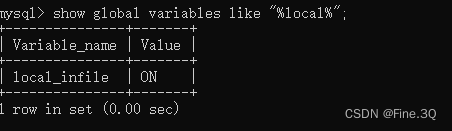
讯享网
如果是 off ,可以通过 set global local_infile=1; 开启
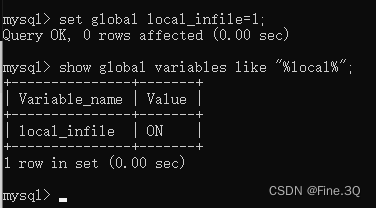
有时候开机之后又会 off,可以在 my.ini 中写入设置
3. Java开发中的使用
下面是我在开发过程中自己封装的类用于操作:

讯享网import com.mysql.cj.jdbc.JdbcStatement; import org.springframework.beans.factory.annotation.Value; import org.springframework.stereotype.Component; import java.io.InputStream; import java.sql.Connection; import java.sql.DriverManager; import java.sql.PreparedStatement; import java.sql.SQLException; import java.util.List; @Component public class LoadInfileUtils {
    private Connection connection; @Value("spring.datasource.username") private String username; @Value("spring.datasource.password") private String password; @Value("spring.datasource.url") private String url; @Value("spring.datasource.driver-class-name") private String driverName; / * 获取数据库连接,Connection */ private Connection getConnection() throws ClassNotFoundException, SQLException {
    Class.forName(driverName); connection = DriverManager.getConnection(url,username,password); return connection; } / * 通过 流的方式,将 要写到文件中的数据 ,载入到 sql 语句中执行 * loadSql 是 load in file 的执行语句,由 下面的assemblySql() 方法拼接而成 * inputStream 数据流 */ public int batchLocalFromStream(String loadSql, InputStream inputStream) throws SQLException, ClassNotFoundException {
    if (inputStream == null){
    return 0; } connection = getConnection(); PreparedStatement statement = null; int result = 0; try {
    statement = connection.prepareStatement(loadSql); //mysql 8,不同版本的MySQL 数据库 使用的操作引擎不同, if (statement.isWrapperFor(JdbcStatement.class)){
    com.mysql.cj.jdbc.ClientPreparedStatement mysqlStatement = statement.unwrap(com.mysql.cj.jdbc.ClientPreparedStatement.class); mysqlStatement.setLocalInfileInputStream(inputStream); result = mysqlStatement.executeUpdate(); } // mysql 5.7 版本 //com.mysql.jdbc.PreparedStatement mysqlStatement = statement.unwrap(com.mysql.jdbc.PreparedStatement.class);  //mysqlStatement.setLocalInfileInputStream(inputStream);  //mysqlStatement.executeUpdate(); }catch (SQLException throwables){
    throwables.printStackTrace(); }finally {
    if (statement != null){
    statement.close(); } if (connection != null) {
    connection.close(); } } return result; } / * 组织 sql 语句: load data local infile * databaseName:数据库名称,注意需要设置,因为不使用框架中一套数据,通过原生的 jdbc 获取的 connection 连接,所以需要指定 数据库 * tableName 表名 * fileName 文件全路径,批量入库的数据 刷到文件的全路径 * columnsName 表中 字段列表 * fieldstr 字段分隔符 * linestr 记录分隔符 */ public String assemblySql(String databaseName, String tableName, String fileName, List<String> columnsName,String fieldstr,String linestr){
    String insertColumn = new Joiner(",").add(columnsName).toString(); return "LOAD DATA LOCAL INFILE '"+fileName + "' INTO TABLE" + databaseName + "." + tableName + " FIELDS TERMINATED BY '" + fieldstr + "' LINES TERMINATED BY '" + linestr + "' ("+insertColumn+") "; } }
在使用过程中的操作:
 import com.baomidou.mybatisplus.annotation.IdType; import com.baomidou.mybatisplus.annotation.TableField; import com.baomidou.mybatisplus.annotation.TableId; import org.springframework.beans.factory.annotation.Autowired; import org.springframework.beans.factory.annotation.Value; import java.io.*; import java.lang.reflect.Field; import java.sql.SQLException; import java.util.Arrays; import java.util.List; import java.util.stream.Collectors; public class TestLoadFileService {
    @Autowired private LoadInfileUtils loadInfileUtils; // 行(记录)分隔符 public static final String LINE_TERMINATED = "\n\n"; // 字段分隔符 public static final String FIELD_TERMINATED = "\t\t"; // 此处是从封装的Appproperties 类中获取 数据库库名,可以自行定义 private String dbName = Appproperties.getDbName(); / * 将 List<T> 实体类对象 刷到文件中,注意,实体类T,我在实体类中重写了它的 toString() 方法,将toString()方法返回值,拼接成要入库的一条记录的数据字符串,其中需要用到字段分隔符,将每个字段的数据拼接 */ public void writeBeansToFile(List<T> beans, File file){
    if (beans != null && !beans.isEmpty()){
    OutputStream outputStream = null; try {
    if (!file.exists()){
    file.createNewFile(); } outputStream = new BufferedOutputStream(new FileOutputStream(file)); for (T bean : beans) {
    outputStream.write((bean.toString() + LINE_TERMINATED).getBytes("UTF-8")); } }catch (IOException e){
    e.printStackTrace(); }finally {
    if (outputStream != null){
    try {
    outputStream.flush(); outputStream.close(); } catch (IOException e) {
    e.printStackTrace(); } } } } } / * 将文件中的数据 load入库 * file 写入的文件 * tableName 表名称 * object 实体类型,用于获取字段列表 */ public void loadFileToMySQL(File file,String tableName,Object object) {
    InputStream inputStream = null; try {
    String dbName = dbName; inputStream = new FileInputStream(file); String assemblySql = loadInfileUtils.assemblySql(dbName, tableName, file.getPath(), getObjectFields(object), FIELD_TERMINATED, LINE_TERMINATED); loadInfileUtils.batchLocalFromStream(assemblySql,inputStream); }catch (SQLException | FileNotFoundException | ClassNotFoundException throwables) {
    throwables.printStackTrace(); }finally {
    if (inputStream != null){
    try {
    inputStream.close(); }catch (IOException e){
    e.printStackTrace(); } } } } / * 通过反射方式,获取类中的字段值,同时排除不在数据库中存在的字段,排除id自增的值,load 方式可以给自增id 赋值 */ private List<String> getObjectFields(Object object) {
    Class<?> aClass = object.getClass(); Field[] declaredFields = aClass.getDeclaredFields(); List<String> stringList = Arrays.stream(declaredFields).map(Field::getName).collect(Collectors.toList()); for (Field declaredField : declaredFields) {
    TableField tableField = declaredField.getAnnotation(TableField.class); if (tableField != null && !tableField.exist()){
    stringList.remove(declaredField.getName()); } TableId tableId = declaredField.getAnnotation(TableId.class); if (tableId != null && tableId.type().equals(IdType.AUTO)){
    stringList.remove(declaredField.getName()); } } return stringList; } }
另外,在application.properties文件中,数据库连接配置需要添加:allowLoadInfile=true
讯享网spring.datasource.url=jdbc:mysql://localhost:3306/test?serverTimezone=Asia/Shanghai&……&allowLoadInfile=true
对于 数据库 load in file 的 sql 语句具体解释,用的过程中就会很明白,其实不难,但是有些需要注意的点:
- 如果是导入有中文的数据,mysql 设置的utf8 字符集,所以导入的xxx.txt 文件也要保存utf-8的字符集
- 在本地服务器导入本地服务器文本到MySQL,不指定LOACL,出现唯一性约束冲突,会失败回滚,数据导入不进去,这个时候就需要加ignore或者replace来导入数据
- 如果报错:The MySQL server is running with the --secure-file-priv option so it cannot解决:
secure-file-priv的值有三种情况: secure_file_prive=null ––限制mysqld 不允许导入导出 secure_file_priv=/path/ – --限制mysqld的导入导出只能发生在默认的/path/目录下 secure_file_priv=’’ – --不对mysqld 的导入 导出做限制 查看你的secure-file-priv设置:
讯享网show variables like ‘%secure%’;
将secure_file_priv变量设置为空,或者将文本拷贝到默认路径下。
- ……
4. sqlite 数据库同样方式导入文件批量入库的操作
sqlite 数据库中有 .import 的命令,可以将文件导入到表中 讯享网.import;
那对于具体的使用,就不做阐述了,具体使用到,可以研究。
总之
具体使用过程中,遇到问题,解决问题, 遇到困难,克服困难。
寄语:
希望能在工作中,勿忘初心,纵使现实很糟糕,也要学会爱自己,充实自己!
版权声明:本文内容由互联网用户自发贡献,该文观点仅代表作者本人。本站仅提供信息存储空间服务,不拥有所有权,不承担相关法律责任。如发现本站有涉嫌侵权/违法违规的内容,请联系我们,一经查实,本站将立刻删除。
如需转载请保留出处:https://51itzy.com/kjqy/33572.html