
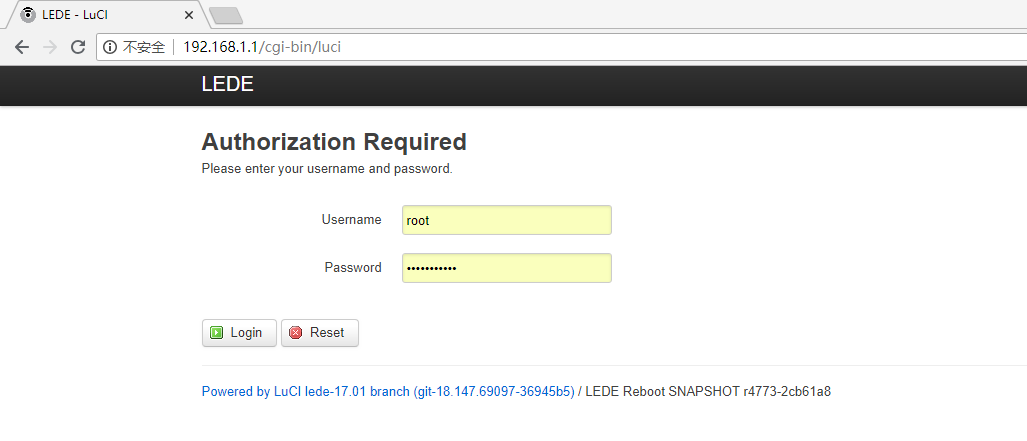
什么是Luci呢?先直观的感受一下,打开web浏览器,输入R2的网关地址,然后出现了一个web登录界面,这个就是Openwrt Luci的应用。
那么到底什么是Luci呢?在这里我先给大家一个公式:Luci = lua + uci,然后接下来我针对这个公式去讲解什么是Luci。
首先简单介绍一下什么是lua和uci;lua是一门编程语言,在后面你会看到它长什么样子,uci(Unified Configuration Interface)是Openwrt的配置框架。
那么到这里能不能大致猜到Luci是什么了?没错,Luci就是这两者的结合,简单理解就是基于lua语言去实现配置Openwrt。
我们再回过头来看这个web界面,是不是感觉和家里路由器的配置web界面很相近呀,细心一点看,会看到路径除了IP地址外,还有"/cgi-bin/luci",这里留个伏笔,后面我们会讲到为什么是这个路径。
那么接下来我们就来看luci的基本用法,以及工作原理,让大家对Luci有一个初步的认识。
- 初识Luci
输入账号密码(一般默认是root,root)登录页面,登录后的界面类似于这样:
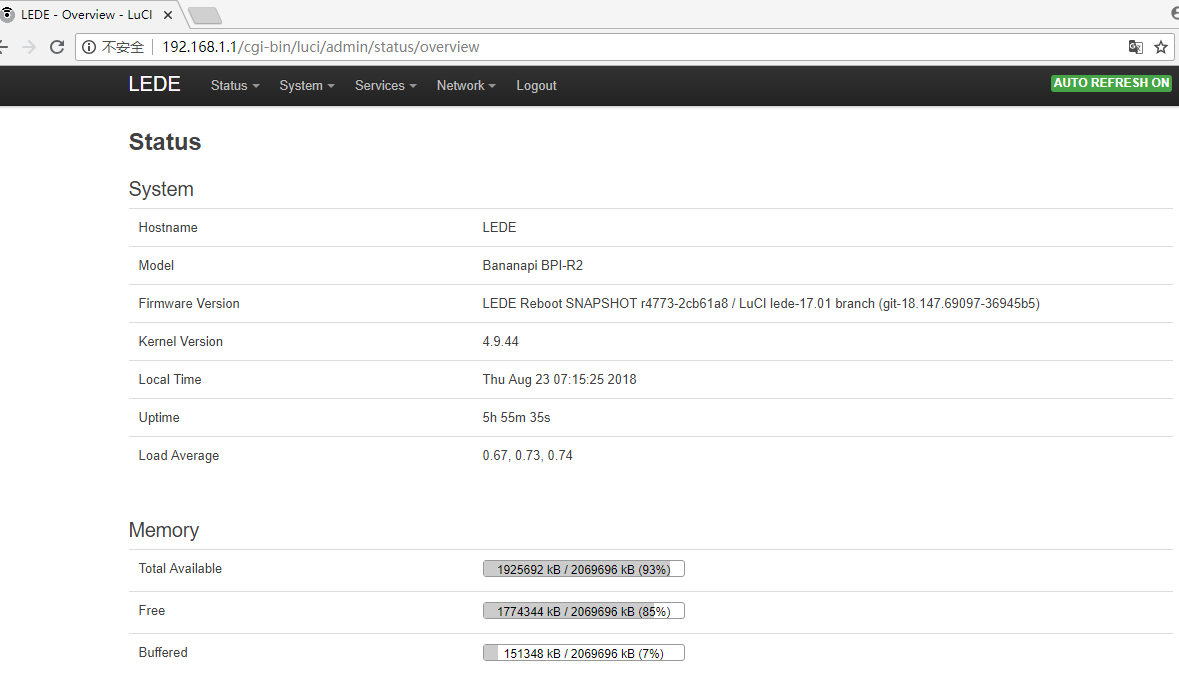
从页面上可以看到我们设备的固件、内核版本以及内存等相关信息。
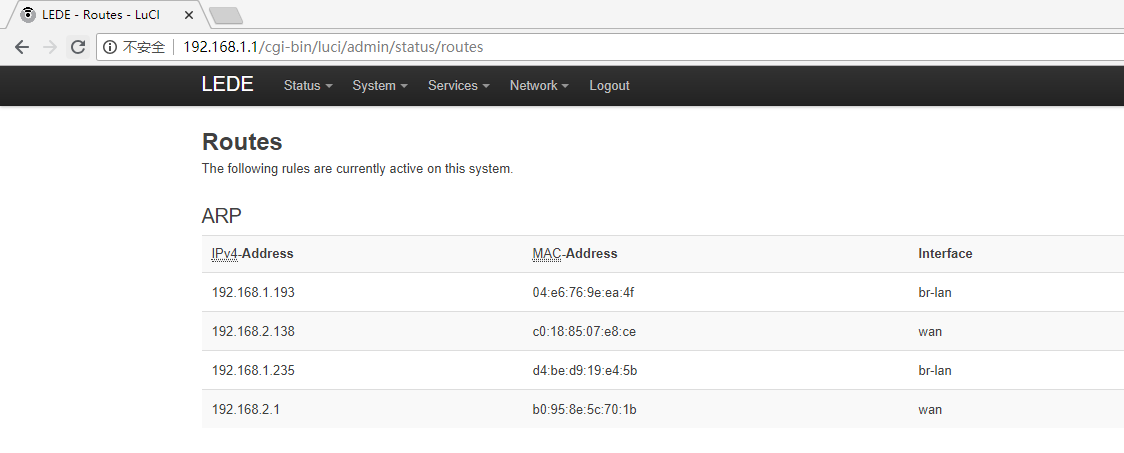
点击Status => Routes,我们可以看到设备上的路由信息:

更多的Luci界面的配置细节,我在这里就不过多阐述,后续结合代码的时候再来看部分Luci的配置,接下来我们来看一下Luci的工作原理。
回到第一个问题,我们在浏览器里输入网关地址“192.168.1.1”,但是为什么Luci的路径是“http://192.168.1.1/cgi-bin/luci”,那么当我们在web输入网关地址后,页面是在哪里被调用的呢?在这里我们就要引入一个概念uhttpd,那么这个uhttpd是个什么东东呢?
uhttpd是一个轻量级的web服务器,由于其可以和Openwrt的配置框架UCI结合到一起,因此默认被用于OpenWrt的Web管理接口LuCI。 我们都知道,网站都是被部署在一台台服务器,PC等设备上的,我们的设备访问网站时,先是通过网络访问到部署这个网站的服务器,然后服务器的web服务再返回页面给我们;也就是说如果服务器没有web服务,我们是访问不了网页的哦。 讯享网
- 接下来我们来看一下uhttpd的UCI配置
讯享网root@LEDE:/# cat /etc/config/uhttpd config uhttpd 'main' list listen_http '0.0.0.0:80' #http协议IPV4的监听端口80 list listen_http '[::]:80' #http协议IPV6的监听端口为443 list listen_https '0.0.0.0:443' list listen_https '[::]:443' option redirect_https '1' option home '/www' #指定根路径 option rfc1918_filter '1' option max_requests '3' #最大请求数 option max_connections '100' #最大TCP连接数 option cert '/etc/uhttpd.crt' #HTTPS连接的证书路径 option key '/etc/uhttpd.key' #HTTPS连接的私钥路径 option cgi_prefix '/cgi-bin' #cgi脚本的路径,这个路径又是home的相对路径,即/www/cgi-bin option lua_prefix '/luci' #lua解释器路径,这个路径又是home的相对路径,即/www/luci option lua_handler '/usr/lib/lua/luci/sgi/uhttpd.lua' #lua runtime初始化的路径 option script_timeout '60' option network_timeout '30' option http_keepalive '20' option tcp_keepalive '1' option ubus_prefix '/ubus' config cert 'defaults' option days '730' option bits '2048' option country 'ZZ' option state 'Somewhere' option location 'Unknown' option commonname 'LEDE'
当然我们也可以通过uci的命令去查看:
root@LEDE:/www/cgi-bin# uci show uhttpd uhttpd.main=uhttpd uhttpd.main.listen_http='0.0.0.0:80' '[::]:80' uhttpd.main.listen_https='0.0.0.0:443' '[::]:443' uhttpd.main.redirect_https='1' uhttpd.main.home='/www' uhttpd.main.rfc1918_filter='1' uhttpd.main.max_requests='3' uhttpd.main.max_connections='100' uhttpd.main.cert='/etc/uhttpd.crt' uhttpd.main.key='/etc/uhttpd.key' uhttpd.main.cgi_prefix='/cgi-bin' uhttpd.main.lua_prefix='/luci' uhttpd.main.lua_handler='/usr/lib/lua/luci/sgi/uhttpd.lua' uhttpd.main.script_timeout='60' uhttpd.main.network_timeout='30' uhttpd.main.http_keepalive='20' uhttpd.main.tcp_keepalive='1' uhttpd.main.ubus_prefix='/ubus' uhttpd.defaults=cert uhttpd.defaults.days='730' uhttpd.defaults.bits='2048' uhttpd.defaults.country='ZZ' uhttpd.defaults.state='Somewhere' uhttpd.defaults.location='Unknown' uhttpd.defaults.commonname='LEDE' 细看一下,是不是和"/etc/config/uhttpd"里面的uhttpd的配置是一样的,没错,现在我们已经接触到Openwrt的UCI框架了。
实际上Openwrt里面的所有配置都是在"/etc/config"目录下,我们看一下有哪些配置:
讯享网root@LEDE:/etc/config# ls aria2 firewall luci network sysstat uhttpd dhcp hd-idle mtkhnat qos system wireless dropbear kdump mwan3 rpcd ucitrack
这些配置就构成了整个Openwrt的配置,而管理这些配置的框架正是UCI,我们可以简单去理解,就是UCI = /etc/config/,这样的好处就是方便统一配置,不过你配置什么,只管去"/etc/config"目录下找对应需要配置的服务就好了,而且都是使用uci的方式,十分方便;相比Ubuntu等Linux其它衍生系统的配置文件来讲是要方便和简单很多,后面讲Ubuntu系统的时候,大家就能感受到。
到这里大家应该对UCI有一个初步的认识了,接下来我们通过继续看uhttpd的那个问题,去认识lua语言,然后让大家更加理解 Luci = lua + uci 这个公式。
由上面uhttpd的配置来看,当我们通过web的方式访问R2时,uhttpd会导向"/www"的路径,那么我们来看看R2上的"/www"里面有什么。
root@LEDE:/www# ls
/cgi-bin      index.html   /luci-static
root@LEDE:/www# cat index.html
<?xml version="1.0" encoding="utf-8"?>
<!DOCTYPE html PUBLIC "-//W3C//DTD XHTML 1.1//EN" "http://www.w3.org/TR/xhtml11/DTD/xhtml11.dtd">
<html xmlns="http://www.w3.org/1999/xhtml">
<head>
<meta http-equiv="Cache-Control" content="no-cache" />
<meta http-equiv="refresh" content="0; URL=/cgi-bin/luci" />
</head>
<body style="background-color: white">
<a style="color: black; font-family: arial, helvetica, sans-serif;" href="/cgi-bin/luci">LuCI - Lua Configuration Interface</a>
</body>
</html>
root@LEDE:/www#
能看到,"/www"路径下面有个index.html,同时打印出“index.html”的内容,可以看到这个内容“href="/cgi-bin/luci”,原来是这里把网关导向了“/cgi-bin/luci”;那么我们再来看看这个路径里面又有什么?
讯享网root@LEDE:/www/cgi-bin# ls #这里有个luci的脚本 luci root@LEDE:/www/cgi-bin# cat luci #打印luci这个脚本的内容,可以看到这个脚本里的内容就是lua语言写的 #!/usr/bin/lua require "luci.cacheloader" require "luci.sgi.cgi" luci.dispatcher.indexcache = "/tmp/luci-indexcache" luci.sgi.cgi.run()
这个路径下面放着一个lua的脚本,脚本里面调用了这个接口“luci.sgi.cgi.run()”,那么这个接口执行的函数在哪里呢,在这里:
root@LEDE:/usr/lib/lua/luci/sgi# ls cgi.lua uhttpd.lua root@LEDE:/usr/lib/lua/luci/sgi# cat cgi.lua -- Copyright 2008 Steven Barth <> -- Licensed to the public under the Apache License 2.0. * function run() local r = luci.http.Request( luci.sys.getenv(), limitsource(io.stdin, tonumber(luci.sys.getenv("CONTENT_LENGTH"))), ltn12.sink.file(io.stderr) ) local x = coroutine.create(luci.dispatcher.httpdispatch) local hcache = "" local active = true while coroutine.status(x) ~= "dead" do local res, id, data1, data2 = coroutine.resume(x, r) if not res then print("Status: 500 Internal Server Error") print("Content-Type: text/plain\n") print(id) break; end if active then if id == 1 then io.write("Status: " .. tostring(data1) .. " " .. data2 .. "\r\n") elseif id == 2 then hcache = hcache .. data1 .. ": " .. data2 .. "\r\n" elseif id == 3 then io.write(hcache) io.write("\r\n") elseif id == 4 then io.write(tostring(data1 or "")) elseif id == 5 then io.flush() io.close() active = false elseif id == 6 then data1:copyz(nixio.stdout, data2) data1:close() end end end end run()函数就在cgi.lua里面;现在我们可以初步了解到,lua语言就是这样被Luci使用的。
那么我们再整体看一下整个访问流程:web(输入网关地址)==> uhttpd调用"/www/index.html" ==> index.html重定向到"/cgi-bin/luci" ==> luci被启动。讲到这里可能大家对Luci有一个初步的认识了,由于Luci涉及lua语言,这门语言不像Java,C普及率那么高,我这里暂时也点到为止,更多Luci的知识后续有时间我会继续和大家一起研究。
Luci Github:https://github.com/openwrt/luci
版权声明:本文内容由互联网用户自发贡献,该文观点仅代表作者本人。本站仅提供信息存储空间服务,不拥有所有权,不承担相关法律责任。如发现本站有涉嫌侵权/违法违规的内容,请联系我们,一经查实,本站将立刻删除。
如需转载请保留出处:https://51itzy.com/kjqy/25951.html