
- macOS、Linux 或通过 WSL2 的 Windows(Linux20.04)
- CPU:4G或更高配置
- 内存:8GB或以上(低于此配置可能影响使用体验)
是用于访问大模型(如 GPT、通义千问、DeepSeek、Gemini 等)服务的 应用程序编程接口密钥,它本质上是一串唯一的、保密的字符串,作为开发者或用户调用模型 API 的 身份凭证和权限凭证。
- 安全使用指南:
- 严格保密:禁止将API Key上传至GitHub、公开论坛或前端页面
- 权限最小化:仅分配必要模型访问权限,日常调用避免使用主密钥
- 实时监控:在云服务平台(Google Cloud/阿里云/腾讯云等)配置调用量及费用预警机制
可以使用免费的,有些APIkey可以在平台注册之后,享用试用的key。
- 飞书:App ID和App Secret
- 钉钉:Client ID和Client Secret
>> curl -fsSL https://openclaw.bot/install.sh | bash
Windows
iwr -useb https://openclaw.ai/install.ps1 | iex
windows部署时可能遇到powershell闪退的情况,重启机器或使用管理员权限
检查是否安装成功可以通过以下两种命令方式验证:
- 版本检查命令:
讯享网 openclaw -V
执行该命令会显示当前安装的 OpenClaw 工具的版本号,例如:
pi@linux:$ openclaw -v 2026.3.2 pi@linux:$ - 帮助命令:
讯享网 openclaw –help
该命令会显示 OpenClaw 的使用帮助信息,包括所有可用的命令选项和参数说明。典型输出包括:
Usage: openclaw [options] [command]Options: –dev Dev profile: isolate state under ~/.openclaw-dev, default gateway port 19001, and shift derived ports (browser/canvas) -h, –help Display help for command –log-level <level> Global log level override for file + console (silent|fatal|error|warn|info|debug|trace) –no-color Disable ANSI colors –profile <name> Use a named profile (isolates OPENCLAW_STATE_DIR/OPENCLAW_CONFIG_PATH under ~/.openclaw-<name>) -V, –version output the version number
Commands: Hint: commands suffixed with * have subcommands. Run <command> –help for details. acp * Agent Control Protocol tools agent Run one agent turn via the Gateway agents * Manage isolated agents (workspaces, auth, routing) approvals * Manage exec approvals (gateway or node host) browser * Manage OpenClaw‘s dedicated browser (Chrome/Chromium) channels * Manage connected chat channels (Telegram, Discord, etc.) clawbot * Legacy clawbot command aliases completion Generate shell completion script config * Non-interactive config helpers (get/set/unset/file/validate). Default: starts setup wizard. configure Interactive setup wizard for credentials, channels, gateway, and agent defaults cron * Manage cron jobs via the Gateway scheduler daemon * Gateway service (legacy alias) dashboard Open the Control UI with your current token devices * Device pairing + token management directory * Lookup contact and group IDs (self, peers, groups) for supported chat channels dns * DNS helpers for wide-area discovery (Tailscale + CoreDNS) docs Search the live OpenClaw docs doctor Health checks + quick fixes for the gateway and channels gateway * Run, inspect, and query the WebSocket Gateway health Fetch health from the running gateway help Display help for command hooks * Manage internal agent hooks logs Tail gateway file logs via RPC memory * Search and reindex memory files message * Send, read, and manage messages models * Discover, scan, and configure models node * Run and manage the headless node host service nodes * Manage gateway-owned node pairing and node commands onboard Interactive onboarding wizard for gateway, workspace, and skills pairing * Secure DM pairing (approve inbound requests) plugins * Manage OpenClaw plugins and extensions qr Generate iOS pairing QR/setup code reset Reset local config/state (keeps the CLI installed) sandbox * Manage sandbox containers for agent isolation secrets * Secrets runtime reload controls security * Security tools and local config audits sessions * List stored conversation sessions setup Initialize local config and agent workspace skills * List and inspect available skills status Show channel health and recent session recipients system * System events, heartbeat, and presence tui Open a terminal UI connected to the Gateway uninstall Uninstall the gateway service + local data (CLI remains) update * Update OpenClaw and inspect update channel status webhooks * Webhook helpers and integrations Examples: openclaw models –help
讯享网Show detailed help for the models command.
openclaw channels login –verbose
Link personal WhatsApp Web and show QR + connection logs. openclaw message send –target + –message “Hi” –json
讯享网Send via your web session and print JSON result.
openclaw gateway –port 18789
Run the WebSocket Gateway locally. openclaw –dev gateway
讯享网Run a dev Gateway (isolated state/config) on ws://127.0.0.1:19001.
openclaw gateway –force
Kill anything bound to the default gateway port, then start it. openclaw gateway …
讯享网Gateway control via WebSocket.
openclaw agent –to + –message “Run summary” –deliver
Talk directly to the agent using the Gateway; optionally send the WhatsApp reply. openclaw message send –channel telegram –target @mychat –message “Hi”
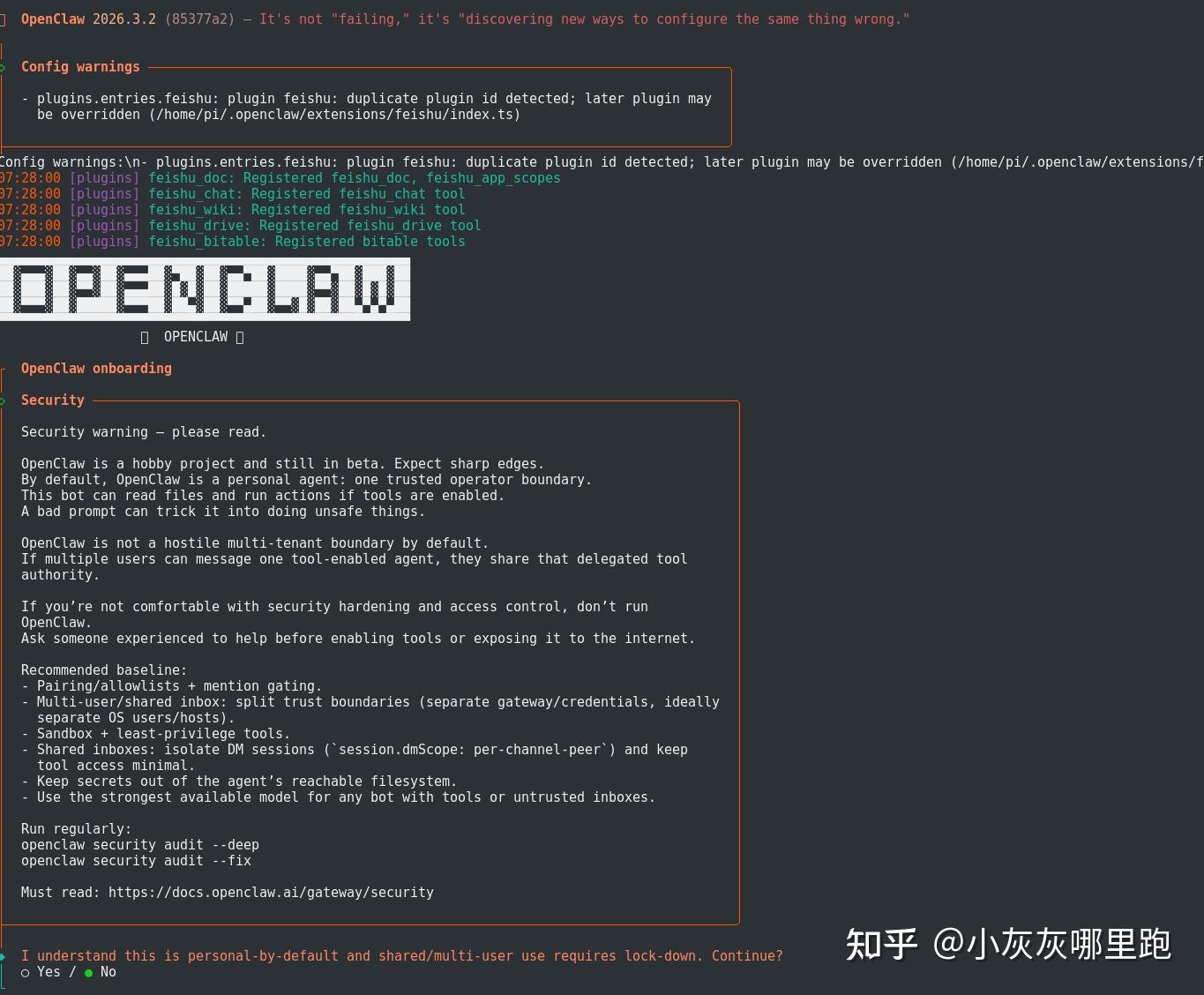
讯享网Send via your Telegram bot.</code></pre></div><p data-pid="6yuBnNEN">跟着配置向导进行配置。未进入配置向导,可手动启动配置向导</p><div class="highlight"><pre><code class="language-text"> openclaw onboard --install-daemon
GPT plus 代充 只需 145
配置向导会引导你完成:
- 选择 AI 模型提供商:
- Anthropic (Claude)、OpenAI、Google Gemini、本地 Ollama ,
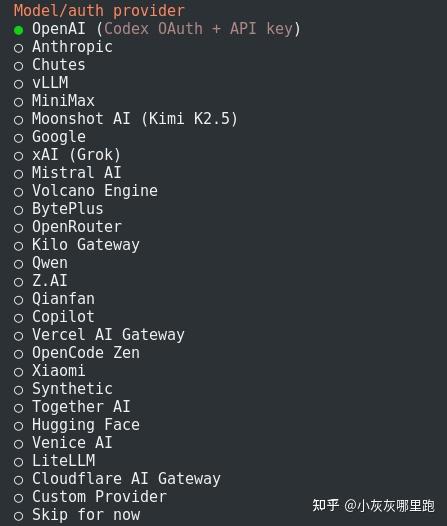
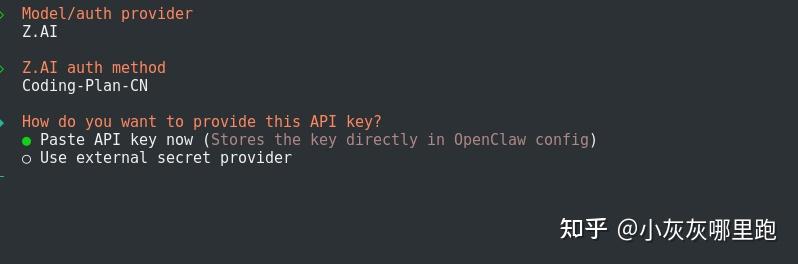
- 针对自己注册的AI供应商,选取相应的内容
- 配置 API Key:输入对应提供商的 API 密钥
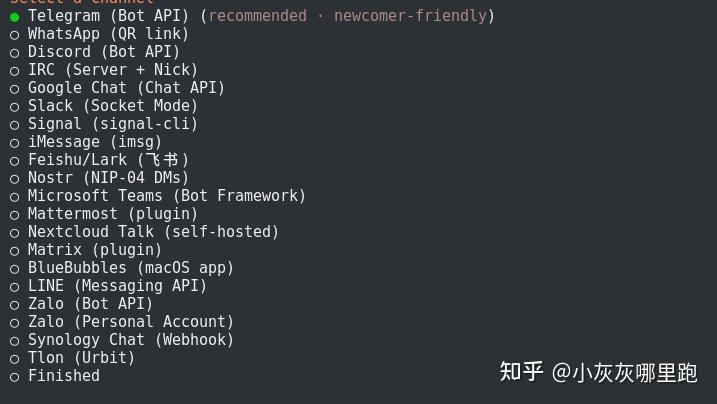
- 选择消息渠道:飞书(推荐新手)、WhatsApp等
- 首先打开飞书开放平台:https://open.feishu.cn/app ,账号登录进入开发者后台去创建个机器人配置。
点击→开发者后台→企业自建应用→配置个机器人(会跳出配置界面)
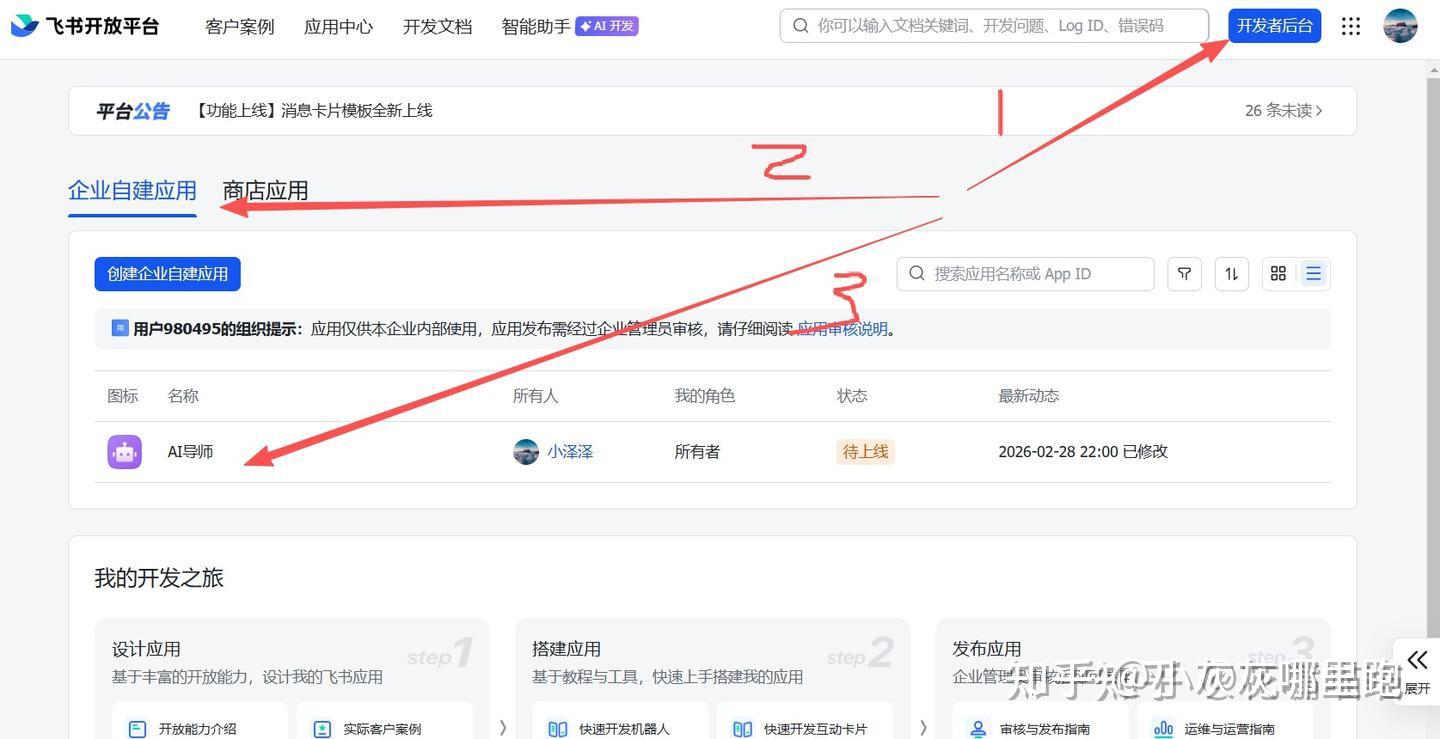
配置机器人
Step 1、选择→添加应用能力→机器人→点击权限管理
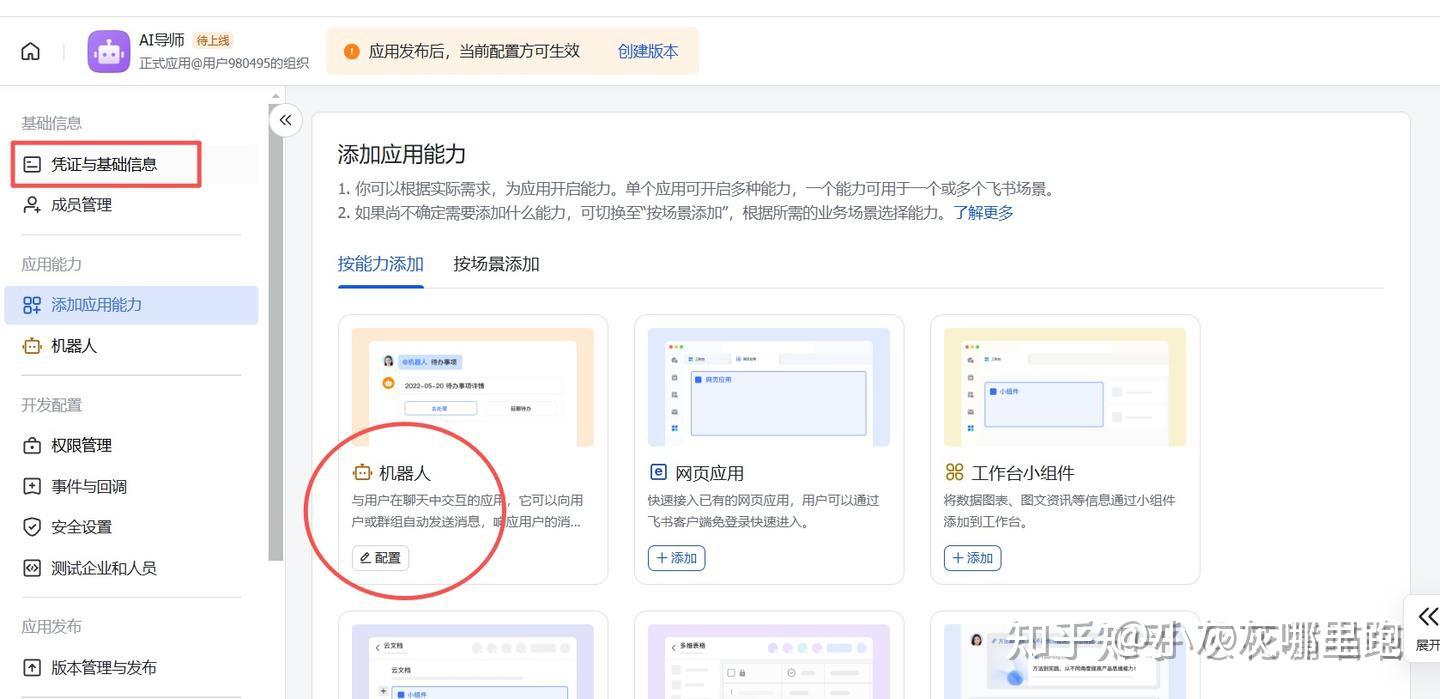
Step 2、
认证与基础配置: 这里需要填写飞书机器人的账号密码信息,用于建立连接,请在openclaw平台进行相应设置。
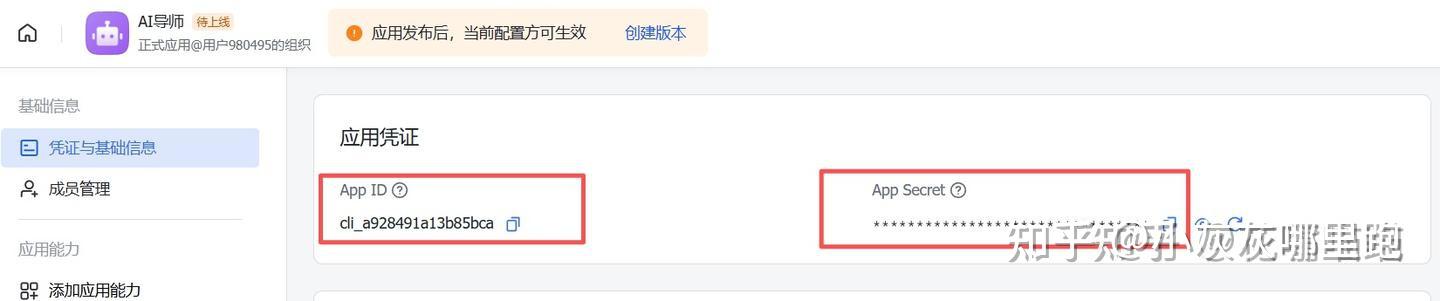
Step 3、
需要为飞书机器人配置相应权限。
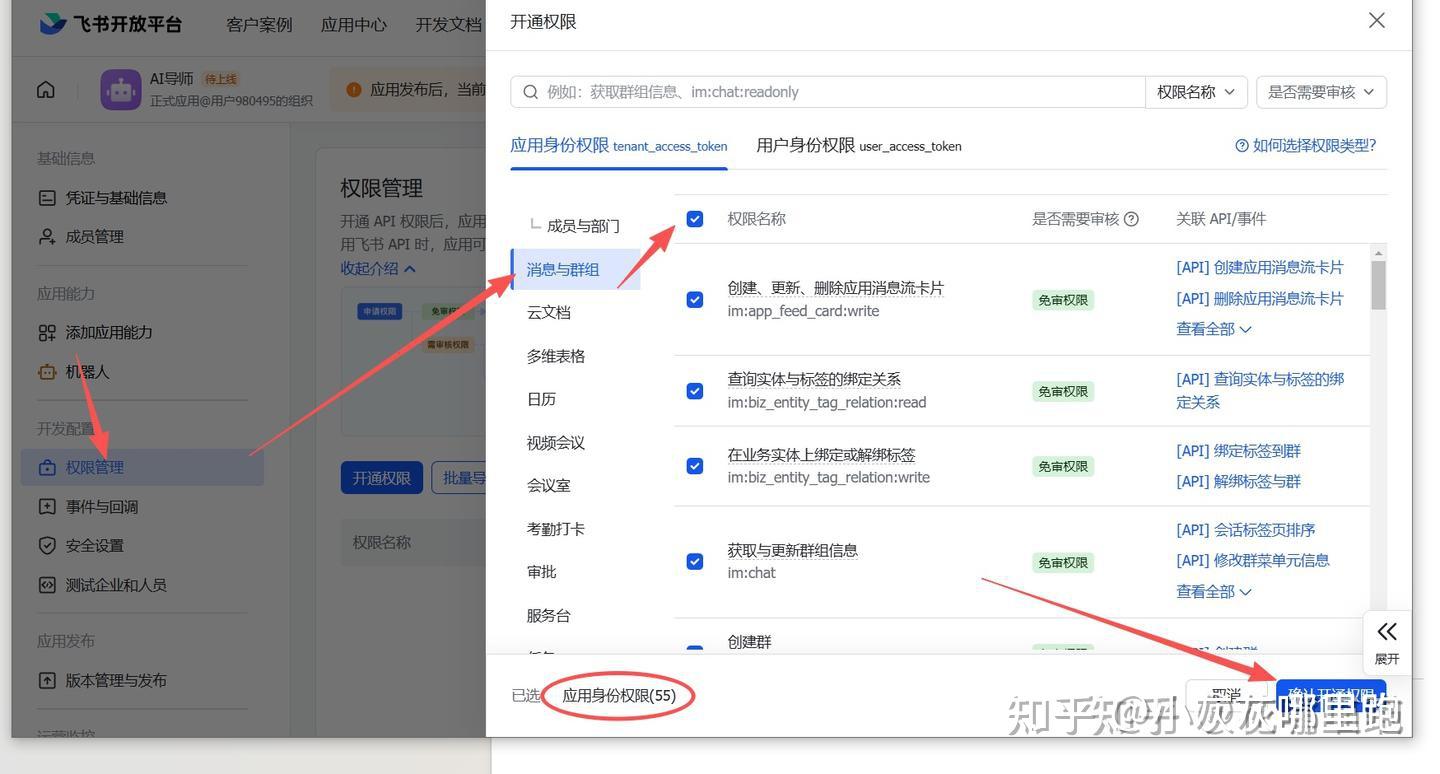
Step 4:建立OpenClaw与飞书机器人的连接
- 飞书端配置:
- 进入机器人管理页面
- 选择“事件与回调”功能
- 启用“使用长连接接收事件”选项
- 注意:保存前需确保OpenClaw端已完成相应配置
- OpenClaw端配置:
~/.openclaw/openclaw.json“channels”: {
讯享网"feishu": { "enabled": true, "appId": "cli_a92be5d3bc3a5bca", "appSecret": "ypr3szkGZWfoZd9OeFyZ8cusTtwn1riX", "domain": "feishu", "groupPolicy": "open", "chunkMode": "length", "allowFrom": [ "a", "*" ], "connectionMode": "websocket", "dmHistoryLimit": 2, "dmPolicy": "open", "groupCommandMentionBypass": "always", "renderMode": "auto", "topicSessionMode": "enabled" }
},
- 此步骤目的是让飞书平台在用户向机器人发送消息时,能够及时通知OpenClaw系统。
- 安装守护进程:使 Gateway 作为系统服务运行
openclaw gateway 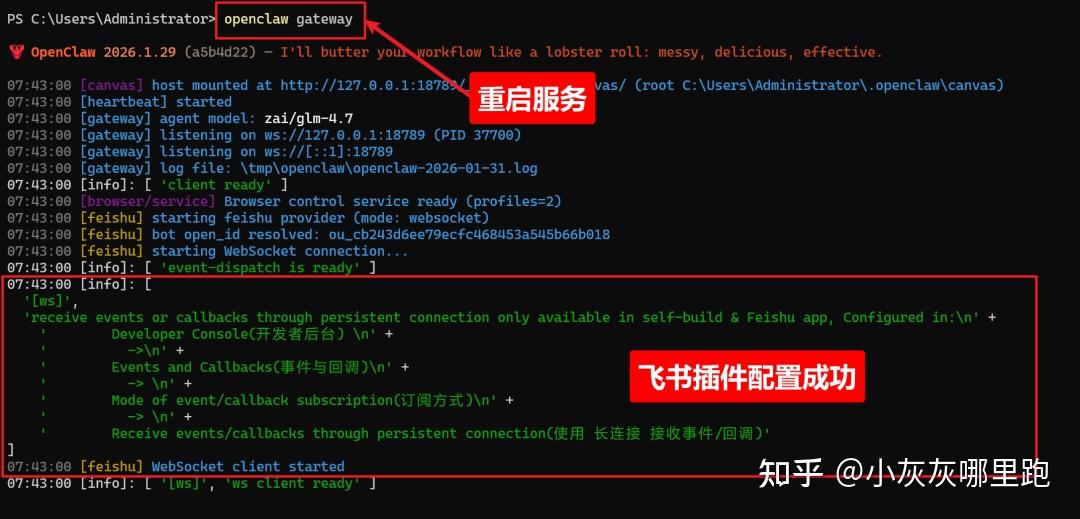
现在你的OpenClaw(龙虾)就可以正常运行了。通过以下几个简单步骤,你可以快速完成部署并开始使用:
- 启动服务:
- 确保OpenClaw服务已经成功启动
- 服务默认运行在本地端口18789
- 在浏览器地址栏输入:http://127.0.0.1:18789/
- 这是OpenClaw的Web控制界面
- 首次访问可能需要几秒钟加载时间
- 在控制台界面可以与OpenClaw进行交互对话
- 支持自然语言输入和指令执行
- 可查看当前运行状态和日志信息
- 通过飞书开放平台配置Webhook
- 将OpenClaw与飞书机器人对接
- 实现跨平台的工作流自动化
- 在控制台可以创建和管理多个OpenClaw实例
- 每个实例可以独立配置不同的工作流
- 支持实例之间的任务调度和协作
- 自动化处理日常办公任务
- 智能问答和信息查询
- 数据分析和报表生成
- 跨平台消息同步和提醒
如果遇到任何问题,可以查看服务日志或重启OpenClaw服务。现在你就可以开始享受智能化的工作体验了!
版权声明:本文内容由互联网用户自发贡献,该文观点仅代表作者本人。本站仅提供信息存储空间服务,不拥有所有权,不承担相关法律责任。如发现本站有涉嫌侵权/违法违规的内容,请联系我们,一经查实,本站将立刻删除。
如需转载请保留出处:https://51itzy.com/kjqy/213652.html