
0x00 背景
| 名称 | 版本 |
|---|---|
| 操作系统 | CentOS 6.10 x64 |
| GnuTLS库 | gnutls-3.5.19 |
| gnutls依赖库 | nettle-3.4 |
| gnutls依赖库 | gmp-6.1.2 |
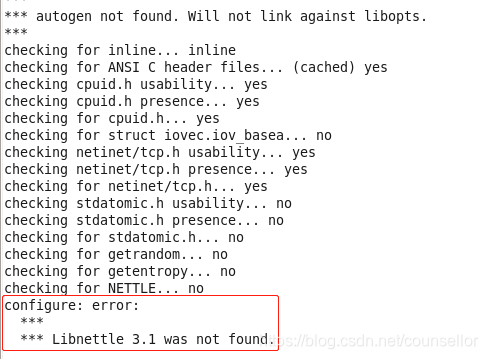
安装gnutls前需要先安装两个依赖库,一个是gmp,另一个是nettle。安装完这两个依赖库后,准备安装gnutls,结果报错:
讯享网
0x01 问题原因
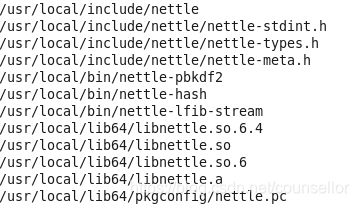
nettle这货安装的时候,自己安装到了/usr/local/lib目录下了。gnutls安装时默认会到系统目录下/usr/lib下寻找依赖关系。
软件路径瞎按,系统依赖瞎找是问题的形成原因。
安装nettle结束后,没有跟我们说安装到哪里了,我们看下nettle的路径
find /usr -name '*nettle*' 讯享网
0x02 问题修复
安装nettle时,通过--prefix参数指定安装路径为/usr

讯享网cd /tmp/nettle-3.4 && ./configure --prefix=/usr/ && make && make install
再继续安装gnutls
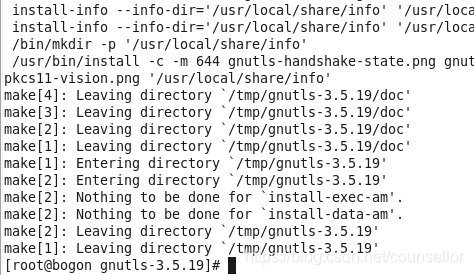
cd /tmp/gnutls-3.5.19 && PKG_CONFIG_PATH=/usr/local/lib64/pkgconfig:/usr/lib64/pkgconfig:/usr/local/lib/pkgconfig:/usr/lib/pkgconfig && ./configure --enable-shared --with-included-libtasn1 \ --with-included-unistring --without-p11-kit && make && make install 安装成功
0x03 扩展思考
可能当前用户是普通用户,莫非sudo安装的路径就变成了/usr/local,su的安装路径是/usr
讯享网[test@bogon tmp]$ sudo echo $PATH /usr/local/bin:/usr/bin:/bin:/usr/local/sbin:/usr/sbin:/sbin:/home/test/bin [test@bogon tmp]$ su Password: [root@bogon tmp]# echo $PATH /usr/local/bin:/usr/bin:/bin:/usr/local/sbin:/usr/sbin:/sbin:/home/test/bin
系统PATH的路径是完全相同的。所以不是用户属性控制的。
查下./configure的用法
[root@bogon nettle-3.4]# ./configure --help `configure' configures nettle 3.4 to adapt to many kinds of systems. Usage: ./configure [OPTION]... [VAR=VALUE]... To assign environment variables (e.g., CC, CFLAGS...), specify them as VAR=VALUE. See below for descriptions of some of the useful variables. Defaults for the options are specified in brackets. Configuration: -h, --help display this help and exit --help=short display options specific to this package --help=recursive display the short help of all the included packages -V, --version display version information and exit -q, --quiet, --silent do not print `checking ...' messages --cache-file=FILE cache test results in FILE [disabled] -C, --config-cache alias for `--cache-file=config.cache' -n, --no-create do not create output files --srcdir=DIR find the sources in DIR [configure dir or `..'] Installation directories: --prefix=PREFIX install architecture-independent files in PREFIX [/usr/local] --exec-prefix=EPREFIX install architecture-dependent files in EPREFIX [PREFIX] 安装路径抓虾的真正原因是./configure默认是安装到/usr/local下的。
0x04 小结
- 第三方软件linux系统推荐安装到
/usr/local路径下 - 先make uninstall卸载掉安装错的nettle,但是报错了
版权声明:本文内容由互联网用户自发贡献,该文观点仅代表作者本人。本站仅提供信息存储空间服务,不拥有所有权,不承担相关法律责任。如发现本站有涉嫌侵权/违法违规的内容,请联系我们,一经查实,本站将立刻删除。
如需转载请保留出处:https://51itzy.com/kjqy/18991.html