
目录
1. 概述
2. 模块设计
5. 设计Block的主要接口
6. 启动游戏
7. 实现游戏的主体架构
7.1 实现游戏的主体架构
7.2 补充私有数据成员
7. 3 补充私有成员函数
7.4 完善游戏主体架构
9. 绘制方块
10. 实现游戏场景
10.1 游戏过程中数据的存储
10.2 数据数据的初始化
10.4 测试游戏场景
11. 完善方块的渲染
11.1 新方块和预告方块的创建
11.2 渲染方块
12. 俄罗斯方块的降落
13. 实现俄罗斯方块的左右移动
本教程配套视频
1. 概述
使用C++面向对象思想开发俄罗斯方块游戏。
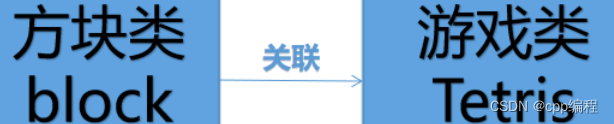
2. 模块设计
3. 创建项目
本教程配套视频
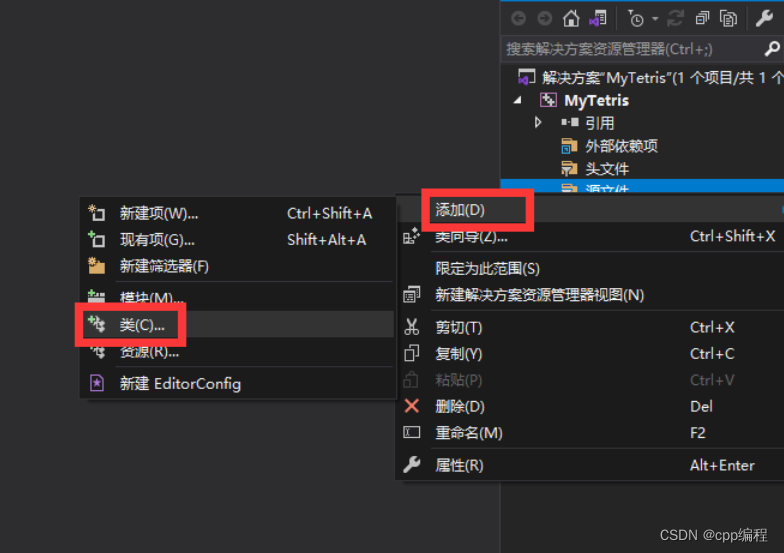
添加类Block和Tetris
4. 设计Tetris的主要接口
本教程配套视频
Tetris.h
class Tetris { public: Tetris(int rows, int cols, int left, int top, int blockSize); void init(); void play(); };讯享网
5. 设计Block的主要接口
Block.h
讯享网#include <graphics.h> class Block { public: Block(); void drop(); void moveLeftRight(int offset); void retate(); //旋转 void draw(int leftMargin, int topMargin); };
6. 启动游戏
main.cpp
#include "Tetris.h" int main() { Tetris game(20, 10, 56, 58, 36); game.play(); return 0; }7. 实现游戏的主体架构
7.1 实现游戏的主体架构
Tetris.cpp
讯享网void Tetris::play() { init(); int timer = 0; while (1) { keyEvent(); //待定义 timer += getDelay(); //待定义 if (timer > delay) { //delay待定义 timer = 0; drop(); //待定义 update = true; //待定义 } if (update) { update = false; updateWindow(); //待定义 clearLine(); //待定义 } } }
7.2 补充私有数据成员
Tetris.h
private: int delay; bool update;7. 3 补充私有成员函数
Tetris.cpp
讯享网private: void keyEvent(); int getDelay(); void drop(); void updateWindow(); void clearLine();
7.4 完善游戏主体架构
游戏开始时,需要创建新方块,以及下一个方块的预告。
添加新的数据成员
Tetris.h
Block* curBlock; Block* nextBlock; //方块预告以上两个数据成员都是private权限,并需要补充头文件Block.h

Tetris.h
讯享网#include "Block.h"
完善游戏主题架构
void Tetris::play() { init(); nextBlock = new Block; curBlock = nextBlock; nextBlock = new Block; // ... }8. 创建新方块
在调用 new Block 时,会自动调用Block的默认构造函数,所以我们需要在这个构造函数里面完成新方块的创建。
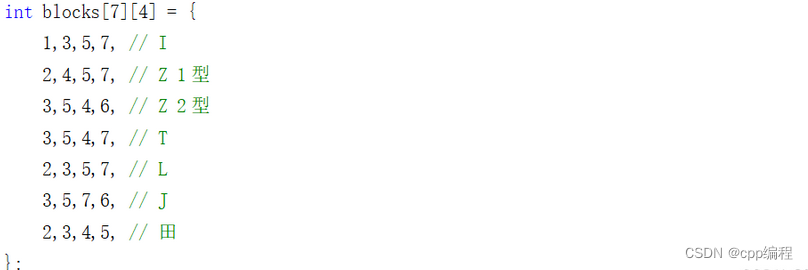
俄罗斯方块的表示方法有很多,最常见的是使用一个二维数组,表示一种俄罗斯方块的某种形态,也就是说,一个俄罗斯方块,需要使用4个二维数组来表示各个形态(4个方向)。我们这里使用一个更灵巧的方式: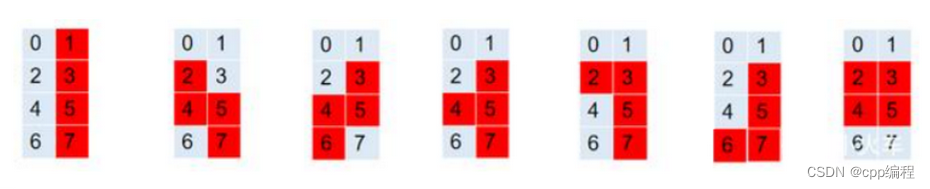
Block.h
讯享网struct Point { int row; int col; }; class Block { public: Block(); void drop(); void moveLeftRight(int offset); void retate(); //旋转 void draw(int leftMargin, int topMargin); int getBlockType(); private: int x; int y; int blockType; Point smallBlocks[4]; IMAGE* img; private: static int size; static IMAGE* imgs[7]; };
注意,在这里,我们把所有的方块图像,定义为Block类的static数据成员.
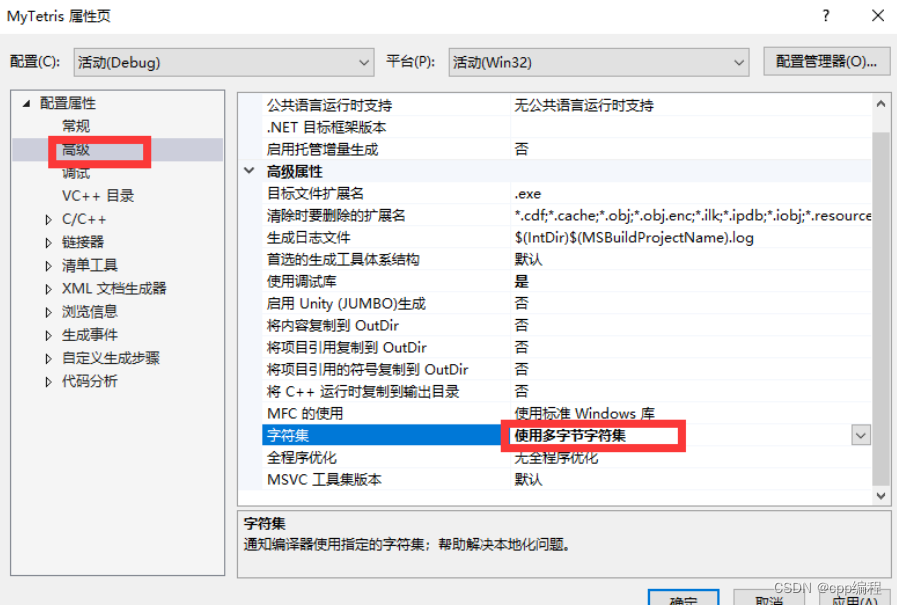
IMAGE* Block::imgs[7] = { NULL, }; int Block::size = 36; Block::Block() { // 仅初始化一次 if (imgs[0] == NULL) { IMAGE imgTmp; loadimage(&imgTmp, "res/tiles.png"); SetWorkingImage(&imgTmp); for (int i = 0; i < 7; i++) { imgs[i] = new IMAGE; getimage(imgs[i], i * size, 0, size, size); } SetWorkingImage(); srand(time(NULL)); } // 以下,对每个新创建的方块,都要执行: blockType = 1 + rand() % 7; img = imgs[blockType - 1]; int blocks[7][4] = { 1,3,5,7, // I 2,4,5,7, // Z 1型 3,5,4,6, // Z 2型 3,5,4,7, // T 2,3,5,7, // L 3,5,7,6, // J 2,3,4,5, // 田 }; for (int i = 0; i < 4; i++) { smallBlocks[i].row = blocks[blockType - 1][i] / 2; smallBlocks[i].col = blocks[blockType - 1][i] % 2; } }同时把项目属性的字符集,修改为多字节字符集。
9. 绘制方块
绘制正在降落过程中的方块。
讯享网void Block::draw(int leftMargin, int topMargin) { for (int i = 0; i < 4; i++) { int x = smallBlocks[i].col * size + leftMargin; int y = smallBlocks[i].row * size + topMargin; putimage(x, y, img); } }
10. 实现游戏场景
10.1 游戏过程中数据的存储
添加以下数据成员,用来表示游戏的状态数据,用一个二维数组来表示各个位置的状态。
int rows; int cols; int leftMargin; int topMargin; int blockSize; IMAGE imgBg; vector<vector<int>> map;10.2 数据数据的初始化
在Tetris类的构造函数中,对游戏数据进行初始化。
讯享网Tetris::Tetris(int rows, int cols, int left, int top, int blockSize) { this->rows = rows; this->cols = cols; this->leftMargin = left; this->topMargin = top; this->blockSize = blockSize; for (int i = 0; i < rows; i++) { vector<int> row; for (int j = 0; j < cols; j++) { row.push_back(0); } map.push_back(row); } }
10.3 初始化游戏场景
const int SPEED_NORMAL = 500; //普通速度 const int SPEED_QUICK = 50; //快速降落速度 void Tetris::init() { initgraph(640, 832); loadimage(&imgBg, "res/bg.jpg"); delay = SPEED_NORMAL; for (int i = 0; i < rows; i++) { for (int j = 0; j < cols; j++) { map[i][j] = 0; } } }
10.4 测试游戏场景
已经定义很多成员函数,但是大部分都还没有做具体的实现,现在把这些成员函数都补充一个空的函数体,以便测试,后面再详细实现各个函数接口。
修改main函数,添加测试代码:
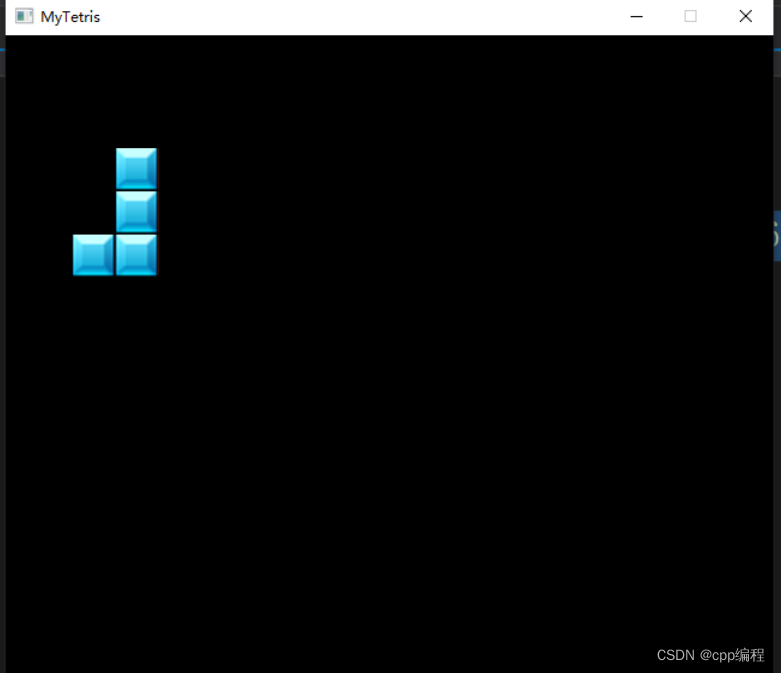
讯享网int main() { Tetris game(20, 10, 56, 58, 36); //game.play(); game.init(); Block block; block.draw(56, 58); system("pause"); return 0; }
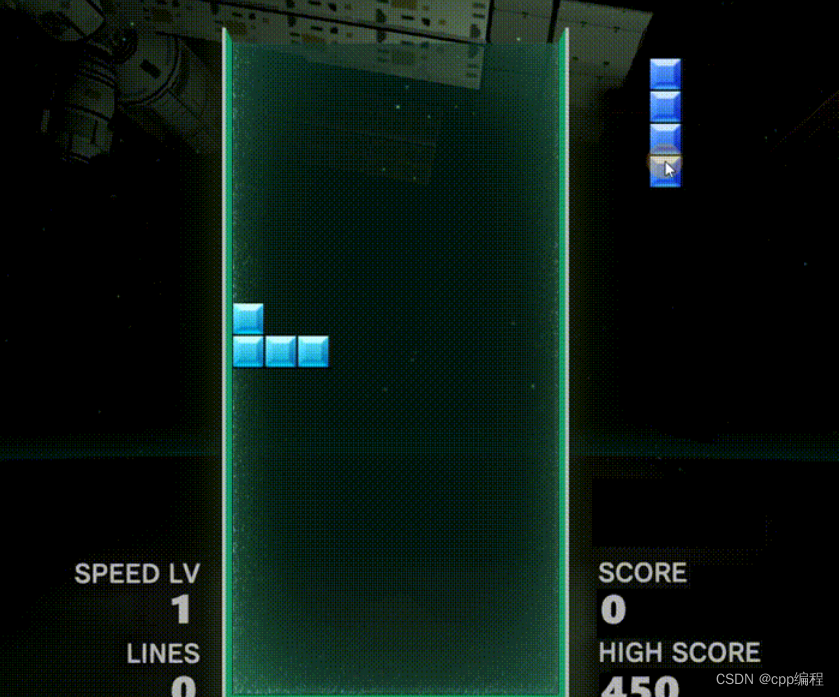
执行效果如下:
11. 完善方块的渲染
11.1 新方块和预告方块的创建
在7.4中已经实现了新方块和预告方块的定义和创建。
11.2 渲染方块
在Block类中添加接口getImages, 以获取各种方块的图形纹理。
//Block.h class Block { public: static IMAGE getImages(); ...... }添加getImages的实现:
讯享网//Block.cpp IMAGE Block::getImages() { return imgs; }
渲染俄罗斯方块:
void Tetris::updateWindow() { BeginBatchDraw(); putimage(0, 0, &imgBg); IMAGE imgs = Block::getImages(); for (int i = 0; i < rows; i++) { for (int j = 0; j < cols; j++) { if (map[i][j] == 0) continue; int x = j * blockSize + leftMargin; int y = i * blockSize + topMargin; putimage(x, y, imgs[map[i][j] - 1]); } } curBlock->draw(leftMargin, topMargin); nextBlock->draw(689, 150); //绘制预告方块 EndBatchDraw(); }
12. 俄罗斯方块的降落
在Tetris类中添加数据成员,用来备份当前正在降落的俄罗斯方块,以便让俄罗斯方块进入非法位置后进行还原。
讯享网Block bakBlock;
实现俄罗斯方块的降落操作:
void Tetris::drop() { bakBlock = *curBlock; curBlock->drop(); if (!curBlock->blockInMap(map)) { bakBlock.solidify(map); delete curBlock; //curBlock = new Block; curBlock = nextBlock; nextBlock = new Block; } delay = SPEED_NORMAL; //每下将一次,就把降落速度还原成普通速度 }补充实现Block的赋值构造函数:
讯享网Block& Block::operator=(const Block& other) { if (this == &other) return *this; this->blockType = other.blockType; for (int i = 0; i < 4; i++) { this->smallBlocks[i] = other.smallBlocks[i]; } return *this; }
补充实现Block的固化功能:
void Block::solidify(vector<vector<int>>& map) { for (int i = 0; i < 4; i++) { // 设置标记,“固化”对应位置 map[smallBlocks[i].row][smallBlocks[i].col] = blockType; } }测试效果:
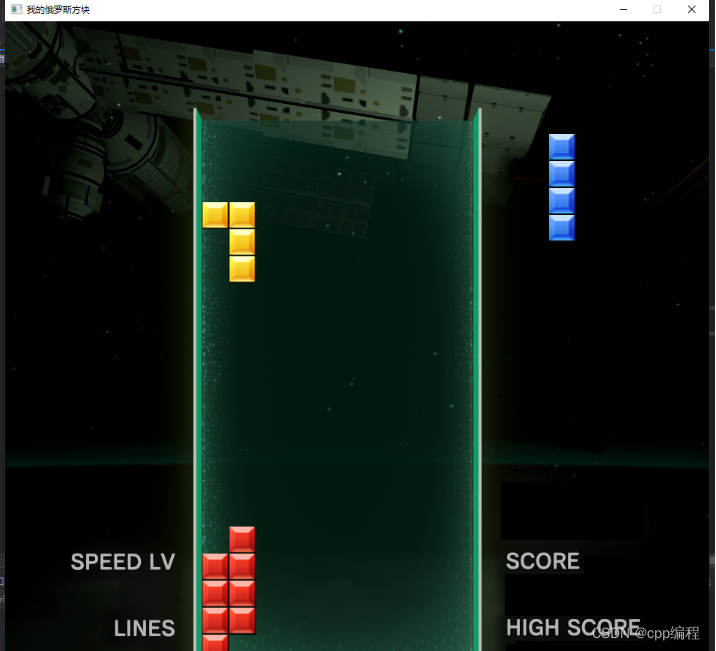
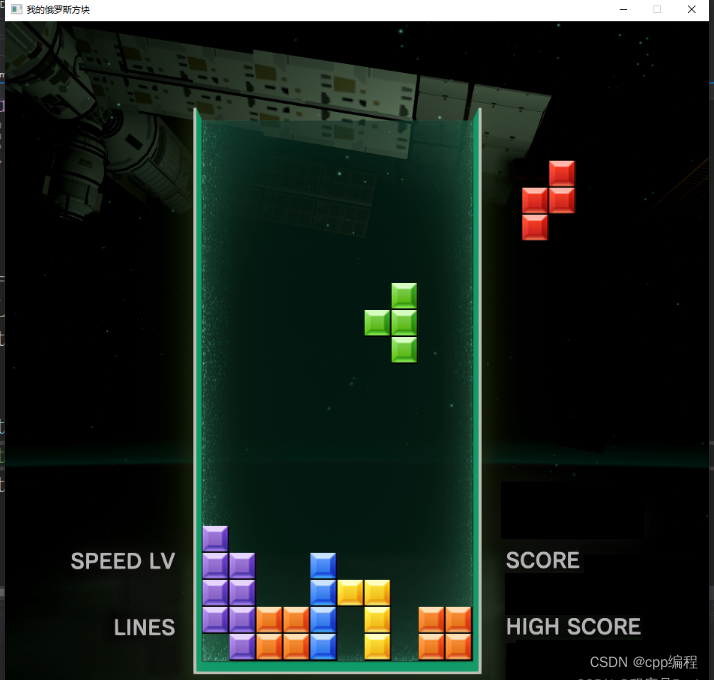
13. 实现俄罗斯方块的左右移动
在之前的按键事件处理中,实现左右移动:
讯享网void Tetris::keyEvent() { int dx = 0; bool rotateFlag = false; unsigned char ch = 0; while (_kbhit()) { unsigned char ch = _getch(); if (ch == 224) { ch = _getch(); switch (ch) { case 72: rotateFlag = true; break; case 80: delay = SPEED_QUICK; //快速降落 break; case 75: dx = -1; break; case 77: dx = 1; break; default: break; } } } if (dx != 0) { moveLeftRight(dx); update = true; } if (rotateFlag) { //rotate(); //update = true; } }
添加内部成员函数moveLeftRight:
void Tetris::moveLeftRight(int offset) { bakBlock = *curBlock; curBlock->moveLeftRight(offset); if (!curBlock->blockInMap(map)) { *curBlock = bakBlock; } }实现Block类的moveLeftRight
讯享网void Block::moveLeftRight(int offset) { for (int i = 0; i < 4; i++) { smallBlocks[i].col += offset; } }
测试效果:
14. 实现旋转变形(待更新)
今天的分享就到这里了,大家要好好学C语言/C++哟~
欢迎转行和学习编程的伙伴,利用更多的资料学习成长比自己琢磨更快哦!
对于准备学习C/C++编程的小伙伴,如果你想更好的提升你的编程核心能力(内功)不妨从现在开始!
整理分享(多年学习的源码、项目实战视频、项目笔记,基础入门教程)加下方群获取哦~
C语言C++编程学习交流圈子,:【点击进入】
C语言从入门到精通(C语言入门C语言教程C语言零基础C语言基础C语言学习C
版权声明:本文内容由互联网用户自发贡献,该文观点仅代表作者本人。本站仅提供信息存储空间服务,不拥有所有权,不承担相关法律责任。如发现本站有涉嫌侵权/违法违规的内容,请联系我们,一经查实,本站将立刻删除。
如需转载请保留出处:https://51itzy.com/kjqy/18786.html