
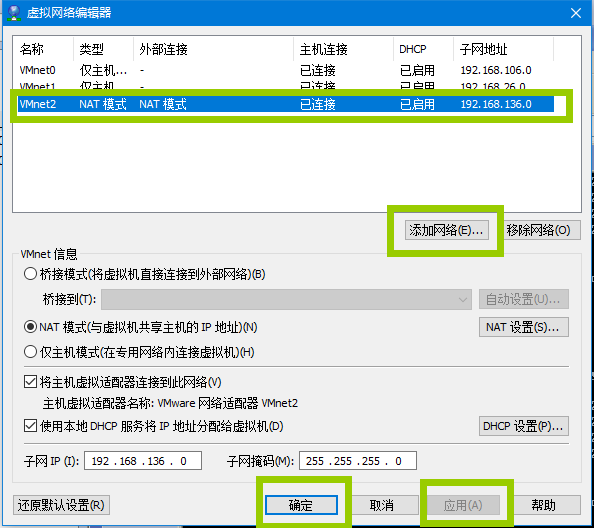
1.首先在VMWare虚拟机主界面-菜单-编辑-虚拟网络编辑器,添加网络(NAT模式)并应用确认:
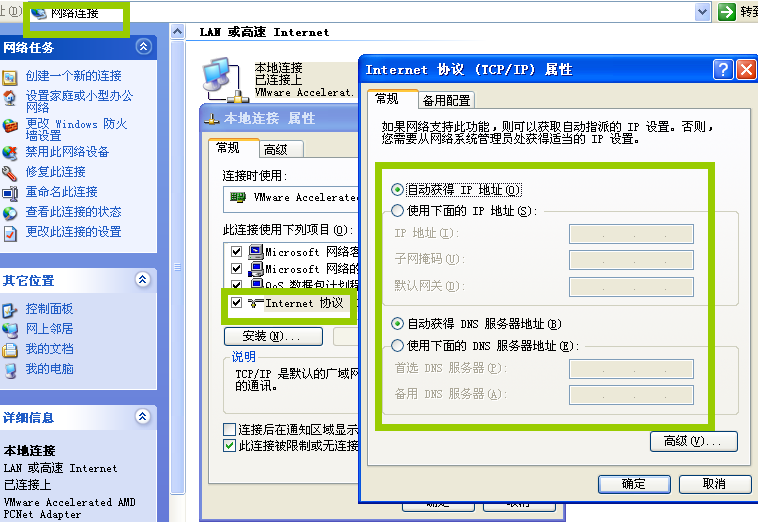
2.在xp虚拟机-控制面板-网络连接-本地连接-属性-internet设置-选择自动获取IP地址、DBS服务器地址:
3.重启本地连接,显示连接上,ping www.baidu.com 得到返回,即网络设置成功:
C:Documents and Settingswinxp>ipconfig
Windows IP Configuration
Ethernet adapter 本地连接:

Connection-specific DNS Suffix . : localdomain
IP Address… … … … : 192.168.136.128
Subnet Mask … … … . . : 255.255.255.0
Default Gateway … … … : 192.168.136.2
C:Documents and Settingswinxp>ping www.baidu.com
Pinging www.a.shifen.com [61.135.169.125] with 32 bytes of data:
Reply from 61.135.169.125: bytes=32 time=15ms TTL=128

Reply from 61.135.169.125: bytes=32 time=16ms TTL=128
Reply from 61.135.169.125: bytes=32 time=16ms TTL=128
Reply from 61.135.169.125: bytes=32 time=16ms TTL=128
Ping statistics for 61.135.169.125:
Packets: Sent = 4, Received = 4, Lost = 0 (0% loss),
Approximate round trip times in milli-seconds:
Minimum = 15ms, Maximum = 16ms, Average = 15ms
版权声明:本文内容由互联网用户自发贡献,该文观点仅代表作者本人。本站仅提供信息存储空间服务,不拥有所有权,不承担相关法律责任。如发现本站有涉嫌侵权/违法违规的内容,请联系我们,一经查实,本站将立刻删除。
如需转载请保留出处:https://51itzy.com/kjqy/159468.html