
前言
1.思路总结:
* 1.每个单号多个文件直接遍历IO临时单号zip包,
* 2.多个单号临时zip包遍历IO到总临时zip包,
* 3.总临时zip包copy到前端下载zip包,
* 4.删除所有临时zip包,下载完成!
2. 参数说明:
* AcasConfig.getProfile() 自定义的路径 D:/home/acas/uploadPath
* totalZip:总临时zip包
* zipList:多个临时订单zip包集合
* zipFilePath:当前订单临时zip
* paths:文件路径数组
目录
1.RestController层
2.Service层
3.批量下载,zip打包效果(示例:Windows版,linux也一样)

1.RestController层
/本方法使用windows,Linux 批量下载,zip打包 实测用于生产环境
* 通过订单id批量下载
* @param ids 货号单集合
* @return
* 思路总结:
* 1.每个单号多个文件直接遍历IO临时单号zip包,
* 2.多个单号临时zip包遍历IO到总临时zip包,
* 3.总临时zip包copy到前端下载zip包,
* 4.删除所有临时zip包,下载完成!
* 参数说明:
* AcasConfig.getProfile() 自定义的路径 D:/home/acas/uploadPath
* totalZip:总临时zip包
* zipList:多个临时订单zip包集合
* zipFilePath:当前订单临时zip
* paths:文件路径数组
*/
@Api(tags = "订单表") @RestController @RequestMapping("/order/order") @Slf4j public class OrderController extends BaseController { @Autowired private IOrderService orderService; @Autowired private OrderMapper orderMapper; /本方法使用windows,Linux 批量下载,zip打包 实测用于生产环境 * * 通过订单id批量下载 * @param ids 货号单集合 * @return * * 思路总结: * 1.每个单号多个文件直接遍历IO临时单号zip包, * 2.多个单号临时zip包遍历IO到总临时zip包, * 3.总临时zip包copy到前端下载zip包, * 4.删除所有临时zip包,下载完成! * * 参数说明: * AcasConfig.getProfile() 自定义的路径 D:/home/acas/uploadPath * totalZip:总临时zip包 * zipList:多个临时订单zip包集合 * zipFilePath:当前订单临时zip * paths:文件路径数组 */ @ApiOperation(value = "通过订单id批量下载", notes = "通过订单id批量下载") @GetMapping(value = "/batchDownload") public AjaxResult batchDownload(@RequestParam String ids, HttpServletResponse response) { //批量下载订单号单如 ids:"MA00002,MA00001,MA00002,MA00003" String[] parameterValues = ids.split(","); //各个文件压缩包临时存放路径集合 List<String> zipList = new ArrayList(); //Linux版创建临时zip,总存放压缩文件 AcasConfig.getProfile()= D:/home/acas/uploadPath/临时zip.zip String totalZip = AcasConfig.getProfile() + "/临时zip.zip"; try { for (String orderNo : parameterValues) { //通过遍历订单号获取所有这一订单所有数据库中的文件路径 resultOriginFile:"/profile/upload/2022/05/23/85e2fbc8-6a3e-4544-8a88-97b9febb1ddd粗蛋白.jpg,/profile/upload/2022/05/23/e52773f6-7fae-4c36-97c5-b9edfbea2dc3粗脂肪.jpg" String resultOriginFile = orderMapper.selectOrder(orderNo).getResultOriginFile(); if (StringUtils.isEmpty(resultOriginFile)) { continue; } //Linux版创建临时文件 String zipFilePath = AcasConfig.getProfile() + "/" + orderNo + "订单zip.zip"; zipList.add(zipFilePath); //文件路径数组 paths :["/profile/upload/2022/05/23/85e2fbc8-6a3e-4544-8a88-97b9febb1ddd粗蛋白.jpg","/profile/upload/2022/05/23/e52773f6-7fae-4c36-97c5-b9edfbea2dc3粗脂肪.jpg"] String[] paths = resultOriginFile.split(","); //调用@Service层方法 orderService.batchDownload(totalZip, zipList, zipFilePath, paths); } //判断有无订单需要下载文件,没有直接相应前台"没有需要下载的文件!",直接结束方法 if (CollectionUtils.isEmpty(zipList)) { return AjaxResult.error("没有需要下载的文件!"); } // 设置Content-Disposition响应头,控制浏览器弹出保存框,若没有此句浏览器会直接打开并显示文件 // 中文名要进行URLEncoder.encode编码,否则客户端能下载但名字会乱码 String orderDocuments = "订单原始记录文件.zip"; String filenames = URLEncoder.encode(orderDocuments, "UTF-8"); response.setHeader("Content-disposition", "attachment;filename=" + filenames + ";" + "filename*=utf-8''" + filenames); //该流不可以手动关闭,手动关闭下载会出问题,下载完成后会自动关闭 ServletOutputStream outputStream = response.getOutputStream(); FileInputStream inputStream = new FileInputStream(totalZip); // 如果是SpringBoot框架,在这个路径 需要org.apache.tomcat.util.http.fileupload.IOUtils产品否则,需要自主引入apache的 commons-io依赖 // copy方法为文件复制,在这里直接实现了下载效果 IOUtils.copy(inputStream, outputStream); inputStream.close(); //下载完成之后,删掉临时zip包 zipList.add(totalZip); for (String zipListPath : zipList) { File fileTempZip = new File(zipListPath); fileTempZip.delete(); } } catch (Exception e) { log.error("下载异常!", e); return AjaxResult.error("下载异常!"); } return AjaxResult.success("下载完成!"); } }讯享网
2.Service层
讯享网@Service public class OrderServiceImpl extends ServiceImpl<OrderMapper, Order> implements IOrderService { @Override public void batchDownload(String totalZip, List<String> zipList, String zipFilePath, String[] paths) throws IOException { //Linux不会自动创建,手动创建临时的.zip文件 File totalFile = new File(totalZip); if (!totalFile.exists()) { totalFile.createNewFile(); } File zipFile = new File(zipFilePath); if (!zipFile.exists()) { zipFile.createNewFile(); } if (paths.length != 0) { //压缩输出流,包装流,将临时文件输出流包装成压缩流,将所有文件输出到这里,打成zip包 ZipOutputStream zipOut = new ZipOutputStream(new FileOutputStream(zipFilePath)); ZipOutputStream totalZipOut = new ZipOutputStream(new FileOutputStream(totalZip)); //循环调用压缩文件方法,将一个一个需要下载的文件打入压缩文件包 for (String path : paths) { //文件完整路径 String pathFile = path.replaceAll("/profile", ""); path = AcasConfig.getProfile() + pathFile; //调用压缩方法在下面定义 fileToZip(path, zipOut); } zipOut.close(); //循环调用压缩文件方法,将一个一个压缩包打入总压缩文件包 for (String zipListPath : zipList) { fileToZip(zipListPath, totalZipOut); } totalZipOut.close(); } } private static void fileToZip(String filePath, ZipOutputStream zipOut) throws IOException { // 需要压缩的文件 File file = new File(filePath); // 获取文件名称,如果有特殊命名需求,可以将参数列表拓展,传fileName String documents = file.getName(); FileInputStream fileInput = new FileInputStream(filePath); // 缓冲 byte[] bufferArea = new byte[1024 * 10]; BufferedInputStream bufferStream = new BufferedInputStream(fileInput, 1024 * 10); // 将当前文件作为一个zip实体写入压缩流,fileName代表压缩文件中的文件名称 zipOut.putNextEntry(new ZipEntry(documents)); int length = 0; // 最常规IO操作,不必紧张 while ((length = bufferStream.read(bufferArea, 0, 1024 * 10)) != -1) { zipOut.write(bufferArea, 0, length); } //关闭流 fileInput.close(); // 需要注意的是缓冲流必须要关闭流,否则输出无效 bufferStream.close(); // 压缩流不必关闭,使用完后再关 } }
3.批量下载,zip打包效果(示例:Windows版,linux也一样)
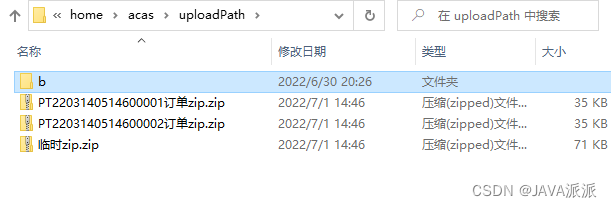
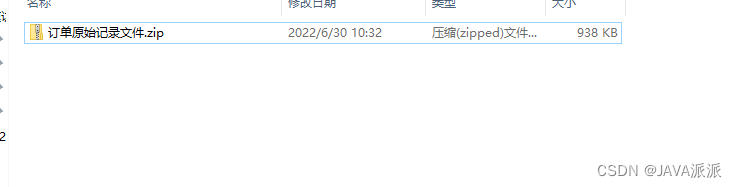
我也是第一次接触批量下载,它本身并不难,都只是一些IO的常规操作,没有弯弯绕绕,只是在实现完整功能的过程中踩到了一些坑,在此记录一下,以便加深印象和帮助他人吧~~
版权声明:本文内容由互联网用户自发贡献,该文观点仅代表作者本人。本站仅提供信息存储空间服务,不拥有所有权,不承担相关法律责任。如发现本站有涉嫌侵权/违法违规的内容,请联系我们,一经查实,本站将立刻删除。
如需转载请保留出处:https://51itzy.com/kjqy/12876.html