
零. 概述
本文章主要讲下蓝牙协议栈HCI EIR的搜索的注册(让别人搜索到我们的EIR)以及主动搜索对方的EIR信息
一. 声明
本专栏文章我们会以连载的方式持续更新,本专栏计划更新内容如下:
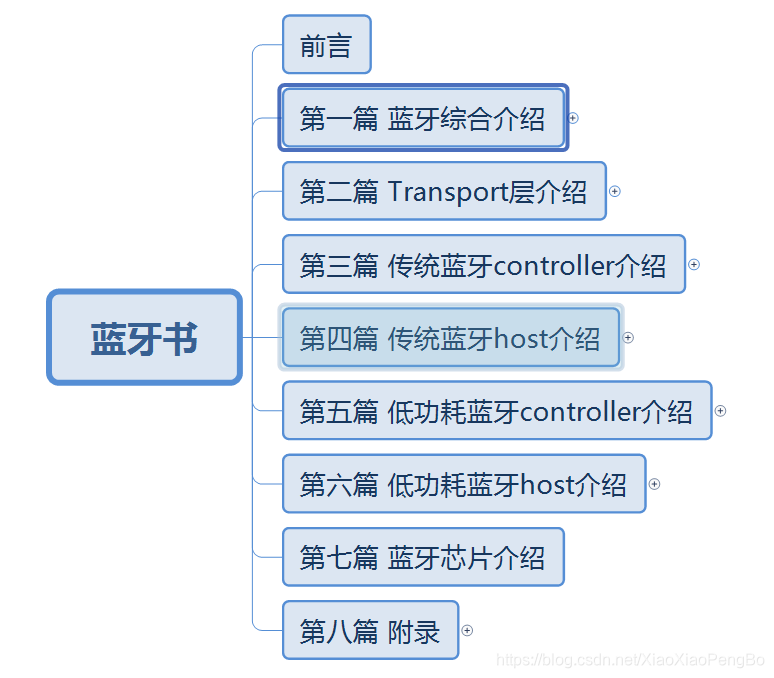
第一篇:蓝牙综合介绍 ,主要介绍蓝牙的一些概念,产生背景,发展轨迹,市面蓝牙介绍,以及蓝牙开发板介绍。
第二篇:Transport层介绍,主要介绍蓝牙协议栈跟蓝牙芯片之前的硬件传输协议,比如基于UART的H4,H5,BCSP,基于USB的H2等
第三篇:传统蓝牙controller介绍,主要介绍传统蓝牙芯片的介绍,包括射频层(RF),基带层(baseband),链路管理层(LMP)等
第四篇:传统蓝牙host介绍,主要介绍传统蓝牙的协议栈,比如HCI,L2CAP,SDP,RFCOMM,HFP,SPP,HID,AVDTP,AVCTP,A2DP,AVRCP,OBEX,PBAP,MAP等等一系列的协议吧。
第五篇:低功耗蓝牙controller介绍,主要介绍低功耗蓝牙芯片,包括物理层(PHY),链路层(LL)
第六篇:低功耗蓝牙host介绍,低功耗蓝牙协议栈的介绍,包括HCI,L2CAP,ATT,GATT,SM等
第七篇:蓝牙芯片介绍,主要介绍一些蓝牙芯片的初始化流程,基于HCI vendor command的扩展
第八篇:附录,主要介绍以上常用名词的介绍以及一些特殊流程的介绍等。
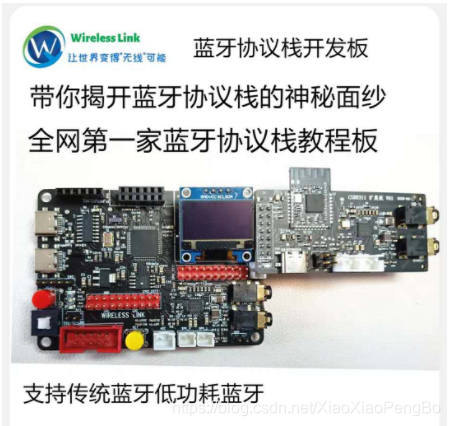
另外,开发板如下所示,对于想学习蓝牙协议栈的最好人手一套。以便更好的学习蓝牙协议栈,相信我,学完这一套视频你将拥有修改任何协议栈的能力(比如Linux下的bluez,Android下的bluedroid)。
-------------------------------------------------------------------------------------------------------------------------
CSDN学院链接(进入选择你想要学习的课程):https://edu.csdn.net/lecturer/5352?spm=1002.2001.3001.4144
蓝牙交流扣扣群:
Github代码:https://github.com/sj/bluetooth_stack
入手开发板:https://item.taobao.com/item.htm?spm=a1z10.1-c-s.w4004-22329603896.18.5aeb41f973iStr&id=622836061708
蓝牙学习目录:https://blog.csdn.net/XiaoXiaoPengBo/article/details/
--------------------------------------------------------------------------------------------------------------------------
二. EIR注册以及extern inquiry扫描对方的EIR
1. EIR概念介绍
在了解EIR之前,我们先来说下搜索,在之前我们也说过搜索分为3中类型,标准/RSSI/EIR
那区别在于标准搜索只会附带以下信息

那RSSI就是在标准搜索的基础上会附带RSSI,那么EIR(EXTENDED INQUIRY RESPONSE)就是在这些基础上会附带额外的一些信息,比如remote name,对方支持的UUID等(前提是对方注册了EIR)。

EIR信息不管是否有效数据是多少byte,最终都要240byte
EIR Data Structure的格式为:1Byte length+nByte type(一般是1byte)+n byte EIR raw data
其中length包括Type + raw data
EIR可以包含的信息有如下(并不是所有的都会用在EIR中,以下是SIG的data type):
| Data Type Value | Data Type Name | Reference for Definition |
|---|---|---|
| 0x01 | «Flags» | Bluetooth Core Specification:Vol. 3, Part C, section 8.1.3 (v2.1 + EDR, 3.0 + HS and 4.0)Vol. 3, Part C, sections 11.1.3 and 18.1 (v4.0)Core Specification Supplement, Part A, section 1.3 |
| 0x02 | «Incomplete List of 16-bit Service Class UUIDs» | Bluetooth Core Specification:Vol. 3, Part C, section 8.1.1 (v2.1 + EDR, 3.0 + HS and 4.0)Vol. 3, Part C, sections 11.1.1 and 18.2 (v4.0)Core Specification Supplement, Part A, section 1.1 |
| 0x03 | «Complete List of 16-bit Service Class UUIDs» | Bluetooth Core Specification:Vol. 3, Part C, section 8.1.1 (v2.1 + EDR, 3.0 + HS and 4.0)Vol. 3, Part C, sections 11.1.1 and 18.2 (v4.0)Core Specification Supplement, Part A, section 1.1 |
| 0x04 | «Incomplete List of 32-bit Service Class UUIDs» | Bluetooth Core Specification:Vol. 3, Part C, section 8.1.1 (v2.1 + EDR, 3.0 + HS and 4.0)Vol. 3, Part C, section 18.2 (v4.0)Core Specification Supplement, Part A, section 1.1 |
| 0x05 | «Complete List of 32-bit Service Class UUIDs» | Bluetooth Core Specification:Vol. 3, Part C, section 8.1.1 (v2.1 + EDR, 3.0 + HS and 4.0)Vol. 3, Part C, section 18.2 (v4.0)Core Specification Supplement, Part A, section 1.1 |
| 0x06 | «Incomplete List of 128-bit Service Class UUIDs» | Bluetooth Core Specification:Vol. 3, Part C, section 8.1.1 (v2.1 + EDR, 3.0 + HS and 4.0)Vol. 3, Part C, sections 11.1.1 and 18.2 (v4.0)Core Specification Supplement, Part A, section 1.1 |
| 0x07 | «Complete List of 128-bit Service Class UUIDs» | Bluetooth Core Specification:Vol. 3, Part C, section 8.1.1 (v2.1 + EDR, 3.0 + HS and 4.0)Vol. 3, Part C, sections 11.1.1 and 18.2 (v4.0)Core Specification Supplement, Part A, section 1.1 |
| 0x08 | «Shortened Local Name» | Bluetooth Core Specification:Vol. 3, Part C, section 8.1.2 (v2.1 + EDR, 3.0 + HS and 4.0)Vol. 3, Part C, sections 11.1.2 and 18.4 (v4.0)Core Specification Supplement, Part A, section 1.2 |
| 0x09 | «Complete Local Name» | Bluetooth Core Specification:Vol. 3, Part C, section 8.1.2 (v2.1 + EDR, 3.0 + HS and 4.0)Vol. 3, Part C, sections 11.1.2 and 18.4 (v4.0)Core Specification Supplement, Part A, section 1.2 |
| 0x0A | «Tx Power Level» | Bluetooth Core Specification:Vol. 3, Part C, section 8.1.5 (v2.1 + EDR, 3.0 + HS and 4.0)Vol. 3, Part C, sections 11.1.5 and 18.3 (v4.0)Core Specification Supplement, Part A, section 1.5 |
| 0x0D | «Class of Device» | Bluetooth Core Specification:Vol. 3, Part C, section 8.1.6 (v2.1 + EDR, 3.0 + HS and 4.0)Vol. 3, Part C, sections 11.1.5 and 18.5 (v4.0)Core Specification Supplement, Part A, section 1.6 |
| 0x0E | «Simple Pairing Hash C» | Bluetooth Core Specification:Vol. 3, Part C, section 8.1.6 (v2.1 + EDR, 3.0 + HS and 4.0)Vol. 3, Part C, sections 11.1.5 and 18.5 (v4.0) |
| 0x0E | «Simple Pairing Hash C-192» | Core Specification Supplement, Part A, section 1.6 |
| 0x0F | «Simple Pairing Randomizer R» | Bluetooth Core Specification:Vol. 3, Part C, section 8.1.6 (v2.1 + EDR, 3.0 + HS and 4.0)Vol. 3, Part C, sections 11.1.5 and 18.5 (v4.0) |
| 0x0F | «Simple Pairing Randomizer R-192» | Core Specification Supplement, Part A, section 1.6 |
| 0x10 | «Device ID» | Device ID Profile v1.3 or later |
| 0x10 | «Security Manager TK Value» | Bluetooth Core Specification:Vol. 3, Part C, sections 11.1.7 and 18.6 (v4.0)Core Specification Supplement, Part A, section 1.8 |
| 0x11 | «Security Manager Out of Band Flags» | Bluetooth Core Specification:Vol. 3, Part C, sections 11.1.6 and 18.7 (v4.0)Core Specification Supplement, Part A, section 1.7 |
| 0x12 | «Slave Connection Interval Range» | Bluetooth Core Specification:Vol. 3, Part C, sections 11.1.8 and 18.8 (v4.0)Core Specification Supplement, Part A, section 1.9 |
| 0x14 | «List of 16-bit Service Solicitation UUIDs» | Bluetooth Core Specification:Vol. 3, Part C, sections 11.1.9 and 18.9 (v4.0)Core Specification Supplement, Part A, section 1.10 |
| 0x15 | «List of 128-bit Service Solicitation UUIDs» | Bluetooth Core Specification:Vol. 3, Part C, sections 11.1.9 and 18.9 (v4.0)Core Specification Supplement, Part A, section 1.10 |
| 0x16 | «Service Data» | Bluetooth Core Specification:Vol. 3, Part C, sections 11.1.10 and 18.10 (v4.0) |
| 0x16 | «Service Data - 16-bit UUID» | Core Specification Supplement, Part A, section 1.11 |
| 0x17 | «Public Target Address» | Bluetooth Core Specification:Core Specification Supplement, Part A, section 1.13 |
| 0x18 | «Random Target Address» | Bluetooth Core Specification:Core Specification Supplement, Part A, section 1.14 |
| 0x19 | «Appearance» | Bluetooth Core Specification:Core Specification Supplement, Part A, section 1.12 |
| 0x1A | «Advertising Interval» | Bluetooth Core Specification:Core Specification Supplement, Part A, section 1.15 |
| 0x1B | «LE Bluetooth Device Address» | Core Specification Supplement, Part A, section 1.16 |
| 0x1C | «LE Role» | Core Specification Supplement, Part A, section 1.17 |
| 0x1D | «Simple Pairing Hash C-256» | Core Specification Supplement, Part A, section 1.6 |
| 0x1E | «Simple Pairing Randomizer R-256» | Core Specification Supplement, Part A, section 1.6 |
| 0x1F | «List of 32-bit Service Solicitation UUIDs» | Core Specification Supplement, Part A, section 1.10 |
| 0x20 | «Service Data - 32-bit UUID» | Core Specification Supplement, Part A, section 1.11 |
| 0x21 | «Service Data - 128-bit UUID» | Core Specification Supplement, Part A, section 1.11 |
| 0x22 | «LE Secure Connections Confirmation Value» | Core Specification Supplement Part A, Section 1.6 |
| 0x23 | «LE Secure Connections Random Value» | Core Specification Supplement Part A, Section 1.6 |
| 0x24 | «URI» | Bluetooth Core Specification:Core Specification Supplement, Part A, section 1.18 |
| 0x25 | «Indoor Positioning» | Indoor Positioning Service v1.0 or later |
| 0x26 | «Transport Discovery Data» | Transport Discovery Service v1.0 or later |
| 0x27 | «LE Supported Features» | Core Specification Supplement, Part A, Section 1.19 |
| 0x28 | «Channel Map Update Indication» | Core Specification Supplement, Part A, Section 1.20 |
| 0x29 | «PB-ADV» | Mesh Profile Specification Section 5.2.1 |
| 0x2A | «Mesh Message» | Mesh Profile Specification Section 3.3.1 |
| 0x2B | «Mesh Beacon» | Mesh Profile Specification Section 3.9 |
| 0x2C | «BIGInfo» | |
| 0x2D | «Broadcast_Code» | |
| 0x3D | «3D Information Data» | 3D Synchronization Profile, v1.0 or later |
| 0xFF | «Manufacturer Specific Data» | Bluetooth Core Specification:Vol. 3, Part C, section 8.1.4 (v2.1 + EDR, 3.0 + HS and 4.0)Vol. 3, Part C, sections 11.1.4 and 18.11 (v4.0)Core Specification Supplement, Part A, section 1.4 |
以上介绍都在文档CSS_V9中,想详细看的可以看下
2. EIR注册,方便被对方搜索到
假设我们仅仅支持HFP HF的UUID,那么我们仅仅注册HFP的UUID,蓝牙本地名称
1)EIR数据组包(我们只开了PROFILE_HFP_ENABLE的宏)
static err_t bt_ass_eir_data() { uint8_t data_pos =0; uint8_t len = 0; #if 1 /* local name */ len = strlen(BT_LOCAL_NAME); eir_data[data_pos++] = len + 1; eir_data[data_pos++] = BT_DT_COMPLETE_LOCAL_NAME; memcpy(eir_data+data_pos,BT_LOCAL_NAME,strlen(BT_LOCAL_NAME)); data_pos += strlen(BT_LOCAL_NAME); #endif /* 16 bit UUID */ len = 1; #if PROFILE_DID_ENABLE len += 2; #endif #if PROFILE_HFP_ENABLE len += 2; #endif #if PROFILE_SPP_ENABLE len += 2; #endif #if PROFILE_A2DP_ENABLE len += 2; #endif #if PROFILE_AVRCP_ENABLE len += 2; #endif eir_data[data_pos++] = len; eir_data[data_pos++] = BT_DT_COMPLETE_LIST_OF_16_BIT_SERVICE_CLASS_UUIDS; #if PROFILE_DID_ENABLE eir_data[data_pos++] = BT_SERVICE_CLASS_PNP_INFORMATION & 0xff; eir_data[data_pos++] = (BT_SERVICE_CLASS_PNP_INFORMATION>>8) & 0xff; #endif #if PROFILE_HFP_ENABLE eir_data[data_pos++] = BT_SERVICE_CLASS_HANDSFREE & 0xff; eir_data[data_pos++] = (BT_SERVICE_CLASS_HANDSFREE>>8) & 0xff; #endif #if PROFILE_SPP_ENABLE eir_data[data_pos++] = BT_SERVICE_CLASS_SERIAL_PORT & 0xff; eir_data[data_pos++] = (BT_SERVICE_CLASS_SERIAL_PORT>>8) & 0xff; #endif #if PROFILE_A2DP_ENABLE eir_data[data_pos++] = BT_SERVICE_CLASS_AUDIO_SINK & 0xff; eir_data[data_pos++] = (BT_SERVICE_CLASS_AUDIO_SINK>>8) & 0xff; #endif #if PROFILE_AVRCP_ENABLE eir_data[data_pos++] = BT_SERVICE_CLASS_AV_REMOTE_CONTROL & 0xff; eir_data[data_pos++] = (BT_SERVICE_CLASS_AV_REMOTE_CONTROL>>8) & 0xff; #endif /* Device ID */ #if PROFILE_DID_ENABLE eir_data[data_pos++] = 9; eir_data[data_pos++] = BT_DT_DEVICE_ID; eir_data[data_pos++] = DID_VENDOR_ID_SOURCE_VALUE & 0xff; eir_data[data_pos++] = (DID_VENDOR_ID_SOURCE_VALUE>>8) & 0xff; eir_data[data_pos++] = DID_VENDOR_ID_VALUE & 0xff; eir_data[data_pos++] = (DID_VENDOR_ID_VALUE>>8) & 0xff; eir_data[data_pos++] = DID_PRODUCT_ID_VALUE & 0xff; eir_data[data_pos++] = (DID_PRODUCT_ID_VALUE>>8) & 0xff; eir_data[data_pos++] = DID_VERSION_ID_VALUE & 0xff; eir_data[data_pos++] = (DID_VERSION_ID_VALUE>>8) & 0xff; #endif return 0; }讯享网
2) HCI写EIR

讯享网err_t bt_stack_worked(void *arg) { printf("bt_stack_worked\r\n"); bt_ass_eir_data(); hci_write_eir(eir_data); return 0; }
其中hci_write_eir的函数实现如下:
err_t hci_write_eir(uint8_t *eir_data) { struct bt_pbuf_t *p; if((p = bt_pbuf_alloc(BT_TRANSPORT_TYPE, HCI_WRITE_EIR_PLEN, BT_PBUF_RAM)) == NULL) { BT_HCI_TRACE_ERROR("ERROR:file[%s],function[%s],line[%d] bt_pbuf_alloc fail\n",__FILE__,__FUNCTION__,__LINE__); return BT_ERR_MEM; } /* Assembling command packet */ p = hci_cmd_ass(p, HCI_WRITE_EIR, HCI_HOST_C_N_BB, HCI_WRITE_EIR_PLEN); /* Assembling cmd prameters */ ((uint8_t *)p->payload)[3] = 0x01; /* FEC is required */ memset(((uint8_t *)p->payload)+4,0,240); memcpy(((uint8_t *)p->payload)+4,eir_data,240); phybusif_output(p, p->tot_len,PHYBUSIF_PACKET_TYPE_CMD); bt_pbuf_free(p); return BT_ERR_OK; }我们来看下转的btsnoop架设看一下我们用HCI写EIR的效果
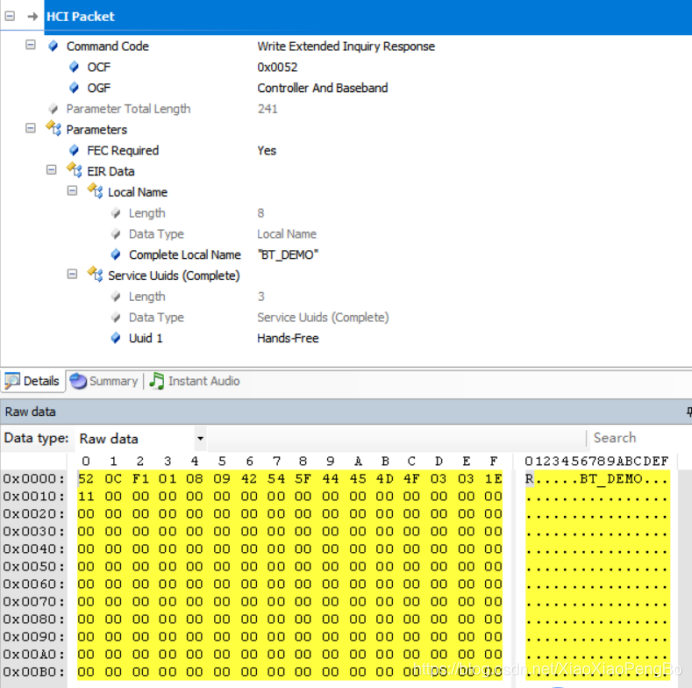
可以看到我们设置上了Local Name以及HFP的UUID
我们来抓一个air log看下EIR数据
可以看到EIR data是在baseband(基带层)层抓到的

3. extern inquiry,搜索到对方的EIR信息
要实现Extern inquiry扫描,那么需要做三个步骤:
步骤 1) 在蓝牙初始化的时候write inquiry mode
我们首先来介绍下这个HCI command

参数:Inquiry mode

我们来看下代码
讯享网err_t hci_write_inquiry_mode(uint8_t inquiry_mode) { struct bt_pbuf_t *p; if((p = bt_pbuf_alloc(BT_TRANSPORT_TYPE, HCI_W_INQUIRY_MODE_LEN, BT_PBUF_RAM)) == NULL) { BT_HCI_TRACE_ERROR("ERROR:file[%s],function[%s],line[%d] bt_pbuf_alloc fail\n",__FILE__,__FUNCTION__,__LINE__); return BT_ERR_MEM; } /* Assembling command packet */ p = hci_cmd_ass(p, HCI_WRITE_INQUIRY_MODE, HCI_HOST_C_N_BB, HCI_W_INQUIRY_MODE_LEN); ((uint8_t *)p->payload)[3] = inquiry_mode; phybusif_output(p, p->tot_len,PHYBUSIF_PACKET_TYPE_CMD); bt_pbuf_free(p); return BT_ERR_OK; }
其中入参我们定义有以下类型,而我们选择INQUIRY_MODE_EIR
#define INQUIRY_MODE_STANDARD 0 #define INQUIRY_MODE_RSSI 1 #define INQUIRY_MODE_EIR 2步骤2)执行inquiry command
此步骤跟前面搜索的一样,不做介绍,我们直接来看下第三个步骤
步骤3)接收inquiry with EIR data
我们首先来看下我们的代码
讯享网case HCI_INQUIRY_RESULT: case HCI_EXT_INQ_RESULT: for(i=0; i<((uint8_t *)p->payload)[0]; i++) { resp_offset = i*14; BT_HCI_TRACE_DEBUG("hci_event_input: Inquiry result %d\nBD_ADDR: 0x",i); for(i = 0; i < BD_ADDR_LEN; i++) { BT_HCI_TRACE_DEBUG("%x",((uint8_t *)p->payload)[1+resp_offset+i]); } BT_HCI_TRACE_DEBUG("\n"); BT_HCI_TRACE_DEBUG("Page_Scan_Rep_Mode: 0x%x\n",((uint8_t *)p->payload)[7+resp_offset]); BT_HCI_TRACE_DEBUG("Class_of_Dev: 0x%x 0x%x 0x%x\n",((uint8_t *)p->payload)[10+resp_offset], ((uint8_t *)p->payload)[11+resp_offset], ((uint8_t *)p->payload)[12+resp_offset]); BT_HCI_TRACE_DEBUG("Clock_Offset: 0x%x%x\n",((uint8_t *)p->payload)[13+resp_offset], ((uint8_t *)p->payload)[14+resp_offset]); bdaddr = (void *)(((uint8_t *)p->payload)+(1+resp_offset)); if((inqres = bt_memp_malloc(MEMP_HCI_INQ)) != NULL) { bd_addr_set(&(inqres->bdaddr), bdaddr); inqres->psrm = ((uint8_t *)p->payload)[7+resp_offset]; inqres->psm = ((uint8_t *)p->payload)[9+resp_offset]; memcpy(inqres->cod, ((uint8_t *)p->payload)+10+resp_offset, 3); inqres->co = *((uint16_t *)(((uint8_t *)p->payload)+13+resp_offset)); if(evhdr->code == HCI_EXT_INQ_RESULT) { uint8_t temp_rssi = ((uint8_t *)p->payload)[14+resp_offset]; uint8_t *eir_data = ((uint8_t *)p->payload) + 15; uint8_t *temp_eir_data = eir_data; if(temp_rssi && 0x80) /* negative rssi */ inqres->rssi = ((int8_t)(temp_rssi & (~0x80)) -128)&0xff; else inqres->rssi = temp_rssi; while(temp_eir_data[0] != 0) { uint8_t eir_element_len = temp_eir_data[0]; uint8_t eir_element_type = temp_eir_data[1]; if(eir_element_type == BT_DT_COMPLETE_LOCAL_NAME) { memset(inqres->remote_name,0,HCI_REMOTE_NAME_LEN); memcpy(inqres->remote_name,temp_eir_data+2,eir_element_len-1); break; } temp_eir_data += eir_element_len + 1; } } HCI_REG(&(pcb->ires), inqres); HCI_EVENT_INQ_RESULT(pcb,inqres,ret); } else { BT_HCI_TRACE_ERROR("ERROR:file[%s],function[%s],line[%d] bt_memp_malloc fail\n",__FILE__,__FUNCTION__,__LINE__); } } break;
可以看到虽然普通的inquiry result跟extern inquiry result是不一样的,我们的代码还是放在一起解析。
我们来看下btsnoop,以一个K2的名称的蓝牙音响为例。

我们来看下air log

EIR的虽然方便使用,不需要普通inquiry + HCI get remote name去配合获取到remote的名字,但是在使用过程中要注意几点:
1)Extern inquiry的结果会反复上来(有重复),需要协议栈过滤
可以看到同样的蓝牙地址,同样的蓝牙名称,但是RSSI不同,在同一次搜索中会上来几次


2)Extern inquiry的搜索可能有的时候不带EIR数据
可以看到同样的蓝牙地址,有的时候并没有上来EIR的data


版权声明:本文内容由互联网用户自发贡献,该文观点仅代表作者本人。本站仅提供信息存储空间服务,不拥有所有权,不承担相关法律责任。如发现本站有涉嫌侵权/违法违规的内容,请联系我们,一经查实,本站将立刻删除。
如需转载请保留出处:https://51itzy.com/kjqy/12252.html