
Vue电商项目—订单管理—订单列表模块-10
1.1 订单管理概述
订单管理模块用于维护商品的订单信息,
可以查看订单的商品信息、物流信息,
并且可以根据实际的运营情况对订单做适当的调整。

1.2 订单列表
1. 订单列表展示
 // 订单请求参数 queryInfo: {
    query: '', pagenum: 1, pagesize: 10 }
讯享网
讯享网 // 获取订单列表数据 async getOrderList() {
    // 发送请求 const {
   data: res} = await this.$http.get('orders', {
   params: this.queryInfo}); if(res.meta.status !== 200){
    return this.$message.error('获取订单数据失败!'); } this.$message.success('获取订单数据成功!'); this.orderList = res.data.goods; this.total = res.data.total; console.log(res); }
2. 查看订单地址信息
1. 省市区三级联动效果
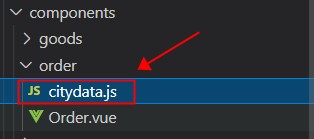
// 导入省市区联动数据 import cityData from './citydata.js' 讯享网 // 省市区联动数据 cityData
<el-form-item label="省市区/县" prop='address1'> <!-- 级联选择器 --> <el-cascader :options="cityData" v-model="editAddressForm.address1" > </el-cascader> </el-form-item> 
3. 查看订单物流信息
注意:由于给定的测试接口不能使用了,就模拟了个 Data数据

讯享网// 物流数据 logisticsList: [ {
    "time": "2018-05-10 09:39:00", "ftime": "2018-05-10 09:39:00", "context": "已签收,感谢使用顺丰,期待再次为您服务", "location": "" }, {
    "time": "2018-05-10 08:23:00", "ftime": "2018-05-10 08:23:00", "context": "[北京市]北京海淀育新小区营业点派件员 顺丰速运 95338正在为您派件", "location": "" }, {
    "time": "2018-05-10 07:32:00", "ftime": "2018-05-10 07:32:00", "context": "快件到达 [北京海淀育新小区营业点]", "location": "" }, {
    "time": "2018-05-10 02:03:00", "ftime": "2018-05-10 02:03:00", "context": "快件在[北京顺义集散中心]已装车,准备发往 [北京海淀育新小区营业点]", "location": "" }, {
    "time": "2018-05-09 23:05:00", "ftime": "2018-05-09 23:05:00", "context": "快件到达 [北京顺义集散中心]", "location": "" }, {
    "time": "2018-05-09 21:21:00", "ftime": "2018-05-09 21:21:00", "context": "快件在[北京宝胜营业点]已装车,准备发往 [北京顺义集散中心]", "location": "" }, {
    "time": "2018-05-09 13:07:00", "ftime": "2018-05-09 13:07:00", "context": "顺丰速运 已收取快件", "location": "" }, {
    "time": "2018-05-09 12:25:03", "ftime": "2018-05-09 12:25:03", "context": "卖家发货", "location": "" }, {
    "time": "2018-05-09 12:22:24", "ftime": "2018-05-09 12:22:24", "context": "您的订单将由HLA(北京海淀区清河中街店)门店安排发货。", "location": "" }, {
    "time": "2018-05-08 21:36:04", "ftime": "2018-05-08 21:36:04", "context": "商品已经下单", "location": "" } ]
Timeline 时间线组件,在 2.6.0,三月份才有


而目前安装的 vue-cli-plugin-element 插件,最后一次更新在 二月份
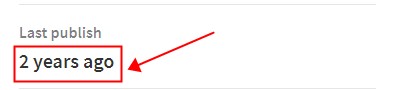
引入文件
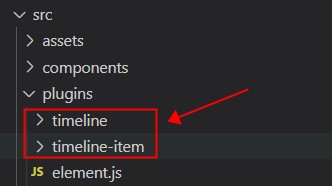
在 Element.js,注册下就好了
当前使用的版本是 2.6.3
 <!-- 物流进度对话框 --> <el-dialog title="物流进度" :visible.sync="ProgresDialogVisible" width="50%" > <!-- 物流信息展示区域 --> <el-timeline :reverse="reverse"> <!-- timestamp 时间戳 string --> <el-timeline-item v-for="(activity, index) in logisticsList" :key="index" :timestamp="activity.time"> {
   {
activity.context}} </el-timeline-item> </el-timeline> </el-dialog> 
该模块完整代码
讯享网<template> <div> <!-- 面包屑导航区域 --> <el-breadcrumb separator-class="el-icon-arrow-right"> <el-breadcrumb-item :to="{ path: '/home' }">首页</el-breadcrumb-item> <el-breadcrumb-item>订单管理</el-breadcrumb-item> <el-breadcrumb-item>订单列表</el-breadcrumb-item> </el-breadcrumb> <!-- 卡片视图区域 --> <el-card> <!-- 搜索区域 --> <el-row> <el-col :span="8"> <el-input placeholder="请输入内容" v-model="queryInfo.query" clearable @clear='getOrderList'> <el-button slot="append" icon="el-icon-search" @click="getOrderList"></el-button> </el-input> </el-col> </el-row> <!-- 表格显示区域 --> <el-table :data="orderList" border stripe> <el-table-column type='index' label='#'></el-table-column> <el-table-column label='订单编号' prop='order_number'></el-table-column> <el-table-column label='订单价格' prop='order_price'></el-table-column> <el-table-column label='是否付款' prop='pay_status'> <!-- 作用域插槽 --> <template slot-scope="scope"> <el-tag type="success" v-if="scope.row.pay_status === '1' ">已付款</el-tag> <el-tag type="danger" v-else>未付款</el-tag> </template> </el-table-column> <el-table-column label='是否发货' prop='is_send'></el-table-column> <el-table-column label='下单时间' prop='create_time'> <!-- 作用域插槽 --> <template slot-scope="scope">{
   {
   scope.row.create_time | dateFormat}}</template> </el-table-column> <el-table-column label='操作'> <!-- 作用域插槽 --> <template> <el-button type="primary" icon="el-icon-edit" size="mini" @click="showDialogVisible"></el-button> <el-button type="success" icon="el-icon-location" size="mini" @click="showProgressBox"></el-button> </template> </el-table-column> </el-table> <!-- 分页区域 --> <el-pagination @size-change="handleSizeChange" @current-change="handleCurrentChange" :current-page="queryInfo.pagenum" :page-sizes="[3, 5, 10, 15]" :page-size="queryInfo.pagesize" layout="total, sizes, prev, pager, next, jumper" :total="total"> </el-pagination> <!-- 修改地址对话框 --> <el-dialog title="修改地址" :visible.sync="editDialogVisible" width="50%" @close='editDialogClosed'> <!-- 表单区域 --> <el-form :model="editAddressForm" :rules="editAddressRules" ref="editAddressRef" label-width="100px" class="demo-ruleForm" > <el-form-item label="省市区/县" prop='address1'> <!-- 级联选择器 --> <el-cascader :options="cityData" v-model="editAddressForm.address1" > </el-cascader> </el-form-item> <el-form-item label="详细地址" prop='address2'> <el-input v-model="editAddressForm.address2"></el-input> </el-form-item> </el-form> <!-- 底部区域 --> <span slot="footer" class="dialog-footer"> <el-button @click="editDialogVisible = false">取 消</el-button> <el-button type="primary" @click="editDialogVisible = false">确 定</el-button> </span> </el-dialog> <!-- 物流进度对话框 --> <el-dialog title="物流进度" :visible.sync="ProgresDialogVisible" width="50%" > <!-- 物流信息展示区域 --> <el-timeline :reverse="reverse"> <!-- timestamp 时间戳 string --> <el-timeline-item v-for="(activity, index) in logisticsList" :key="index" :timestamp="activity.time"> {
   {
   activity.context}} </el-timeline-item> </el-timeline> </el-dialog> </el-card> </div> </template> <script> // 导入省市区联动数据 import cityData from './citydata.js' export default {
    data() {
    return {
    // 订单请求参数 queryInfo: {
    query: '', pagenum: 1, pagesize: 10 }, // 存储订单列表数据 orderList: [], // 总数据条数 total: 0, // 控制修改地址对话框的显示与隐藏 editDialogVisible: false, // 修改地址表单对象 editAddressForm: {
    address1: [], address2: '' }, // 修改地址表单对象验证规则 editAddressRules: {
    address1: [ {
   required: true, message: '请选择省市区/县', trigger: 'blur' } ], address2: [ {
   required: true, message: '请选择详细地址', trigger: 'blur' } ] }, // 省市区联动数据 cityData, // 控制物流进度对话框显示与隐藏 ProgresDialogVisible: false, // 物流数据 logisticsList: [ {
    "time": "2018-05-10 09:39:00", "ftime": "2018-05-10 09:39:00", "context": "已签收,感谢使用顺丰,期待再次为您服务", "location": "" }, {
    "time": "2018-05-10 08:23:00", "ftime": "2018-05-10 08:23:00", "context": "[北京市]北京海淀育新小区营业点派件员 顺丰速运 95338正在为您派件", "location": "" }, {
    "time": "2018-05-10 07:32:00", "ftime": "2018-05-10 07:32:00", "context": "快件到达 [北京海淀育新小区营业点]", "location": "" }, {
    "time": "2018-05-10 02:03:00", "ftime": "2018-05-10 02:03:00", "context": "快件在[北京顺义集散中心]已装车,准备发往 [北京海淀育新小区营业点]", "location": "" }, {
    "time": "2018-05-09 23:05:00", "ftime": "2018-05-09 23:05:00", "context": "快件到达 [北京顺义集散中心]", "location": "" }, {
    "time": "2018-05-09 21:21:00", "ftime": "2018-05-09 21:21:00", "context": "快件在[北京宝胜营业点]已装车,准备发往 [北京顺义集散中心]", "location": "" }, {
    "time": "2018-05-09 13:07:00", "ftime": "2018-05-09 13:07:00", "context": "顺丰速运 已收取快件", "location": "" }, {
    "time": "2018-05-09 12:25:03", "ftime": "2018-05-09 12:25:03", "context": "卖家发货", "location": "" }, {
    "time": "2018-05-09 12:22:24", "ftime": "2018-05-09 12:22:24", "context": "您的订单将由HLA(北京海淀区清河中街店)门店安排发货。", "location": "" }, {
    "time": "2018-05-08 21:36:04", "ftime": "2018-05-08 21:36:04", "context": "商品已经下单", "location": "" } ] } }, created() {
    // 调用 获取订单列表数据函数 this.getOrderList(); }, methods: {
    // 获取订单列表数据 async getOrderList() {
    // 发送请求 const {
   data: res} = await this.$http.get('orders', {
   params: this.queryInfo}); if(res.meta.status !== 200){
    return this.$message.error('获取订单数据失败!'); } this.$message.success('获取订单数据成功!'); this.orderList = res.data.goods; this.total = res.data.total; console.log(res); }, // 分页条数改变事件 handleSizeChange(newSize) {
    this.queryInfo.pagesize = newSize; this.getOrderList(); }, // 当前页码改变事件 handleCurrentChange(newNum) {
    this.queryInfo.pagenum = newNum; this.getOrderList(); }, // 点击 修改,显示修改地址对话框 showDialogVisible() {
    this.editDialogVisible = true; }, // 修改地址对话框关闭事件 editDialogClosed() {
    // 清空表单数据 this.$refs.editAddressRef.resetFields(); }, // 点击 地址按钮,显示 物流进度对话框 showProgressBox() {
    // 显示 物流进度对话框 this.ProgresDialogVisible = true; } } } </script> <style lang="less" scoped> .el-table {
    margin: 15px 0; } .el-cascader {
    width: 100%; } </style>
版权声明:本文内容由互联网用户自发贡献,该文观点仅代表作者本人。本站仅提供信息存储空间服务,不拥有所有权,不承担相关法律责任。如发现本站有涉嫌侵权/违法违规的内容,请联系我们,一经查实,本站将立刻删除。
如需转载请保留出处:https://51itzy.com/kjqy/80697.html