
前言
五子棋是一种两人对弈的纯策略型棋类游戏,亦称串珠连,五子是中国民间非常熟知的一个古老棋种,它因操作简单、逻辑性强,深受大家喜爱。本项目基于Java技术,开发了一个操作简单、界面简洁、功能较完整的“五子棋”游戏。该游戏具有良好的用户界面和良好的用户体验,游戏AI设计也更为合理,可以实现双人模式的游戏。
效果展示
一 游戏界面
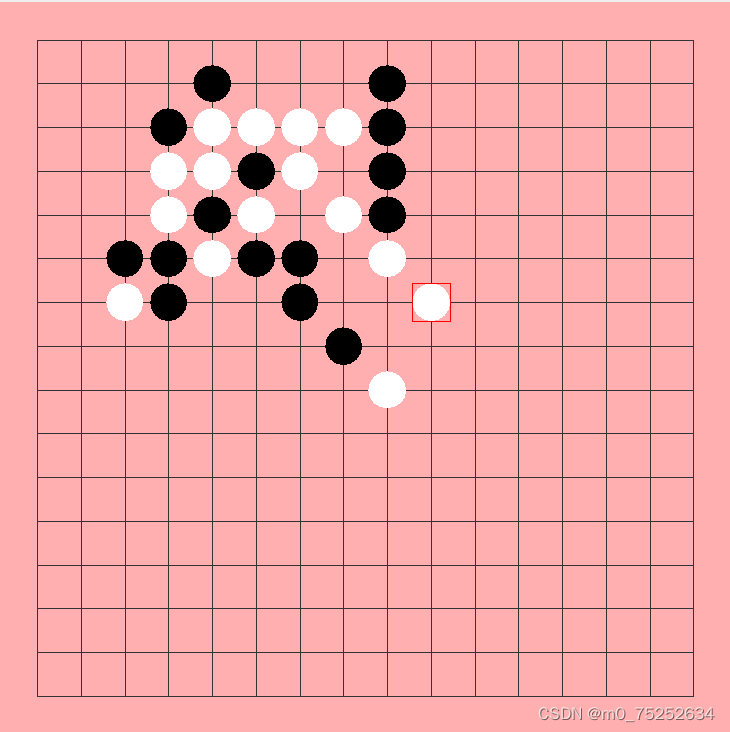
二 悔棋与重开功能

三 功能架构图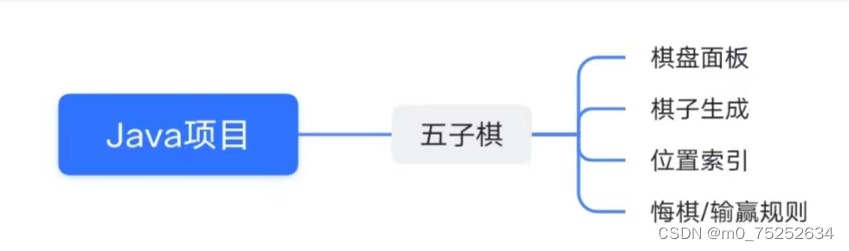
项目简介
开发的五子棋游戏,其要具有以下特点:系统操作简单,界面友好。界面灵活缩放,可随窗体大小绘制游戏界面,界面美观大方。黑白子轮流下棋,支持游戏悔棋的功能等。
总体需求
本程序主要完成五子棋游戏的简单操作,用户通过鼠标完成游戏过程。需要满足以下几点要求:
1.实现五子棋简易窗口界面。
2.实现黑白棋轮流下棋功能。
3.实现自动判断获胜方功能。
4.实现悔棋与重开游戏功能。
实现过程
1.绘制窗体对象。
2.UI设计(包括游戏区域、黑白棋子、按钮和标题区域)。
3.使用鼠标监听事件实现下棋。
4.连成五子判定获胜的实现。
代码展示
写窗口、棋盘面板、控制面板
import java.awt.BorderLayout; import java.awt.Toolkit; import java.awt.event.ActionEvent; import java.awt.event.ActionListener; import javax.swing.JButton; import javax.swing.JFrame; import javax.swing.JMenu; import javax.swing.JMenuBar; import javax.swing.JMenuItem; import javax.swing.JPanel; public class FiveFrame extends JFrame{ public static final int WIDTH=300; public static final int HEIGH=400; private JPanel toolBar; //工具栏里面的三个按钮 private JButton startButton,backButton,exitButton; private DrawPanel drawPanel; //棋盘的面板 private JMenuBar menuBar; private JMenu sysMenu; private JMenuItem startMenuItem,backMenuItem,exitMenuItem; private MyListener listener; public FiveFrame(){ } public void init(){ listener=new MyListener(); this.setTitle("单机版五子棋游戏"); toolBar=new JPanel(); sysMenu=new JMenu("系统"); startButton=new JButton("开始"); startButton.addActionListener(listener); backButton=new JButton("悔棋"); backButton.addActionListener(listener); exitButton=new JButton("退出"); exitButton.addActionListener(listener); drawPanel=new DrawPanel(); menuBar=new JMenuBar(); sysMenu=new JMenu("系统"); startMenuItem=new JMenuItem("开始"); startMenuItem.addActionListener(listener); backMenuItem=new JMenuItem("悔棋"); backMenuItem.addActionListener(listener); exitMenuItem=new JMenuItem("退出"); exitMenuItem.addActionListener(listener); this.setJMenuBar(menuBar); //设置窗口菜单栏 menuBar.add(sysMenu); sysMenu.add(startMenuItem); sysMenu.add(backMenuItem); sysMenu.add(exitMenuItem); toolBar.add(startButton); toolBar.add(backButton); toolBar.add(exitButton); this.setLayout(new BorderLayout()); this.add(toolBar,BorderLayout.NORTH); this.add(drawPanel,BorderLayout.CENTER); this.setDefaultCloseOperation(JFrame.EXIT_ON_CLOSE); // this.setResizable(false); this.setSize(WIDTH,HEIGH); //窗口出现在界面的中间 this.setLocation(Toolkit.getDefaultToolkit().getScreenSize().width/2-400,Toolkit.getDefaultToolkit().getScreenSize().height/2-340); pack(); //固定棋盘大小的功能 this.setVisible(true); } private class MyListener implements ActionListener{ @Override public void actionPerformed(ActionEvent e){ if(e.getSource()==startButton||e.getSource()==startMenuItem){ drawPanel.restartGame(); } if(e.getSource()==backButton||e.getSource()==backMenuItem){ drawPanel.goback(); } if(e.getSource()==exitButton||e.getSource()==exitMenuItem){ System.exit(0); } } } }讯享网
绘制棋盘,画棋子
讯享网import java.awt.Color; import java.awt.Dimension; import java.awt.Graphics; import java.awt.event.MouseEvent; import java.awt.event.MouseListener; import javax.swing.JOptionPane; import javax.swing.JPanel; public class DrawPanel extends JPanel implements MouseListener{ public static final int MARGIN=30; //边距 public static final int GRID_SPAN=35; //网格间距 public static final int ROWS=15; public static final int COLS=15; private int x_index,y_index; private boolean isBlack=true; private Chess[] chessList=new Chess[(ROWS+1)*(COLS+1)];//装棋子的组数 private int chessCount=0; //棋子的个数 //游戏是否结束的标志 private boolean gameOver=false; public DrawPanel() { super(); this.setBackground(Color.pink); this.addMouseListener(this); } @Override //注解是用来指定方法重写的,只能修饰方法并且只能用于方法重写,不能修饰其它的元素。 它可以强制一个子类必须重写父类方法或者实现接口的方法。 public void paint(Graphics g){ //画笔 super.paint(g); //调用父类的这个方法才能把设置的东西显示出来 //画棋盘-横线 for(int i=0;i<=ROWS;i++){ g.drawLine(MARGIN, MARGIN+i*GRID_SPAN, MARGIN+COLS*GRID_SPAN,MARGIN+i*GRID_SPAN); } //画棋盘-竖线 for(int i=0;i<=COLS;i++){ g.drawLine(MARGIN+i*GRID_SPAN, MARGIN, MARGIN+i*GRID_SPAN, MARGIN+ROWS*GRID_SPAN); } //画棋子 for(int i=0;i<chessCount;i++){ int xPos=chessList[i].getX()*GRID_SPAN+MARGIN; int yPos=chessList[i].getY()*GRID_SPAN+MARGIN; g.setColor(chessList[i].getColor()); g.fillOval(xPos-Chess.DIAMETER/2,yPos-Chess.DIAMETER/2, Chess.DIAMETER, Chess.DIAMETER); //最后一颗棋子上画红色框 if(i==chessCount-1){ g.setColor(Color.red); g.drawRect(xPos-Chess.DIAMETER/2, yPos-Chess.DIAMETER/2, Chess.DIAMETER, Chess.DIAMETER); } } } @Override public Dimension getPreferredSize(){ return new Dimension(MARGIN*2+GRID_SPAN*ROWS,MARGIN*2+GRID_SPAN*COLS); } @Override public void mouseClicked(MouseEvent e) { // TODO Auto-generated method stub } @Override public void mousePressed(MouseEvent e) { // TODO Auto-generated method stub x_index=(e.getX()-MARGIN+GRID_SPAN/2)/GRID_SPAN; y_index=(e.getY()-MARGIN+GRID_SPAN/2)/GRID_SPAN; System.out.print("("+x_index+","+y_index+")"); //是不是一个可用的棋子
游戏规则
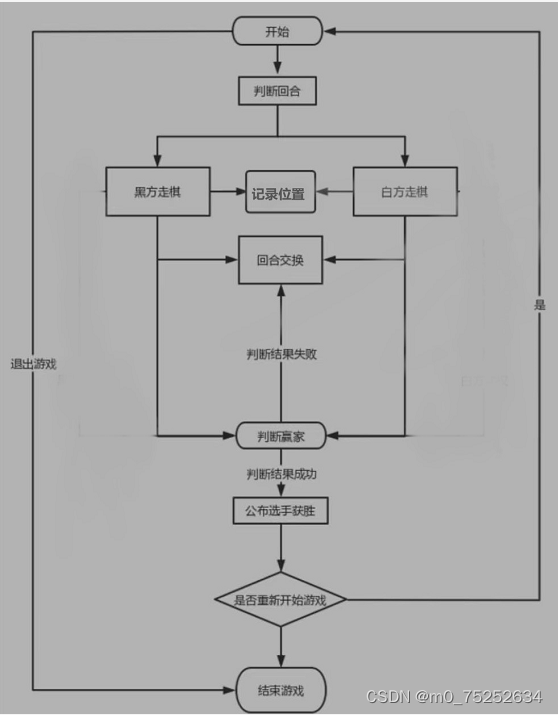
先定义Chess类,得到棋盘中棋子的索引值和颜色,为判断五子连珠做准备
package game06; import java.awt.Color; public class Chess { private int x; //棋盘中x的索引值 private int y; private Color color;//棋子颜色 static final int DIAMETER=30; public Chess(int x, int y, Color color) { super(); this.x = x; this.y = y; this.color = color; } public int getX() { return x; } public void setX(int x) { this.x = x; } public int getY() { return y; } public void setY(int y) { this.y = y; } public Color getColor() { return color; } public void setColor(Color color) { this.color = color; } }限定棋子所能下的位置,判断棋子是否可用。
讯享网 //1.游戏结束不能下棋 if(gameOver){ return; } //2.落在棋盘外面,不能下 if(x_index<0||x_index>COLS||y_index>ROWS){ return; } //3.位置上已有棋子存在,不能下 if(findChess(x_index,y_index)){ return; }
记录黑白方走棋,实现回合交换
Chess ch=new Chess(x_index,y_index,isBlack?Color.black:Color.white); chessList[chessCount++]=ch; System.out.print("棋子子个数: "+chessCount); this.repaint();判断赢的方法,四个方向(从西南到东北,从西北到东南,水平方向,垂直方向)只要实现五子连珠,即赢。
讯享网//位置上是否有棋子 private boolean findChess(int x,int y){ for(Chess c:chessList){ if(c!=null&&c.getX()==x&&c.getY()==y){ return true; } } return false; } //得到棋盘上的棋子 private Chess getChess(int x,int y,Color color){ for(Chess c:chessList){ if(c!=null&&c.getX()==x&&c.getY()==y&&c.getColor()==color){ return c; } } return null; } // 赢棋的方法,需要四个方向 private boolean isWin(){ return search1()||search2()||search3()||search4(); } //1.从西南到东北方向 private boolean search1(){ int continueCount=1; //连续棋子的个数 //斜向上寻找 for(int x=x_index+1,y=y_index-1;x<=COLS&&y>=0;x++,y--){ Color c=isBlack?Color.black:Color.white; if(getChess(x,y,c)!=null){ continueCount++; }else{ break; } } //斜向下寻找 for(int x=x_index-1,y=y_index+1;x<=ROWS&&x>=0;x--,y++){ Color c=isBlack?Color.black:Color.white; if(getChess(x,y,c)!=null){ continueCount++; }else{ break; } } //五子连珠 if(continueCount>=5){ return true; }else{ continueCount=1; } return false; } //2.水平左右-西东 private boolean search2(){ int continueCount=1; //连续棋子的个数 //寻找-西方向 for(int x=x_index-1;x>=0;x--){ Color c=isBlack?Color.black:Color.white; if(getChess(x,y_index,c)!=null){ continueCount++; }else{ break; } } //寻找-东方向 for(int x=x_index+1;x<=COLS;x++){ Color c=isBlack?Color.black:Color.white; if(getChess(x,y_index,c)!=null){ continueCount++; }else{ break; } } //五子连珠 if(continueCount>=5){ return true; }else{ continueCount=1; } return false; } //西北到东南 private boolean search3(){ int continueCount=1; //连续棋子的个数 //斜向上寻找 for(int x=x_index-1,y=y_index-1;x>=0&&y>=0;x--,y--){ Color c=isBlack?Color.black:Color.white; if(getChess(x,y,c)!=null){ continueCount++; }else{ break; } } //斜向下寻找 for(int x=x_index+1,y=y_index+1;x<=COLS&&y<ROWS;x++,y++){ Color c=isBlack?Color.black:Color.white; if(getChess(x,y,c)!=null){ continueCount++; }else{ break; } } //五子连珠 if(continueCount>=5){ return true; }else{ continueCount=1; } return false; } //垂直向下 private boolean search4(){ int continueCount=1; //连续棋子的个数 //寻找-向上的方向 for(int y=y_index-1;y>=0;y--){ Color c=isBlack?Color.black:Color.white; if(getChess(x_index,y,c)!=null){ continueCount++; }else{ break; } } //寻找-向下的方向 for(int y=y_index+1;y<=ROWS;y++){ Color c=isBlack?Color.black:Color.white; if(getChess(x_index,y,c)!=null){ continueCount++; }else{ break; } } //五子连珠 if(continueCount>=5){ return true; }else{ continueCount=1; } return false; }
游戏功能:重开
public void restartGame(){ //清除棋子 for(int i=0;i<chessList.length;i++){ chessList[i]=null; } //恢复游戏相关的变量 isBlack=true; gameOver=false; chessCount=0; this.repaint(); }游戏功能:悔棋
讯享网void goback(){ //棋盘中没有棋子,不能悔棋 if(chessCount==0){ return; } chessList[chessCount-1]=null; chessCount--; if(chessCount>0){ x_index=chessList[chessCount-1].getX(); y_index=chessList[chessCount-1].getY(); } isBlack=!isBlack; this.repaint(); }
git提交代码
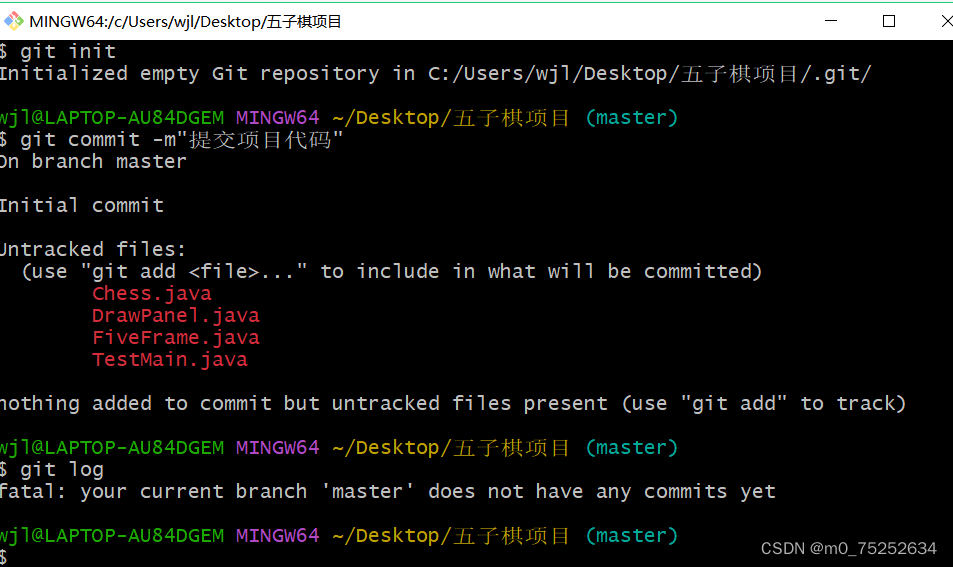
git链接 https://github.com/8768z/game.git
心得
通过此次任务,我对swing的相关知识有了进一步的了解,对java这门语言也有了比以前更深刻的认识。对java的一些基本语法,比如数据类型、运算符、程序流程控制和数组等,理解更加透彻。java最核心的核心就是面向对象思想,对于这一个概念,我又多了更深层次的领悟。
考虑到游戏体验的优化,我们在游戏模式设计时应做多样化的考虑,对玩家需求进行探索。在AI算法方还有更多的优化空间,例如可适时根据玩家的走棋进行优化的算法。随着学习程度的进一步加深,希望能开发出更多新的玩法,带来更好的体验。
版权声明:本文内容由互联网用户自发贡献,该文观点仅代表作者本人。本站仅提供信息存储空间服务,不拥有所有权,不承担相关法律责任。如发现本站有涉嫌侵权/违法违规的内容,请联系我们,一经查实,本站将立刻删除。
如需转载请保留出处:https://51itzy.com/kjqy/80160.html