
实验目的:1. JavaScript编程综合能力训练
2. 熟悉DOM事件
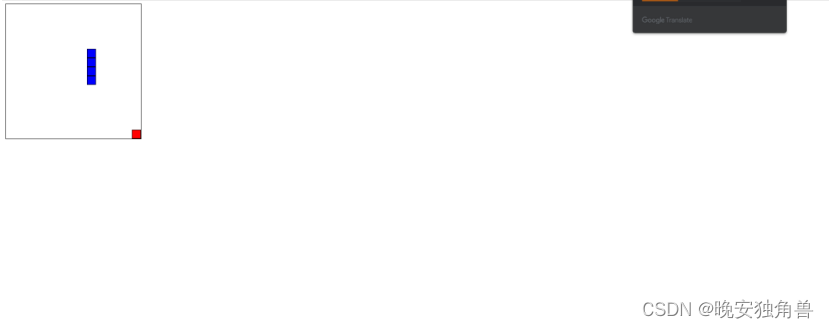
功能要求:玩家通过上、下、左、右按键控制蛇头的移动方向使其向指定方向前进,并吃掉随机位置上产生的食物来获得分数。每吃掉一次食物,贪吃蛇的身体都会变长,并且会继续在随机位置上产生下一个食物。一旦蛇头碰到墙壁或蛇身,游戏失败。根据游戏的难度可以设置不同的游戏速度。
代码展示:
<!DOCTYPE html>
<html lang="en">
<head>
    <meta charset="UTF-8">
    <meta name="viewport" content="width=device-width, initial-scale=1.0">
    <title>贪吃蛇小游戏</title>
    <style>
        #game-board {
            position: relative;
            width: 300px;
            height: 300px;
            border: 1px solid #000;
            overflow: hidden; /* 隐藏溢出部分 */
            display: inline-block;
        }

        #score-board {
            position: relative;
            display: inline-block;
            vertical-align: top;
            padding: 10px;
        }

        .snake, .food {
            position: absolute;
            box-sizing: border-box; /* 让边框不增加元素的尺寸 */
            width: 20px;
            height: 20px;
        }

        .snake {
            background-color: #00f;
            border: 1px solid #000;
        }

        .food {
            background-color: #f00;
            border: 1px solid #000;
        }
    </style>
</head>
<body>

<div id="game-board"></div>
<div id="score-board">得分: <span id="score">0</span></div>

<script>
    // JavaScript代码在这里

    const gameBoard = document.getElementById('game-board');
    const scoreSpan = document.getElementById('score');
    let snake = [{ x: 100, y: 100 }]; // 初始蛇身
    let food = generateFoodPosition();
    let direction = 'right';
    let nextDirection = 'right'; // 用于存储下一个方向
    let score = 0;
    let gameSpeed = 200; // 游戏速度

    function generateFoodPosition() {
        const x = Math.floor(Math.random() * 15) * 20;
        const y = Math.floor(Math.random() * 15) * 20;
        return { x, y };
    }

    function draw() {
        // 清空游戏面板
        gameBoard.innerHTML = '';

        // 画蛇
        snake.forEach(segment => {
            const snakeSegment = document.createElement('div');
            snakeSegment.className = 'snake';
            snakeSegment.style.left = `${segment.x}px`;
            snakeSegment.style.top = `${segment.y}px`;
            gameBoard.appendChild(snakeSegment);
        });

        // 画食物
        const foodElement = document.createElement('div');
        foodElement.className = 'food';
        foodElement.style.left = `${food.x}px`;
        foodElement.style.top = `${food.y}px`;
        gameBoard.appendChild(foodElement);
    }

    function move() {
        const head = { ...snake[0] };

        // 更新方向
        direction = nextDirection;

        // 根据方向移动蛇头
        switch (direction) {
            case 'up':
                head.y -= 20;
                break;
            case 'down':
                head.y += 20;
                break;
            case 'left':
                head.x -= 20;
                break;
            case 'right':
                head.x += 20;
                break;
        }

        // 将新的蛇头添加到蛇身数组的开头
        snake.unshift(head);

        // 判断是否吃到食物
        if (head.x === food.x && head.y === food.y) {
            score++;
            food = generateFoodPosition();
            updateScore();
        } else {
            // 如果没吃到食物,移除蛇尾
            snake.pop();
        }

        // 判断游戏是否结束
        if (
            head.x < 0 ||
            head.x >= gameBoard.offsetWidth ||
            head.y < 0 ||
            head.y >= gameBoard.offsetHeight ||
            checkCollision()
        ) {
            alert('游戏结束!得分:' + score);
            resetGame();
            return;
        }

        draw();
    }

    function checkCollision() {
        // 检查蛇头是否与蛇身碰撞
        for (let i = 1; i < snake.length; i++) {
            if (snake[i].x === snake[0].x && snake[i].y === snake[0].y) {
                return true;
            }
        }
        return false;
    }

    function resetGame() {
        snake = [{ x: 100, y: 100 }];
        food = generateFoodPosition();
        direction = 'right';
        nextDirection = 'right';
        score = 0;
        updateScore();
        draw();
    }

    function updateScore() {
        scoreSpan.textContent = score;
    }

    // 监听键盘事件,改变蛇的移动方向
    window.addEventListener('keydown', (event) => {
        switch (event.key) {
            case 'ArrowUp':
                if (direction !== 'down') {
                    nextDirection = 'up';
                }
                break;
            case 'ArrowDown':
                if (direction !== 'up') {
                    nextDirection = 'down';
                }
                break;
            case 'ArrowLeft':
                if (direction !== 'right') {
                    nextDirection = 'left';
                }
                break;
            case 'ArrowRight':
                if (direction !== 'left') {
                    nextDirection = 'right';
                }
                break;
        }
    });

    // 游戏循环
    setInterval(move, gameSpeed);

    // 初始绘制
    draw();
</script>

</body>
</html>
讯享网
效果展示:
版权声明:本文内容由互联网用户自发贡献,该文观点仅代表作者本人。本站仅提供信息存储空间服务,不拥有所有权,不承担相关法律责任。如发现本站有涉嫌侵权/违法违规的内容,请联系我们,一经查实,本站将立刻删除。
如需转载请保留出处:https://51itzy.com/kjqy/78690.html