
转录组之质量控制加序列剪切 (fastp)
本文简介:这篇文章是经过了自己学习实践出来的,参考了很多资料,如若有大佬能指出错误,我将感激不敬,有错误,请在评论区留言,谢谢。
更新日期:2023年7月14号
本文知乎地址:https://zhuanlan.zhihu.com/p/
作者:CYH-BI
参考地址:OpenGene/fastp: An ultra-fast all-in-one FASTQ preprocessor (QC/adapters/trimming/filtering/splitting/merging…) (github.com)
fastp简介
fastp 这款软件由陈实富开发(海普洛斯 联合创始人 / CTO),可以对转录组下机数据经行质量控制加序列剪切,也就是说该软件可以实现,FastQC + Trimmomatic 两款软件基本功能,并且该软件的速度非常快。
部分功能如下:(本句参考至fastp: 一款超快速全功能的FASTQ文件自动化质控+过滤+校正+预处理软件 - 知乎 (zhihu.com))
- 对数据自动进行全方位质控,生成人性化的报告
- 过滤功能(低质量,太短,太多N……);
- 对每一个序列的头部或尾部,计算滑动窗内的质量均值,并将均值较低的子序列进行切除(类似Trimmomatic的做法,但是快非常多);
- 全局剪裁 (在头/尾部,不影响去重),对于Illumina下机数据往往最后一到两个cycle需要这样处理;
- 去除接头污染。厉害的是,你不用输入接头序列,因为算法会自动识别接头序列并进行剪裁;
- 对于双端测序(PE)的数据,软件会自动查找每一对read的重叠区域,并对该重叠区域中不匹配的碱基对进行校正;
- 去除尾部的polyG。对于Illumina NextSeq/NovaSeq的测序数据,因为是两色法发光,polyG是常有的事,所以该特性对该两类测序平台默认打开;
- 对于PE数据中的overlap区间中不一致的碱基对,依据质量值进行校正;
- 可以对带分子标签(UMI)的数据进行预处理,不管UMI在插入片段还是在index上,都可以轻松处理;
-可以将输出进行分拆,而且支持两种模式,分别是指定分拆的个数,或者分拆后每个文件的行数; - …等功能
总结就是:
- 输入输出文件设置
- 接头处理
- 全局裁剪(即直接剪掉起始和末端低质量碱基)
- 滑窗质量剪裁 (与trimmomatic相似,该软件介绍与用法可以在我主页找到)
- 过滤过短序列
- 校正碱基(用于双端测序)
- 质量过滤
总之很牛。
fastp的安装
- 方法一
使用官网安装包安装(GitHub)
# 使用wegt下载安装并赋予可执行权限 wget http://opengene.org/fastp/fastp chmod a+x ./fastp
讯享网 - 方法二
使用codna安装
讯享网
conda install -c bioconda fastp这种方法最简单(推荐)
fastp的使用
fastp支持 .fq 与 .fq.gz 的输入与输出,fastp 软件会生成HTML格式的报告,该报告中没有任何一张静态图片,所有的图表都是使用JavaScript动态绘制(后续举例)
很多参数都默认开启,就比如说接头处理,由算法自动识别并剪切,总之非常方便。接下来我们看一下它的参数:
使用一下命令可以查看参数简介:
fastp -h 讯享网[chenyh@mu01 ~]$ fastp -h option needs value: --html usage: fastp [options] ... options: -i, --in1 read1 input file name (string [=]) -o, --out1 read1 output file name (string [=]) -I, --in2 read2 input file name (string [=]) -O, --out2 read2 output file name (string [=]) --unpaired1 for PE input, if read1 passed QC but read2 not, it will be written to unpaired1. Default is to discard it. (string [=]) --unpaired2 for PE input, if read2 passed QC but read1 not, it will be written to unpaired2. If --unpaired2 is same as --unpaired1 (default mode), both unpaired reads will be written to this same file. (string [=]) --overlapped_out for each read pair, output the overlapped region if it has no any mismatched base. (string [=]) --failed_out specify the file to store reads that cannot pass the filters. (string [=]) -m, --merge for paired-end input, merge each pair of reads into a single read if they are overlapped. The merged reads will be written to the file given by --merged_out, the unmerged reads will be written to the files specified by --out1 and --out2. The merging mode is disabled by default. --merged_out in the merging mode, specify the file name to store merged output, or specify --stdout to stream the merged output (string [=]) --include_unmerged in the merging mode, write the unmerged or unpaired reads to the file specified by --merge. Disabled by default. -6, --phred64 indicate the input is using phred64 scoring (it'll be converted to phred33, so the output will still be phred33) -z, --compression compression level for gzip output (1 ~ 9). 1 is fastest, 9 is smallest, default is 4. (int [=4]) --stdin input from STDIN. If the STDIN is interleaved paired-end FASTQ, please also add --interleaved_in. --stdout stream passing-filters reads to STDOUT. This option will result in interleaved FASTQ output for paired-end output. Disabled by default. --interleaved_in indicate that <in1> is an interleaved FASTQ which contains both read1 and read2. Disabled by default. --reads_to_process specify how many reads/pairs to be processed. Default 0 means process all reads. (int [=0]) --dont_overwrite don't overwrite existing files. Overwritting is allowed by default. --fix_mgi_id the MGI FASTQ ID format is not compatible with many BAM operation tools, enable this option to fix it. -V, --verbose output verbose log information (i.e. when every 1M reads are processed). -A, --disable_adapter_trimming adapter trimming is enabled by default. If this option is specified, adapter trimming is disabled -a, --adapter_sequence the adapter for read1. For SE data, if not specified, the adapter will be auto-detected. For PE data, this is used if R1/R2 are found not overlapped. (string [=auto]) --adapter_sequence_r2 the adapter for read2 (PE data only). This is used if R1/R2 are found not overlapped. If not specified, it will be the same as <adapter_sequence> (string [=auto]) --adapter_fasta specify a FASTA file to trim both read1 and read2 (if PE) by all the sequences in this FASTA file (string [=]) --detect_adapter_for_pe by default, the auto-detection for adapter is for SE data input only, turn on this option to enable it for PE data. -f, --trim_front1 trimming how many bases in front for read1, default is 0 (int [=0]) -t, --trim_tail1 trimming how many bases in tail for read1, default is 0 (int [=0]) -b, --max_len1 if read1 is longer than max_len1, then trim read1 at its tail to make it as long as max_len1. Default 0 means no limitation (int [=0]) -F, --trim_front2 trimming how many bases in front for read2. If it's not specified, it will follow read1's settings (int [=0]) -T, --trim_tail2 trimming how many bases in tail for read2. If it's not specified, it will follow read1's settings (int [=0]) -B, --max_len2 if read2 is longer than max_len2, then trim read2 at its tail to make it as long as max_len2. Default 0 means no limitation. If it's not specified, it will follow read1's settings (int [=0]) -D, --dedup enable deduplication to drop the duplicated reads/pairs --dup_calc_accuracy accuracy level to calculate duplication (1~6), higher level uses more memory (1G, 2G, 4G, 8G, 16G, 24G). Default 1 for no-dedup mode, and 3 for dedup mode. (int [=0]) --dont_eval_duplication don't evaluate duplication rate to save time and use less memory. -g, --trim_poly_g force polyG tail trimming, by default trimming is automatically enabled for Illumina NextSeq/NovaSeq data --poly_g_min_len the minimum length to detect polyG in the read tail. 10 by default. (int [=10]) -G, --disable_trim_poly_g disable polyG tail trimming, by default trimming is automatically enabled for Illumina NextSeq/NovaSeq data -x, --trim_poly_x enable polyX trimming in 3' ends. --poly_x_min_len the minimum length to detect polyX in the read tail. 10 by default. (int [=10]) -5, --cut_front move a sliding window from front (5') to tail, drop the bases in the window if its mean quality < threshold, stop otherwise. -3, --cut_tail move a sliding window from tail (3') to front, drop the bases in the window if its mean quality < threshold, stop otherwise. -r, --cut_right move a sliding window from front to tail, if meet one window with mean quality < threshold, drop the bases in the window and the right part, and then stop. -W, --cut_window_size the window size option shared by cut_front, cut_tail or cut_sliding. Range: 1~1000, default: 4 (int [=4]) -M, --cut_mean_quality the mean quality requirement option shared by cut_front, cut_tail or cut_sliding. Range: 1~36 default: 20 (Q20) (int [=20]) --cut_front_window_size the window size option of cut_front, default to cut_window_size if not specified (int [=4]) --cut_front_mean_quality the mean quality requirement option for cut_front, default to cut_mean_quality if not specified (int [=20]) --cut_tail_window_size the window size option of cut_tail, default to cut_window_size if not specified (int [=4]) --cut_tail_mean_quality the mean quality requirement option for cut_tail, default to cut_mean_quality if not specified (int [=20]) --cut_right_window_size the window size option of cut_right, default to cut_window_size if not specified (int [=4]) --cut_right_mean_quality the mean quality requirement option for cut_right, default to cut_mean_quality if not specified (int [=20]) -Q, --disable_quality_filtering quality filtering is enabled by default. If this option is specified, quality filtering is disabled -q, --qualified_quality_phred the quality value that a base is qualified. Default 15 means phred quality >=Q15 is qualified. (int [=15]) -u, --unqualified_percent_limit how many percents of bases are allowed to be unqualified (0~100). Default 40 means 40% (int [=40]) -n, --n_base_limit if one read's number of N base is >n_base_limit, then this read/pair is discarded. Default is 5 (int [=5]) -e, --average_qual if one read's average quality score <avg_qual, then this read/pair is discarded. Default 0 means no requirement (int [=0]) -L, --disable_length_filtering length filtering is enabled by default. If this option is specified, length filtering is disabled -l, --length_required reads shorter than length_required will be discarded, default is 15. (int [=15]) --length_limit reads longer than length_limit will be discarded, default 0 means no limitation. (int [=0]) -y, --low_complexity_filter enable low complexity filter. The complexity is defined as the percentage of base that is different from its next base (base[i] != base[i+1]). -Y, --complexity_threshold the threshold for low complexity filter (0~100). Default is 30, which means 30% complexity is required. (int [=30]) --filter_by_index1 specify a file contains a list of barcodes of index1 to be filtered out, one barcode per line (string [=]) --filter_by_index2 specify a file contains a list of barcodes of index2 to be filtered out, one barcode per line (string [=]) --filter_by_index_threshold the allowed difference of index barcode for index filtering, default 0 means completely identical. (int [=0]) -c, --correction enable base correction in overlapped regions (only for PE data), default is disabled --overlap_len_require the minimum length to detect overlapped region of PE reads. This will affect overlap analysis based PE merge, adapter trimming and correction. 30 by default. (int [=30]) --overlap_diff_limit the maximum number of mismatched bases to detect overlapped region of PE reads. This will affect overlap analysis based PE merge, adapter trimming and correction. 5 by default. (int [=5]) --overlap_diff_percent_limit the maximum percentage of mismatched bases to detect overlapped region of PE reads. This will affect overlap analysis based PE merge, adapter trimming and correction. Default 20 means 20%. (int [=20]) -U, --umi enable unique molecular identifier (UMI) preprocessing --umi_loc specify the location of UMI, can be (index1/index2/read1/read2/per_index/per_read, default is none (string [=]) --umi_len if the UMI is in read1/read2, its length should be provided (int [=0]) --umi_prefix if specified, an underline will be used to connect prefix and UMI (i.e. prefix=UMI, UMI=AATTCG, final=UMI_AATTCG). No prefix by default (string [=]) --umi_skip if the UMI is in read1/read2, fastp can skip several bases following UMI, default is 0 (int [=0]) --umi_delim delimiter to use between the read name and the UMI, default is : (string [=:]) -p, --overrepresentation_analysis enable overrepresented sequence analysis. -P, --overrepresentation_sampling one in (--overrepresentation_sampling) reads will be computed for overrepresentation analysis (1~10000), smaller is slower, default is 20. (int [=20]) -j, --json the json format report file name (string [=fastp.json]) -h, --html the html format report file name (string [=fastp.html]) -R, --report_title should be quoted with ' or ", default is "fastp report" (string [=fastp report]) -w, --thread worker thread number, default is 3 (int [=3]) -s, --split split output by limiting total split file number with this option (2~999), a sequential number prefix will be added to output name ( 0001.out.fq, 0002.out.fq...), disabled by default (int [=0]) -S, --split_by_lines split output by limiting lines of each file with this option(>=1000), a sequential number prefix will be added to output name ( 0001.out.fq, 0002.out.fq...), disabled by default (long [=0]) -d, --split_prefix_digits the digits for the sequential number padding (1~10), default is 4, so the filename will be padded as 0001.xxx, 0 to disable padding (int [=4]) --cut_by_quality5 DEPRECATED, use --cut_front instead. --cut_by_quality3 DEPRECATED, use --cut_tail instead. --cut_by_quality_aggressive DEPRECATED, use --cut_right instead. --discard_unmerged DEPRECATED, no effect now, see the introduction for merging. -?, --help print this message
前面说到fastp 软件可以处理单端与双端数据,那么我将以这两个方面举例:
- 对于单端数据
fastp -i in_put.fq -o out_put.fq -h out_put.html-i 输入(.fq格式,或者.fq.gz)
-o 输出 (.fq格式,或者.fq.gz)
-h 输出质控报告
- 对于双端数据
讯享网
fastp -i /home/chenyh/RNAseq_data/sample1_1.fq.gz -I /home/chenyh/RNAseq_data/sample1_2.fq.gz -o /home/chenyh/ly_NT_RNAseq/fastp_result/sample1-1_trimmed.fq.gz -O /home/chenyh/ly_NT_RNAseq/fastp_result/sample1_2_trimmed.fq.gz -h /home/chenyh/ly_NT_RNAseq/fastp_result/html/sample1.html代码解释如下:
-i 第一条reads(.fq格式,或者.fq.gz)
-I 第二条reads(.fq格式,或者.fq.gz)
-o 第一条reads结果(不是零,是"哦")
-O 第二条reads结果(小i对应小o,大I对应大O)
-h 输出质控报告,包含两条reads的结果其他参数看你需求哈!我只需要去除低质量碱基与接头序列等,所以上述参数我认为可以了。
无论是单端还是双端,都会生成一个html文件,该文件就是质控报告,如果是双端则会包含两条reads质控前后的基本信息,接下来,得到html文件后,我们查看质控报告。
fastp质控报告的解读
这部分报告与FastQC 软件生成的报告类似,但比FastQC 质控报告详细。
- summary 部分
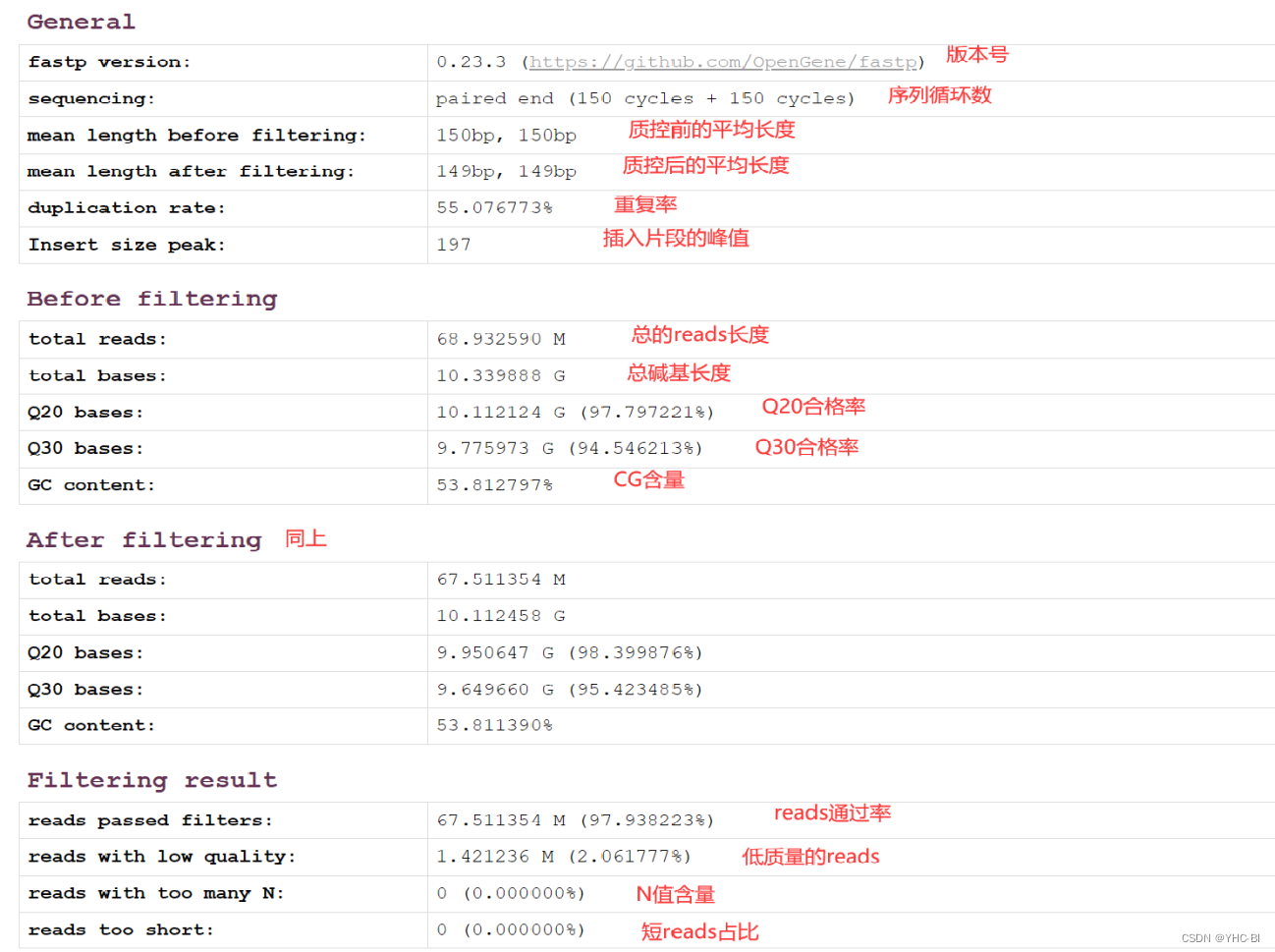
该部分为各reads的汇总信息,通过该部分,我们可以而后能够清晰的看到各reads的前后质控各种信息,可以为我们后续处理提供帮助。
Q20,Q30它们代表的是某一碱基质量值占全部碱基数的百分比,就类似于产品合格率,不同的质量标准会产生不同的合格率,标准越高,质量越好,达标的就越少;合格率越高,那么达标的数据就越多。一般来说,对于二代测序,最好是达到Q20的碱基要在95%以上(最差不低于90%),Q30要求大于85%(最差也不要低于80%)。(本句摘自(4条消息) 生信学习笔记:fastp质控处理生成的report结果解读_twocanis的博客-CSDN博客)

- Adapters(接头部分)
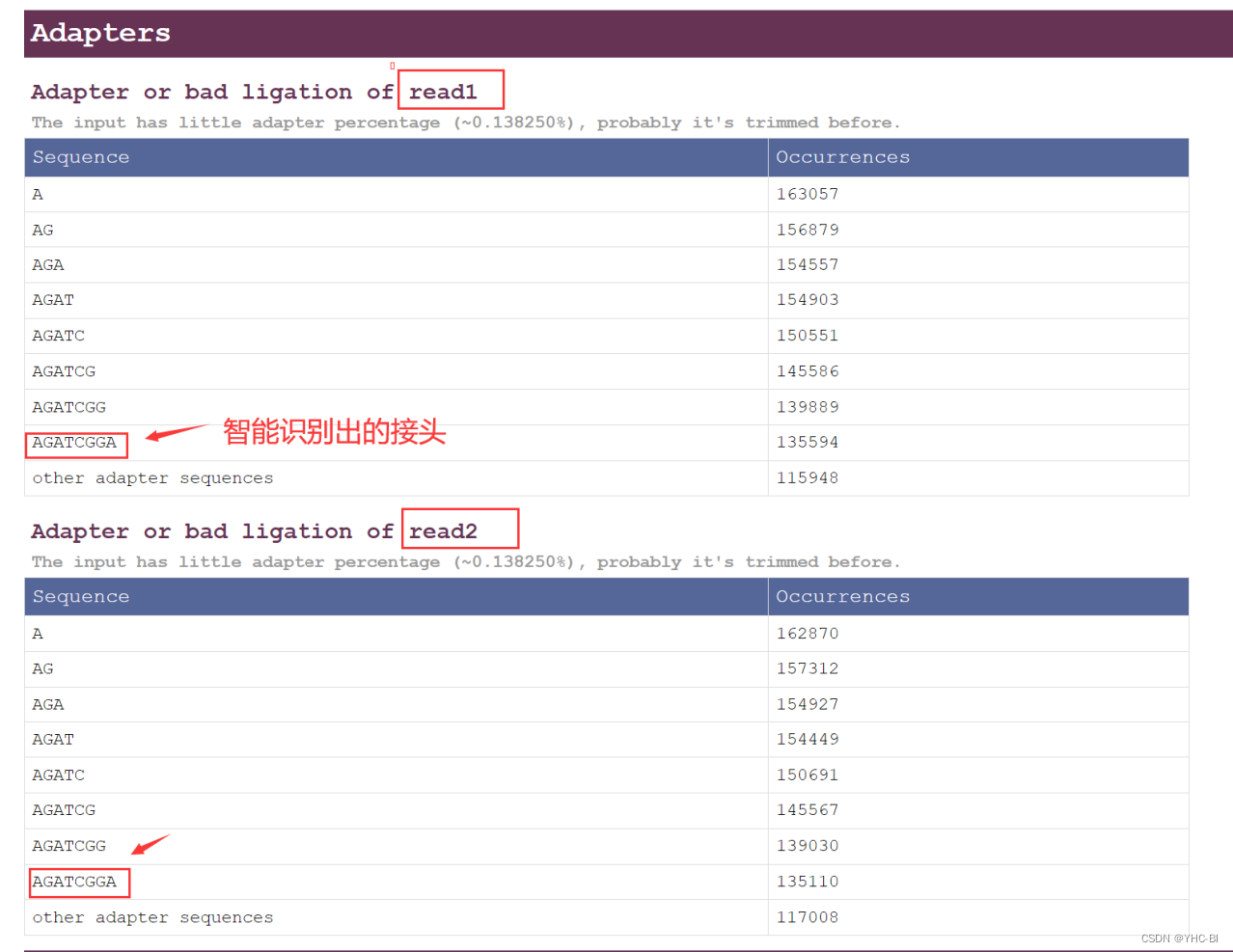
接头是二代测序过程中,序列过短,循环测序时测到接头(我这个数据是150个碱基,看你的情况,可能不一样),可看下图:


对于fastp软件生成的结果,两个文件(两端的reads)列出了从1到几十位的adapters的发生次数,以及其他未列出的接头数(我这里只有8位,也就是说自动识别到接头)
- Insert size estimation 部分
至于为什么会有插入片段,请看这篇文章:一篇文章说清楚什么是“插入片段”? - 知乎 (zhihu.com)
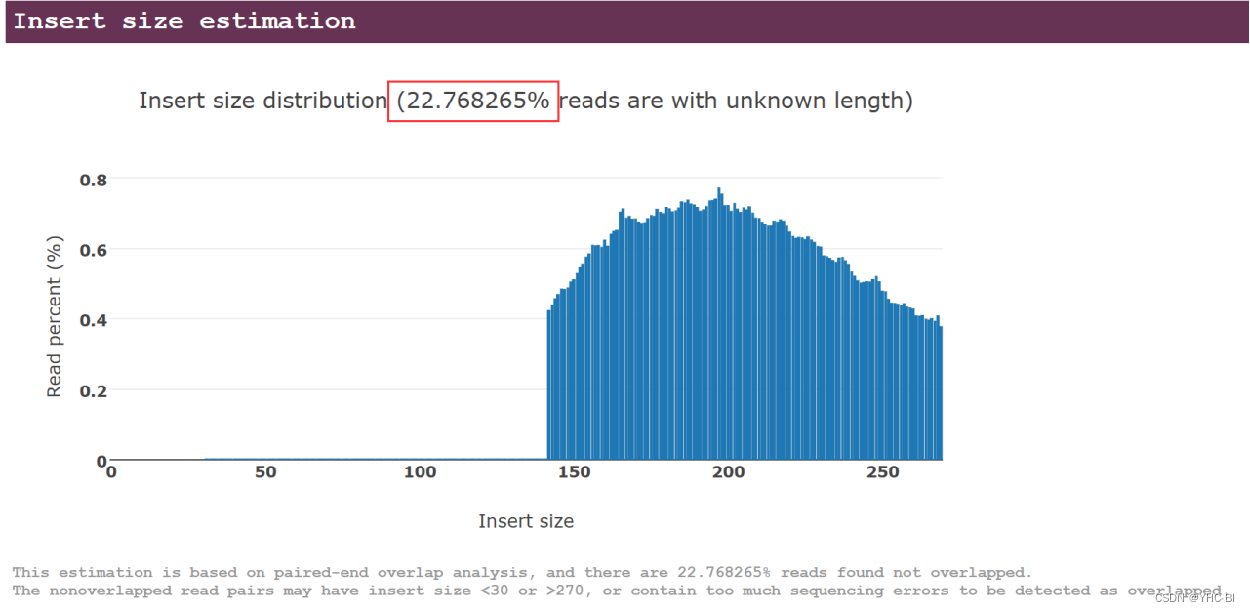
(我数据中22.%的读数没有重叠,你得看你的数据,我这里只能举例)
鼠标放到图上,可以查看特定位置的结果(自己尝试)
- filtering 部分
该部分有好多内容,包括每条reads前后的结果。
quality 部分
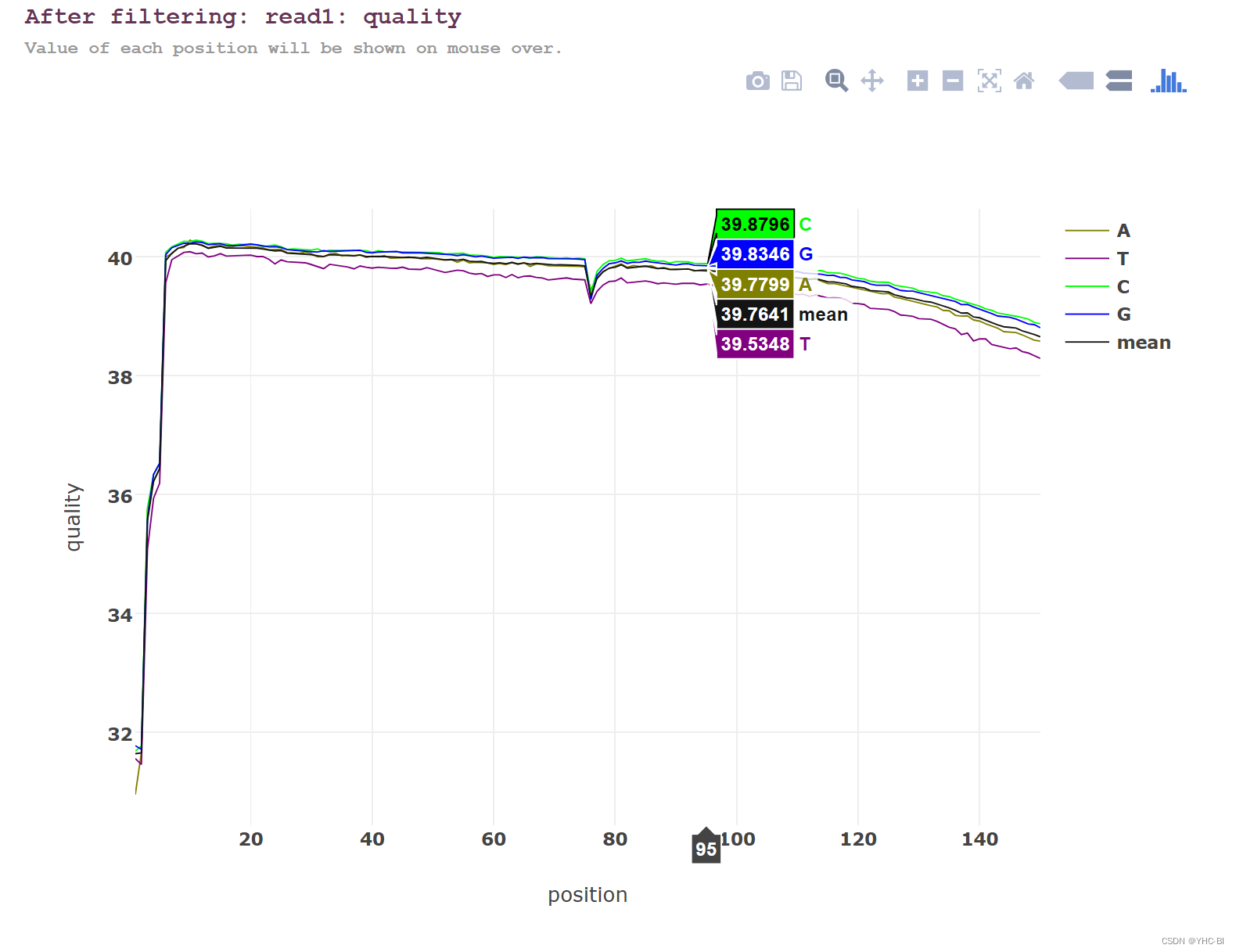
在不同位置上的碱基质量分布,一般来讲质量应 >30 且波动较小为不错的数据
鼠标可以放到线上,可以查看特定位置数据,还可以长按左键后画框,框起来的部分会放大。
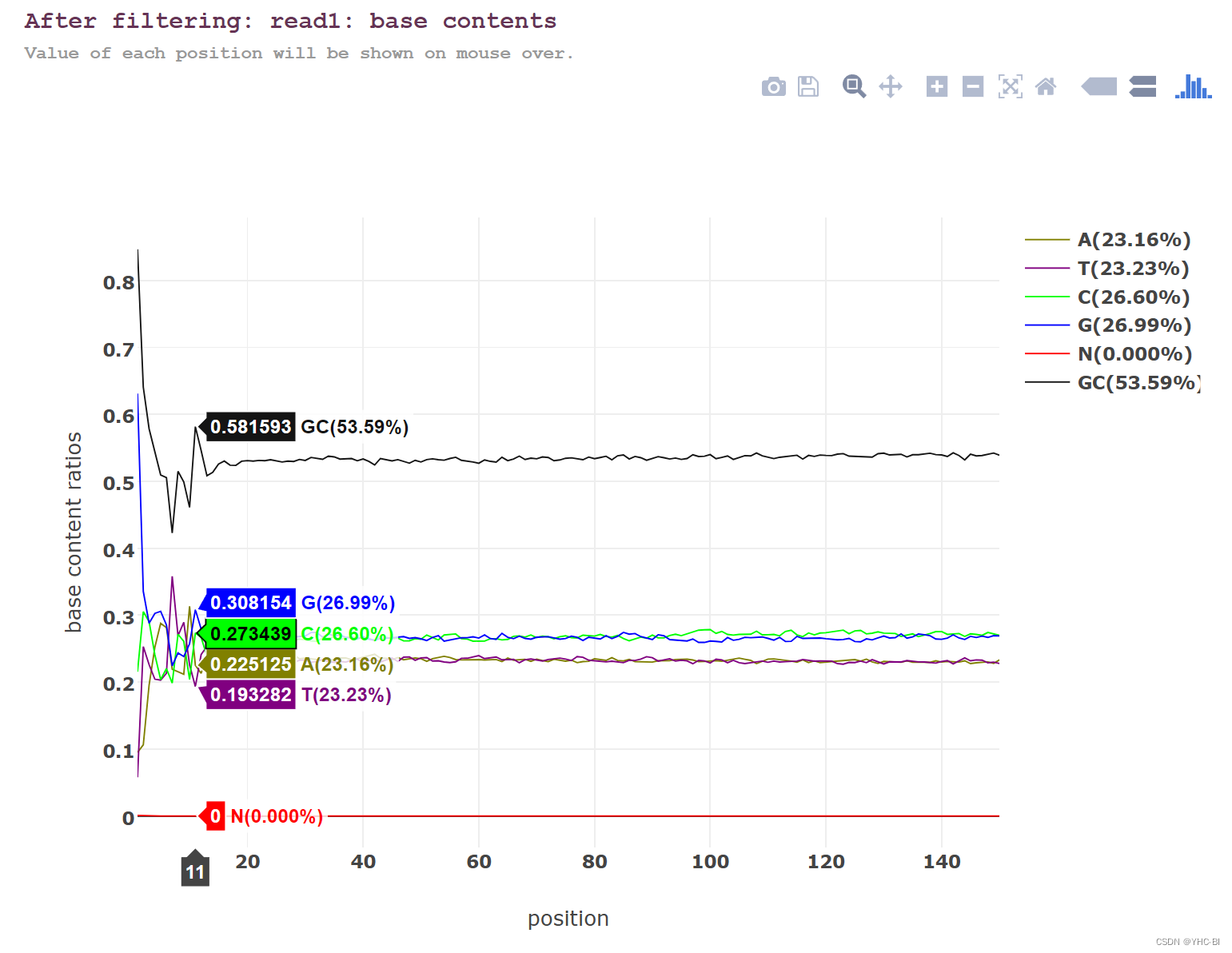
碱基质量部分
read各个位置上碱基比例分布,这个是为了分析碱基的分离程度。何为碱基分离?已知AT配对,CG配对,假如测序过程是比较随机的话(随机意味着好),那么在每个位置上A和T比例应该差不多,C和G的比例也应该差不多,如上图所示,两者之间即使有偏差也不应该太大,最好平均在1%以内,如果过高,除非有合理的原因,比如某些特定的捕获测序所致,否则都需要注意是不是测序过程有什么偏差。
前面波动很大的部分基本都是建库时的问题,该问题部分解决。
鼠标可以放到线上,可以查看特定位置数据(如下图),还可以长按左键后画框,框起来的部分会放大。
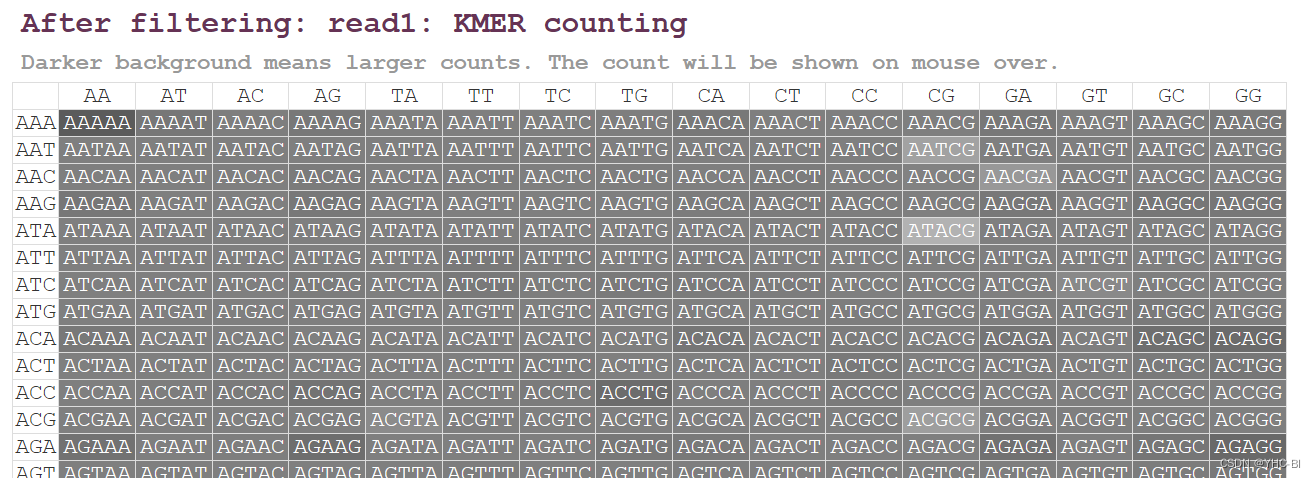
- KMER计数
fastp对5个碱基长度的所有组合的出现次数进行了统计,然后把它放在了一张表格中,表格的每一个元素为深背景白字,背景越深,则表示重复次数越多。观察颜色就可以发现有哪些异常的信息。鼠标可停留在某一具体组合上看出现次数和平均占比。
鼠标可以放到小框里,可以查看特定位置数据
其他部分都一样的参考,不在叙述
fastp解读部分结束。
到此,本文内容结束,这篇文章是经过了自己学习实践出来的,参考了很多资料,如若有大佬能指出错误,我将感激不敬,有错误,请在评论区留言,谢谢。
版权声明:本文内容由互联网用户自发贡献,该文观点仅代表作者本人。本站仅提供信息存储空间服务,不拥有所有权,不承担相关法律责任。如发现本站有涉嫌侵权/违法违规的内容,请联系我们,一经查实,本站将立刻删除。
如需转载请保留出处:https://51itzy.com/kjqy/76339.html