
互动影像设计与processing作业:Roche
一、作业展示
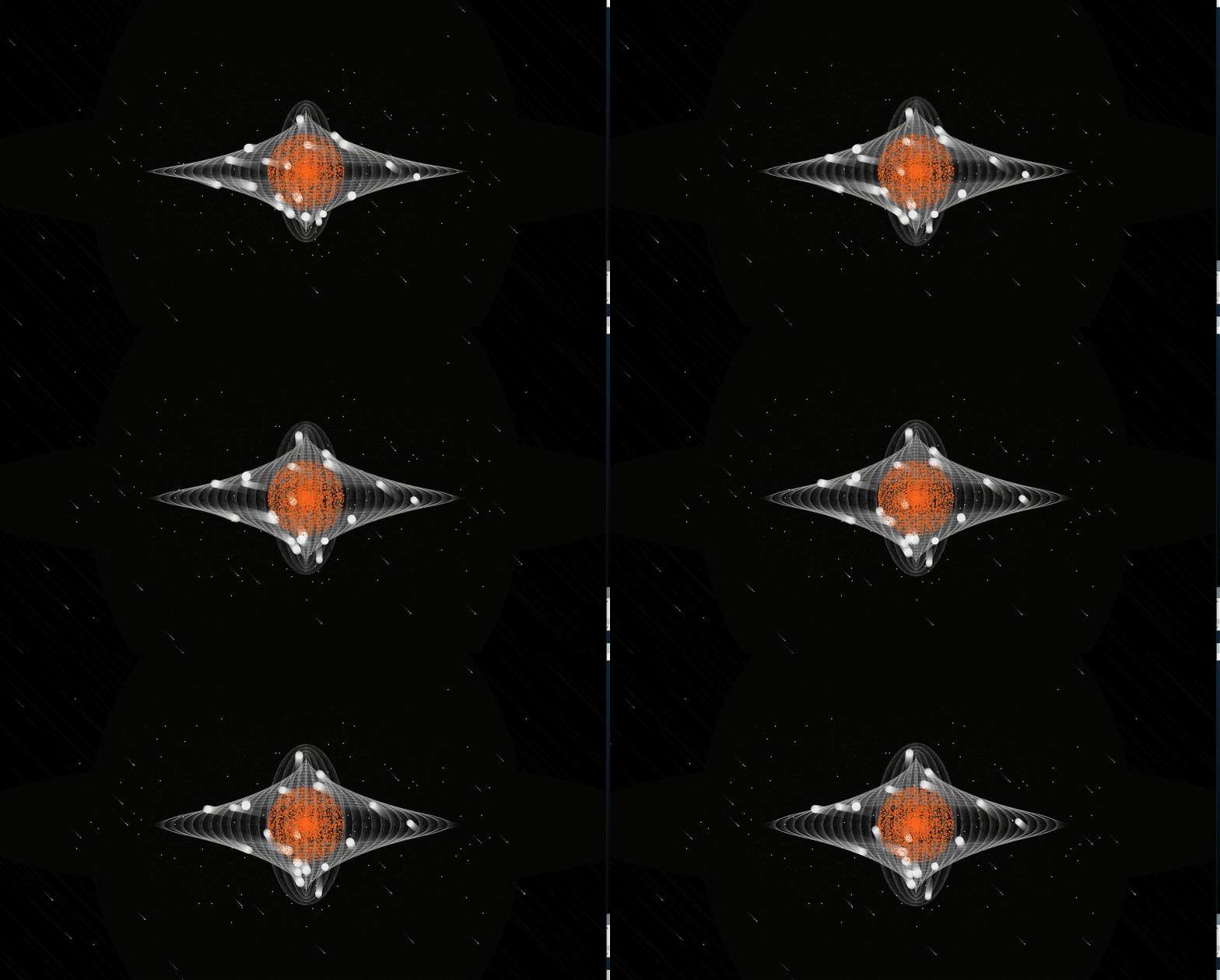
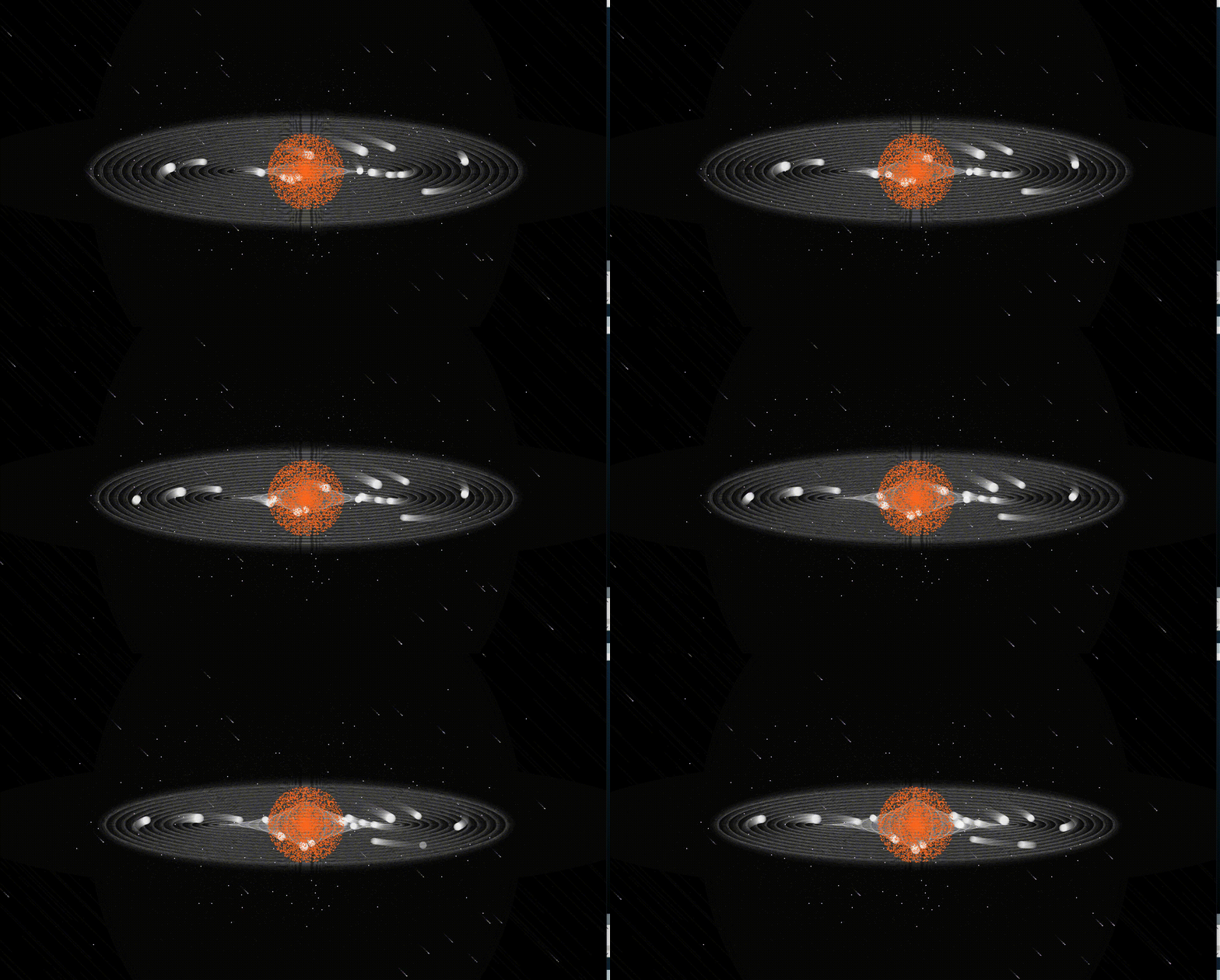
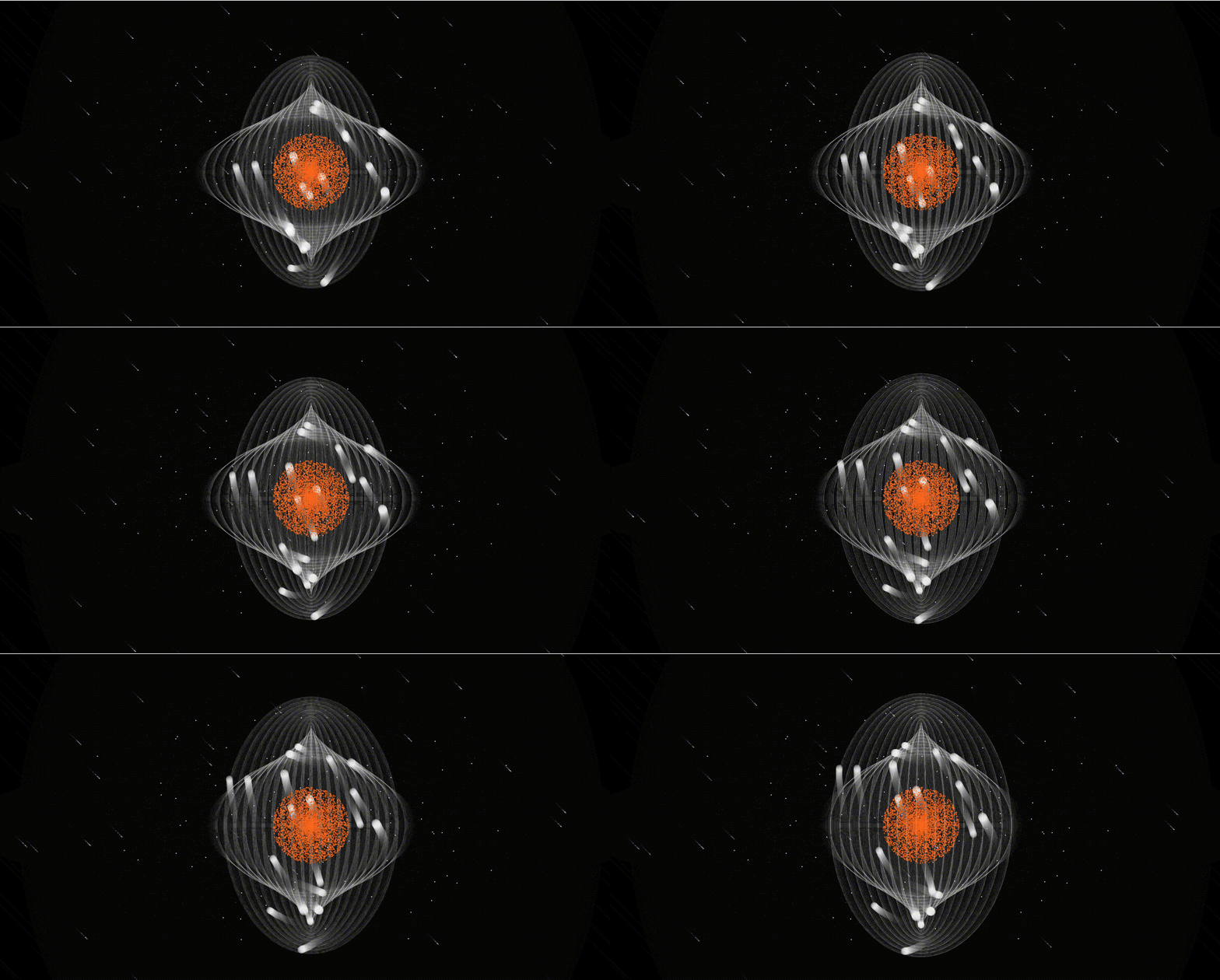
由于视频上传有限制所以就不上传了,搞成动图展示了
二、寓意
“天上的云,聚了又散,人生离合,亦复如斯。”
一开始的白色小球围着轨道环绕中心的橙色星球,当周围声音越大,白色小球靠近得越快,会越快地将橙色星球环绕其中,寓意着个人世界中的热闹盛况。随着时间的流逝,当白色小球散开时,声音越大,轨道扩散的速度越快,但到了一定距离后,轨道长度的变化将不再受声音的影响,一番热闹过后,就会逐渐安静下来,小球和轨道的扩散开来仿若人群散开,被别处的热闹所吸引离去,只有自己的声音回响。鼠标一点,一切又会重新开始,人生就是这样,自己参与的无数热闹或许会再来,或许不再,但无论怎样的变换,自己都应当保持一颗炽热的心去倾听和活动。
三、素材与交互点
1. 所用素材
背景音乐
由小瀬村晶的 Love Theme 纯音乐和麦克风周围收音的声音组成。纯音乐营造一种安静寂寥的氛围,显得声音比较空灵,可以使人平静下来倾听自己的声音和自己周围的声音,增加交互的沉浸感。
2. 交互点
声音、键盘、鼠标交互
- 在一定范围内,外界传入声音的大小影响轨道长度的变化。
- 点击鼠标,轨道又会回到最初的地点。
- 按下键盘上的“a”或"A"可保存图片,如同用照片记录下人生的重要瞬间。
- 戴上耳机时,可以倾听到与背景音乐融合和自身周围环境白噪声。
四、创作与源码
1.背景流星和星星的制作
参考这位博主的原文https://blog.csdn.net/QianQing_mio/article/details/
大面积的静态星星和动态流星展现浩瀚的宇宙和衬托个人星球的炽热和寂寥。
//背景流星和星星 class Stars {
    int star_num;//星星的数量 int meteor_num;//流星的数量 PVector[] stars_p, meteor_p, velocity;//星星和流星的位置,流星的速度 PVector acceleration; float rms; Stars(int num, int meteor_num) {
    this.star_num = num; this.meteor_num = meteor_num; stars_p = new PVector[num]; meteor_p =new PVector[meteor_num]; velocity = new PVector[meteor_num]; rms = this.rms; //星星位置初始化 float x1 = 0; float y1 = 0; for (int i=0; i<star_num; i++) {
    float x= map(noise(x1), 0, 1, 0, width); float y =map(noise(y1), 0, 1, 0, height); stars_p[i] = new PVector(x, y); y1+=30; x1+=0.5; } //流星初始化 for (int i=0; i<meteor_num; i++) {
    //初始化流星的位置 meteor_p[i] = new PVector(random(width), random(height)); //初始化流星的速度 float a = int(random(1, 2)); float b= int(random(1, 2)); velocity[i] = new PVector(rms, rms); } } void display() {
    //画星星 for (int i=0; i<star_num; i++) {
    if (i%30==0) {
    //大一点点的星星 stroke(#edccf7); fill(#edccf7); ellipse(stars_p[i].x, stars_p[i].y, 2, 2); } else {
    stroke(255); point(stars_p[i].x, stars_p[i].y); } } //画流星 for (int i =0; i<meteor_num; i++) {
    float m =random(0, 1); float c = random(5); if (c>4) {
    stroke(#edccf7); } else {
    stroke(0); } if (m>meteor_num/2) {
    point(meteor_p[i].x, meteor_p[i].y); } else {
    ellipse(meteor_p[i].x, meteor_p[i].y, random(5), random(3)); } } } //流星位置更新 void update(float rms) {
    for (int i=0; i<meteor_num; i++) {
    velocity[i].x=rms; velocity[i].y =rms; meteor_p[i].add(velocity[i]); } } void checkEdge() {
    for (int i=0; i<meteor_num; i++) {
    if (meteor_p[i].x>width) {
    meteor_p[i].x=0; } if (meteor_p[i].y>height) {
    meteor_p[i].y=0; } } } }
讯享网
2.主体元素
橙色星球由 5000 个透明度变换橙色粒子组成,象征着个人保持着热烈的世界状态但在宇宙中又显得比较安静寂寥的形象。白色小球代表与自己相伴但又会逐渐离开或许又重新会回来的人或事物。
讯享网//构成中心圆橙色的粒子 class Particle{
    float r, x0, y0, theta; float x; float y; Particle(float r1,float r2) {
    theta = radians(random(360)); this.r = r1; this.r = r2; x0 = width/2; y0 = height/2; } void update() {
    x = x0+r*cos(theta); y = y0+r*sin(theta); theta+=radians(random(0.01, 0.05)); } void display() {
    noStroke(); float p = map((float)randomGaussian(), 0, 1, 0, 255); fill(#FC651F, p); ellipse(x, y, random(2, 4), random(2, 4)); } }
形成一个橙色视觉中心点
//行星 class Planet {
    float w;//定义图片的宽高 PImage circle; Particle[] particles; Planet() {
    //光圈 circle = loadImage("sun3.png"); w=250; particles = new Particle[5000]; for (int i=0; i<particles.length; i++) {
    particles[i] = new Particle(random(120), random(120)); } } void update() {
    for (int i=0; i<particles.length; i++) {
    particles[i].update(); particles[i].display(); } } void display() {
    imageMode(CENTER); //image(circle, width/2, height/2, w, w); } void mousePressed() {
    for (int i=0; i<particles.length; i++) {
    particles[i] = new Particle(random(120), random(120)); } } }
3.白色小球与其轨迹
围着轨道环绕中心的橙色星球移动的白色小球和它的轨迹路线
讯享网//卫星 class Satellite {
    float a, b;//定义椭圆轨道的宽高(半长轴,半短轴) float x, y;//定义卫星的坐标 float h;//让椭圆轨道倾斜的变量 float angle, angleSpeed;//定义椭圆三角函数的角和角速度变化的速度 float[] c = new float[3]; float r1;//卫星的半径大小 float mass; Particle[] particles; Satellite (float a, float b) {
    this.a= a; this.b=b; angle =random(radians(360)); angleSpeed = 0.01f; x = a*cos(radians(angle))+width/2; y = b*sin(radians(angle))+height/2; colorMode(HSB); r1 = random(20, 30); } void update() {
    x = a*cos(angle)+width/2; y = b*sin(angle)+height/2; angle +=angleSpeed; } void display() {
    //轨道 stroke(255); strokeWeight(0.1); noFill(); ellipse(width/2, height/2, 2*a, b*2); //卫星的形状实现 noStroke(); fill(255, 100); ellipse(x, y, r1, r1); } void update2(float rms2) {
    float ra =map(rms2, 0, 1, 1, 10); if (a>540) {
    x = a*cos(angle)+width/2; y = b*sin(angle)+height/2; stroke(255); strokeWeight(0.1); noFill(); ellipse(width/2, height/2, 2*a, b*2); float ap=ra; float bp=ra; a-=ap; b-=bp; } else {
    float ap=ra; float bp=ra; x = a*cos(angle)+width/2; y = b*sin(angle)+height/2; angle +=angleSpeed; display(); a-=ap; b-=bp; } } }
4.主程序运行部分
import processing.sound.*; //所用到的库sound Planet planet; Stars s; Satellite[] satellites; //音乐 AudioIn audio; Amplitude amp, amp2; SoundFile file; //保存图片 String filename; int j; void setup() {
    size(1980, 1080); background(0); planet = new Planet(); s = new Stars(3000, 30);//初始化星空背景 satellites =new Satellite[20];//初始化卫星 for (int i=0; i<satellites.length; i++) {
    satellites[i] = new Satellite(150+i*50, 20+i*10); } file = new SoundFile(this, "小瀬村晶 - Love Theme.mp3"); file.loop(); file.play(); //收播外部的声音,营造氛围感,声音会更有空灵感 audio = new AudioIn(this, 0); audio.play(); audio.start(); //分析背景音乐的振幅 amp = new Amplitude(this); amp.input(file); //输入麦克风传来的声音的振幅 amp2 = new Amplitude(this); amp2.input(audio); //图片保存 j=0; filename = "Listening"; } void draw() {
    //background(0, 200); noStroke(); fill(0, 18); rect(0, 0, width, height); //音乐文件的声音改变背景流星的运动速度 float rms = amp.analyze(); rms = map(rms, 0, 1, 0.5, 1); //println(rms); //分析麦克风传入的声音 float rms2 = amp2.analyze(); //rms = map(rms2, 0, 1, 0.5, 1); //println(rms2); s.display(); s.update(rms); s.checkEdge(); for (int i=0; i<satellites.length; i++) {
    //planets[i].display(); satellites[i].update2(rms2); } planet.display(); planet.update(); //点击"a"或"A"保存当前画面为图片 if (keyPressed) {
    if (key == 'a' || key == 'A') {
    saveFrame(filename+j+".jpg"); j++; } } } void mousePressed() {
    s = new Stars(3000, 30); for (int i=0; i<satellites.length; i++) {
    satellites[i] = new Satellite(150+i*30, 20+i*10); } }
版权声明:本文内容由互联网用户自发贡献,该文观点仅代表作者本人。本站仅提供信息存储空间服务,不拥有所有权,不承担相关法律责任。如发现本站有涉嫌侵权/违法违规的内容,请联系我们,一经查实,本站将立刻删除。
如需转载请保留出处:https://51itzy.com/kjqy/68682.html