
集合(Set)
一个集合是不同对象的无序的容器。 常见用途包括成员资格测试、从序列中删除重复项、以及数学运算,如交集,并集,差集等。

Python集合的重要属性如下:
- Sets are unordered – Items stored in a set aren’t kept in any particular order.
- Set items are unique – Duplicate items are not allowed.
- Sets are unindexed – You cannot access set items by referring to an index.
- Sets are changeable (mutable) – They can be changed in place, can grow and shrink on demand.
创建一个集合
可以通过将用逗号分隔的元素序列放在花括号{}中来创建集合。
set_of_shapes = {
   'circle','square','triangle'} for shape in set_of_shapes: print(shape)
讯享网
讯享网triangle circle square
set_of_shapes.add('polygon') print(set_of_shapes) 讯享网{'triangle', 'polygon', 'circle', 'square'}
集合不允许重复元素。 在创建集合时会自动将其删除。
# Example: Set removes duplicates S = {
'red', 'green', 'blue', 'red'} print(S) # {'blue', 'green', 'red'} 讯享网{'blue', 'red', 'green'}
集合本身是可变的,但是它不能包含可变的对象。
例如:集合可以包含不可更改的对象,例如数字、字符串、元组等。
S = {
   1, 'abc', ('a', 'b'), True}
但是列表和字典是可变的,因此无法成为集合的元素。
讯享网# TypeError: unhashable type: 'list' S = {
   [1, 2], {
   'a':1, 'b':2}}
--------------------------------------------------------------------------- TypeError Traceback (most recent call last) <ipython-input-5-e6436edb64d7> in <module> 1 # TypeError: unhashable type: 'list' ----> 2 S = {[1, 2], {'a':1, 'b':2}} TypeError: unhashable type: 'list' 集合构造函数
也可以使用称为set()的类型构造函数来创建集合。
讯享网# Set of items in an iterable S = set('abc') print(S) # {'a', 'b', 'c'} # Set of successive integers S = set(range(0, 4)) print(S) # {0, 1, 2, 3} # Convert list into set S = set([1, 2, 3]) print(S) # {1, 2, 3}
{'c', 'a', 'b'} {0, 1, 2, 3} {1, 2, 3} 将元素添加到集合
可以使用add()方法将单个元素添加到集合中。
讯享网#Example: Add ‘yellow’ to the set S = {
   'red', 'green', 'blue'} S.add('yellow') print(S) # {'blue', 'green', 'yellow', 'red'}
{'yellow', 'blue', 'red', 'green'} 可以使用update()方法将多个元素添加到集合中。
讯享网#Example: Add ‘yellow’ and ‘orange’ to the set S = {
   'red', 'green', 'blue'} S.update(['yellow', 'orange']) print(S) # {'blue', 'orange', 'green', 'yellow', 'red'}
{'yellow', 'blue', 'orange', 'red', 'green'} 从集合中删除元素
要从集合中删除单个元素,可使用remove()或discard()方法。
讯享网#Example: Remove ‘red’ from the set S = {
   'red', 'green', 'blue'} S.remove('red') print(S) # {'blue', 'green'}
{'blue', 'green'} 讯享网#Example: Remove ‘red’ from the set S = {
'red', 'green', 'blue'} S.discard('red') print(S) # {'blue', 'green'}
{'blue', 'green'} 两种方法的工作原理完全相同。
唯一的区别是,如果指定的元素不存在于集合中:
- remove()方法抛出KeyError
- discard()方法什么也不做


pop()方法从集合中删除随机元素并返回它。
(The pop() method removes an arbitrary element from the set and returns the element removed.)
讯享网#Example: Remove random item from the set print returned value S = {
   'red', 'green', 'blue'} x = S.pop() print(S) print(x)
{'red', 'green'} blue 讯享网set1 = set([9,4,5,2,6,7,1,8]) print(set1) print(set1.pop())
{1, 2, 4, 5, 6, 7, 8, 9} 1 讯享网set1 = set((6,3,1,7,2,9,8,0)) print(set1) print(set1.pop()) print(set1)
{0, 1, 2, 3, 6, 7, 8, 9} 0 {1, 2, 3, 6, 7, 8, 9} 讯享网a = set("abcdefg") print(a.pop()) print(a)
g {'e', 'f', 'c', 'a', 'b', 'd'} 讯享网a = set("abcdefg") print(a.pop()) print(a)
g {'e', 'f', 'c', 'a', 'b', 'd'} 讯享网b=set([43,54,2,67]) print(b.pop()) print(b)
67 {2, 43, 54} 如果集合为空,则pop()引发异常。
讯享网# KeyError: 'pop from an empty set' S = set() S.pop()
--------------------------------------------------------------------------- KeyError Traceback (most recent call last) <ipython-input-17-b12> in <module> 1 # KeyError: 'pop from an empty set' 2 S = set() ----> 3 S.pop() KeyError: 'pop from an empty set' 使用clear()方法从集合中删除所有元素。
讯享网# Example: Empty entire set S = {
   'red', 'green', 'blue'} S.clear() print(S) # set()
set() 得到集合大小
要查找集合中有多少元素,可使用len()方法。
讯享网#Example: Find length of a set S = {
   'red', 'green', 'blue'} print(len(S)) # 3
3 遍历集合
要遍历集合的元素,可使用for循环。
讯享网#Example: Print each item in a set S = {
   'red', 'green', 'blue'} for item in S: print(item) # blue green red
blue red green 检查元素是否存在于集合中
要检查集合中是否存在特定元素,可以在if语句中使用in和not in运算符
讯享网# Check for presence S = {
   'red', 'green', 'blue'} if 'red' in S: print('yes')
yes 讯享网# Check for absence S = {
'red', 'green', 'blue'} if 'yellow' not in S: print('yes')
yes 集合操作
集合通常用于计算数学运算,例如交集,并集,差和对称差。
集合并集
可以使用union()方法或|运算符对两个或更多集合执行并集操作。

讯享网#Example: A = {
   'red', 'green', 'blue'} B = {
   'yellow', 'red', 'orange'} # by operator print(A | B)
{'blue', 'orange', 'yellow', 'red', 'green'} 讯享网# by method print(A.union(B))
{'blue', 'orange', 'yellow', 'red', 'green'} 集合交集
可以使用intersection()方法或&运算符在两个或多个集合上执行交集。

讯享网#Example: A = {
   'red', 'green', 'blue'} B = {
   'yellow', 'red', 'orange'} # by operator print(A & B)
{'red'} 讯享网# by method print(A.intersection(B))
{'red'} 集合差集
可以使用difference()方法或-运算符来计算两个或多个集合之间的差集。
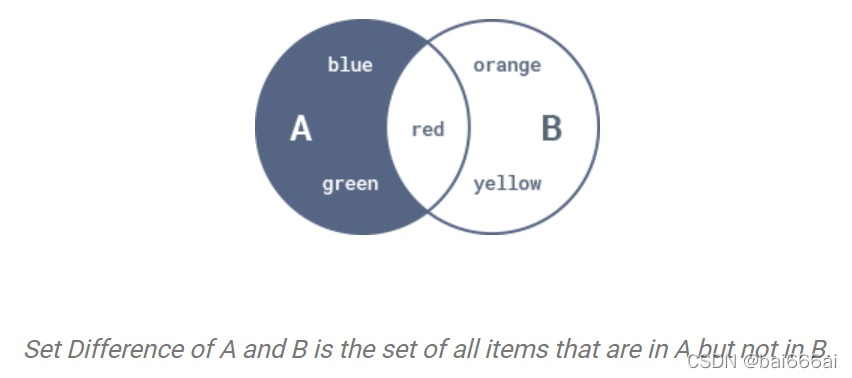
讯享网#Example: A = {
   'red', 'green', 'blue'} B = {
   'yellow', 'red', 'orange'} # by operator print(A - B) # by method print(A.difference(B))
{'blue', 'green'} {'blue', 'green'} 集合对称差集(Symmetric Difference)
可以使用symmetric_difference()方法或^运算符来计算两个或多个集合之间的对称差集。

讯享网#Example: A = {
   'red', 'green', 'blue'} B = {
   'yellow', 'red', 'orange'} # by operator print(A ^ B)
{'yellow', 'orange', 'blue', 'green'} 讯享网# by method print(A.symmetric_difference(B))
{'yellow', 'orange', 'blue', 'green'} 讯享网
版权声明:本文内容由互联网用户自发贡献,该文观点仅代表作者本人。本站仅提供信息存储空间服务,不拥有所有权,不承担相关法律责任。如发现本站有涉嫌侵权/违法违规的内容,请联系我们,一经查实,本站将立刻删除。
如需转载请保留出处:https://51itzy.com/kjqy/68272.html