
函数头文件:
#include <sys/types.h> #include <sys/stat.h> #include <unistd.h>讯享网
函数功能:获取文件属性,比如文件权限,文件属主,文件大小等属性。
函数原型:int lstat(const char *pathname, struct stat *statbuf);
函数参数:第一个参数为传入参数,pathname为绝对路径或相对路径。第二个参数为传出参数,它将文件所具有的属性信息存放在该结构体指针所指的结构体中。接收该属性信息时,需要提前定义一个结构体变量struct stat st,或者结构体指针struct stat* pst = &st。这里推荐使用结构体变量,更为方便。
这里介绍一下绝对路径和相对路径:绝对路径即是像/home/ubuntu这样从根目录/为起始具体到某个文件。相对路径则是默认从当前路径下自动寻找,比如说当前在home路径下,我又想进入ubuntu这个目录内,则可以使用命令cd ubuntu来进入目录,此时ubuntu前没有任何信息,则默认从当前目录下寻找,当然也是可以找到并进入。
后面我们详细聊聊这个结构体struct stat:
讯享网 struct stat { dev_t st_dev; //文件的设备编号 /* ID of device containing file */ ino_t st_ino; //文件的结点号 /* Inode number */ mode_t st_mode; //文件的类型权限 /* File type and mode */ nlink_t st_nlink; //文件的硬链接数 /* Number of hard links */ uid_t st_uid; //用户id /* User ID of owner */ gid_t st_gid; //组id /* Group ID of owner */ dev_t st_rdev; //文件的设备类型 /* Device ID (if special file) */ off_t st_size; //文件的大小 /* Total size, in bytes */ blksize_t st_blksize; //文件块大小 /* Block size for filesystem I/O */ blkcnt_t st_blocks; //文件的块数 /* Number of 512B blocks allocated */ struct timespec st_atim; //文件最后一次访问时间 /* Time of last access */ struct timespec st_mtim; //文件最后一次修改时间 /* Time of last modification */ struct timespec st_ctim; //文件最后一次改变时间(属性)/* Time of last status change */ };//结构体信息来自 man命令下lstat函数详解
下面使用lstat函数获取文件属性:
此处为ubuntu下,linux中shell命令解释器,使用stat + 文件名即可查看文件信息。

如下图所示:
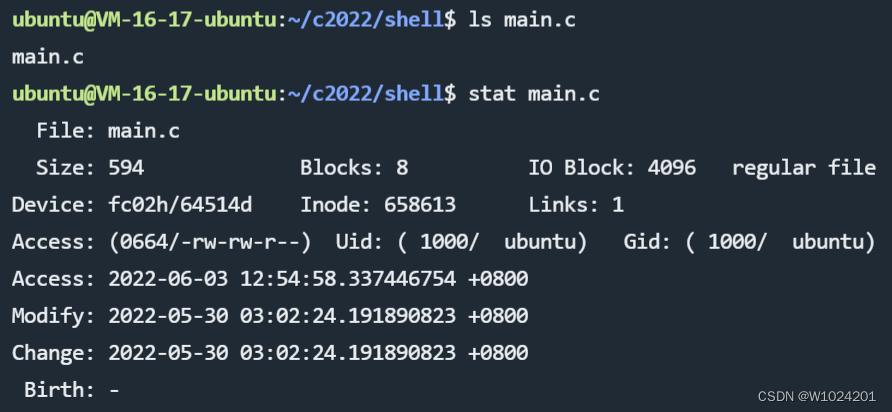
接下来使用lstat系统调用函数来编写一段代码,获取文件属性。
#include<unistd.h> #include<sys/types.h> #include<sys/stat.h> #include<stdio.h> #include<stdlib.h> int main() { struct stat st;//定义结构体变量 int res = stat("main.c",&st);//调用函数获取文件信息,使用相对路径 if(res == -1)//获取文件属性失败,打印错误信息 { perror("get file stat fail"); exit(1); } printf("size:%ld ",st.st_size); printf("dev:%ld ",st.st_dev); printf("blocks:%ld ",st.st_blocks); printf("inode:%ld ",st.st_ino); printf("link:%ld ",st.st_nlink); printf("uid:%d ",st.st_uid); printf("gid:%d \n",st.st_gid); return 0; }编译执行,我们发现和我们使用命令stat + 文件名得到的文件信息一致;

了解lstat函数后,我们获取文件的信息更为方便,可以手动实现一些相关命令来熟悉此类信息。
实现类似ls -l获取文件信息也会更加方便。
版权声明:本文内容由互联网用户自发贡献,该文观点仅代表作者本人。本站仅提供信息存储空间服务,不拥有所有权,不承担相关法律责任。如发现本站有涉嫌侵权/违法违规的内容,请联系我们,一经查实,本站将立刻删除。
如需转载请保留出处:https://51itzy.com/kjqy/67919.html