
1、前言
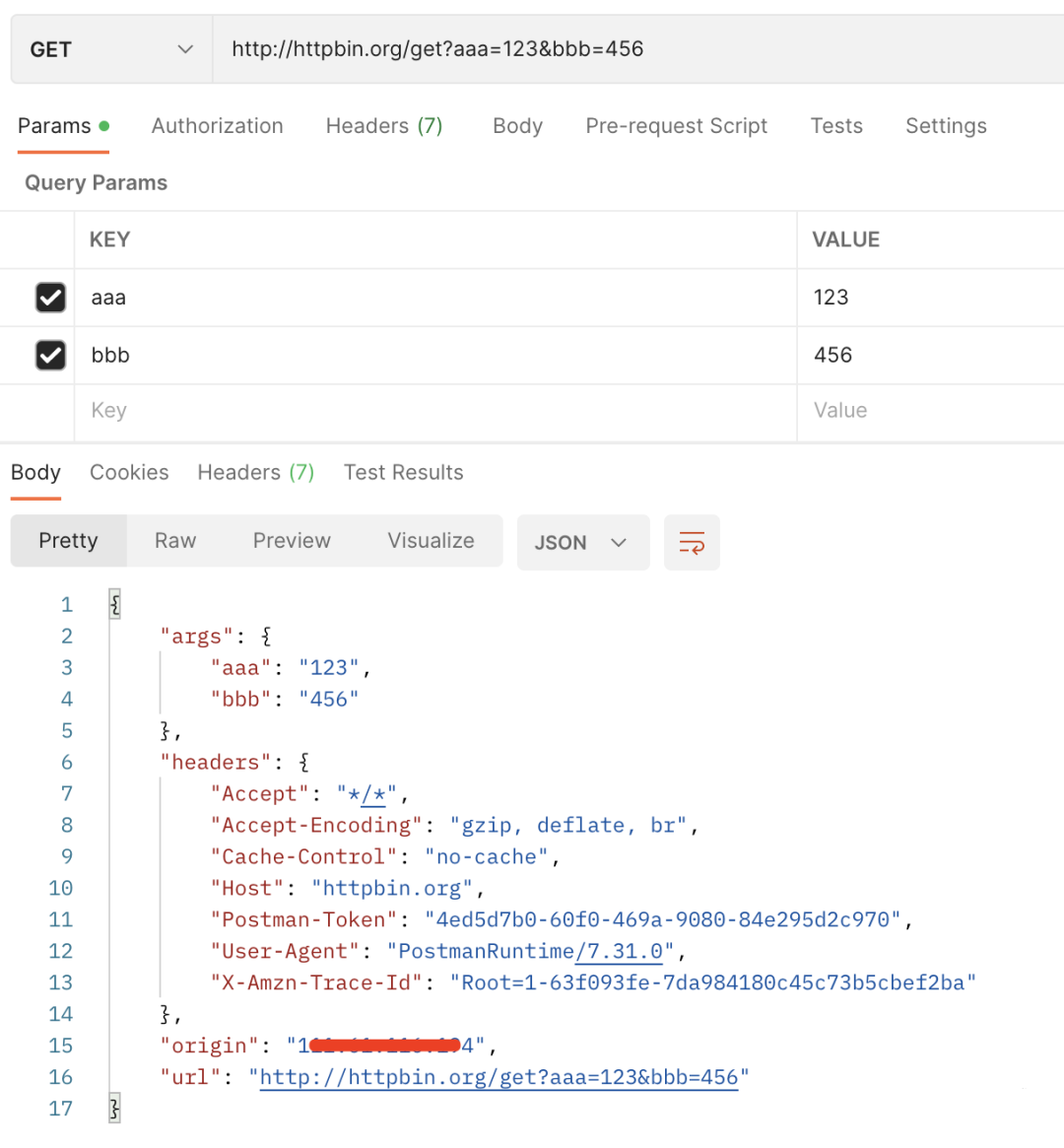
使用 Postman 进行接口测试,如下图。
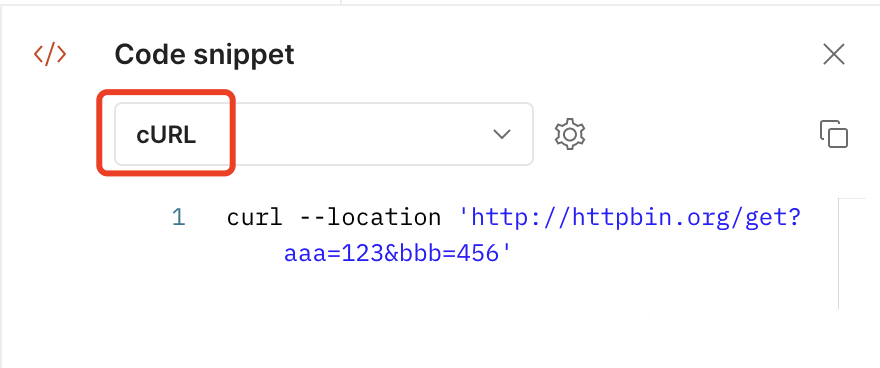
在 Postman 的代码段里,可以转换你需要的不同语言的代码,其中就可以转换 cURL 代码。
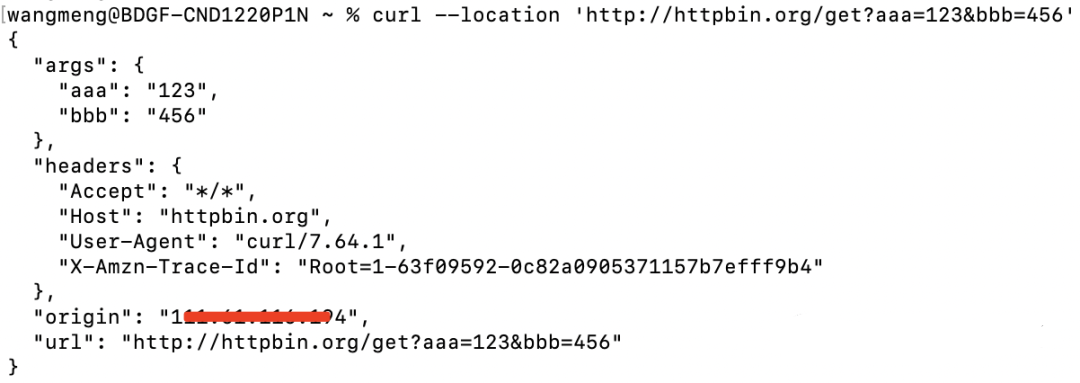
将此代码复制到命令行里执行,可以执行成功,请求结果和在 Postman 里执行的结果一样。
cURL 在命令行或脚本中用于传输数据。
2、简介
cURL 是一个利用 URL 语法在命令行下工作的文件传输工具,1997年首次发行。它支持文件上传和下载,所以是综合传输工具,但按传统习惯称 cURL 为下载工具。cURL 还包含了用于程序开发的 libcurl。
cURL 支持的通信协议有 FTP、FTPS、HTTP、HTTPS、TFTP、SFTP、Gopher、SCP、Telnet、DICT、FILE、LDAP、LDAPS、IMAP、POP3、SMTP 和 RTSP。
cURL 还用于汽车、电视机、路由器、打印机、音频设备、移动电话、平板电脑、机顶盒、媒体播放器,是超过100亿个安装中数千个软件应用程序的互联网传输引擎。
官方网址:
https://curl.se/
3、命令参数
基本操作命令:
curl -X <method> [-H “xxx:xxx”]… [-d “xxx=xxx”]… url -X :请求方式 GET、POST。。。。。。 -H :请求头header -d :POST/PUT/。。。请求所带的form表单或body,GET请求无视这个参数 url :请求地址讯享网
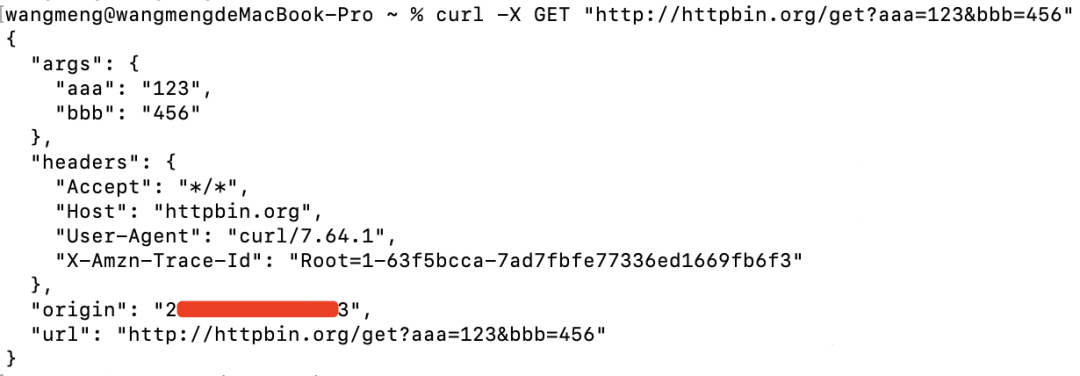
示例1:GET请求
讯享网curl -X GET "http://httpbin.org/get?aaa=123&bbb=456"
示例2:POST请求,参数为form表单
curl -X POST "http://httpbin.org/post" -d "aaa=123" -d "bbb=456"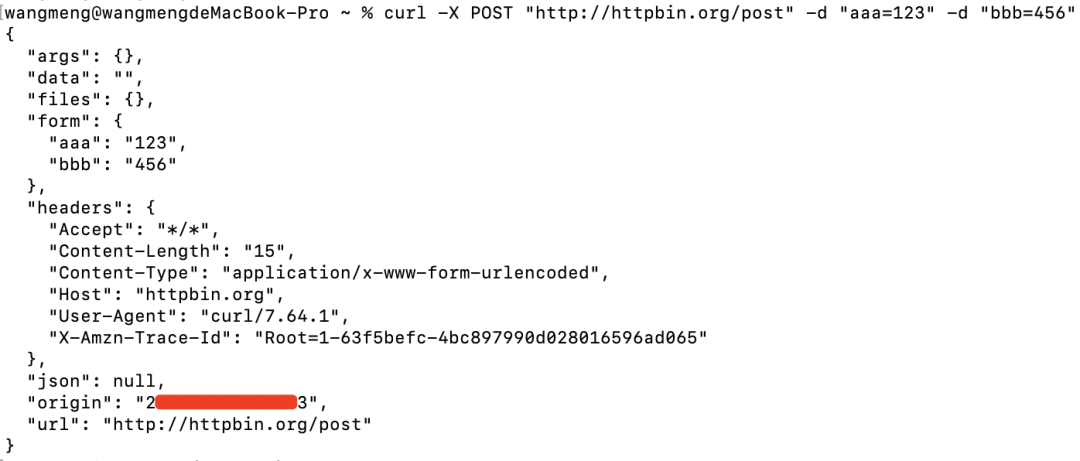
示例3:POST请求,参数为json,并且有请求头header参数
讯享网curl -X POST "http://httpbin.org/post" -H "accesstoken: test123" -H "Content-Type: application/json" -d '{"cancel": 0,"services": [{"status": 1,"code": "001"}],"model": "demo","id": "test123-001"}'
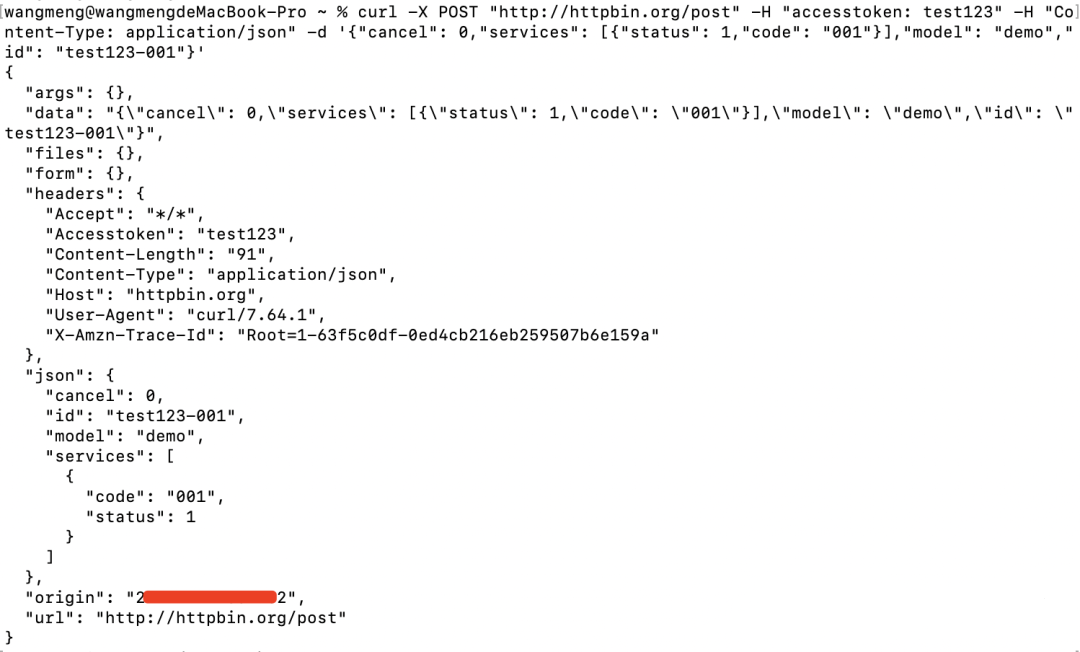
查找更多参数,输入命令 curl --help 即可。
wangmeng@wangmengdeMacBook-Pro ~ % curl --help Usage: curl [options...] <url> --abstract-unix-socket <path> Connect via abstract Unix domain socket --alt-svc <file name> Enable alt-svc with this cache file --anyauth Pick any authentication method -a, --append Append to target file when uploading --basic Use HTTP Basic Authentication --cacert <file> CA certificate to verify peer against --capath <dir> CA directory to verify peer against -E, --cert <certificate[:password]> Client certificate file and password --cert-status Verify the status of the server certificate --cert-type <type> Certificate file type (DER/PEM/ENG) --ciphers <list of ciphers> SSL ciphers to use --compressed Request compressed response --compressed-ssh Enable SSH compression -K, --config <file> Read config from a file --connect-timeout <seconds> Maximum time allowed for connection --connect-to <HOST1:PORT1:HOST2:PORT2> Connect to host -C, --continue-at <offset> Resumed transfer offset -b, --cookie <data|filename> Send cookies from string/file -c, --cookie-jar <filename> Write cookies to <filename> after operation --create-dirs Create necessary local directory hierarchy --crlf Convert LF to CRLF in upload --crlfile <file> Get a CRL list in PEM format from the given file -d, --data <data> HTTP POST data --data-ascii <data> HTTP POST ASCII data --data-binary <data> HTTP POST binary data --data-raw <data> HTTP POST data, '@' allowed --data-urlencode <data> HTTP POST data url encoded --delegation <LEVEL> GSS-API delegation permission --digest Use HTTP Digest Authentication -q, --disable Disable .curlrc --disable-eprt Inhibit using EPRT or LPRT --disable-epsv Inhibit using EPSV --disallow-username-in-url Disallow username in url --dns-interface <interface> Interface to use for DNS requests --dns-ipv4-addr <address> IPv4 address to use for DNS requests --dns-ipv6-addr <address> IPv6 address to use for DNS requests --dns-servers <addresses> DNS server addrs to use --doh-url <URL> Resolve host names over DOH -D, --dump-header <filename> Write the received headers to <filename> --egd-file <file> EGD socket path for random data --engine <name> Crypto engine to use --expect100-timeout <seconds> How long to wait for 100-continue -f, --fail Fail silently (no output at all) on HTTP errors --fail-early Fail on first transfer error, do not continue --false-start Enable TLS False Start -F, --form <name=content> Specify multipart MIME data --form-string <name=string> Specify multipart MIME data --ftp-account <data> Account data string --ftp-alternative-to-user <command> String to replace USER [name] --ftp-create-dirs Create the remote dirs if not present --ftp-method <method> Control CWD usage --ftp-pasv Use PASV/EPSV instead of PORT -P, --ftp-port <address> Use PORT instead of PASV --ftp-pret Send PRET before PASV --ftp-skip-pasv-ip Skip the IP address for PASV --ftp-ssl-ccc Send CCC after authenticating --ftp-ssl-ccc-mode <active/passive> Set CCC mode --ftp-ssl-control Require SSL/TLS for FTP login, clear for transfer -G, --get Put the post data in the URL and use GET -g, --globoff Disable URL sequences and ranges using {} and [] --happy-eyeballs-timeout-ms <milliseconds> How long to wait in milliseconds for IPv6 before trying IPv4 --haproxy-protocol Send HAProxy PROXY protocol v1 header -I, --head Show document info only -H, --header <header/@file> Pass custom header(s) to server -h, --help This help text --hostpubmd5 <md5> Acceptable MD5 hash of the host public key --http0.9 Allow HTTP 0.9 responses -0, --http1.0 Use HTTP 1.0 --http1.1 Use HTTP 1.1 --http2 Use HTTP 2 --http2-prior-knowledge Use HTTP 2 without HTTP/1.1 Upgrade --ignore-content-length Ignore the size of the remote resource -i, --include Include protocol response headers in the output -k, --insecure Allow insecure server connections when using SSL --interface <name> Use network INTERFACE (or address) -4, --ipv4 Resolve names to IPv4 addresses -6, --ipv6 Resolve names to IPv6 addresses -j, --junk-session-cookies Ignore session cookies read from file --keepalive-time <seconds> Interval time for keepalive probes --key <key> Private key file name --key-type <type> Private key file type (DER/PEM/ENG) --krb <level> Enable Kerberos with security <level> --libcurl <file> Dump libcurl equivalent code of this command line --limit-rate <speed> Limit transfer speed to RATE -l, --list-only List only mode --local-port <num/range> Force use of RANGE for local port numbers -L, --location Follow redirects --location-trusted Like --location, and send auth to other hosts --login-options <options> Server login options --mail-auth <address> Originator address of the original email --mail-from <address> Mail from this address --mail-rcpt <address> Mail to this address -M, --manual Display the full manual --max-filesize <bytes> Maximum file size to download --max-redirs <num> Maximum number of redirects allowed -m, --max-time <seconds> Maximum time allowed for the transfer --metalink Process given URLs as metalink XML file --negotiate Use HTTP Negotiate (SPNEGO) authentication -n, --netrc Must read .netrc for user name and password --netrc-file <filename> Specify FILE for netrc --netrc-optional Use either .netrc or URL -:, --next Make next URL use its separate set of options --no-alpn Disable the ALPN TLS extension -N, --no-buffer Disable buffering of the output stream --no-keepalive Disable TCP keepalive on the connection --no-npn Disable the NPN TLS extension --no-sessionid Disable SSL session-ID reusing --noproxy <no-proxy-list> List of hosts which do not use proxy --ntlm Use HTTP NTLM authentication --ntlm-wb Use HTTP NTLM authentication with winbind --oauth2-bearer <token> OAuth 2 Bearer Token -o, --output <file> Write to file instead of stdout --pass <phrase> Pass phrase for the private key --path-as-is Do not squash .. sequences in URL path --pinnedpubkey <hashes> FILE/HASHES Public key to verify peer against --post301 Do not switch to GET after following a 301 --post302 Do not switch to GET after following a 302 --post303 Do not switch to GET after following a 303 --preproxy [protocol://]host[:port] Use this proxy first -#, --progress-bar Display transfer progress as a bar --proto <protocols> Enable/disable PROTOCOLS --proto-default <protocol> Use PROTOCOL for any URL missing a scheme --proto-redir <protocols> Enable/disable PROTOCOLS on redirect -x, --proxy [protocol://]host[:port] Use this proxy --proxy-anyauth Pick any proxy authentication method --proxy-basic Use Basic authentication on the proxy --proxy-cacert <file> CA certificate to verify peer against for proxy --proxy-capath <dir> CA directory to verify peer against for proxy --proxy-cert <cert[:passwd]> Set client certificate for proxy --proxy-cert-type <type> Client certificate type for HTTPS proxy --proxy-ciphers <list> SSL ciphers to use for proxy --proxy-crlfile <file> Set a CRL list for proxy --proxy-digest Use Digest authentication on the proxy --proxy-header <header/@file> Pass custom header(s) to proxy --proxy-insecure Do HTTPS proxy connections without verifying the proxy --proxy-key <key> Private key for HTTPS proxy --proxy-key-type <type> Private key file type for proxy --proxy-negotiate Use HTTP Negotiate (SPNEGO) authentication on the proxy --proxy-ntlm Use NTLM authentication on the proxy --proxy-pass <phrase> Pass phrase for the private key for HTTPS proxy --proxy-pinnedpubkey <hashes> FILE/HASHES public key to verify proxy with --proxy-service-name <name> SPNEGO proxy service name --proxy-ssl-allow-beast Allow security flaw for interop for HTTPS proxy --proxy-tls13-ciphers <ciphersuite list> TLS 1.3 proxy cipher suites --proxy-tlsauthtype <type> TLS authentication type for HTTPS proxy --proxy-tlspassword <string> TLS password for HTTPS proxy --proxy-tlsuser <name> TLS username for HTTPS proxy --proxy-tlsv1 Use TLSv1 for HTTPS proxy -U, --proxy-user <user:password> Proxy user and password --proxy1.0 <host[:port]> Use HTTP/1.0 proxy on given port -p, --proxytunnel Operate through an HTTP proxy tunnel (using CONNECT) --pubkey <key> SSH Public key file name -Q, --quote Send command(s) to server before transfer --random-file <file> File for reading random data from -r, --range <range> Retrieve only the bytes within RANGE --raw Do HTTP "raw"; no transfer decoding -e, --referer <URL> Referrer URL -J, --remote-header-name Use the header-provided filename -O, --remote-name Write output to a file named as the remote file --remote-name-all Use the remote file name for all URLs -R, --remote-time Set the remote file's time on the local output -X, --request <command> Specify request command to use --request-target Specify the target for this request --resolve <host:port:address[,address]...> Resolve the host+port to this address --retry <num> Retry request if transient problems occur --retry-connrefused Retry on connection refused (use with --retry) --retry-delay <seconds> Wait time between retries --retry-max-time <seconds> Retry only within this period --sasl-ir Enable initial response in SASL authentication --service-name <name> SPNEGO service name -S, --show-error Show error even when -s is used -s, --silent Silent mode --socks4 <host[:port]> SOCKS4 proxy on given host + port --socks4a <host[:port]> SOCKS4a proxy on given host + port --socks5 <host[:port]> SOCKS5 proxy on given host + port --socks5-basic Enable username/password auth for SOCKS5 proxies --socks5-gssapi Enable GSS-API auth for SOCKS5 proxies --socks5-gssapi-nec Compatibility with NEC SOCKS5 server --socks5-gssapi-service <name> SOCKS5 proxy service name for GSS-API --socks5-hostname <host[:port]> SOCKS5 proxy, pass host name to proxy -Y, --speed-limit <speed> Stop transfers slower than this -y, --speed-time <seconds> Trigger 'speed-limit' abort after this time --ssl Try SSL/TLS --ssl-allow-beast Allow security flaw to improve interop --ssl-no-revoke Disable cert revocation checks (Schannel) --ssl-reqd Require SSL/TLS -2, --sslv2 Use SSLv2 -3, --sslv3 Use SSLv3 --stderr Where to redirect stderr --styled-output Enable styled output for HTTP headers --suppress-connect-headers Suppress proxy CONNECT response headers --tcp-fastopen Use TCP Fast Open --tcp-nodelay Use the TCP_NODELAY option -t, --telnet-option <opt=val> Set telnet option --tftp-blksize <value> Set TFTP BLKSIZE option --tftp-no-options Do not send any TFTP options -z, --time-cond <time> Transfer based on a time condition --tls-max <VERSION> Set maximum allowed TLS version --tls13-ciphers <list of TLS 1.3 ciphersuites> TLS 1.3 cipher suites to use --tlsauthtype <type> TLS authentication type --tlspassword TLS password --tlsuser <name> TLS user name -1, --tlsv1 Use TLSv1.0 or greater --tlsv1.0 Use TLSv1.0 or greater --tlsv1.1 Use TLSv1.1 or greater --tlsv1.2 Use TLSv1.2 or greater --tlsv1.3 Use TLSv1.3 or greater --tr-encoding Request compressed transfer encoding --trace <file> Write a debug trace to FILE --trace-ascii <file> Like --trace, but without hex output --trace-time Add time stamps to trace/verbose output --unix-socket <path> Connect through this Unix domain socket -T, --upload-file <file> Transfer local FILE to destination --url <url> URL to work with -B, --use-ascii Use ASCII/text transfer -u, --user <user:password> Server user and password -A, --user-agent <name> Send User-Agent <name> to server -v, --verbose Make the operation more talkative -V, --version Show version number and quit -w, --write-out <format> Use output FORMAT after completion --xattr Store metadata in extended file attributes4、将cURL命令转换为其他语言
推荐一个网址:
https://curlconverter.com/
可以将 cURL 命令转换为 Python、JavaScript、PHP、R、Go、C#、Ruby、Rust、Elixir、Java、MATLAB、Dart、CFML、Ansible URI 或 JSON。
打开此页面。

示例:如下图是 Postman 一个接口的执行结果
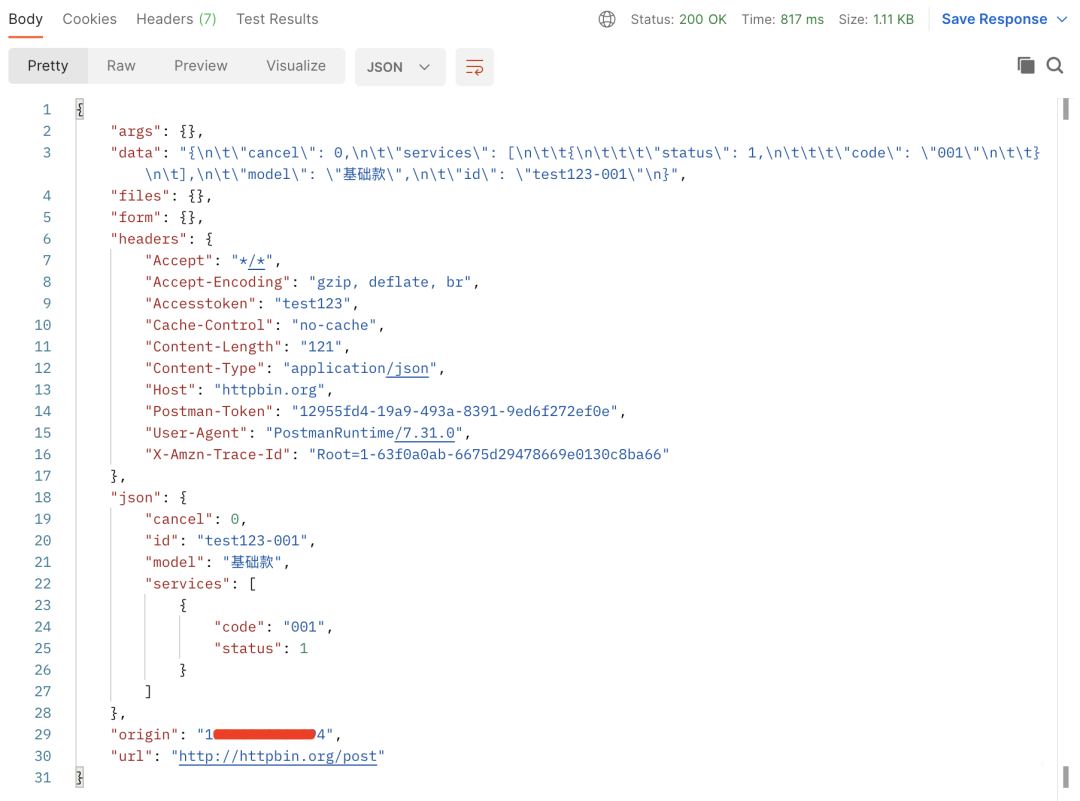
将此接口的 cURL 代码拷贝进去,生成想要的代码,例如 Python。
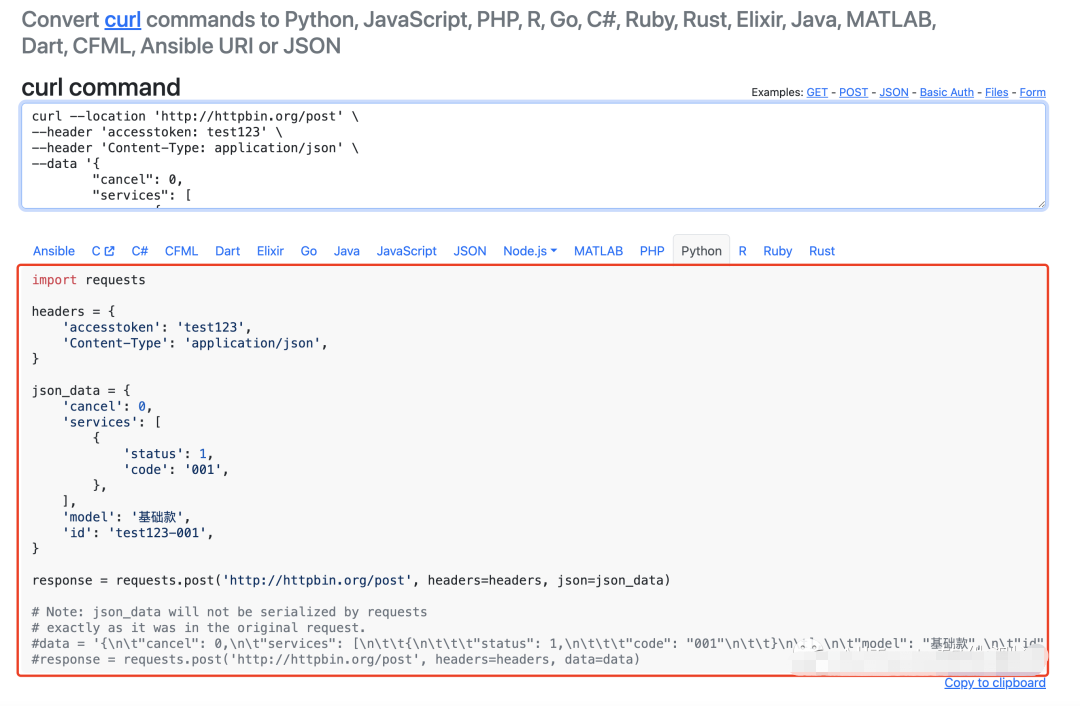
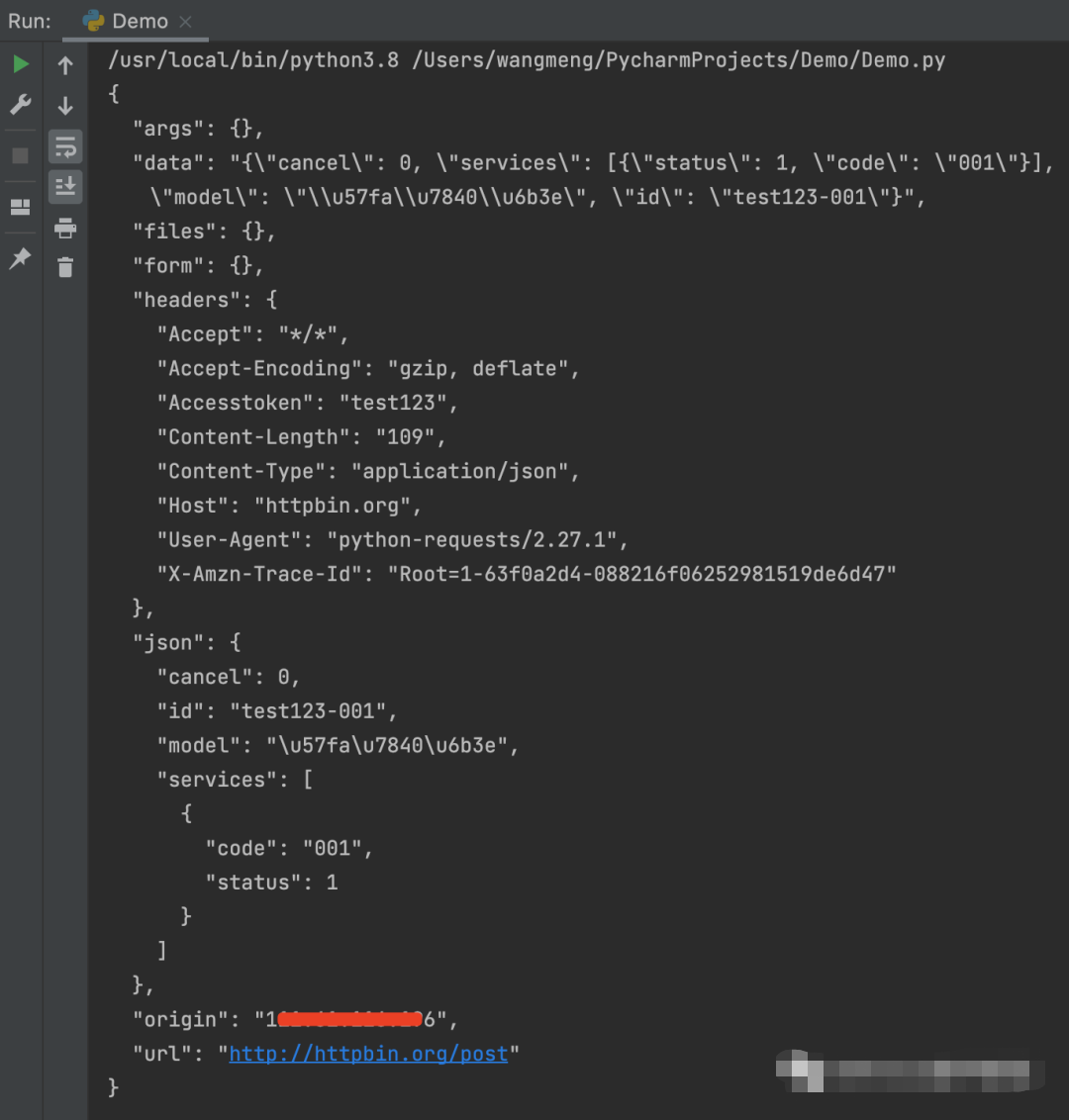
将生成的 Python 代码复制后,进行执行。

讯享网#!/usr/bin/env python # -*- coding: utf-8 -*- # 公众号:AllTests软件测试 import requests headers = { 'accesstoken': 'test123', 'Content-Type': 'application/json', } json_data = { 'cancel': 0, 'services': [ { 'status': 1, 'code': '001', }, ], 'model': '基础款', 'id': 'test123-001', } response = requests.post('http://httpbin.org/post', headers=headers, json=json_data) print(response.text)
执行结果和在 Postman 上执行的结果一致。
5、将cURL命令转换为Python请求的库
Uncurl 是一个库,允许你将 cURL 命令转换为使用 requests 的 Python 代码。由于 Chrome 网络检查器有一个漂亮的“复制为cURL”,因此该工具对于在 Python 中重新创建浏览器请求非常有用。
GitHub地址:
https://github.com/spulec/uncurl
安装
pip install uncurl
代码示例:
#!/usr/bin/env python # -*- coding: utf-8 -*- # 公众号:AllTests软件测试 import uncurl context = "curl -X POST 'http://httpbin.org/post' -H 'accesstoken: test123' -H 'Content-Type: application/json' -d '{\"cancel\": 0,\"services\": [{\"status\": 1,\"code\": \"001\"}],\"model\": \"demo\",\"id\": \"test123-001\"}'" print(uncurl.parse(context))运行结果,已经将 cURL 命令转换为 Python 请求。
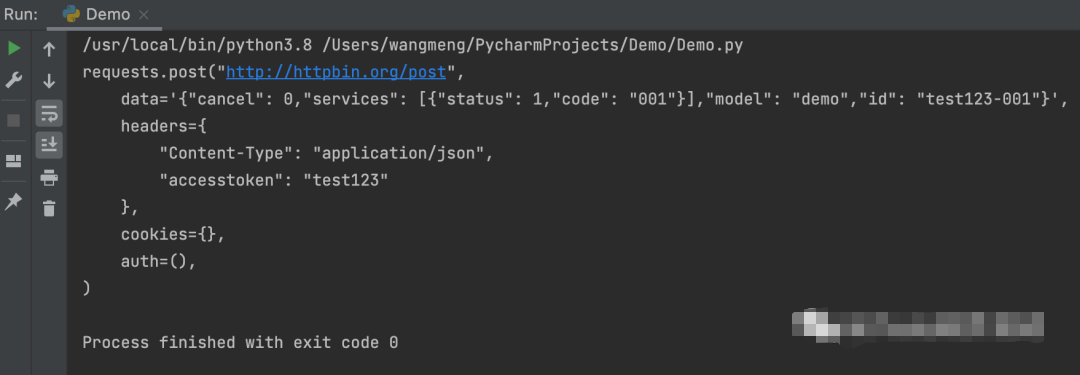
接下来将转换后的 Python 请求脚本执行一下。
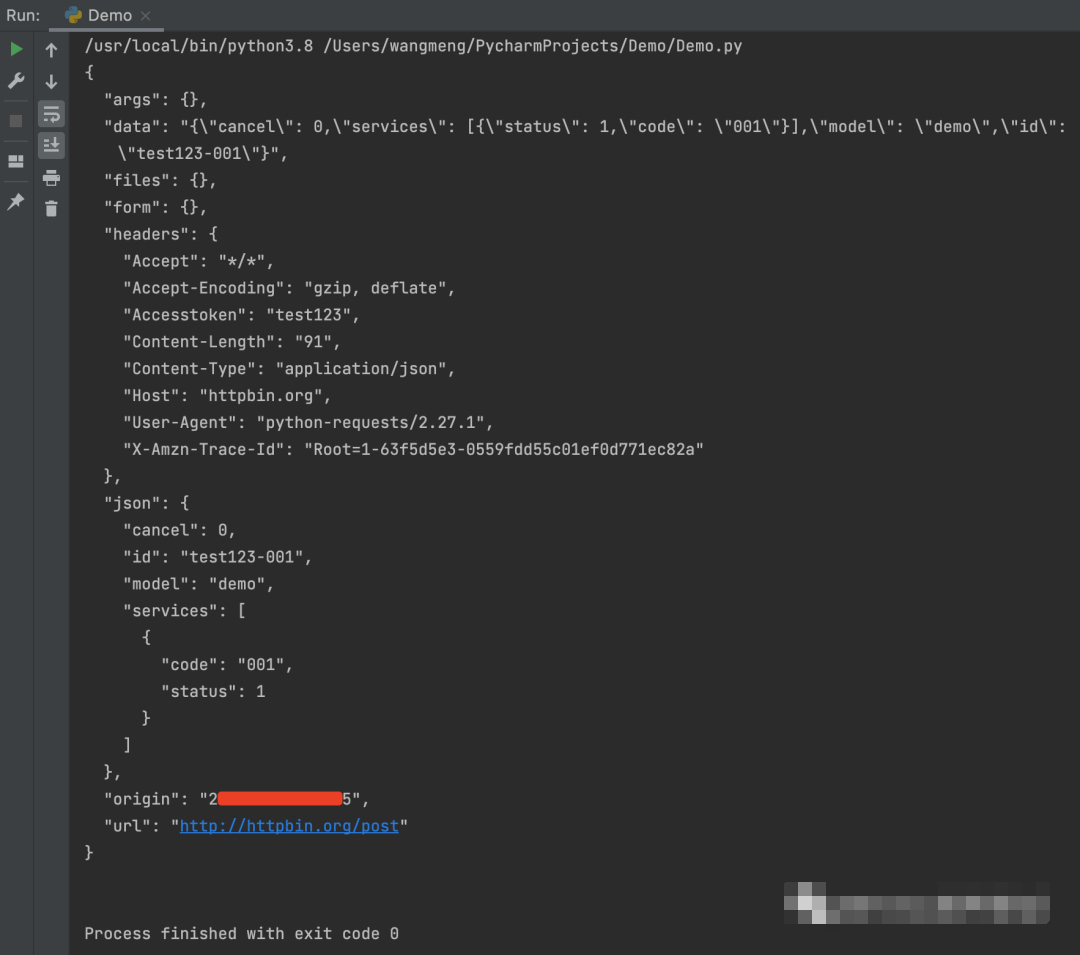
讯享网#!/usr/bin/env python # -*- coding: utf-8 -*- # 公众号:AllTests软件测试 import requests response = requests.post("http://httpbin.org/post", data='{"cancel": 0,"services": [{"status": 1,"code": "001"}],"model": "demo","id": "test123-001"}', headers={ "Content-Type": "application/json", "accesstoken": "test123" }, cookies={}, auth=(), ) print(response.text)
请求结果,执行成功。
6、将Python请求转换为cURL命令的库
Curlify 是一个库,允许你将 Python 请求转换为 cURL 命令。
GitHub地址:
https://github.com/ofw/curlify
安装:
pip install curlify
代码示例:
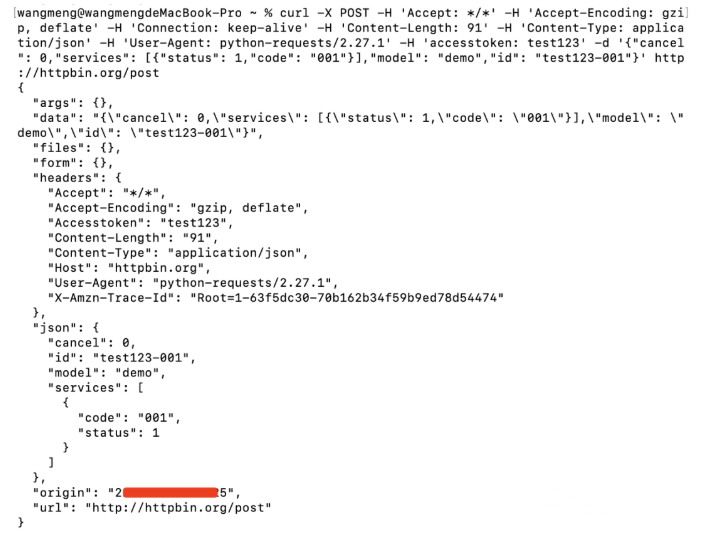
#!/usr/bin/env python # -*- coding: utf-8 -*- # 公众号:伤心的辣条 import curlify import requests response = requests.post("http://httpbin.org/post", data='{"cancel": 0,"services": [{"status": 1,"code": "001"}],"model": "demo","id": "test123-001"}', headers={ "Content-Type": "application/json", "accesstoken": "test123" }, cookies={}, auth=(), ) print(curlify.to_curl(response.request))运行结果,已经将 Python 请求转换为 cURL 命令。

在命令行上执行 cURL 命令,执行成功。
最后: 下方这份完整的软件测试视频学习教程已经整理上传完成,朋友们如果需要可以自行免费领取【保证100%免费】

这些资料,对于【软件测试】的朋友来说应该是最全面最完整的备战仓库,这个仓库也陪伴上万个测试工程师们走过最艰难的路程,希望也能帮助到你!

版权声明:本文内容由互联网用户自发贡献,该文观点仅代表作者本人。本站仅提供信息存储空间服务,不拥有所有权,不承担相关法律责任。如发现本站有涉嫌侵权/违法违规的内容,请联系我们,一经查实,本站将立刻删除。
如需转载请保留出处:https://51itzy.com/kjqy/66064.html