
巨坑,虚拟机挂了。。。。。测试账户什么全没了。重整精神重来,重新整理一下,理出大致框架
nodeos的配置文档:~./local/share/eosio/nodeos/config
nodeos 重启后 ./nodeos --hard-replay-blockchain /nodeos --resync
nodeos --replay-blockchain --hard-replay-blockchain
[root@bogon config]# cleos --help 讯享网
讯享网文本信息 Command Line Interface to EOSIO Client Usage: cleos [OPTIONS] SUBCOMMAND Options: -h,--help Print this help message and exit 获取帮助信息 -u,--url TEXT=http://127.0.0.1:8888/ the http/https URL where nodeos is running --wallet-url TEXT=unix:///root/eosio-wallet/keosd.sock the http/https URL where keosd is running -r,--header pass specific HTTP header; repeat this option to pass multiple headers -n,--no-verify don't verify peer certificate when using HTTPS --no-auto-keosd don't automatically launch a keosd if one is not currently running -v,--verbose output verbose actions on error //输出冗长的错误信息 --print-request print HTTP request to STDERR //向标准输出打印http请求 --print-response print HTTP response to STDERR //向标准输出打印http响应 Subcommands: version Retrieve version information //检索版本信息 create Create various items, on and off the blockchain //创建,启动和关闭链上的各种项目 convert Pack and unpack transactions //打包和解压交易 get Retrieve various items and information from the blockchain set Set or update blockchain state transfer Transfer EOS from account to account net Interact with local p2p network connections wallet Interact with local wallet sign Sign a transaction push Push arbitrary transactions to the blockchain multisig Multisig contract commands wrap Wrap contract commands system Send eosio.system contract action to the blockchain.
cleos [OPTIONS] SUBCOMMAND [OPTIONS]选项 SUBCOMMAND子命令
version :版本
Subcommands:
[root@bogon config]# cleos version client Build version: 59626f1e a. create:创建账户和密钥对
讯享网[root@bogon config]# cleos create
输出:

讯享网
Subcommands: key Create a new keypair and print the public and private keys //创建新的密钥对和打印公钥和私钥 account Create a new account on the blockchain (assumes system contract does not restrict RAM usage) //创建区块链上的账户(假定系统合约不限制RAM使用) 1.创建密钥对
讯享网Cleos create key -h
Options: -h,--help Print this help message and exit --r1 Generate a key using the R1 curve (iPhone), instead of the K1 curve (Bitcoin) -f,--file TEXT Name of file to write private/public key output to. (Must be set, unless "--to-console" is passed //将密钥对生成输出到文件中 --to-console Print private/public keys to console. //在控制台上显示 以–to-console为例:
讯享网[root@bogon config]# cleos create key --to-console
输出:

2.创建账户
[root@bogon config]# cleos create account eosio bob EOS4uUhxvwm1DdDETv2g8NFgVRCZWzChAcciC4ek2tLuu6oBLDbtw 输出:

b.convert

讯享网[root@bogon config]# cleos convert
Subcommands: pack_transaction From plain signed json to packed form unpack_transaction From packed to plain signed json form pack_action_data From json action data to packed form unpack_action_data From packed to json action data form 输出:
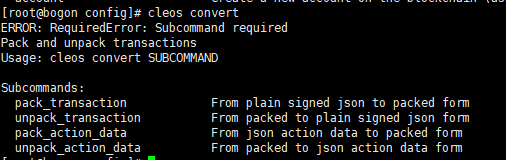
c.get:重要的,用与从区块中获取信息。
讯享网[root@bogon config]# cleos get
Subcommands: info Get current blockchain information //获得当前区块的信息 block Retrieve a full block from the blockchain //获得指定区块的信息 account Retrieve an account from the blockchain //j检索区块链中的一个账户 code Retrieve the code and ABI for an account abi Retrieve the ABI for an account table Retrieve the contents of a database table scope Retrieve a list of scopes and tables owned by a contract currency Retrieve information related to standard currencies accounts Retrieve accounts associated with a public key servants Retrieve accounts which are servants of a given account transaction Retrieve a transaction from the blockchain actions Retrieve all actions with specific account name referenced in authorization or receiver schedule Retrieve the producer schedule transaction_id Get transaction id given transaction object 讯享网[root@bogon config]# cleos get info
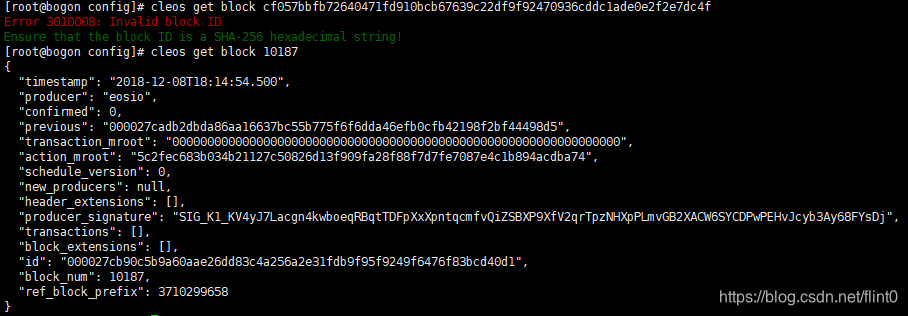
{ "server_version": "59626f1e", "chain_id": "cf057bbfbfd910bcb67639c22df9fcddc1ade0e2f2e7dc4f", "head_block_num": 10187, "last_irreversible_block_num": 10186, "last_irreversible_block_id": "000027cadb2dbda86aa16637bc55b775f6f6dda46efb0cfb42198f2bf44498d5", "head_block_id": "000027cb90c5b9a60aae26dd83c4a256a2e31fdb9f95f9249f6476f83bcd40d1", "head_block_time": "2018-12-08T18:14:54.500", "head_block_producer": "eosio", "virtual_block_cpu_limit": , "virtual_block_net_limit": , "block_cpu_limit": , "block_net_limit": , "server_version_string": "v1.4.4-dirty" } 讯享网[root@bogon config]# cleos get block
Positionals: block TEXT The number or ID of the block to retrieve (required) //指定区块的ID号 Options: --header-state Get block header state from fork database instead //获取区块的头部状态 输出:
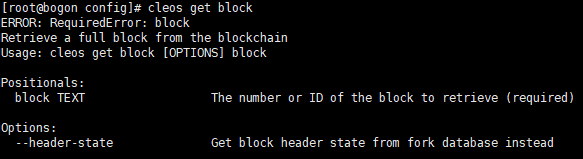
block TEXT 指的是 head_block_num,头部区块编号
讯享网[root@bogon config]# cleos get block 10187
输出:
[root@bogon config]# cleos get account 讯享网Usage: cleos get account [OPTIONS] name [core-symbol] Positionals: name TEXT The name of the account to retrieve (required)//检索账户的名字 core-symbol TEXT The expected core symbol of the chain you are querying Options: -j,--json Output in JSON format //以json格式输出
[root@bogon config]# cleos get account bob 看到bob的信息
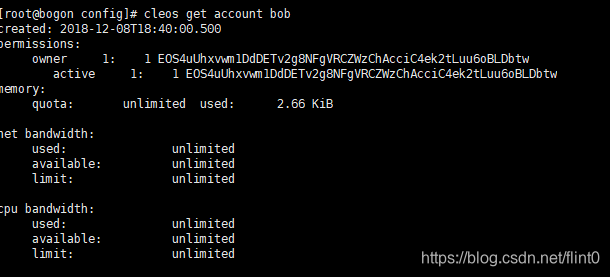
讯享网created: 2018-12-08T18:40:00.500 permissions: owner 1: 1 EOS4uUhxvwm1DdDETv2g8NFgVRCZWzChAcciC4ek2tLuu6oBLDbtw active 1: 1 EOS4uUhxvwm1DdDETv2g8NFgVRCZWzChAcciC4ek2tLuu6oBLDbtw memory: quota: unlimited used: 2.66 KiB net bandwidth: used: unlimited available: unlimited limit: unlimited cpu bandwidth: used: unlimited available: unlimited limit: unlimited
1.查看区块信息
cleos -u http://127.0.0.1:8888 get info
输出:

…待续
版权声明:本文内容由互联网用户自发贡献,该文观点仅代表作者本人。本站仅提供信息存储空间服务,不拥有所有权,不承担相关法律责任。如发现本站有涉嫌侵权/违法违规的内容,请联系我们,一经查实,本站将立刻删除。
如需转载请保留出处:https://51itzy.com/kjqy/65395.html