
分享一个曾经用过的在Unity Editor 上模拟小断线的重连的工具类(手机大退再回来),复制代码到你的工程中,然后挂载到任意物体;运行后,即可模拟断线重连了。
源码如下:

using UnityEditor; using UnityEngine; public class SwitchToBackground : MonoBehaviour {
    public void sendApplicationPauseMessage(bool isPause) {
    Transform[] transList = GameObject.FindObjectsOfType<Transform>(); for (int i = 0; i < transList.Length; i++) {
    Transform trans = transList[i]; //Note that messages will not be sent to inactive objects trans.SendMessage("OnApplicationPause", isPause, SendMessageOptions.DontRequireReceiver); } } public void sendApplicationFocusMessage(bool isFocus) {
    Transform[] transList = GameObject.FindObjectsOfType<Transform>(); for (int i = 0; i < transList.Length; i++) {
    Transform trans = transList[i]; //Note that messages will not be sent to inactive objects trans.SendMessage("OnApplicationFocus", isFocus, SendMessageOptions.DontRequireReceiver); } } public void sendEnterBackgroundMessage() {
    sendApplicationPauseMessage(true); sendApplicationFocusMessage(false); } public void sendEnterFoegroundMessage() {
    sendApplicationFocusMessage(true); sendApplicationPauseMessage(false); } } [CustomEditor(typeof(SwitchToBackground))] public class simulateSwitchToBackgroundEditor : Editor {
    void OnEnable() {
    } public override void OnInspectorGUI() {
    DrawDefaultInspector(); serializedObject.Update(); serializedObject.ApplyModifiedProperties();//now varibles in script have been updated  if (GUILayout.Button("send enter background message")) {
    if (Application.isPlaying) {
    ((SwitchToBackground)target).sendEnterBackgroundMessage(); } } if (GUILayout.Button("send enter foeground message")) {
    if (Application.isPlaying) {
    ((SwitchToBackground)target).sendEnterFoegroundMessage(); } } } }
讯享网
挂载带场景任意物体上即可。。。

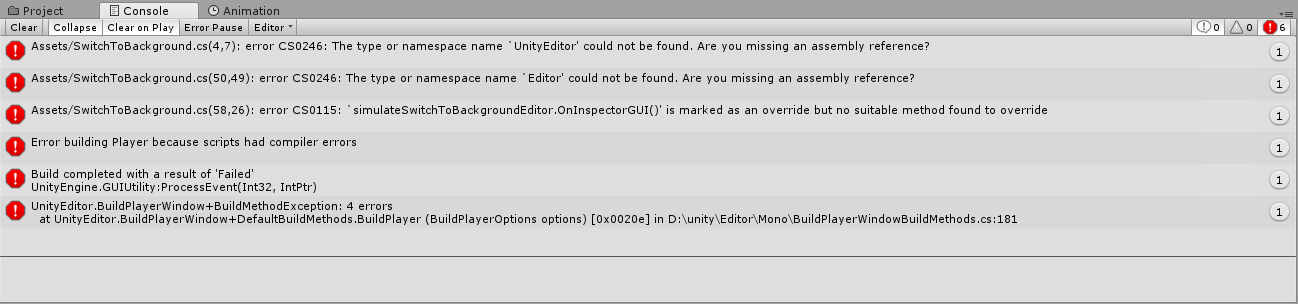
PS:一个需要注意的点,打包时需要将代码全部注释,重新编译后重新尝试打包即可,否则会报错,
版权声明:本文内容由互联网用户自发贡献,该文观点仅代表作者本人。本站仅提供信息存储空间服务,不拥有所有权,不承担相关法律责任。如发现本站有涉嫌侵权/违法违规的内容,请联系我们,一经查实,本站将立刻删除。
如需转载请保留出处:https://51itzy.com/kjqy/64827.html