
1 开发环境
在介绍内容之前,先说明一下开发环境,如下图:
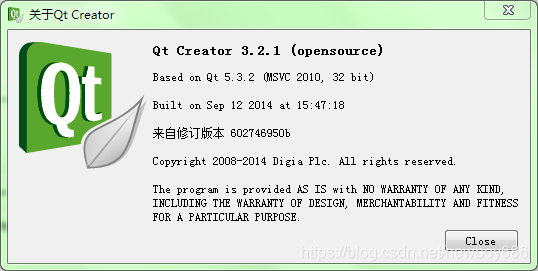
讯享网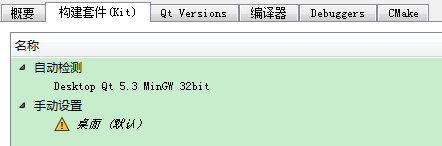
Qt版本:Qt5.3.2;
Qt开发工具:Qt Creater 3.2.1;
Qt构建工具:Desktop Qt 5.3 MinGW 32bit;
Qt开发平台:Windows 7 64bit。
2 QString
今天介绍QString的比较部分的功能,之前的内容可以参考以下链接。
0022:Qt常用类 - QString(01,QString的编码方式和初始化)
0023:Qt常用类 - QString(02,增加)
0024:Qt常用类 - QString(03,删除)
0025:Qt常用类 - QString(04,修改)
0026:Qt常用类 - QString(05,查询)
0027:Qt常用类 - QString(06,遍历)
0028:Qt常用类 - QString(07,子字符串)
0029:Qt常用类 - QString(08,格式化)

下面是比较部分的示例代码。
/* * compare(const QString &other, Qt::CaseSensitivity cs) * localeAwareCompare(const QString &other) * operator==(const char *other) * operator<(const char *other) * operator<=(const char *other) * operator>(const char *other) * operator>=(const char *other) */ //compare(const QString &other, Qt::CaseSensitivity cs) QString strComp = "12345abcde一二三四五"; qDebug("compare: result = %d.", strComp.compare("12345abcde一二三四五")); //localeAwareCompare(const QString &other) qDebug("localeAwareCompare: result = %d.", strComp.localeAwareCompare("23456")); //operator==(const char *other) qDebug("==: result = %d.", strComp == "23456abcde一二三四五"); //operator<(const char *other) qDebug("<: result = %d.", strComp < "23456abcde一二三四五"); //operator<=(const char *other) qDebug("<=: result = %d.", strComp <= "12345abcde一二三四五"); //operator>(const char *other) qDebug(">: result = %d.", strComp > "23456abcde一二三四五"); //operator>=(const char *other) qDebug(">=: result = %d.", strComp >= "23456abcde一二三四五"); 讯享网
在学习过程中,可以将上述代码放到一个按钮的响应函数中,以调试方式运行,就可以在Qt Creater中的应用程序输出窗口看到输出结果了。
版权声明:本文内容由互联网用户自发贡献,该文观点仅代表作者本人。本站仅提供信息存储空间服务,不拥有所有权,不承担相关法律责任。如发现本站有涉嫌侵权/违法违规的内容,请联系我们,一经查实,本站将立刻删除。
如需转载请保留出处:https://51itzy.com/kjqy/63903.html