
jsTree可以显示一个树状视图,支持复选框选中,选中触发事件等:
其中主要用到的方法有:
1.设置数据:
这里的data一般是ajax请求服务器返回的,必须要有id,parent,text这三个字段用于显示,也可以额外返回自己需要的字段。
这里还增加了插件配置:'plugins':["wholerow","checkbox"] 表示在会显示复选框。
//一般data从后台返回,调用这个方法显示视图 $('#jstree_demo_div').jstree({


  'plugins':["wholerow","checkbox"], 'core' : { 'data' : [ { "id" : "ajson1", "parent" : "#", "text" : "Simple root node" }, { "id" : "ajson2", "parent" : "#", "text" : "Root node 2" ,'state' : { 'selected' : false },}, { "id" : "ajson3", "parent" : "ajson2", "text" : "Child 1" }, { "id" : "ajson4", "parent" : "ajson2", "text" : "Child 2" }, ] } });
讯享网
2.监听选择选择事件,方法返回一个data,为上面设置jstree显示的data:
讯享网$('#jstree_demo_div').on("changed.jstree", function (e, data) { console.log(data.selected); console.log("selected"); });
3.获取选中的列的对象用如下方法:
$('#jstree_demo_div').jstree().get_selected(true);如果只想返回ID,那么不用传true参数即可

4.如果一个页面中发出两次ajax请求,调用了两次jstree显示方法,但是第二次显示的结果仍然是第一次的话,那么需要再每次发送ajax请求之前调用destroy方法清空一下jsTree(其实官网上还有一个refresh方法,但是我试了一下并不管用,最后才试出的用这个方法):
讯享网$('#jstree_div').jstree("destroy");
完整的代码如下:
<!DOCTYPE html> <html> <head> <title></title> <meta charset="utf-8"> <link rel="stylesheet" href="https://cdnjs.cloudflare.com/ajax/libs/jstree/3.2.1/themes/default/style.min.css" /> <script src="https://cdnjs.cloudflare.com/ajax/libs/jquery/1.12.1/jquery.min.js"></script> <script src="https://cdnjs.cloudflare.com/ajax/libs/jstree/3.2.1/jstree.min.js"></script> </head> <body> <div id="jstree_demo_div"></div> <button>OK</button> </body> <script type="text/javascript"> // 选择的时候调用的方法 $('#jstree_demo_div').on("changed.jstree", function (e, data) {
     console.log(data.selected); console.log("selected"); }); // $('button').on('click', function () {
     //get_selected返回选中的列 console.log($('#jstree_demo_div').jstree().get_selected(true)); }); //一般data从后台返回,调用这个方法显示视图 $('#jstree_demo_div').jstree({
   'plugins':["wholerow","checkbox"], 'core' : { 'data' : [ { "id" : "ajson1", "parent" : "#", "text" : "Simple root node" }, { "id" : "ajson2", "parent" : "#", "text" : "Root node 2" ,'state' : { 'selected' : false },}, { "id" : "ajson3", "parent" : "ajson2", "text" : "Child 1" }, { "id" : "ajson4", "parent" : "ajson2", "text" : "Child 2" }, ] } }); </script> </html>
页面显示:
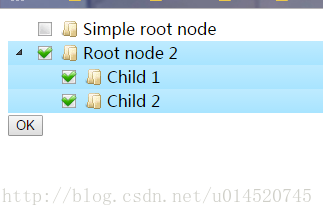
版权声明:本文内容由互联网用户自发贡献,该文观点仅代表作者本人。本站仅提供信息存储空间服务,不拥有所有权,不承担相关法律责任。如发现本站有涉嫌侵权/违法违规的内容,请联系我们,一经查实,本站将立刻删除。
如需转载请保留出处:https://51itzy.com/kjqy/63168.html