
1 Cppcheck简介
CppCheck是一个静态代码检查工具。在众多的静态代码检查工具中cppcheck是一款较为优秀的工具。它简单、开源、免费、功能强大,值得推广和使用。
CppCheck对产品的源代码执行严格的逻辑检查。执行的检查包括:
- 自动变量检查
- 代码格式错误,以及性能因素检查
- 异常 STL 函数使用检查
- 操作系统资源释放检查,中断.文件描述符等
- 内存泄漏检查,主要是通过内存引用指针
- 异常内存使用,释放检查
- 过期的函数,废弃函数调用检查
- class类检查
- 数组的边界检查
2 Cppcheck安装
2.1 linux下安装
Ubuntu终端窗口输入:sudo apt-get install cppcheck
2.2 windows下安装
从Cppcheck - A tool for static C/C++ code analysis下载安装文件,安装即可
3 Cppcheck检查内存泄露
3.1对局部变量分配内存检查
#include <iostream> #include <stdlib.h> #include <string.h> using namespace std; void malloc_test1(){ cout << " malloc 10 bytes" << endl; char *s = (char *)malloc(10 * sizeof(char)); strcpy(s, "abcd"); } void malloc_test2(){ cout << " malloc 4 bytes for int" << endl; int *data = (int *)malloc( sizeof(int)); *data = 2; } void new_test1(){ cout << " new_test1 " << endl; int *p = new int; *p = 1; } void new_test2(){ cout << " new_test2 " << endl; int *pdata; pdata = new int [8]; pdata[0] = 2; delete pdata; } int main() { malloc_test1(); malloc_test2(); new_test1(); new_test2(); return 0; }讯享网
Leak.cpp有四处内存泄漏,用cppcheck检查,在终端输入:cppcheck leak.cpp

四处泄漏的地方全都找到了!
3.2 对全局变量分配内存检查
讯享网#include <iostream> #include <stdlib.h> #include <string.h> using namespace std; int *g_buff = NULL; void malloc_test(){ cout << " malloc 10 bytes" << endl; g_buff = (int *)malloc(10 * sizeof(int)); g_buff[0]= 10; printf("g_buff[0] %d\n", g_buff[0]); } int main() { malloc_test(); return 0; }
输入cppcheck global_leak.cpp, 没有查到内存泄漏。

3.3 A函数分配B函数释放
#include <iostream> #include <stdlib.h> #include <string.h> using namespace std; int *g_buff = NULL; int *fa(){ int *p = new int; *p = 1; } void fb(int *p){ delete p; } int main() { int *data = fa(); fb(data); return 0; }输入cppcheck ab_leak.cpp, 报告有内存泄露,实际上没有内存泄露。

3.4 小结
Cppcheck能查到部分内存泄漏,但是查不到全局变量内存泄漏,有时候可能会误报。
4 内存越界检查
4.1 堆缓冲区溢出
讯享网// overflow.c #include <stdio.h> #include <stdlib.h> #include <string.h> int main(int argc, const char *argv[]) { char *s = (char*)malloc(4 * sizeof(char)); printf("s address = %p\n",s); strcpy(s, "Hello"); printf("string is: %s\n", s); free(s); return 0; }
检查结果,发现内存越界。

4.2 栈缓冲区溢出
4.2.1上溢
#include <stdio.h> #include <unistd.h> #define N 10 void test(){ int arr[N]; arr[10] = 1; } int main() { int stack_array[100]; printf("stack overflow1..\n"); stack_array[101] = 1; printf("stack overflow2..\n"); test(); return 0; }检查结果,发现内存越界。

4.2.2下溢
讯享网#include <iostream> #include <stdint.h> #include <stdio.h> using namespace std; int main() { char p[5] = "abc"; uint8_t tmp = 5; int a = 1; int b = 2; int c = 3; char c1 = '1'; char c2 = '2'; char c3 = '3'; p[-1] = 7; cout << "out of bound " << endl; cout << "*p = " <<(void*)p << endl; cout << "&temp "<< (void*)&tmp << endl; printf("a address %p\n", &a); printf("b address %p\n", &b); printf("c address %p\n", &c); printf("c1 address %p\n", &c1); printf("c2 address %p\n", &c2); printf("c3 address %p\n", &c3); cout << " tmp ="<< (uint32_t)tmp << endl; return 0; }
检查结果,发现内存越界。

4.3 较为复杂的内存越界
// overflow.c #include <stdio.h> #include <stdlib.h> #include <string.h> char *get_mem(){ char *buff= (char*)malloc(4 * sizeof(char)); return buff; } void use_mem(char *text){ strcpy(text,"abcde"); printf("text= %s\n",text); free(text); } int main(int argc, const char *argv[]) { char *data = get_mem(); use_mem(data); return 0; }在这个例子中,get_mem()分配内存,use_mem使用内存,发现了越界。Cppcheck检查结果:

cppcheck没能发现内存越界。
4.4 小结
在检查内存越界问题上,在一个函数里声明、分配使用,cppcheck能查出越界问题,如果不是一个函数里使用,就容易出现漏报。
5 内存释放后又使用
讯享网#include <stdio.h> #include <malloc.h> int main() { int *p = NULL; printf("use after free\n"); p = (int *)malloc(10 * sizeof(int)); free(p); *p = 3; return 0; }
检查结果:

6 对空指针进行写操作

#include <stdio.h> #include <string.h> int fun(){ char *p = NULL; strcpy(p,"a"); return 0; } int main(int argc, const char *argv[]) { printf("write null\n"); fun(); return 0; }检查结果:

7 遗漏文件描述符
讯享网 #include <stdlib.h> #include <string.h> #include <stdio.h> void read_file(){ char buff[10]={0}; FILE *fp = fopen("test.txt", "r"); if (fp == NULL) { perror("Open file recfile"); exit(1); } fread(buff, 1, 10, fp); printf("buff:%s\n", buff); } int main() { read_file(); return 0; }
read.cpp是读一个文件,但是没有关闭文件描述符。如果一个进程打开的文件描述符达到最大值(一般是1024),将无法打开任何文件描述符,包括打开socket、管道、信号量、共享内存、消息队列。
检查结果:

8 检查类
// Student.cpp : 此文件包含 "main" 函数。程序执行将在此处开始并结束。 // #include <iostream> #include <string> using namespace std; class Student { public: Student() { cout << "Student = "<< sizeof(Student) << endl; } ~Student() { } void Study() { cout << "I am studying " << endl; } char name[20]; int age; string address; }; int main() { cout << "Student : " << sizeof(Student) << endl; Student *p = new Student; p->Study(); std::cout << "Hello World!\n"; } 终端输入命令:
cppcheck --enable=all Student.cpp

9 自动变量检查
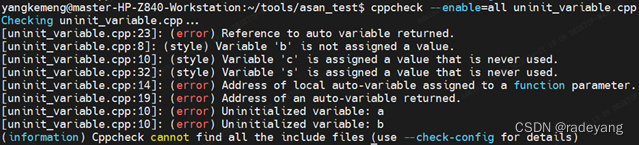
对于自动变量,cppcheck可以查出变量未初始化、引用局部变量地址和返回局部变量的引用等问题。
讯享网 #include <stdlib.h> #include <string.h> #include <stdio.h> using namespace std; void test(){ int a; int b; int c = 0; c = a + b; } int f1(char fp){ char c = 'a'; *fp = &c; return 0; } char *f2(int i){ char c = 'a'; return &c; } string &getstring(){ string text = "abcd"; return text; } int main() { test(); int *p = NULL; int a = 0; f1(&p); f2(a); string s = getstring(); return 0; }
检查结果:
10 cppcheck在TI C62项目上的实战应用
检查dod/src目录,输入命令:cppcheck src
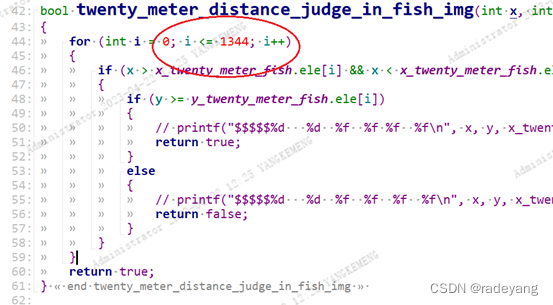
检查结果:

发现一处越界,对比代码:
查看声明:
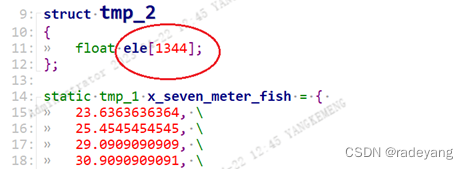
最终确认这是一处数组越界。
11 jenkins安装cppcheck插件
Cppcheck插件在构建工作区中扫描Cppcheck报告文件,并报告在静态C / C ++代码分析期间检测到的问题。
此插件提供以下功能:
- 在构建,构建状态评估和图形之后配置要扫描的文件。
- 趋势报告显示每种类型检测到的问题数。
- 结果摘要和结果详细信息包括新问题和已解决的问题。
- 列出突出问题的源代码。
- 显示单个页面上突出显示的所有违规。
- 仪表板视图 portlet显示每个作业的问题数。远程访问API(REST API)
12 Windows使用cppcheck
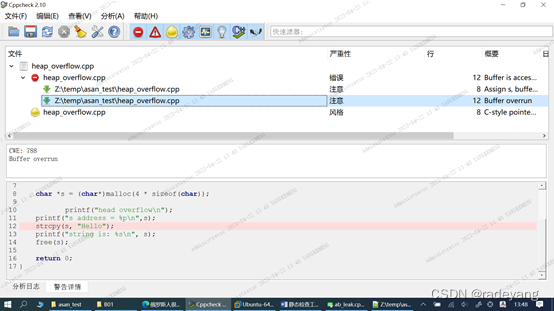
12.1 选择分析-文件菜单,在弹出的对话框中选择文件,cppcheck给出检查结果。
可视化的界面更容易找到出错的位置。
12.2 选择分析-目录菜单可以选择目录,例如选择dod/src
工具栏 可以过滤
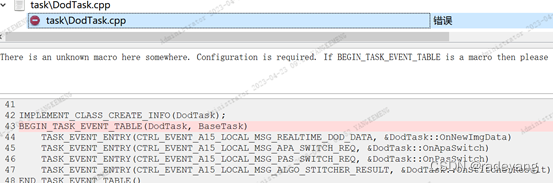
12.3 Cppcheck的误报
在C62上测试发现对于消息注册总是会误报。
13 总结
Cppcheck是一款优秀的静态检查工具, 性能明显超出其它同类产品,如pclint、QAC等。Cppcheck能查出部分的内存泄漏、越界,有时候会漏报、误报,所以cppcheck的检查不能作为唯一的依据,也不能代替动态检查。Cppcheck与jenckins搭配使用,提交代码就可以对相关文件进行检查,避免将错误引入版本。
Cppcheck对于提高代码质量的稳定性、可靠性是很有帮助的。
版权声明:本文内容由互联网用户自发贡献,该文观点仅代表作者本人。本站仅提供信息存储空间服务,不拥有所有权,不承担相关法律责任。如发现本站有涉嫌侵权/违法违规的内容,请联系我们,一经查实,本站将立刻删除。
如需转载请保留出处:https://51itzy.com/kjqy/59483.html